Inspiration
When I developed an app for the first time during a hackathon, I signed up for several API services. However, I soon faced a problem: I couldn’t keep track of free trial periods or billing dates. I didn’t know which services were still free, when they would start charging, or how much I was spending in total.
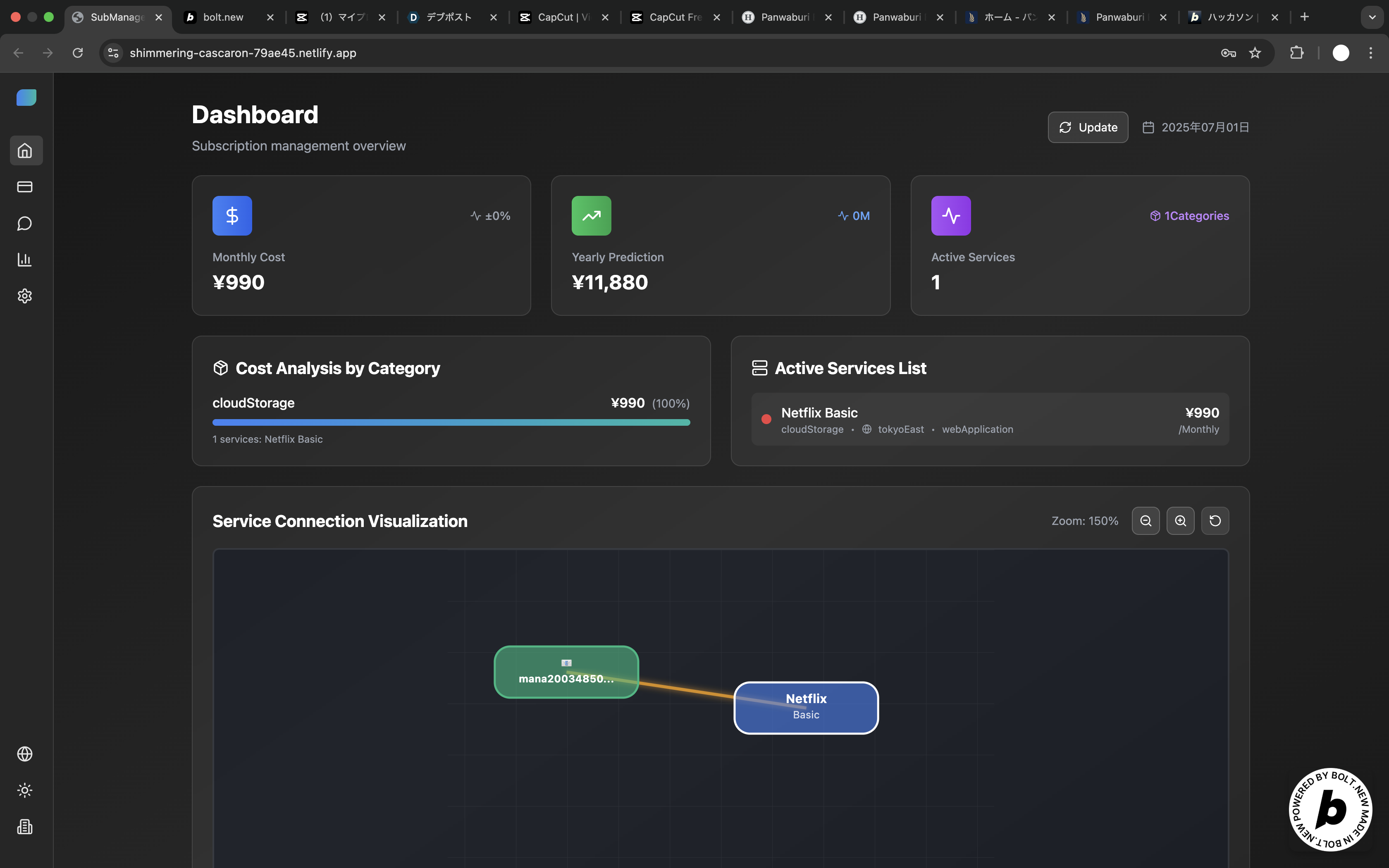
To solve this problem I experienced myself, I built “Vizzy.” Vizzy visualizes your email addresses and connected services in a flowchart-style layout, making subscription management intuitive and easy to understand.
What it does
This app visually maps your email addresses and the subscriptions linked to them using a flowchart-style interface.
The dashboard shows key information such as monthly and yearly costs, as well as the total number of services you’re subscribed to. The flowchart format makes it easy to understand the connections between services and emails at a glance.
A sidebar is included to make navigation between pages simple and intuitive.
Users can add email addresses and register subscriptions with a single click, making management fast and effortless.
How we built it
・The frontend is built using TypeScript and React. ・For styling, I primarily used Tailwind CSS, which allows for conditional class application and efficient merging of overlapping Tailwind classes. ・For state management, I used the React Context API. ・The app is deployed on Netlify, which I chose because it allows fast and easy deployment—even for someone like me who isn’t an engineer.
Challenges we ran into
Here are some of the challenges we faced:
・Difficulty with API integration As someone with no engineering background and no prior coding experience, I didn’t even know what an API was at first. I had to learn from YouTube videos and by asking AI tools, and eventually, I was able to understand how APIs work.
・Understanding programming languages I was also overwhelmed by the variety of programming languages. Frontend and backend development often use different languages, and I didn’t know the differences or strengths of each. Over time, I gained a solid understanding of them.
・Token consumption and how to properly use Bolt In the beginning, I used only Build mode for all my work, which quickly consumed all 10 million tokens. After watching the official Bolt YouTube tutorials, I learned the correct way to use the platform and became comfortable using Discuss mode effectively.
Accomplishments that we're proud of
・Intuitive and user-friendly UI After many iterations, I was able to create a UI that I’m personally satisfied with. With help from 21st.dev, the design turned out well and feels intuitive to use.
・Flowchart-style UI Although some of the finer functionalities are still incomplete, I’m happy that I was able to shape it into a flowchart-style layout as I envisioned.
What we learned
Through this project, I learned the following:
・The joy of coming up with ideas At the idea stage, I learned how fun and challenging it is to think about what people struggle with, what problems exist in current services, and what kind of service I personally want. It was a valuable experience in understanding the process of identifying real needs.
・Technical terms and communication Before joining this hackathon, I had never written code or heard most technical terms. To be honest, I thought I could build an app with Bolt without knowing any of that. But I quickly realized that AI isn’t magic—it’s more like working with a skilled programmer. I learned how important it is to clearly explain what I want, just like talking to a person.
・The difficulty of UI/UX design I also discovered how hard it is to create a user interface that meets people’s expectations, and how much thought it takes to make something easy to use. Designing a good UI/UX is much more complex than I imagined.
What's next for サブスクリプションマネージャー
There are already many features I’d like to add in the future:
・Automatic detection and email integration Using the Gmail API, I plan to implement a feature that automatically detects and displays subscriptions linked to the user’s Gmail account. This way, users won’t have to manually enter each subscription—just entering their email will display everything automatically.
・AI advisor By integrating the OpenAI API, I want to enable a chat-based AI advisor. It would help detect unused or overlapping services and provide helpful suggestions through conversation.
・One-click cancellation A feature that allows users to cancel subscriptions with a single click, handled automatically by the AI.
Built With
- framermotion
- netlify
- node.js
- openai
- openaiapi
- postgresql
- react18
- reactbeautfuldnd
- reacthookform
- supabase
- tailiwindcss
- vite

Log in or sign up for Devpost to join the conversation.