Inspiration
Studying today is fragmented: assignments live in one place, class files in another, and “AI help” usually lives in a separate chat tab. Even when students use AI, the tool typically has no idea what happens after it responds—whether the student actually understood, got distracted, or became dependent on asking for the next step. We wanted a workspace that feels like a place to study, where focus and learning are supported in real time, not just through prompts.
What it does
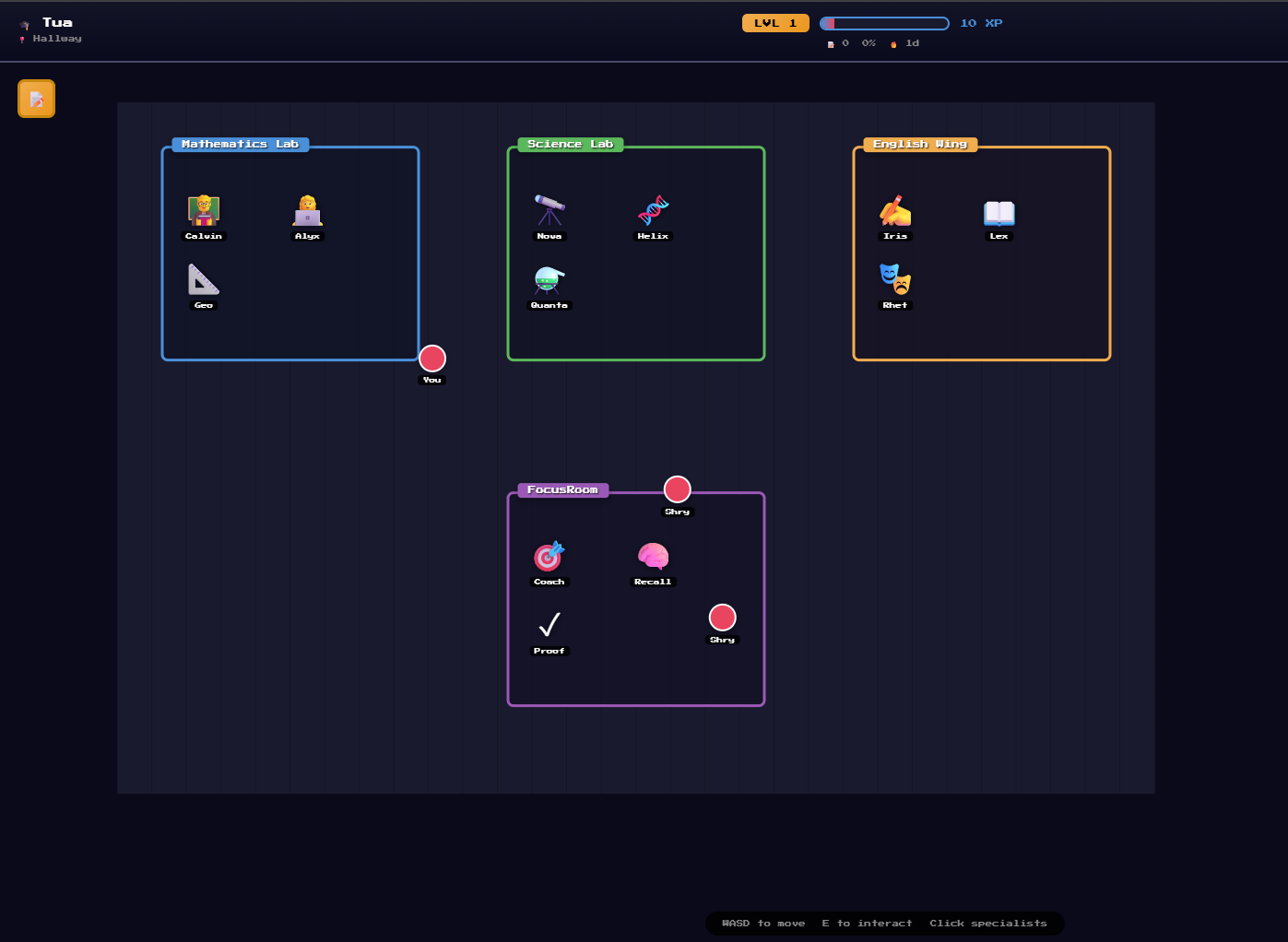
StudyWorld is a pixel-style student “office” where you can interact with specialized AI teacher agents organized by department (Math, Science, English) and then enter the Focus Room—the core experience—where you lock in on real tasks.
In the Focus Room, students can:
Choose tasks/assignments and run a timed study session
Ask subject specialists for guided help and explanations
Get learning supports like structured guidance and visual explanations (including Manim-style visuals)
Use a real-time computer-vision attention signal layer to detect engagement drops during study and provide supportive interventions
View session insights and AI decisions logged with timestamps
It also integrates with Opennote as the long-term learning workspace/memory layer, so studying becomes continuous across sessions rather than isolated chats.
How we built it
Frontend: A web app with a pixel-office hub world and a Focus Room page for sessions, tasks, and specialist interaction
AI agents: Department-based “teacher” agents designed to guide learning with subject-appropriate styles
Focus Room signals: Integrated a live CV pipeline (OpenCV-based) to derive attention/engagement signals during study sessions
Logging & insights: Session events and AI decisions are captured with timestamps and displayed in the UI
Opennote integration: Used Opennote as the central workspace for study artifacts and structured session insights so the system can “pick up where you left off”
Challenges we ran into
Not becoming “just another chatbot”: We focused on making StudyWorld a learning environment with a dedicated Focus Room rather than a chat-first app.
Designing CV support responsibly: We wanted the focus signals to feel helpful—not punitive—while avoiding storing sensitive raw video.
Making adaptive behavior explainable: Logging decisions in a way that’s understandable and tied to timestamps and session context.
Meaningful Opennote integration: Ensuring Opennote is used as a real memory/workspace layer, not a simple export button.
Accomplishments that we’re proud of
Built a gamified office UI that makes studying feel like an interactive space
Shipped a working Focus Room that combines tasks, timed sessions, specialist help, and real-time engagement signals
Implemented timestamped decision/insight logging so the system isn’t a black box
Integrated Opennote as a backbone for continuity across sessions
What we learned
The biggest gap in AI studying tools isn’t generating answers—it’s structure, timing, and follow-through.
UI/UX changes how people learn: making it feel like a “place” increases engagement compared to a blank chat box.
Explainability matters: if a system adapts in real time, users need to see why it changed course.
What’s next for StudyWorld
Build a full knowledge graph view that visually shows how concepts connect over time using Opennote’s logged artifacts and relationships
Add deeper student/teacher analytics (focus patterns, misconception trends, intervention effectiveness)
Improve personalization: adapt focus plans and teaching style based on longer-term patterns and outcomes
Expand interactive learning modes (retrieval drills, spaced repetition scheduling, and more visual-first explanations)
Built With
- fastapi
- framer-motion
- google-gemini-api
- livekit
- mediapipe
- next.js
- opennote-api
- pixi.js
- python
- react
- tailwind-css
- typescript
- vanilla-css
- websockets

Log in or sign up for Devpost to join the conversation.