-
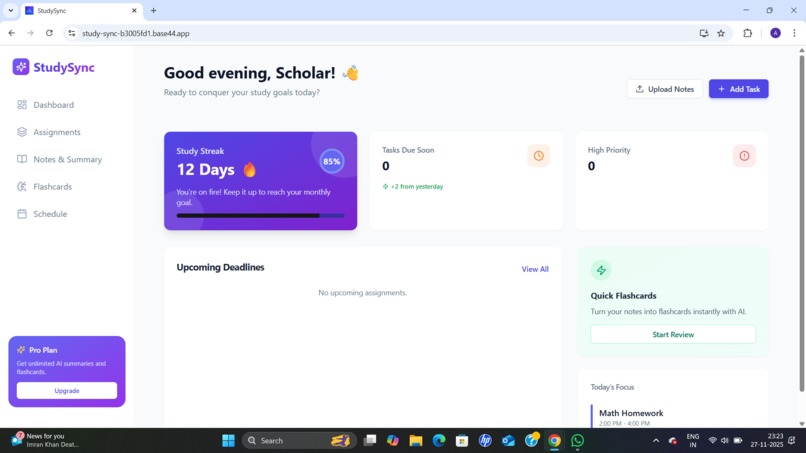
Home Page

Inspiration
StudySync is a complete AI-powered productivity tool designed to make student life simpler, more organized, and stress-free.
Students often struggle with keeping track of assignments, deadlines, notes, and study material. StudySync solves this by letting students:
Upload screenshots, PDFs, or handwritten notes
Automatically extract tasks, due dates, and topics
Generate clean summaries of class notes
Convert notes into flashcards
Build personalized study timelines
Track progress through a friendly dashboard
StudySync combines Vision AI + LLMs + modern web technologies to help students spend less time organizing and more time learning. It’s built for fast-paced academic life where clarity, structure, and efficient studying are essential.
Whether you’re a school student, college learner, or someone preparing for exams, StudySync is your smart study partner.
What it does
- Upload an image or PDF
- AI extracts text → tasks → due dates
- AI summarizes key concepts
- AI generates flashcards
- AI builds your weekly study timeline
How we built it
We built StudySync using a combination of modern web technologies and AI-powered services. Our development workflow was divided into four main components:
Frontend (UI/UX) Built using Next.js, React, and TailwindCSS Designed clean, student-friendly interfaces for uploads, dashboards, summaries, and flashcards Integrated responsive layouts to ensure smooth mobile and desktop experience
Backend & APIs Used Next.js API routes for fast serverless endpoints Implemented an OCR pipeline to extract text from images and PDFs Integrated an LLM API to process extracted text and generate: Tasks Due dates Summaries Flashcards Study timelines
AI Layer Vision AI for reading handwritten/printed text Language model used for: Identifying assignments Prioritizing tasks Creating study plans Writing explanations Generating question–answer pairs
Team Collaboration Shared GitHub repository Task breakdown across 4 members: frontend, backend, AI logic, testing Rapid iteration + constant integration to meet the 12-hour deadline
Challenges we ran into
We faced several challenges during development:
Accurate OCR Extraction Images with low resolution, shadows, or handwriting made text extraction inconsistent and required fallback methods.
Structuring Tasks from Unstructured Text LLMs sometimes generated large blocks of text instead of clear tasks. We had to build smart prompt structures and validation rules.
Time Constraints Fitting AI integration + UI + logic into a 12-hour window required extreme prioritization and fast decision-making.
Flashcard Quality Ensuring that flashcards were relevant, helpful, and not overly simplistic required refining prompts multiple times.
UI Consistency Balancing speed and design quality while building multiple screens in parallel was tricky.
Accomplishments that we're proud of
We’re incredibly proud of:
✔ Building a fully working end-to-end AI productivity tool in under 12 hours From uploading notes to generating flashcards, everything works smoothly.
✔ Clean, modern, student-friendly UI Users can navigate easily and enjoy the experience.
✔ Accurate task extraction and summarization Even messy screenshots or long PDFs were handled surprisingly well.
✔ Real-time AI-generated study timelines This feature impressed our testers the most.
✔ Strong team collaboration We worked efficiently, divided roles perfectly, and delivered more than we expected.
What we learned
This project taught us a lot:
How to integrate OCR + LLMs into a real product We learned about vision pipelines, text normalization, and prompt engineering.
Timeboxing and prioritization With only 12 hours, we focused on the features that would create the most impact.
Building a high-quality UI fast Tailwind and component libraries helped us push features quickly.
Team communication under pressure We improved at dividing tasks, avoiding overlap, and syncing progress efficiently.
Real-world usability thinking We designed StudySync for actual students, not just for a demo.
What's next for StudySync
We plan to expand StudySync far beyond the hackathon version:
Mobile App (Android + iOS) Instant photo capture → immediate study material.
Collaboration & Shared Study Groups Students can share notes, summaries, and flashcards.
AI Quiz Generator Generate full practice quizzes based on uploaded content.
Voice Notes → Summaries Record audio → AI transforms it into notes, tasks, and flashcards.
Smart Reminders & Streak System Daily study reminders, habit tracking, and gamification.
Cloud Sync Across Devices Seamless experience across laptop, tablet, and phone.
Chrome Extension Extract tasks directly from classroom portals, WhatsApp Web, or PDFs online.
