Inspiration
Students often struggle to balance multiple subjects, prioritise difficult topics, prepare for examination deadlines, and stay consistent with their study schedules. Even when they create a timetable, missed sessions and changing priorities can make it difficult to stay on track.
We wanted to build something that goes beyond a static timetable: a study companion that connects planning, execution, and progress tracking in one place. This inspired us to create StudyPilot 2.0, an application designed to help students organise their learning, adapt their schedules, and make their study workflow more manageable.
What it does
StudyPilot 2.0 is a student-focused study-planning application that brings essential learning workflows together.
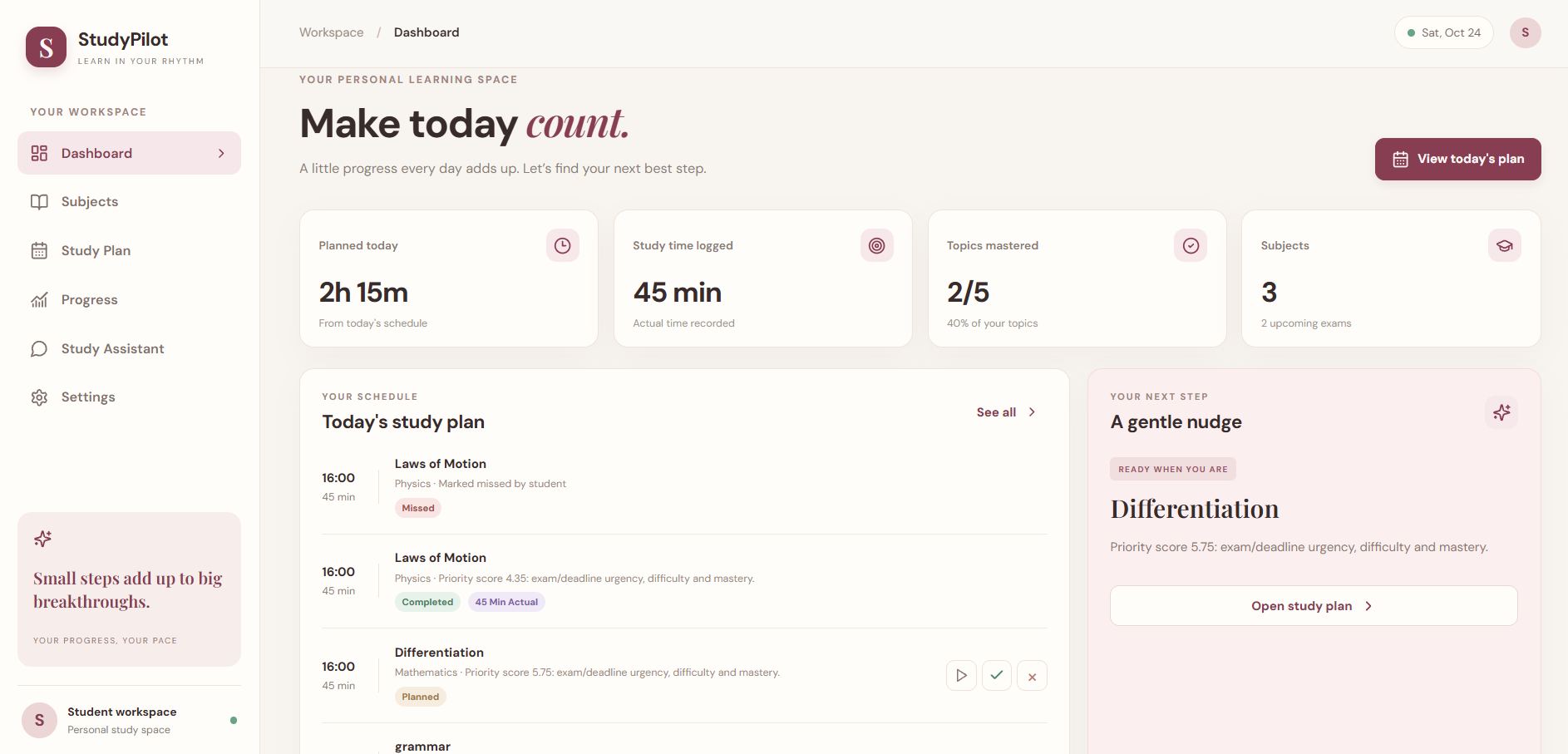
- Dashboard: View study-related metrics, upcoming exams, and today's sessions.
- Subject management: Create, edit, and delete subjects and organise them by priority.
- Topic management: Break subjects into individual topics and track difficulty, mastery, deadlines, and completion.
- Study-plan generation: Generate structured schedules based on exam dates, deadlines, topic difficulty, mastery, subject priority, available time, and focus-block settings.
- Session tracking: Start, complete, or mark sessions as missed and record actual study time.
- Adaptive replanning: Replan remaining work when sessions are missed or study progress changes.
- Progress tracking: Review study activity through summaries based on stored session data.
- Personalised settings: Save study preferences for a more tailored workflow.
- MCP-powered assistant: Interact with supported study functionality through a browser-based conversational simulator connected to an MCP server.
StudyPilot aims to help students move from planning their studies to completing tasks, adapting when plans change, and reviewing their progress.
How we built it
We built StudyPilot 2.0 using a modular architecture that separates the user interface, backend logic, data storage, and tool integration.
Technology stack:
- React and Vite for the frontend.
- FastAPI for the backend API.
- SQLite for persistent application data.
- Python for backend and study-planning logic.
- Official MCP Python SDK for client-server communication.
- Model Context Protocol (MCP) with Streamable HTTP for exposing study-related tools through a separate MCP server.
The study-planning engine uses deterministic application logic to organise study activities based on relevant scheduling inputs. The backend manages application operations and persistent data, while the frontend provides the interface students use to manage their study workflow.
For the assistant integration, the browser-based assistant sends requests to the FastAPI backend. The MCP client then communicates with the separate MCP server, which exposes 18 tools for subjects, topics, planning, sessions, progress, and history.
We verified the local implementation using backend API tests, frontend tests, a production build, and an MCP real-client smoke test. The MCP smoke test checked connection initialisation, protocol negotiation, tool discovery, read and mutation operations, and data persistence.
The assistant currently uses deterministic intent routing rather than an external large language model. StudyPilot is an MCP-enabled browser application, not a live connection to a physical Alexa+ device.
Challenges we ran into
One of our main challenges was integrating multiple components into a single workflow. The React frontend, FastAPI backend, SQLite database, and MCP server each had separate responsibilities, so getting them to communicate reliably required careful configuration and testing.
Another challenge was understanding the MCP client-server architecture and verifying that tool calls did more than simply connect successfully. We needed to check tool discovery, operations, and persistence to confirm that the integration worked in the local environment.
Designing a useful study-planning workflow was also challenging. A schedule needs to account for several factors, including exam dates, subject priorities, topic difficulty, mastery, and available study time. We wanted the application to support replanning rather than treat the original timetable as fixed.
Finally, testing the application across separate services highlighted the importance of configuration, database paths, error handling, and clear setup instructions. These challenges helped us appreciate how much reliable software depends on the connections between components, not just the individual features.
Accomplishments that we're proud of
We are proud to have built a working study-planning application that connects subject organisation, topic management, scheduling, session tracking, replanning, and progress summaries.
We also implemented a separate MCP server and an MCP client using the official Python SDK, allowing supported study operations to be exposed through a reusable tool interface.
Our documented local verification results include:
- Six backend API tests passed.
- Three frontend tests passed.
- The Vite production build succeeded.
- The MCP real-client smoke test passed, including tool discovery and persistence verification.
Beyond the technical implementation, we are proud of bringing these features into one coherent student-focused workflow and preparing a working demonstration of the application.
What we learned
Building StudyPilot 2.0 taught us that a useful application requires more than an attractive interface. Frontend interactions, backend logic, database persistence, and tool integration must work together consistently to create a dependable experience.
We learned how to connect a React application to a FastAPI backend, manage persistent data with SQLite, and use the MCP Python SDK to connect a client to a separate tool server over Streamable HTTP.
We also learned the importance of testing individual components and complete workflows separately. A running server does not necessarily mean that tool calls, database changes, or user interactions are working correctly.
Most importantly, we learned to distinguish implemented functionality from future possibilities. Clear limitations, reproducible setup instructions, and honest testing results are essential when presenting a software project.
What's next for StudyPilot 2.0: Adaptive Study Planning Powered by MCP
Our next goal is to make StudyPilot more intelligent, flexible, and useful for students.
Potential improvements include:
- Smarter schedule optimisation: Improve how study sessions are distributed according to exam urgency, topic difficulty, mastery, and available time.
- More responsive replanning: Make schedule adjustments more useful when students miss sessions or complete work earlier than expected.
- Richer progress insights: Help students identify unfinished topics, recurring study patterns, and areas that may need more attention.
- Improved assistant interactions: Expand conversational access to supported study tools and improve intent handling and error recovery.
- More personalised study preferences: Provide additional options for study duration, breaks, focus blocks, and scheduling preferences.
- Stronger verification and deployment: Expand end-to-end tests, improve clean-install documentation, and prepare the application for more reliable deployment.
Our long-term vision is to help students build realistic study routines that respond to their progress instead of forcing them to follow a rigid timetable.
StudyPilot 2.0 — Plan. Track. Learn.
Built With
- api
- context
- css
- fastapi
- html
- javascript
- mcp
- mcp)
- model
- protocol
- pydantic
- pytest
- python
- react
- rest
- sdk
- sqlalchemy
- sqlite
- vite

Log in or sign up for Devpost to join the conversation.