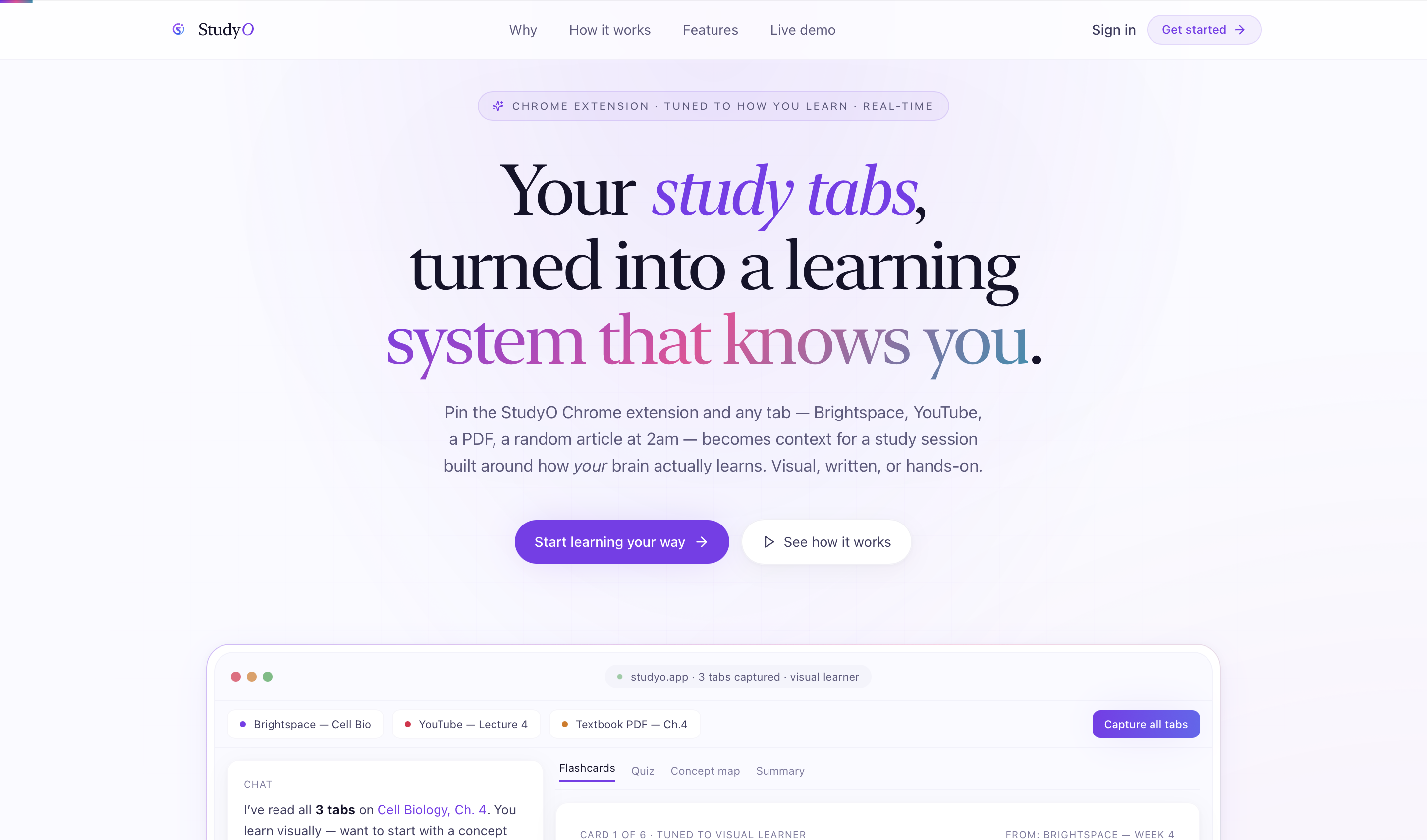
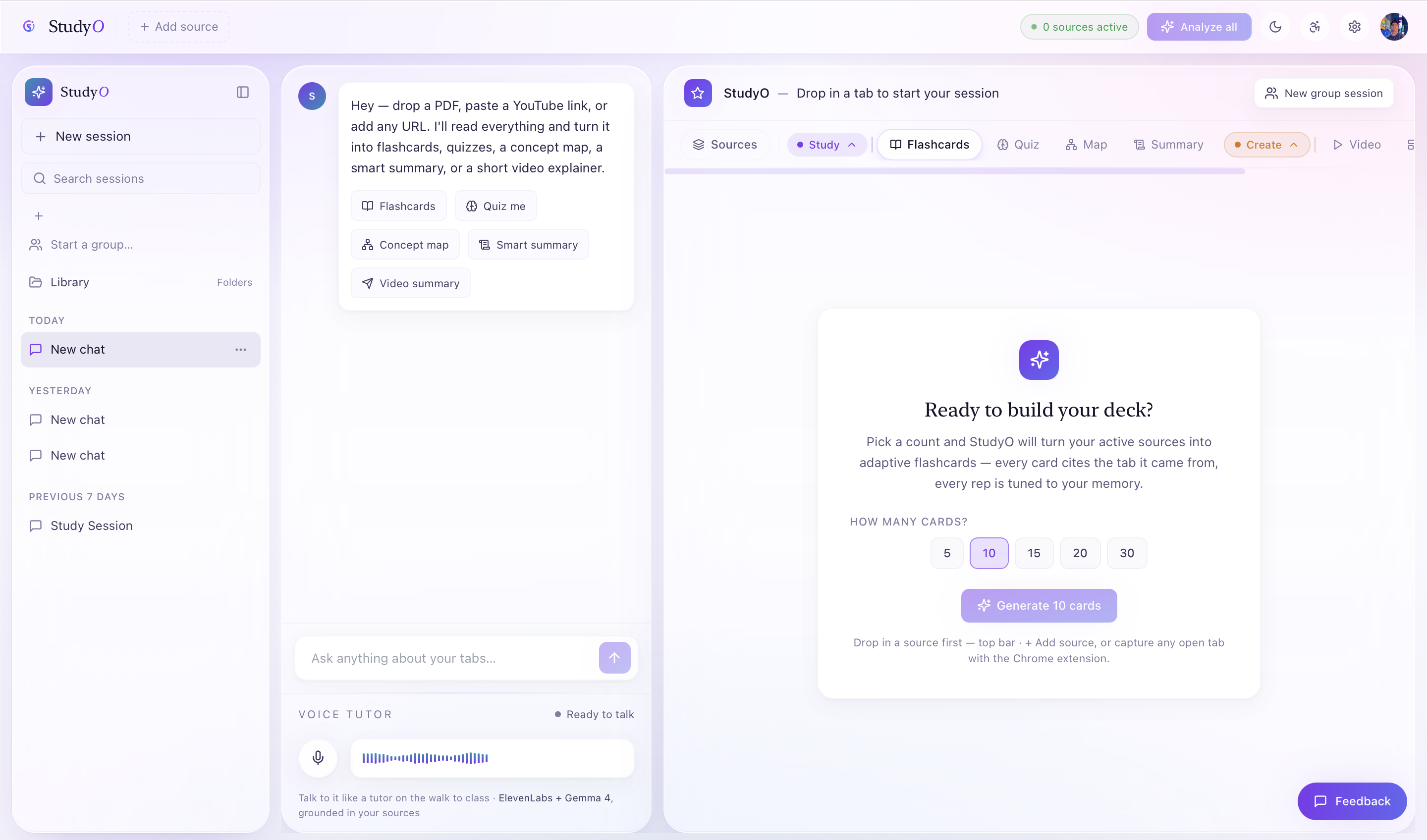
🎓 StudyO — Your tabs, turned into a study session.
💡 Inspiration
The average student keeps 30+ tabs open while studying. Notes get lost. Lectures don't get reviewed. PDFs sit unread. YouTube videos get paused and never resumed.
We've lived this. Every study session starts with good intentions — a YouTube lecture here, a PDF there, a few Wikipedia tabs — and ends with 47 open tabs, a half-filled Notion page, and the vague feeling that nothing stuck.
The problem isn't access to information. It's the gap between consuming content and actually learning it.
Existing tools like Notion, Anki, and Quizlet all require you to do the heavy lifting — manually creating flashcards, typing summaries, building quizzes. That friction kills consistency. And none of them know how you learn best.
We built StudyO to be the missing layer between your browser and your brain — an AI-native learning OS that ingests everything you already read, watch, and record, and turns it into the exact study artifact your brain wants, in the style it learns best.
✨ What It Does
StudyO is a personalized AI learning workspace built around three core loops:
🔁 Loop 1 — Ingest Anything
| Source | How |
|---|---|
| Upload → auto-thumbnail → full text extraction | |
| 🎬 YouTube | Paste URL → transcript + metadata pulled automatically |
| 🌐 Web URL | Paste link → Cheerio scrapes structured content |
| 🎙️ Audio lecture | Upload → waveform visual + HLS playback |
| 🗂️ Open tabs | Chrome extension bulk-ingests your active study tabs in one click |
🔁 Loop 2 — Generate What You Need
From any combination of sources, StudyO generates:
- 📇 Flashcards — JSON-mode, schema-validated, ready to review
- ❓ Quizzes — multi-choice with explanations, deep-thinking mode
- 🗺️ Concept Maps — D3-style node/edge graphs of ideas and relationships
- 📝 Summaries — TL;DR + key points + study questions
- 🎨 Canvas — interactive HTML lessons, style-aware
- 🎬 AI Explainer Videos — narrated, captioned, multi-format, delivered in ~60 seconds
🔁 Loop 3 — Study Your Way
A 60-second VARK onboarding quiz (Visual / Auditory / Reading / Kinesthetic) runs once at sign-up and adapts every AI surface in the app:
| Style | Chat | Generated Content |
|---|---|---|
| 👁️ Visual | ASCII diagrams, suggests Concept Map | Charts, mind-maps, color-coded sections |
| 🎧 Auditory | Conversational lecturer voice | Narration player with speed slider |
| 📖 Reading/Writing | Structured prose, headings | Embedded notes, definition lists |
| ✋ Kinesthetic | "Try this" framing | Drag interactions, inline quizzes |
Plus a Vapi voice tutor grounded in your actual sources — quizzes you, explains concepts, runs spaced repetition sessions, all by voice.
🛠️ How We Built It
Architecture Overview
Browser / Chrome Extension
        │
        ▼
  Next.js 16 App Router  ←──  Clerk Auth (v7)
        │
   ┌────┴────┐
   │  API    │──── Source Ingest (PDF, YouTube, URL, Audio)
   │ Routes  │──── AI Generators (Flashcards, Quiz, Summary, Concept Map)
   │         │──── Streaming Chat (SSE + VARK injection)
   └────┬────┘
        │
   ┌────┴──────────────┐
   │  MongoDB Atlas     │  (JSON-schema validated, compound indexes)
   │  Cloudinary v2     │  (upload, transform, stream, stitch)
   │  Google Gemma 4    │  (primary: 26B, thinking: "high")
   │  ElevenLabs        │  (TTS narration)
   │  Vapi + Deepgram   │  (voice agent)
   └───────────────────┘
🎬 The AI Video Pipeline (our crown jewel)
No FFmpeg server. No separate media infra. Pure Cloudinary transformation chain:
Gemini script  →  Scene images (Gemini Image / DALL·E)  →  ElevenLabs narration
      │                        │                                    │
      └────────── All uploaded to Cloudinary with tagged public_ids ┘
                                    ↓
              fl_layer_apply chain stitches → master MP4
                                    ↓
          ONE explicit() call → 6 eager renditions in a single API call:
            📺 HLS m3u8 (adaptive bitrate)
            📱 9:16 portrait (Shorts / Reels / TikTok)
            🟦 1:1 square (LinkedIn / Twitter)
            🎞️ 3-second animated GIF preview
            🎬 q_auto:good + f_auto MP4
            🖼️ Smart poster (g_auto saliency)
What Cloudinary replaced for us
| Without Cloudinary | With Cloudinary |
|---|---|
| AWS S3 + signed URLs | One SDK call |
| FFmpeg server | fl_layer_apply transformation chain |
| MUX / Bento for HLS | streaming_profile: "hd" |
| Whisper for captions | Built from narration text + timings |
| Sharp for PDF thumbnails | pg_1 URL parameter |
| Custom waveform generator | fl_waveform URL parameter |
| Cloudflare CDN | Built in with q_auto + f_auto |
Tech Stack
Frontend      Next.js 16 · TypeScript strict · Zustand · Tailwind v3 · Framer Motion
Auth & Data   Clerk v7 · MongoDB Atlas
AI            Gemma 4 26B (primary) · Gemini 2.5 Flash (fallback) · GPT-4o-mini (tertiary)
Media         Cloudinary v2 · ElevenLabs · Vapi + Deepgram
Ingestion     pdf-parse · youtube-transcript · cheerio
Extension     Chrome MV3
🚧 Challenges We Ran Into
1. The Video Pipeline Was Brutally Hard to Get Right
Stitching multi-scene videos entirely through Cloudinary's transformation layer — without any server-side FFmpeg — required deeply understanding layer composition, timing, and eager transformation sequencing. Getting captions synced to narration timing, then encoding that into WebVTT on the fly, was a weekend of pain we don't wish on anyone.
2. VARK Injection Without Prompt Bloat
Adapting every AI call to a learning style sounds simple until you're streaming SSE responses and every extra token in the system prompt costs latency. We had to carefully balance the size of the LEARNER PROFILE addendum against response quality — and write style-specific prompt templates that actually changed output behavior meaningfully, not cosmetically.
3. Cross-Session Master Agent Context
Building a workspace-wide agent that has coherent context across dozens of sessions and hundreds of sources — without hallucinating or losing track — required careful MongoDB schema design and a tiered context injection strategy. Too little context and it's useless; too much and it hits token limits and slows to a crawl.
4. Chrome Extension CORS + Auth
The Clerk cookie-based auth doesn't travel cleanly into a Manifest V3 extension service worker. We had to build a custom /api/status polling endpoint and handle the auth handoff carefully so the extension could authenticate without requiring the user to re-login from the popup.
5. Streaming + Schema Validation Together
Running thinking: "high" on Gemma 4 while simultaneously streaming and schema-validating JSON output meant we couldn't just parse at the end — we had to implement a streaming JSON parser that validated structure incrementally and surfaced partial results to the UI in real time.
🏆 Accomplishments That We're Proud Of
- 🎬 A fully working AI video pipeline — from text prompt to narrated, captioned, multi-format explainer video in ~60 seconds, with zero FFmpeg and zero dedicated media server
- 🧠 True learning-style personalization — not a skin, but behavioral adaptation at the model prompt level that genuinely changes how the AI explains, structures, and formats content
- 📦 7-in-1 media infrastructure — Cloudinary replaces S3, CDN, FFmpeg, MUX, Whisper, Sharp, and a waveform generator in a single SDK
- 🗣️ A voice tutor that knows your sources — Vapi agent dynamically configured with the user's actual ingested content as system context
- ✅ Zero TypeScript errors, clean build —
npx tsc --noEmitandnpx next buildpass clean across 32 files
📚 What We Learned
- Cloudinary is vastly underused as an AI media orchestration layer. Most teams treat it as a CDN. We used it as a video stitching engine, a streaming pipeline, and an asset tagging system — all in one.
- Learning personalization needs to go deeper than the UI. Changing font size or colors for visual learners doesn't do anything. The adaptation has to live in the prompt layer and change how the model actually structures its output.
- AI video is the killer feature nobody's built well yet. Every student has sat through a lecture they didn't understand and wished someone would just explain it differently. On-demand, source-grounded explainer videos are genuinely compelling — and technically much harder than they look.
- Thinking modes are worth the latency cost for generative tasks. Gemma 4's
thinking: "high"on concept maps and quizzes produced measurably more accurate, interconnected output. The extra seconds are worth it when the artifact has to be study-ready.
🚀 What's Next for StudyO
Near-term
- 🔔 Spaced repetition scheduler — surface the right flashcards at the right time, Anki-style, built into the app
- 📊 Learning analytics dashboard — track retention, quiz performance, and time-per-concept across sessions
- 🧑🤝🧑 Live Study Groups — real-time collaborative sessions where multiple users study the same source set with shared AI context
Medium-term
- 🏫 LMS integrations — Brightspace, Canvas, Blackboard source connectors so course materials auto-ingest
- 🌍 Multilingual support — generate all artifacts in the user's native language, with narration
- 📱 Mobile app — iOS/Android with offline flashcard review and voice tutor on the go
Long-term
- 🎓 StudyO for educators — let professors upload course content and provision personalized study environments for entire cohorts
- 🤝 Institutional licensing — university-wide deployments with learning analytics for faculty
**Built for students who keep 30 tabs open.** 🎓 *StudyO turns your chaos into a curriculum.*
Built With
- cloudnary
- elevenlabs
- mongodb


Log in or sign up for Devpost to join the conversation.