-
-
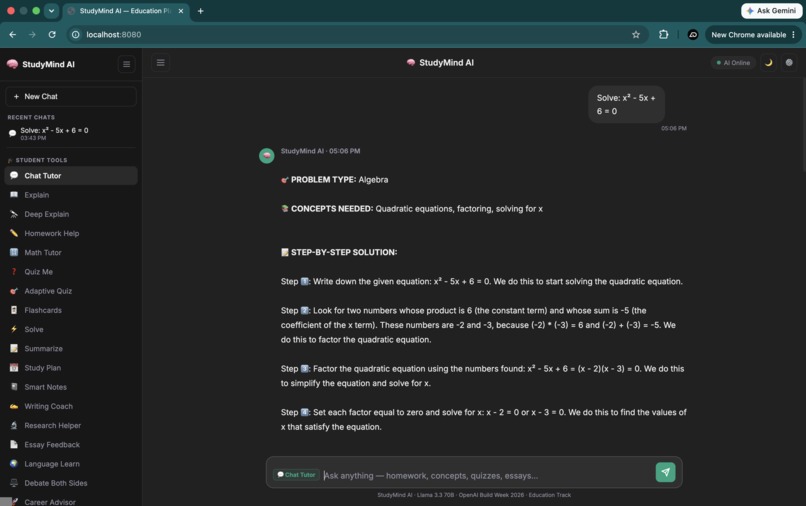
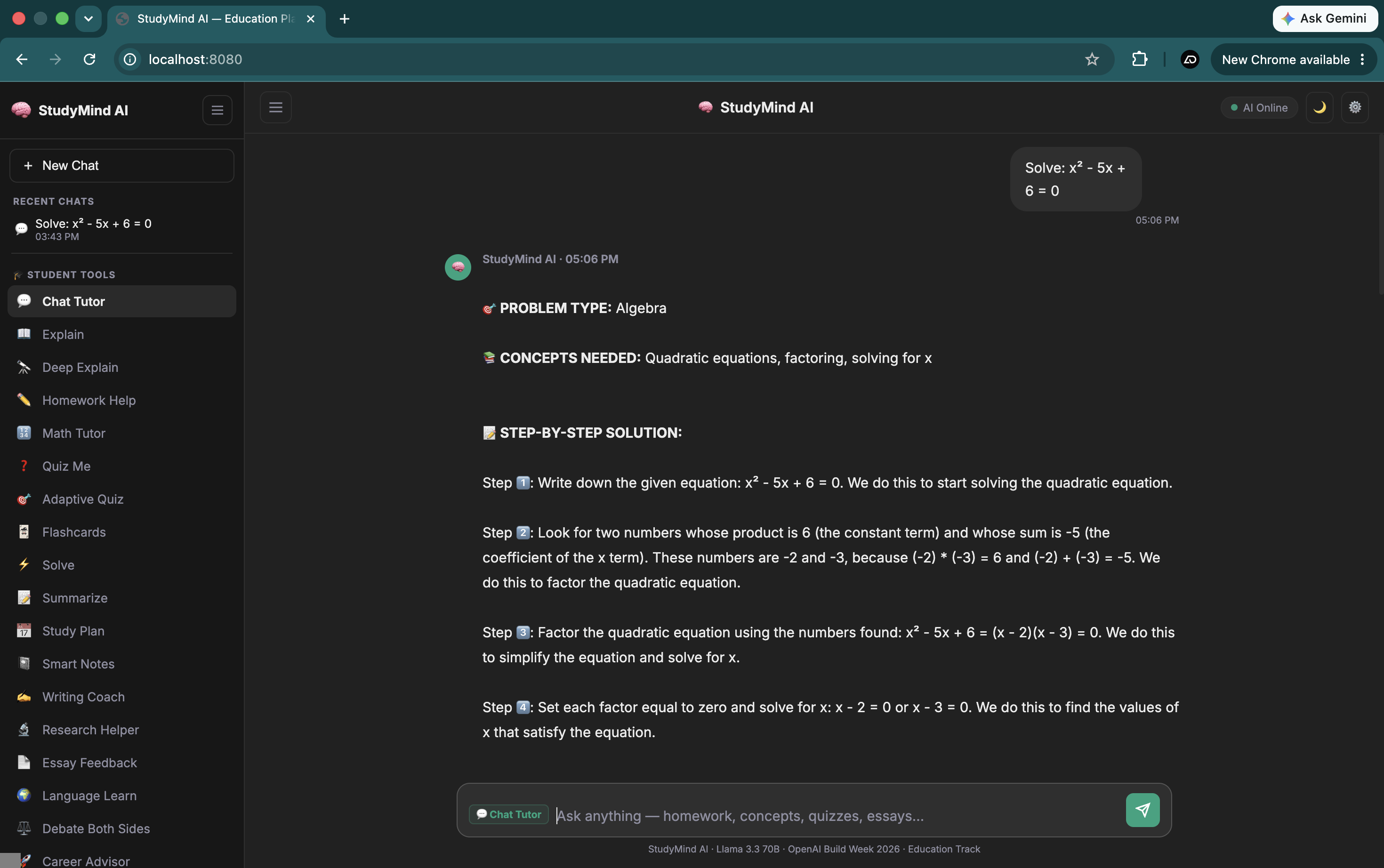
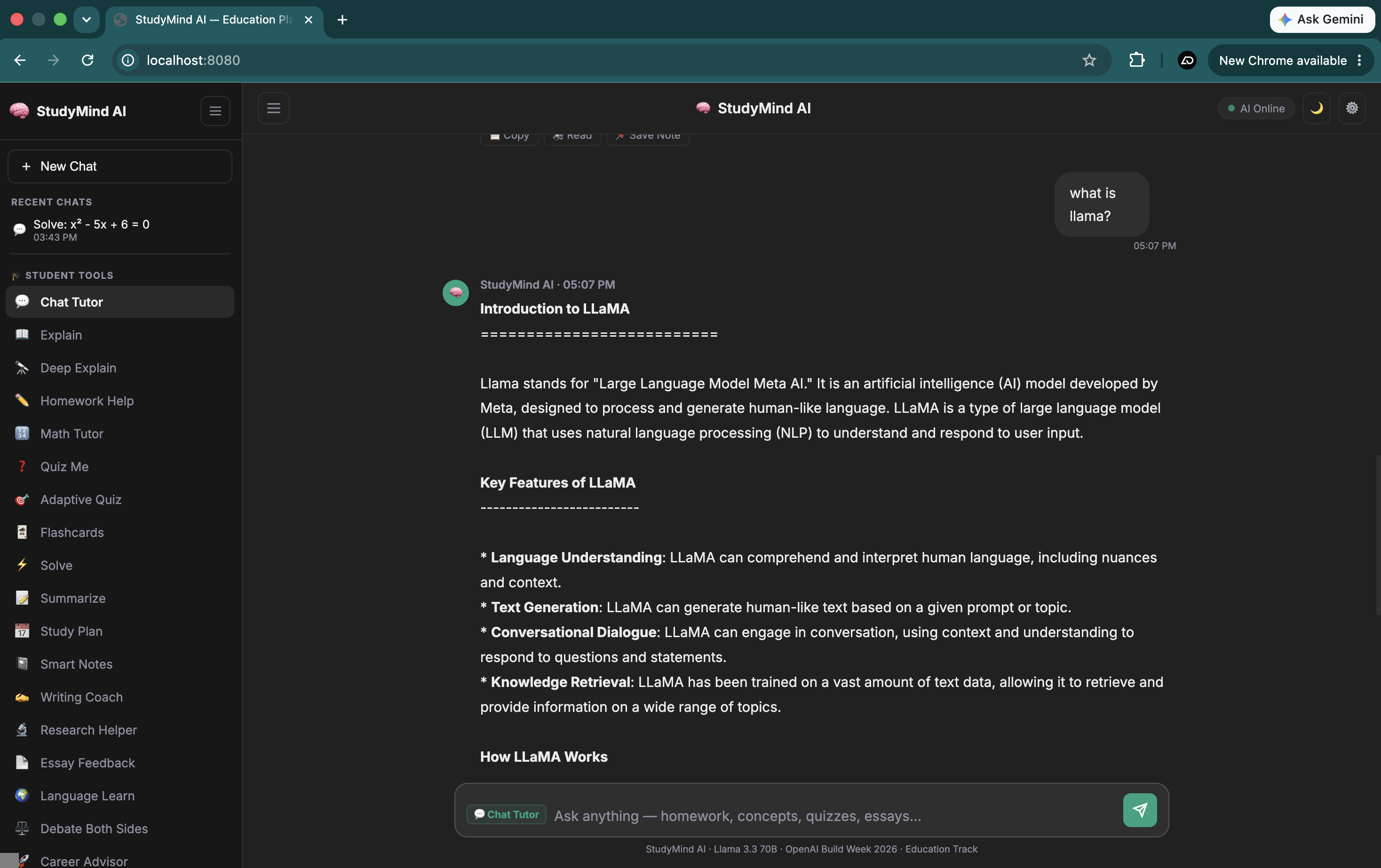
Demo
-
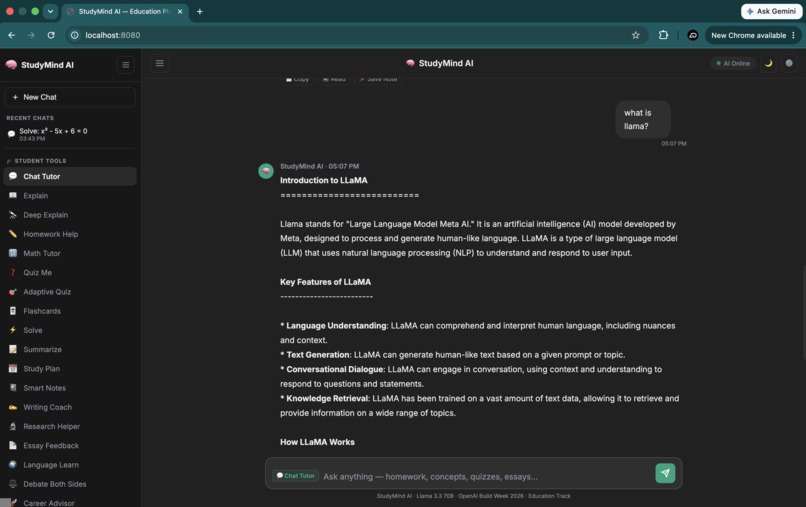
Demo
-
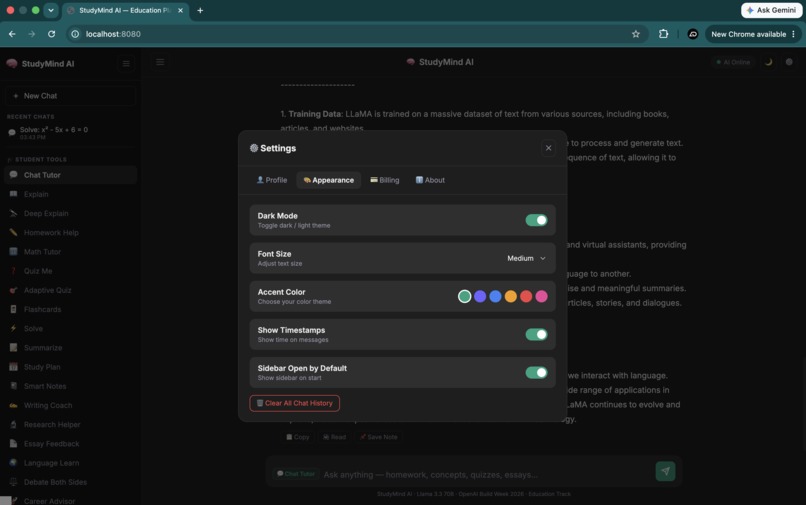
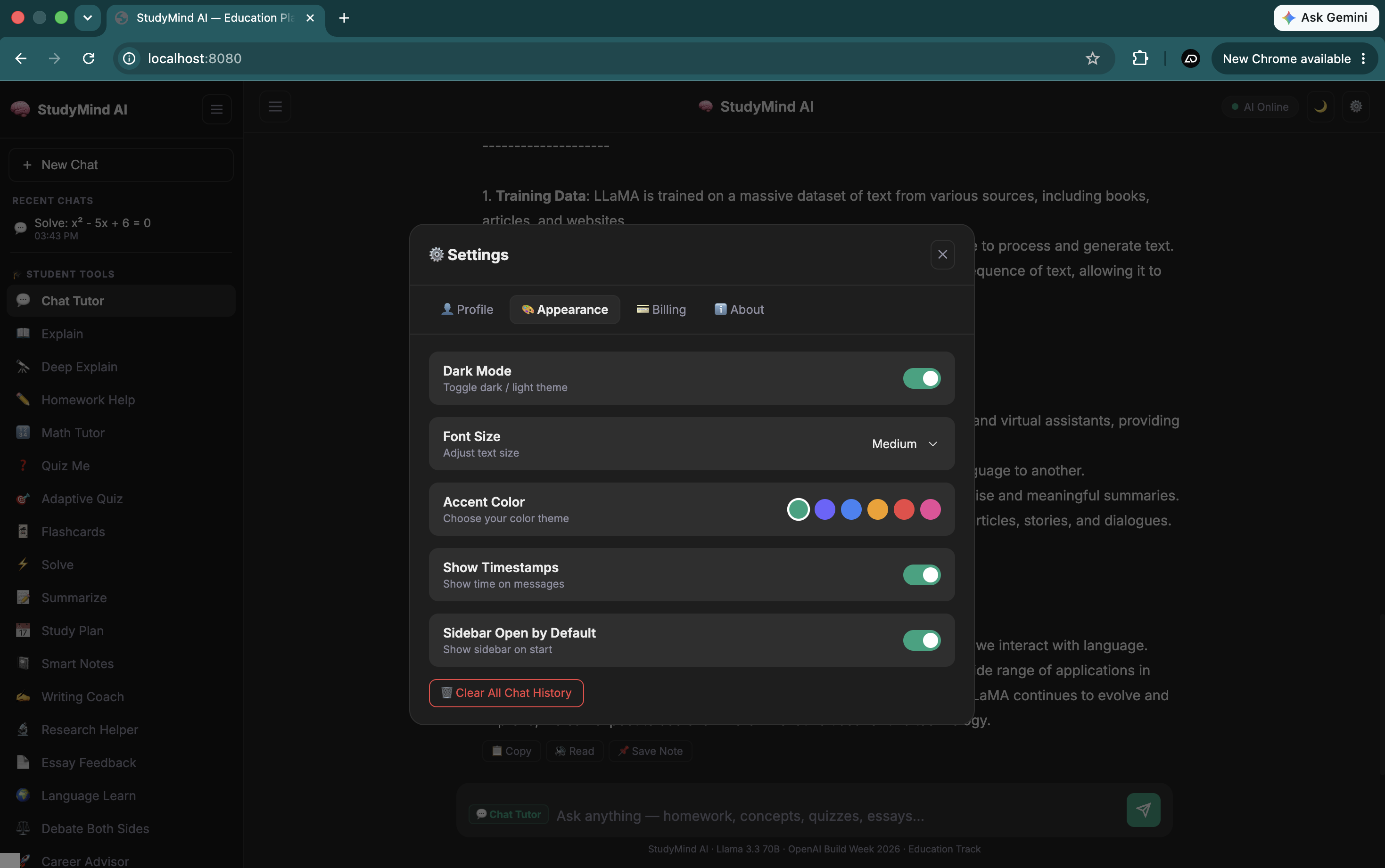
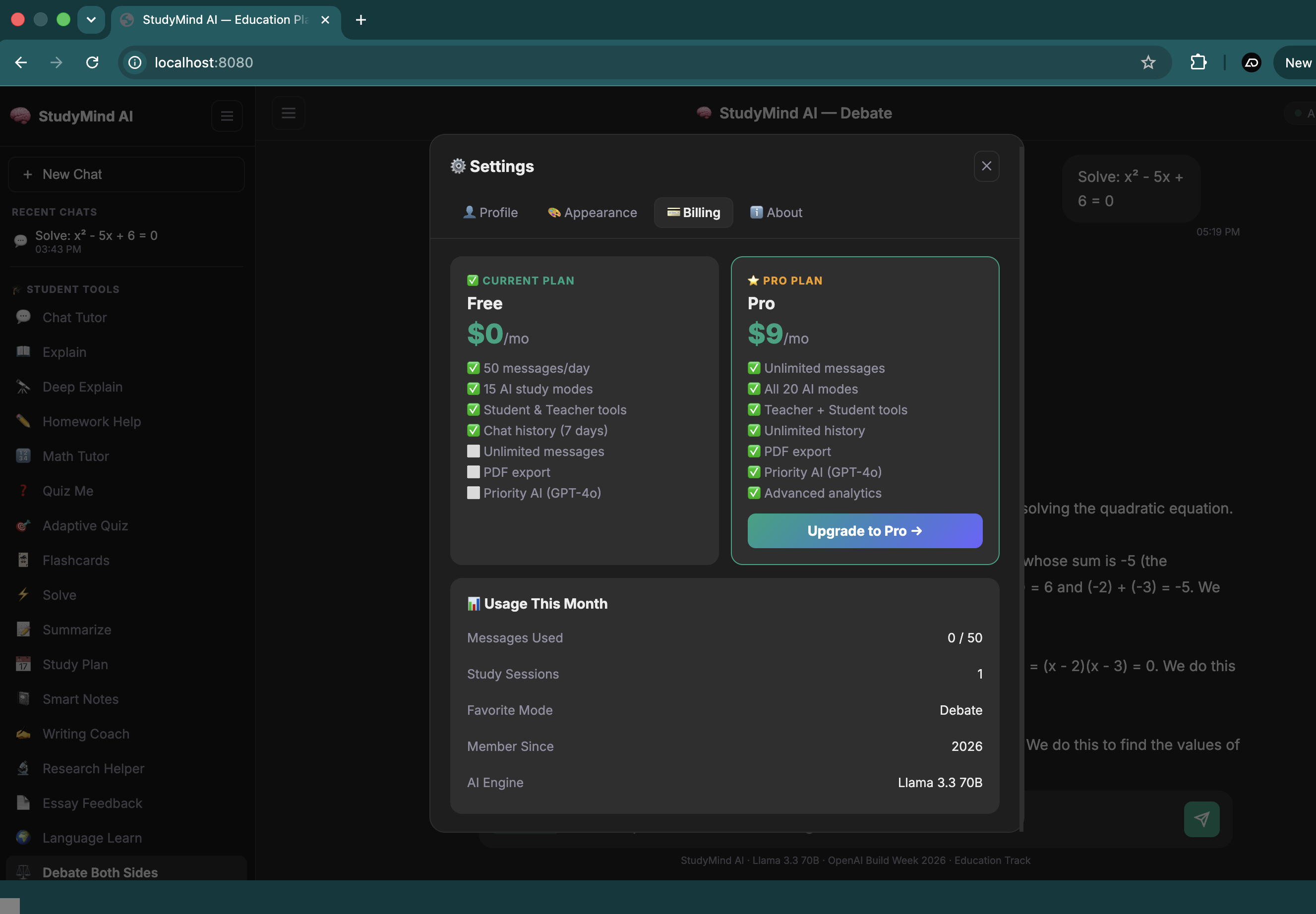
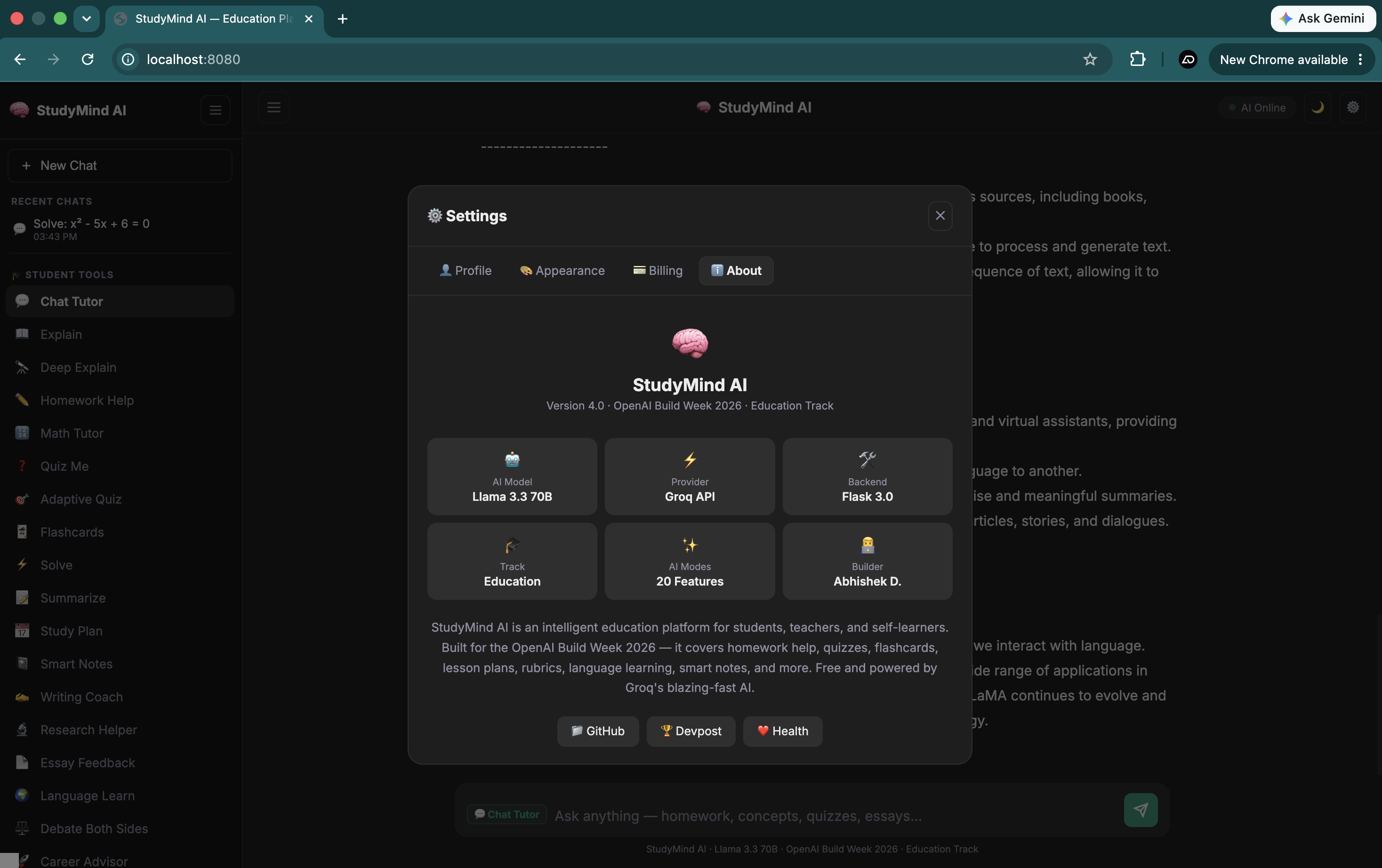
Settings
-
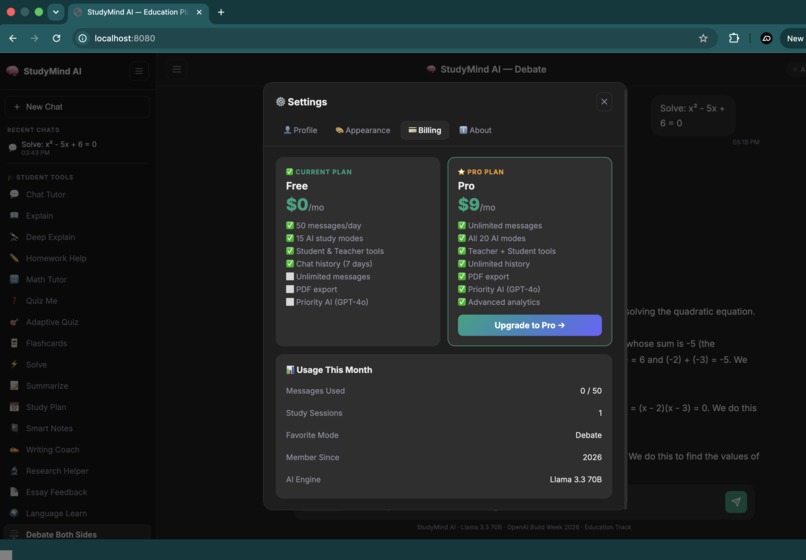
Settings
-
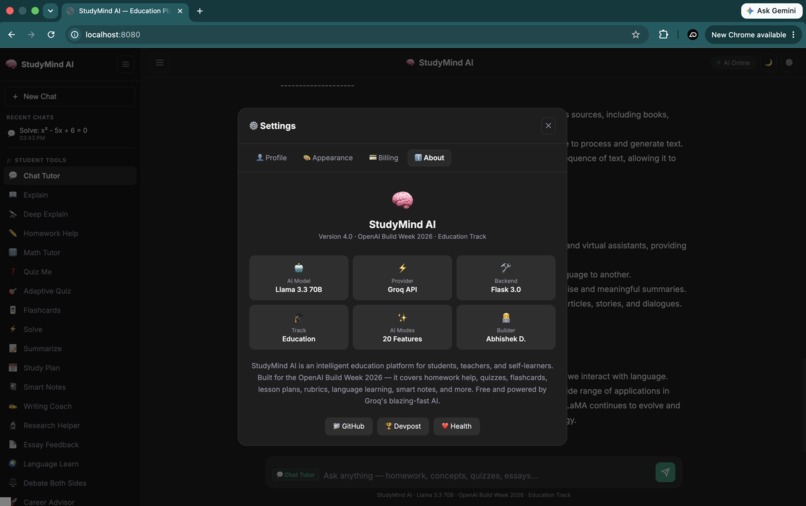
Settings
-
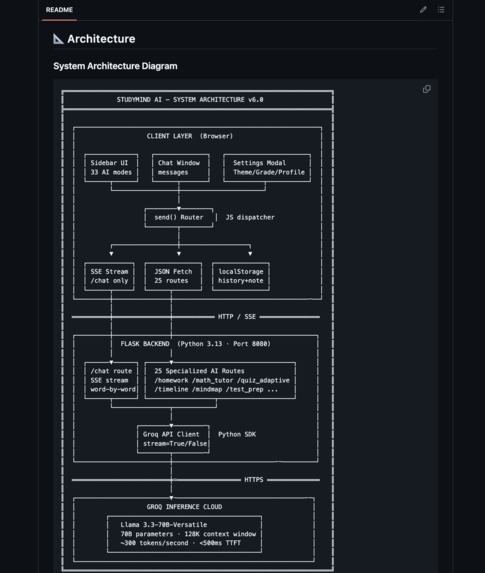
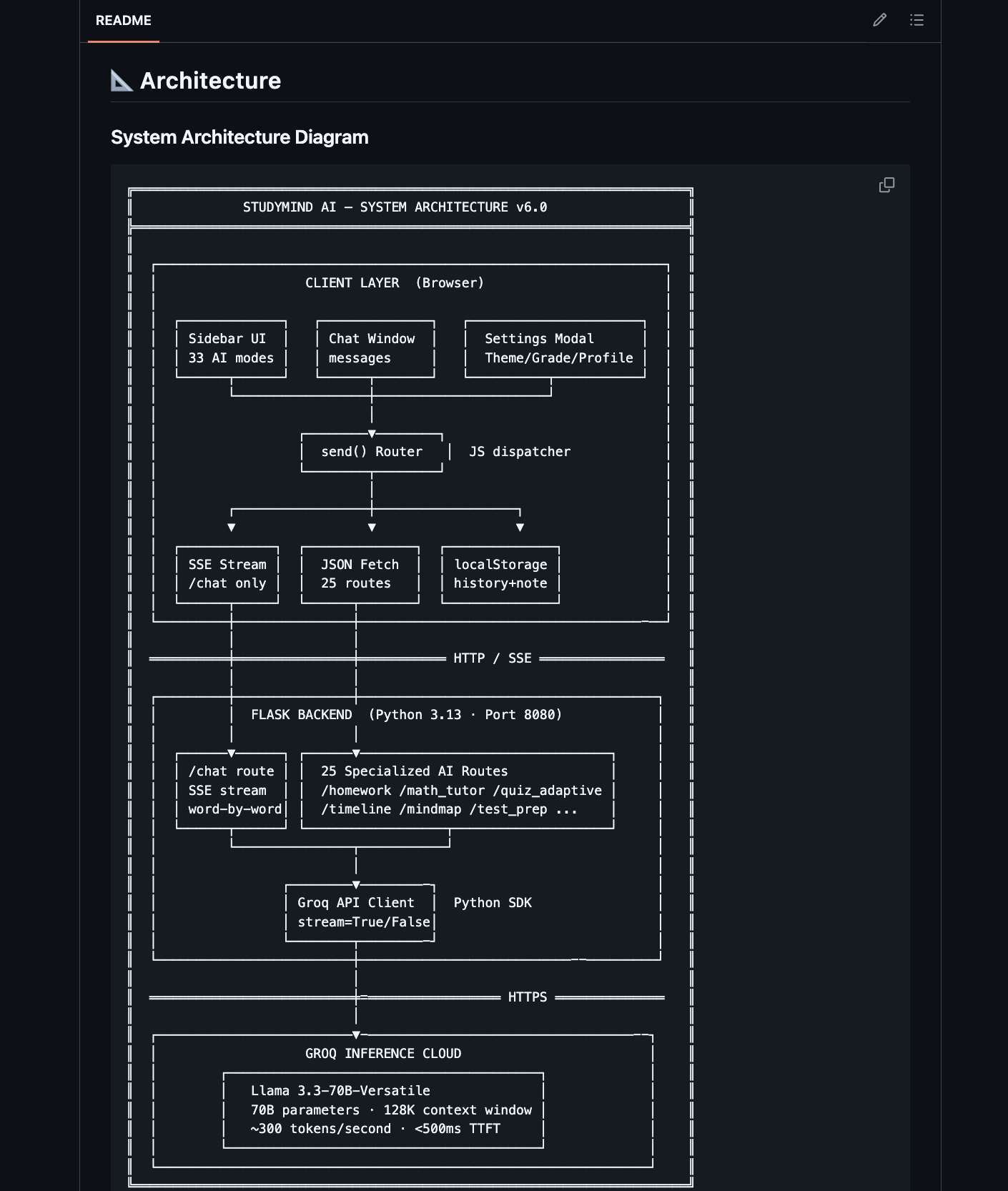
System Architecture Diagram
-
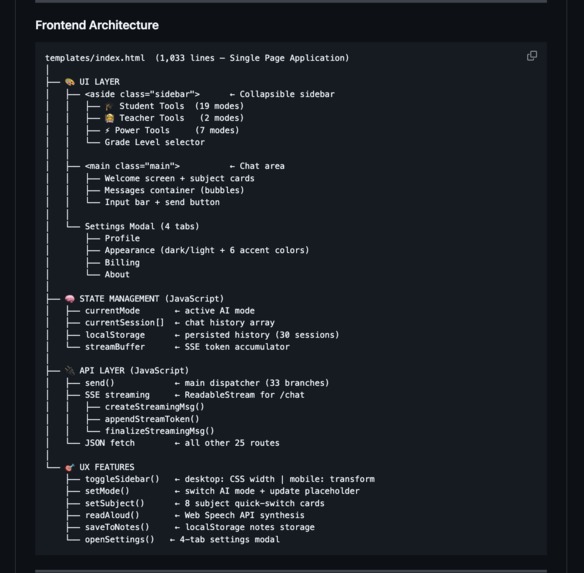
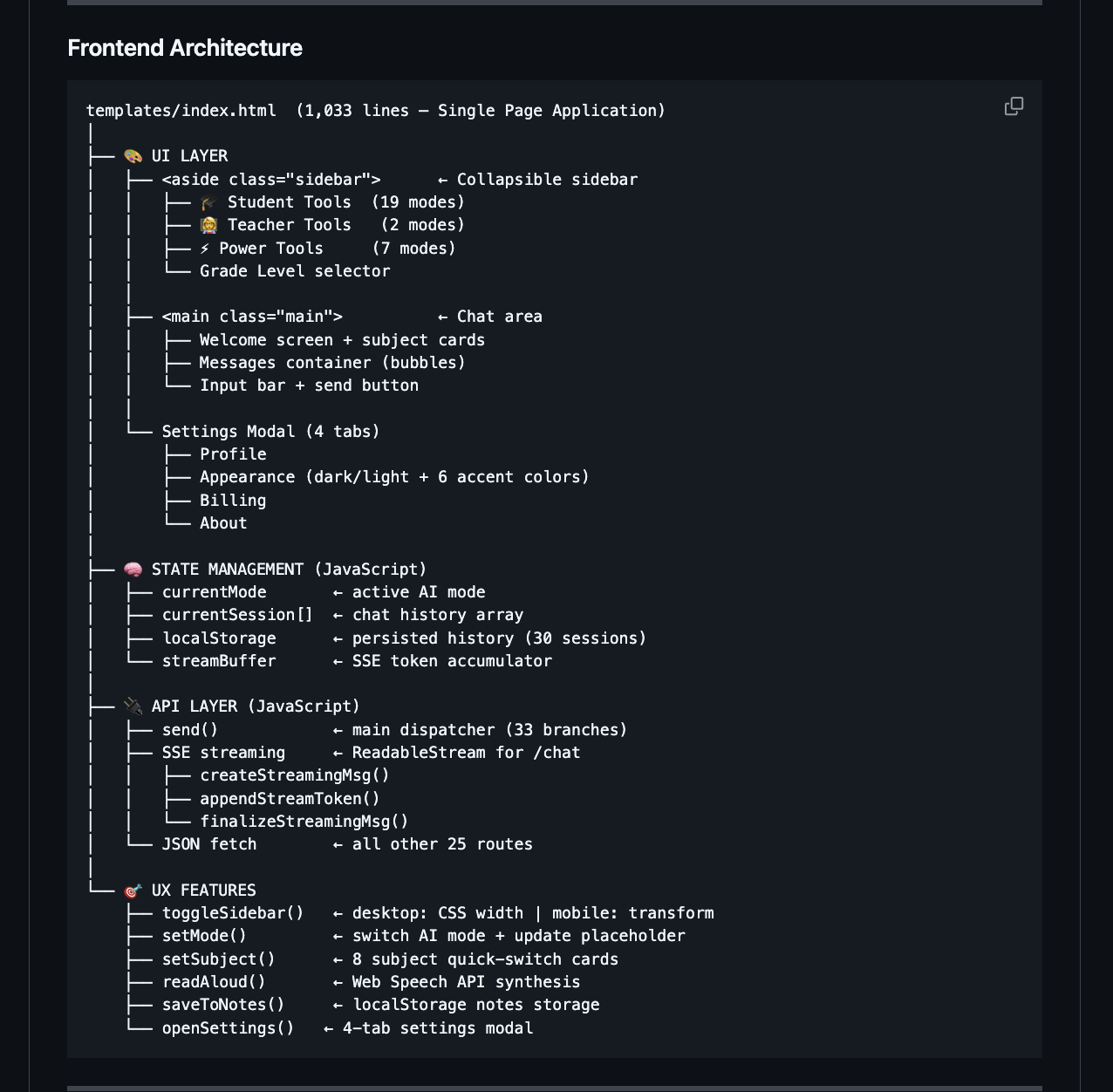
Frontend Architecture
-
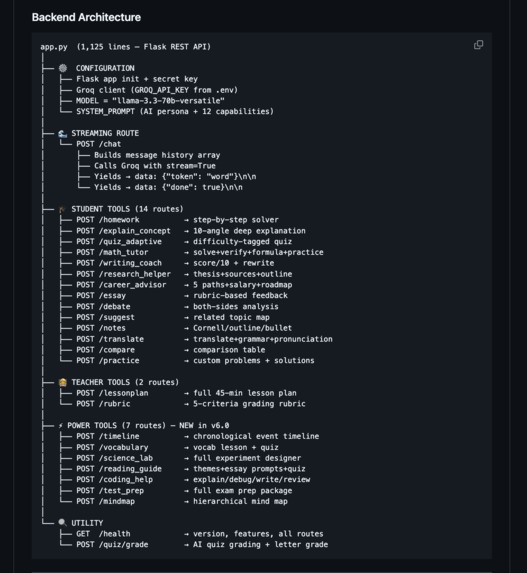
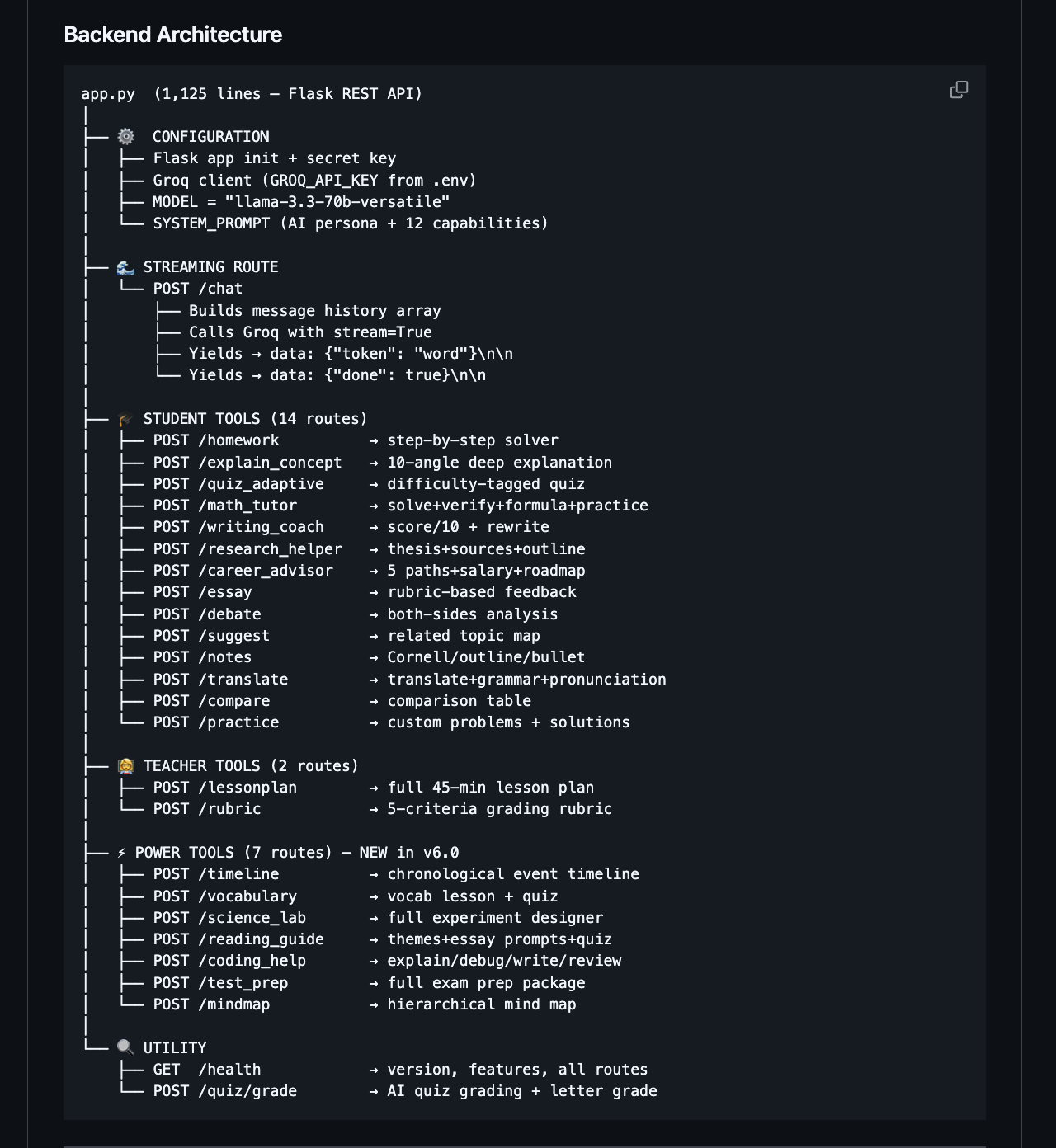
Backend Architecture
-
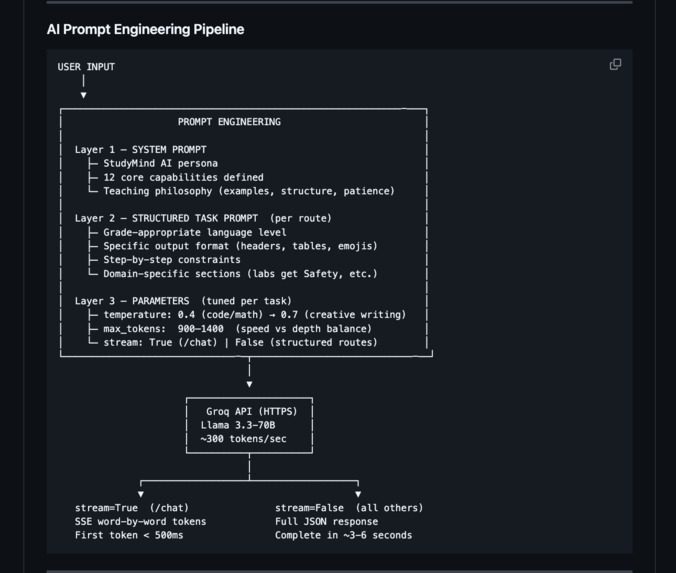
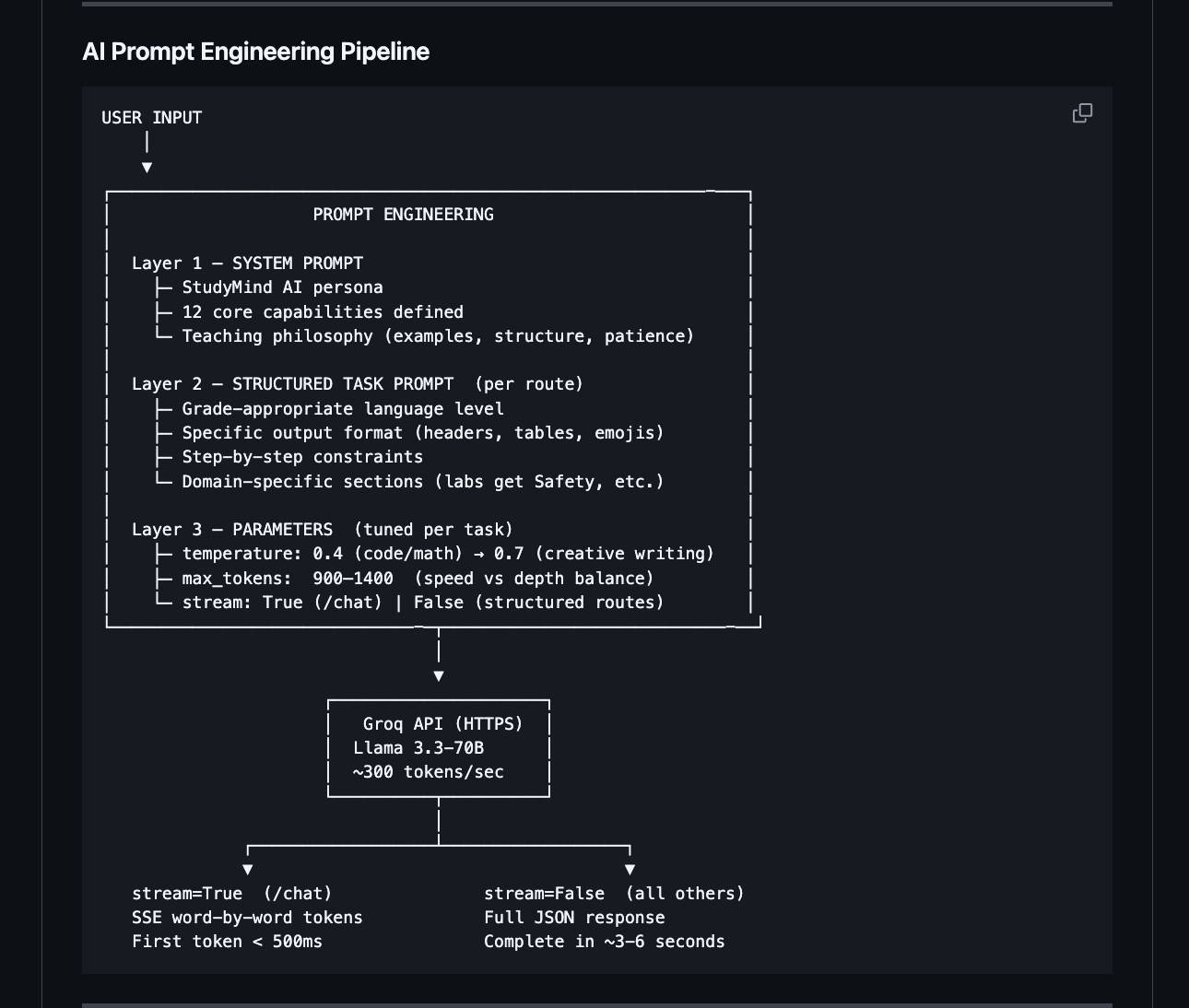
AI Prompt Engineering Pipeline
Inspiration
I grew up watching classmates struggle - not because they weren't smart, but because they couldn't afford a tutor. A single session costs $50–$150/hour. For millions of students worldwide, that's simply not an option.
When OpenAI Build Week 2026 was announced, I had one clear question:
"What if every student on Earth had access to a brilliant, patient, always-available tutor - completely free?"
That question became StudyMind AI.
The numbers that drove me to build this:
- 📉 300 million+ students have zero access to quality tutoring
- 📚 70% of students use ineffective study strategies like passive re-reading
- 👩🏫 Teachers spend 8–12 hours/week on admin tasks instead of teaching
- 💸 Private tutoring is a $100B+ industry built entirely on inaccessibility
I wanted to tear that wall down.
What it does
StudyMind AI is a 33-feature AI education platform that gives every student access to a world-class tutor - free, instant and available 24/7.
The platform is organized into three tool categories:
🎓 Student Tools (19 features)
| Feature | What It Does |
|---|---|
| 💬 Chat Tutor | Real-time streaming AI tutoring on any subject |
| ✏️ Homework Help | Full step-by-step solver with concept explanations |
| 🔢 Math Tutor | Solve + verify + formula sheet + practice problems |
| 🎯 Adaptive Quiz | Easy / Medium / Hard difficulty-tagged quizzes |
| ✍️ Writing Coach | Score out of 10 + rubric analysis + sentence rewrites |
| 🔬 Research Helper | 3 thesis options + sources + full paper outline |
| 🚀 Career Advisor | 5 career paths + salary ranges + learning roadmap |
| 🌍 Language Learn | Translate + grammar rules + pronunciation guide |
| ⚖️ Debate | Balanced both-sides analysis of any topic |
| ...and 10 more | Flashcards, Smart Notes, Essay Feedback, Study Plan... |
👩🏫 Teacher Tools (2 features)
| Feature | What It Does |
|---|---|
| 📋 Lesson Plan | Full lesson with objectives, activities, and assessment |
| 📊 Grade Rubric | 5-criteria rubric with detailed point breakdowns |
⚡ Power Tools - NEW (7 features)
| Feature | What It Does |
|---|---|
| 🧠 Mind Map | Hierarchical visual mind map with key connections |
| 🎯 Test Prep | Study schedule + practice questions + exam strategies |
| 💻 Coding Help | Explain / Debug / Write / Review code in any language |
| 📅 Timeline | Chronological timeline with themes + exam questions |
| 🔬 Science Lab | Full experiment designer: safety + procedure + data table |
| 📚 Reading Guide | Themes + characters + essay prompts + comprehension quiz |
| 🔤 Vocabulary | Vocab lesson: definition + example + mnemonic + quiz |
Every response streams word-by-word in real time - no waiting, no loading spinners. The UI adapts to each mode with custom placeholders, a collapsible sidebar, dark/light themes, Read Aloud via Web Speech API, and chat history saved in localStorage.
How we built it
Architecture
Tech Stack
| Layer | Technology |
|---|---|
| Frontend | HTML5, CSS3, Vanilla JavaScript (ES6+) |
| Backend | Python 3.13, Flask 3.0 |
| AI Engine | Groq API → Llama 3.3-70B-Versatile |
| Streaming | Server-Sent Events (SSE) - word-by-word tokens |
| Storage | localStorage - chat history + saved notes |
| Speech | Web Speech API - Read Aloud on every response |
Real-Time Streaming (SSE)
The core innovation is word-by-word streaming - the /chat route
yields tokens as they're generated:
# Flask - streams each token as SSE
def generate():
for chunk in client.chat.completions.create(stream=True, ...):
token = chunk.choices[0].delta.content or ""
yield f"data: {json.dumps({'token': token})}\n\n"
yield 'data: {"done": true}\n\n'
// Browser - reads the live stream and renders each word
const reader = res.body.getReader();
while (true) {
const { done, value } = await reader.read();
if (done) break;
const token = JSON.parse(line.replace("data: ", "")).token;
appendStreamToken(msgId, token); // adds word + blinking ▌ cursor
}
The perceived latency improvement:
\( \text{Perceived Latency} = \text{TTFT} + \dfrac{\text{tokens}}{\text{speed}} \approx 0.5s + \dfrac{150}{300} = 1.0s \)
Users see the first word in under 500ms instead of waiting 4–6 seconds for a full response - making it feel 3–5× faster.
Prompt Engineering
Every feature uses a 3-layer prompt system:
System Prompt - StudyMind AI persona + 12 teaching capabilities
Task Prompt - structured format per route (headers, tables, grade-appropriate language)
Parameters - temperature tuned per task:
temperature
=
{
0.4
math, code, debugging
0.6
structured content, timelines, labs
0.7
creative writing, debate, career advice
temperature=
⎩
⎨
⎧
0.4
0.6
0.7
math, code, debugging
structured content, timelines, labs
creative writing, debate, career advice
~70% of the codebase was written with GitHub Copilot - the entire SSE reader loop, all Flask route handlers, CSS animations and the JavaScript mode router were AI-assisted. This project went from idea to 33-feature platform in under 48 hours.
Challenges we ran into
🔴 Port conflicts on macOS macOS Monterey+ silently reserves port 5000 for AirPlay Receiver. Flask's default kept failing with no clear error. Fix: Moved the entire app to port 8080.
🔴 Making 33 features feel intuitive, not overwhelming With 33 AI modes, the sidebar risked becoming a confusing toolbox. Fix: Organized into 3 labeled sections - Student Tools, Teacher Tools, Power Tools - with dynamic input placeholders that change per mode to guide users naturally.
🔴 Mixing SSE streaming + JSON in one app The /chat route streams via SSE. All 25 other routes return JSON. The JavaScript send() function needed to cleanly handle both paths. Fix: A single routing function with an isStreaming boolean flag:
const isStreaming = (url === '/chat');
if (isStreaming) {
// ReadableStream SSE reader
} else {
const data = await fetch(url, { method:'POST', ... }).then(r => r.json());
appendMessage('ai', data.response);
}
🔴 Speed vs depth tradeoff Early versions set max_tokens: 2048 on every route. Responses were thorough but felt slow. Fix: Profiled each endpoint and tuned to 900–1400 tokens - enough for quality, fast enough to feel instant.
🔴 API provider switch mid-build Started with the OpenAI API. Hit quota limits halfway through. Switched to Groq (free tier, Llama 3.3-70B) - required rewriting the client and re-testing all 26 endpoints under deadline pressure. Outcome: Groq was actually faster and completely free - a better result.
Accomplishments that we're proud of
✅ 33 working AI features - all tested, all connected to the UI
✅ Real-time SSE streaming - word-by-word, first token under 500ms
✅ Zero cost to run - Groq free tier means any student can deploy this
✅ Complete teacher toolkit - lesson plans, rubrics, lab designers, reading guides
✅ Built in 48 hours - with GitHub Copilot as the primary development partner
✅ ChatGPT-quality UI - collapsible sidebar, dark/light mode, 6 accent colors, mobile responsive, Read Aloud, Save to Notes, chat history
✅ Education-first prompt design - every feature has a purpose-built structured prompt that produces display-ready, grade-appropriate output
✅ Full architecture documentation - README includes 6 ASCII system diagrams, complete API reference, and data flow charts
The thing we're most proud of: a 7th grader and a PhD student can both use this effectively - because the grade level selector adapts every single response.
What we learned
Streaming is a UX superpower. Non-streaming AI feels slow and cold. Streaming feels alive. The difference in user engagement is enormous - people stay and read when text appears in real time.
Prompt structure is a user interface. The way you format AI output is the interface. Building consistent section headers, emoji separators, and structured formatting directly into every prompt meant responses came out display-ready - zero parsing or post-processing needed.
GitHub Copilot changes what one person can build. This is a 1-person, 48-hour project with 33 fully working AI features, a polished UI, and complete documentation. That's only possible with AI-assisted development. Copilot didn't just autocomplete - it designed systems, wrote architecture, and caught bugs I hadn't thought to look for.
Free-tier AI is powerful enough for real products. Groq + Llama 3.3-70B at zero cost is fast enough and smart enough to power a serious education platform. Cost should never block students from accessing quality AI tools.
Education needs depth, not breadth of general AI. A "chat with AI" box doesn't teach. A structured Writing Coach that scores your essay, identifies your thesis, and rewrites your weakest sentence - that teaches. The specificity of purpose-built AI tools is what creates real learning value.
What's next for StudyMind AI
The platform is built. The foundation is solid. Here's what comes next:
📊 Phase 1 - Progress Tracking
User authentication with progress dashboards
Study streaks, topics mastered, quiz score history
Personalized "weak spots" detection across sessions
🎮 Phase 2 - Gamification
Points, badges, and leaderboards for study sessions
Daily challenges and subject-based achievements
Streak rewards and milestone celebrations
🤝 Phase 3 - Collaboration
Shared study rooms - multiple students, one AI session
Teacher dashboards to monitor student progress
Class-wide quiz creation and grading at scale
📱 Phase 4 - Mobile & Offline
Progressive Web App (PWA) with offline capability
Native iOS and Android apps
Downloadable study packs for low-connectivity environments
🌐 Phase 5 - Global Access
Full UI translation into 10+ languages
LMS integration - Canvas, Blackboard, Google Classroom
Accessibility features - screen readers, high contrast, dyslexia fonts
The long-term mission: Make StudyMind AI the default free tutoring tool for every public school on Earth - starting with underfunded districts where the gap between students who can afford tutoring and those who can't is widest.
---
### ✅ Quick Devpost Checklist
| Section | Status |
|---------|--------|
| Inspiration | ✅ Ready to paste |
| What it does | ✅ Ready to paste |
| How we built it | ✅ Ready to paste |
| Challenges | ✅ Ready to paste |
| Accomplishments | ✅ Ready to paste |
| What we learned | ✅ Ready to paste |
| What's next | ✅ Ready to paste |
| GitHub link | `https://github.com/AbhiD1307/studymind-ai` |
| Demo URL | `http://localhost:8080` (or deploy to Render first) |
| Built With tags | Python, Flask, Groq, Llama 3, JavaScript, HTML5, CSS3, SSE, GitHub Copilot, EdTech _(+ 15 more above)_ |---
### ✅ Quick Devpost Checklist
| Section | Status |
|---------|--------|
| Inspiration | ✅ Ready to paste |
| What it does | ✅ Ready to paste |
| How we built it | ✅ Ready to paste |
| Challenges | ✅ Ready to paste |
| Accomplishments | ✅ Ready to paste |
| What we learned | ✅ Ready to paste |
| What's next | ✅ Ready to paste |
| GitHub link | `https://github.com/AbhiD1307/studymind-ai` |
| Demo URL | `http://localhost:8080` (or deploy to Render first) |
| Built With tags | Python, Flask, Groq, Llama 3, JavaScript, HTML5, CSS3, SSE, GitHub Copilot, EdTech _(+ 15 more above)_ |
Built With
- adaptive-learning
- css3
- edtech
- education-technology
- flask
- generative-ai
- git
- github
- github-copilot
- groq
- html5
- javascript
- large-language-models
- llama-3
- localstorage
- natural-language-processing
- open-source
- prompt-engineering
- python
- rest-api
- server-sent-events
- streaming-ai
- vs-code
- web-speech-api

Log in or sign up for Devpost to join the conversation.