Inspiration
We wanted to experience ways that we can make learning more fun and we took an interest in building a study community that is gamified and help users organize their assignments at the same time.
What it does
- When you enter StudyMate you will be directed to our log-in page where you can easily sign in with your email and password. In case you haven’t yet had a study account, you can also register a new account to start your studying journey with StudyMate.
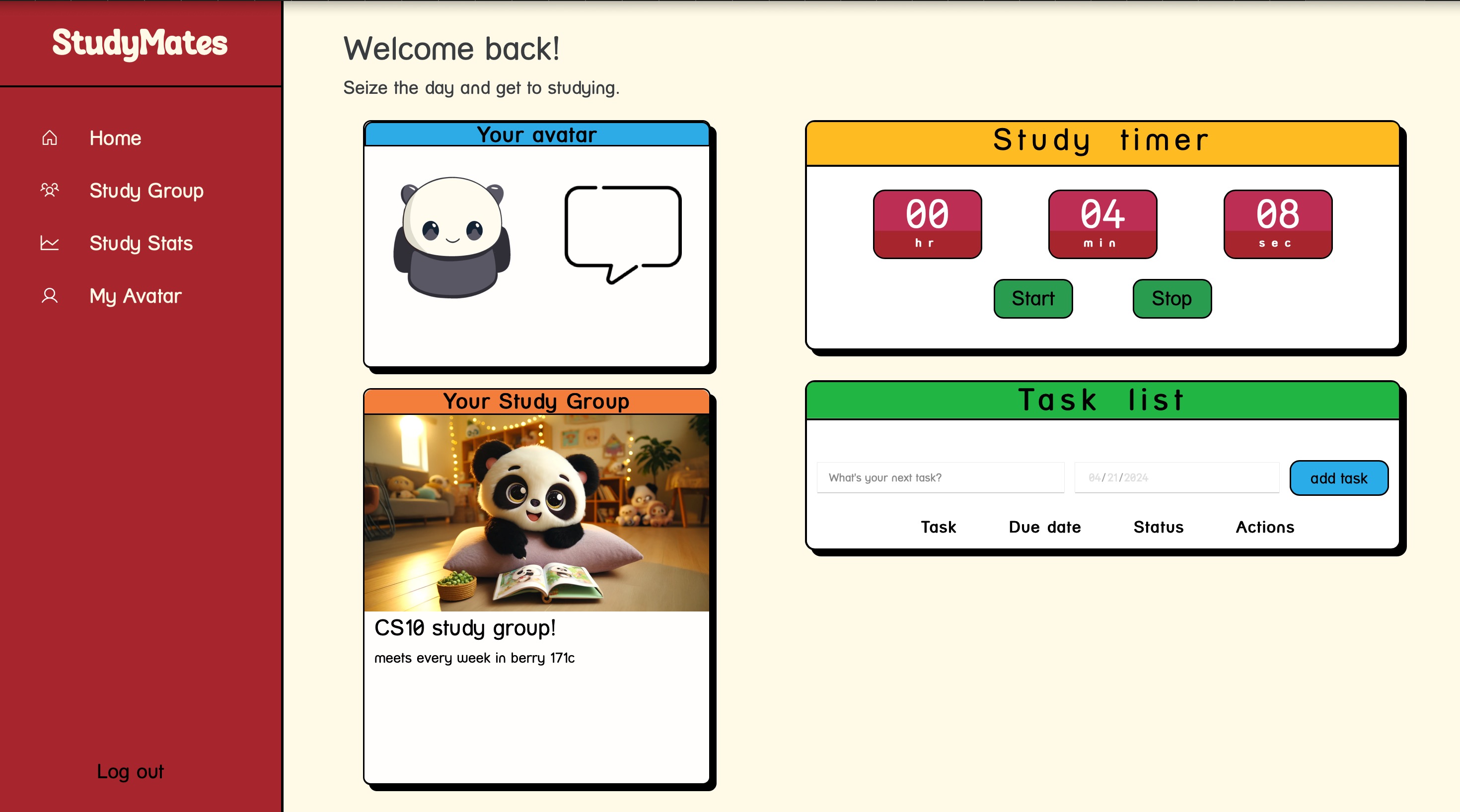
- Once you have successfully signed in, you will automatically enter our homepage where can create your avatar using a variety of cute animal emojis so that your studying time won’t become so stressful. You can also join a study group in which the study topic matches your interests and it will appear on your homepage along with other windows.
- On our homepage, there is a study timer which you can press start and stop anytime you want to keep track of your study time. Don’t even think about cheating because once you leave the web (not necessarily delete the tab) or your screen is off, the timer will automatically pause. The timer will also reset at midnight for you to get a good grip on your daily study routine and have the chance to be on your group's daily leaderboard for having the most study time.
- We also have a pop-up to-do list on our homepage that keeps track of your deadlines and homework. You can add new tasks to the checklist by typing in the task along with its due date. Once you complete a task in the checklist, you can toggle it so it will be marked completed and moved to the bottom of the list, giving spaces for other due new tasks, or you can simply just delete it from the list.
- On the banner on the left of the screen, you can navigate between your Profile, your StudyStats, the Homepage, and the StudyGroup.
- On StudyGroup, you can either create a new study group and choose your own study topic and theme for other like-minded people to join, or you can check out other study groups with different topics and themes to join.
- Once you join a study group by clicking on it, you will see a Dartmouth campus map that continuously updates each member’s location, avatar, study status, and study time. On top of the screen is the leaderboard which ranks the members with the most study time thus far in the day and it will reset after each day so don’t worry about not getting enough recognition.
- When you are sick and tired of exams and homework you can always leave the group or even log out of StudyMate to replenish yourself just like how we need to sleep after 24 hours of coding non-stop to create this body of work.
How we built it
We implemented the website with a UI/UX design process and used React, CSS, and HTML for front-end development. We also implemented the backend for our website through Express.js, Node.js, and MongoDB.
Challenges we ran into
We struggled with running the authentication because every time we try to run a page we need to ensure we are in the right port. Since everyone is using a different port, when we merge to GitHub our ports get overwritten which became a tedious process to test our code. Vite.config and server.js need to be constantly updated after merge. We also struggled with piecing the CSS design together since we were working on different pages, and after merges, they crashed with each other horribly.
Accomplishments that we're proud of
We were proud to get our avatars to move around the study group map. This was a laborious and time-consuming process. We were also proud of the leaderboard feature, and the successful group creating and joining features.
What we learned
We learned a lot about using git and debugging with the console log.
What's next for Studymates
We would like to continue polishing the design of the project and expand our study spaces with more maps and better character customization


Log in or sign up for Devpost to join the conversation.