-
-
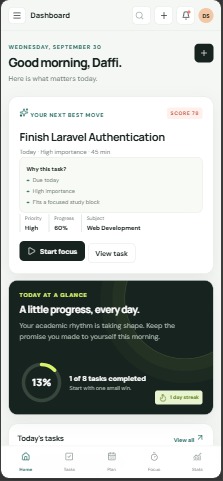
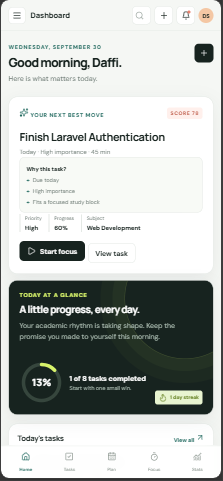
Responsive mobile experience
-
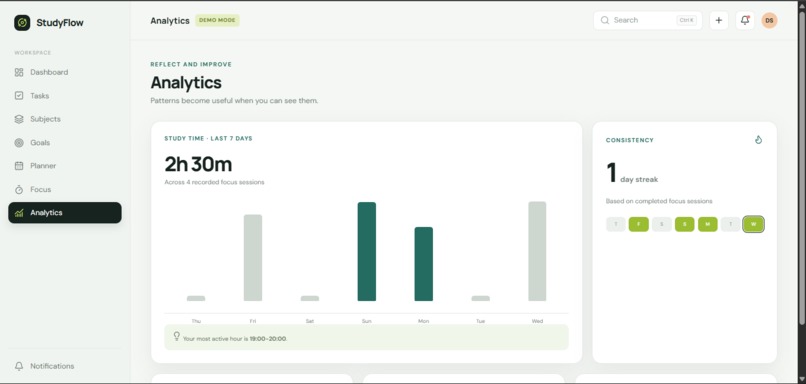
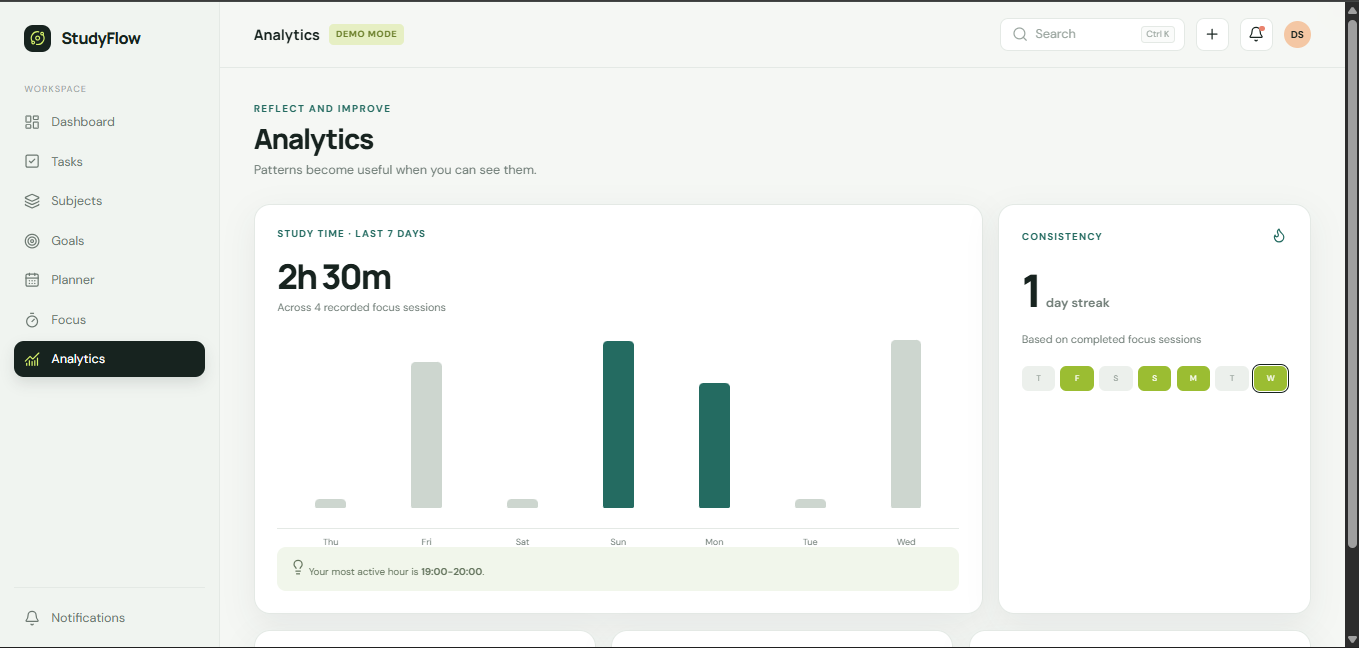
Study progress and session analytics
-
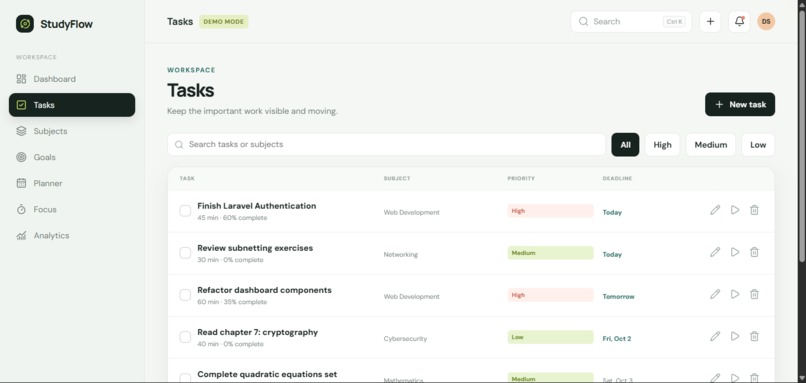
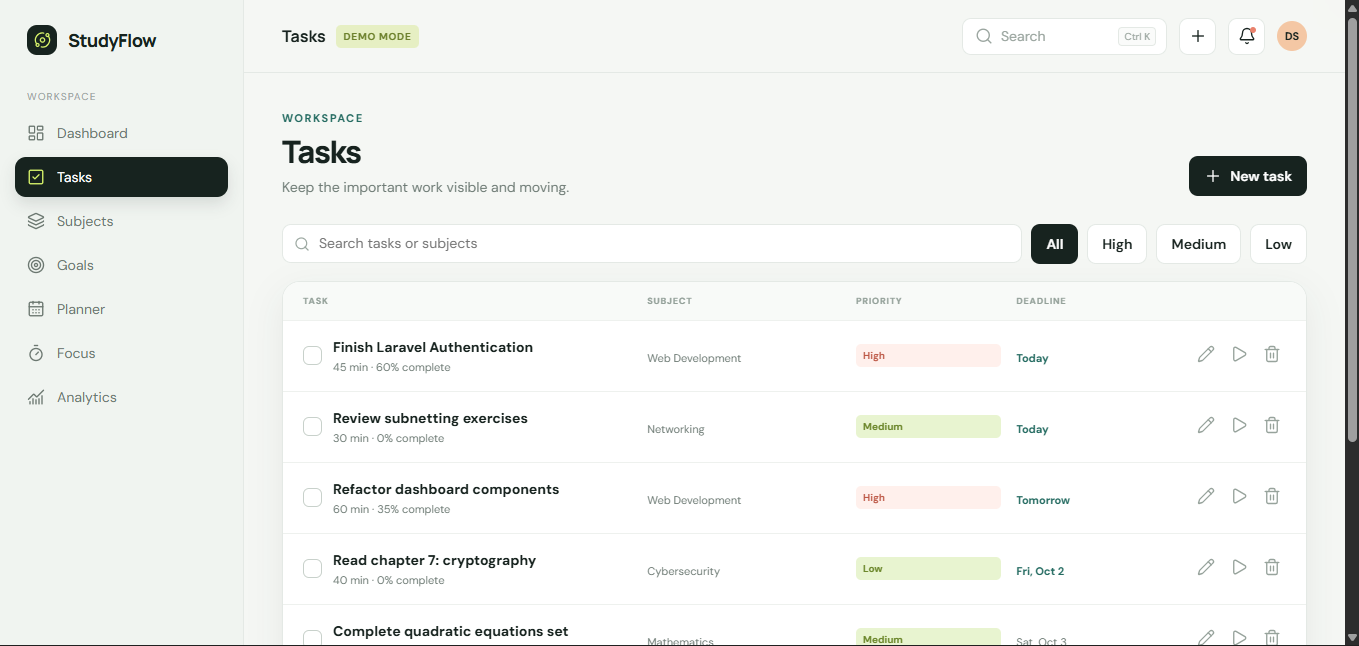
Task management + priority information
-
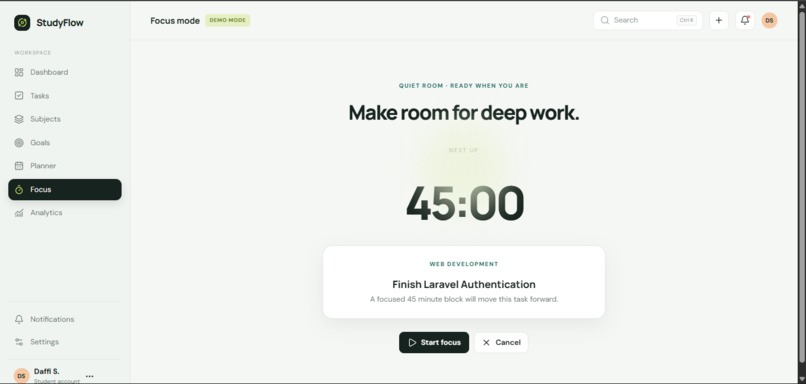
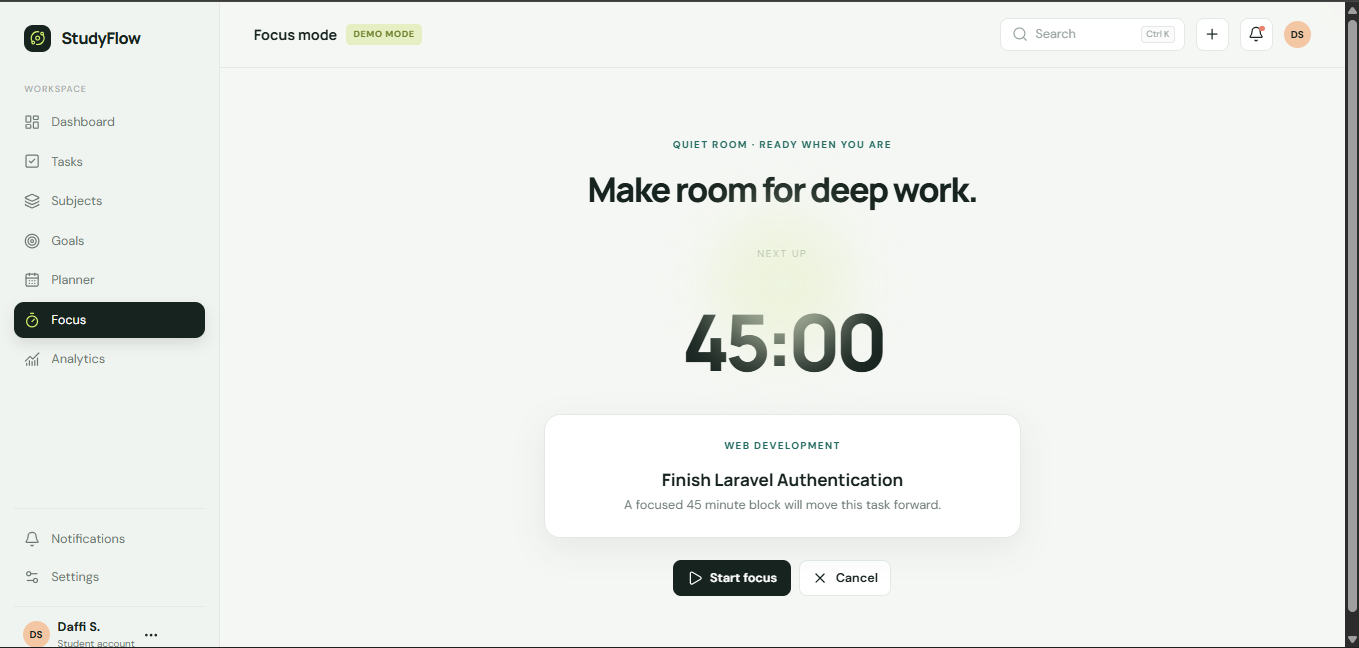
Focus session
-
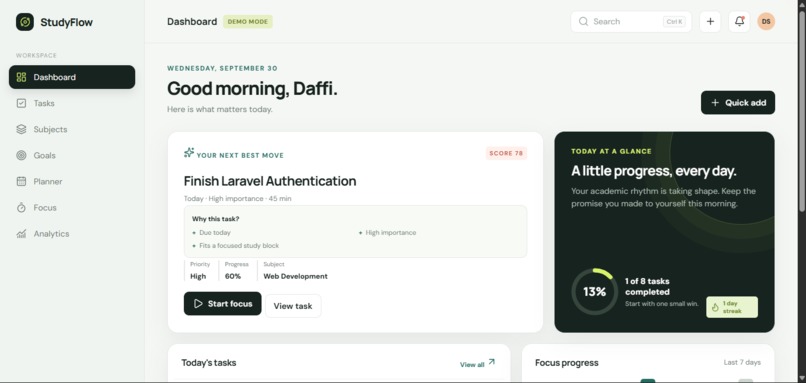
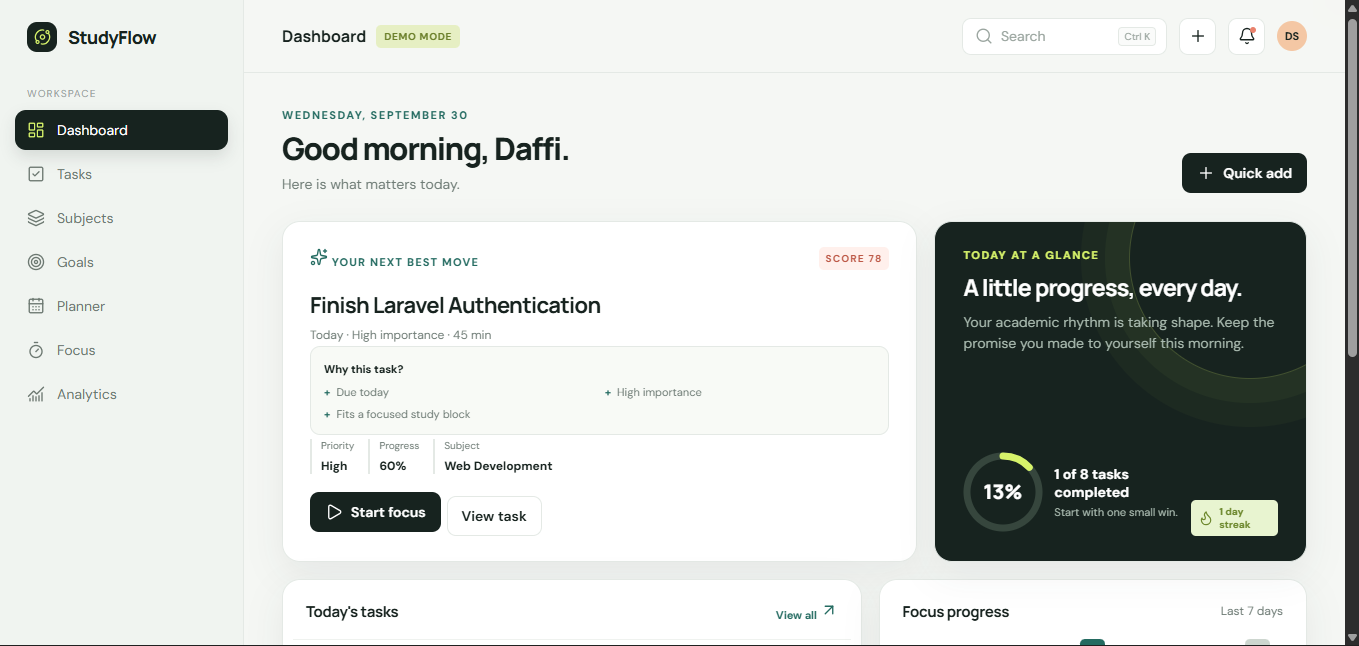
Your next best move + Priority Engine
StudyFlow
Turn study chaos into your next best move.
The Problem
Students usually don't have a shortage of things to do.
They have assignments, exams, projects, goals, deadlines, and study sessions happening at the same time. The difficult part is often not knowing what needs to be done, but deciding what should be done next.
Traditional to-do lists show everything, but they don't necessarily help students make that decision.
We wanted to build something that goes one step further.
Our Solution
StudyFlow is an academic decision system that turns a student's workload into one clear next action.
Instead of simply displaying a list of tasks, StudyFlow analyzes task information such as:
deadline importance difficulty progress estimated duration
and combines these factors into a transparent Priority Engine.
The result is a personalized:
Your next best move
The recommendation also explains why that task was selected, so students can understand the decision instead of blindly following an algorithm.
How It Works
StudyFlow is built around a simple loop:
Plan → Prioritize → Focus → Complete → Reflect
- Plan
Students organize their tasks, subjects, goals, and study sessions.
- Prioritize
The Priority Engine evaluates active tasks using a transparent heuristic based on urgency, importance, difficulty, progress, and estimated duration.
- Focus
Students can immediately start a focus session for the recommended task.
- Complete
Completed tasks and focus sessions update the application's state.
- Reflect
Study sessions are stored and used to generate analytics, helping students understand their study activity over time.
Key Features Priority Engine
A transparent scoring system that helps determine which task deserves attention next.
Your Next Best Move
The dashboard highlights one recommended task instead of overwhelming the student with another giant list.
Why This Task?
StudyFlow explains the factors behind a recommendation, such as:
high urgency approaching deadline high importance low completion progress suitable estimated duration Task Management
Create, edit, complete, delete, search, filter, and organize academic tasks.
Goals & Milestones
Break larger academic goals into milestones and automatically calculate progress from completed milestones.
Planner
Schedule study sessions throughout the week with validation for invalid times and overlapping sessions.
Focus Mode
Start, pause, resume, reload, and complete focus sessions while preserving timer state.
Analytics
Study-session data is transformed into meaningful study-time analytics instead of relying on fake or hardcoded metrics.
Command Palette
Quickly navigate through the application and perform common actions using Ctrl + K / Cmd + K.
Quick Add
Create a task, goal, planner session, or start a focus session without navigating through multiple screens.
Local Persistence
Application data is persisted with localStorage, allowing the frontend-only application to maintain state across page reloads.
Technical Implementation
StudyFlow is intentionally built as a frontend-only modular web application.
Tech Stack HTML CSS JavaScript localStorage Lucide Icons Google Fonts
The JavaScript code is separated into modules responsible for:
application state storage demo data navigation tasks goals planner focus sessions analytics notifications settings command palette utility functions priority calculation
No backend or database is required to run the current version.
What Makes It Different?
The main idea behind StudyFlow is simple:
A task manager tells you what you have to do. StudyFlow helps you decide what to do next.
The Priority Engine is deliberately transparent rather than pretending to be an AI system.
Instead of saying "AI recommends this task", StudyFlow shows the reasoning behind the recommendation.
This makes the system easier to understand, debug, and improve.
Challenges
One of our biggest challenges was making the application feel like one connected system instead of a collection of separate productivity features.
For example, the focus timer could not simply be a timer. Completing a focus session needed to affect stored study data, which then needed to appear in analytics.
We also had to handle persistent frontend state without a backend, including tasks, goals, planner sessions, notifications, focus sessions, and settings.
Another challenge was designing a Priority Engine that was useful while remaining understandable and transparent.
Responsive design was also important because StudyFlow needed to work across desktop, tablet, and mobile layouts.
What We Learned
Building StudyFlow taught us more than just writing UI code.
We learned how to:
structure a larger vanilla JavaScript application into modules manage shared application state persist application data with localStorage design a transparent prioritization algorithm connect multiple features through shared state handle timer persistence and session tracking build responsive interfaces debug interactions across multiple modules test an application systematically before submission
Most importantly, we learned that building a good product is not only about adding features. It is about making the features work together around one clear problem.
AI Usage
AI tools were used during development as development and learning assistance, including brainstorming, debugging, code suggestions, refactoring assistance, and reviewing implementation approaches.
We reviewed, tested, modified, and integrated the generated suggestions into the project and verified the resulting functionality.
The project architecture, product direction, feature decisions, debugging, testing, and final implementation were reviewed by the developer.
We understand the submitted code and can explain the technical decisions behind the project.
Future Improvements
If we continue developing StudyFlow, we would like to explore:
cloud synchronization multi-device persistence richer study insights customizable prioritization preferences calendar integrations more advanced long-term academic planning
The current version intentionally focuses on building a reliable core experience around one idea:
helping students decide what to do next.
Built With
- css
- googlefonts
- html
- javascript
- localstorage
- lucide


Log in or sign up for Devpost to join the conversation.