Inspiration
As a student, I consistently struggled with maintaining focus during extended study sessions. While the Pomodoro Technique offered a valuable framework, I found myself easily sidetracked by manual timer adjustments or digital distractions. This personal challenge sparked the idea for StudyBuddy AI: a smart study companion designed to not only manage time but also actively encourage focus and reflection on learning material. My goal was to create an intuitive, encouraging, and effective tool for boosting productivity and knowledge retention.
What it does
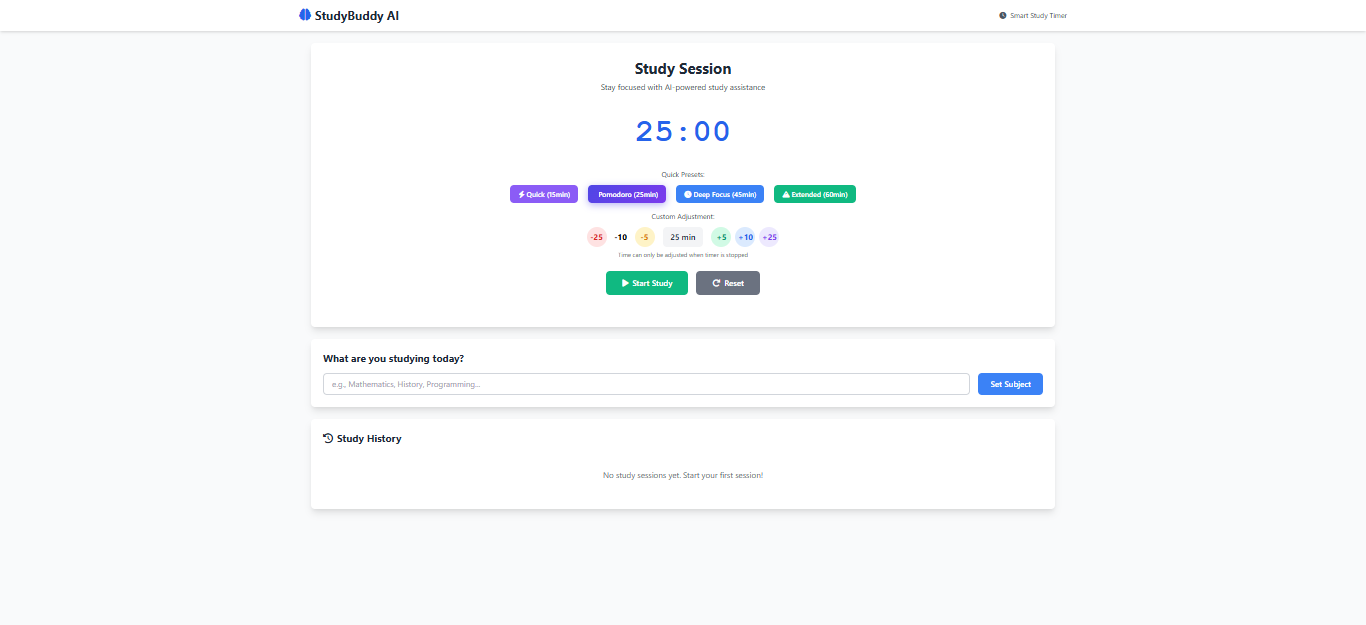
StudyBuddy AI functions as a smart study timer with integrated focus assistance. It allows users to:
- Set custom study durations or choose from quick presets like Pomodoro (25 minutes), Quick (15 minutes), Deep Focus (45 minutes), and Extended (60 minutes).
- Start, pause, stop, and reset study sessions.
- Input and track their current study subject.
- Receive random "Focus Checks" during active sessions, prompting them to answer questions about their study material.
- Calculate a "Focus Score" based on their responses to these checks.
- View a history of their past study sessions, including subject, duration, planned duration, focus score, and a summary.
- Receive real-time success messages for actions like setting the timer or completing focus checks.
How we built it
StudyBuddy AI was built using standard web technologies: HTML for structure, Tailwind CSS for styling, and JavaScript for all the interactive logic.
- Front-End Structure (HTML & Tailwind CSS): The user interface was designed with a clear layout, including navigation, the main timer display, time adjustment controls, a subject input field, and a session history section. Tailwind CSS was utilized extensively to apply modern, responsive styling directly within the HTML, ensuring a clean and functional design. Subtle animations were added for a more polished user experience.
- Core Logic (JavaScript Class): All application logic is encapsulated within a
StudyBuddyAIJavaScript class, which manages the application's state and behavior.- Timer Management: The class handles the countdown, updating the display every second using
setInterval. Methods likestartTimer(),pauseTimer(),stopTimer(), andresetTimer()control the timer's flow and update the UI accordingly. - Time Adjustment:
adjustTime()andsetPresetTime()methods allow users to modify the study duration, with safeguards to prevent changes while the timer is active. - Focus Check System: A set of predefined
focusQuestionsis used.scheduleFocusCheck()employssetTimeoutwith randomized intervals (between 3 to 7 minutes) to trigger theshowFocusCheck()popup. User responses are captured bysubmitFocusCheck()orskipFocusCheck(), and their engagement contributes to thefocusChecksarray. - Session Management: The
setSubject()method captures the user's study topic. At the end of a session,saveSession()compiles details like duration, focus score, and a summary, adding them to thesessionsDataarray.
- Timer Management: The class handles the countdown, updating the display every second using
- Data Persistence (Local Storage):
sessionsDatais stored in the browser'slocalStorageusingJSON.stringify()and retrieved usingJSON.parse()to ensure study history persists across browser sessions.loadSessionsHistory()dynamically renders the stored sessions onto the page. - User Feedback: A
showSuccess()utility provides immediate visual confirmation for various user actions, enhancing the interactive feel of the application. - Event Listeners: All interactive elements, such as buttons and input fields, have event listeners attached to trigger the corresponding JavaScript functions.
Challenges we ran into
Several challenges emerged during development:
- UI Synchronization with Timer State: A significant hurdle was ensuring the UI, specifically button visibility (Start/Pause/Stop) and the enable/disable state of time adjustment controls, accurately reflected whether the timer was running or stopped. This required precise management of CSS classes and pointer events based on the
isRunningvariable. - Managing Multiple Timers: Coordinating the main
setIntervalfor the countdown and thesetTimeoutfor random focus checks proved tricky. It was crucial to correctlyclearIntervalandclearTimeoutwhen pausing, stopping, or resetting the timer to prevent unintended behavior or multiple instances of the timer/checks running concurrently. - Local Storage Data Structure: Designing an efficient and easily manageable structure for storing study session data in
localStoragewas a key consideration. An array of session objects was chosen for straightforward addition and retrieval. - Randomizing Focus Check Intervals: Implementing a random, yet practical, interval for focus checks (e.g., between 3 and 7 minutes) and ensuring it didn't disrupt the main timer's operation presented a minor, interesting logical challenge.
- Focus Score Logic: Ensuring the
focusScorecalculation was robust and accurate, especially when users chose to skip focus checks, required careful refinement of thecalculateFocusScore()function. - User Experience (UX): Considerations around providing clear user feedback, intuitive time adjustments, and basic keyboard accessibility (like
Enterkey support for inputs) were ongoing design considerations that contributed to a smoother user experience.
Accomplishments that we're proud of
- Successfully implementing a robust and responsive study timer.
- Developing the unique "Focus Check" feature with randomized questions and a calculated focus score, which I believe adds significant value beyond a basic timer.
- Creating a persistent session history using
localStorage, allowing users to track their progress over time. - Building the entire application as a single, well-structured JavaScript class, demonstrating good object-oriented principles.
- Achieving a clean, intuitive, and visually appealing user interface with Tailwind CSS and subtle animations.
What we learned
This project provided invaluable hands-on experience and deepened my understanding of:
- JavaScript Timers: A more profound understanding of
setIntervalandsetTimeout, including best practices for managing and clearing them. - DOM Manipulation: Extensive practice in dynamically updating the web page in response to user actions and application state changes.
- Client-Side Data Storage: Practical application of
localStoragefor persisting user data. - CSS Frameworks: Enhanced proficiency with Tailwind CSS for rapid and efficient styling.
- Object-Oriented JavaScript: The benefits of structuring application logic using classes for better organization and maintainability.
- User Experience Design: The importance of thoughtful UI design, clear feedback, and error handling for a positive user interaction.
What's next for StudyBuddy AI
Looking ahead, I have several ideas to enhance StudyBuddy AI:
- Advanced AI Integration: Implement more sophisticated AI models (e.g., via APIs) to analyze focus check answers for deeper insights into comprehension or to generate personalized study recommendations.
- Gamification Elements: Introduce points, badges, or streaks to motivate users and make studying more engaging.
- Break Timer Feature: Add a dedicated short and long break timer option after study sessions, following the Pomodoro methodology more closely.
- Statistical Reporting: Provide more detailed statistics and charts on study patterns, focus scores over time, and subject-specific performance.
- Task List Integration: Allow users to add specific study tasks or goals for each session.
- Customizable Focus Check Frequency: Give users control over how often focus checks appear.
- Notifications: Implement browser notifications to alert users when a session ends or a focus check is due, even if they're in another tab.
- Sound Cues: Add customizable sound notifications for timer start, end, and focus checks.
Built With
- chatgpt
- gemini

Log in or sign up for Devpost to join the conversation.