## Inspiration
The idea came from a very simple observation: students usually want to study better, but they struggle to stay consistent with planning and focus. Most of the time, they either overplan or switch between too many apps, which breaks their flow.
I also faced the same issue while managing my own study routine. I would plan things in one place, use a timer in another app, and track progress somewhere else. That constant switching made it harder to stay focused for long sessions.
That’s when I thought of building something that keeps everything in one place, but still stays minimal enough not to distract the user.
The goal was not to create a “complex productivity tool,” but a simple study companion that feels natural to use every day and quietly helps you stay on track.
## What it does
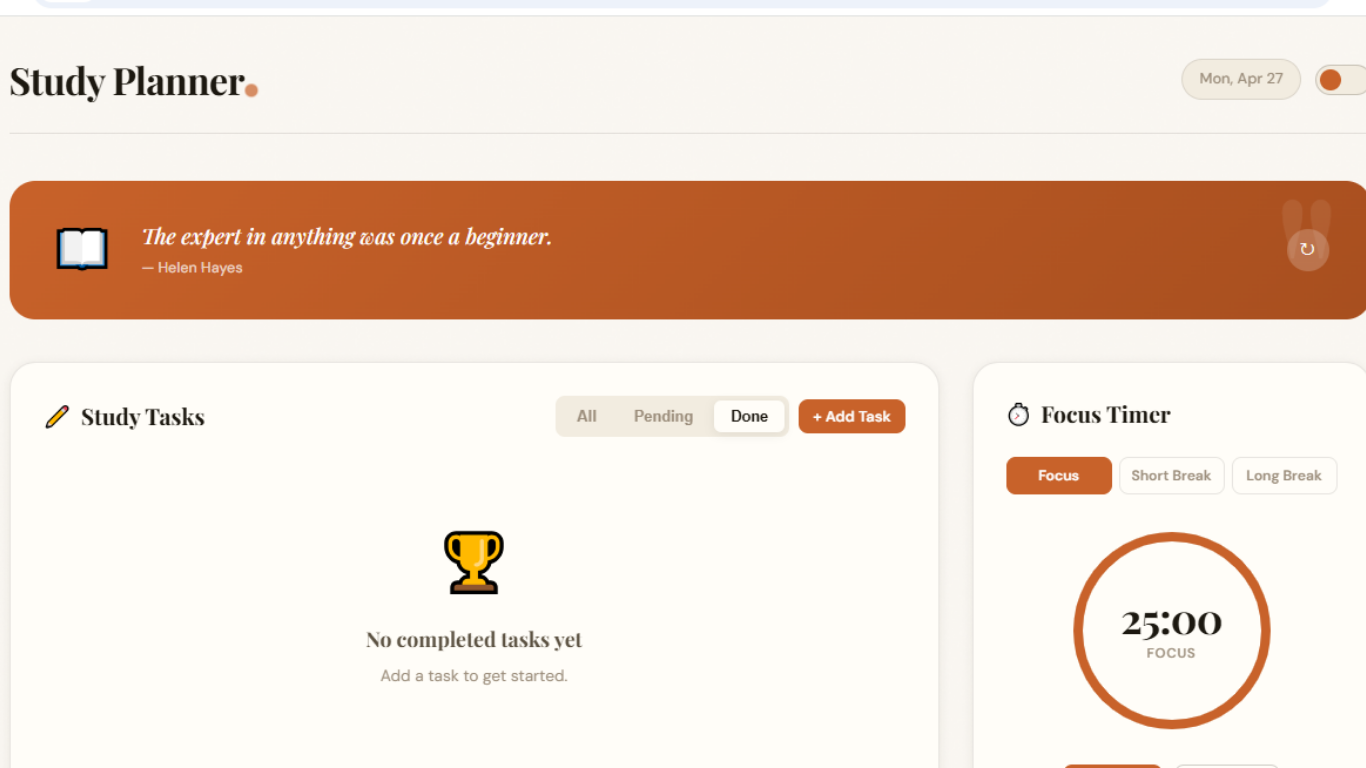
The Smart Study Planner helps students organize their daily study routine in a simple and structured way. It brings everything needed for focused learning into one clean interface.
Users can add, edit, and delete tasks to manage their daily schedule without confusion. A built-in Pomodoro timer helps break study time into focused sessions with short breaks, making it easier to stay productive without burnout.
It also includes a basic progress tracker that shows how much of the planned work has been completed, so students can clearly see their consistency over time. Along with that, light and dark mode support keeps the experience comfortable for different environments.
Overall, it works as a lightweight all-in-one study companion designed to keep planning, focus, and progress tracking in one place.
How we built it
The project was built using a simple but solid front-end stack: HTML, CSS, and JavaScript. The focus was on keeping the structure clean and easy to maintain rather than using heavy frameworks.
First, the layout was designed in HTML to separate the main sections like tasks, timer, and progress tracking. Then CSS was used to create a minimal and responsive UI that works smoothly on both desktop and mobile devices. A lot of attention was given to spacing, readability, and keeping the interface distraction-free.
JavaScript was used to handle all the functionality. The task manager was built using basic array operations to add, update, and delete tasks dynamically. The Pomodoro timer was implemented using setInterval, making sure it stays accurate during focus sessions. For progress tracking, simple calculations were used to show completion based on completed tasks versus total tasks.
Local storage was also used to save user data, so tasks and progress remain even after refreshing the page. This made the experience more practical and user-friendly.
Overall, the goal was to keep the code lightweight, organized, and easy to scale in the future.
Challenges we ran into
One of the first challenges was keeping everything simple while still adding useful features. It was easy to get carried away with ideas, but the real challenge was deciding what actually matters for a student’s daily use.
Another issue was managing the Pomodoro timer. Making sure it stayed accurate, didn’t reset unexpectedly, and worked smoothly when users switched between tasks required careful handling of intervals and state updates.
The task system also needed attention. As features like edit, delete, and completion tracking were added, the JavaScript logic started getting a bit complex. Keeping the code clean and avoiding bugs while updating multiple states was something I had to refine a few times.
Design consistency was another challenge. I wanted the UI to stay minimal, but still feel modern and engaging. Balancing simplicity with visual appeal took a few iterations.
Lastly, syncing everything with local storage had its own small issues, especially ensuring that data stayed consistent after refresh without breaking the user experience.
In the end, solving these problems helped make the project more stable, focused, and user-friendly.
Accomplishments that we're proud of
One of the biggest achievements was turning a simple idea into a fully working tool that actually feels usable in daily student life. It’s not just a concept anymore, it’s something functional that brings planning, focus, and tracking together in one place.
We’re especially proud of the clean and minimal interface. It was challenging to keep things simple while still making the app look modern and engaging, but the final design feels smooth and distraction-free.
Building a reliable Pomodoro timer that runs consistently without glitches was another highlight. It adds real value to the study flow and helps users stay focused in structured sessions.
We also managed to implement local storage successfully, which makes the experience more practical since users don’t lose their tasks or progress after refreshing the page.
Overall, the biggest accomplishment is creating something lightweight, useful, and easy to use, without unnecessary complexity.
What we learned
This project taught us that building something simple often takes more thought than building something complex. Keeping the interface clean while still making it functional required a lot of careful decisions about what to include and what to remove.
We also learned how important structure is in JavaScript when a project starts to grow. Even a small app can become messy if the logic for tasks, timers, and storage isn’t organized properly from the beginning.
Working with the Pomodoro timer helped us understand how timing functions work in real scenarios, especially handling intervals and making sure they don’t break when users interact with other parts of the app.
Another key learning was around user experience. Small details like spacing, readability, and smooth interactions make a big difference in how useful an app feels.
Overall, this project helped us improve both our technical skills and our understanding of how to build something that is actually practical for everyday use.
## What’s next for Study Planner
The next step is to make the Study Planner more powerful while still keeping it simple. One of the main improvements planned is adding better progress analytics, so students can clearly see patterns in their study habits over days and weeks.
We also want to improve task organization with features like categories, priorities, and deadlines. This will help users manage not just daily tasks, but full study goals in a more structured way.
Another focus is enhancing the Pomodoro system by allowing custom session lengths and smarter break suggestions based on user behavior.
In the future, cloud sync support is also planned so users can access their data across multiple devices without losing anything.
The goal is to keep improving it step by step without losing the core idea: a clean, distraction-free tool that actually helps students stay consistent.

