Inspiration
We were inspired by a simple problem students face every day: managing many school projects, assignments, tests, and deadlines at the same time. Important tasks can easily be forgotten when everything is spread across notebooks, messages, and different apps. We wanted to create one simple, beautiful place where students could see their school responsibilities and stay organized.
What it does
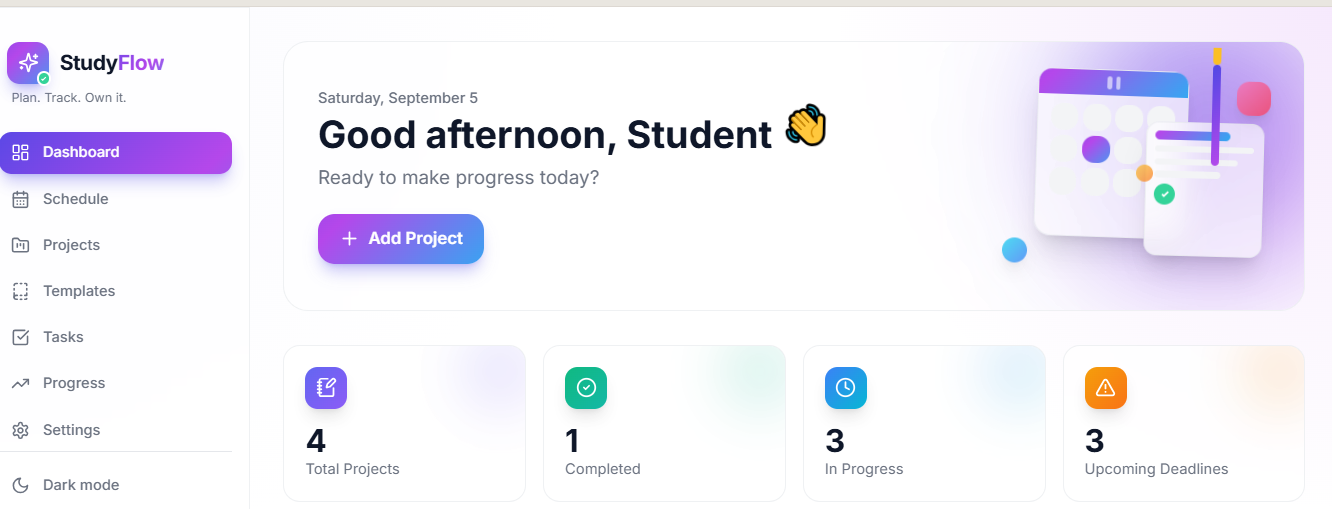
StudyFlow is a student productivity platform that combines a school schedule, project planner, task manager, deadline tracker, and progress dashboard.
Students can create projects, set deadlines, organize tasks, track their progress, manage their weekly schedule, prioritize important work, and view their upcoming deadlines. The dashboard gives students a quick overview of what they need to do and how much they have accomplished.
How we built it
We built StudyFlow as a modern responsive web application using HTML, CSS, and JavaScript, with a strong focus on UI/UX and creative CSS design.
We used responsive layouts, CSS Grid, Flexbox, animations, transitions, interactive cards, progress indicators, modals, dark mode, and responsive navigation to create a polished experience. JavaScript handles the interactive features, while local storage keeps the student's projects, tasks, schedule, and preferences saved between sessions.
Challenges we ran into
One of our biggest challenges was balancing an attractive design with functionality. We wanted StudyFlow to look impressive while remaining simple and easy to use.
We also had to make the timetable and dashboard work across different screen sizes. Managing project progress, deadlines, filtering, and persistent data while keeping the interface responsive required careful planning and testing.
Accomplishments that we're proud of
We are proud of turning a simple idea into a complete interactive student productivity platform.
We are especially proud of the responsive dashboard, animated project cards, interactive schedule, progress tracking, dark mode, and the way different parts of the application work together. We also focused heavily on CSS so that the project would not only function well but also stand out visually.
What we learned
We learned how important good user experience is when designing productivity tools. We also improved our understanding of responsive web design, CSS animations, component organization, JavaScript interactions, data persistence, and designing interfaces that are both attractive and practical.
Most importantly, we learned that a successful project is not just about adding many features — it is about solving a real problem in a simple and useful way.
What's next for StudyFlow
We want to continue developing StudyFlow into a more powerful student platform.
Our future plans include adding smart study recommendations, calendar synchronization, reminders and notifications, collaborative group projects, teacher/student features, academic analytics, and AI-powered planning that can help students break large projects into smaller achievable tasks.
Our goal is to make StudyFlow a tool students can use throughout the entire school year to stay organized, motivated, and on track.

