-
-
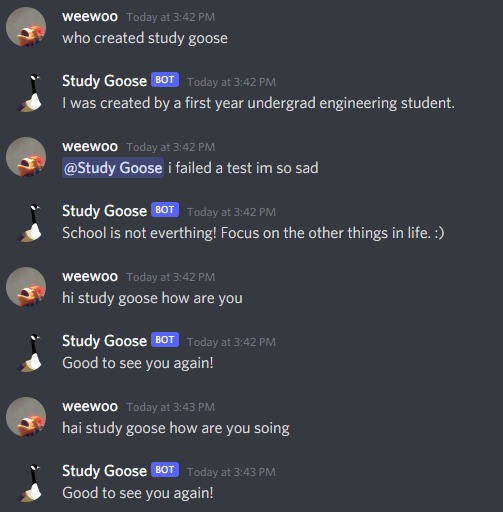
chatbot AI that uses deep learning and neural networks to train a model that can respond to messages, even with improper spelling.
-
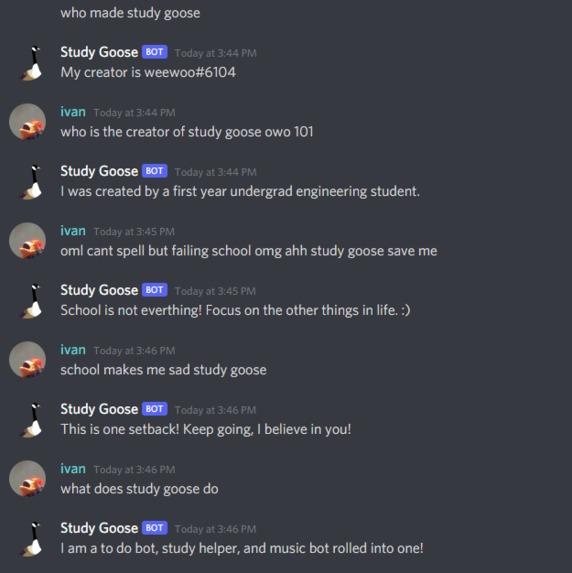
More examples of the accuracy and versatility of Study Goose
-
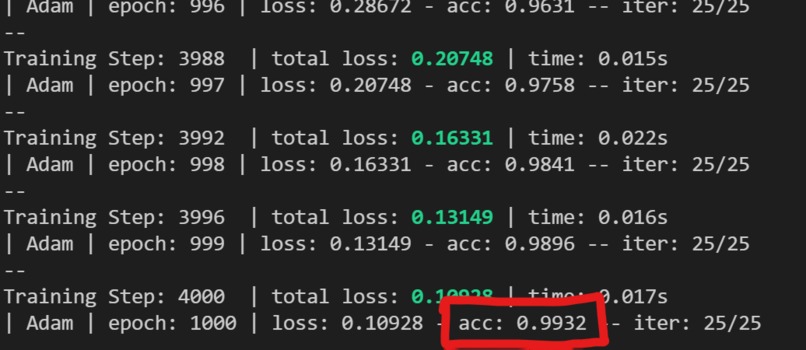
99% + accuracy of our custom machine learning model
-
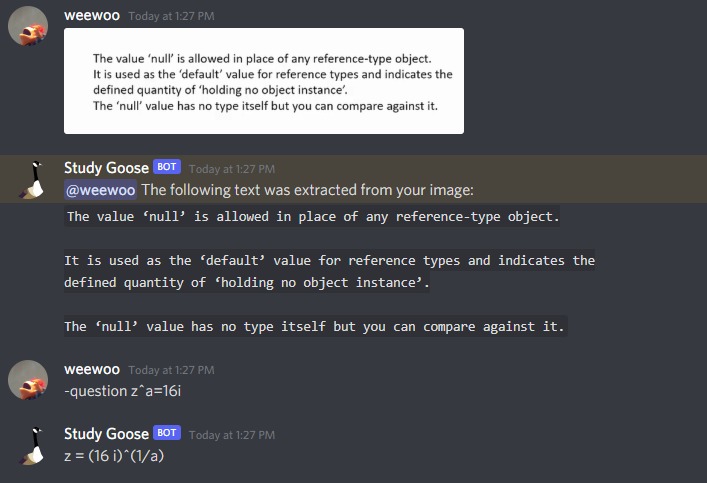
imagetotext and question feature using image processing and wolfram API
-
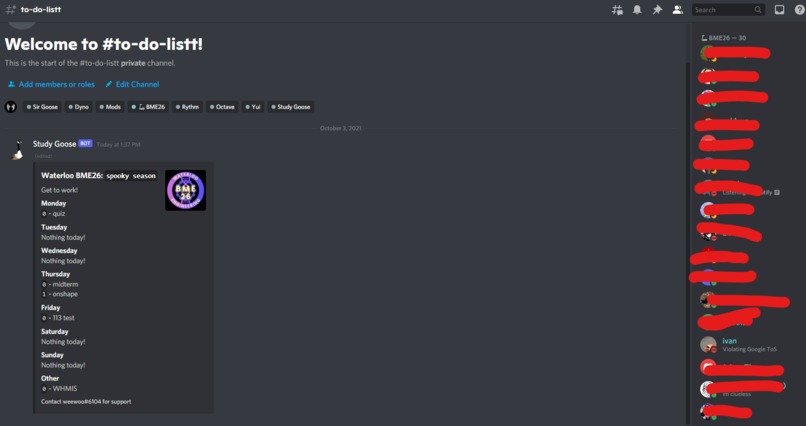
Study Goose is already in large programs with 400+ members
-
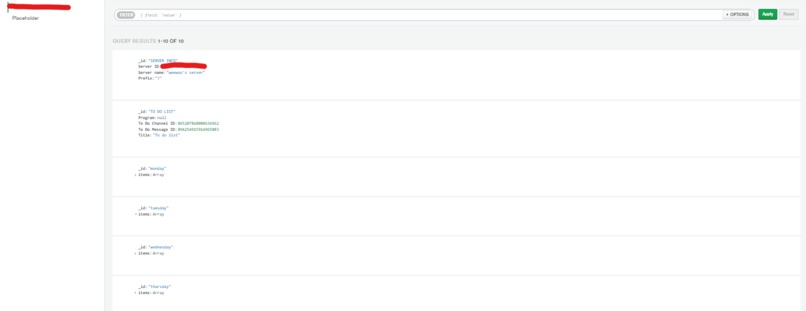
Sample database collection of a server
-
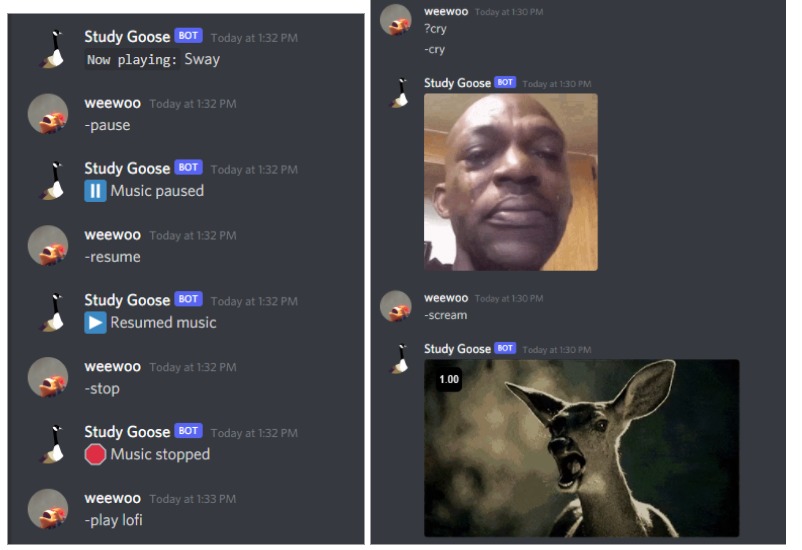
Examples of commands


Inspiration
During the pandemic, many schools from primary to post-secondary have been forced online. As a result, students are finding new ways to connect, manage, and engage in the virtual environment, and communication platforms like Discord have skyrocketed in usage and at many schools like the University of Waterloo, every program, class, and club have a Discord. However, Discord is not a common app for all students, as the platform was originally targeted towards gamers. As a result, it can be a confusing place to navigate on top of all the other online platforms.
We created Study Goose, an all-inclusive Discord Bot for students and beyond! (Called Study Goose because like the Canadian Geese infestation at our university, Study Goose is everywhere)
What it does
Study Goose does many things, and we’ll go over each of its features and commands associated with each category.
To do list
Study Goose manages a to-do list for the server that is meant to be managed by server admins in class settings where representatives of the class can update it with new tasks that the class has for the week, something that is already being done widely in our school. Students can see their class deliverables for the week and let each other know if anything is missing. Teamwork makes the dream work!
In addition, whenever Study Goose joins a server, it automatically creates a dedicated to-do list for each one.
Associated Commands:
settodo: Moves the to-do list to the current channel. Ex: ?settodo
reset: Resets the to do list, creating a fresh blank one while leaving the previous one in the channel for future reference. Ex: ?reset
add: Adds an item to the current to-do list based on the day or heading. Ex: ?add day [your item to do], ?add monday quiz, ?add other do survey
remove: Adds an item to the current to-do list based on the day and item reference number. Ex: ?remove [heading] [item number], ?remove monday 1
edit: Edits an item to the current to-do list based on the day and item reference number. Ex: edit [heading][item number][item to do], ?edit tuesday 2 exam
Chatbot AI
If any message mentions @Study Goose or says the words “study goose”, study goose responds to their message using its trained Machine Learning model, specifically trained on common phrases that a new member may have such as “who are you” “What do you do” “hi” and many more. Study Goose is unique because we custom-built its deep learning model and neural network, tailored to students. Because Study Goose’s chatbot uses ML to figure out what the user is asking, new users can learn more about the bot without having to worry about finding the right command or spelling it correctly. The Study Goose ML model is ~99%+ accurate.
Music Bot Studying with music is a must and with the recent shutdown of Groovy and Rythm, students who aren’t as familiar with other bots may not be able to find other smaller bots. So, we included that into Study Goose too! Study Goose has a simple music-playing feature, allowing you to play songs from a Youtube URL or song titles and search words.
Unlike Groove and Rythm, Study Goose does not offer paid services, which was the main reason these bots violated Google ToS by profiting through the use of Google services. Study Goose is and will always be free to use.
Associated Commands: play[url], pause, resume, stop, join, disconnect
Question
Need to answer a math question? Geography? Ask Study Goose! Simply ask Study Goose and it will answer, being able to complete complex mathematical equations and answer a wide range of questions.
Associated Commands: ?question[your question]
imageToText:
One issue with school is note-taking. With Study Goose’s image to text feature, simply use the command, upload your image, and study goose will extract all the text for you!
Associated Commands: ?imagetotext and then follow prompt to upload the image
Other features:
?pin: Allow regular members to pin important content without needing server admins or permissions
?cry and ?scream: Study Goose sends gifs and memes to help you express your pain and frustration in school
?help: help display
?help [command]: Displays help details for every command and how to use it
?setprefix: Allows server admins to update the prefix
suggest: Suggest new features to improve Study Goose!
How we built it
Study Goose has a lot of features, so we will go over each of the groups and how they were built and what technologies it uses. Study Goose itself is a Discord Bot, written in python using the discord.py API, all the features and commands use the discord API in order to communicate with users and bot output.
Specific features that used other technologies were:
To do list features and setprefix
The to-do list and prefix were stored with MongoDB, providing a robust way to store large amounts of data in an organized fashion and save it should the bot ever need to reboot. The to-do list's location in the server is also stored, enabling commands like settodo to accurately locate and move the to-do list to a new channel. Every time Study Goose joins a server, it creates a new collection for it on the database.
Music Bot
The music bot features were made with discord.py[voice] and youtube_dl
Image to Text
The image to text feature was made using Pytesseract and PIL (Python Imaging Library)
Chatbot
The chatbot was built with TensorFlow, NumPy, TFLearn, and NLTK (Natural Language Toolkit) and used a custom training set that we created to train the model. We created our own neural network and model instead of using a pre-trained one from the internet in order to fit the context of the bot.
Questions
We used the wolfram API to make use of its computational power and vast question and answer base.
Full list of technologies: Python, discord.py API, MongoDB, discord.py [voice], youtube_dl, Pytesseract, PIL (Python Imaging Library), NumPy, TensorFlow, TFLearn, NLTK, wolfram API
Challenges we ran into
We tried to use a LOT of new technology, and the learning curve was very steep, especially with image processing, machine learning, and robust database management. Most of the technology was completely new to use other than previous experience with Python and a little in discord.py.
There were a lot of issues with getting the machine learning model and the neural network set up and also training it with the right words to a high degree of accuracy.
Accomplishments that we're proud of
IT WORKS! We’re so proud of the entire project, as it functionally does everything we wanted and also handles errors. In addition, we’re very proud to have learned so many new concepts and technologies in a short period of time.
What we learned
We learned so much, mostly from the challenges, learning how to create neural networks, machine learning models, process images, manage databases across servers, accessing youtube music, and creating robust code
What's next for Study Goose
Study Goose has so many applications. The bot is currently hosted locally but we plan to shift it to a Microsoft Azure server later this week or in the next few days for better management.
We hope to improve the chatbot ML model, adding more phrases and training it for longer. We’d also like for the music feature to be able to extract music from other sources like Spotify, Bandcamp, or SoundCloud should using youtube ever be an issue in the future. Also more APIs! Such as plagiarism checkers, possible reminder features, and other tools to help student communities grow and learn quickly.


Log in or sign up for Devpost to join the conversation.