Inspiration
Studying alone is lonely, and the usual fix makes it worse. When I study by myself, I miss having a friend at the next desk, so I open the group chat "just to check". Twenty minutes later, the study session is gone. Phones and social feeds are built to hold our attention, not give it back. I wanted the feeling of studying side by side with friends, without the feed, the notifications or the phone.
What it does
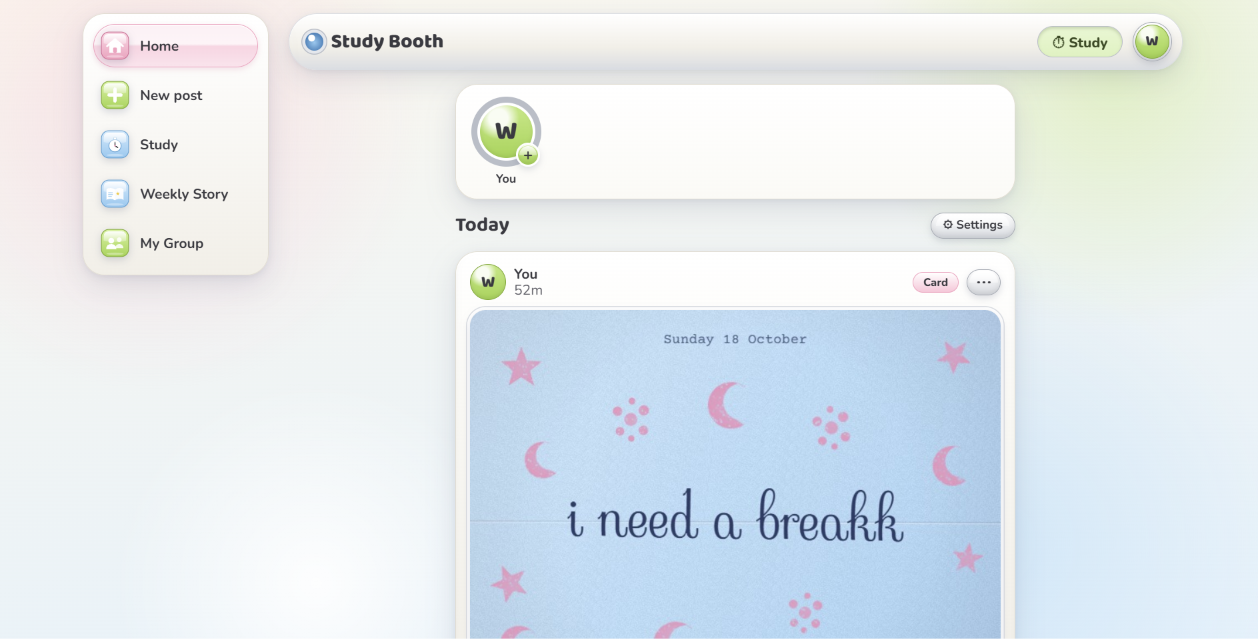
Study Booth is a laptop web app for small groups of friends who study apart. A calm widget floats over your notes, and friends send each other small, handmade-feeling moments:
- Fog glass: blow into your mic to fog up the camera view, then write a message in the fog with your finger (tracked on-device) or the mouse.
- Photo: a webcam snapshot with retro filters like a 2000s digicam with an orange date stamp.
- Card note: a short message in handwritten script on a stamped paper card.
Posts arrive under scratch-card foil, and friends scratch them off to reveal them. There's no endless feed, only the last 24 hours, and focus mode hides new posts until your study timer ends.
AI works quietly in the background:
- Handwriting moderation: it reads the text in every post and blocks anything mean or unsafe before friends see it.
- Context-aware captions: it suggests captions based on the photo and how long you've been studying. You always choose.
- Smart check-ins: it nudges the whole group at the right moment ("Everyone's been at it a while. Stretch break!").
- Weekly story: it writes a short recap from the group's real study stats.
How I built it
- Frontend: Next.js and React, with a custom glossy Y2K "gadget" design. All art and icons are original CSS/SVG.
- Camera and mic: Web Audio API for blow detection, and Canvas for the fog, filters and scratch foil.
- Hand tracking: MediaPipe HandLandmarker runs entirely in the browser; you pinch to write.
- Floating widget: the Document Picture-in-Picture API (Chrome/Edge).
- Backend: Supabase for auth, Postgres with Row Level Security on every table, private photo storage and live updates.
- AI: Claude (vision + text), called only from server routes. Every response is validated against a zod schema.
- Hosting: Vercel.
- Workflow: I wrote a detailed proposal and spec first, then built it with AI coding agents (Claude Code), reviewing and testing each phase.
Safety was designed in from the start, because users are students, some under 18. Every post is saved as pending, and only the server can approve it after moderation. If the AI fails, the post is held (fail closed). Text found in images is treated as data, never as instructions, which protects against prompt injection written on the fog.
Challenges I ran into
- Every post was being blocked. I assumed my moderation prompt was too strict. It turned out the AI requests were failing through our API proxy, which didn't support some features, and my fail-closed moderation correctly held anything it couldn't check. Lesson: check the plumbing before blaming the prompt.
- Sign-ups broke during testing. Supabase's built-in email sender has a low hourly limit, so I added password sign-in.
- Finger tracking was jittery. I added smoothing, a pinch gesture with hysteresis, and a mouse fallback.
- The first interface was cluttered, with windows everywhere. I restructured it into one screen at a time, with a stories row and a feed.
- Scope. I cut features I loved, like embroidered and rhinestone note styles, to ship something reliable.
Accomplishments that I'm proud of
- Writing in the fog on one laptop and watching it appear under foil on another a few seconds later.
- A red-team suite of 28 cases (harmless posts, mean posts, prompt injections, sarcasm and slang) passing at 100%.
- A scripted two-friend end-to-end test passing 60/60 checks.
- Turning a proposal doc into a deployed, working app in days.
What I learned
- AI makes building fast, but deciding what to build, what to cut and how to keep people safe is still on you.
- A clear spec and clear prompts matter more than any single line of code.
- Safety works best as a design principle: fail closed, treat user content as data, and keep AI output as suggestions.
- How to ship a real full-stack app: auth, database security rules, environment variables and deployment.
What's next for Study Booth
- Bring back stitched (embroidered) and bedazzled (rhinestone) note styles
- A photobooth strip mode and a Sunday scrapbook email for each group
- A much bigger red-team set, with more slang, languages and handwriting styles, plus a "blocked by mistake" feedback button
- Play-testing with more students to measure whether they really pick up their phones less
Built With
- canvas
- claude
- css
- mediapipe
- next.js
- picture-in-picture
- supabase
- typescript
- vercel
- web-audio-api

Log in or sign up for Devpost to join the conversation.