-
-
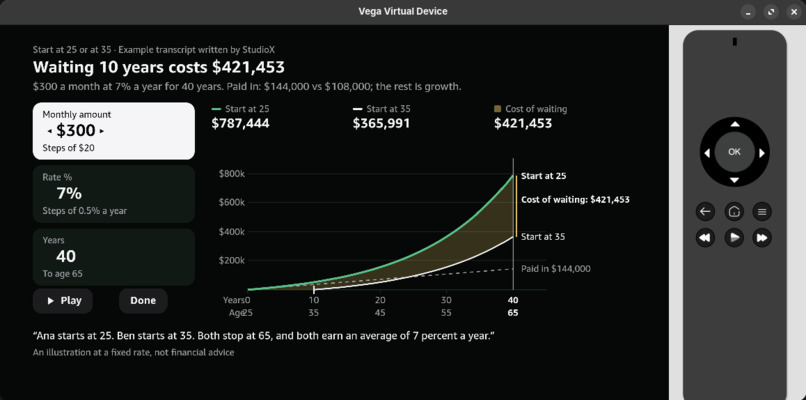
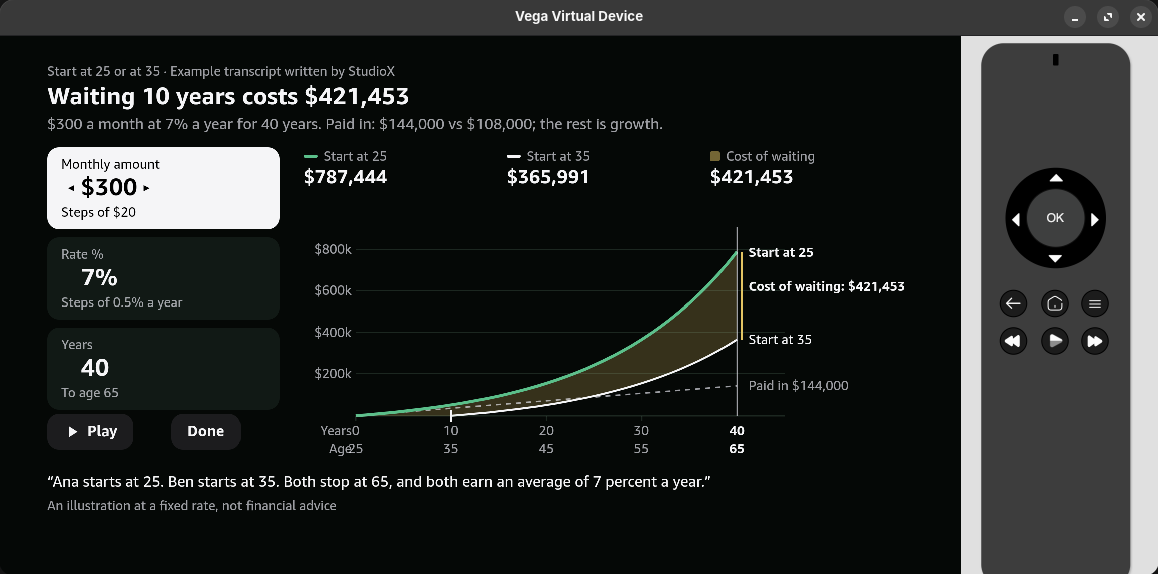
finance map
-
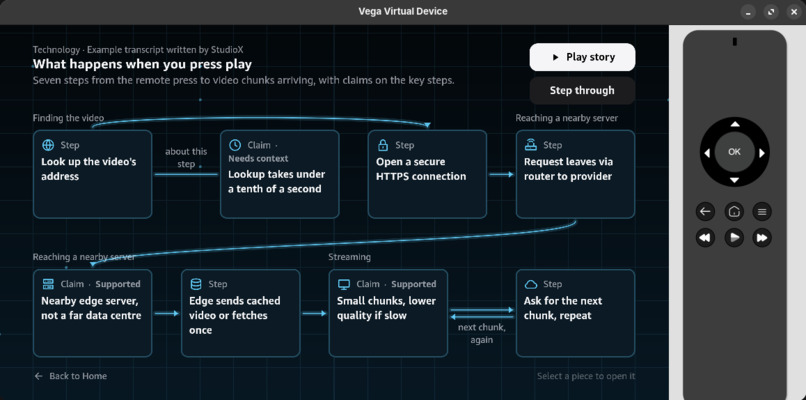
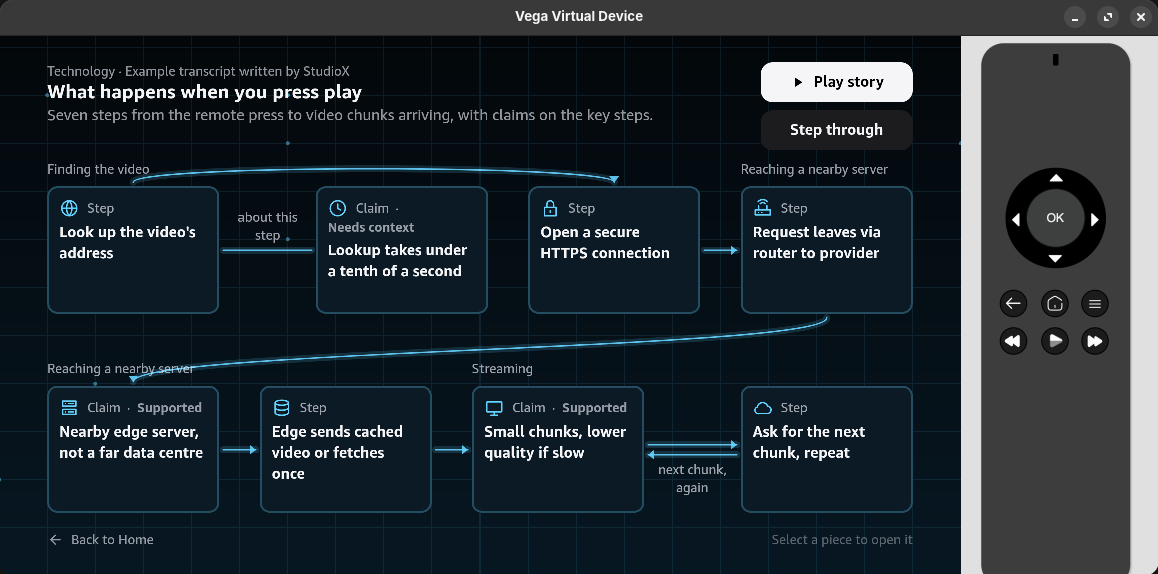
tech map
-
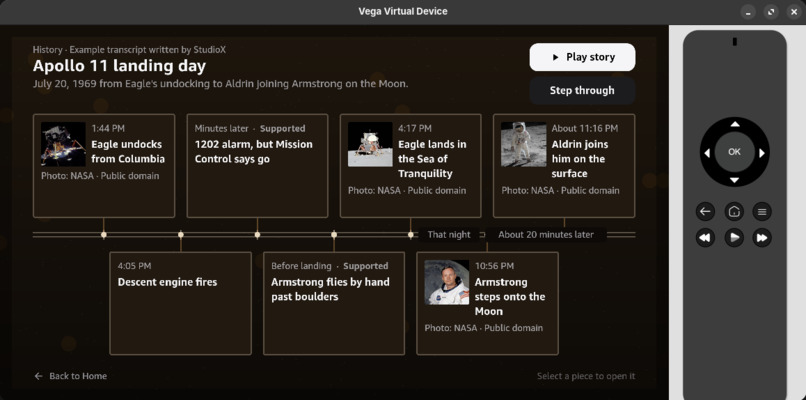
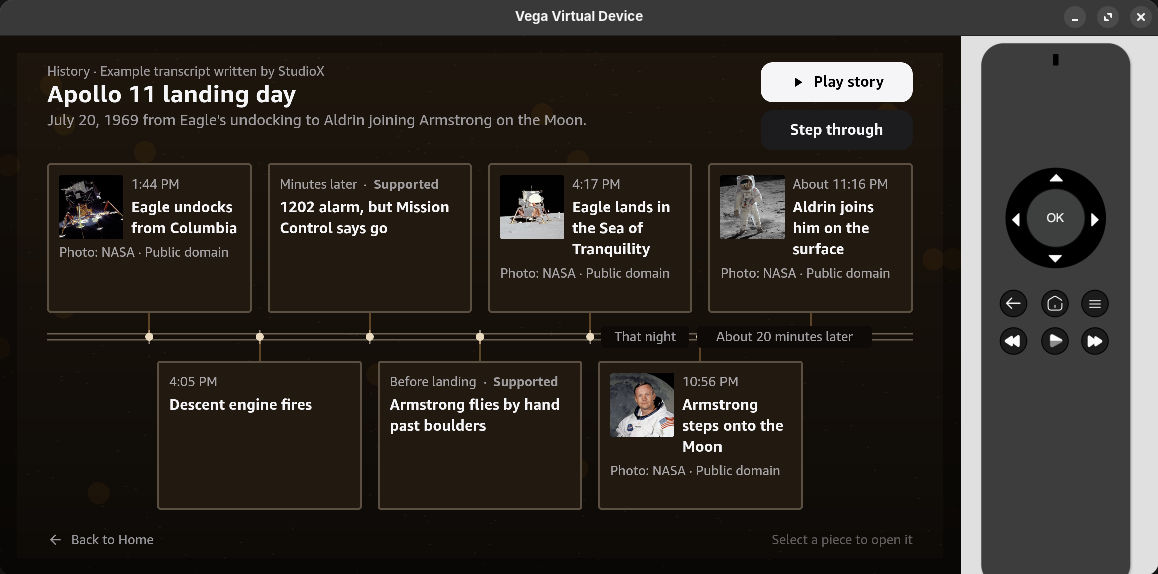
history map
-
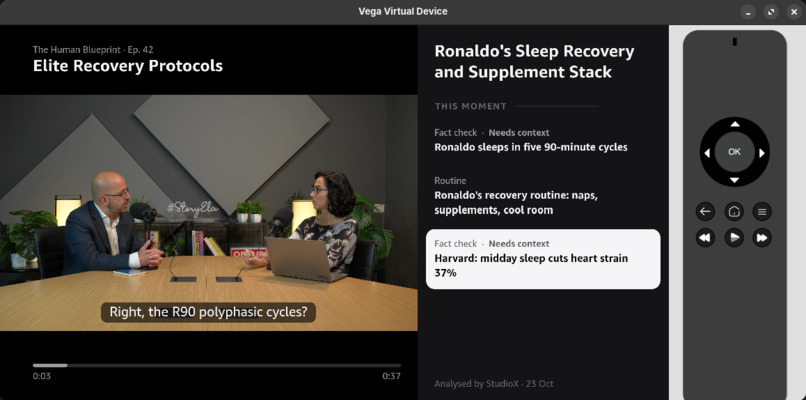
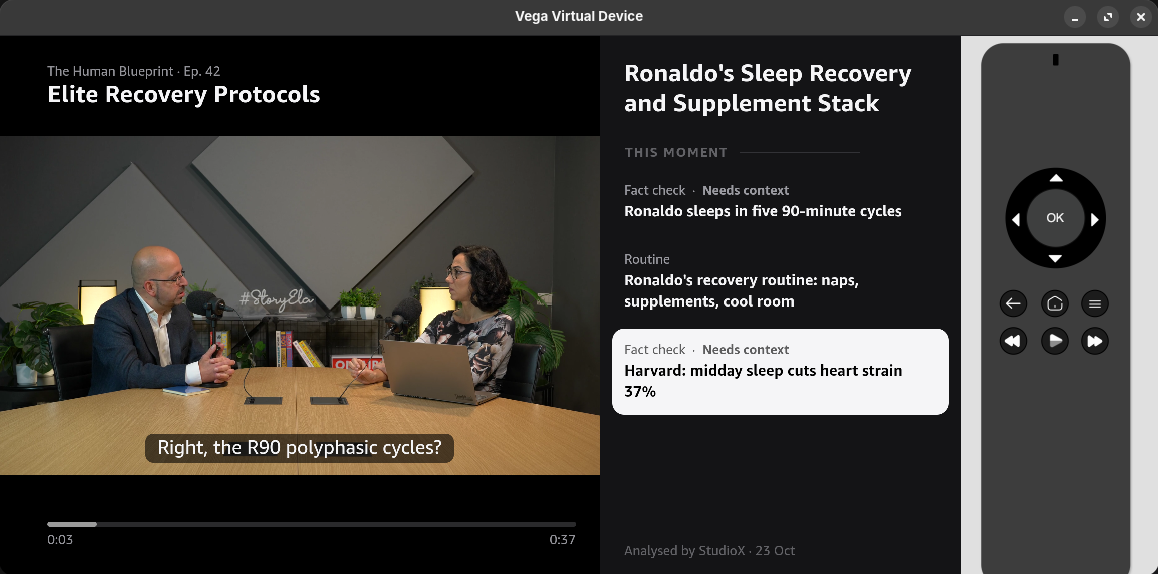
interface
StudioX — See the Whole Story.
An AI-enhanced viewing platform and Generative X-Ray engine for Fire TV, built natively on Amazon Vega OS.
Your TV remembers where you stopped. StudioX helps you remember what you understood.
Long-form videos are filled with ideas, relationships, arguments, and details that are difficult to reconstruct after watching. StudioX transforms that information into interactive visual experiences, directly on your television.
Press Map. An entire podcast becomes a connected knowledge graph, with every node linked to the exact moment it was discussed.
Press Pause. Explore the people, claims, evidence, and relationships behind what you are watching, complete with source-backed verification.
Ask from your phone. Speak naturally, and contextual answers appear directly on the TV.
Explore a crime story. Follow suspect timelines, uncover contradictions, and investigate events without revealing anything beyond your current playhead.
StudioX combines generative interfaces, spoiler-safe AI agents, live fact-checking, and native D-pad navigation into one unified living-room experience.
Project Resources
- Source Code (MIT License): GitHub — StudioX
- Developer Friction Log: 46 documented issues and 14 feature requests
Project Overview
| Category | Implementation |
|---|---|
| Competition Track | Fire TV — Vega OS |
| Additional Challenge | AWS Builder Mini Challenge |
| Priority Categories | AI-Enhanced Viewing · Multi-Modal UX |
| TV Runtime | React Native for Vega 0.83 · Vega SDK 0.24 · Vega OS 1.2 |
| AI Architecture | Strands Agents on Amazon Bedrock AgentCore |
| AWS Services | Bedrock · AgentCore · Step Functions · Lambda · API Gateway · DynamoDB · S3 · CloudFront · EventBridge · Guardrails · CDK |
| Spoiler Evaluation | 0 leaks across 39 tests |
| Claim Verification | 0 false DEBUNKED verdicts across 39 evaluations |
| Map Payloads | 14.7–23.4 KB |
| Production TV Package | 925 KiB |
| Developer Contribution | 46 friction entries · 14 feature requests |
1. Inspiration — The Second Night Is Where Long Videos Fall Apart
Imagine watching a two-hour podcast about sleep science.
On Monday, the guest explains sleep cycles, circadian rhythms, supplements, bedroom temperatures, and recovery. You understand the discussion as it happens.
On Tuesday, you resume where you stopped.
The television remembers your timestamp. But the connections between Monday's ideas have faded. You remember individual facts, not the complete explanation.
Rewinding means searching through minutes of video. Looking things up on your phone interrupts the experience. And once you finish, reconstructing the argument requires remembering where every important point appeared.
Video players are designed to preserve playback progress, not understanding.
The problem extends across genres.
In a crime drama, you forget which suspect had an alibi and which piece of evidence contradicted it. Searching online risks spoiling future episodes.
In a financial podcast, you hear an explanation about compound growth but cannot easily experiment with the numbers yourself.
In a historical documentary, dozens of names, dates, and events pass by without a clear way to revisit their relationships.
And traditional AI summaries don't fully solve this. Compressing an hour of information into a few paragraphs still leaves viewers reading text instead of exploring how everything connects.
Our Inspiration: The Next Generation of X-Ray
Amazon's X-Ray demonstrated how contextual information can enrich the viewing experience.
StudioX extends that concept into the generative era.
Instead of displaying only static metadata, StudioX analyzes the content and constructs an appropriate visual interface for what the viewer is watching.
A podcast becomes a concept map.
A crime episode becomes an investigation board.
A historical documentary becomes an event timeline.
A financial explanation becomes an interactive simulation.
The goal isn't to put a chatbot on television. It's to make the structure of the content itself interactive.
2. What It Does — One Button, Any Genre, Zero Typing
StudioX is designed for a 10-foot living-room experience.
The Fire TV application uses no text-entry fields or on-screen keyboards. Every primary interaction works with the standard television remote.
For natural-language questions, viewers use a mobile companion while keeping their attention on the TV.
Feature Overview
| Feature | Experience |
|---|---|
| Generative Map | Converts video content into a navigable knowledge graph with timestamp-linked nodes |
| Play the Story | Automatically walks through the connected graph, one node at a time |
| Step Through | Explores the graph manually using D-pad directional controls |
| Interactive Simulations | Turns explanations into adjustable visual models |
| Spoiler Lock | Restricts narrative information to the viewer's current playhead |
| Co-Viewer HUD | Displays contextual people, claims, timelines, and related insights on pause |
| Voice Companion | Accepts spoken questions from a phone and displays answers on the TV |
| Who's Who | Identifies people and entities discussed in the content |
| Quiet Fact-Check | Surfaces source-backed verification for contested or nuanced claims |
| Send to Phone | Transfers actionable checklists, routines, and source links to the mobile companion |
Experience 1 — Turn a Podcast Into a Knowledge Graph
Consider a dense science podcast covering sleep improvement.
The guest discusses:
- 90-minute sleep cycles.
- Magnesium L-threonate and apigenin.
- Circadian rhythms.
- Bedroom temperature.
- Claims about recovery and sleep quality.
These topics are introduced at different moments throughout the episode.
Press Map.
StudioX synthesizes the discussion into a connected visual structure:
              SLEEP SCIENCE
                    |
           How sleep works
                    |
          +---------+---------+
          |                   |
     Sleep Cycles       Circadian Rhythm
          |                   |
     90-Minute Model     Light Exposure
          |                   |
          +---------+---------+
                    |
              Sleep Routine
                    |
          +---------+---------+
          |                   |
     Bedtime Timing     Room Temperature
          |                   |
          +---------+---------+
                    |
             Expected Results
                    |
            Evidence Check
Each node is linked to its supporting moment in the video.
The viewer can select a concept and jump directly to the timestamp where the guest introduced it.
Instead of remembering where information appeared, viewers navigate its meaning.
Play the Story
Selecting Play begins an automatic guided walkthrough of the knowledge graph.
Nodes are highlighted sequentially every 1.6 seconds.
The experience can be interrupted immediately with any remote input.
Viewers can also step through nodes manually with LEFT and RIGHT.
The graph becomes a visual explanation of the episode, not just an index of timestamps.
Experience 2 — Turn an Explanation Into an Interactive Simulation
StudioX doesn't stop at organizing concepts.
It can transform suitable explanations into interactive visual experiences.
From the sleep-science map, select Play the Night.
The television displays a dusk-to-dawn simulation.
A moon travels across a window while a timeline illustrates the modeled sleep cycles throughout the night.
The viewer can change bedtime using the remote.
Press LEFT or RIGHT to shift the starting time in 15-minute increments.
The simulated wake time updates immediately.
For example:
Lights Out: 23:00 → 23:15
Wake Time: 06:30 → 06:45
The simulation uses an illustrative sleep-cycle model so viewers can explore the relationship between bedtime and wake-time assumptions.
The same rendering engine supports other domains:
Personal Finance
Compare compound investment growth when starting at age 25 versus 35.
History
Explore the Apollo 11 mission through a chronological event timeline.
Engineering
Navigate a signal-propagation diagram with connected components.
Educational Content
Convert step-by-step explanations into visual flows.
The underlying mechanism is the same.
AI analyzes the content and selects the appropriate visual structure. Vega renders it as a native, remote-controlled interface.
Experience 3 — Investigate a Crime Story Without Spoilers
The same Map button behaves differently for narrative content.
Instead of a concept tree, StudioX generates an investigation board.
Imagine a fictional crime episode.
A suspect claims to have been at Westside Diner between 9:30 PM and 11:00 PM.
However, investigators discover that a phone associated with the suspect connected to a cellular tower near Pier 9 at 10:14 PM.
StudioX connects these events on a visual timeline.
             INVESTIGATION BOARD
                     |
              Suspect Alibi
                     |
        Westside Diner: 9:30 PM
                     |
                     |
              CONFLICT DETECTED
                     |
        Pier 9 Phone Ping: 10:14 PM
                     |
              Evidence Analysis
                     |
           Identity Not Confirmed
The viewer can explore both pieces of evidence, examine their timestamps, and understand why they appear contradictory.
But a phone ping does not necessarily establish who was carrying the device.
StudioX preserves that distinction rather than presenting an uncertain inference as a proven conclusion.
Spoiler Lock
Narrative maps are synchronized to the viewer's playback position.
Future revelations remain locked until the playhead reaches the relevant evidence.
AI-generated segment markers are integrated with Vega's native SeekBar.
The graph reveals only information the viewer has already encountered.
StudioX lets you investigate the story without accidentally discovering its ending.
Experience 4 — Ask Questions From Your Phone
While watching the crime episode, the viewer asks the mobile companion:
"Doesn't the phone ping break his alibi?"
StudioX processes the question through the live co-viewer agent and displays the response directly on the television:
The record shows where the phone may have been, not necessarily who was holding it. Cell tower evidence also identifies approximate coverage areas rather than a precise location.
The answer uses the permitted episode context and relevant evidence.
The viewer never needs to open a TV keyboard or leave the video interface.
The interaction works as one connected flow:
Phone Voice → AWS Co-Viewer Agent → Spoiler-Safe Answer → Fire TV
Experience 5 — Fact-Checking That Stays Quiet
Podcasts and documentaries frequently include claims that sound authoritative but need additional context.
Suppose a guest says:
"Harvard data shows midday sleep cuts cardiovascular strain by 37%."
StudioX identifies the underlying research and compares the spoken claim against the actual finding.
The cited figure concerns cardiovascular mortality in an observational cohort, not a measured 37% reduction in acute cardiovascular strain.
StudioX classifies the claim as:
NUANCED
The viewer can open the card to see the evidence, explanation, and original sources.
The verification engine supports conservative verdict resolution, including DEBUNKED when independent authoritative evidence meets strict contradiction requirements.
Fully supported claims do not receive distracting warning badges.
Fact-checking remains in the background until it adds meaningful value to the viewing experience.
3. How We Built It — Native Vega OS Meets Agentic AWS
StudioX separates its architecture into two major systems:
1. AWS Analysis Engine
Performs transcription, semantic analysis, knowledge graph generation, factual verification, and spoiler-safe question answering.
2. Native Vega OS Application
Handles media playback, D-pad navigation, dynamic graph rendering, simulations, contextual overlays, and mobile companion synchronization.
The key architectural decision was to perform expensive semantic analysis once and render compact structured results locally on the TV.
Architecture Overview
                   STUDIOX
                      |
             CONTENT INGESTION
                      |
                 Amazon S3
                      |
                 EventBridge
                      |
              AWS Step Functions
                      |
             Episode Analysis
                      |
          +-----------+-----------+
          |                       |
     Amazon Transcribe      AgentCore Runtime
                                  |
                           Strands Agents
                                  |
                  +---------------+---------------+
                  |               |               |
              Entities         Claims          Timeline
                  |               |               |
                  +---------------+---------------+
                                  |
                        Nova Web Grounding
                                  |
                       Bedrock Guardrails
                                  |
                      Deterministic Validators
                                  |
                         TV Curator Agent
                                  |
                         Map Author Agent
                                  |
                      Typed JSON Package
                                  |
                             Amazon S3
                                  |
                            CloudFront
                                  |
                            < 25 KB
                                  |
                                  v
                       FIRE TV — VEGA OS
                                  |
                       Schema Validation
                                  |
                     Native UI Composition
                                  |
                   Reanimated + SVG Widgets
                                  |
              +-------------------+----------------+
              |                   |                |
          Knowledge Map       Co-Viewer HUD    Simulations
              |                   |                |
              +-------------------+----------------+
                                  |
                           Media Player
                                  |
                      KeplerVideoSurfaceView


                  LIVE QUESTION FLOW

                Mobile Companion
                       |
                  API Gateway
                       |
                    Lambda
                       |
              AgentCore Co-Viewer
                       |
                  SpoilerGuard
                       |
               Grounded Response
                       |
                Fire TV + Phone
AWS Episode Analysis Pipeline
Episode ingestion is orchestrated by AWS Step Functions.
The pipeline performs the following operations:
Step 1 — Transcript Preparation
Amazon Transcribe generates timestamped speech data when a transcript is not already available.
Step 2 — Topic Discovery
An analyst agent identifies the episode's primary topics, structure, and content type.
Step 3 — Specialist Analysis
Strands agents extract entities, factual claims, routines, narrative events, and relationships.
Step 4 — External Verification
Amazon Nova 2 Lite Web Grounding retrieves sources for factual claim evaluation.
Step 5 — Safety and Validation
Bedrock Guardrails, CitationGuard, and deterministic verdict logic validate outputs before publication.
Step 6 — Visual Layout Planning
A TV Curator agent selects appropriate presentation structures based on the episode.
Step 7 — Graph Generation
The Map Author agent connects nodes, evidence timestamps, visual layouts, and interactive elements.
Step 8 — Package Publication
The completed structured JSON package is published to Amazon S3 and distributed through CloudFront.
This architecture allows the television to access generated visual experiences without executing heavy AI inference during normal map navigation.
Strands Agents on Amazon Bedrock AgentCore
StudioX uses two dedicated AgentCore runtimes.
| Runtime | Responsibility |
|---|---|
| Analyst | Episode segmentation, knowledge extraction, claim verification, graph authoring, and precomputation |
| Co-Viewer | Live contextual questions, spoiler-safe responses, and mobile-to-TV interaction |
The analyst uses Strands Agents-as-Tools to coordinate specialist agents.
Claude Haiku 5.5 handles orchestration, while Amazon Nova provides web-grounded factual verification.
Pydantic structured outputs establish deterministic contracts between the cloud pipeline and television renderer.
Runtime Safety Through Strands Hooks
StudioX uses BeforeToolCallEvent hooks to enforce runtime boundaries.
SpoilerGuard
Restricts episode transcript access to the current playhead before contextual information reaches the agent.
BudgetGuard
Enforces token and tool-execution limits to control runaway agent operations.
CitationGuard
Retains only citations actually returned during the relevant search execution.
Deterministic Verdict Resolution
The model reports evidence stances, but code assigns the final fact-check label.
A DEBUNKED verdict requires:
- Two independent authoritative sources supporting the contradiction.
- Zero accepted authoritative sources supporting the original claim.
Otherwise, uncertain cases default conservatively to NUANCED.
This prevents the final factual verdict from being determined solely by unconstrained language generation.
Typed Generative UI — No HTML, No WebViews
The AI does not generate React components or arbitrary executable code.
It produces structured, schema-validated data.
The Fire TV application contains the actual native renderers.
For example, a claim card is represented as:
{
  "id": "claims-s1-1",
  "type": "claim",
  "evidence": [
    {
      "t0": 6.76,
      "t1": 11.0
    }
  ],
  "claim": "Harvard clinical data shows midday sleep cuts cardiovascular strain by 37 percent.",
  "speaker": "Dr. Julian",
  "verdict": "NUANCED",
  "counter": "The 37% figure concerns cardiovascular mortality in an observational cohort, not acute cardiovascular strain.",
  "sources": [
    {
      "title": "Harvard Gazette — Sleeping your way to heart health",
      "url": "https://news.harvard.edu/gazette/story/2007/02/sleeping-your-way-to-heart-health"
    },
    {
      "title": "National Center for Biotechnology Information",
      "url": "https://pmc.ncbi.nlm.nih.gov/articles/PMC4667384/"
    }
  ],
  "headline": "Harvard: midday sleep cuts heart strain 37%",
  "teaser": "Does a nap really cut heart strain 37%?"
}
The renderer validates the card and presents it using predefined native components.
This architecture provides:
- Predictable television layouts.
- Consistent focus behavior.
- Strong schema enforcement.
- Small network payloads.
- No runtime-generated executable code.
- No WebView dependency.
Contextual Widget Selection
When playback pauses, the television ranks available contextual cards using their evidence timestamps.
The local scoring system considers:
- Overlap with the preceding 15 seconds.
- A limited forward relevance window.
- Recency decay for older evidence.
The three highest-scoring eligible widgets are displayed.
Narrative content is additionally filtered through the playhead-based spoiler boundary.
The result is contextual information that appears immediately without a new model invocation for every pause.
4. Deep Vega OS Integration
StudioX is built specifically for Amazon's Vega OS, using React Native for Vega 0.83.
The application integrates native media playback, remote focus management, lifecycle handling, system notifications, and hardware-oriented rendering.
Vega Platform Features
| Capability | Platform Integration |
|---|---|
| Native Video Playback | KeplerVideoSurfaceView with setSurfaceHandle |
| Media Streaming | W3C Media Source Extensions with fragmented MP4 |
| Remote Transport Controls | IMediaPlaybackServer and setMediaControlFocus() |
| Segment Navigation | Vega UI Components SeekBar |
| Animated Graph Rendering | Reanimated 4 and react-native-svg |
| TV Focus Management | TVFocusGuideView, hasTVPreferredFocus, useTVEventHandler |
| Lifecycle Handling | useKeplerAppStateManager |
| System Notifications | useToastKepler |
Hardware-Oriented Video Pipeline
StudioX uses the following playback architecture:
Fragmented MP4 → MediaSource → KeplerVideoSurfaceView → Platform Decoder
The client fetches fragmented MP4 media through 2 MB HTTP range requests and appends the segments to the media source.
Decoded video frames remain within the platform media pipeline instead of passing through JavaScript memory.
This keeps video decoding separate from the React Native interface.
Native Generative Graph Rendering
The map renderer combines Reanimated 4 UI-thread worklets with react-native-svg.
Interactive layouts are generated from typed graph descriptions.
Each graph supports:
- Connected visual nodes.
- Evidence-based timestamp links.
- Deterministic directional neighbors.
- Animated traversal.
- Native focused-card states.
- Contextual detail drawers.
The rendering architecture targets smooth 60 FPS interaction without requiring HTML or browser-based visualization engines.
Deterministic D-Pad Navigation
AI-generated graphs have dynamic spatial layouts.
Traditional automatic focus resolution is unreliable when nodes form irregular networks instead of fixed grids.
StudioX computes an explicit directional-neighbor table for each generated graph.
Every LEFT, RIGHT, UP, or DOWN input has a deterministic destination.
Focus restoration uses TVFocusGuideView, and overlays implement focus trapping to prevent navigation from escaping into the underlying screen.
BACK cleanly unwinds the navigation hierarchy:
Detail Sheet → Map → HUD → Player → Home
Television-First Layout Standards
| Design Parameter | StudioX Implementation |
|---|---|
| Logical Canvas | 960 × 540 dp |
| Safe Margins | 48 dp horizontal · 27 dp vertical |
| Typography | 24 dp titles · 19 dp headlines · 15 dp body · 13 dp captions |
| Minimum Text Size | 12 dp |
| Primary Text Contrast | 19.3:1 on black |
| HUD Text Contrast | 16.9:1 |
| Secondary Text Contrast | 6.5:1 |
| Focus Border | 2 dp |
| Graphic Focus Scaling | 1.08× |
| Transition Duration | 200 ms ease-out |
| Animation Coordinates | Whole-dp pixel snapping |
The co-viewer HUD also preserves the video itself.
When opened, playback occupies a smaller 16:9 viewport on the left, allowing the contextual interface to appear alongside it rather than covering the video with opaque panels.
Efficient Packaging Through Vega
Vega provides core runtimes through the operating system.
StudioX uses these platform capabilities instead of embedding large runtime dependencies in its binary.
We also implemented Dual Bundle Packaging with raw JavaScript and precompiled Hermes bytecode.
Final production package: 925 KiB (947,242 bytes).
The package contains the native application and its UI logic, while semantic map data is distributed separately through CloudFront.
5. Technical Challenges We Solved
Building StudioX required solving problems across native playback, AI grounding, cloud orchestration, and television navigation.
Challenge 1 — Accurate Grounding Across Two Evidence Types
Our initial Bedrock Guardrails evaluation rejected 5 of 6 valid science cards, with grounding scores between 0.02 and 0.49.
The underlying issue was that a single validation check attempted to verify both transcript-derived information and external scientific citations against the episode transcript.
We separated the responsibilities:
- Episode grounding verifies what the guest actually said.
- External citation validation verifies supporting research against retrieved sources.
The resulting grounding scores improved to 0.73–1.00, above our configured 0.70 threshold.
Challenge 2 — Preventing Unsupported Fact-Check Verdicts
Early experiments showed that weak third-party sources could influence factual labels.
We introduced deterministic verdict resolution and authoritative-domain filtering.
A DEBUNKED label now requires independent authoritative contradictory evidence.
This gives the fact-check engine a conservative, reproducible decision boundary.
Challenge 3 — Reliable Step Functions Orchestration
Agent outputs can vary structurally when optional fields are omitted.
We strengthened workflow boundaries with schema validation and S3 pointer-based payload passing.
This prevents downstream JSONPath mappings from depending on fragile nested model output structures.
Challenge 4 — AgentCore Grounding Permissions
We integrated Amazon Nova Web Grounding directly into deployed AgentCore runtimes.
This required configuring execution-role permissions for bedrock:InvokeTool and the Nova grounding system tool.
The final permissions are deployed through AWS CDK.
Challenge 5 — Fragmented Video Streaming on Vega
We implemented direct W3C Media Source Extensions playback using fragmented MP4 and range-based buffering.
This gave us an explicit media-loading path integrated with Vega's native video surface.
Challenge 6 — Minimizing Application Package Size
During development, the build process included media assets from the staging directory, producing a package around 174 MB.
We separated media assets from application packaging and refined release staging.
The resulting production package measured just 925 KiB.
Challenge 7 — Remote Navigation Across Dynamic Maps
Automatically laid-out semantic graphs created inconsistent focus movement.
We implemented graph-specific neighbor adjacency tables, modal focus traps, and focus restoration.
We also added a 600 ms debounced SeekBar mechanism that collects directional input before committing a media seek.
This makes navigation predictable even under rapid remote input.
6. Verified Results and Benchmarks
We evaluated StudioX across spoiler safety, claim verification, source integrity, cloud execution, and package efficiency.
Safety and Factual Grounding
| Benchmark | Result | Evaluation |
|---|---|---|
| Spoiler Leakage | 0 / 39 | 13 mid-episode questions across 3 runs |
| False DEBUNKED Verdicts | 0 / 39 | Repeated claim-verification evaluations |
| Verdict Ground Truth Agreement | 13 / 15 | Two ambiguous cases safely classified as NUANCED |
| Citation Integrity | 21 / 21 | Valid HTTPS citations returned by search tools |
| Guardrails Grounding Scores | 0.73–1.00 | Configured acceptance threshold of 0.70 |
Cloud Processing
| Benchmark | Measured Result |
|---|---|
| End-to-End Analysis | Approximately 2 minutes for two parallel demo-episode workflows |
| Model Calls | 23 |
| Input Tokens | 20,456 |
| Output Tokens | 16,627 |
| Cached Prefix Tokens | 17,428 |
| Map Author Generation | 8.8–33.9 seconds across 5 runs |
| Map Schema Rejections | 0 across those 5 runs |
Vega Application
| Benchmark | Measured Result |
|---|---|
| Map JSON Payloads | 14.7–23.4 KB |
| Production Release Package | 925 KiB |
| Compiled Package Size | 947,242 bytes |
| Rendering Architecture | Native React Native + Reanimated + SVG |
| Downloaded Executable UI | None |
| WebViews | None |
Automated Testing
The implementation is supported by:
- 225 Jest tests across the Fire TV client.
- 137 pytest test suites across the cloud pipeline and agent contracts.
These evaluations cover the implemented demo scenarios and provide repeatable checks for the system's core safety and data contracts.
7. Developer Feedback — 46 Friction Entries, 14 Feature Requests
In addition to building StudioX, we documented the engineering experience across Vega OS and AWS.
Our developer friction log includes 46 entries and 14 actionable feature requests.
Each entry provides:
- The task being attempted.
- Reproduction steps.
- Expected versus observed behavior.
- Severity and engineering impact.
- The implemented workaround.
- A recommended platform-level improvement.
Selected Findings
| Platform Component | Developer Observation | Engineering Recommendation |
|---|---|---|
| Vega Virtual Device Media Playback | Direct URL playback encountered MEDIA_ERR_SRC_NOT_SUPPORTED |
Improve URL-mode emulation and document MSE fallback approaches |
| React Native for Vega | 960 × 540 dp coordinate details were difficult to discover during onboarding | Surface base coordinate specifications prominently in initial documentation |
| Vega CLI Packaging | Build staging included large media asset directories | Add package-size warnings and automated staging cleanup |
| Vega SeekBar | Rapid D-pad navigation triggered excessive seek operations | Introduce native preview scrubbing with debounced commit |
| Nova Web Grounding | Source quality varied across verification runs | Support authoritative-domain restrictions directly in grounding configuration |
The friction log also covers AgentCore orchestration, cloud permissions, navigation behavior, runtime integration, and development tooling.
Our objective was to make the feedback useful to engineering teams, with reproducible examples rather than generic feature suggestions.
Explore the Complete StudioX Developer Friction Log
8. What Makes StudioX Different?
1. Generative Interfaces Instead of Generated Paragraphs
StudioX does not simply display AI-written summaries beside a video.
It generates structured visual experiences based on the content itself.
Different kinds of information produce different interaction models.
The content determines the interface.
2. Context Tied Directly to Playback
Every generated card is connected to supporting evidence timestamps.
The viewer can navigate from a concept to the exact second it was discussed.
Context is not a separate chat history. It is part of the viewing timeline.
3. Spoiler Safety Enforced in the Agent Runtime
Narrative context is restricted before the agent can inspect transcript segments.
The playhead determines which information is eligible for answers and visual maps.
This is enforced through Strands tool-access hooks rather than relying only on natural-language instructions.
4. A Multi-Modal Experience Designed Around Television
The TV handles viewing and visual exploration.
The remote handles navigation.
The phone handles natural-language input.
AWS handles reasoning and verification.
Each component has a clear responsibility within one synchronized experience.
5. Compact Generative UI Delivery
Episode analysis is performed in the cloud and published as a structured package.
The native television renderer uses that package to construct interactive graphs locally.
This avoids transmitting fully rendered interfaces or running heavy inference on the TV.
6. An Extensible Generative X-Ray Architecture
The package parser and rendering engine are separated from the underlying video player.
This creates a foundation for integrating the same contextual UI layer into different Vega streaming experiences.
9. Potential Impact
StudioX is designed for an emerging category of television content: long-form experiences that viewers want to understand, not merely consume.
Educational Podcasts and Interviews
Turn dense discussions into explorable knowledge graphs and practical visual models.
Documentaries and Historical Content
Connect people, events, locations, and evidence into chronological and conceptual structures.
Crime and Mystery Series
Allow viewers to revisit clues, compare character statements, and follow investigations without spoilers.
Personal Finance and Technical Learning
Convert spoken explanations into visual comparisons and simulations that viewers can control from the couch.
Streaming Platforms and Content Creators
Provide richer contextual viewing experiences without creating separate handcrafted interfaces for every episode.
Scalable Distribution
The architecture preprocesses episodes through AWS and distributes compact results through CloudFront.
Many viewers can reuse the same generated episode package without repeating the entire analysis.
Live contextual questions are handled separately through the co-viewer runtime.
This separates catalog-scale preprocessing from personalized interaction.
10. What's Next
StudioX establishes a foundation for a new class of AI-enhanced television experiences.
Our development roadmap focuses on three directions.
A. Personalized Cross-Session Understanding
Extend the knowledge graph with viewer-specific continuity.
Using Bedrock AgentCore Memory, StudioX can build personalized catch-up experiences based on what the viewer has already watched.
Instead of only remembering a timestamp, the system can reconstruct the concepts, characters, and relationships introduced before that point.
B. Creator-Powered Ingestion
Provide a creator-facing upload pipeline that turns videos into StudioX-compatible semantic packages.
Creators could make their podcasts, courses, documentaries, and educational content explorable without manually authoring knowledge graphs.
C. Generative X-Ray for the Vega Ecosystem
Package the rendering engine as a reusable Vega integration.
The envisioned interface:
<StudioXOverlay />
Streaming applications could provide their own video content and attach StudioX-generated context layers using the same native UI infrastructure.
Future work also includes expanded voice-remote integration, deeper playback personalization, and additional generative visualization types.
11. Technologies Used
Television and Frontend
React Native for Vega 0.83, Vega SDK 0.24, Vega OS 1.2, TypeScript, Reanimated 4, react-native-svg, Vega UI Components, KeplerVideoSurfaceView, W3C Media Source Extensions, Hermes.
AI and Agent Frameworks
Strands Agents SDK, Amazon Bedrock AgentCore Runtime, Claude Haiku 5.5, Amazon Nova 2 Lite Web Grounding, Amazon Bedrock Guardrails, Pydantic structured outputs.
AWS Infrastructure
AWS Step Functions, AWS Lambda, Amazon API Gateway, Amazon DynamoDB, Amazon S3, Amazon CloudFront, Amazon EventBridge, Amazon Transcribe, AWS CDK, IAM.
Testing and Validation
Jest, pytest, deterministic verdict evaluation, CitationGuard, SpoilerGuard, BudgetGuard, JSON schema validation.
Development Environment
Amazon Vega Virtual Device.
12. Final Thoughts — A New Layer of Understanding for Television
Television has evolved from scheduled broadcasts to on-demand streaming and intelligent recommendations.
But the fundamental playback interaction has remained largely unchanged.
You play something, pause it, rewind it, and eventually move on.
StudioX introduces another possibility: the video itself becomes explorable.
An hour-long conversation becomes a connected map.
A technical explanation becomes an interactive model.
A mystery becomes a navigable investigation.
A disputed claim becomes an evidence-backed explanation.
And the whole experience remains native to Fire TV, accessible through familiar remote controls.
By combining Amazon Vega OS, Strands Agents, Amazon Bedrock AgentCore, and generative structured interfaces, StudioX demonstrates how AI can enrich television without turning the living room into a chatbot interface.
Don't just remember where you stopped. Remember how everything connects.
StudioX — See the Whole Story.
Source Code: github.com/Shantanu-00/StudioX
Developer Feedback: StudioX Friction Log — 46 Entries, 14 Feature Requests
Built With
- adbt
- amazon-api-gateway
- amazon-bedrock
- amazon-bedrock-agentcore
- amazon-cloudfront
- amazon-dynamodb
- amazon-eventbridge
- amazon-nova
- amazon-transcribe
- amazon-web-services
- aws-cdk
- aws-lambda
- aws-step-functions
- bedrock-guardrails
- claude
- fire-tv
- python
- react-native
- react-native-reanimated
- react-native-svg
- strands-agents
- vega-media-controls
- vega-os
- vega-ui-components
- w3c-media-source-extensions

Log in or sign up for Devpost to join the conversation.