Inspiration
Short-form content production repeats the same expensive loop: find a story, decide whether it is worth making, write a script, find visuals, generate narration, render the video, and monitor the result. Most automated video tools hide the important part: the editorial judgment. They generate an output, but do not show which stories were considered, why one was selected, why another was rejected, or whether the result used real services. We built Studio Floor as an autonomous production desk that makes the entire process visible and explainable.
What it does
Studio Floor runs a complete production pipeline:
- Scouts live news and social story signals.
- Sends candidates to a Director agent powered by Google Cloud Vertex AI.
- Decides whether a story should be produced.
- Records the Director's reasoning and editorial angle.
- Uses Vertex AI again to write a structured short-form script.
- Finds visual media through Pexels.
- Generates narration with Google Cloud Text-to-Speech.
- Combines scenes, audio, captions, and timing with FFmpeg.
- Publishes a real vertical MP4.
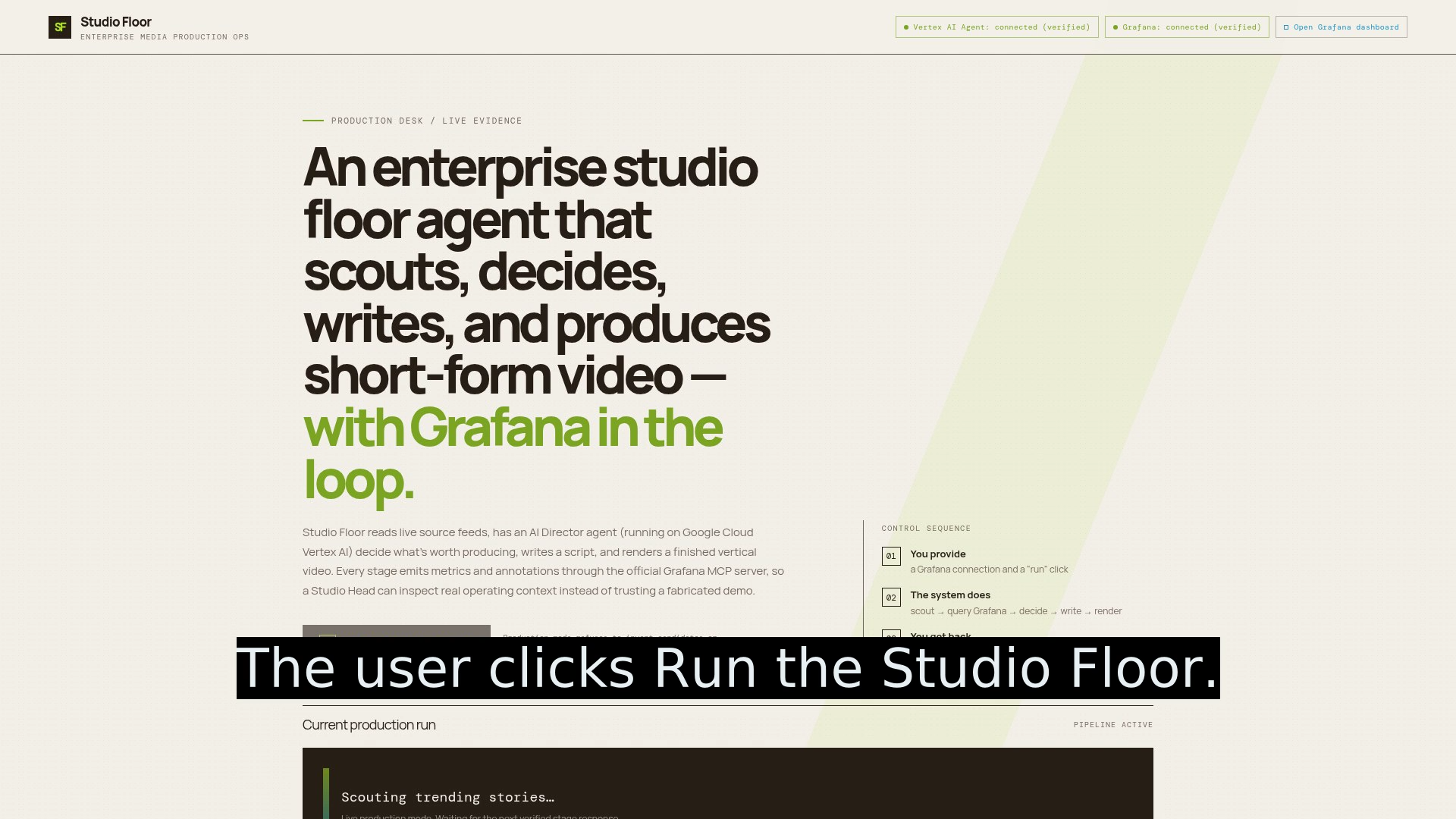
- Sends production context and metrics to Grafana. The user starts the workflow by clicking "Run the Studio Floor" in the web application. The interface shows the live pipeline stages, selected story, AI decision, reasoning, generated script, Grafana evidence, rendered video, and run history.
How we built it
Studio Floor is a full-stack Replit artifact with a React/Vite frontend and a Node/Express API. The main pipeline is:
Scout → Grafana context → Vertex AI Director → Vertex AI Writer → Produce → Publish

Google Cloud Vertex AI is used at runtime for editorial decisions and script writing.

The Vertex AI implementation is located at:

artifacts/studio-floor/legacy-src/orchestrator/vertexClient.js

That file imports the Google GenAI SDK and calls:

getClient().models.generateContent(...)

The Director and Writer call this client from:

artifacts/studio-floor/legacy-src/orchestrator/director.js
artifacts/studio-floor/legacy-src/orchestrator/writer.js

Grafana is used at runtime through the official Grafana MCP server.

The Grafana MCP implementation is located at:

artifacts/studio-floor/legacy-src/observability/mcpGrafanaClient.js

It imports the official MCP SDK, starts the mcp-grafana server over stdio, and calls tools including:

list_datasources
query_prometheus
create_annotation

The production pipeline requests live Grafana context before the Director makes its decision:

artifacts/studio-floor/legacy-src/pipeline/pipeline.js

The frontend and API run together so the user can start the pipeline directly from the production desk.

## Challenges we ran into

The hardest part was making the workflow real without hiding failures behind fake success states.

We had to solve several problems:
Verifying that Vertex AI and Grafana were reachable instead of only checking whether environment variables existed.
Connecting to Grafana through its official MCP server and querying Prometheus context at runtime.
Keeping production mode from silently substituting fake AI decisions or scripts.
Handling Grafana read permissions separately from optional dashboard and annotation write permissions.
Synchronizing scene audio and video durations so the final MP4 does not end early.
Making the complete pipeline visible in the UI instead of presenting only a finished video.
Keeping credentials on the server and out of the frontend build.

## Accomplishments that we're proud of
We are proud that Studio Floor produces a complete, playable vertical MP4 from a single user action.

We are also proud that every run exposes the reasoning behind the output:

The story selected by the Scout.
The Director's decision.
The editorial reasoning.
The generated script.
The scene breakdown.
The media and narration stages.
Grafana context and production metrics.
The final published video.
The full run history.
The Vertex AI and Grafana status badges are live-verified. They do not simply report that credentials are present.

The project also has an explicit demo mode for offline testing. Demo behavior is labeled instead of being presented as live production behavior.

## What we learned
We learned that an agentic workflow is more useful when it exposes its decisions and operational context.

We also learned that integrations should be verified at runtime. Naming Vertex AI or Grafana in a project description is not enough; the application must import the SDKs, make real calls, surface failures, and show the result to the user.

Using Grafana MCP gave the pipeline a way to read its own operational context before making an editorial decision. This made observability part of the agent workflow rather than a separate dashboard added afterward.

## What's next for Studio Floor — Autonomous Content Studio
Next, we would expand Studio Floor with:

More news and social sources.
Human review and approval checkpoints.
Multiple output formats for TikTok, Reels, and YouTube Shorts.
Better story deduplication and source verification.
Production analytics comparing predicted story value with actual performance.
More Grafana dashboards for cost, latency, quality, and failure analysis.
Scheduled recurring production runs.
Team workspaces with editorial roles and approvals.
Built With
- ai
- cloud
- context
- express.js
- ffmpeg
- gemini
- grafana
- javascript
- mcp
- model
- node.js
- pexels
- prometheus
- react
- replit
- text-to-speech
- typescript
- vertex
- vite

Log in or sign up for Devpost to join the conversation.