Inspiration
As students, we often struggle to stay focused during online classes or self-study sessions. Distractions like drowsiness, yawning, or simply looking away from the screen can go unnoticed, leading to lost productivity. We wanted to build a tool that gives students real-time feedback on their focus, using only their webcam and a machine learning model trained from scratch, no black-box APIs, no shortcuts.
What it does
- Tracks student distraction in real time using the webcam.
- Detects eye closure (drowsiness, micro-sleep) and yawning (fatigue) using custom-trained CNNs.
- Ignores normal blinks (blink smoothing) so only real distraction is flagged.
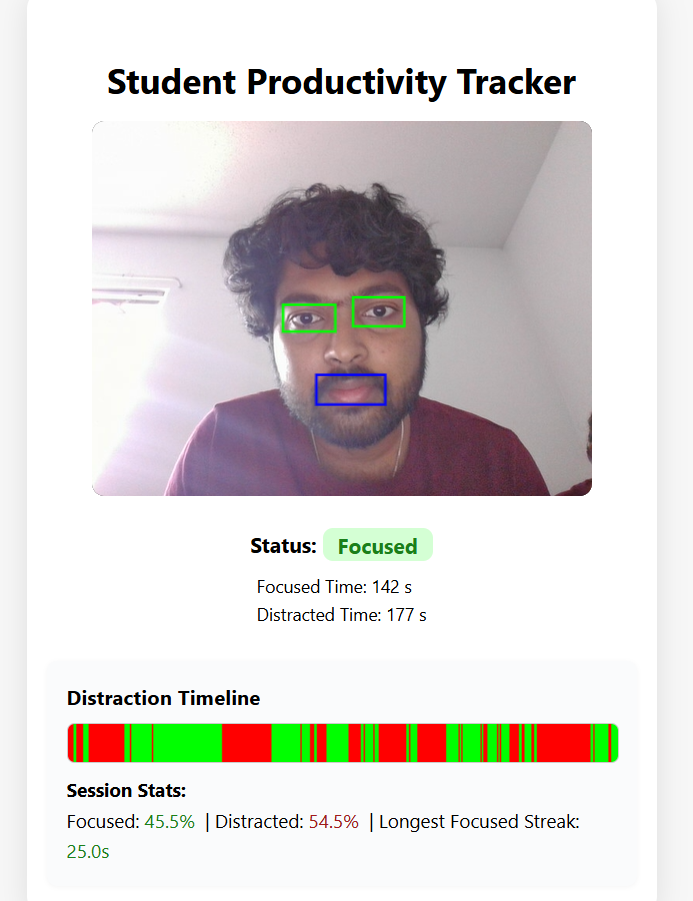
- Shows live overlays for eyes and mouth, a distraction timeline, and session stats (focused/distracted time, streaks).
- All ML models are trained from scratch—no LLMs, no pre-trained APIs, no wrappers.
- Works entirely in the browser and backend—no data leaves your device except for cropped eye/mouth images sent to your own backend.
How we built it
- Datasets:
- MRL Eye Dataset (Kaggle) for eye state (open/closed).
- Yawn Eye Dataset (Kaggle) for yawn detection.
- ML Models:
- Trained two lightweight CNNs (PyTorch): one for eye state, one for yawn detection.
- All training scripts are open source and reproducible.
- Backend:
- FastAPI (Python) serves a /api/frame endpoint.
- Loads our trained models and runs inference on left eye, right eye, and mouth crops sent from the frontend.
- Implements blink smoothing and session stats.
- Frontend:
- HTML/JS with Mediapipe Face Mesh for live landmark detection and region cropping.
- Sends left eye, right eye, and mouth crops to the backend every 0.5s.
- Shows overlays, distraction timeline, and session stats.
- Deployment:
- Backend on Render (free tier), frontend on GitHub Pages or Vercel.
- All code and training scripts are public and reproducible.
Challenges we ran into
- Dataset diversity: Real-world webcam conditions are very different from curated datasets. We had to tune our models and logic to handle normal blinks, lighting, and head pose.
- Blink smoothing: Naively marking every closed-eye frame as “distracted” led to false positives. We implemented temporal smoothing to ignore normal blinks.
- Deployment: Making sure the backend and frontend could talk to each other across different platforms, and handling Python import paths for both local and cloud deployment.
Accomplishments that we're proud of
- End-to-end real ML web app: All models trained from scratch, no black-box APIs.
- Robust, real-time distraction detection: Works in real-world conditions, ignores normal blinks, and provides actionable feedback.
- Open source and reproducible: Anyone can retrain the models, run the app, and extend it for their own needs.
- Professional UI/UX: Live overlays, timeline, and stats make the app easy and fun to use.
What we learned
- How to train and deploy lightweight CNNs for real-time inference.
- How to use Mediapipe Face Mesh for robust, browser-based landmark detection.
- The importance of temporal logic (blink smoothing) for real-world usability.
- How to build, document, and deploy a full-stack ML web app for hackathon judging.
What's next for Student Productivity Tracker
- Add gaze direction detection to track if the student is looking away from the screen.
- Personalized feedback and analytics for students and teachers.
- Mobile support for distraction tracking on any device.
- More distraction cues: hand-to-face, phone usage, etc.
- Open source community: Invite contributions and new features from other students and developers.
Built With
- cnn
- css
- fastapi
- html
- javascript
- machine-learning
- mediapipe
- opencv
- python
- pytorch
- render
- torchvision
- vercel

Log in or sign up for Devpost to join the conversation.