-
-
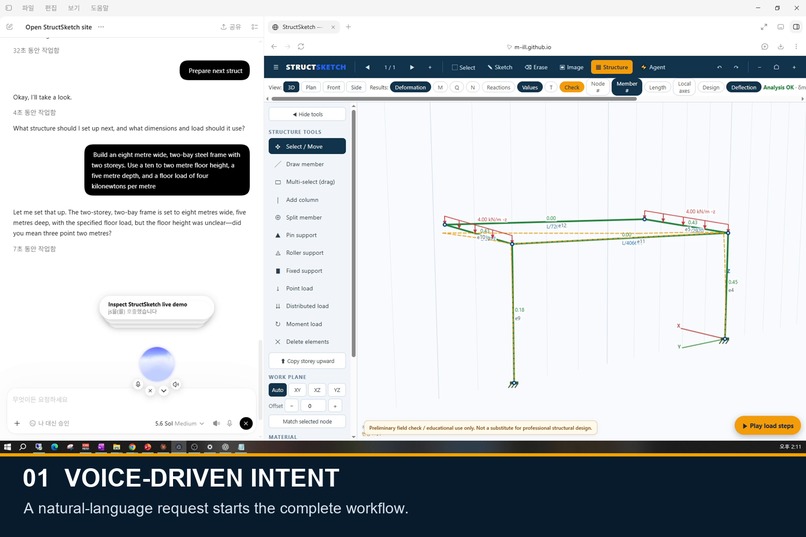
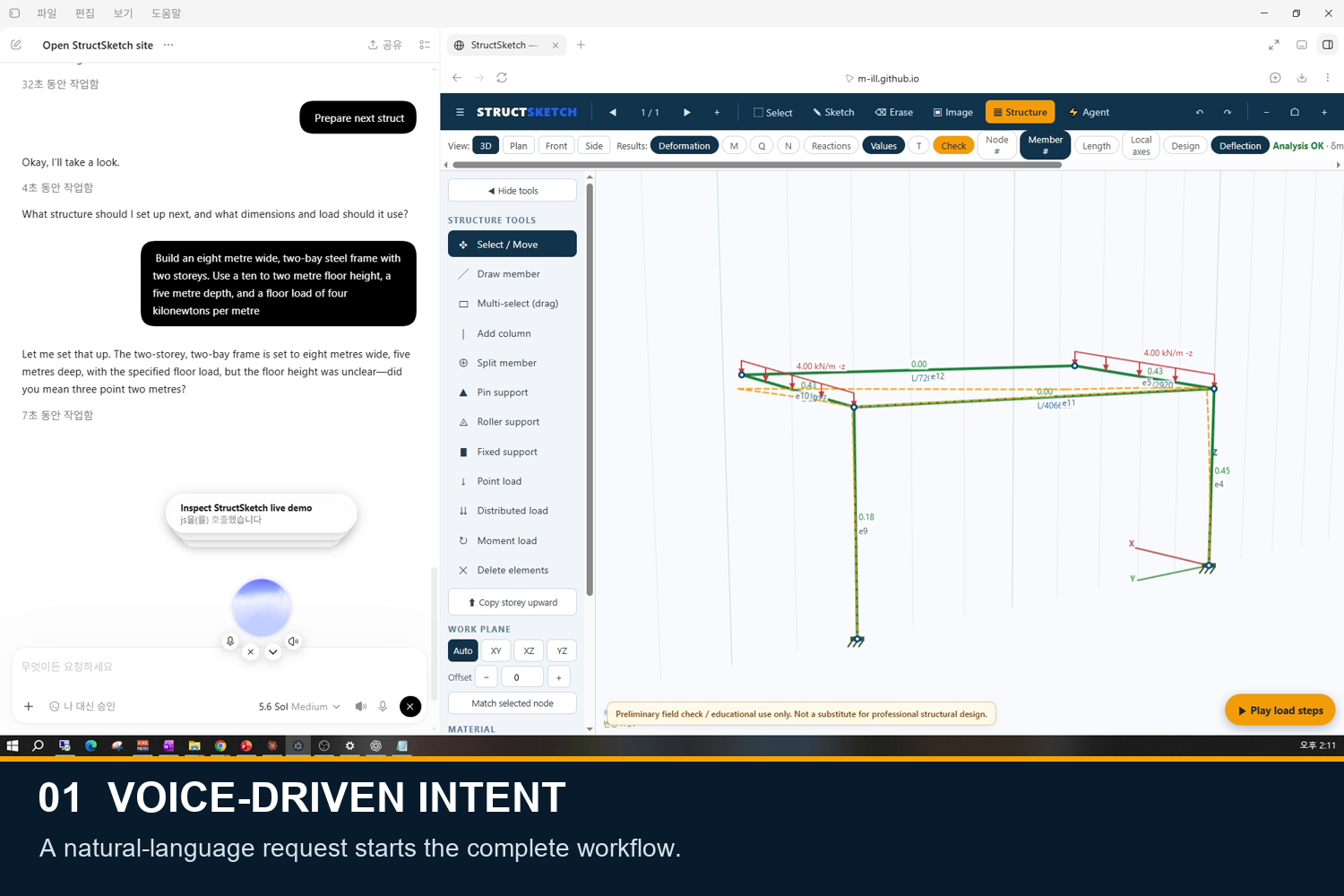
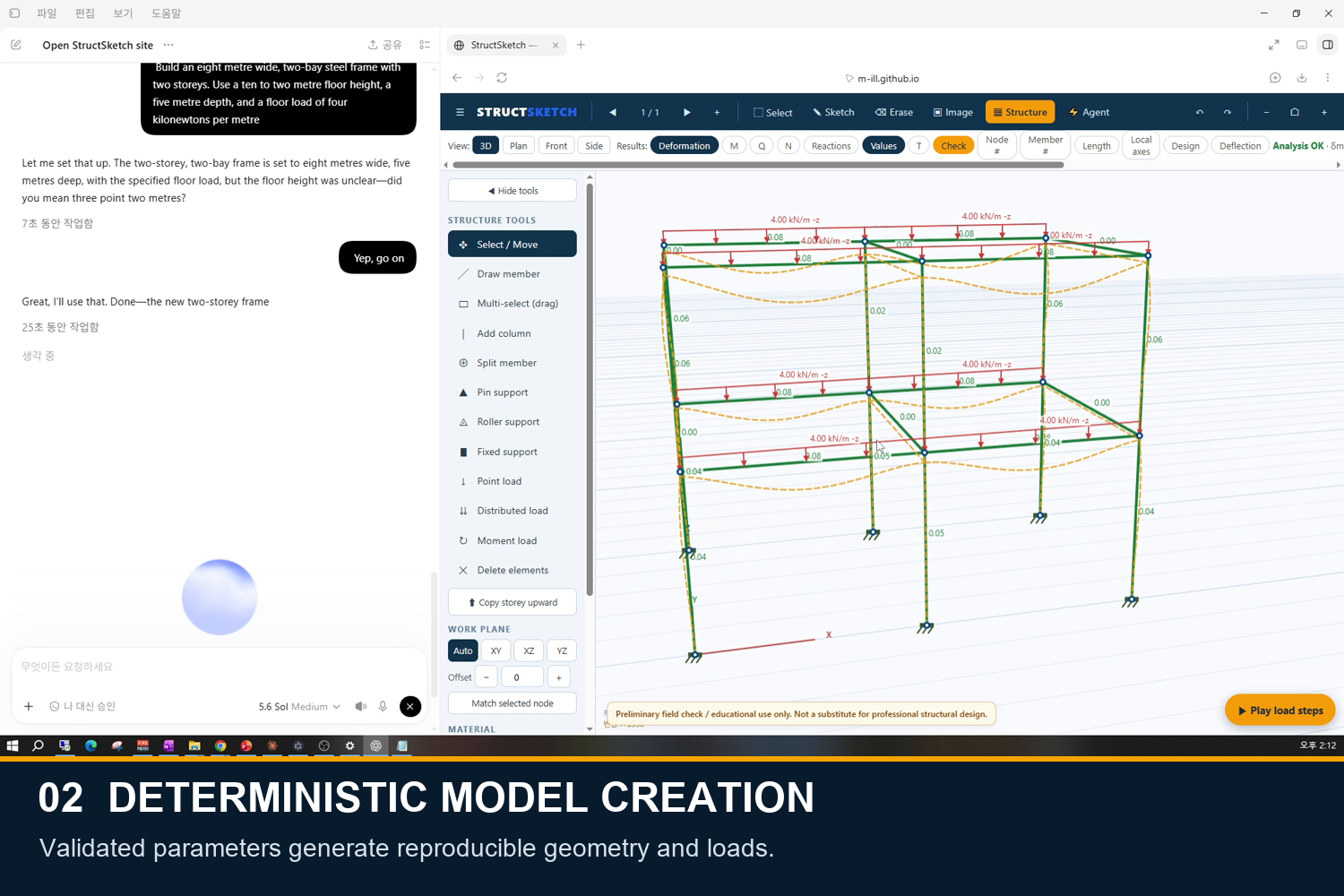
A voice request turns spoken structural intent into WebMCP site tool calls.
-
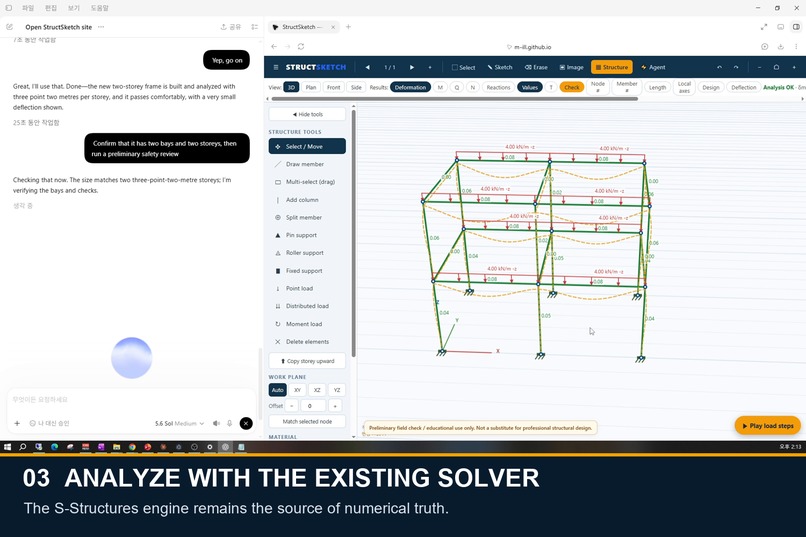
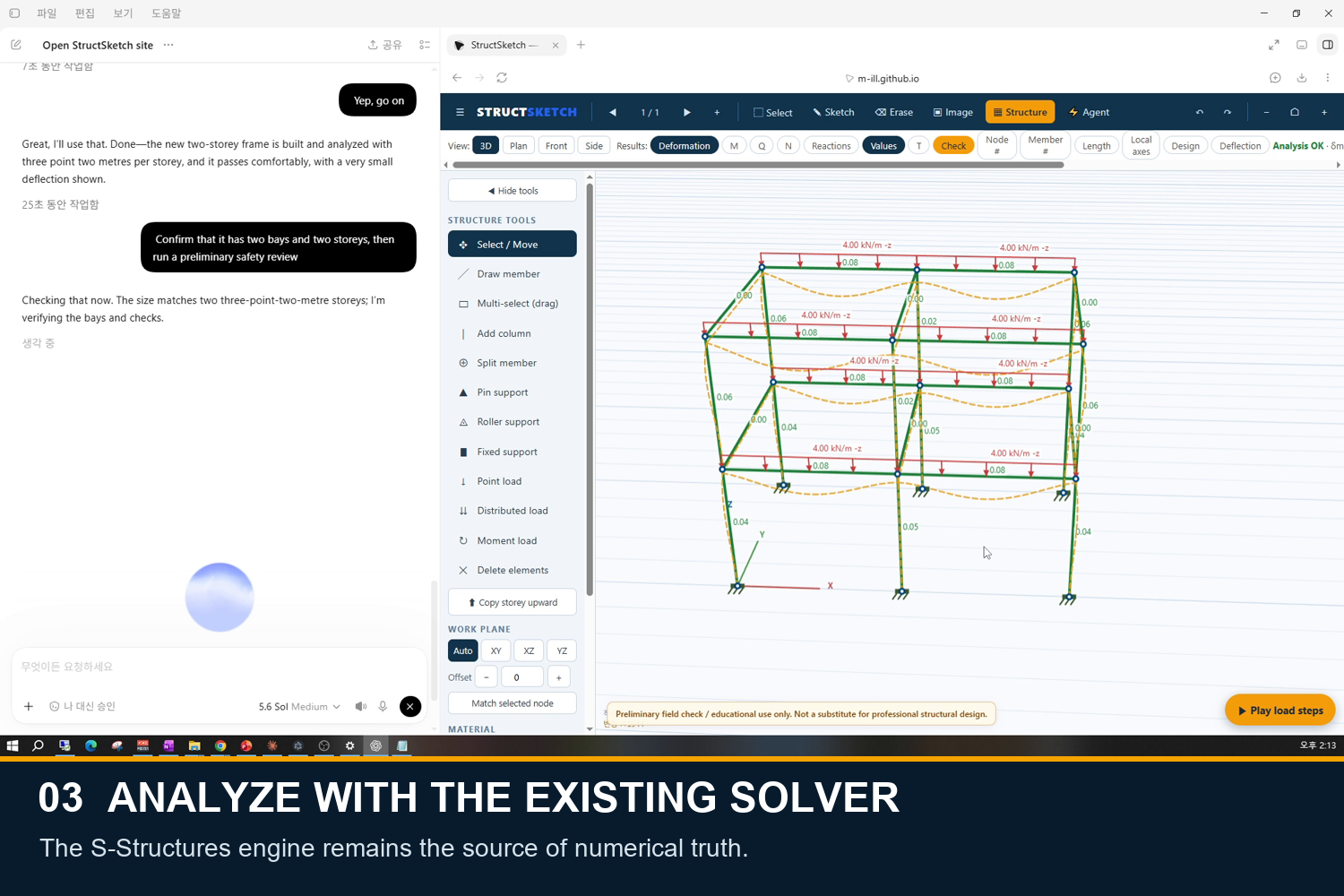
The existing S-Structures solver calculates the model; the agent never invents engineering results.
-
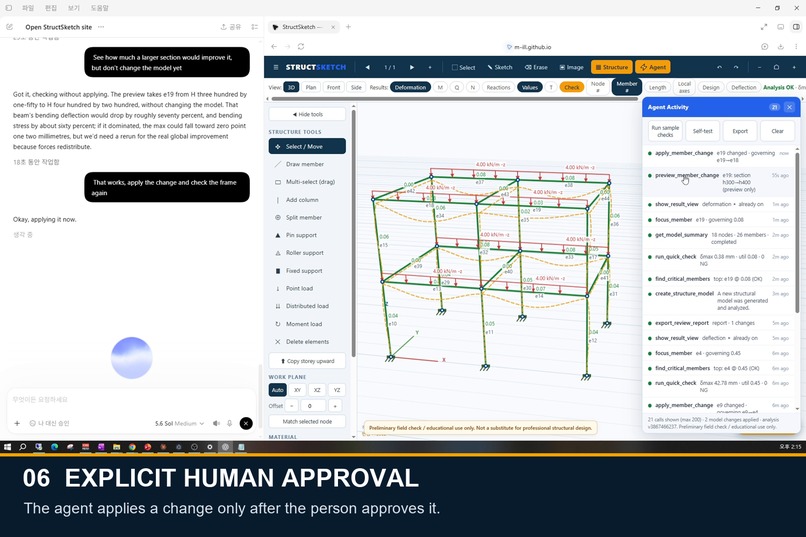
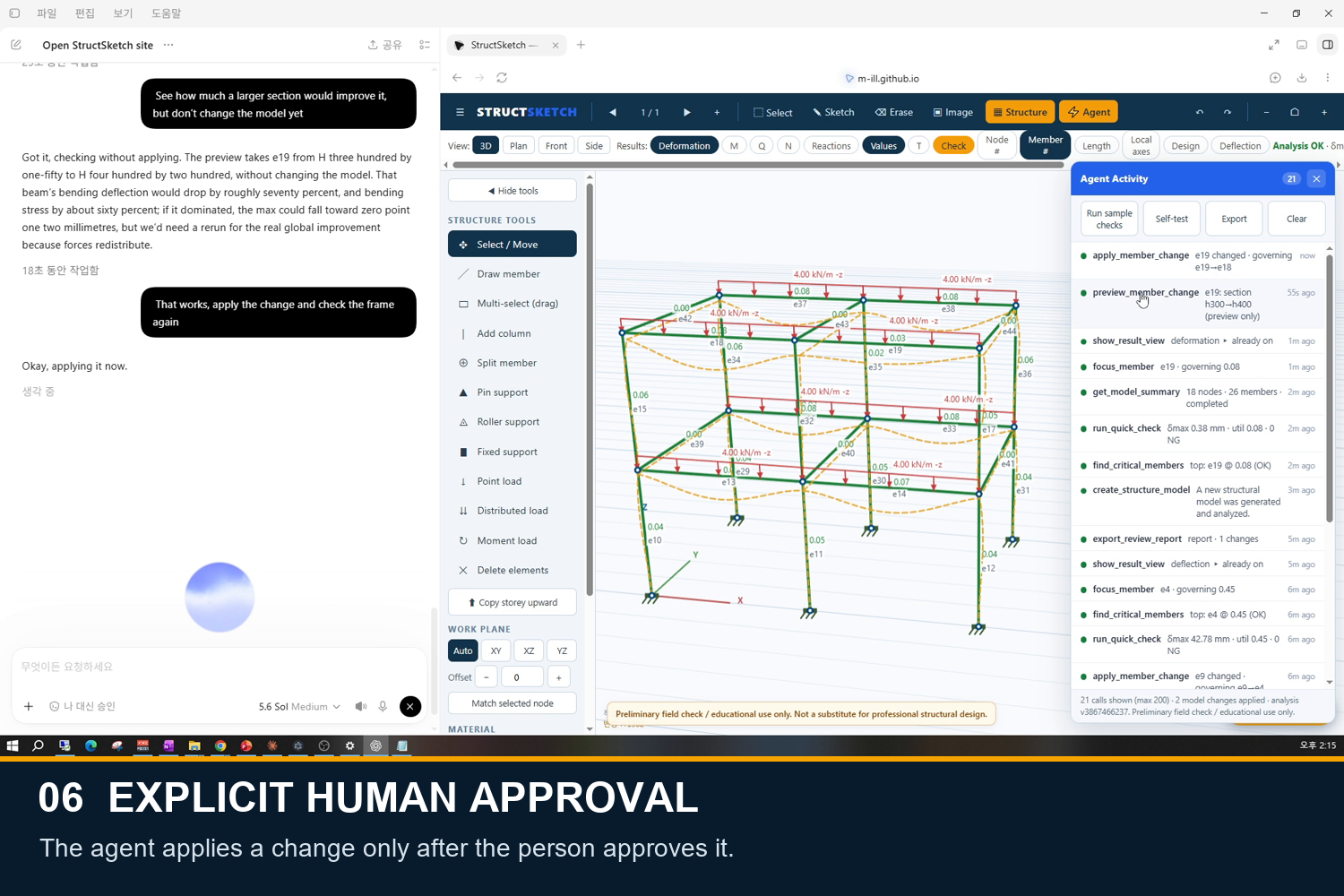
The change is applied only after explicit human approval, then the analysis runs again.
-
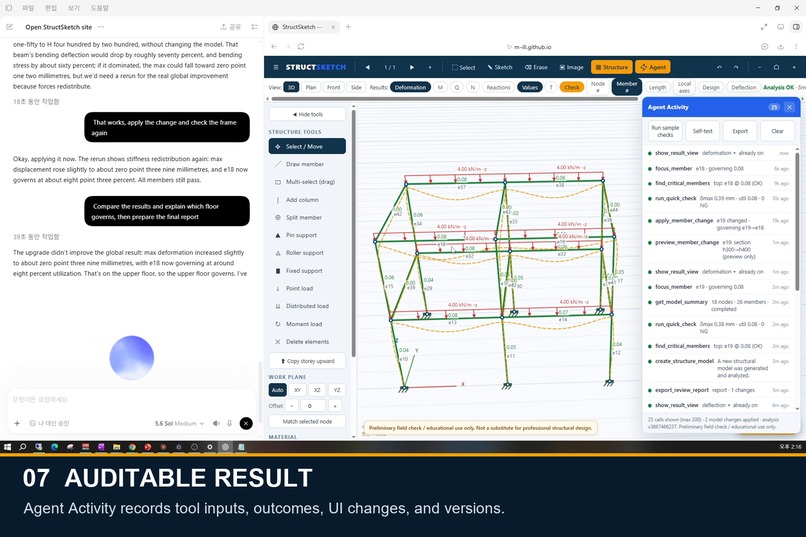
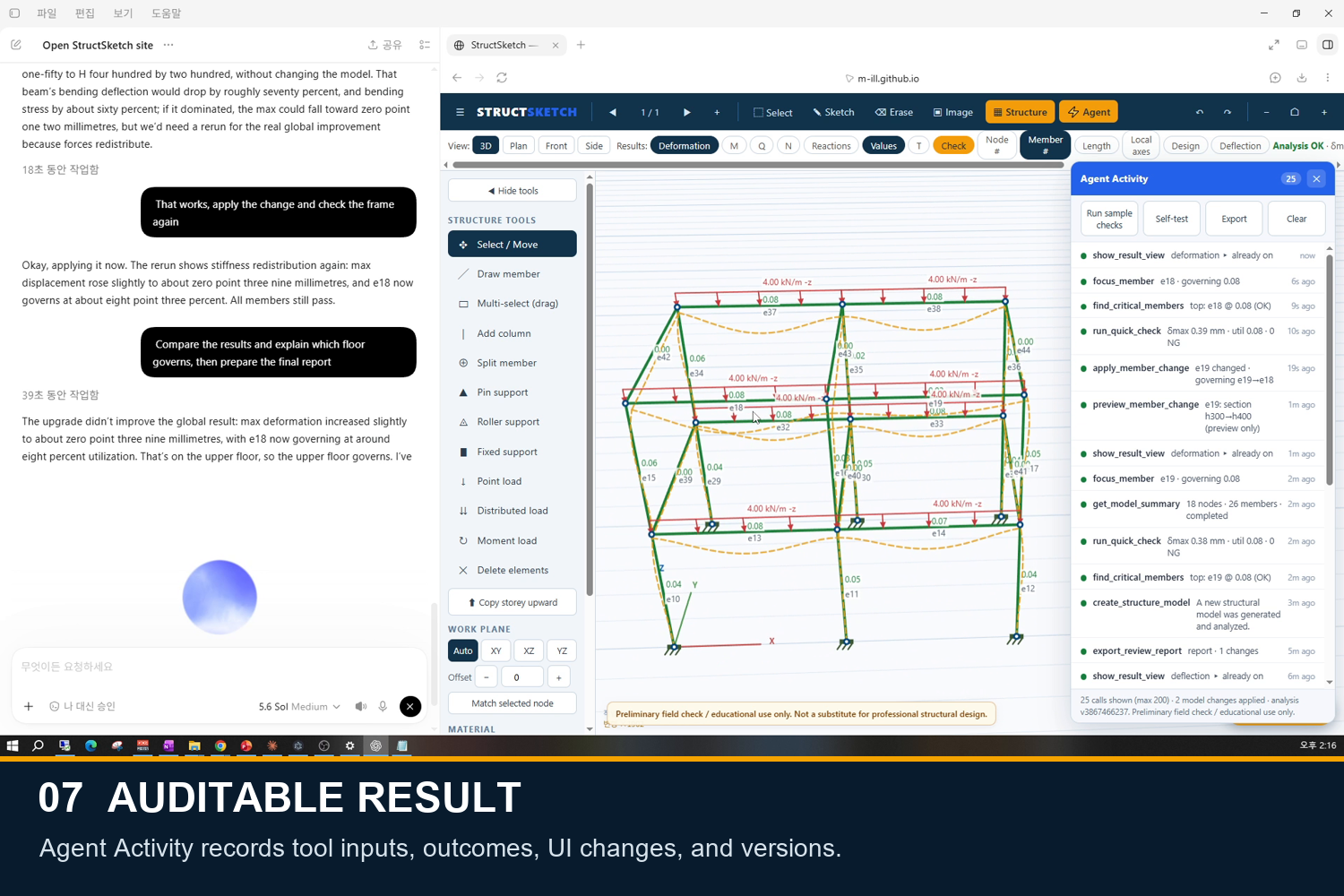
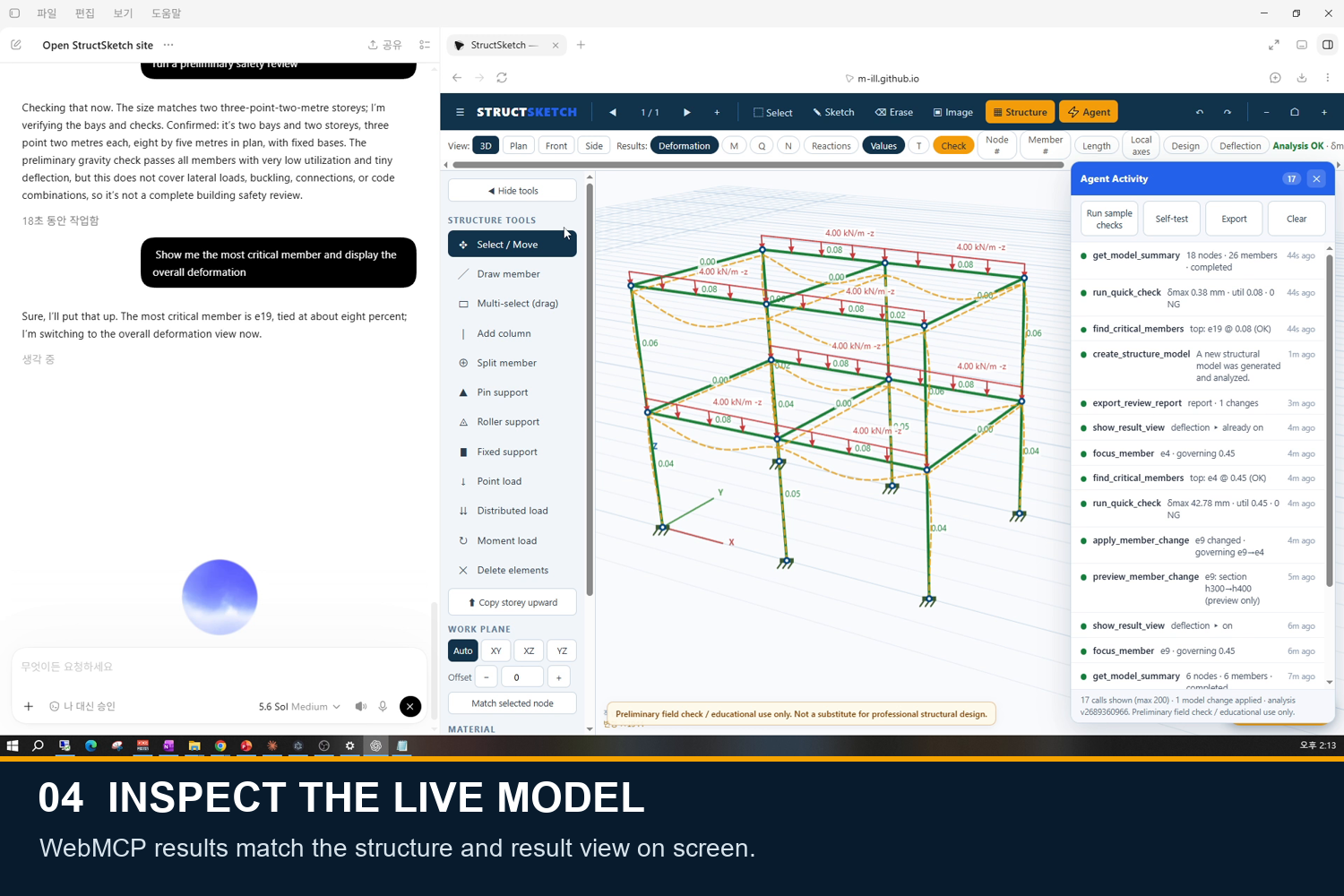
Agent Activity records tool calls, outcomes, UI changes, and analysis versions for an auditable review.
-
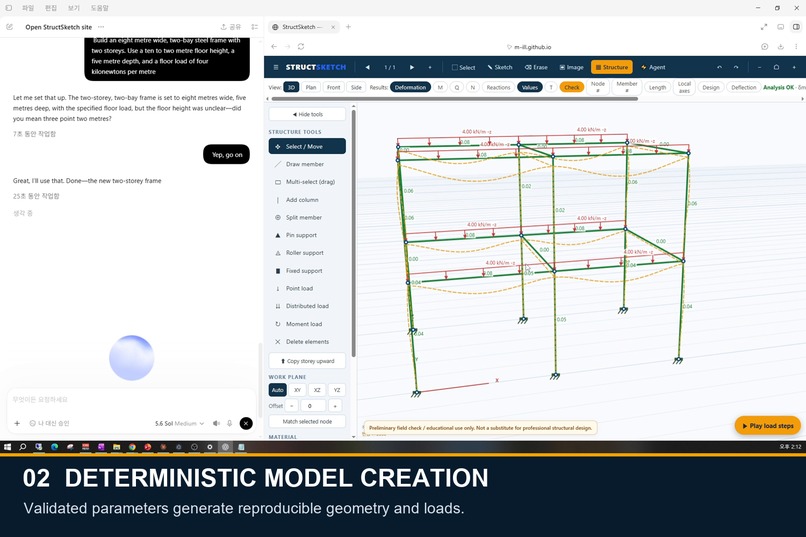
Validated parameters generate deterministic geometry, supports, materials, and loads.
-
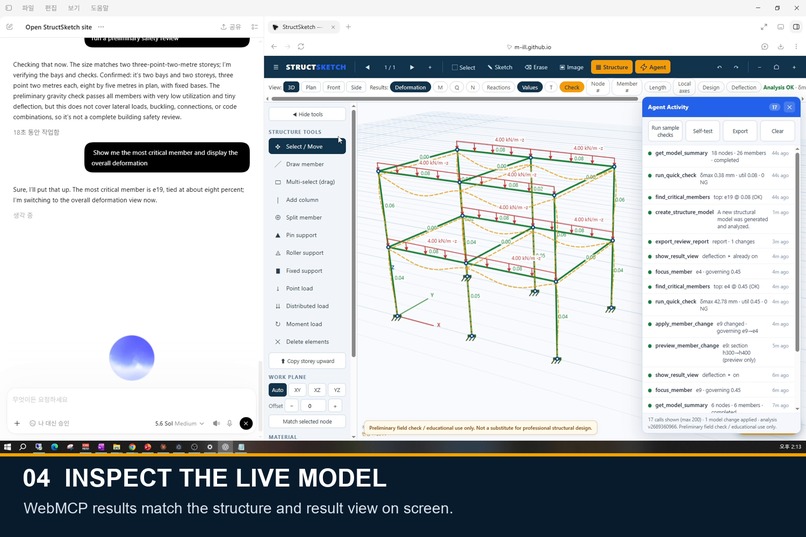
WebMCP lets the agent inspect the live model, highlight critical members, and control the visible result view.
-
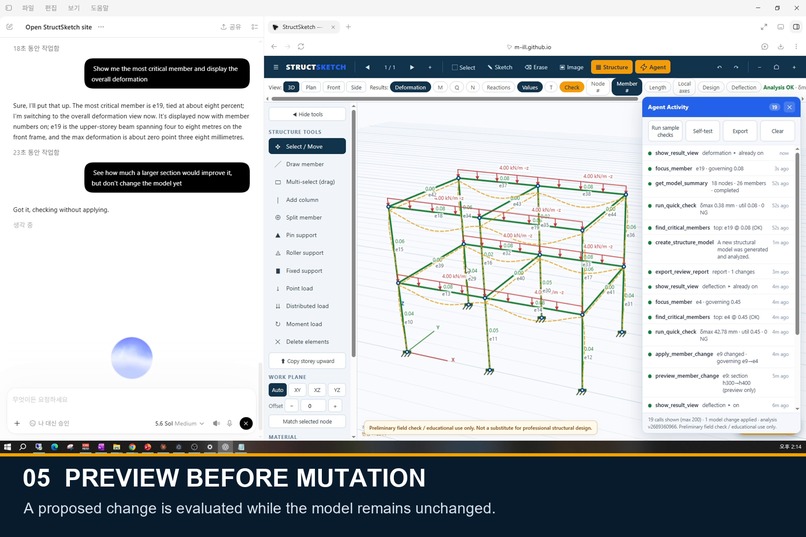
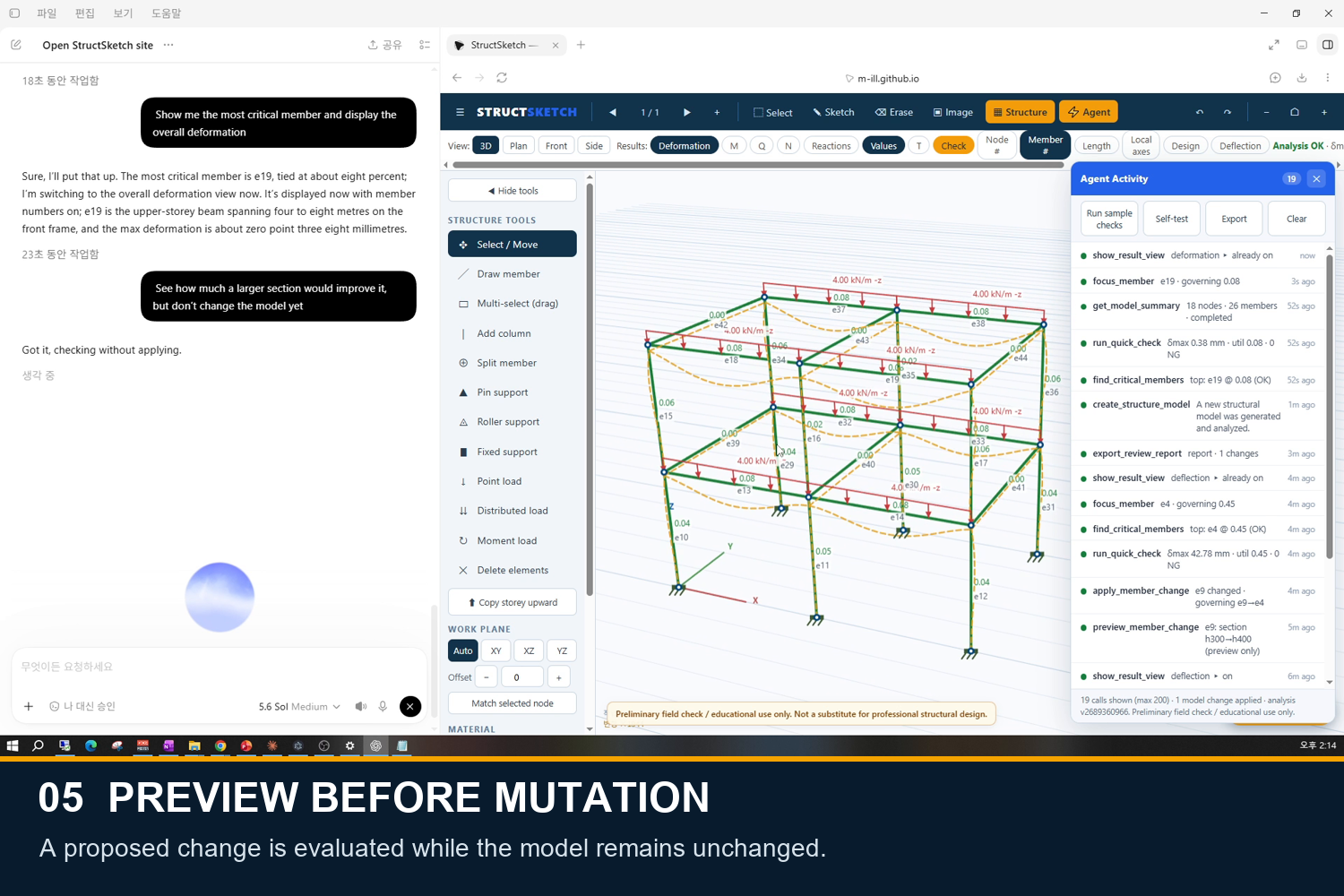
A proposed section change is analyzed as a preview while the live model remains unchanged.
StructSketch — Talk to Your Structure
Open the tablet. Sketch the frame. Say what you need. See what needs attention.
An agent-native workspace for fast, preliminary structural review in the field.
Inspiration
Picture a timber-framing crew in North America or a compact residential job in Japan. The question is often much smaller than a full building design:
- Is this light frame behaving as expected?
- Which member deserves attention?
- Would a larger section make a meaningful difference?
- Can we get a useful first answer before returning to the office?
These decisions often begin with a hand sketch, a calculator, and practical experience. Full structural-analysis packages are powerful, but creating a model, entering loads, finding the governing result, and revising a member can be too much setup for a quick first look.
I wanted that first pass to feel as natural as showing the structure to another person: draw or describe it, ask a question, and see the answer on the same screen.
StructSketch does not replace professional design. It makes the preliminary check faster to start, easier to see, and possible to review later.
What it does
StructSketch is a browser-based 3D structural workspace designed for a tablet-sized field workflow.
- Sketch, open, or describe a simple structure.
- Let the agent translate the request into one of five bounded templates: timber warehouse, portal frame, canopy, roof truss, or multistory frame.
- Confirm the interpreted dimensions, supports, material, and loading before the current model is replaced.
- Run a deterministic preliminary check and see the model, deformation, warnings, and governing member in the same workspace.
- Preview a section or material change without modifying the model. Apply it only after explicit human approval.
- Export an auditable review record containing the model summary, assumptions, results, changes, and Agent Activity history.
The key experience is simple:
Spoken intent → live 3D model → deterministic analysis → visible result → human-approved change
How to try it
Open the live StructSketch demo in ChatGPT's in-app browser, then give the agent one of the prompts below. A single kickoff prompt schedules the complete workflow. The agent will pause only when human approval is required to replace the model or apply a proposed change.
Timber warehouse — full workflow
Use the StructSketch site tools on this page. I want a preliminary review of a timber warehouse: 12.2 m clear span, 4.9 m eave height, 4:12 roof pitch, two 4.8 m bays, cedar timber, pinned bases, collar tie and knee braces, 1.0 kN/m² snow load, and 0.3 kN/m² dead load.

First, repeat the interpreted structure and parameters and ask me to approve replacing the current model. After I approve, create and analyze it, summarize the live model, run the deterministic quick check, show the overall deformation, find and focus the governing member, and explain the result in plain English.

Then check whether the catalog contains a larger timber section for that governing member. If it does, preview it without changing the model, show the before-and-after result, and ask for my approval before applying it. If no larger timber section exists, do not invent or mix materials; explain the catalog limit and export the review report. Keep the Agent Activity panel visible if available.
Steel canopy — full workflow
Use the StructSketch site tools on this page. Review an 8 m steel canopy, 3.5 m high and 4 m deep, with fixed bases, a 1:20 roof pitch, and a 4 kN/m downward roof line load.

Repeat the interpreted parameters and ask before replacing the current model. After approval, create the canopy, summarize it, run the deterministic quick check, show deformation, identify and focus the governing member, and explain what needs attention. Preview the H-400×200×8×13 catalog section (`h400`) for that member without modifying the model and ask before applying it. After approval, apply the change, rerun the analysis, compare the results, and export the review report. Keep the Agent Activity panel visible if available.
Two-storey steel frame — full workflow
Use the StructSketch site tools on this page. Create a preliminary model of a two-storey, two-bay steel frame with 8 m total frame width divided into two bays, 3.3 m per storey, 5 m frame depth, fixed bases, and a 4 kN/m downward beam load.

Confirm your interpretation with me before replacing the model. After approval, create it and continue through the entire review: model summary, deterministic quick check, deformation view, governing-member search and focus, and a plain-English explanation. Preview the H-400×200×8×13 catalog section (`h400`) for the governing member without changing anything. Ask for approval, then apply it only if approved, rerun the check, compare before and after, and export the final review report with Agent Activity included.
Reusable prompt template
Use the StructSketch site tools to review [STRUCTURE TYPE] with [DIMENSIONS], [MATERIAL], [SUPPORTS], and [LOAD]. Confirm the interpreted parameters before replacing the model. After approval, create the model, summarize it, run the quick check, show deformation, find and focus the governing member, and explain the result. Preview a suitable improvement without changing the model, ask for approval, then apply it only if approved. Finally, rerun the analysis, compare before and after, and export the review report. Keep Agent Activity visible.
Why WebMCP
Without WebMCP, an agent has to guess what a technical page means from pixels, labels, menus, and click positions. That is fragile, especially when the important information is the live engineering state behind the interface.
With WebMCP, StructSketch exposes meaningful actions directly:
- Summarize the structure currently open on the page.
- Run the preliminary analysis.
- Find and highlight the governing member.
- Show the deformation or check result.
- Preview a proposed change without touching the model.
- Apply the approved change and prepare a review report.
The page is no longer just something an agent clicks. It becomes a shared workspace where the person and the agent see the same structure, the same result, and the same history.
Clear responsibilities
- The person provides intent, checks the interpretation, and approves consequential changes.
- The agent translates natural language into structured actions and guides the workflow.
- StructSketch generates bounded geometry and performs the numerical analysis.
The agent does not make up the engineering numbers.
How we built it
StructSketch is a static HTML, CSS, and JavaScript application deployed on GitHub Pages. It registers 11 site tools through document.modelContext.registerTool.
Those tools provide structured access to:
- the model currently visible on the page;
- the existing S-Structures linear-static solver;
- critical-member and result-view inspection;
- five validated structural templates;
- preview, approve, apply, and revert operations; and
- a structured review report.
The five generators accept bounded parameters and create reproducible geometry, members, supports, sections, and loads. The existing S-Structures engine—not the language model—performs every calculation.
Every tool call returns structured, JSON-safe results. The Agent Activity panel records its input, result, warnings, visible UI changes, and analysis version, so the interaction remains visible rather than hidden behind the conversation.
Human control and safe editing
Inspection and editing are deliberately separated.
When someone asks whether a larger section would help, StructSketch first calculates a preview against the current analysis version. The model remains unchanged. Applying the proposal requires explicit confirmation.
If the model has changed since the preview, the stale proposal is rejected. If an update fails, the mutation is rolled back. The person can see what was proposed, what was approved, and what changed.
Challenges we ran into
The hardest challenge was connecting an agent to a protected, pre-existing analysis core without rewriting it or duplicating its mathematics.
StructSketch uses the core's own import, analysis, and export paths through a separate adapter layer. This allowed the numerical core to remain unchanged while WebMCP gained structured access to real engineering state and visible interface actions.
The second challenge was trust. A structural tool should not silently modify a model because an agent inferred an instruction. That led to the preview, confirmation, analysis-version binding, rollback, and activity-log workflow.
Accomplishments that we're proud of
- A working public app—not a mocked interface or hidden API demo.
- 11 live WebMCP tools connected to the exact model shown on screen.
- Five deterministic structure templates driven by natural-language intent.
- A complete flow from description to analysis, critical-member inspection, proposed improvement, human approval, re-analysis, and report.
- An unchanged deterministic numerical core.
- 107 passing browser tests covering tool contracts, model generation, controlled mutations, regression behavior, and hardening.
You can watch the structure appear, see the calculation result, inspect the governing member, preview a change, approve it, and review the audit trail—all in one place.
What we learned
WebMCP works best when a tool represents something a person in the domain would actually ask for, rather than mirroring every button in the interface.
We also learned that generative interaction and deterministic computation make a strong pair: the agent handles language and sequencing; the engineering engine remains the source of numerical truth.
Potential impact
StructSketch is aimed at the gap between a hand sketch and a full desktop analysis workflow. It could help field engineers, structural designers, educators, and experienced construction professionals under engineering oversight start a transparent preliminary review while the physical problem is still in front of them.
The goal is not autonomous structural design. The goal is to make the first model-and-check cycle accessible from a tablet, while keeping assumptions, limitations, results, and human decisions visible.
What's next
- Clearer load-path visualization
- More bounded structural templates
- Wider validation against known analysis cases
- Field testing with practicing structural engineers
- Better tablet onboarding for sketch-and-speak workflows
Safety and limitations
StructSketch performs linear-static analysis and simplified allowable-stress screening for preliminary review and education only.
It does not provide code-compliant final design, connection design, full buckling verification, nonlinear analysis, or second-order analysis. A qualified professional must review the model, assumptions, loading, and results before construction or any safety-critical use.
Try it
Built With
- 3d
- analysis
- canvas
- css3
- element
- engineering
- finite
- github
- html5
- javascript
- linear
- pages
- site
- static
- structural
- tools
- visualization
- webmcp
