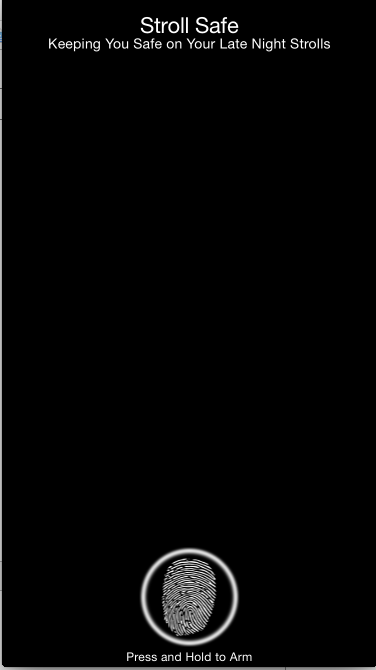
Our campus can be a dangerous place. Due to the disproportionately high number of assaults that students learned of in the Fall 2014 semester, we decided that something needed to be done. Of course there are emergency phone boxes posted throughout campus, but pedestrians rarely notice these, and are even more likely to miss them under stress.
In a past hackathon, we created an Android version of this app. Determined to bring safety to as many people as possible, we borrowed MacBooks from friends and family members to create this app for iPhone users.
In both iOS and Android, Stroll Safe allows students to walk home knowing that if trouble strikes, the police are only a few seconds away. The problem with '911' as a preventative measure is that a person under attack doesn't have the time dial. Stroll Safe seeks to solve this problem by creating an interface that alerts the police at the moment of an attack.
The user simply places their finger on the phone. If the user removes their finger from the phone for more than 2 seconds, the phone assumes the person is under attack. It then gives the user 20 seconds to disarm it with a pass code, or it will notify the police. A less secure mode, "Shake Mode" allows the user to access other areas of their phone, or even make calls. When feeling threatened, the user can shake their phone to activate the 20 second lockdown.The interface also includes ways to disarm the system when the user arrives safely at home.
The first time the app begins, the user is prompted to choose a passcode by entering a 4-digit number twice. It then prompts a user to touch the screen and enter Release Mode. In this mode, users can touch and hold the screen to activate our app’s main functionality. If their finger leaves the screen, they have 2 seconds to press it again or the app will switch to Lock Mode. Once in this mode, they have 20 seconds (or 3 attempts) to put in the right passcode. They can also touch the timer to speed it up if they feel threatened. If the correct passcode is not input, the police will be called. For the purposes of testing, we have substituted one of our numbers instead of 911.
If a user wishes to switch from the app, they can switch from Release Mode to Shake Mode by moving their finger to the shaking phone icon. While in Shake Mode, they can safely close the app by pressing the red X or can switch the app into the background. However, if the user shakes their phone while Stroll Safe is running Shake Mode in the background, the app will enter lock mode and the same 20 second timer will countdown. If the user kills the app while it is running in the background, the police will NOT be called unless the app is killed while in the counting down Lock Mode.
NOTE: This app is not in it's fully finished state. During this hackathon, one team member (Michael Goldstein) perfected the Android version and readied it for release. The other two members (Mitchell Wortman and Noah Prince) built the iPhone app from the ground up. The iOS app is NOT fully finished. The list of implemented features are as follows (the user interface is mostly finished):
- Basic user interface
- Thumb Mode
- Activates Release Mode on thumb up
- Activates Shake Mode on Drag to Shake Mode Button
- Release Mode
- Timer (counts down on a progress bar before activating lockdown)
- Can activate Thumb Mode
- Shake Mode
- Can Disarm from Shake Mode
- Lockdown Mode
- Keyboard and layout finished
- Thumb Mode
What still needs to be finished:
- Shake Mode
- Enable shaking to enter Lockdown
- Lockdown Mode
- Circular 20 second countdown-timer
- Contact police on timeout
- Password disarm
- Testing on an actual iPhone, not just the simulator (none of us have the $99 developer license, yet)


Log in or sign up for Devpost to join the conversation.