-
-
AI report for doctors after exercises
-
MediaPipe technology for stroke patients
-
AI report for doctors after exercises
-
AI report for doctors after exercises
The Problem
Every 40 seconds, someone in the US has a stroke. That's about 795,000 people a year, and roughly 610,000 of them are first strokes. Worldwide, stroke costs over $890 billion a year in medical care, rehab and lost productivity (0.66% of global GDP), and that's projected to almost double by 2050.
Recovery depends on repeating small movements, over and over. But most of that practice happens at home, alone, with nobody watching. In one study of 92 community-living stroke survivors, only 28% did more than 70% of their prescribed home exercises. A Cochrane review of 22 trials (1,937 people) found that rehab delivered remotely gave outcomes similar to in-person therapy, though the evidence is limited.
So distance isn't the main problem. Feedback is. A paper handout can't tell a slow, controlled arm raise from a fast, jerky one. A clinician can, but only if they're in the room. We wanted to put that observation into a phone.
What it does
SCOOT helps stroke survivors do their rehab exercises at home, sitting in a chair, with just a phone. The phone watches the exercise, Gemini talks you through it, and a clinician gets a report afterward.
Example exercise: the seated arm raise. You sit in a chair and lift your arm up in front of you. In our example, the arm goes up slowly once, then up fast once. A clinician would want to know about that difference, and SCOOT shows it.
- Pick an exercise. There are six chair exercises: forward reach, elbow bend, arm raise, knee straighten, leg lift, and ankle pumps.
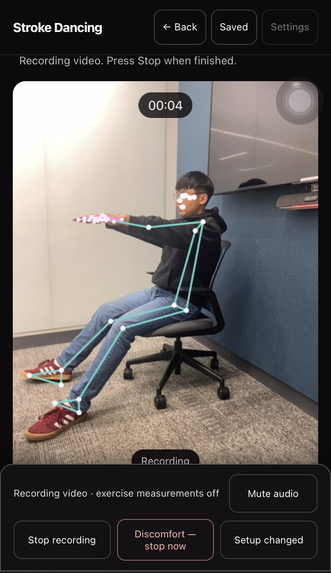
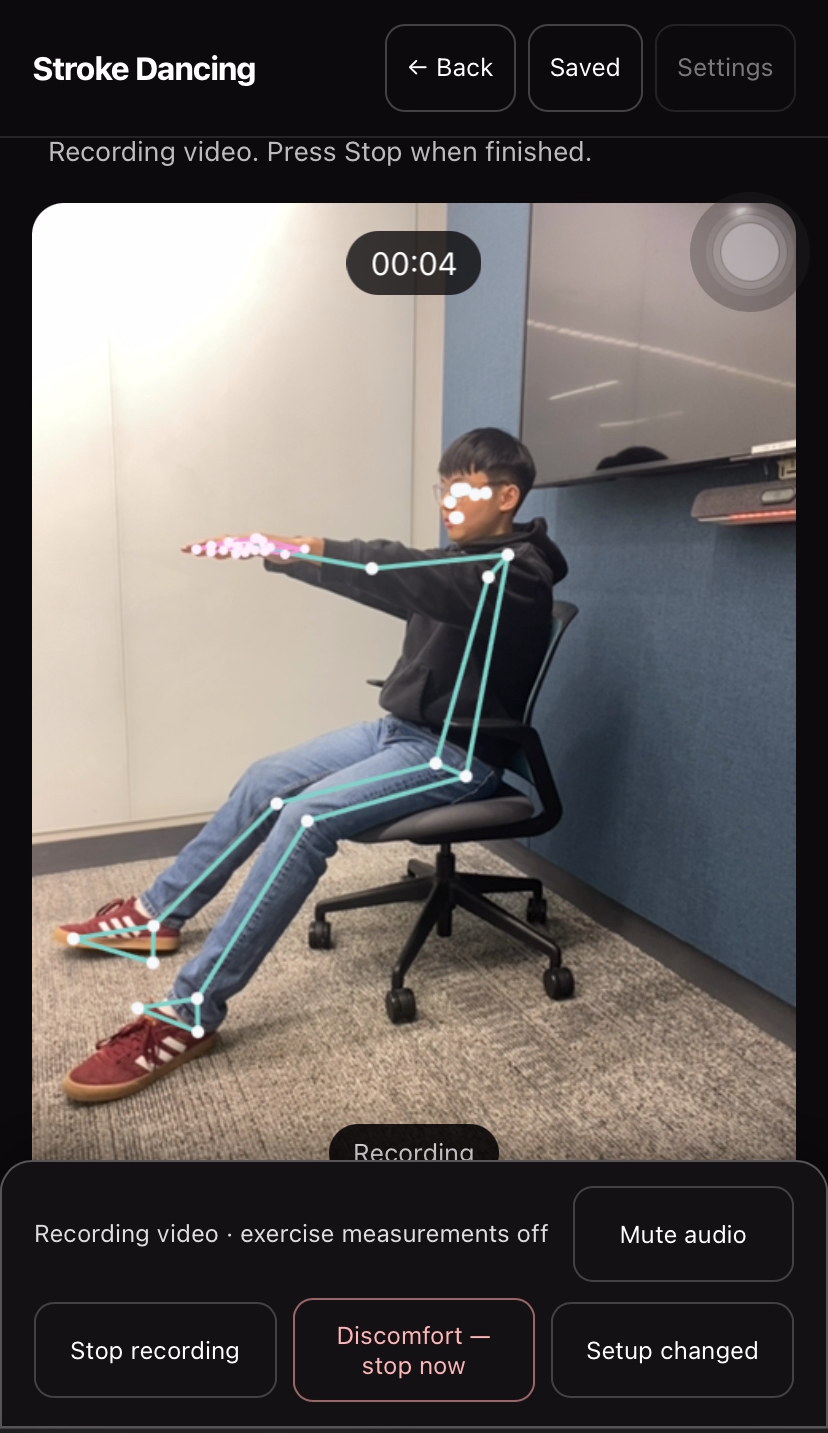
- Point the phone at yourself. The app draws dots and lines on your shoulders, elbows, wrists and hips, so you can see the camera is tracking you correctly before you start.
- Press Record (up to 30 seconds). Gemini's voice gives short instructions, like "Hold your starting position" and "Return to your starting position," and the same words show on screen as captions. The last 5 seconds are counted down. Big Stop and Discomfort buttons are always on screen.
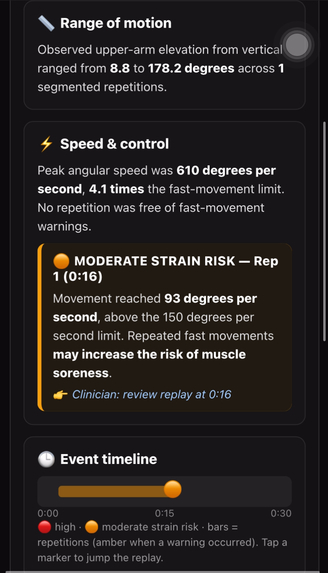
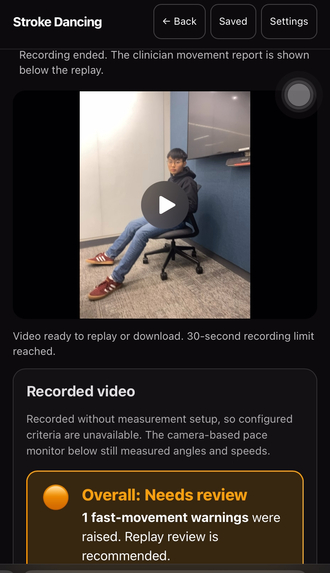
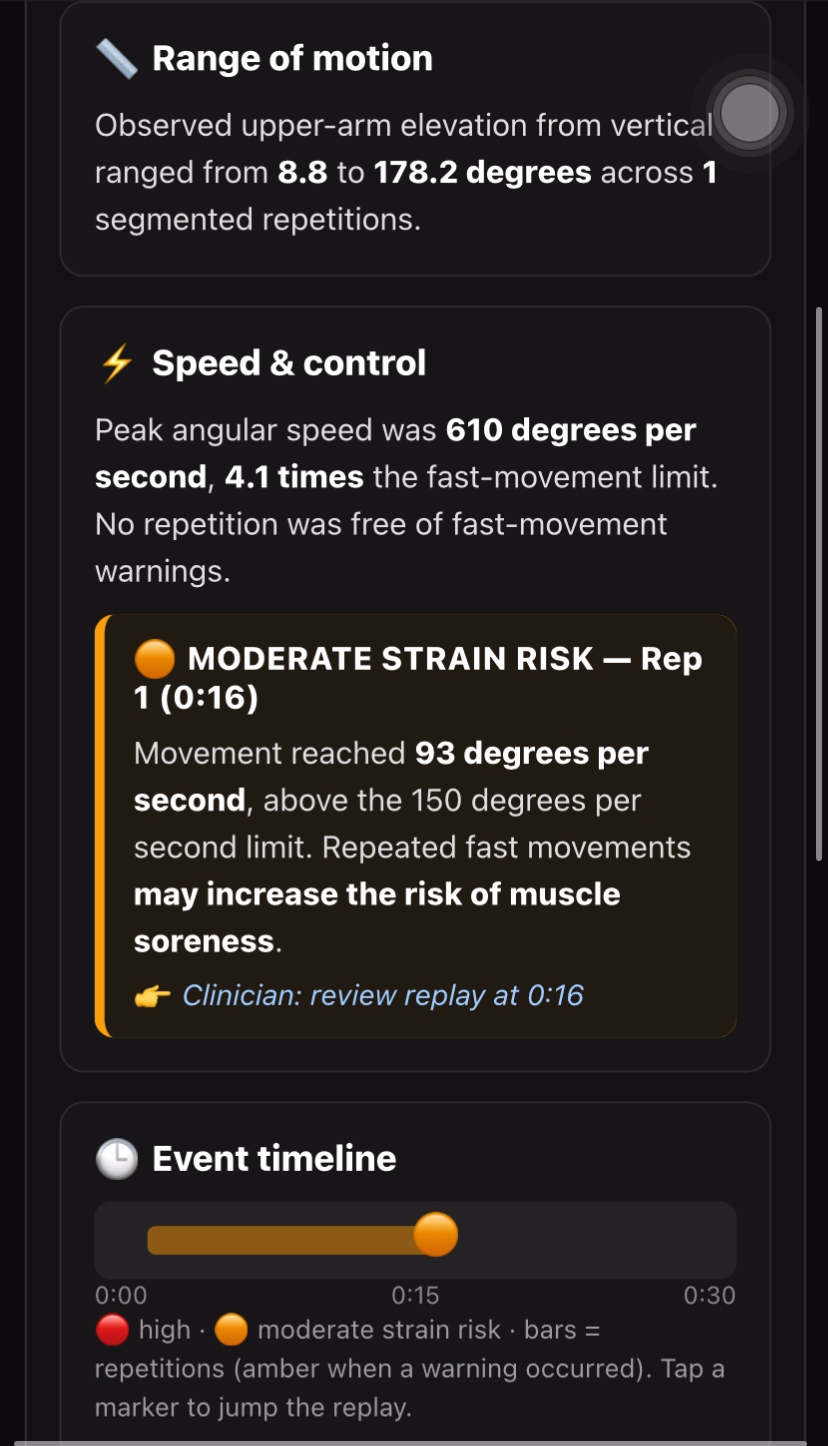
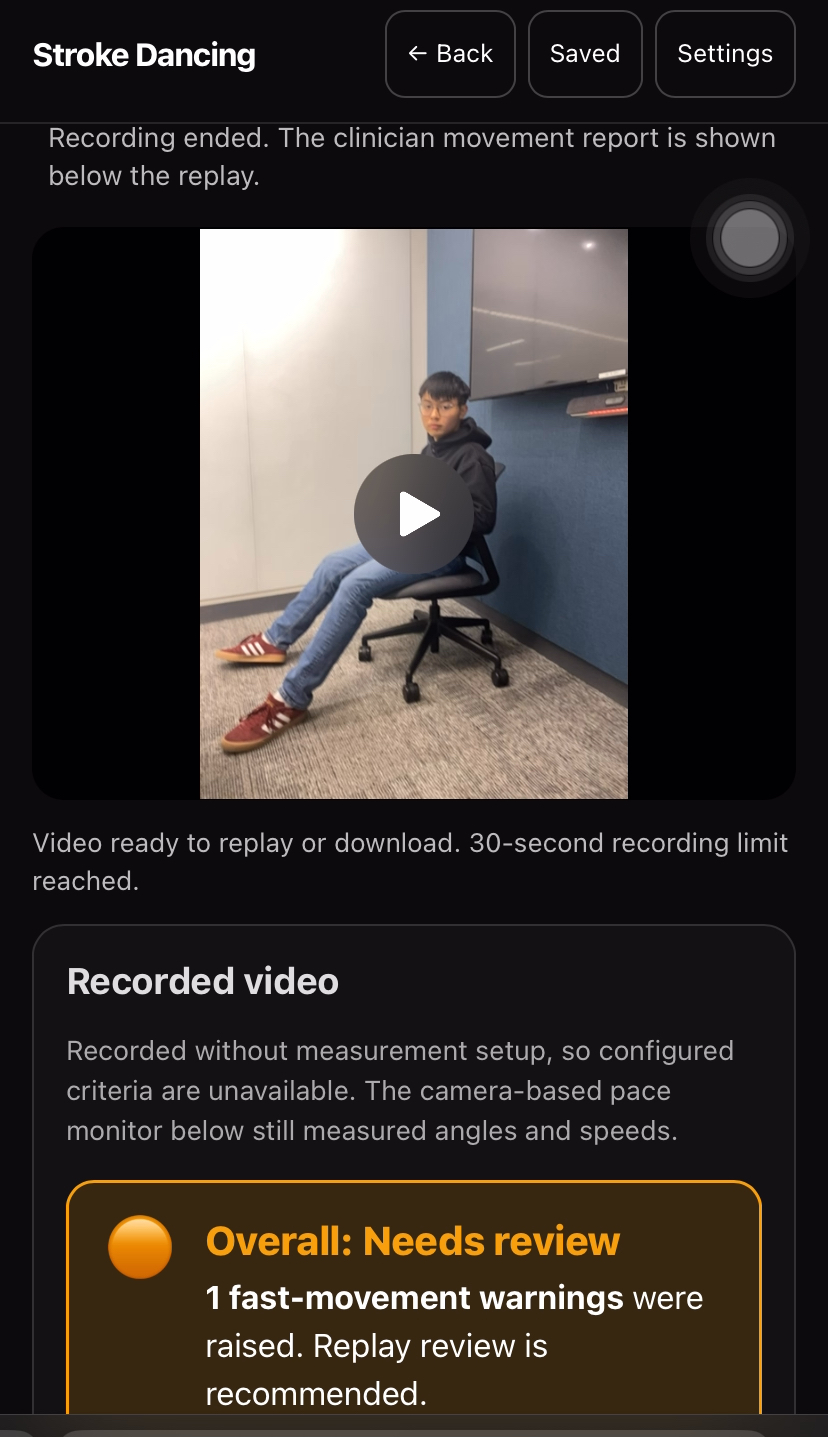
- The clinician report appears right after you stop. The video is at the top so the clinician can watch it, and the report is right below. For the arm raise example, it shows:
- Overall warning: a red banner reads "High strain risk" with 1 fast-movement warning. It also says the camera tracked only 32% of the recording.
- Range of motion: how high the arm went. The upper arm moved from 62.2° to 174.9°, measured from the arm hanging straight down.
- Speed & control: the fastest movement was 881° per second, 5.9× our fast-movement limit (150° per second). The app names the exact moment, "Rep 2 (0:12)", and says movements this fast may increase the risk of muscle soreness or strain.
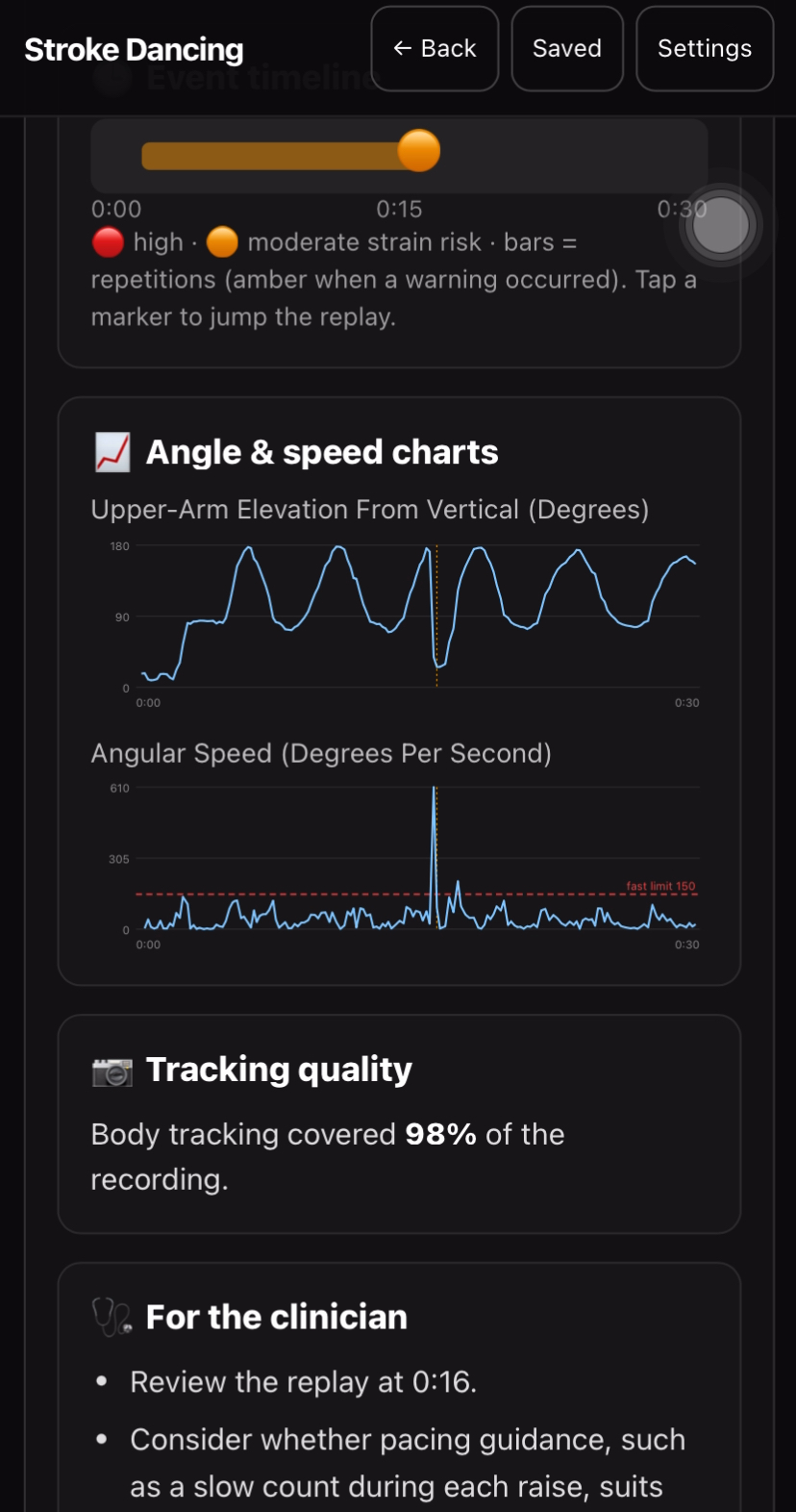
- Timeline: a green bar is a rep with no warning. A red dot at 0:12 is the fast movement (amber means a moderate warning). Tap a dot and the video jumps to that moment.
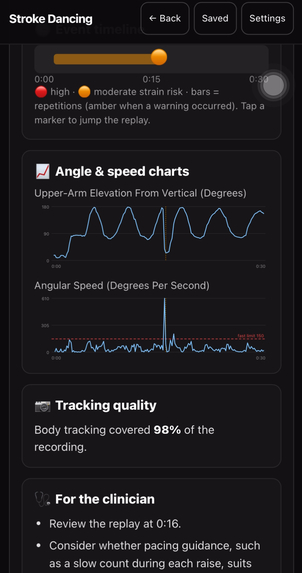
- Charts: arm angle over time, and speed over time with the fast-movement limit drawn as a dashed red line, so you can see the spike cross it.
- Tracking quality: the app says exactly how much of the clip it could see, and warns that fast moves outside that may be missed. It also tells you when tracking stalled (here, for 4 seconds).
- Clinician checklist: four plain next steps. Review the replay at 0:12. Consider whether pacing guidance, like a slow count during each raise, suits this patient. Consider re-recording with the shoulder, elbow, wrist and hip clearly in view. Ask the patient about soreness or discomfort, because a camera cannot detect pain.
This works even when the setup step is skipped. The pace monitor still measures angles and speeds.
- Gemini explains the numbers. The clinician taps Generate Gemini clinician report. Gemini reads the measured angles and speeds and explains in plain English what they mean, using the same math the app used. For example, it can say that 881° per second is 5.9 times the limit. Gemini only receives the finished numbers, never the video or body-tracking data, and it cannot change a single one.
The video stays on the phone. It can be saved in the browser or downloaded.
How we built it
Camera → MediaPipe pose (in the browser) → our math engine → measured facts → voice instructions + instant clinician report → optional Gemini explanation (checked before display)
- Pose: Google's MediaPipe Pose Landmarker runs on-device and turns each frame into body-joint points.
- Math engine: deterministic TypeScript analyzers, one per exercise, plus a pace monitor. They own every number.
- Voice: our math decides when something should be said, like when you return to the starting position. A fixed list of approved short sentences decides what is said, and Gemini text-to-speech reads that sentence aloud. Gemini only ever receives these short sentences, never your video or body data.
- App: HTML + TypeScript + Vite on Vercel, with MediaRecorder for video and IndexedDB for saving on the device.
- Report: the review page is built locally, with no AI. The optional Gemini explanation goes through a protected serverless endpoint, and the API key stays on the server.
The math behind each exercise
All math runs in the camera's own pixel space. Five building blocks:
1. Joint angle from three points (A, B = the joint, C). A straight limb is about 180°, a right angle is 90°.
$$\theta = \arccos\left(\frac{(A-B)\cdot(C-B)}{\lVert A-B\rVert\,\lVert C-B\rVert}\right)$$
2. Height and forward distance, divided by a reference length L that the user marks on screen:
h=y0-y(t)Lf=(W-W0)dL
3. Torso lean relative to resting posture (S = shoulder, H = hip, s = ±1 for forward direction):
$$\alpha = \operatorname{atan2}\big(x_S - x_H,\; -(y_S - y_H)\big), \qquad \Delta = s\,(\alpha - \alpha_0)$$
4. Signed foot angle for ankle pumps, which needs direction (u = knee − ankle, v = foot tip − ankle):
$$\beta = \operatorname{atan2}\big(u_x v_y - u_y v_x,\; u\cdot v\big)$$
5. Angular speed, which powers the fast-movement warning. t is the real capture time of each frame:
i=i-i-1ti-ti-1,ratio=i|i|limit=8811505.9
| Exercise | What we measure |
|---|---|
| Forward reach | Peak elbow angle (1), forward wrist distance (2), torso lean (3), time to target |
| Elbow bend | Smallest elbow angle, bend = resting angle − smallest angle, torso lean, bend/return time |
| Forward arm raise | Upper-arm elevation from vertical (1), wrist height (2), torso lean, speed (5) |
| Knee extension | Knee angle hip–knee–ankle (1), extension = largest − resting angle, times |
| Single-leg lift | Knee height (2), torso lean, lift/return time |
| Ankle pumps | Signed foot angle (4), movement in the assigned direction, times |
Why it's built this way:
- Why divide by L? Things look bigger when they're closer to the camera. Dividing by a fixed length on the same image cancels zoom.
- Why "reference lengths," not centimeters? One camera can't see depth, so we report only what we can honestly measure.
- Why is height y0-y? Image y points down, so "up" means y gets smaller.
- Why real time, not frame count? Phones drop frames. Speed computed from frame counts would be wrong, so we divide by the actual seconds between frames, and never across a tracking gap.
Why the math matters: keeping Gemini honest
If an AI tells a stroke survivor "your arm reached 158°" when the real number was 142°, or hints at a diagnosis nobody made, that's a real risk. It also breaks trust, and a patient who stops trusting the app stops using it. So the AI is never the measurer, and it never makes up what to say.
- The report you see right after Stop uses zero AI. It's pure math.
- Gemini's voice can only read approved sentences. It never says "reach farther," never gives medical advice, and never comments on pain.
- Gemini's explanation is off until the clinician turns it on. It never sees video or body-tracking data, only finished numbers.
- That explanation must link every statement to a measured fact. A validator rejects altered numbers, invented diagnoses, treatment advice, and hidden instructions. If anything fails, a plain template report is shown instead.
- Stop, measurements, replay and saving work with no network and no API key.
Challenges we ran into
- Speed amplifies noise. Speed is a rate of change, so small pose errors can look like big spikes. We compute it from real timestamps, skip tracking gaps, show tracking coverage right next to every warning, and link every warning to the replay so a human can check it.
- Tracking drops. In our arm raise example, the pose tracker stalled for 4 seconds and covered only 32% of the clip. Instead of hiding that, the app says so, keeps the video, and warns that fast movements may be under-counted. Missing data stays "unknown," never zero.
- Voice must never be late or wrong. A slow audio clip could tell you to do something from the step before. So every cue expires, repeats are blocked, and pressing Stop cancels any audio right away.
- Mirrored preview, real left and right. A selfie view flips the image, but your left arm is still your left arm. We run the math on unmirrored pixels and transform taps and overlays to match.
- Honest rep counting. Hands jitter at rest and people hold at the top. Our state machine counts each movement exactly once.
- Keeping Gemini on a leash. Google's standard API terms restrict clinical use, so real symptoms stay on the device and the demo uses fictional context.
- Ankle pumps are tiny. The movement is small and shoes get in the way, so it needs a close side view.
Accomplishments that we're proud of
- It works end to end on a phone. In our arm raise example, it separated a slow raise from a fast one (881°/s, 5.9× the limit) and gave the clinician the exact second to review.
- Gemini does two jobs, safely. It talks you through the exercise and explains the results, but it can only read approved sentences and it can't change a number.
- A review page in seconds, with no AI. Replay, range of motion, speed, a tap-to-jump timeline, charts and a clinician checklist.
- It's honest about what it doesn't know. It states tracking coverage, says when tracking stalled, and reminds the clinician that a camera can't detect pain.
- Six seated exercises on one shared pipeline, in a phone browser, with no install or account.
What we learned
- AI is a great explainer but a risky measurer. Let math measure and let AI explain.
- A voice helps only when it says little, says it at the right time, and says only what we've approved.
- Small details decide trust: mirroring, "unknown ≠ zero," and real time vs. frame counts.
- A warning is only useful if it comes with its evidence: the replay timestamp and the tracking coverage.
- Doing the work on the phone makes privacy much simpler.
What's next for SCOOT
SCOOT is an experimental demo today. The most important next step is to put it in front of real clinicians, such as physical and occupational therapists, and ask them to try it and tell us if it's right.
- Clinician review sessions. We'll show clinicians the replay and report side by side and ask: Do the fast-movement warnings match what you see in the video? Is anything missing or wrong?
- Check our numbers against theirs. We'll compare the angles SCOOT measures with what a clinician measures for the same movement.
- Let clinicians set the limits and the wording. Today's 150° per second fast-movement limit is our own experimental setting, and warnings like "High strain risk" are strong words. Clinicians will tune the limit for each exercise and patient, and decide how warnings should be worded.
- A small supervised pilot. Once clinicians sign off, we'll test with consenting patients under proper clinical approval. We'll measure whether SCOOT helps people do more of their home exercises, since only 28% did in the study we cited.
Then we'll make it ready for more people:
- Test on more iPhones and Android phones, in different rooms and lighting, including the voice instructions in noisy rooms.
- Run a close-up test for ankle pumps, the hardest exercise to track.
- Compare sessions over time for the same exercise.
- Add an optional link so a therapist can open a patient's clip, and use real patient context only after a proper agreement with the AI provider.
Experimental demo. Not a medical device and not clinically validated. For supervised use only.
Built with: TypeScript, HTML, Vite, MediaPipe Pose Landmarker, Gemini API (text + text-to-speech), Vercel, IndexedDB, MediaRecorder
Sources: CDC Stroke Facts · WSO Global Stroke Fact Sheet 2025 · Cochrane: Telerehabilitation for stroke · BMJ Open: home-exercise adherence
Built With
- gemini
- html
- java
- mediapipe
- typescript
- vite

Log in or sign up for Devpost to join the conversation.