Built for Hacklanta, Social Good track. Live at strobeguardlive.us (Chrome on desktop).
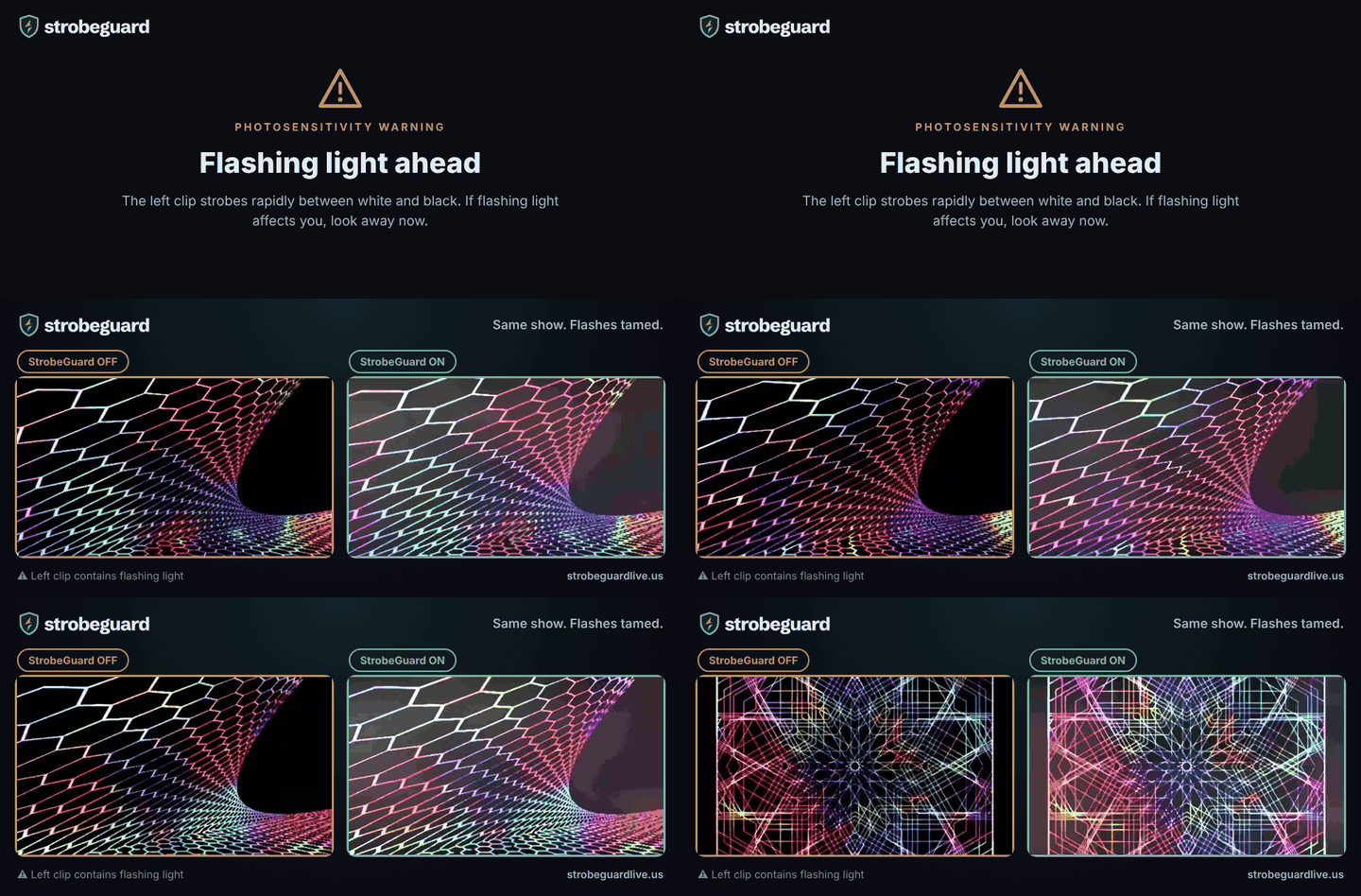
Photosensitivity warning: the animation below includes a flashing clip on its left side. It opens with a warning.
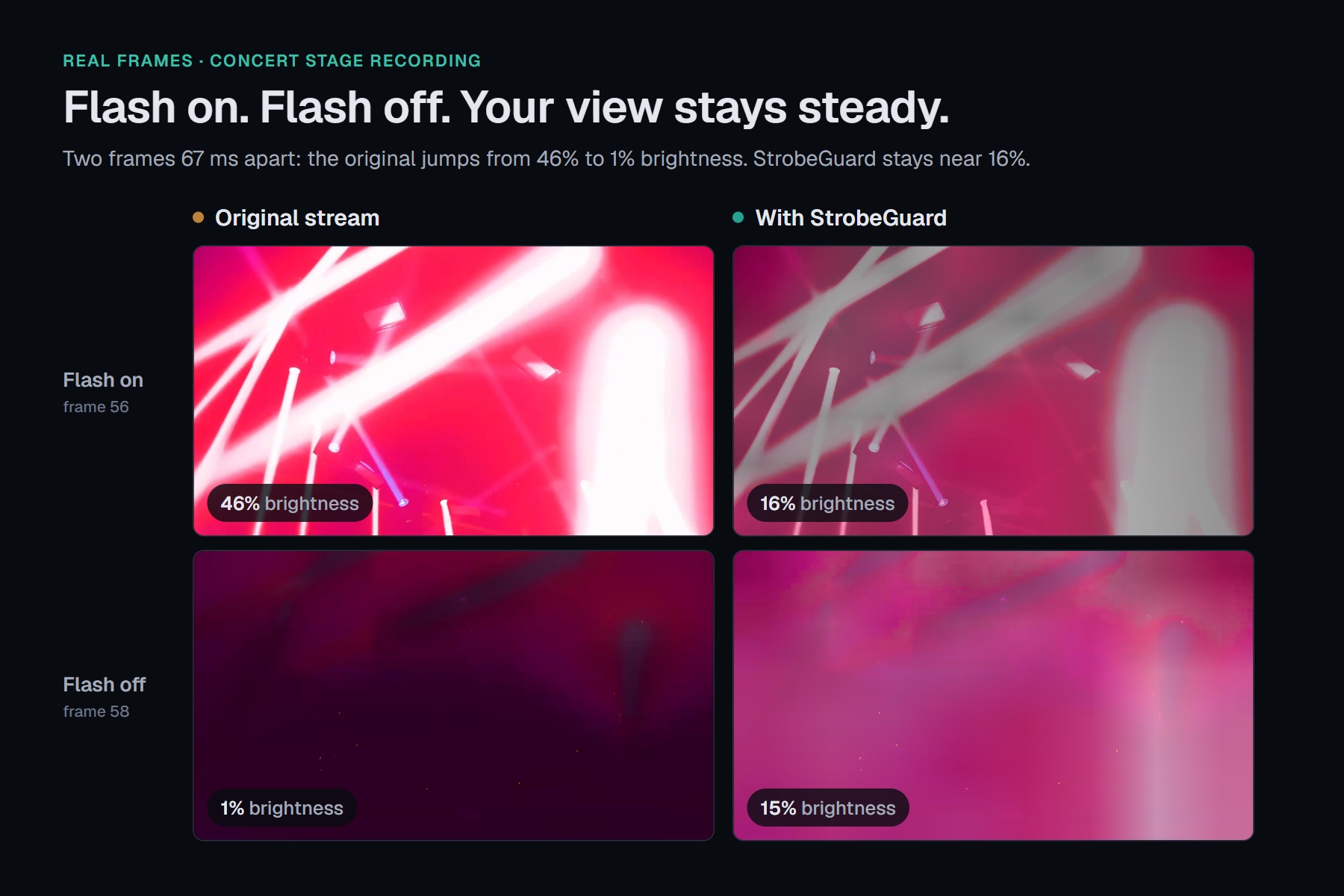
Side-by-side comparison on a 10 Hz flashing screen. With StrobeGuard on (right), the flashing is tamed while the show keeps its brilliance and color.
StrobeGuard is a web app for people with photosensitive epilepsy and others who are sensitive to flashing light. It sits between you and a livestream and shows you a filtered version about half a second behind. In that half second it sees the strobe coming and softens it first. Think of it as noise-cancelling headphones for strobe lights.
Reduces flash risk; not a medical device.
What it does · Inspiration · How we built it · Challenges we ran into · Accomplishments that we're proud of · What we learned · What's next for StrobeGuard
What it does
StrobeGuard lets more people watch concert livestreams. Open the site, share the tab that's playing the stream, and watch the filtered view instead. There's nothing to install, no account and no server.
| Feature | What you get |
|---|---|
| Start in seconds | Open strobeguardlive.us, read the warning, click Share a tab and pick the stream. The filtered view fills the player. |
| Only the flashing parts change | An 8×6 grid watches the screen. A strobing corner is calmed and the rest of the picture is left exactly as it was. Calm streams come out pixel-identical. |
| Camera flashes and fades are left alone | One flash, or a slow fade, isn't a dangerous pattern, so StrobeGuard doesn't touch it. |
| Red gets extra care | Saturated red flashing is higher risk, so it's tracked separately and settled to a steady hue. |
| Sound stays in sync | Audio is delayed by the same 467 ms as the video, with a bass cut and a limiter for sudden loud spikes. |
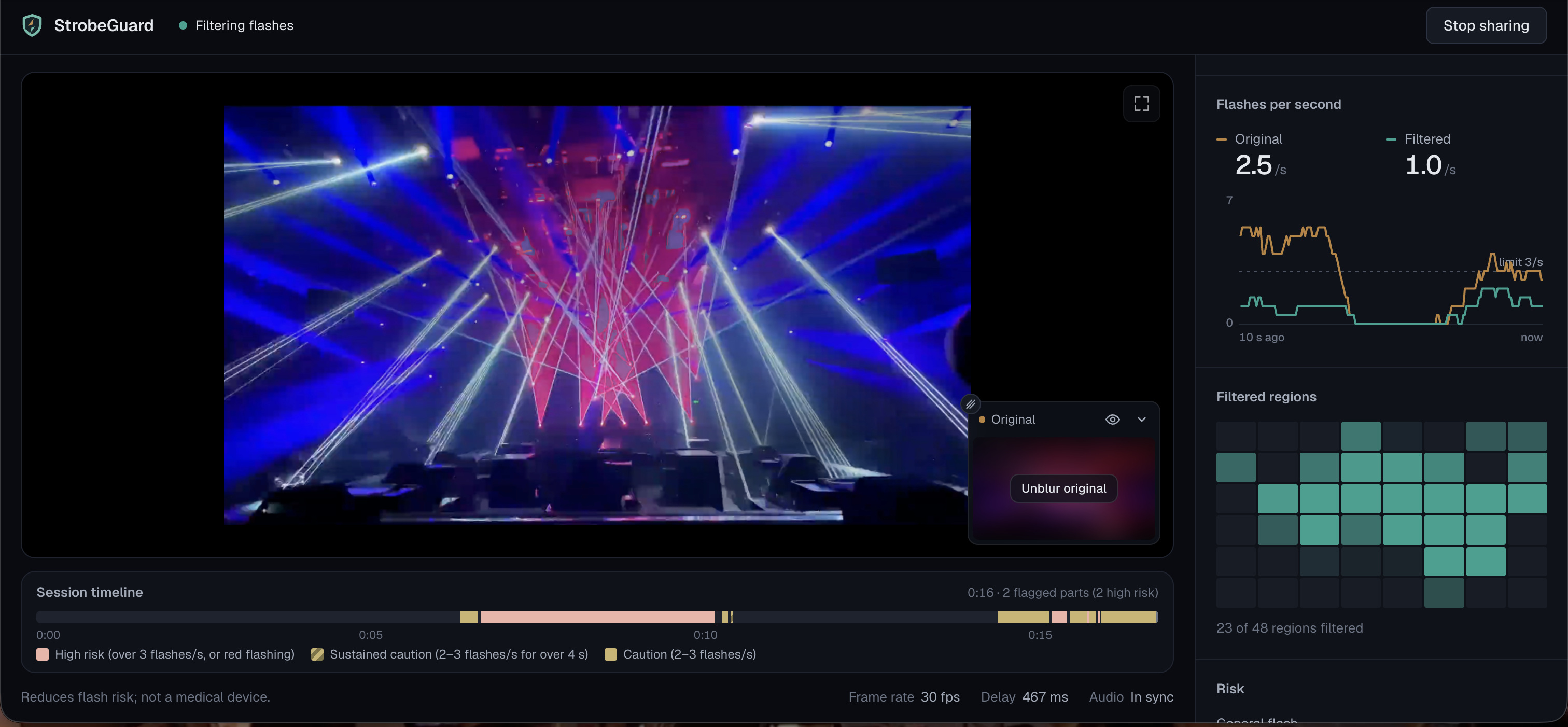
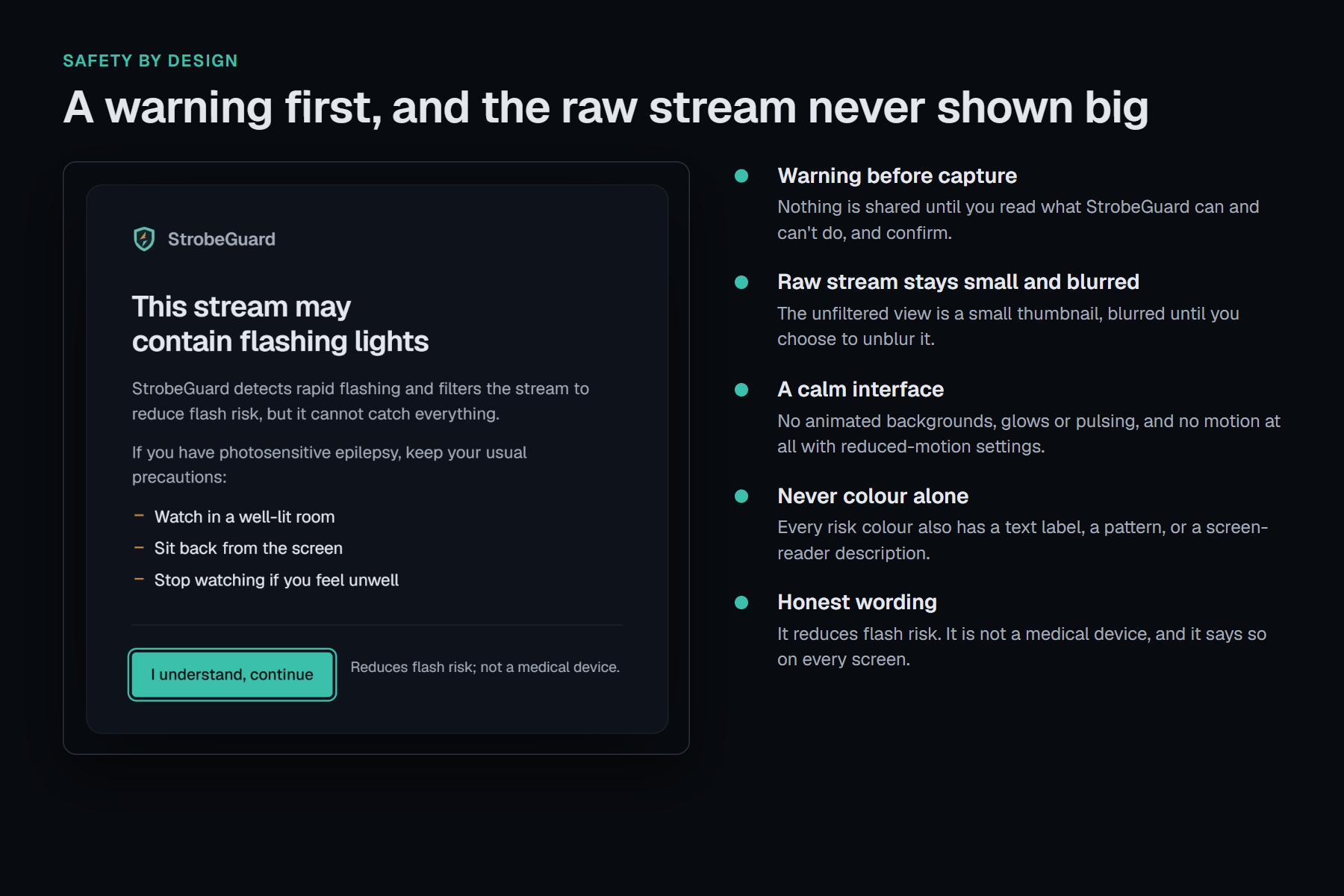
| The raw stream is never shown big | The unfiltered view is a small thumbnail, blurred until you choose to unblur it. |
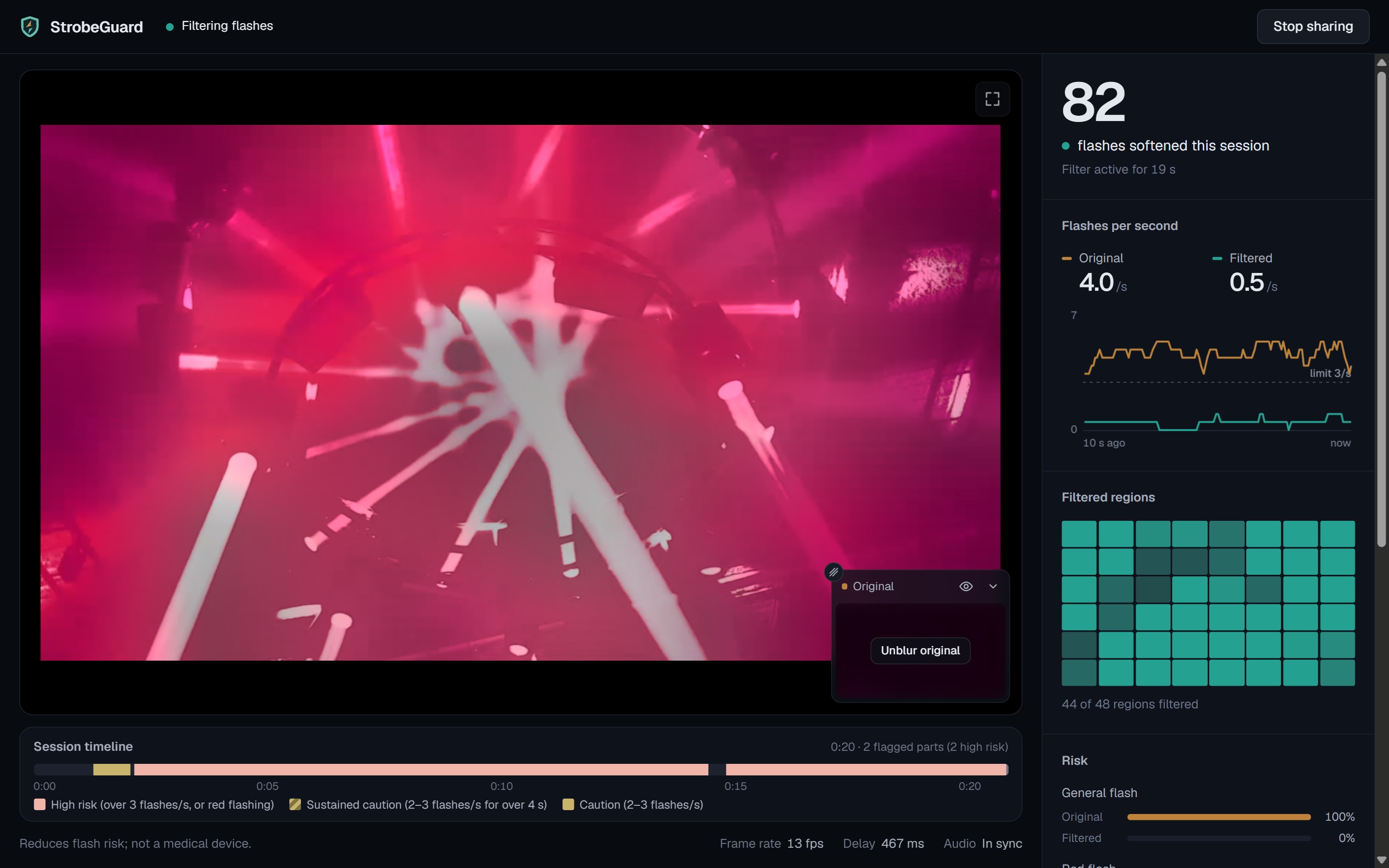
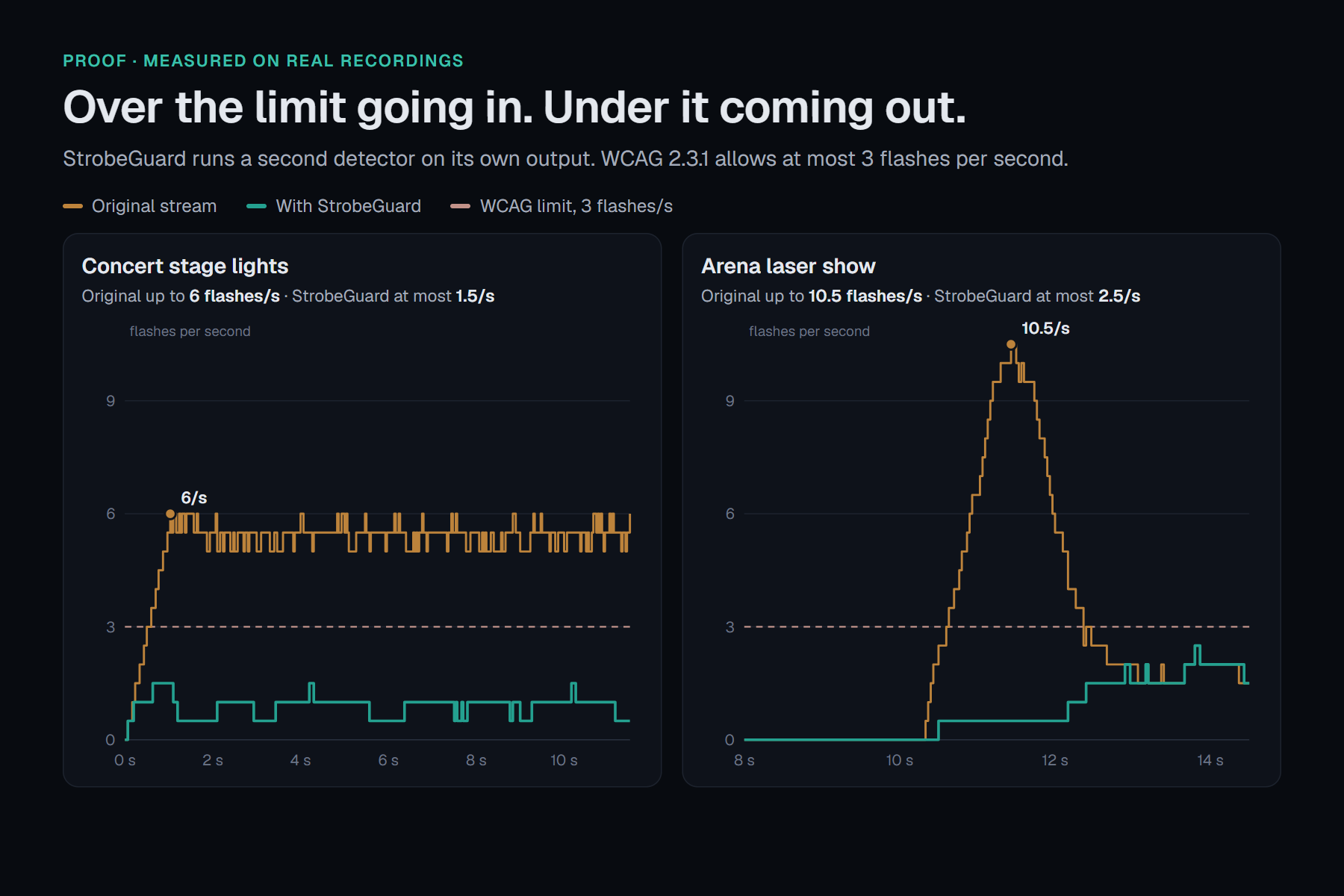
| Live proof | A second detector measures the filtered output. Two graphs show original vs filtered flashes per second against the 3 per second limit. |
| Session timeline | Every risky stretch of the whole show is marked, so you can see what was caught during a two-hour set. |
| Your controls | Brightness, saturation, bass and volume, plus a Maximum protection switch that calms everything. |
| Private by design | Everything runs in your browser tab. Nothing is uploaded. |
What this means for fans
- A fan with photosensitive epilepsy can watch a festival livestream with their friends, instead of skipping it.
- Someone who gets migraines from strobes can keep the show on and still see the stage, the lasers and the artist.
- A parent can let their kid watch a live concert with less risk, and check afterwards when the risky moments happened.
Inspiration
The situation. We're a team of music lovers and avid concert-goers. Modern shows are incredible: strobes, lasers, LED walls, and stage production that gets bigger every tour. Livestreams now bring those shows to people who can't be in the room.
The problem. Much of that spectacle is built on rapid flashing, and for people with photosensitive epilepsy, rapid flashing can trigger seizures. Recorded video can be checked before it's released. Live video can't. A strobe cue in the middle of a set arrives with no warning, and the viewer has no chance to look away first.
What it costs fans today.
- The safest option is to skip the show entirely.
- Otherwise it's watching with the brightness turned down, a hand over your eyes, or a friend calling out when it's safe to look.
- A "this stream contains flashing lights" warning, when there is one, only tells you not to watch. It doesn't help you watch.
We kept noticing how much of the modern concert experience leaves these fans out. So we built an inclusive way back in: a viewer that keeps the music, the stage and the energy, and takes the dangerous flashing out.
How we built it
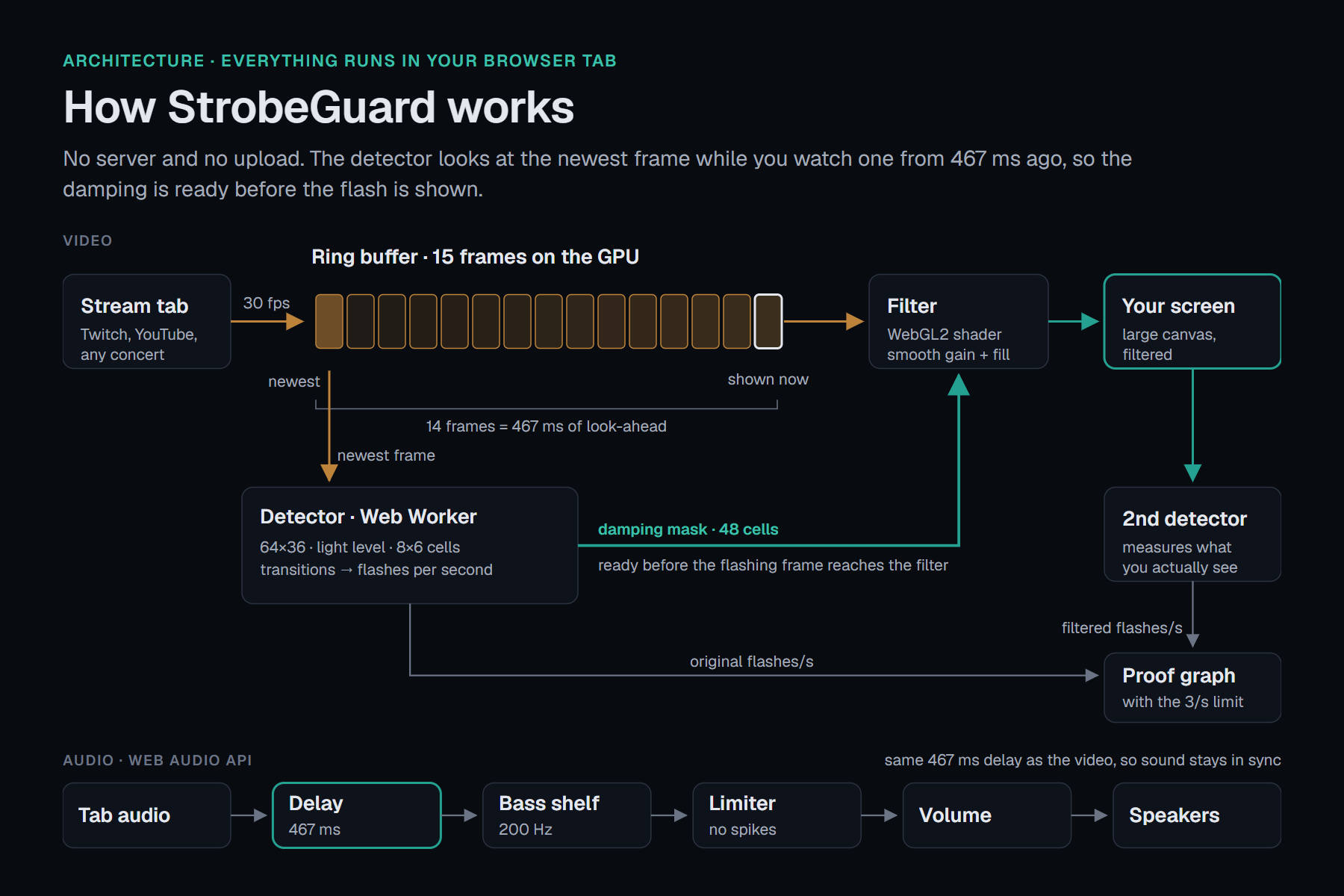
StrobeGuard has five parts. Each one is its own module with its own tests. Three of us built them in parallel on three branches, against interfaces we froze on day one.
 Chrome tab (Twitch, YouTube, concert)
        │  getDisplayMedia, 30 fps + tab audio
        ▼
 hidden <video> ──► 15-frame ring buffer (WebGL textures)
        │                 │ newest frame          │ frame from 467 ms ago
        │                 ▼                       ▼
        │        Web Worker detector ──mask──► WebGL2 filter ──► large <canvas>
        │                                                            │
        │                                     second detector ◄──────┘ ──► proof graphs
        ▼
 tab audio ──► 467 ms delay ──► 200 Hz low-shelf ──► limiter ──► volume ──► speakers
1. Capture. getDisplayMedia feeds a hidden video. Audio is captured without voice processing, and Chrome is asked to silence the original tab, so you only hear our delayed copy.
2. Look-ahead buffer. A ring of 15 frames lives on the GPU as textures. The newest frame is analysed, and the frame you see is the one captured $14/30 \approx 467$ ms earlier. That gap is the core idea: the filter sees each flash before you do.
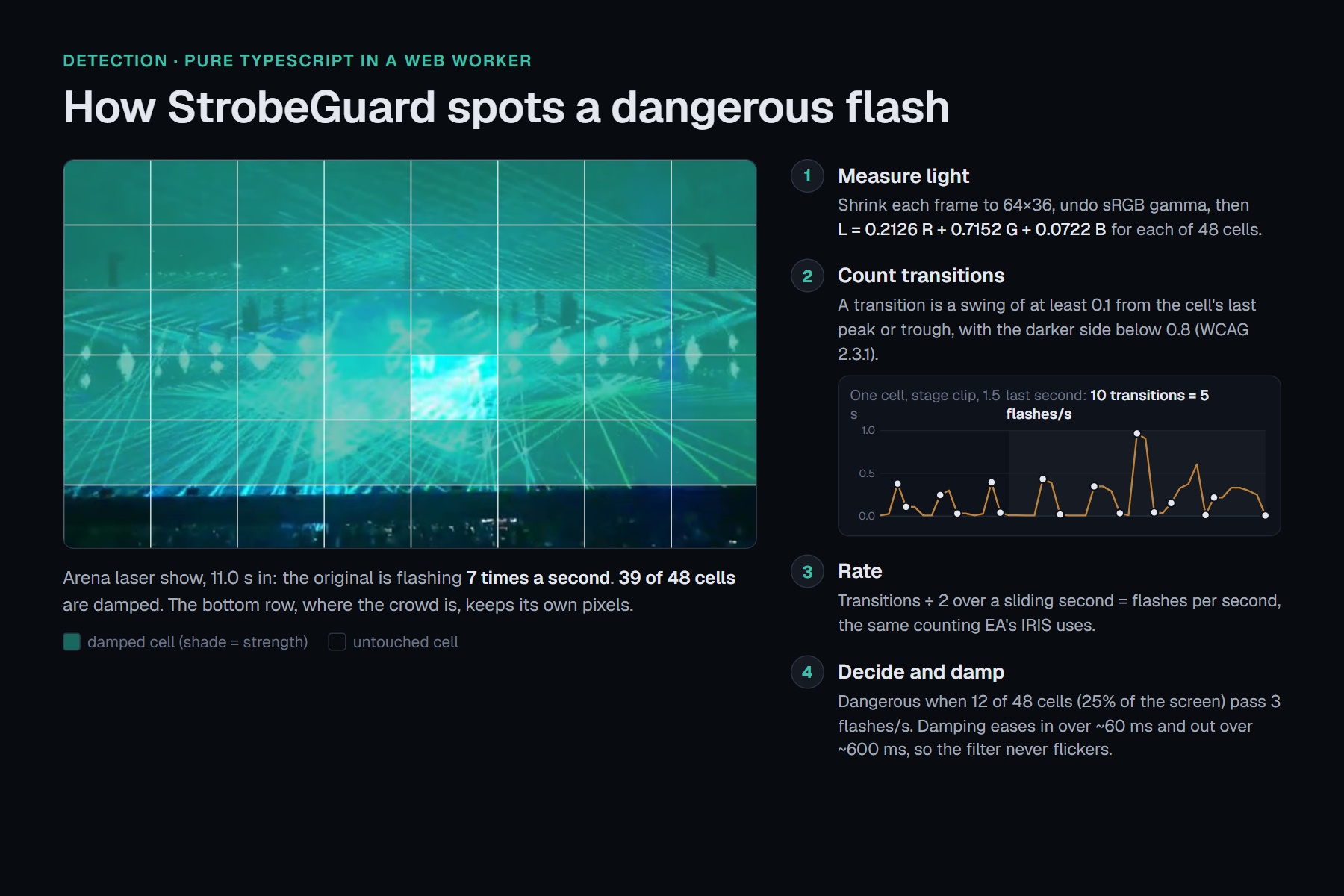
3. Detector (Web Worker). Each frame is shrunk to 64×36, converted to linear light, then to relative luminance:
$$L = 0.2126\,R + 0.7152\,G + 0.0722\,B$$
The screen is split into 48 cells. A transition is a change of at least $0.1$ from the cell's last peak or trough, where the darker side is below $0.8$ (the WCAG 2.3.1 definition). Rates count half-flashes in a sliding one-second window, the way EA's IRIS tool does:
$$r_{\text{cell}} = \frac{\text{transitions in the last 1 s}}{2}$$
A frame is dangerous when cells covering 25% of the screen pass 3 flashes per second. With 48 cells, that's the 12th-highest cell rate: $r_{(12)} > 3$. Saturated red ($R/(R+G+B) \ge 0.8$) is tracked separately. All of this is pure TypeScript, unit-tested with plain arrays.
4. Filter (WebGL2). Two shader passes run on a coarse 8×6 brightness field. Pass 1 averages each region over the displayed frame and the next four buffered frames (weights 5, 4, 3, 2, 1), so the filter starts pulling before a flash is on screen. Pass 2 scales each pixel by a smooth gain and fills in missing light, so detail, hue and edges always come from the current frame. With no damping, the output is bit-exact passthrough. Damping eases in fast and out slowly, so the filter never flickers on its own:
$$m \leftarrow m + (m_{\text{target}} - m)\left(1 - e^{-\Delta t/\tau}\right), \qquad \tau_{\text{in}} = 60\ \text{ms},\quad \tau_{\text{out}} = 600\ \text{ms}$$
5. Audio and proof. The Web Audio chain delays sound by the same 467 ms. A second detector reads the output canvas and draws the live original-vs-filtered graph.
Tech stack
| Layer | Technology |
|---|---|
| App and UI | React, TypeScript (strict), Vite, plain CSS |
| Capture | getDisplayMedia (tab video and tab audio) |
| Frame buffer and filter | WebGL2: a ring buffer of textures, two GLSL passes |
| Detection | Web Worker, OffscreenCanvas, pure TypeScript |
| Audio | Web Audio API: delay, low-shelf filter, compressor, gain |
| Hosting | Vercel, at strobeguardlive.us |
| Testing | node --test (77 unit tests), a real-Chrome end-to-end flash test, a frame-by-frame quality grader |
| Reference | EA's IRIS photosensitivity analyser, to check our detector |
Challenges we ran into
- Timing bugs unit tests couldn't see. A safe 2 Hz flash measured 3–4 flashes/s at the output, because uneven animation ticks replayed frames faster than they were captured. Then an adaptive delay jumped after a stall and inserted a flash in 1 of 14 runs. We fixed both with a fixed 467 ms capture-time delay, and put the audio on the same constant.
- A quality fix that broke safety. A change meant to stop stage lighting going grey let a 5 Hz black/white strobe straight through (5 flashes/s in, 5 out). We reverted it within hours and made a rule: no filter change counts unless quality improves and every clip still passes the safety check.
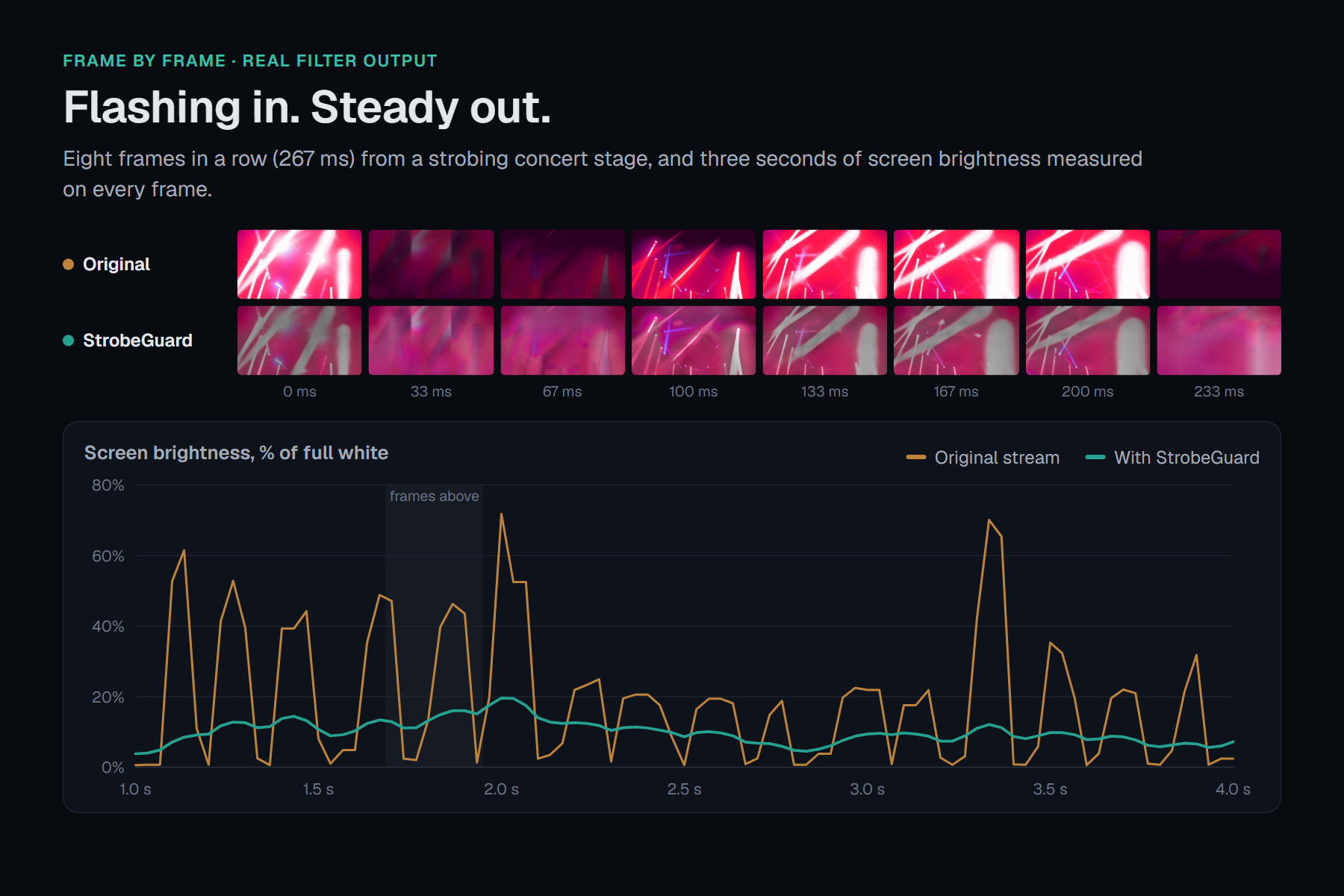
Grey haze and ghost trails. Smoothing every pixel over time can't tell motion from flicker. It washed concerts out to grey and left ghost beams behind moving lights. Rebuilding the filter around a coarse brightness field fixed both:
Static tabs send no frames. A paused tab left the screen black until we added our own 30 fps frame clock.
Hearing the show twice. The original tab kept playing next to our delayed copy. We now ask Chrome to silence it, and warn you if it can't.
An upside-down bug. History textures were stored flipped, so damped areas borrowed brightness from the mirror-image spot. Our test images looked the same top to bottom, so no test caught it.
Browser limits. A 5K screen needed a resolution cap to avoid running out of GPU memory, WebGL contexts can be lost mid-show, and DRM streams can't be captured at all.
Accomplishments that we're proud of
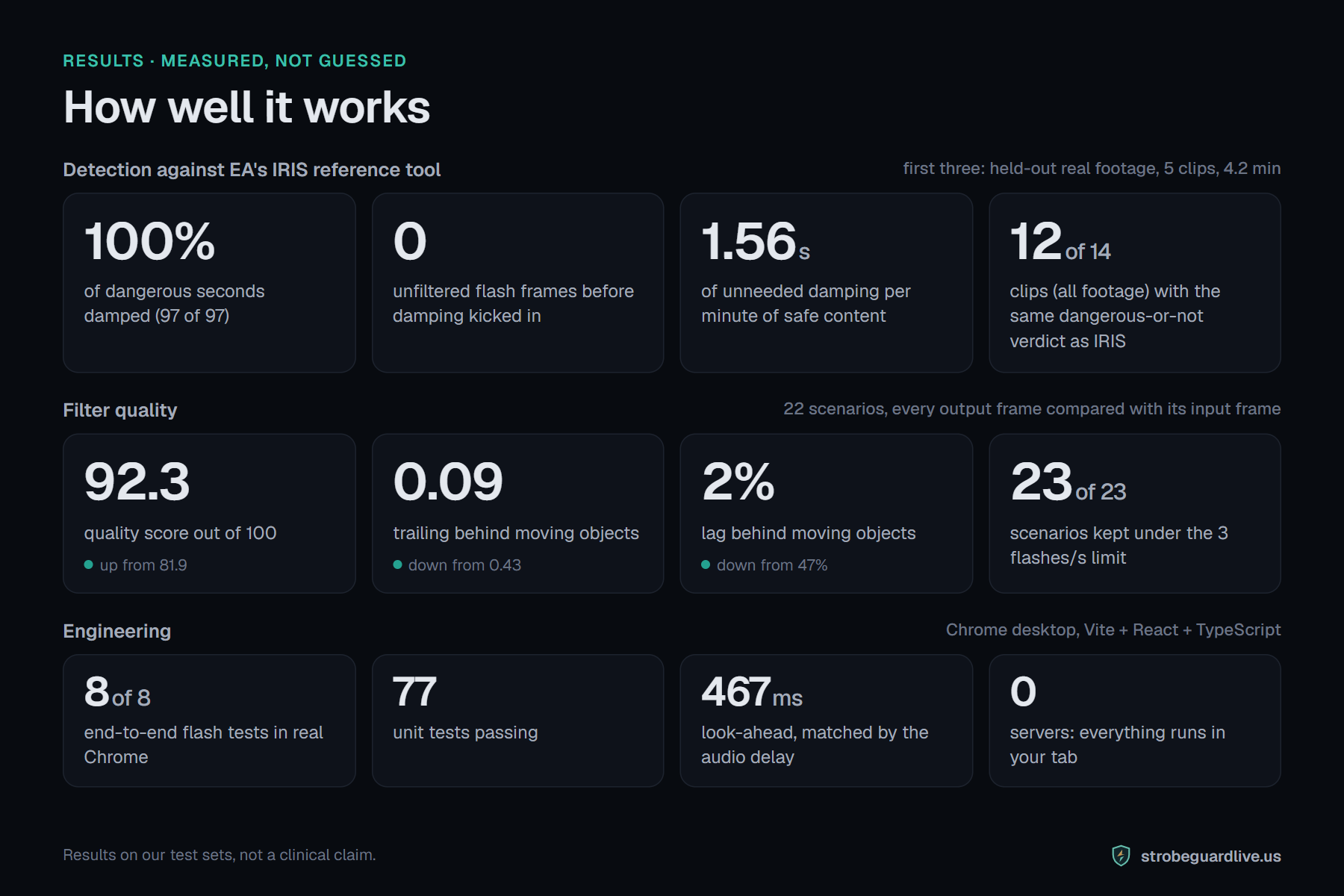
| Measure | Result |
|---|---|
| IRIS-flagged dangerous seconds damped (held-out real footage) | 100% (97 of 97) |
| Unfiltered flash frames before damping engaged (held-out) | 0 |
| Unneeded damping on safe content (held-out) | 1.56 s per minute |
| Same dangerous-or-not verdict as IRIS (all 14 clips) | 12 of 14 |
| Filter quality score, 22 scenarios | 81.9 → 92.3 out of 100 |
| Scenarios kept under 3 flashes/s | 23 of 23 |
| Trailing behind moving objects | 0.43 → 0.09 |
| Lag behind moving objects | 47% → 2% |
| End-to-end flash tests in real Chrome | 8 of 8 |
- A full real-time pipeline (capture, look-ahead, detection, GPU filter, synced audio, proof) running in a browser tab with no backend.
- A tool that shows its work: live original-vs-filtered graphs instead of asking you to trust it.
- A measurement setup (grader, end-to-end test, IRIS comparison) that let us improve the picture without trading away safety.
Results on our test sets, not a clinical claim.
What we learned
- Measure the thing you claim. Our worst bugs only showed up on real tab capture, never in unit tests.
- Safety needs a gate, not an opinion. A hard pass/fail check let us move fast on quality, and it caught the one change that broke safety.
- Standards leave room for interpretation. "Flash" can be counted whole or half, per cell or per frame. Comparing against IRIS showed us where we're stricter, and why.
- Delay is a feature. Half a second of look-ahead is what makes it possible to calm a flash before anyone sees it.
- Accessibility is a design constraint, not a coat of paint. The warning screen, the blurred original, the calm interface and the honest wording mattered as much as the shader.
What's next for StrobeGuard
- Work with the community. Test with people who have photosensitive epilepsy, and with clinicians, to tune thresholds, comfort and wording.
- More shows. Our held-out set has two dangerous events. We want hours of real concert footage, captured live.
- Less delay. Shrink the look-ahead without bringing back the stall bug.
- Finer detection. Catch small, off-grid flashes that an 8×6 grid over-counts or misses.
- Meet fans where they watch. OBS Virtual Camera input, then a browser extension, then conversations with streaming platforms and artists about building this into the player.
Every fan deserves the show. With StrobeGuard, more of them can be there for it.


Log in or sign up for Devpost to join the conversation.