StripeCount
Inspiration
Parking-lot striping estimators often complete one job across several disconnected tools. They locate a property, capture an aerial image, count every marking, calculate a price in a spreadsheet, write a scope of work, and assemble a proposal. That process is slow, repetitive, and easy to get wrong—especially when faded markings, unusual layouts, or last-minute quantity corrections are involved.
StripeCount was inspired by the opportunity to turn that fragmented process into one accountable workspace. The goal was not to create a computer-vision demo that simply draws boxes. We wanted to build a practical estimating agent that moves from a real map selection to corrected quantities, transparent pricing, field-verification questions, human approval, and a professional customer deliverable.
The central design principle became:
Vision observes, deterministic tools calculate, GPT-5.6 drafts, and the estimator approves.
What it does
StripeCount converts a user-selected parking lot into a contractor-ready proposal:
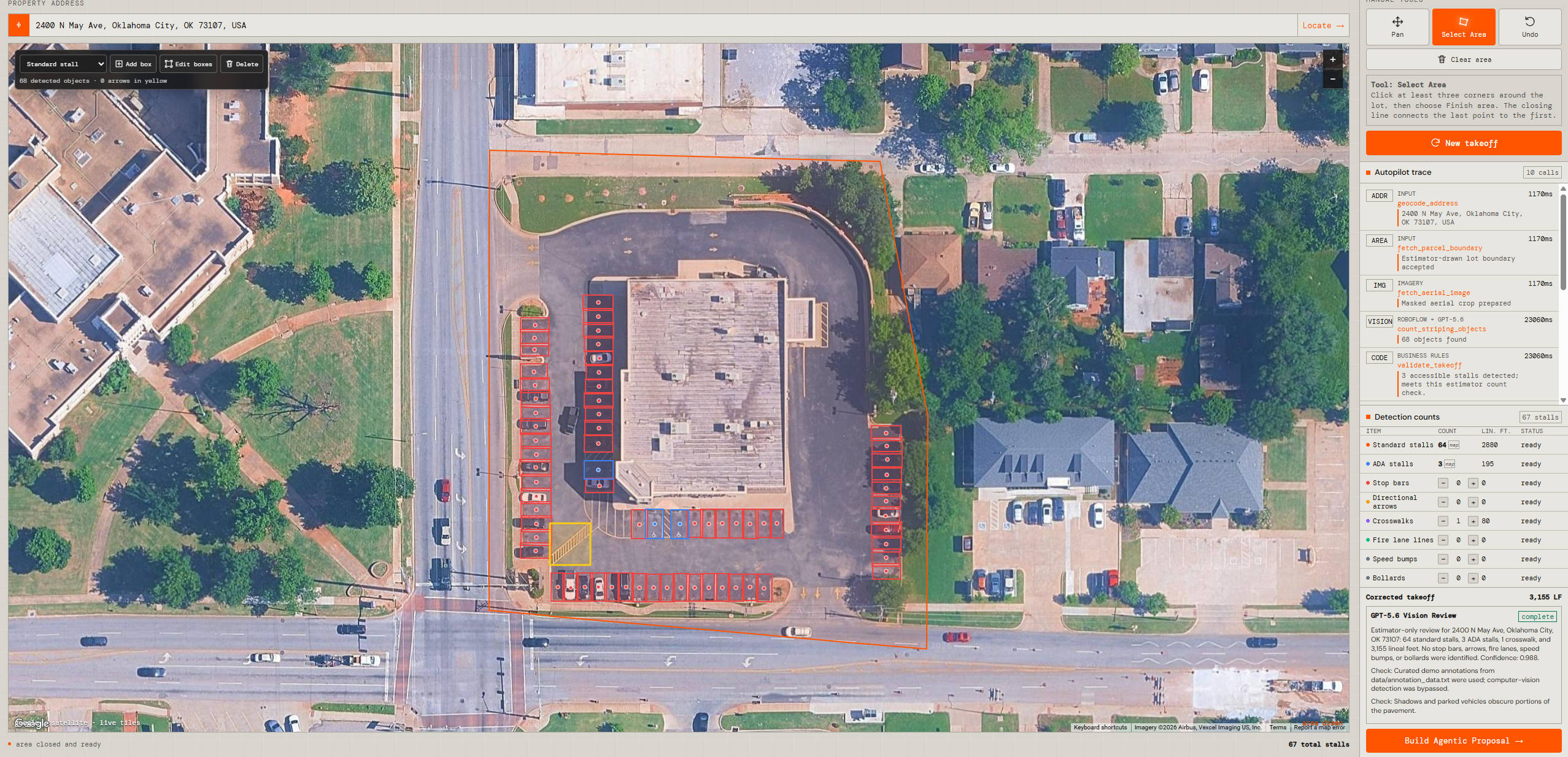
- The estimator searches for any property and navigates live Google satellite imagery with familiar pan and zoom controls.
- They draw and close a polygon around only the lot they want analyzed.
- StripeCount captures a high-resolution aerial at the exact zoom selected by the user and masks the image to the polygon.
- Roboflow detects standard and ADA stalls, while GPT-5.6 identifies arrows, stop bars, crosswalks, fire lanes, speed bumps, and bollards.
- The application merges the detections and deterministically calculates quantities, estimated lineal feet, confidence warnings, and an ADA estimator check.
- The estimator can add, move, resize, reclassify, or delete detection boxes without losing the map.
- The proposal workspace collects customer/job details, project type, paint system, coats, unit prices, labor, mobilization, equipment, traffic control, markup, and tax.
- Deterministic pricing tools calculate the complete quote.
- The GPT-5.6 Proposal Agent drafts the scope of work, assumptions, exclusions, risks, and field-verification questions from the verified takeoff and quote.
- A named estimator must approve the result before StripeCount generates the annotated proposal PDF.
The product deliberately presents an ADA estimator check, not a legal or accessibility certification. Final quantities, dimensions, conditions, requirements, and pricing remain subject to professional field verification.
How we built it
Architecture
StripeCount uses a two-process architecture packaged into one Docker service. A public Next.js application owns the product experience and orchestration, while a private FastAPI worker owns vision-provider coordination and PDF rendering.
flowchart LR
    subgraph Browser[Estimator browser]
        UI[React workspace]
        MAP[Google Maps editor]
        BOX[Polygon and box corrections]
    end

    subgraph Render[Single Render Docker service]
        subgraph Next[Next.js 14 — public port]
            SSE[Streaming takeoff orchestrator]
            REVIEW[Review and approval routes]
            PRICE[Deterministic pricing tools]
            AGENT[GPT-5.6 Proposal Agent]
            STORE[Bounded active-session store]
            PDFPROXY[Streaming PDF proxy]
        end

        subgraph Worker[FastAPI — private loopback]
            VISION[Hybrid vision pipeline]
            REPORT[ReportLab PDF generator]
        end
    end

    STATIC[Google Static Maps]
    RF[Roboflow]
    OAI[OpenAI Responses API<br/>GPT-5.6]
    DB[(Optional PostgreSQL + PostGIS)]

    UI --> MAP
    UI --> BOX
    UI --> SSE
    SSE --> STATIC
    SSE --> VISION
    VISION --> RF
    VISION --> OAI
    SSE --> STORE
    SSE -. optional persistence .-> DB
    UI --> AGENT
    AGENT --> PRICE
    AGENT --> OAI
    AGENT --> STORE
    UI --> REVIEW
    REVIEW --> STORE
    UI --> PDFPROXY
    PDFPROXY --> REPORT
Only Next.js is exposed publicly. FastAPI binds to 127.0.0.1 inside the container, so vision and PDF endpoints are not directly exposed to the internet. This kept deployment simple enough for a single Render service while maintaining a clear boundary between web orchestration and Python image/report processing.
End-to-end data flow
flowchart TD
    A[Address + map viewport] --> B[Estimator polygon]
    B --> C[High-resolution masked crop]
    C --> D1[Roboflow: standard + ADA stalls]
    C --> D2[GPT-5.6: non-stall markings]
    D1 --> E[Merge + IoU deduplication]
    D2 --> E
    E --> F[Counts + linear feet + ADA estimator check]
    F --> G[Human box correction]
    G --> H[Commercial inputs]
    H --> I[Deterministic quote]
    I --> J[GPT-5.6 proposal narrative]
    J --> K[Named estimator approval]
    K --> L[Annotated proposal PDF]
The browser converts geographic positions into the same world-pixel coordinate system used by the requested Static Maps zoom. This ensures that the analysis crop, report crop, polygon, and detection boxes remain aligned. The map stays mounted during detection so the estimator never loses spatial context.
Responsibility boundaries
| Component | Owns | Cannot own |
|---|---|---|
| Google Maps | Address navigation, satellite viewport, user-selected zoom | Detection or pricing |
| Roboflow | Standard-stall and ADA-stall detection | Proposal language or final approval |
| GPT-5.6 vision | Non-stall markings through strict structured output | Monetary calculations |
| Deterministic TypeScript tools | Counts, coats, line items, subtotal, markup, tax, final price | Invented site facts |
| GPT-5.6 Proposal Agent | Scope, assumptions, exclusions, risks, field questions | Quantity or price mutation |
| Estimator | Corrections, commercial inputs, risk resolution, approval | Delegating professional responsibility to AI |
How GPT-5.6 is used
GPT-5.6 has three separate, schema-constrained roles:
1. Long-tail visual detection
The vision worker submits the polygon-masked aerial through the OpenAI Responses API with high image detail. GPT-5.6 returns only supported non-stall classes:
- directional arrows
- stop bars
- crosswalks
- fire-lane markings
- speed-bump markings
- bollards
Roboflow remains responsible for standard and ADA stalls. This division lets a specialized detector handle repetitive stall geometry while GPT-5.6 handles the more visually diverse long tail.
2. Takeoff review checkpoint
After deterministic validation, GPT-5.6 produces a concise review summary, risks, and required estimator actions. Its response is structured, and it cannot mark the job export-ready. That authority remains behind the human-review endpoint.
3. Agentic proposal drafting
The Proposal Agent first calls application-owned tools to:
- inspect the estimator-corrected takeoff;
- calculate the verified quote;
- check commercial readiness;
- send verified tool outputs to GPT-5.6;
- require named-estimator approval.
GPT-5.6 receives corrected quantities, confidence information, image notes, the ADA estimator check, customer/job details, commercial settings, deterministic totals, and readiness warnings. It returns a strict JSON object containing only the commercial narrative. The agent trace makes these steps visible in the UI instead of hiding them behind one loading state.
If the proposal request is unavailable, StripeCount creates a clearly labeled deterministic fallback draft. It never silently pretends that fallback text came from GPT-5.6.
Deterministic pricing
GPT-5.6 does not perform bid arithmetic. For marking class (i), let:
- (q_i) be the estimator-approved quantity;
- (c) be the number of coats;
- (u_i) be the editable unit price.
The marking subtotal is:
$$ M = \sum_i q_i c u_i $$
With labor (L), mobilization (B), equipment (E), traffic control (C), markup rate (r), and tax rate (t):
$$ S = M + L + B + E + C $$
$$ P = S(1+r) $$
$$ F = P + Pt $$
All monetary values are normalized, constrained to nonnegative inputs, and rounded deterministically to cents. The server recalculates the quote before approval and export.
How Codex accelerated development
Codex served as a full-stack implementation and verification partner throughout development. It was not used as a runtime decision-maker inside the customer workflow; it accelerated how the application was designed, built, debugged, tested, and documented.
Codex helped us:
- translate the original product specification and UI/UX reproduction notes into a working Next.js and FastAPI architecture;
- implement Google Maps-style navigation, polygon closing, same-zoom high-resolution capture, and geographic-to-pixel coordinate conversion;
- preserve the original hybrid vision responsibilities while adding editable post-detection boxes;
- design the proposal agent around explicit tool calls and strict boundaries;
- build and test deterministic pricing, approval invalidation, and server-side recalculation;
- iterate on the professional PDF layout and exact center-marker placement;
- diagnose OpenAI authentication and environment-variable problems;
- trace Render PDF failures to the 512 MB memory ceiling and remove duplicate image payloads, bound the active store, and reserve memory for the PDF worker;
- remove the previous bundled test-address dependency and replace it with address-neutral generated fixtures;
- run backend, TypeScript, production-build, and Playwright tests, then use failures to drive targeted fixes;
- keep the README, deployment guide, architecture explanation, and demo script synchronized with the implementation.
The most important product decisions remained human-owned: maintaining editable detections, preserving the user’s map zoom, preventing GPT-5.6 from changing prices, requiring a named approval, and keeping the original object-detection pipeline intact while adding the agentic proposal layer.
Challenges we ran into
Keeping map coordinates aligned
The interactive Google Map, the 1280×1280 Static Maps response, the polygon crop, and latitude/longitude detection boxes use different coordinate representations. Early versions could show correct detections in the backend but place markers incorrectly on the map or PDF. We solved this by using a consistent Web Mercator world-pixel conversion at the user’s selected zoom and by testing center placement with synthetic geometry.
Making the map remain usable during AI work
The first interaction model treated detection like a separate screen. That removed the context estimators needed to judge results. We redesigned the UI so the map remains mounted, progress appears as a compact overlay, and the user can continue viewing the selected area.
Accomplishments that we're proud of
- Built a complete workflow from real map selection to approved proposal instead of stopping at object detection.
- Preserved estimator control through editable map overlays and a named approval gate.
- Used GPT-5.6 in multiple meaningful roles while keeping calculations and professional authority outside the model.
- Made every proposal-agent step visible through an execution trace.
- Produced a multi-page PDF containing the annotated aerial, quantities, pricing, scope, exclusions, risks, and approval record.
- Kept the deployment compact: one public Render service with a private internal worker.
- Made the application independent of bundled property imagery or a special test address.
- Added automated verification for the backend, structured model requests, hybrid-provider orchestration, deterministic pricing, proposal safeguards, production build, browser workflow, and PDF signature.
What we learned
We learned that the strongest AI workflow is not the one that gives the model the most authority. It is the one that gives each component a narrow, testable responsibility.
Specialized vision is valuable for repetitive geometry. GPT-5.6 is valuable for visually diverse objects, risk interpretation, and client-ready language. Deterministic code is essential for money. Human review is essential when aerial imagery and field conditions can affect a real contractor bid.
What's next for StripeCount
- Durable proposal versions, approval history, and generated-PDF object storage.
- Authentication, organizations, and role-based estimator/manager approval.
- Reusable customer profiles, price books, and proposal templates.
StripeCount’s long-term goal is to become the accountable system of work between site imagery and a signed pavement-marking proposal—not merely another AI counting tool.

Log in or sign up for Devpost to join the conversation.