Inspiration
Every streamer has experienced it: you're live, enjoying your game, talking to your community, and suddenly someone in chat says, "We can't hear you!"
Maybe the game is overpowering your microphone. Maybe the background music is too loud. Maybe Discord, sound effects, or text-to-speech are competing with your voice.
The problem is that streamers often don't know something is wrong until their viewers tell them.
I wanted to change that.
StreamMix was created around one simple idea: streamers should know about potential audio problems before chat has to tell them.
What it does
StreamMix is a local-first audio monitoring companion designed for OBS Studio and Twitch.
It connects to OBS and monitors audio sources in real time, helping streamers identify potential issues with their broadcast mix.
Its features include:
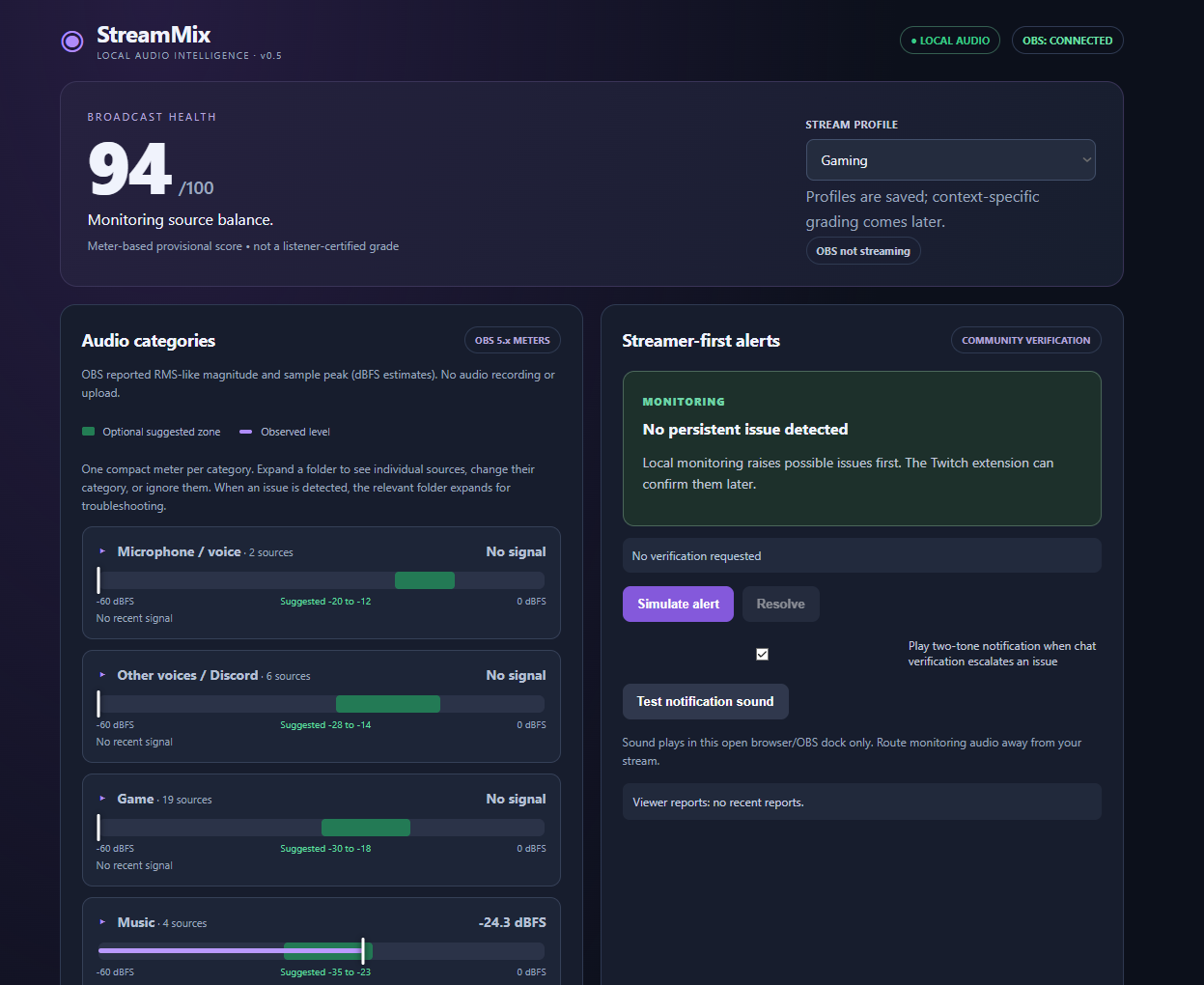
- Live audio monitoring: Track microphones, game audio, music, Discord voices, sound effects, TTS, and other sources.
- Organized audio categories: Collapse multiple audio sources into easy-to-read groups and expand them when troubleshooting is needed.
- Suggested audio ranges: Green guidance zones help streamers understand typical operating levels without enforcing rigid requirements.
- Intelligent warnings: StreamMix detects potential imbalances and alerts the streamer first.
- Community verification: A Twitch extension integration is being developed so viewers can confirm suspected problems or report issues independently.
- Notification sounds: Verified warnings can trigger an audible notification for the streamer.
- Privacy-first design: Audio analysis stays on the streamer's computer, avoiding unnecessary audio uploads.
The goal isn't to force everyone into the same audio settings. It's to help each streamer find the right balance for their content.
How I built it
StreamMix uses Node.js, JavaScript, HTML, and CSS.
It connects to OBS Studio through OBS WebSocket to retrieve live audio meter information. A local analysis engine evaluates source levels and identifies possible problems.
The interface organizes sources into collapsible categories, with individual controls for classification and ignoring unwanted sources.
I also built a Twitch extension frontend and a backend service for broadcaster pairing, viewer reports, and issue verification. Those components have been tested in a simulated environment and are being prepared for live Twitch testing.
A Windows installer provides desktop and Start-menu shortcuts to make the broadcaster application easier to launch.
Challenges I ran into
One major challenge was understanding the difference between measuring individual audio sources and measuring what viewers actually hear.
Individual OBS meters are useful, but they cannot fully represent the final combined broadcast audio. StreamMix currently uses preliminary analysis and clearly distinguishes estimated combined levels from actual mixed output.
Another challenge was building an interface that doesn't overwhelm streamers with technical information. I addressed this by organizing audio sources into collapsible folders and keeping detailed troubleshooting controls out of sight until needed.
I also wanted to protect privacy and bandwidth by keeping audio processing local.
Accomplishments I'm proud of
I'm proud of turning an idea into an installed Windows application that connects to OBS and displays real audio activity.
The project now includes source organization, optional guidance ranges, persistent ignored-source settings, preliminary audio grading, streamer-first warnings, and a working prototype of the Twitch verification workflow.
Automated tests have helped validate the monitoring and verification logic, and the OBS dashboard has been tested on an actual streaming setup.
What I learned
Building StreamMix reinforced how complex streaming audio can be.
A good mix isn't simply about hitting a specific number. Voice intelligibility, game dynamics, music, and audience expectations all matter.
I also learned the importance of creating tools that are approachable for everyday streamers rather than requiring professional audio engineering knowledge.
What's next for StreamMix
The next milestone is completing live Twitch extension testing and allowing actual viewers to verify problems detected locally.
Future improvements include more accurate combined audio measurement, speech-aware analysis, final broadcast monitoring, smarter recommendations, and additional audio profiles for different streaming styles.
Ultimately, I want StreamMix to become an audio assistant that helps streamers focus on entertaining their communities instead of constantly worrying about their sound.
StreamMix detects. Chat confirms. Streamers stay in control.
Built With
- css3
- html5
- javascript
- json
- node.js
- obs-studio
- obs-websocket
- powershell
- twitch
- twitch-extensions
- web
- websockets
- windows

Log in or sign up for Devpost to join the conversation.