-
-
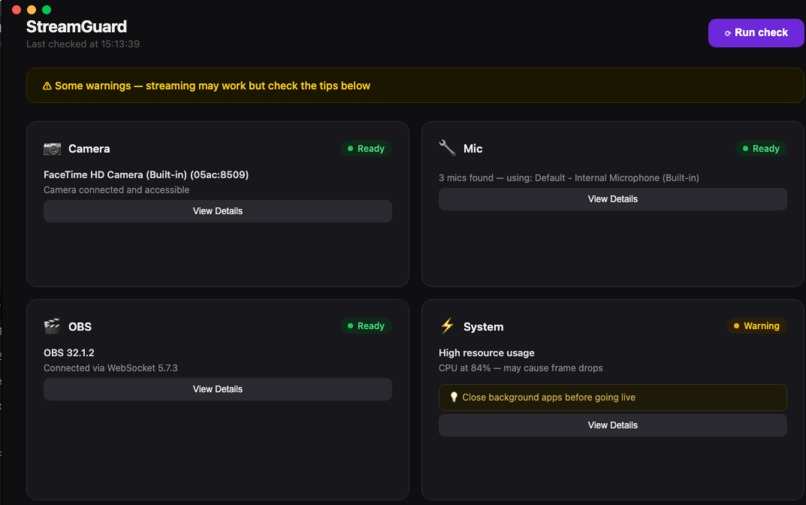
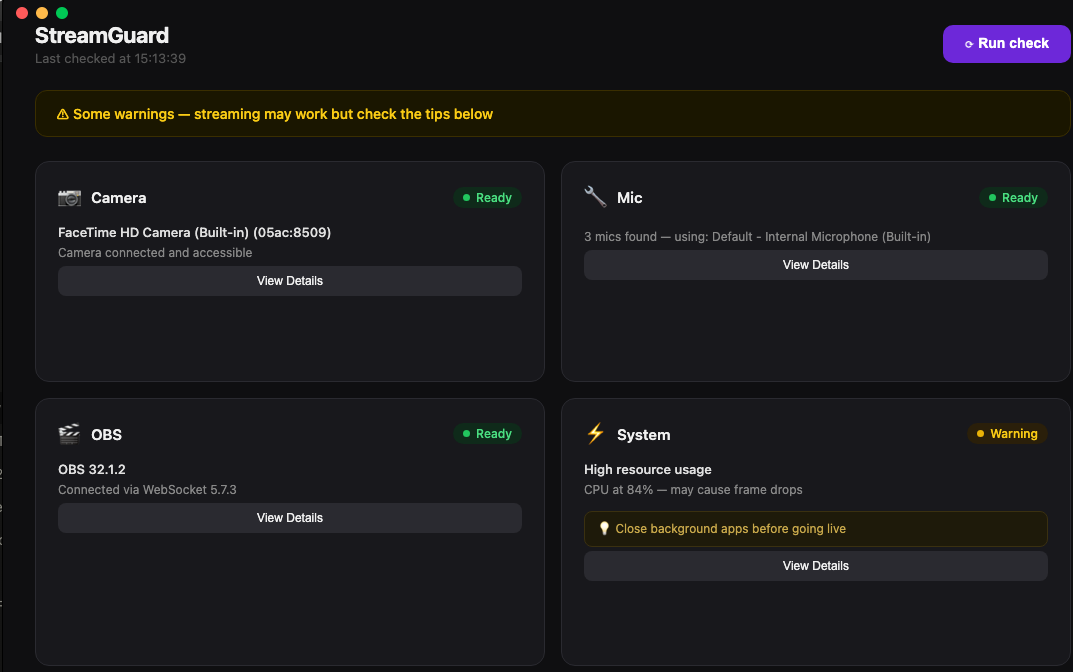
System overview
-
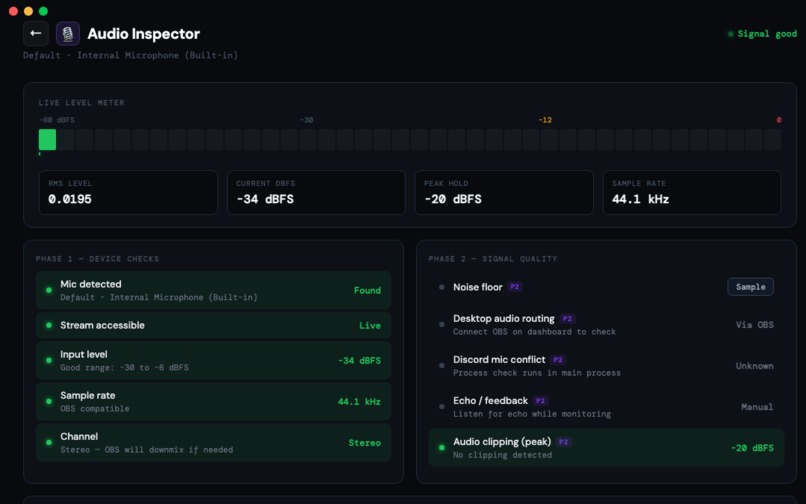
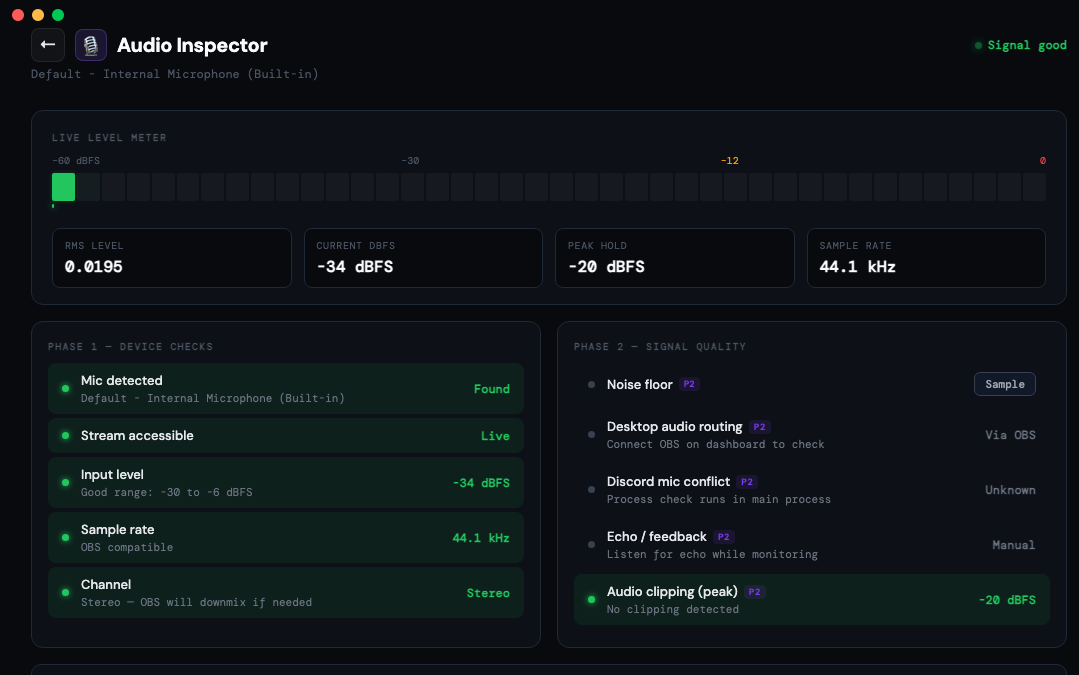
Audio checks
-
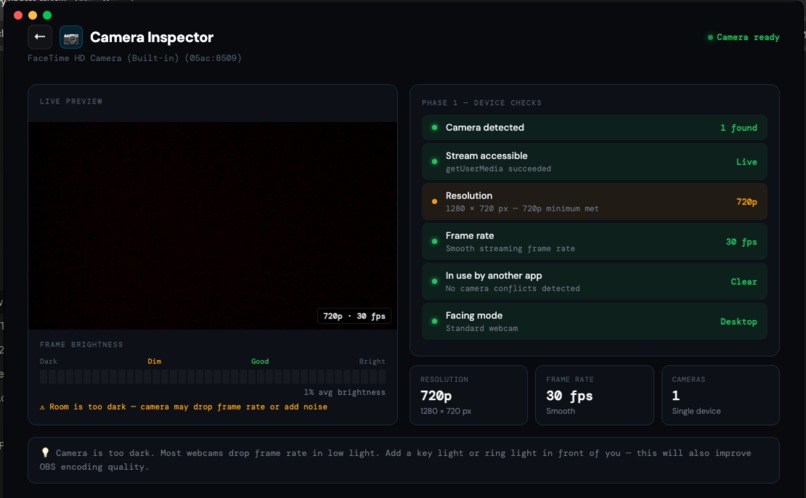
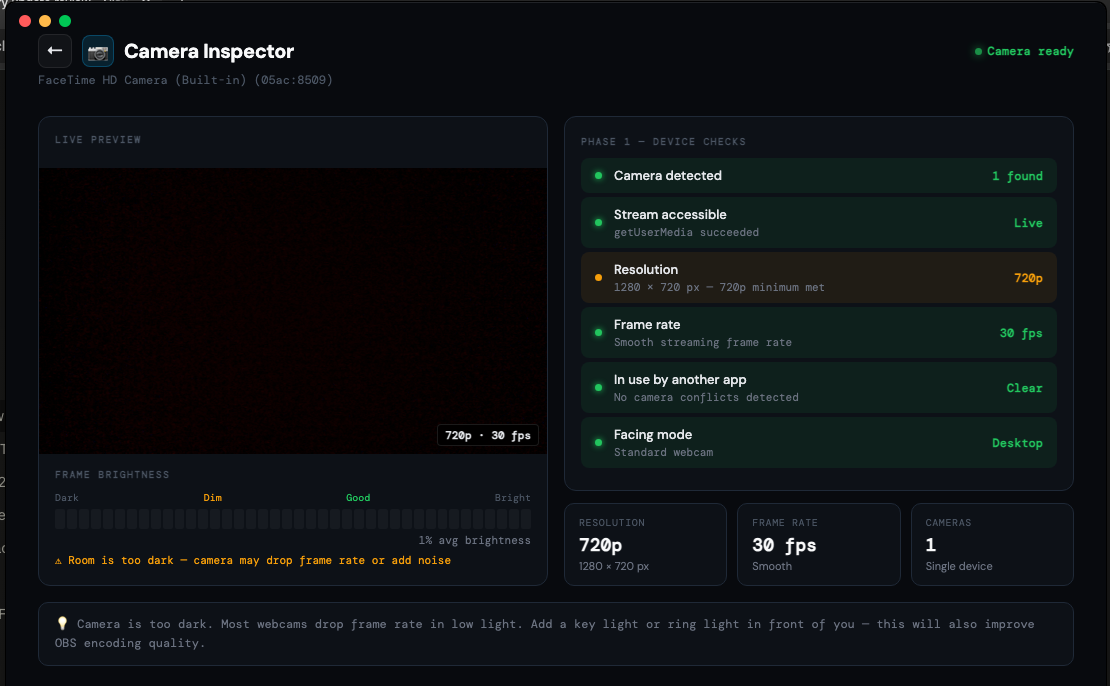
Camera checks
-
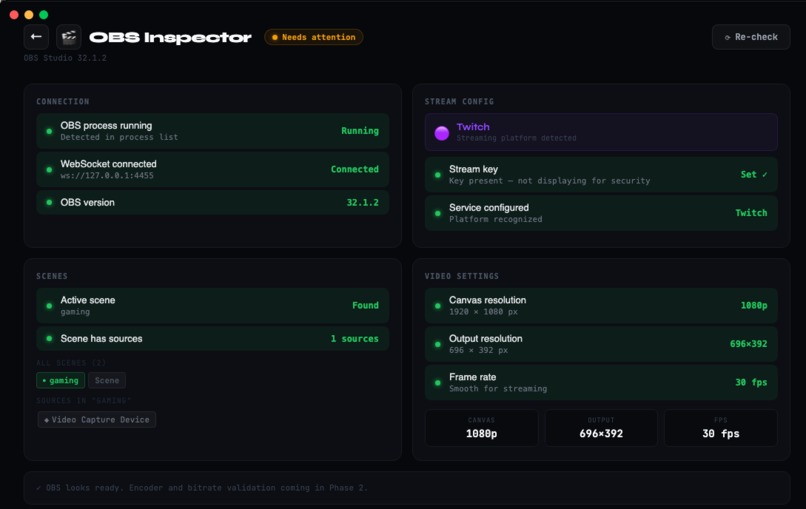
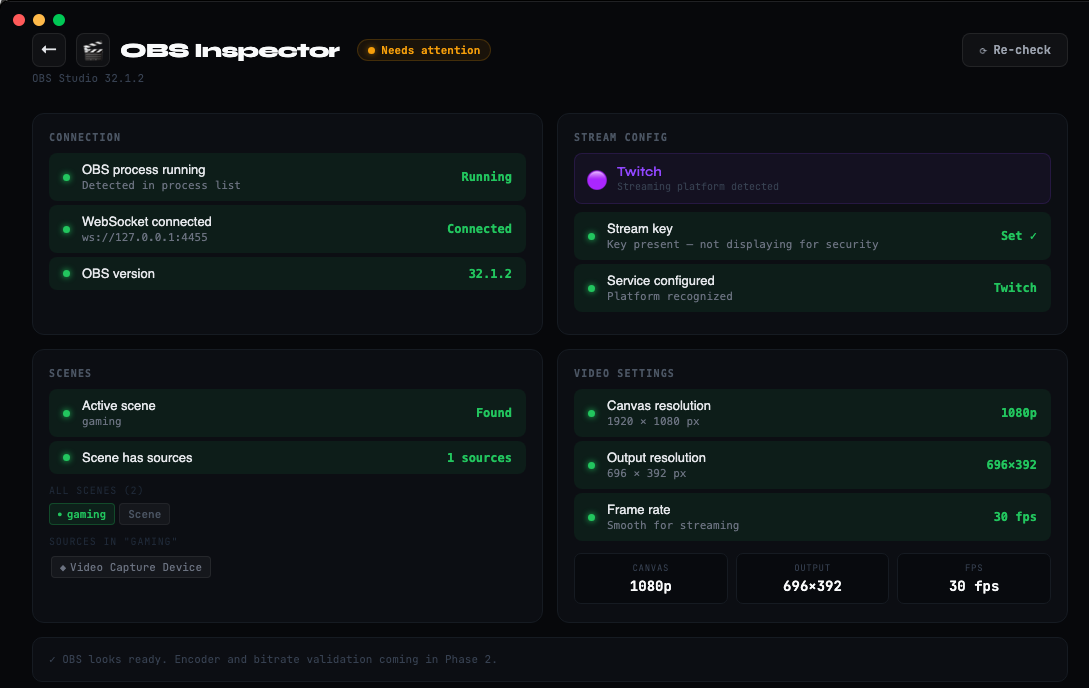
OBS checks
StreamGuard — Pre-Stream Inspector
"Go live. Not troubleshoot."
Inspiration
Every streamer has a story about going live with something broken.
Mine was watching a streamer I follow spend the first 20 minutes of a stream completely unaware that his microphone wasn't working. His chat was going crazy telling him. He couldn't hear them because his audio monitoring was also misconfigured. He found out when he checked his phone.
That moment stuck with me not because it was rare, but because it happens constantly. I went to Reddit and asked streamers directly: "What technical stuff frustrates you most before and during a stream?"
The responses were immediate and painfully specific:
"Voicemeeter is routing things weirdly and I've got no sound. Mic? Game audio? Good luck. Need to reset them almost daily."
"I was dropping over 60% of my frames to Twitch. I pulled up stats in OBS and confirmed it was a network problem spent hours diagnosing something that should take seconds."
"Name something and there's a good chance it won't work tomorrow when I get ready to go live."
That last one hit hard. These aren't beginners. These are people who stream thousands of hours a year. And they still don't have a reliable way to verify their setup before going live.
I searched for a tool that solved this. The closest thing was Twitch Inspector but it only works after you're already streaming. It can't prevent the problem. It can only confirm it happened.
That gap is what StreamGuard is built to fill.
What it does
StreamGuard is a desktop app built with Electron + React that runs a comprehensive pre-stream health check across every layer of a streamer's setup — hardware, software, and platform configuration before they go live.
Phase 1 checks (shipped)
Camera Inspector
- Device detection via
MediaDevicesAPI - Resolution and frame rate verification (
track.getSettings()) - Live brightness analysis using canvas pixel sampling detects dark rooms before they kill your frame rate
- Conflict detection for exclusive camera locks
Audio Inspector
- Live RMS level metering using Web Audio API
AnalyserNode - Input level with real-time segmented VU meter (40 segments, 60fps)
- dBFS readout with peak hold
- Noise floor sampling 2-second silence test to detect background noise
- Sample rate validation (44.1kHz / 48kHz for OBS compatibility)
OBS Inspector
- Process detection via OS process list
- WebSocket connection to OBS Studio (obs-websocket-js v5)
- Scene validation active scene has visible sources
- Stream key presence check
- Video settings: canvas resolution, output resolution, FPS, mismatch detection
- Platform detection (Twitch / YouTube / custom RTMP)
System Inspector
- CPU and RAM load via
systeminformation - GPU encoder detection (NVENC / AMF / VideoToolbox)
- Upload speed and network stability
How I built it
Architecture
The most important architectural decision was understanding Electron's two-process model from first principles:
Renderer Process (Chromium)          Main Process (Node.js)
────────────────────────────         ──────────────────────────
React UI                             OBS WebSocket connection
navigator.mediaDevices    ←IPC→      systeminformation (CPU/GPU)
Web Audio API                        child_process (OBS detection)
Canvas pixel sampling                File system access
Every browser-native API (navigator, AudioContext, canvas) runs in the renderer. Every OS-level operation runs in main. The preload.js bridge exposes only named functions to the renderer no raw Node.js access.
The audio metering pipeline
The mic level meter runs at 60fps using requestAnimationFrame. The math behind it:
RMS (Root Mean Square) measures the energy of the audio signal:
$$\text{RMS} = \sqrt{\frac{1}{N} \sum_{i=1}^{N} x_i^2}$$
Where $x_i$ are the raw PCM samples from getFloatTimeDomainData() (values from $-1.0$ to $1.0$) and $N = 2048$ (the FFT size).
Conversion to dBFS (decibels relative to full scale):
$$\text{dBFS} = 20 \cdot \log_{10}(\text{RMS})$$
Where $0\ \text{dBFS}$ is clipping and $-60\ \text{dBFS}$ is near silence. A healthy streaming signal sits between $-30$ and $-6\ \text{dBFS}$.
Exponential Moving Average for smoothing:
$$S_t = \alpha \cdot S_{t-1} + (1 - \alpha) \cdot x_t$$
Where $\alpha = 0.85$ (weight on history) and $x_t$ is the current RMS reading. This prevents the meter from flickering at 60fps while remaining responsive to real level changes.
The brightness detection pipeline
There's no browser API that returns "how bright is the camera image." The solution: draw each video frame to a hidden 160×90 canvas and sample every pixel.
Why $160 \times 90$? It maintains the $16:9$ aspect ratio and provides a statistically representative sample:
$$\text{pixels sampled} = 160 \times 90 = 14{,}400$$
vs full resolution:
$$\text{pixels at 1080p} = 1920 \times 1080 = 2{,}073{,}600$$
The sample is $143\times$ smaller but the average converges to the same value. This is basic statistical sampling like testing a glass of water from a 1000-litre tank.
Human-perceived luminance (ITU-R BT.709):
$$L = 0.2126 \cdot R + 0.7152 \cdot G + 0.0722 \cdot B$$
The coefficients reflect how human cones perceive color green appears brightest ($71.52\%$), blue darkest ($7.22\%$). A naive $(R + G + B) / 3$ average would be perceptually wrong.
OBS integration
OBS Studio exposes a WebSocket API on ws://127.0.0.1:4455. The five calls that power the OBS inspector:
GetVersion              → OBS version + WebSocket version
GetSceneList            → all scenes + active scene name
GetSceneItemList        → sources in the active scene
GetStreamServiceSettings → platform + stream key presence
GetVideoSettings        → canvas res, output res, FPS numerator/denominator
FPS is returned as a fraction (fpsNumerator / fpsDenominator) to support non-integer rates like 29.97fps ($30000 / 1001$).
Challenges
The process boundary problem
The first major crash: navigator is not defined in the main process. The fix taught me Electron's security model at a deep level navigator is a browser API and has no business in Node.js. The architecture had to be redesigned so device enumeration happens in the renderer (where the browser APIs live) and the results are passed to main via IPC for validation.
IPC object serialization
MediaDeviceInfo objects returned by enumerateDevices() are browser interface objects, not plain JavaScript objects. Electron's IPC uses the structured clone algorithm it can't serialize browser interfaces. The fix: map each device to a plain object { kind, label, deviceId, groupId } before sending through IPC.
The finally return problem
An early version of the OBS inspector had a return statement inside the finally block, which silently overrode every return value from try and catch. The function always returned undefined. This took significant debugging to catch the lesson: finally is for cleanup only, never for return values.
React StrictMode double-mounting
In development, React 18 StrictMode deliberately mounts → unmounts → remounts every component to test cleanup logic. This caused play() interrupted by new load request errors on the camera page. The fix: a mounted guard flag that checks whether the component is still alive before updating state after any async operation.
useEffect(() => {
  let mounted = true
  async function setup() {
    const stream = await navigator.mediaDevices.getUserMedia(...)
    if (!mounted) { stream.getTracks().forEach(t => t.stop()); return }
    // safe to update state
  }
  setup()
  return () => { mounted = false }
}, [])
The OBS wrong IP bug
During development, OBS was connecting to 192.168.1.5:4454 instead of 127.0.0.1:4455. The error ECONNREFUSED 192.168.1.5:4454 was cryptic until I recognized the pattern a hardcoded IP from a previous config test and a port off by one. Small bugs, significant debugging time.
What I learned
Building StreamGuard taught me more about desktop application architecture than any tutorial could:
- Electron's two-process model is not just a technical detail it's a security boundary. Understanding why
nodeIntegration: falsematters changed how I think about application design. - Async gaps are where bugs live. The
mountedguard, the IPC serialization issue, thefinallyreturn all of them happened in the space between starting an async operation and receiving its result. - Statistical sampling is underused in UI. The brightness meter, the noise floor sampler, the ping jitter check all of them use small representative samples instead of exhaustive measurements. Fast and accurate enough.
- Real user research beats assumptions. Posting on Reddit before building Phase 2 changed the roadmap. Streamers care most about audio routing conflicts, ingest server selection, and device changes after driver updates none of which I had prioritized.
What's next
Phase 2 — Smart Setup Assistant
- Best ingest server selector (ping all Twitch/YouTube servers, rank by latency + jitter)
- Device change detection (compare current devices against last known good state catches post-driver-update surprises)
- OBS encoder validation (keyframe interval check wrong value is the #1 cause of stream buffering)
- VoiceMeeter conflict detection
- Platform-specific settings validation (Twitch 6000kbps limit, YouTube keyframe requirements)
Phase 3 — Streaming Automation Hub
- One-click full rig setup
- Profile presets per game/content type
- Real-time monitoring during stream with auto-alerts
Tech stack
| Layer | Technology |
|---|---|
| Desktop framework | Electron 28 |
| UI | React 18 + Vite |
| Audio analysis | Web Audio API (AnalyserNode) |
| Camera/mic access | MediaDevices API (getUserMedia) |
| OBS integration | obs-websocket-js v5 |
| System metrics | systeminformation |
| Process detection | Node.js child_process |
| Build | electron-builder |
Built from scratch with a genuine understanding of every line not vibe coded.
Built With
- electronjs
- javascript

Log in or sign up for Devpost to join the conversation.