-
-
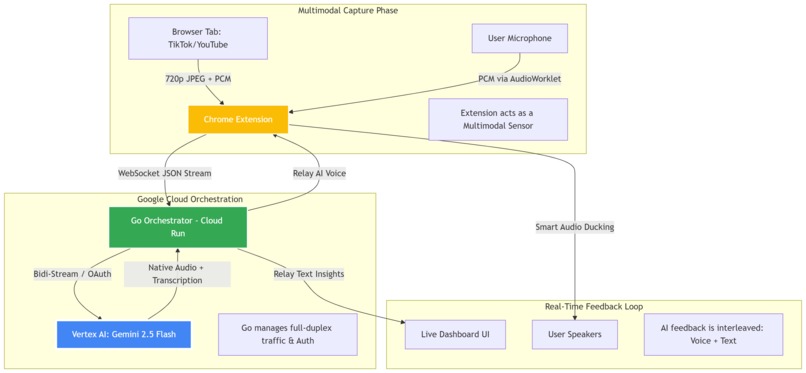
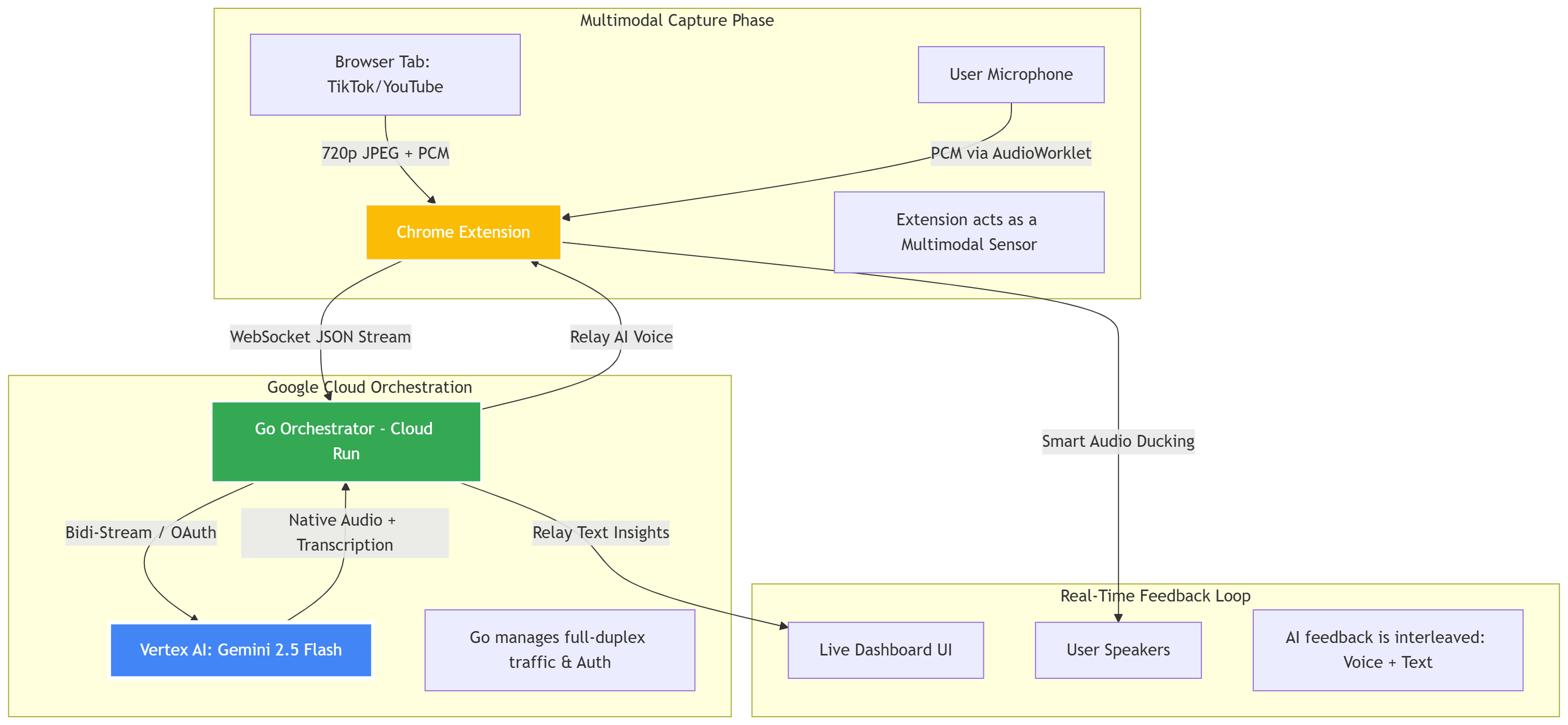
Architecture Diagram
-
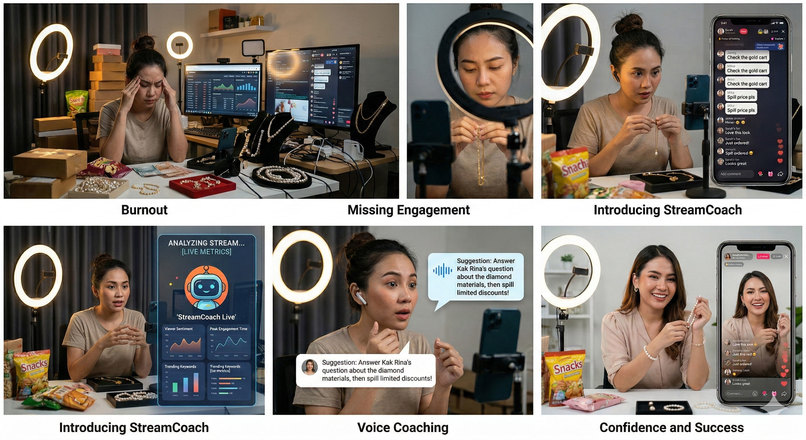
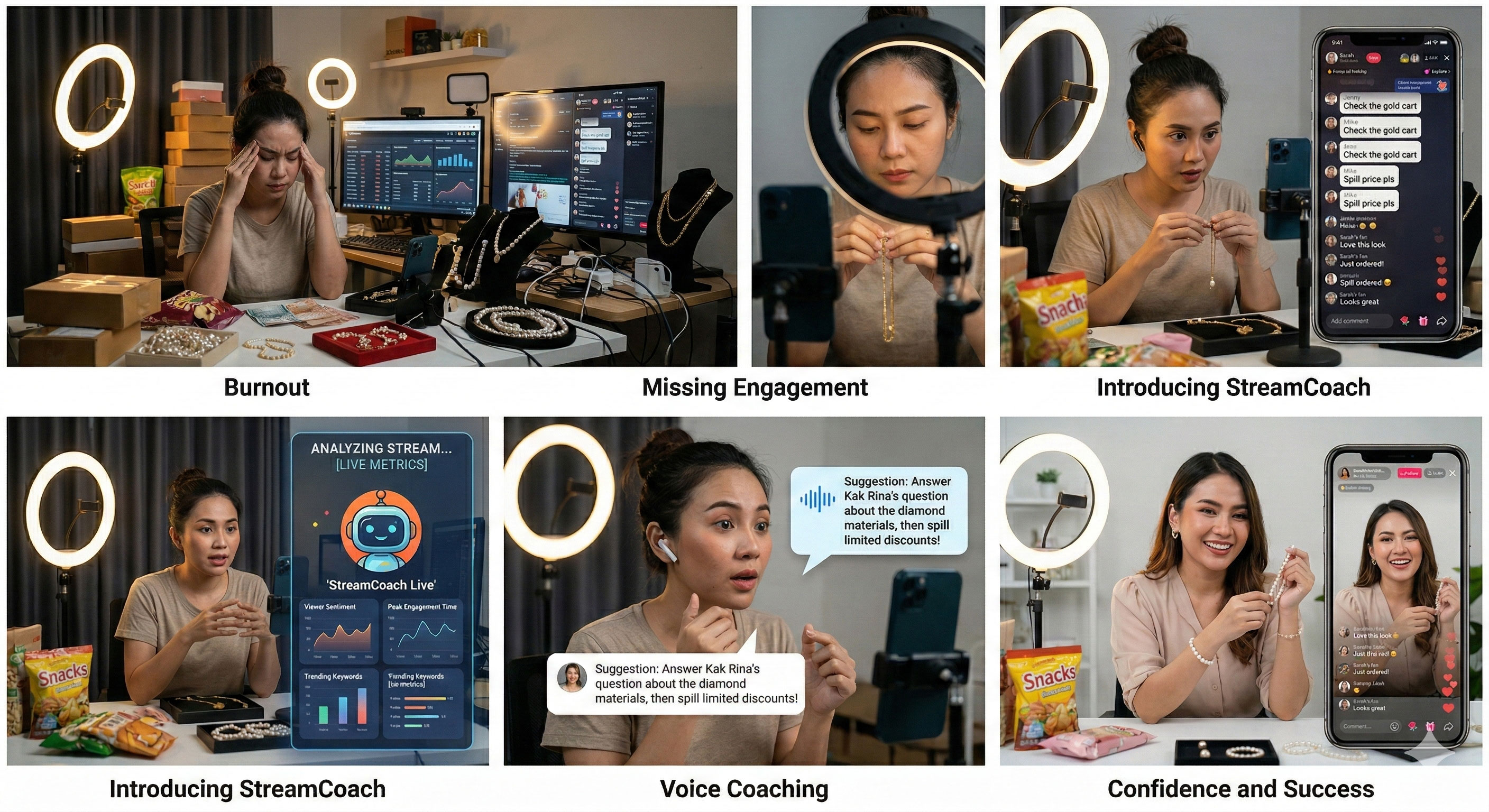
background of the problem
StreamCoach Live: Real-Time AI Performance Agent
Tagline: A proactive, full-duplex multimodal AI Director that sees, hears, and coaches live streamers in real-time.
Elevator Pitch: StreamCoach Live is an AI Agent that 'sees' and 'hears' your stream in real-time, providing proactive native-voice feedback and visual engagement insights using Vertex AI's Gemini Live 2.5 Flash Native Audio.
Inspiration
Live streaming is a high-pressure environment. Solo streamers often struggle to monitor their chat, maintain high energy levels, and handle technical production all at once. Existing AI tools only provide analytics after the stream is over. We were inspired to create a "Digital Director"—a companion that sits in the streamer’s ear, providing the same tactical guidance a professional production crew would, but powered entirely by Vertex AI.
Architecture Overview
StreamCoach Live utilizes a sophisticated full-duplex architecture designed for ultra-low latency and multimodal reasoning.
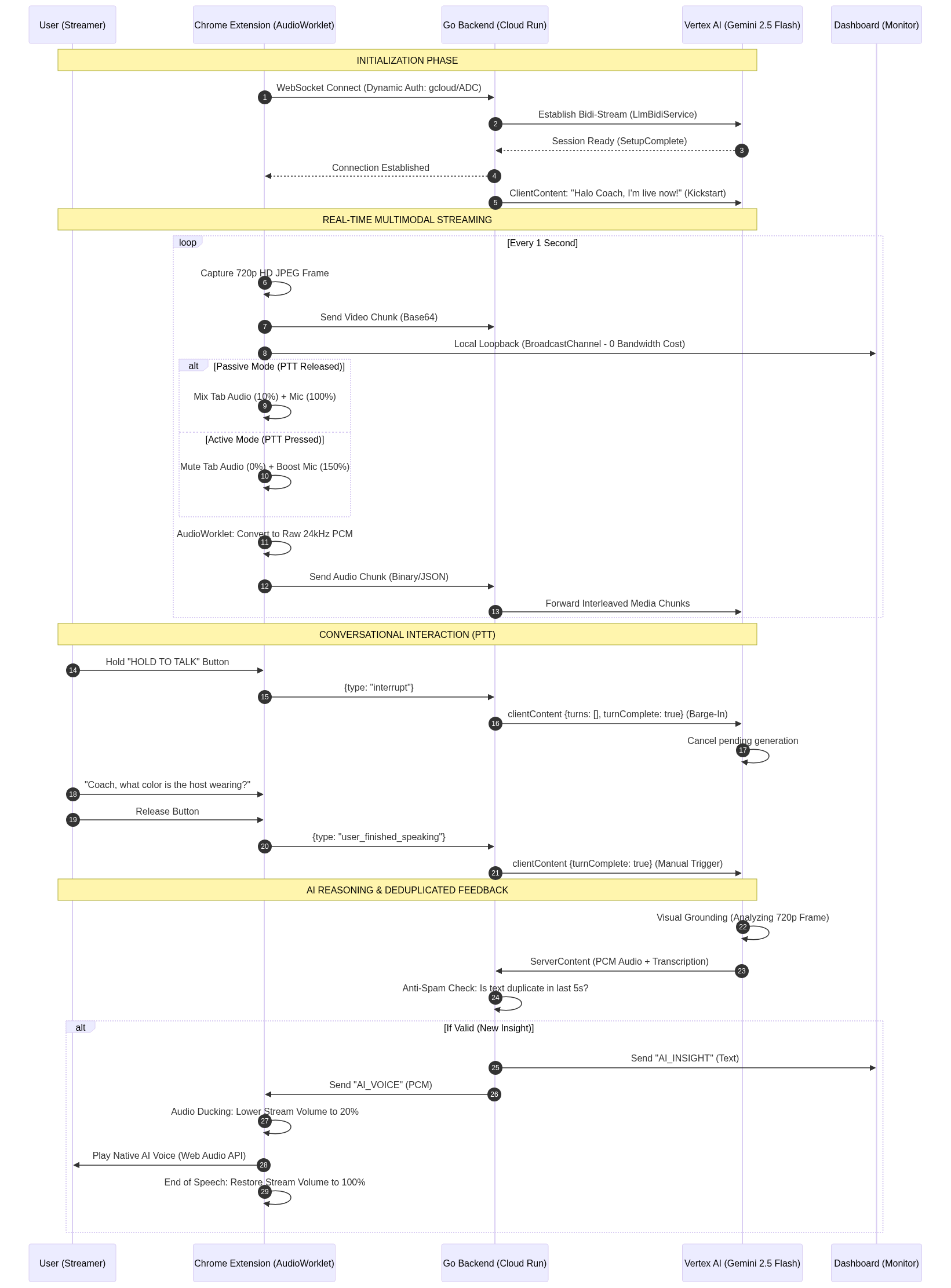
1. High-Fidelity Capture Phase
The system starts with a custom-built Chrome Extension (Manifest V3). Unlike standard screen recorders, our extension acts as a multimodal sensor:
- Visuals: Captures 720p HD frames at 1 FPS to provide clear visual grounding for the AI.
- Audio: Uses the Web Audio API (AudioWorklet) to process raw 24kHz PCM audio in a background thread. It isolates the user's microphone from the stream's audio to ensure the AI only hears direct commands with crystal clarity.
2. Google Cloud Orchestration
The "Heart" of the system is a Golang Orchestrator deployed on Google Cloud Run.
- WebSocket Multiplexing: Manages high-frequency, bidirectional traffic between the extension and Vertex AI.
- Thread-Safe Processing: Implements
sync.Mutexlocks to handle concurrent writes, ensuring stable media streaming without panics. - Dynamic Authentication: Leverages Google's Application Default Credentials (ADC) to securely authenticate with Vertex AI using Service Accounts.
3. Gemini Live 2.5 Flash Native Audio Intelligence
The "Brain" is powered by Vertex AI's Multimodal Live API (LlmBidiService).
- Real-Time Reasoning: Gemini processes interleaved video frames and audio chunks simultaneously.
- Visual Grounding: The AI can specifically answer visual questions (e.g., "What product am I holding?") by analyzing the HD frames.
- Native Audio Output: Instead of robotic TTS, Gemini generates native speech that conveys natural intonation and supports local dialects.
4. Interleaved Feedback Loop
Insights are delivered back to the streamer in two ways:
- AI Voice Feedback: Whispered directly into the streamer's headset.
- AI Insight Recommender: A dynamic dashboard UI that renders tactical coaching cards and suggested actions.
- Smart Audio Ducking: The extension automatically lowers the stream volume to 20% when the AI speaks, ensuring the "Boss" never misses a director's cue.
What it does
StreamCoach Live provides real-time, proactive coaching for TikTok, YouTube, and IG streamers. It monitors chat for missed questions, detects energy drops through facial cues, and suggests "Engagement Opportunities." Streamers can use the Push-to-Talk (PTT) button to ask the AI questions directly, receiving instant answers based on what is happening on the screen.
🌍 Global Impact
StreamCoach Live goes beyond a technical tool—it is an engine for economic and personal growth:
- Democratizing Professional Coaching: Historically, only large brands could afford professional directors to audit their streams. StreamCoach Live levels the playing field, giving solo entrepreneurs and MSMEs (UMKM) access to high-end, data-driven coaching at near-zero cost, empowering them to compete with global giants.
- Accelerating the Creator Economy: As live commerce grows into a trillion-dollar market, many fail due to a lack of guidance. By providing real-time feedback on lighting, energy, and product spotlighting, we directly help creators increase conversion rates and build sustainable digital incomes.
- Bridging the Soft-Skill Gap: Digital presence and articulation are critical workforce skills. StreamCoach acts as a personal tutor that helps users master confidence and eye contact—valuable skills that extend far beyond live streaming into professional public speaking.
How we built it
- Backend: Go (Golang), Gorilla WebSockets, Google OAuth2.
- Cloud: Google Cloud Run, Artifact Registry, Cloud Build, Vertex AI.
- Frontend: JavaScript, Chrome Extension API, Web Audio API (AudioWorklet/GainNodes).
- Design: CSS3 (Vanilla), Dark-mode Tech-Noir aesthetic.
Challenges we ran into
- Audio Feedback Loops: Initially, the AI would trigger itself when its voice leaked into the microphone. We solved this with an "Exclusive Mic Mixing" strategy.
- Concurrency Panics: High-speed multimodal streaming caused concurrent write errors. We resolved this by implementing a strict Mutex synchronization in the Go backend.
- Response Duplication: The AI occasionally sent double responses due to VAD/PTT collisions. We built a custom Anti-Spam Deduplication filter in Go to ensure a clean user experience.
Accomplishments that we're proud of
- Achieving under 1-second latency for a full multimodal reasoning loop.
- Implementing a robust Push-to-Talk system that feels as natural as a real walkie-talkie.
- Successfully deploying a containerized Go backend that seamlessly switches between local and production environments.
What we learned
We discovered that the Gemini 2.5 Flash Native Audio model is transformative for real-time agents. The ability to reason across multiple modes (vision + audio) without a "text-bottleneck" makes the interaction feel incredibly human and intuitive.
What's next for StreamCoach Live
- Audience Sentiment Analysis: Using the AI to track real-time viewer sentiment trends.
- OBS Integration: Moving beyond the browser extension to a dedicated OBS plugin.
- Automated Highlight Reels: Using AI markers to automatically clip high-engagement moments for social media.
For some reason, I didn't include a link to my Cloud Run project. Mainly because I was afraid of wasting tokens, which would drain my credit and incur charges on my credit card. The Cloud Run Google Cloud link is only visible to the judging panel. If you'd like to try a demo, you can view my repository and run it on your Cloud Run. Also, check out my YouTube channel for instructions on how to use it.
Built With
- gemini
- golang
- google-cloud
- vertex

Log in or sign up for Devpost to join the conversation.