-
-
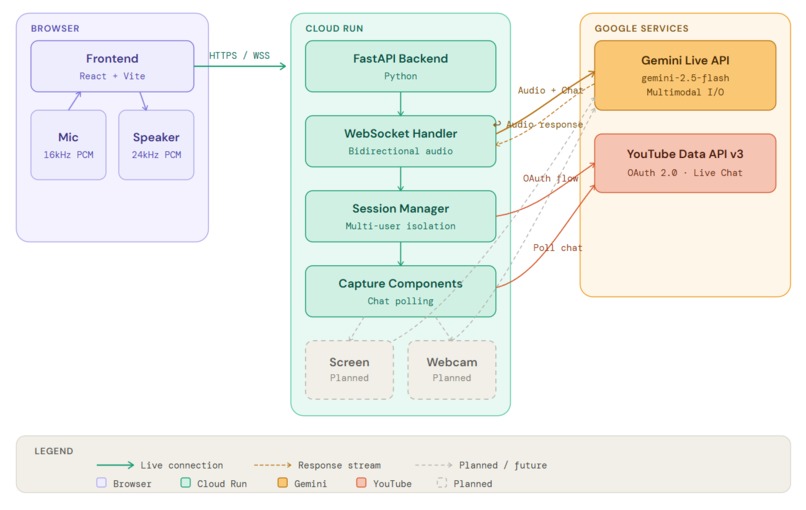
Architecture
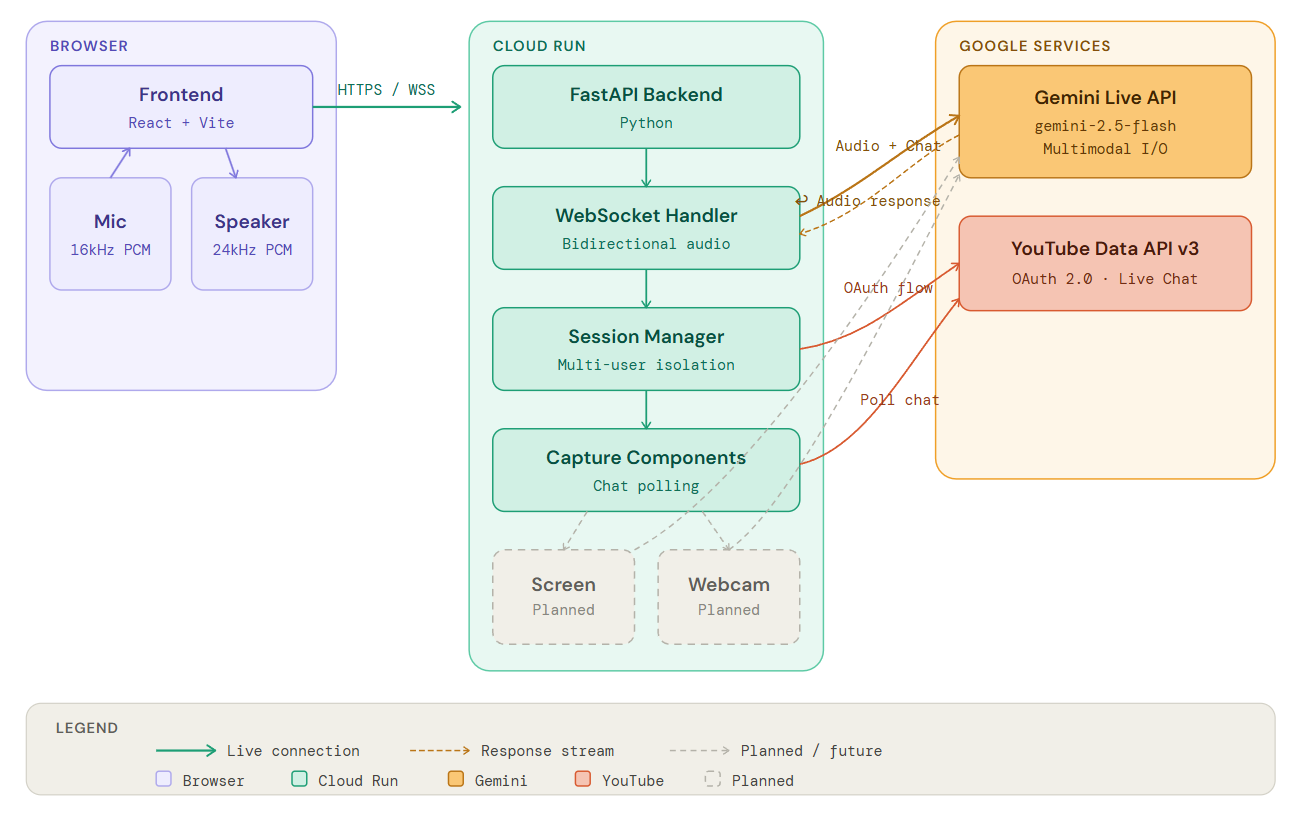
Inspiration
As someone who spends a lot of time watching streams, I kept noticing the same problem, streamers missing questions, chat flying by unanswered, and the audience slowly disengaging. I wondered: what if AI could act as a co-host that actually sees what's being streamed, reads the chat, and responds naturally in real time? When I came across Gemini Live API's multimodal capabilities, I realized I could build something beyond a basic chatbot, an AI companion that genuinely understands the context of a stream as it happens.
What it does
StreamBuddy is an AI co-host for live streamers that:
- Reads YouTube Live chat in real-time and understands viewer questions, comments, and sentiment
- Listens to the streamer you can talk to it directly and it responds naturally, just like a real co-host
- Responds via voice using Gemini Live API's natural audio output
- Engages with your audience by answering questions, reacting to gameplay, and keeping the conversation flowing
- Adapts its personality - adjust humor, supportiveness, and verbosity to match your streaming style
How we built it
Architecture:
- Frontend: React + Vite
- Backend: Python FastAPI on Google Cloud Run with WebSocket support for real-time bidirectional streaming
- AI Engine: Google GenAI SDK with Gemini 2.5 Flash Live API for multimodal understanding
- Integrations: YouTube Data API v3 for live chat capture, OAuth 2.0 for secure authentication
Key Technical Implementations:
Real-time Audio Streaming: Implemented bidirectional WebSocket audio streaming with browser-based microphone capture and AI response playback using Web Audio API
Personality System: Created a configurable personality engine that adjusts AI responses based on humor level, supportiveness, playfulness, and verbosity settings
Chat Analysis: Implemented background chat analysis and topic extraction to help the AI understand audience mood and interests
Deployment:
- Containerized with Docker and deployed to Cloud Run
Challenges we ran into
1. Audio Latency & Synchronization Initially, I experienced 30+ second delays in AI responses. I discovered the proactive audio mode was adding unnecessary latency. By switching to responsive mode and optimizing audio chunk sizes (20-40ms as recommended by Google), I reduced latency to 2-4 seconds.
2. WebSocket Reconnection Logic
Users experienced unwanted microphone prompts after stopping sessions. I implemented a shouldReconnectRef flag to control reconnection behavior, preventing auto-reconnect when users explicitly stop streaming.
Accomplishments that we're proud of
- Real-time multimodal AI: Successfully integrated audio streaming, and chat monitoring into a single coherent AI experience
- Production-ready deployment: Built a scalable cloud-native architecture that handles multiple concurrent streaming sessions
- Natural voice interaction: Achieved conversational AI responses with minimal latency using Gemini Live API
- Seamless OAuth flow: Implemented secure YouTube authentication with proper token management per user
What we learned
- Gemini Live API's proactive vs responsive modes have significant latency trade-offs
- WebSocket audio streaming requires careful buffer management and format conversion
What's next for StreamBuddy
- Webcam and screen video capture - Add streamer's face/reactions to the AI's context for more natural interactions. For PC streamers like gamers, artists etc I plan to capture their screen video and pass to the agent.
- Support for other platforms to expand beyond YouTube Live


Log in or sign up for Devpost to join the conversation.