

Inspiration
Every Twitch community has its own language: inside jokes, recurring characters, chat commands, and unwritten customs. That shared history makes a stream feel special, but it can also leave a new viewer wondering what everyone is talking about.
I wanted to make that first visit feel more welcoming. Stream Field Guide gives viewers a little context without interrupting the broadcast or requiring them to ask questions in a fast-moving chat.
The idea is simple: you don’t need to know the lore to belong.
What it does
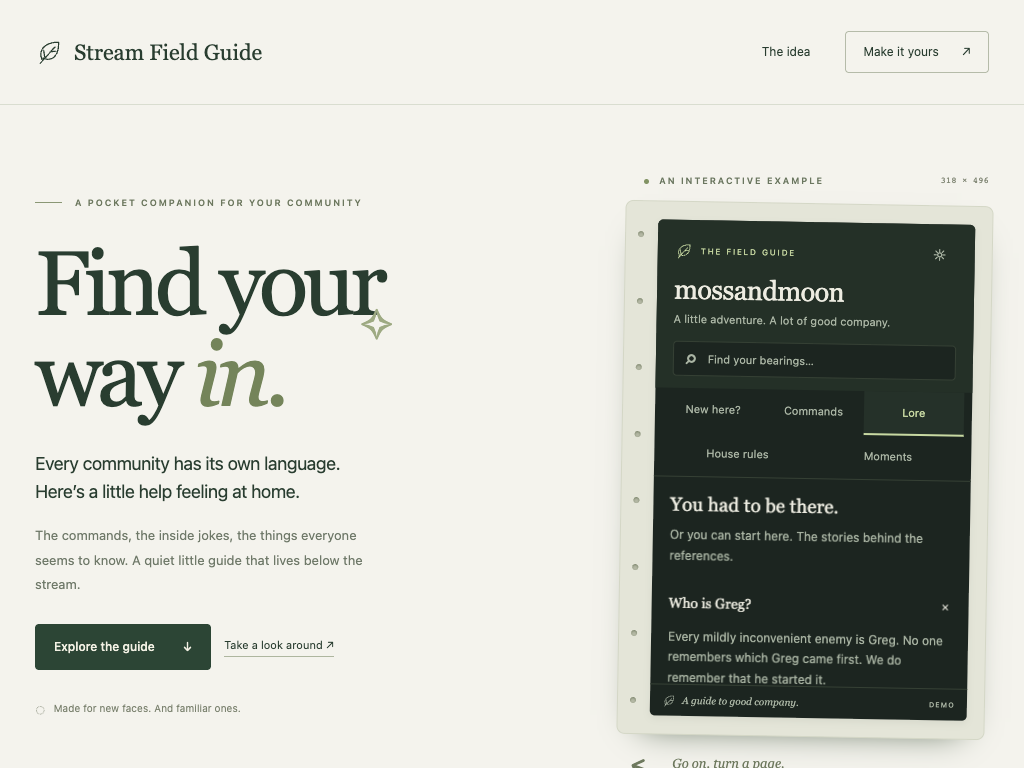
Stream Field Guide is a customizable Twitch panel extension that lives below the stream. It organizes community knowledge into five sections:
- New here? — A welcome, a little local knowledge, and a useful first command.
- Commands — Explanations of existing chat commands, with copy buttons.
- Lore — The stories behind inside jokes, with searchable nicknames and optional origin clips.
- House rules — Community expectations, including spoiler and backseating guidance.
- Moments — Clips that help viewers catch up, prioritizing the latest completed saved broadcast when matching clips are available.
Streamers manage their guide through an editor with live previews, custom colors, entry reordering, and JSON backups. A standalone interactive demo lets visitors explore a fictional community without a Twitch login.
How I built it
I built Stream Field Guide with Preact, TypeScript, Vite, and CSS. The viewer components are shared between the Twitch extension, broadcaster preview, and public demo.
The extension uses Twitch’s Configuration Service to store each channel’s guide and Twitch’s API to retrieve clips. It runs without a custom backend or database.
The visual design takes inspiration from a field notebook: forest greens, warm paper colors, serif headings, and small illustrated details. I wanted exploring a community to feel like opening a welcoming little guidebook.
Challenges I faced
One challenge was fitting useful information into a panel roughly 318 pixels wide. Search, navigation, expandable stories, and readable text all had to work together in that small space.
Another was handling Twitch’s embedded environment. Clipboard copying and backup downloads needed fallback paths when browser restrictions blocked the usual approach.
Clip selection also required more care than simply fetching recent clips. A newly created clip can come from an older broadcast. I matched clips using broadcast video IDs and added a clearly labeled recent-clips fallback when the intended broadcast could not be confirmed.
The editor introduced another challenge: letting streamers preview unfinished work while keeping saved content valid. Incomplete entries remain editable, while completed entries continue to appear in the preview.
What I learned
This project reinforced how much good interface design depends on clear feedback. “Unsaved changes,” “update sent,” and “saved settings loaded” describe different states, and the interface needs to communicate those differences honestly.
I also learned to distinguish application testing from platform verification. Automated tests cover validation, navigation, editing, backups, and simulated Twitch interactions; actual Twitch behavior still needs Hosted Test checks.
What I’m proud of
I’m proud that the project supports both sides of the welcome: viewers get a quiet way to find their bearings, and streamers get tools to explain what makes their community theirs.
The current version is in Twitch Hosted Test, with a working standalone demo. The experience leaves room for viewers to join the conversation—or simply settle in and lurk. Both count.
Built With
- api
- css
- extensions
- gsap
- playwright
- preact
- twitch
- typescript
- vite
- vitest

Log in or sign up for Devpost to join the conversation.