Kids spend more time than ever in front of screens – but not enough time using them to create. Passive content consumption make them audiences, not authors of their own ideas.
Storytopia transforms a child’s drawing into a narrated, illustrated 8-scene quest – merging creativity, storytelling, and AI orchestration to make screen time more engaging and meaningful. Built for the Google Cloud Run Hackathon, Storytopia demonstrates how multi-agent orchestration with Google ADK, Vertex AI, and Cloud Run can turn screen time into a hands-on creative adventure.
How Storytopia works
Storytopia consists of two main components:
- Next.js Frontend (UI Service): Built for the browser, our interface lets children draw directly on a digital canvas – whether on an iPad or a computer. They can also upload photos of their favorite toys, stuffed animals, or hand-drawn art to turn them into story characters.
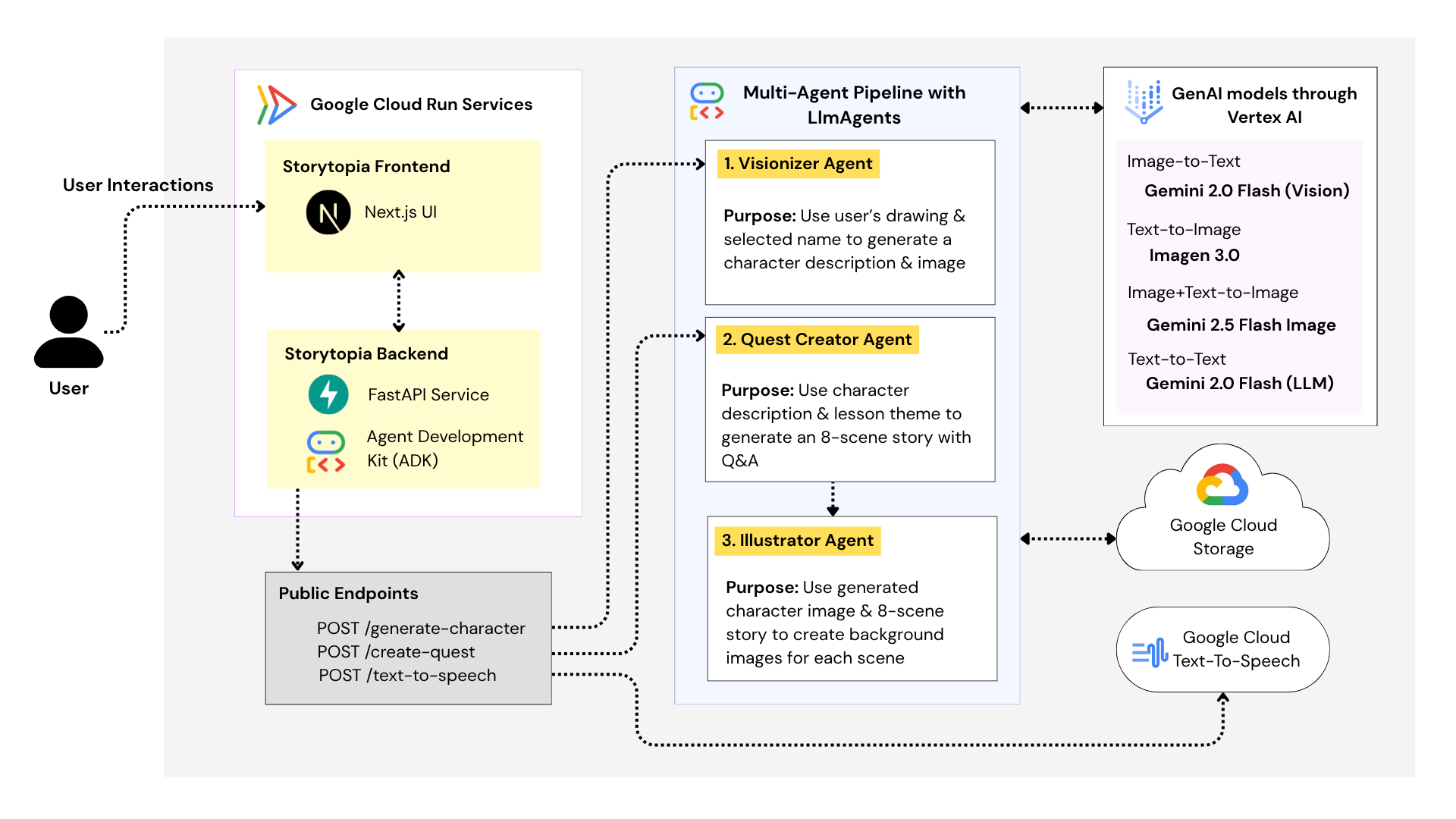
- FastAPI Multi-Agent Backend (Agents Service): Powered by the Google Agent Development Kit (ADK), the backend orchestrates three AI agents – Visionizer, Quest Creator, and Illustrator – to generate characters, stories, and illustrations.
An optional Text-to-Speech endpoint provides narrated playback using Gemini 2.5 Flash TTS.
Cloud Deployment Surfaces
| Component | Technology | Deployment | Purpose |
|---|---|---|---|
| Frontend | Next.js | Cloud Run | Drawing canvas, story flow UI |
| Backend | FastAPI + ADK | Cloud Run | Orchestrates AI agents |
| Media | Cloud Storage | – | Stores all uploads & generated assets |
| AI Services | Vertex AI (Gemini + Imagen) & Cloud TTS | – | Drawing analysis, story generation, image synthesis, narrations |
The frontend and backend are containerized with dedicated Dockerfiles and deployable as two separate Cloud Run services. Runtime dependencies include Google Cloud Storage, Vertex AI (Gemini Flash + Imagen), and Cloud TTS.

Figure 1. Multi-Agent Architecture on Google Cloud Run
How Our Multi-Agent Workflow Works
Transforming a child’s character and lesson into a fully illustrated, interactive picture book is a complex process that benefits from being divided into specialized components – which is exactly where AI agents come to play. Storytopia is a conversation between multiple AI agents (Google ADK) that collaborate with eachother. Below, we walk through each step of the process.
Google ADK Integration
- Each AI agent is defined as an LlmAgent within the Google Agent Development Kit (ADK).
- The FastAPI backend manages interactions through ADK sessions, executed asynchronously using
Runner.run_async. - Structured JSON responses stream back to the frontend in real time.
1. Creating Your Character with the Visionizer Agent
We designed this stage to make kids feel like their hand-drawn art has come to life, while maintaining visual consistency and safety through automated filtering.
When a child finishes their drawing and hits “Generate Character,” we start the process with our Visionizer Agent.
- The frontend sends the base64-encoded drawing and a user ID to the '/generate-character` endpoint.
- Our FastAPI backend uploads the image to Google Cloud Storage and initializes an ADK Runner session.
- The Visionizer Agent takes over:
- It first calls Gemini Flash 2.0 (Vision Capability) to understand the drawing — identifying the character’s key traits, objects, and any safety signals.
- Given that the drawing is appropriate, it builds a detailed prompt for Imagen 3.0, which then produces a high-quality, animated version of the character.
- It first calls Gemini Flash 2.0 (Vision Capability) to understand the drawing — identifying the character’s key traits, objects, and any safety signals.
- The agent returns structured JSON including:
- Extracted visual traits
- The Imagen prompt
- A Cloud Storage URI pointing to the generated image
- Extracted visual traits

2. Turning the Character into a Quest with the Quest Creator Agent
We treat this agent as the “writer” of the experience – blending educational goals with fun, appropriate storytelling. Once the character is ready, the child / a parent selects a lesson theme – for example, kindness, online safety, or learning to ride a bike.

This triggers the Quest Creator Agent. Here’s how it works:
- The frontend sends the character’s metadata (from the Visionizer Agent stage) and the chosen lesson to the
/create-questendpoint. - The Quest Creator Agent, powered by Gemini 2.0 Flash (LLM), generates an 8-scene interactive story, where each scene includes:
- A short story segment and question
- One correct and one incorrect answer
- A corresponding image prompt
3. Bringing the Story to Life with the Illustrator Agent
Once the story structure is ready, we move to the visual storytelling phase with the Illustrator Agent. Here’s the process:
- The quest JSON from the previous step is passed to the Illustrator Agent. We also fetch the generated character image from Cloud Storage (From step 1), and pass it to the agent. We found that this step was really important for maintaining visual consistency - ensuring that the kid's character appears the same in each scene.
- The agent enhances the image prompts for visual consistency across all scenes – matching colors, character poses, and setting details.
- It then calls Gemini Flash 2.5 Image and performs Image&text-to-Image processing, to create eye-catching illustrations for each scene.
- Each generated image is uploaded to Google Cloud Storage, and the URIs are consolidated into the final JSON response.
- The full questbook is asssembled, generated and rendered in the frontend UI.

4. Adding Narration (Optional)
To make stories even more immersive and accessible to all readers, we offer optional narrated playback using Gemini TTS. When a narration request is made (by clicking on the sound icon):
- The frontend sends story text to
/text-to-speech. - The backend invokes Gemini TTS, generating expressive, child-friendly MP3 narration.
- The audio file is stored in Cloud Storage, and the returned URI allows the frontend to sync playback scene by scene.
Try it out!
You can access the hosted version of Storytopia here:
Open Storytopia Web App
Best viewed on: Desktop or iPad (mobile layout not yet fully optimized).
If the screen appears zoomed in, try adjusting the zoom level to around 67% (or to your preference).
Runtime Notes
- Character generation: ~15 seconds
- Quest generation: ~2.5 minutes
- Note that demo video and GIF examples are sped up for presentation purposes.
Future Improvements
We plan to extend Storytopia’s multi-agent pipeline with:
- User story saving and replay – persistent session storage for children to revisit their creations.
- Animation generation via Google Veo, transforming illustrated scenes into short animated clips with synchronized voice and narration. We actually experimented with this feature a little for this hackathon, but found it to be quite costly. We hope to incorporate this feature if we can obtain extra Google Cloud credits!
Built With
- cloudrun
- gemini-flash
- gemini-tts
- gemini-vision
- google-adk
- google-cloud
- nextjs
- python
- typescript


Log in or sign up for Devpost to join the conversation.