-
-
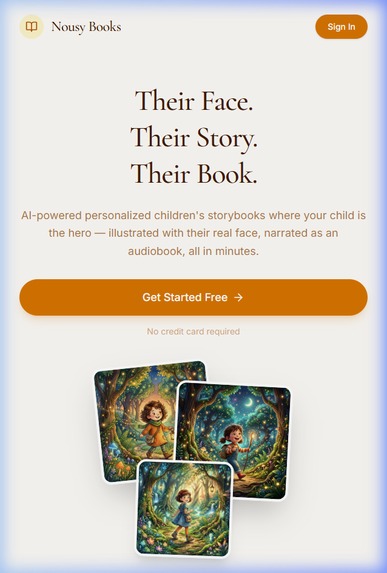
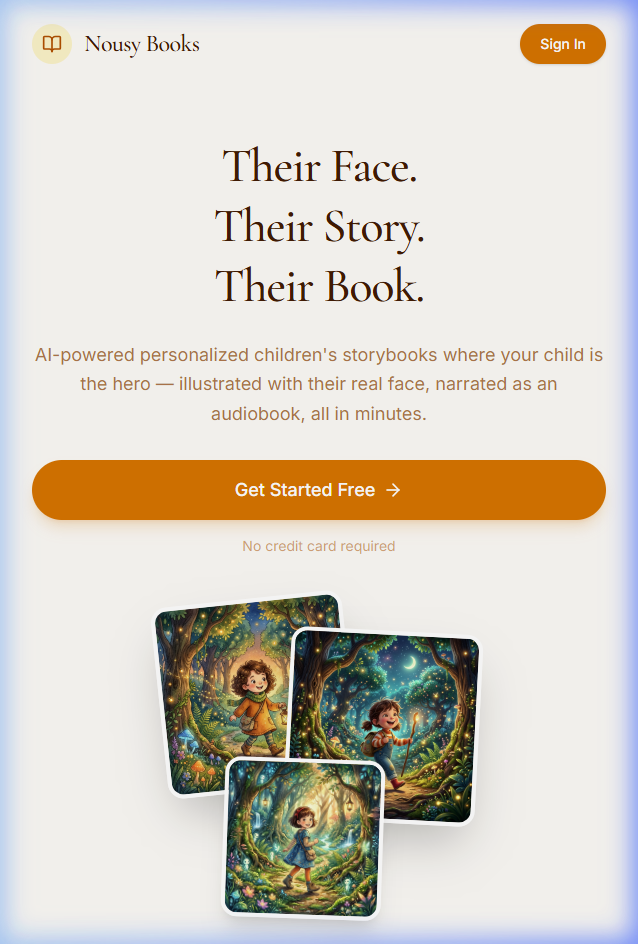
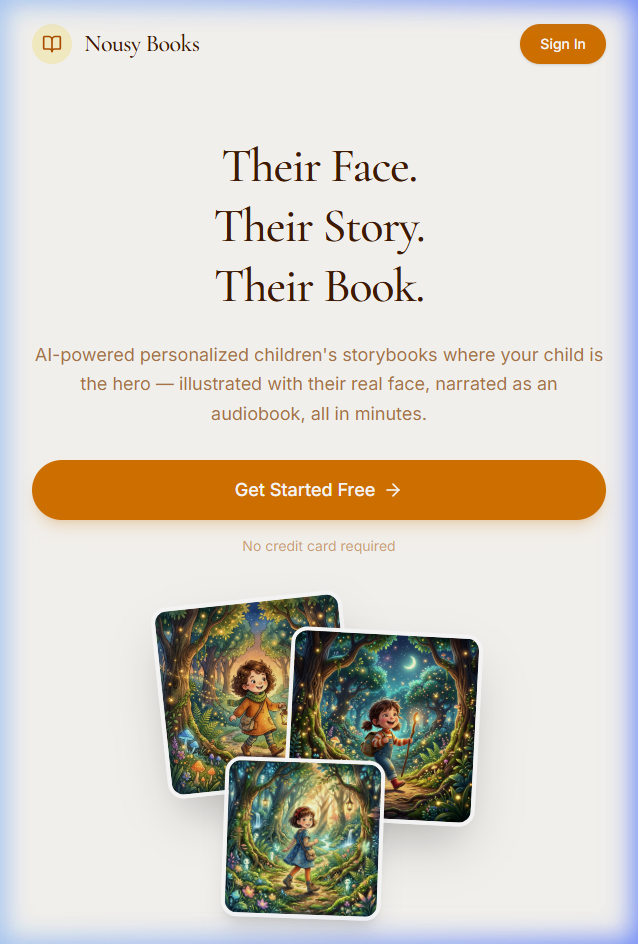
Landing page hero — "Their face. Their story. Their book."
-
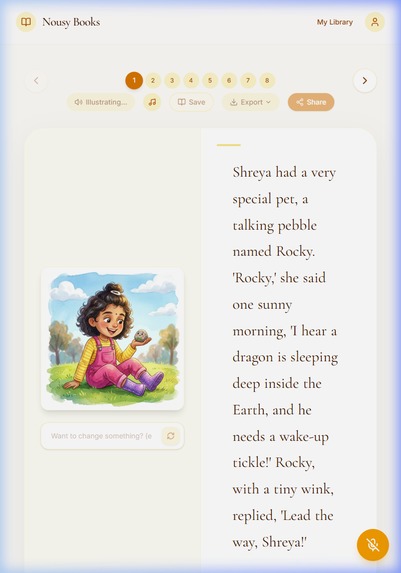
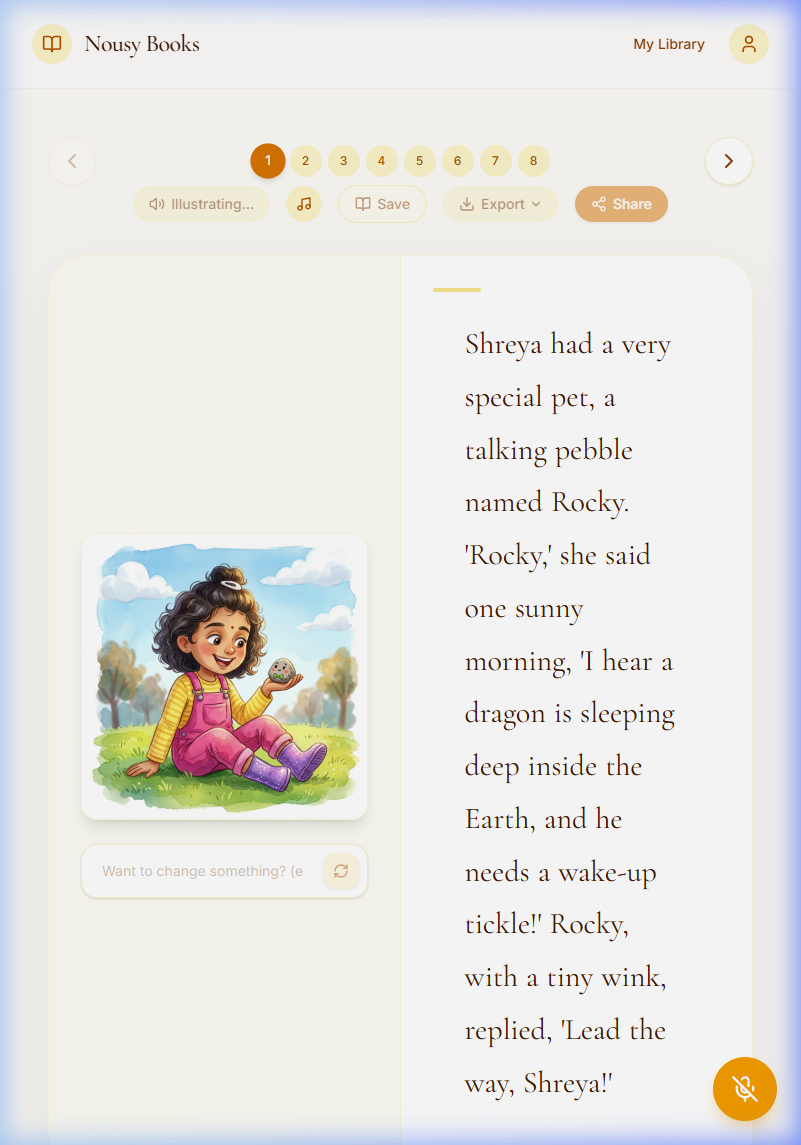
Reading view — Page 1 with character-consistent illustration
-
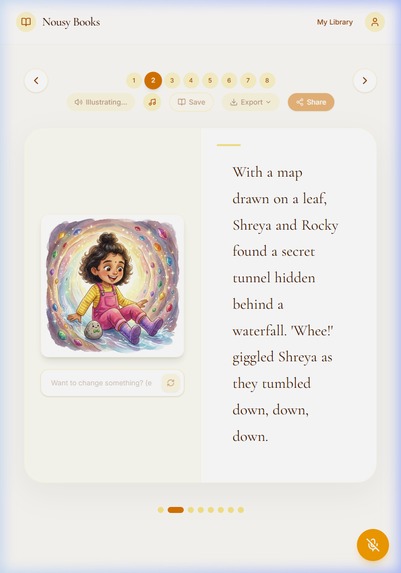
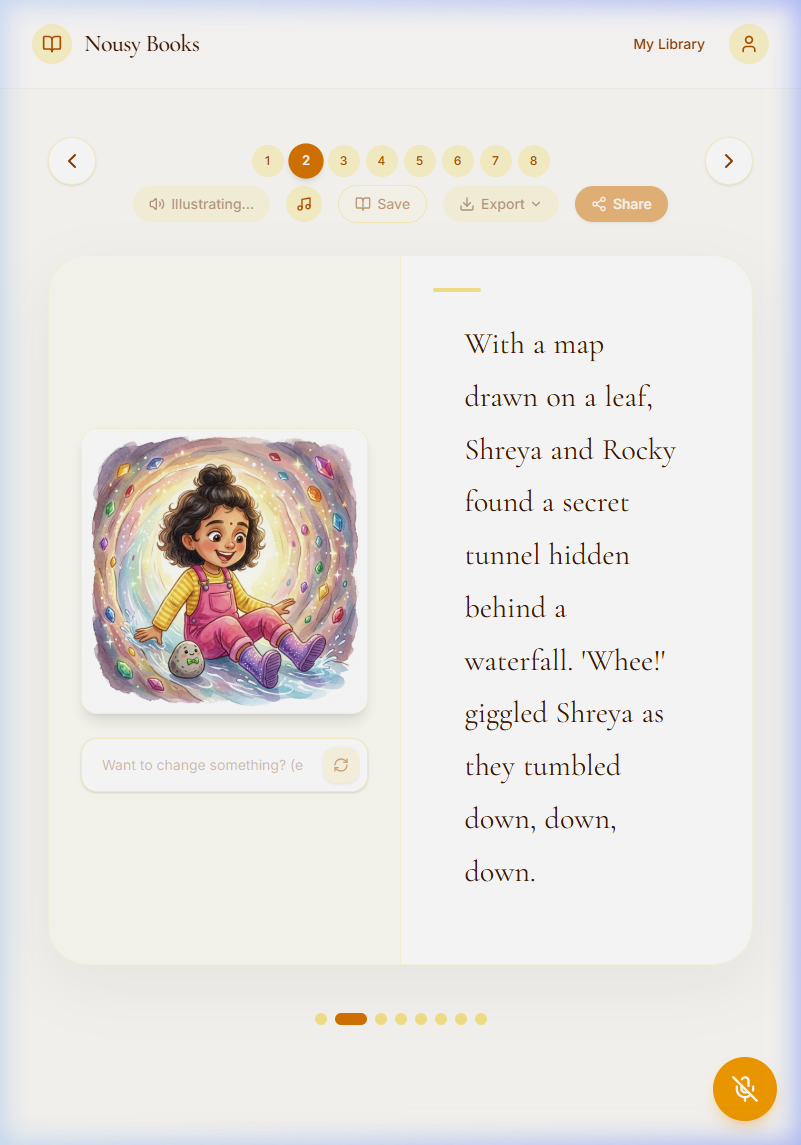
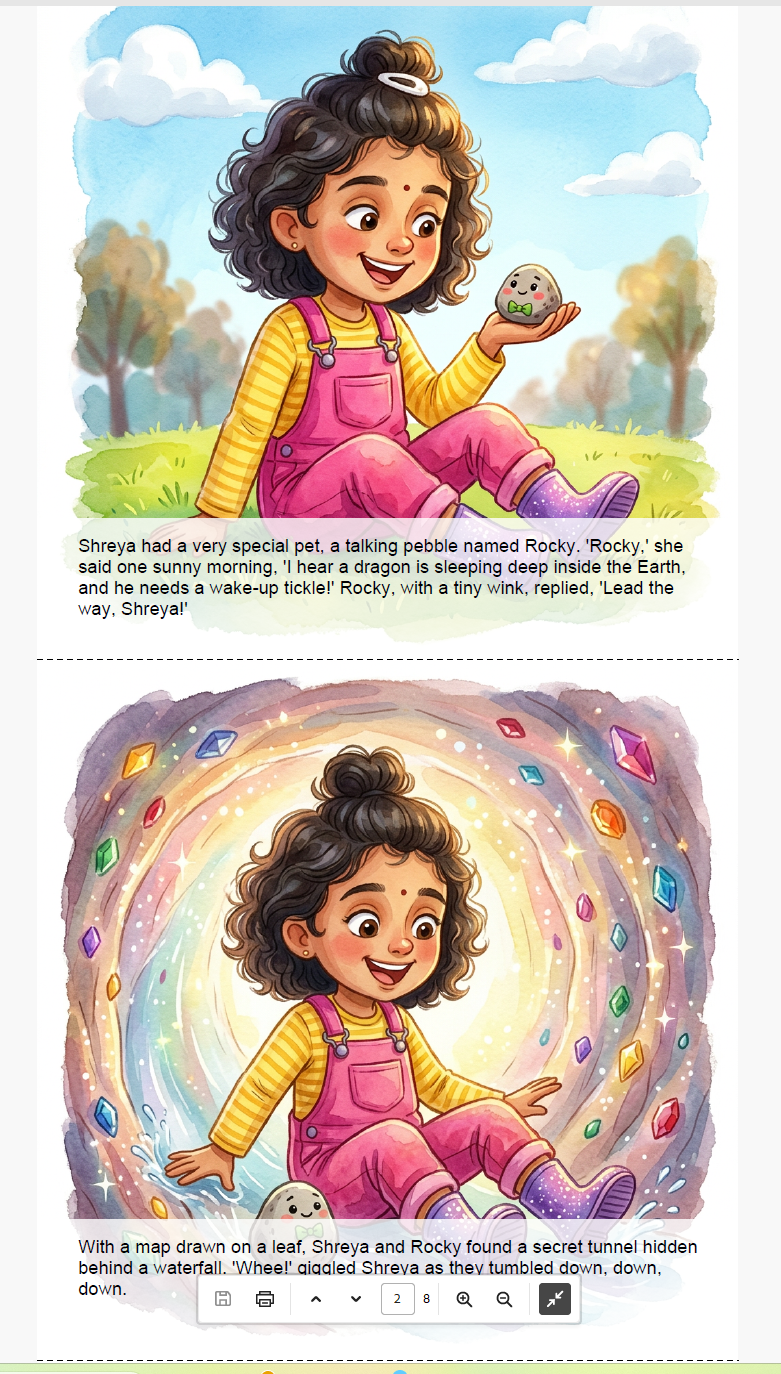
Character consistency — same face, hair, and clothing on Page 2
-
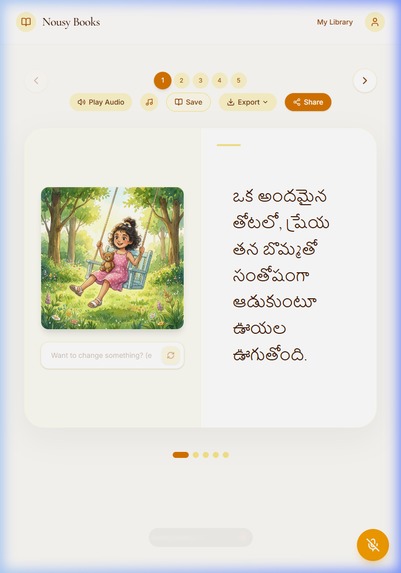
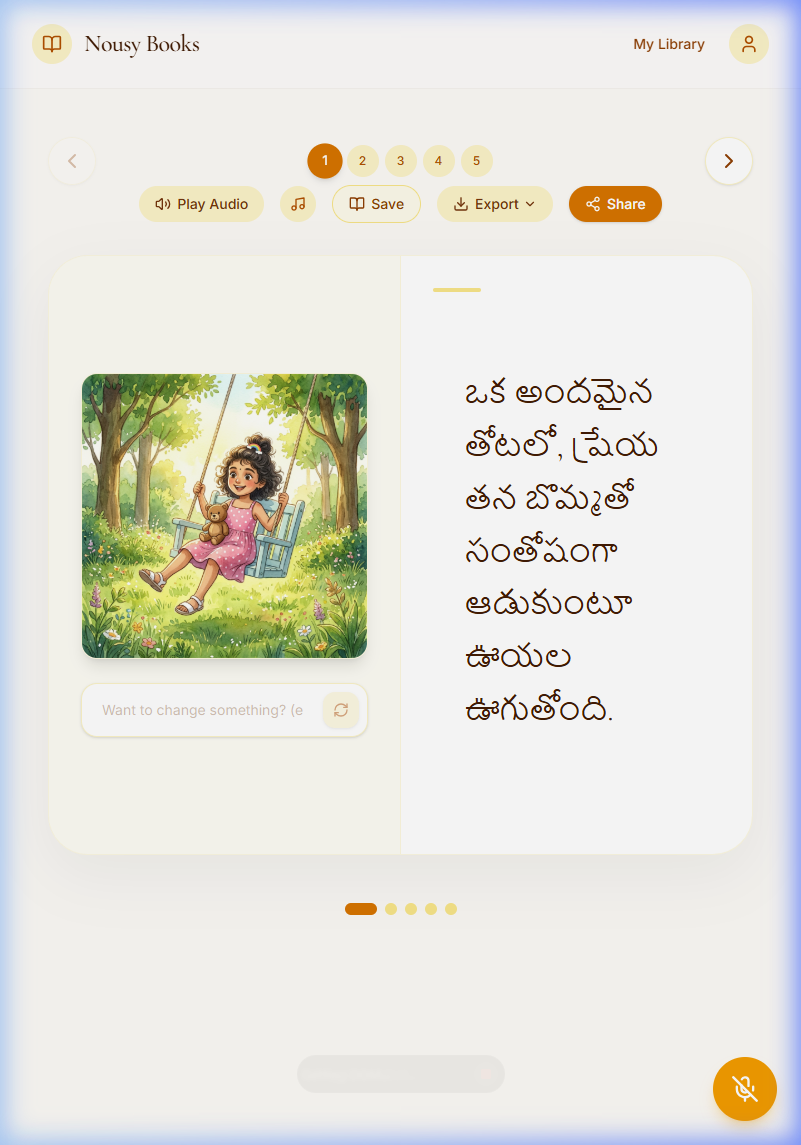
Multi-language support — story generated in Telugu
-
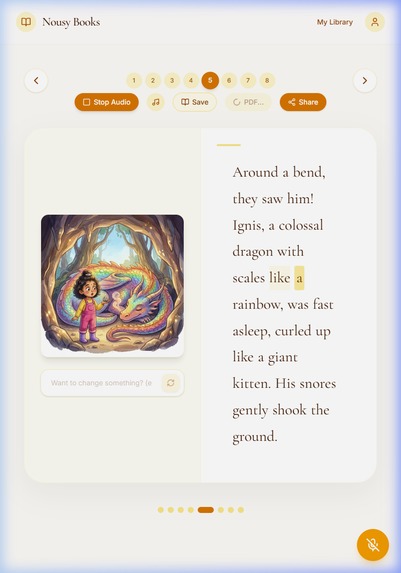
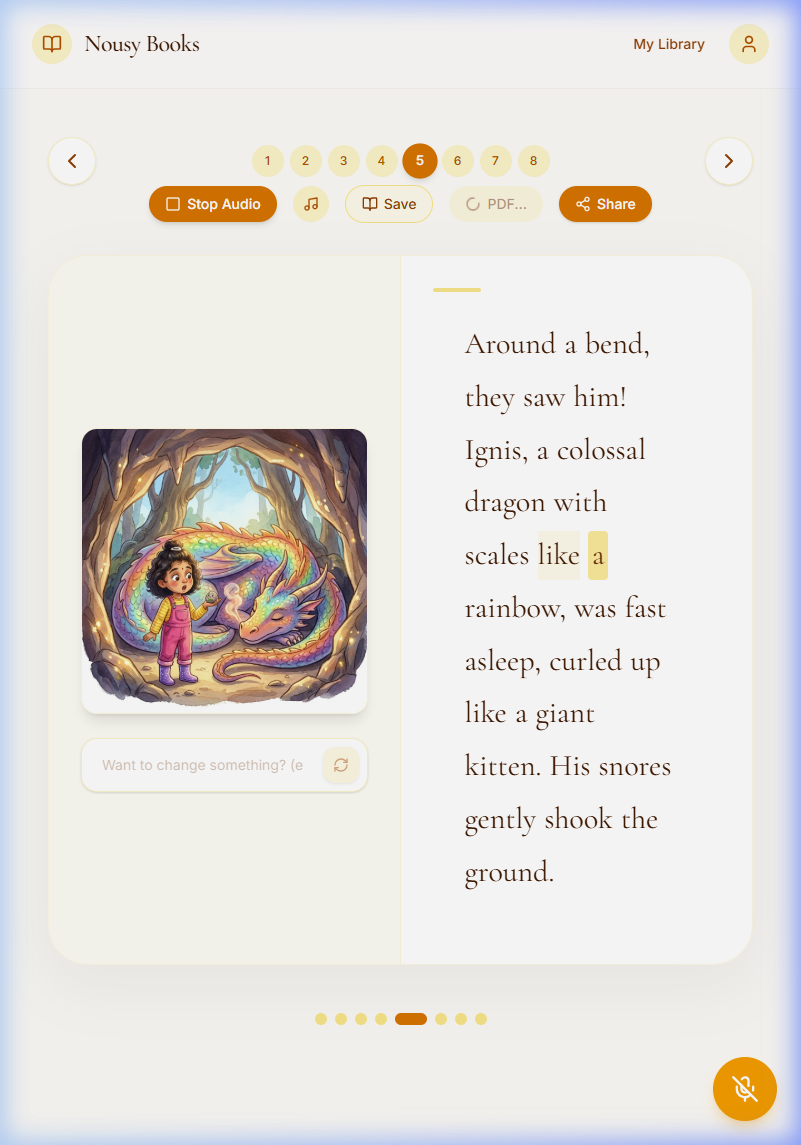
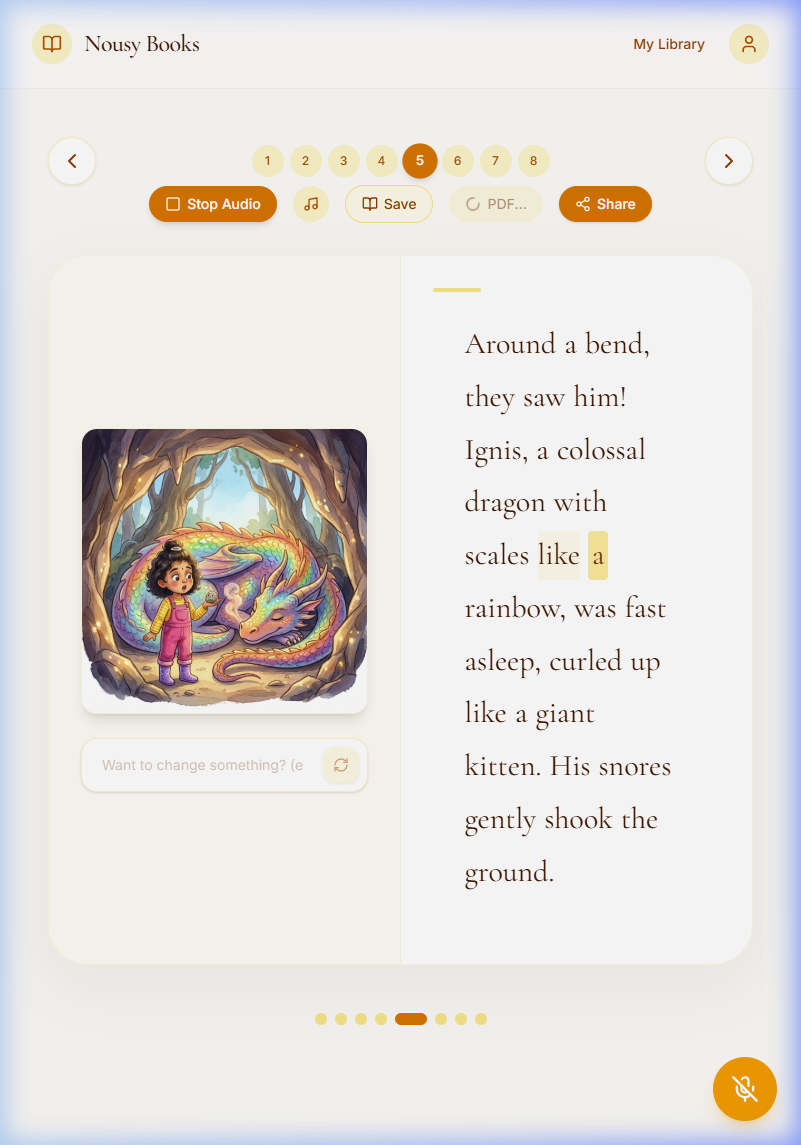
Audiobook narration with real-time word highlighting
-
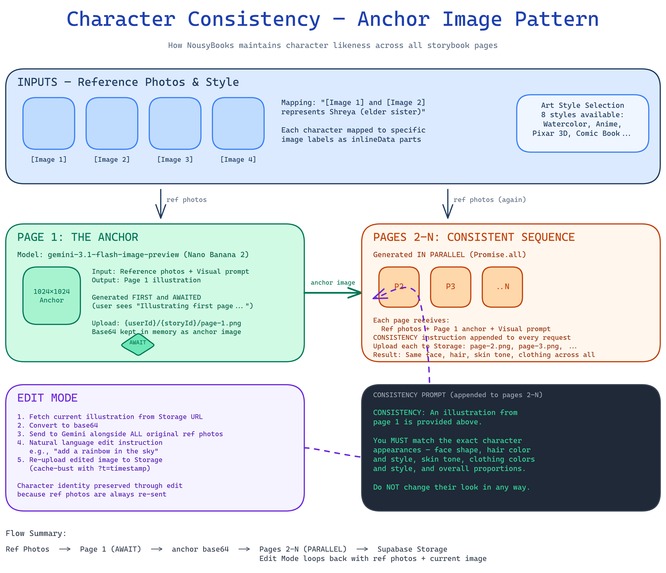
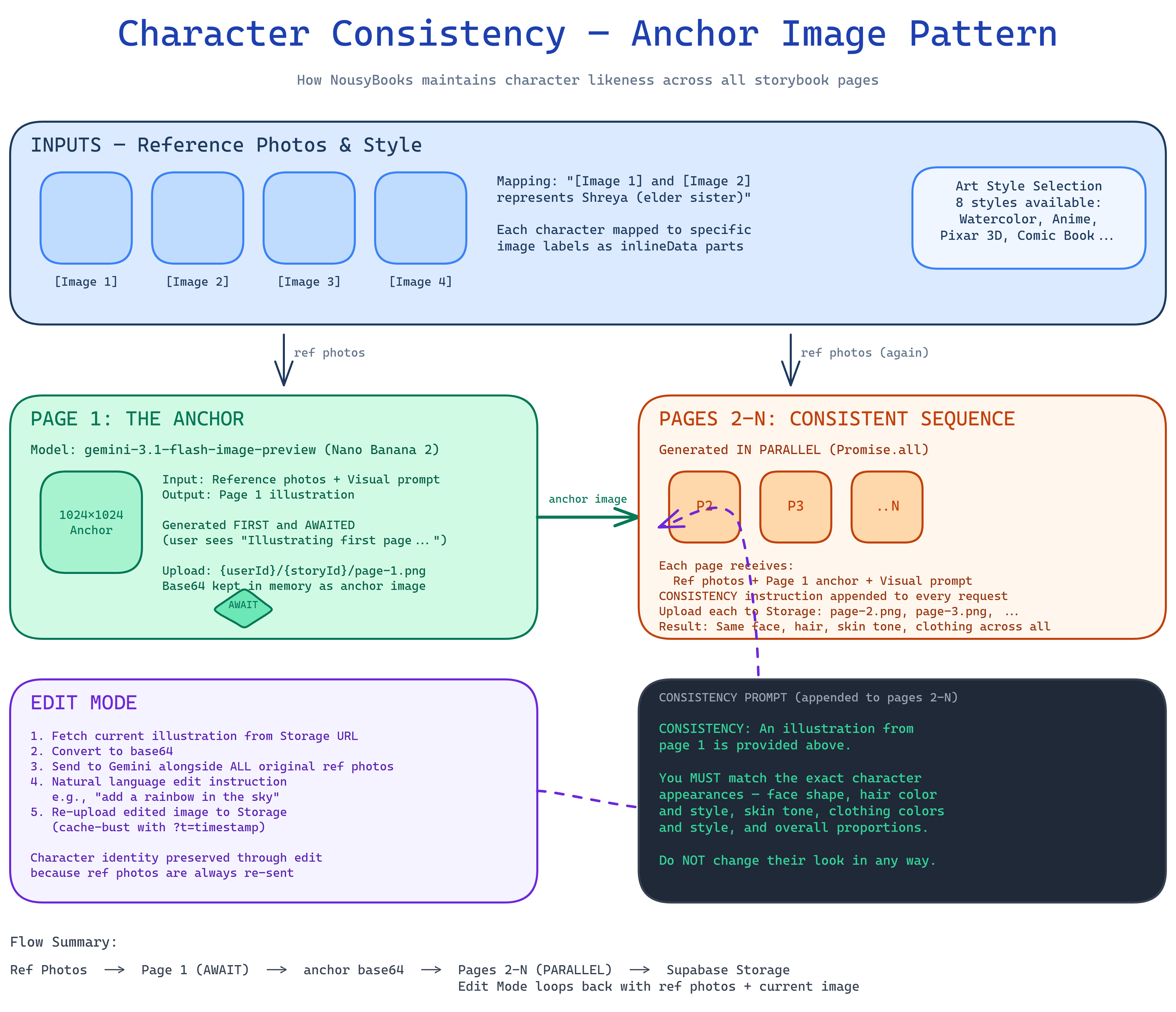
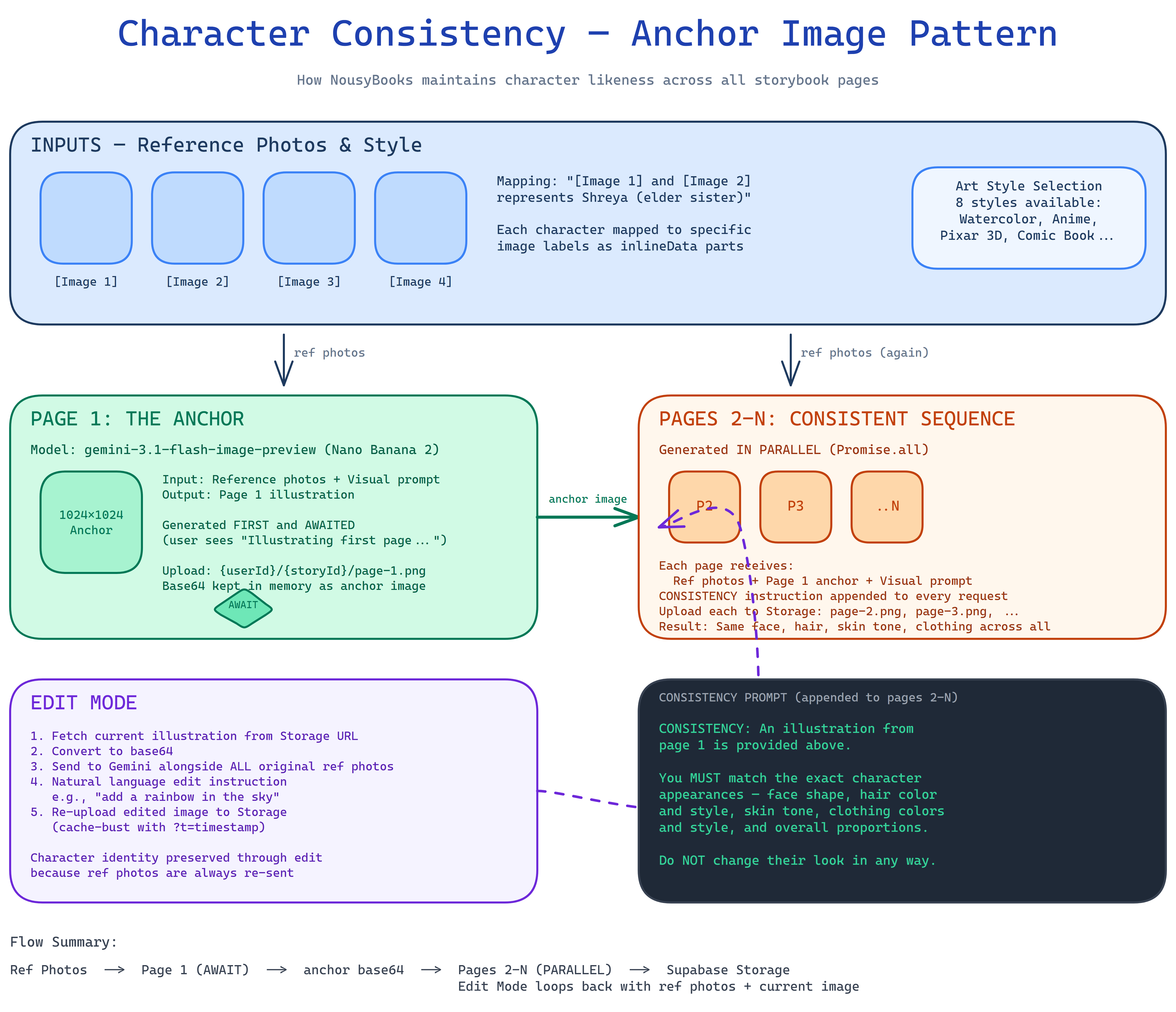
Anchor Image Pattern — how character consistency works across pages
-
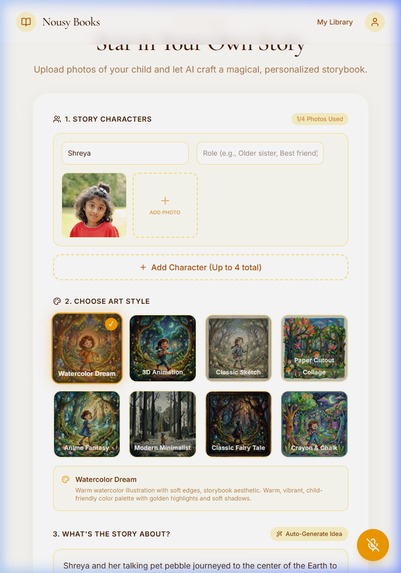
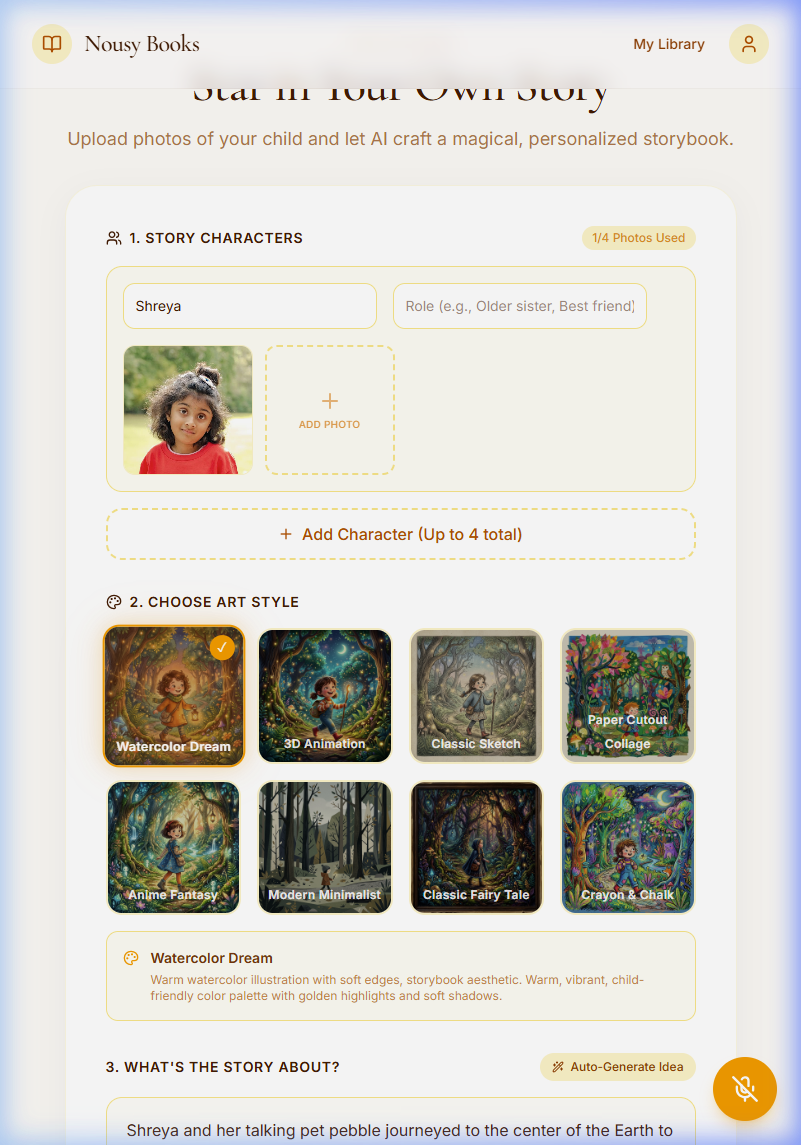
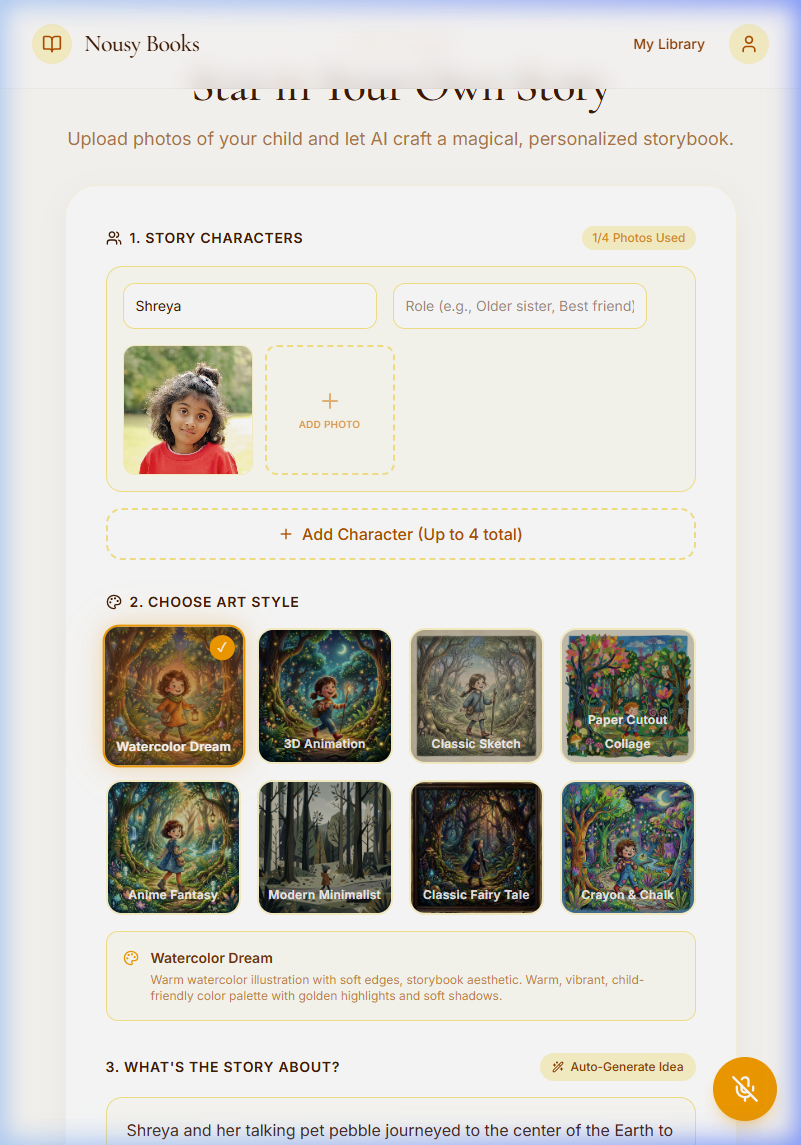
Story creation dashboard — characters, art style, and topic configured
-
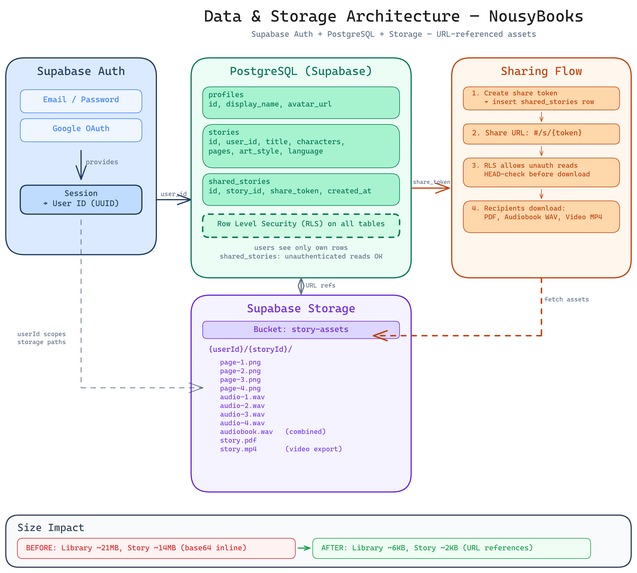
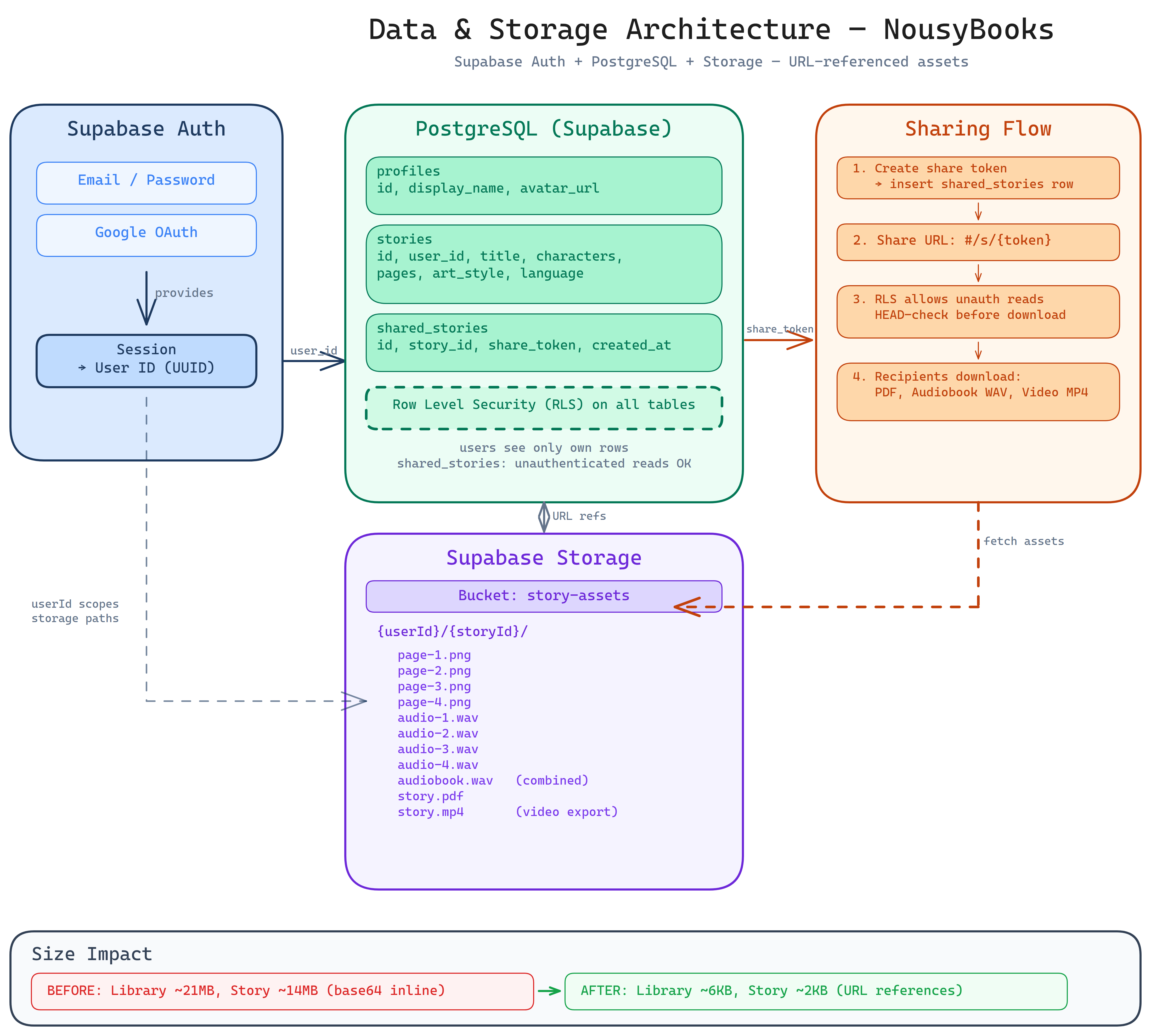
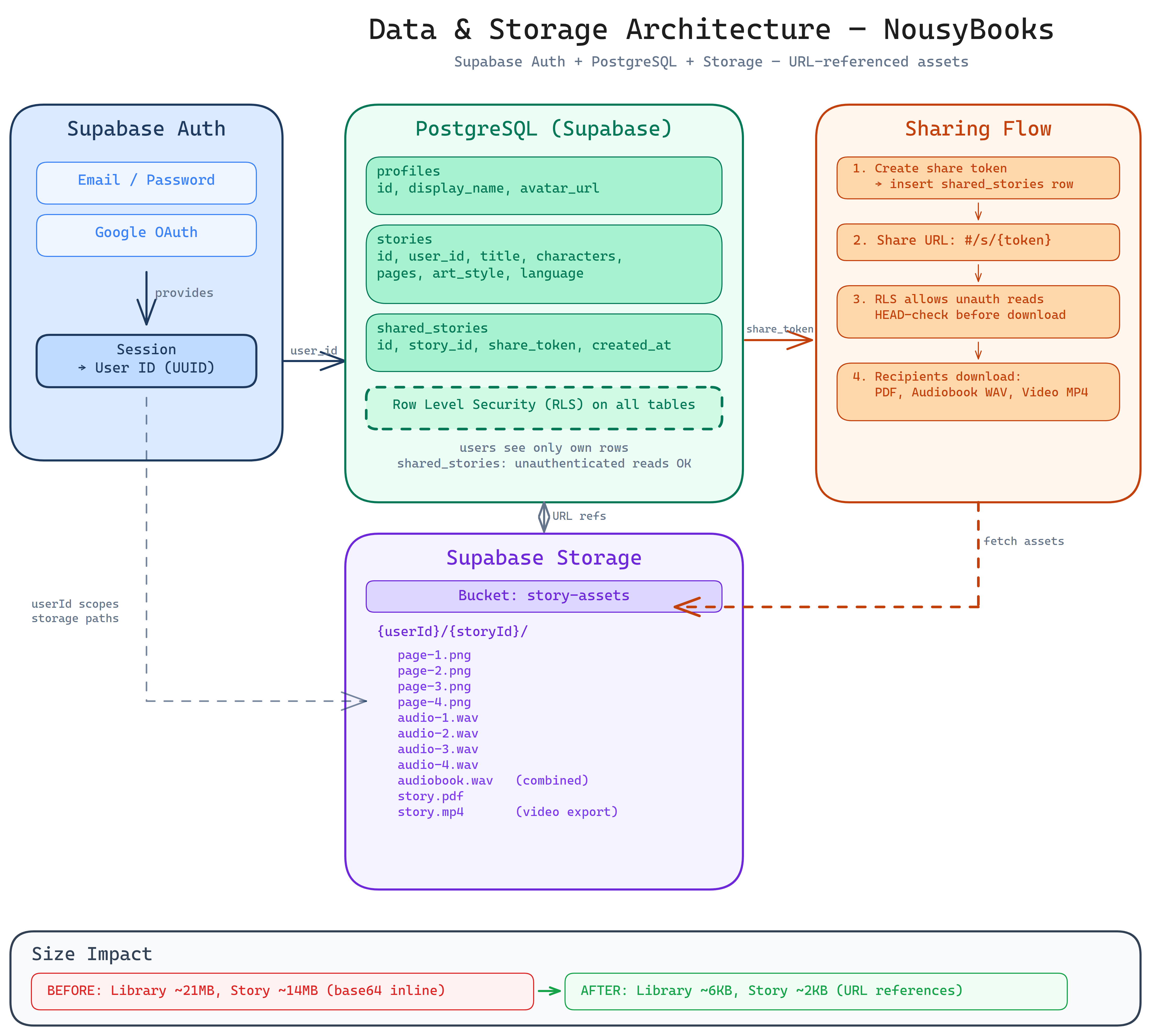
Data & storage architecture — Supabase auth, database, and file storage
-
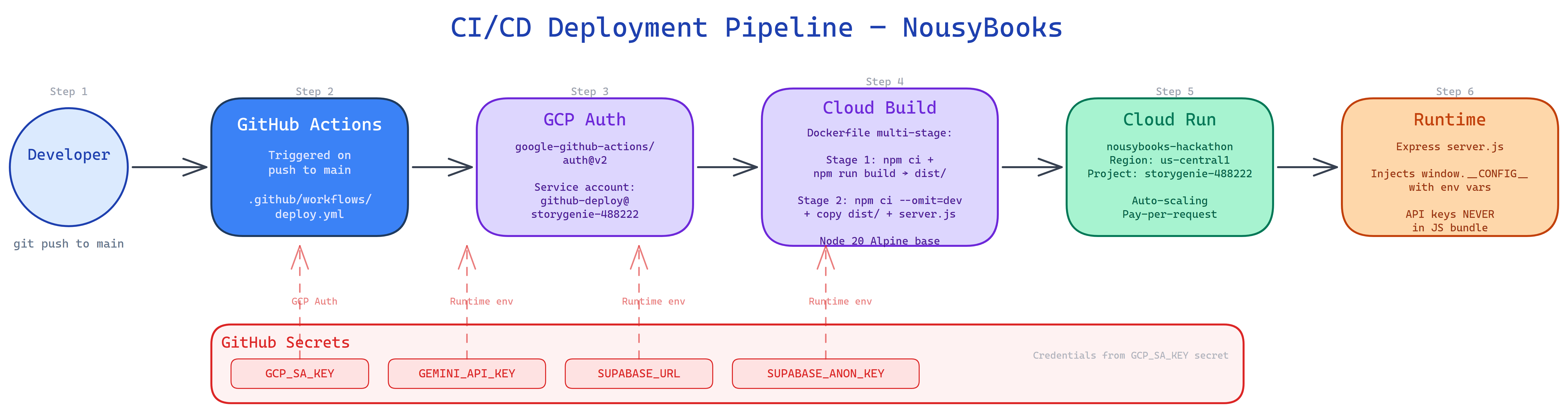
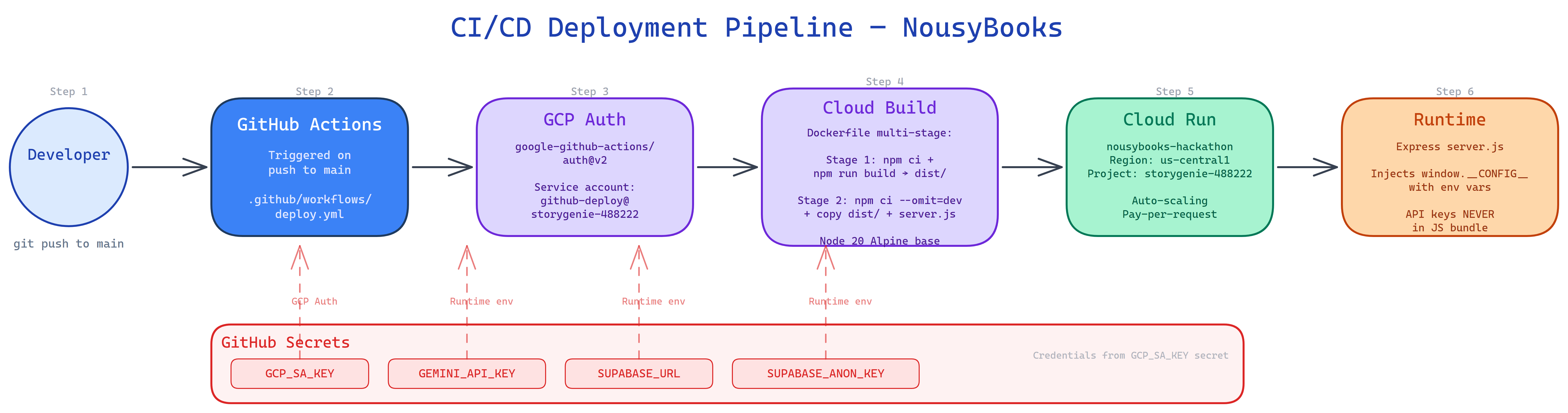
CI/CD pipeline — GitHub Actions auto-deploy to Google Cloud Run
-
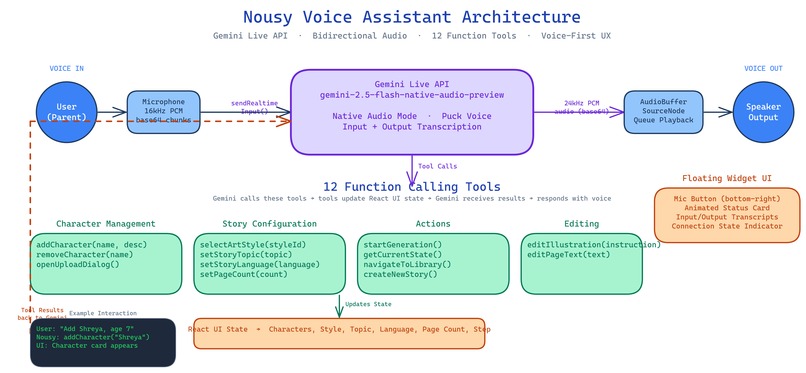
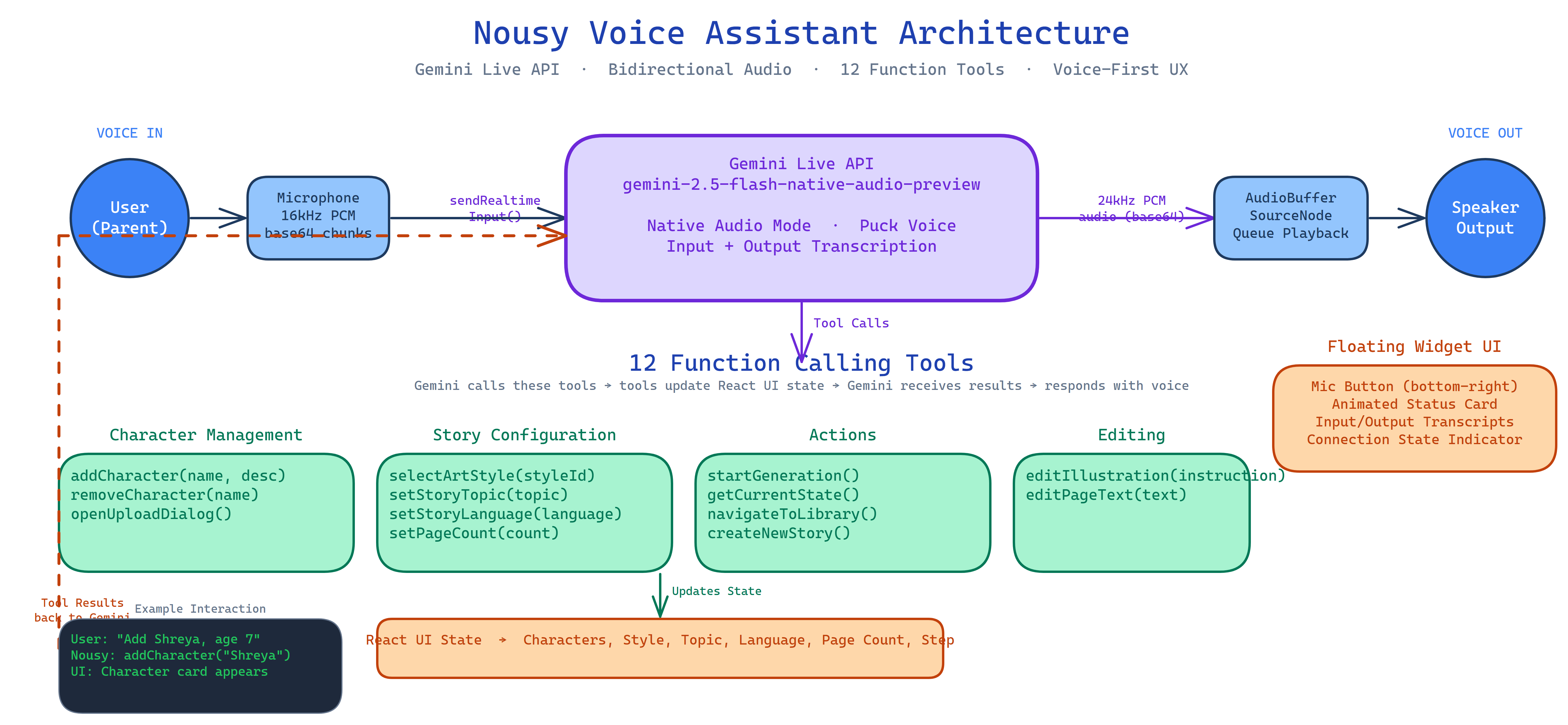
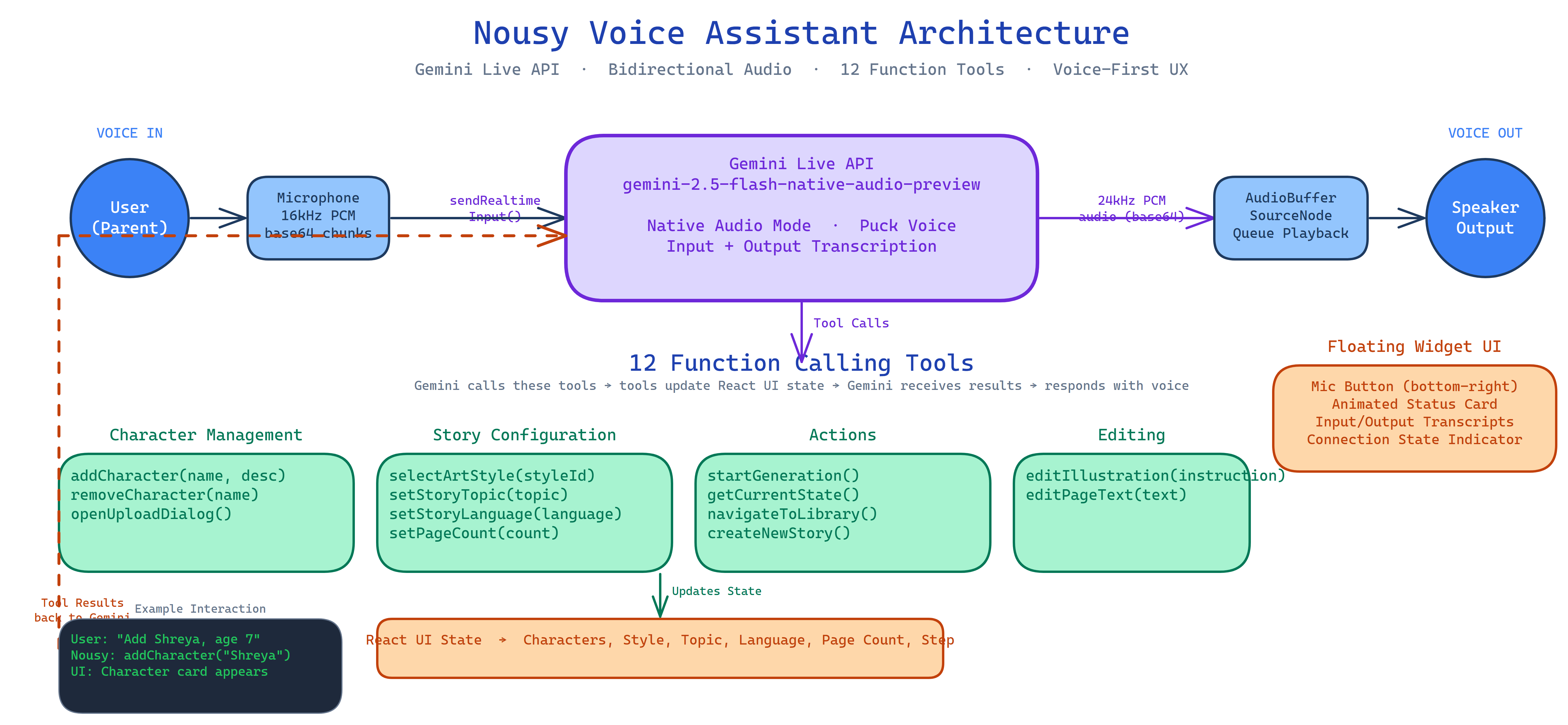
Voice assistant architecture — Gemini Live API with 12 function tools
-
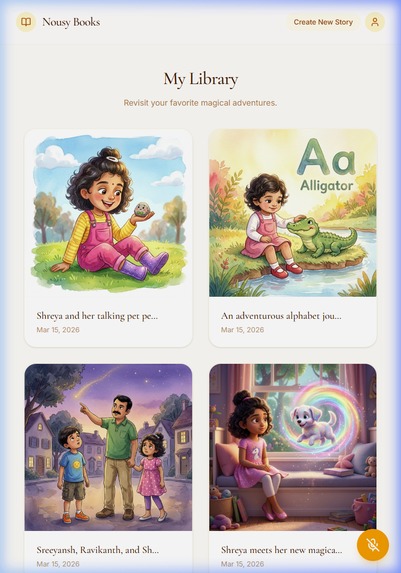
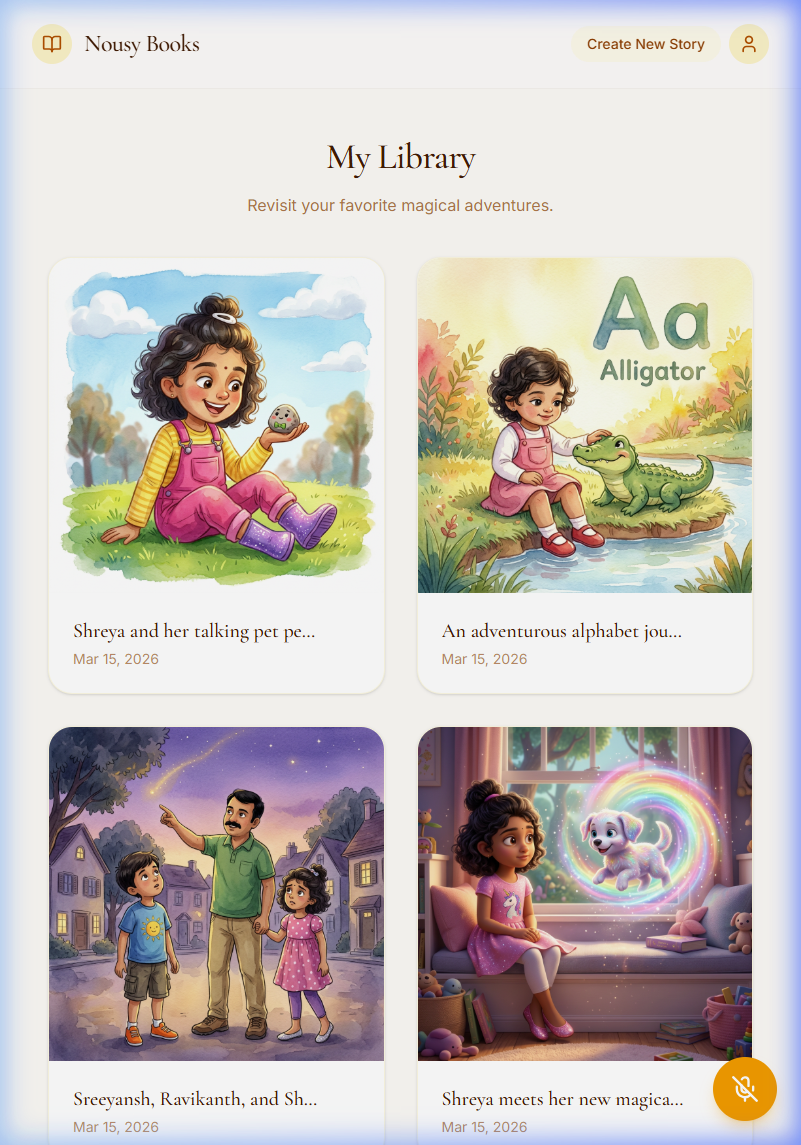
Story library — saved storybooks grid view
-
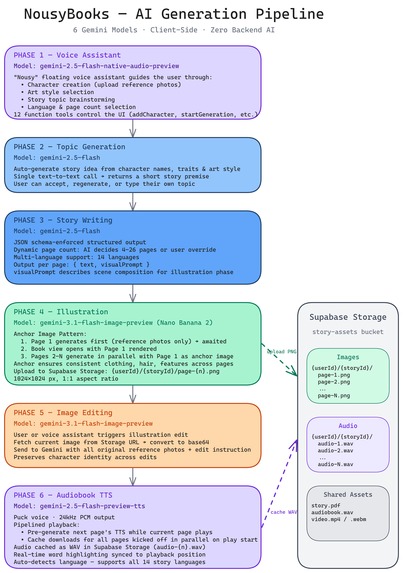
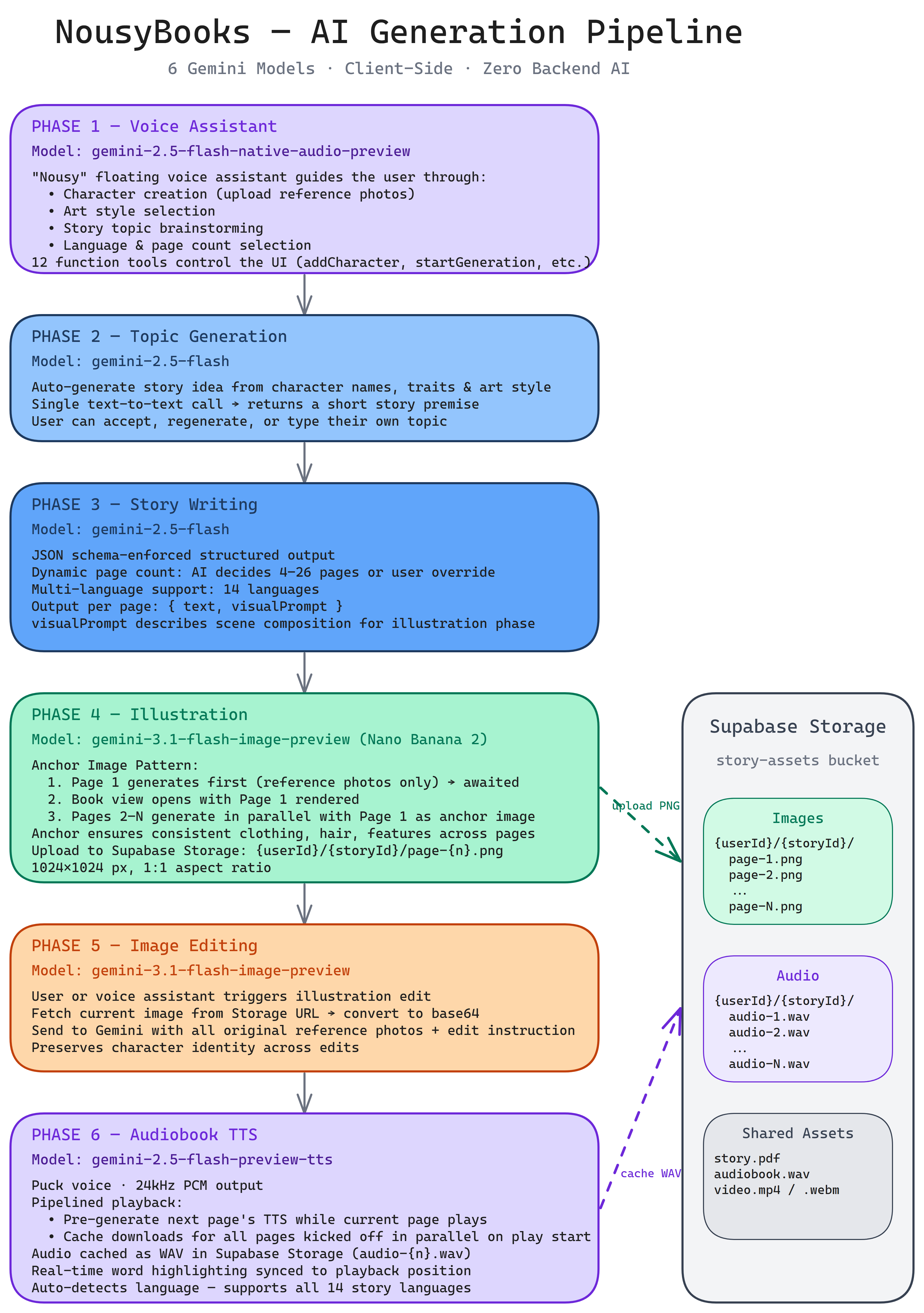
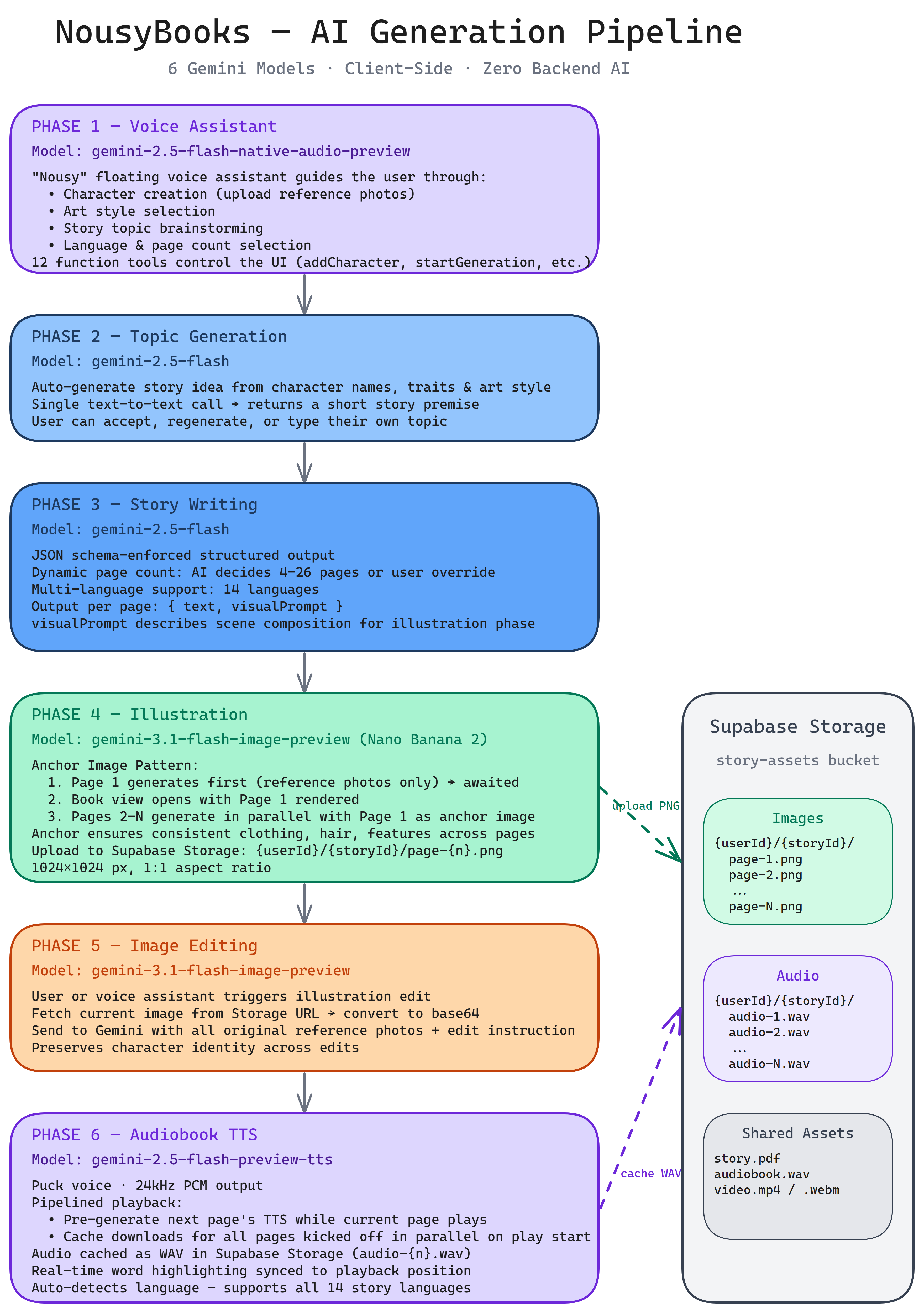
AI pipeline — 6 Gemini models orchestrated end-to-end
-
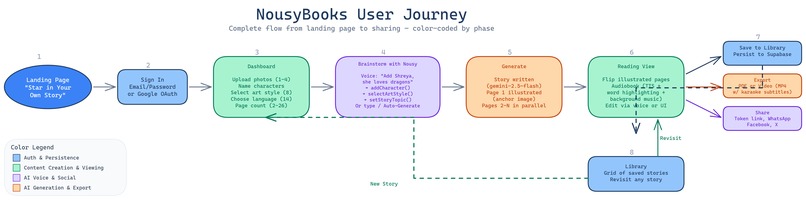
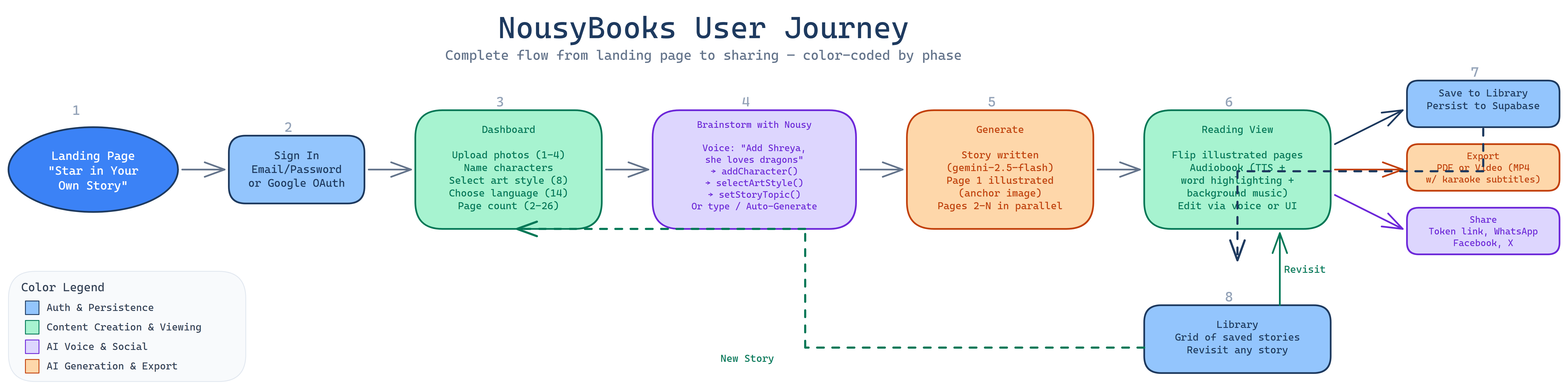
User flow — from photo upload to finished storybook
-
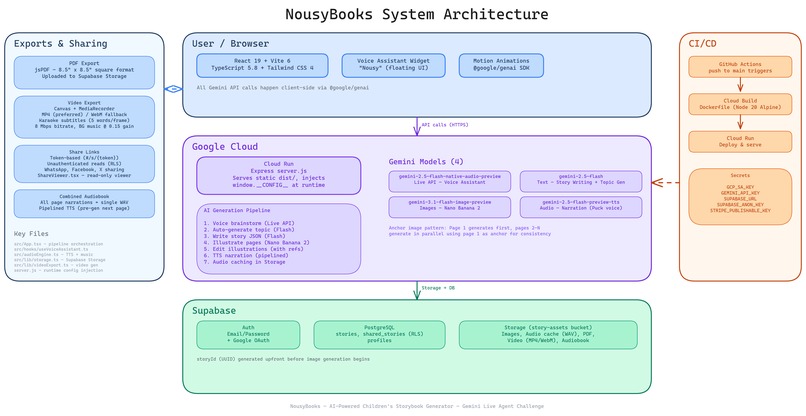
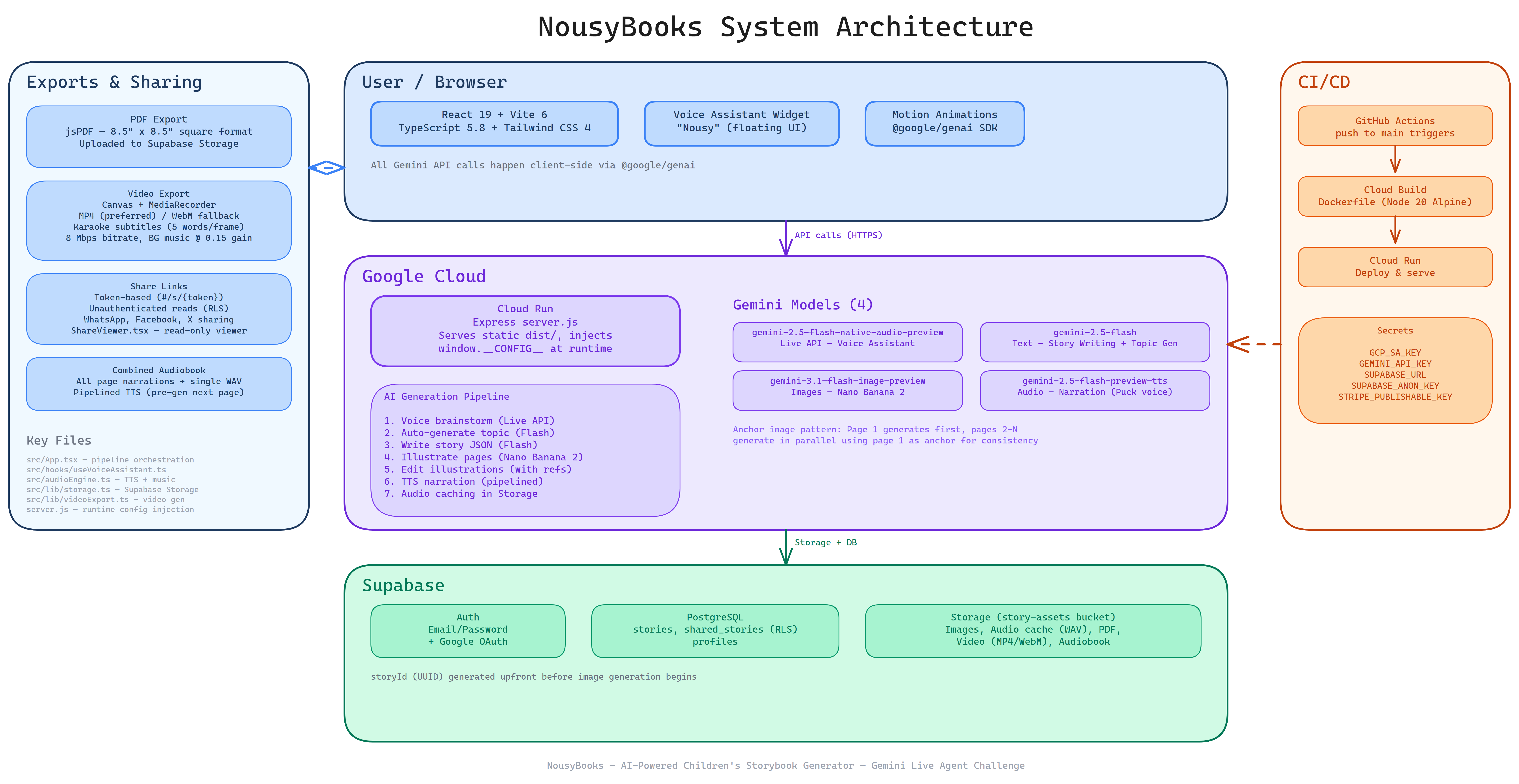
System architecture — full stack overview (React + Gemini + Supabase + Cloud Run)
-
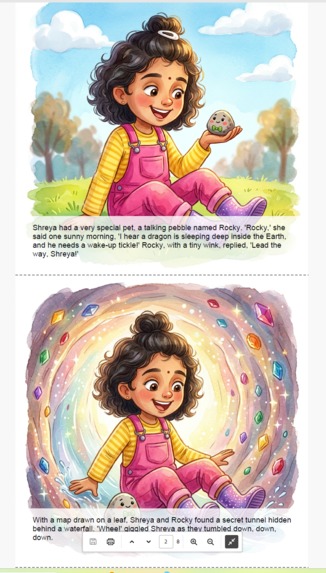
PDF export — print-ready storybook
-
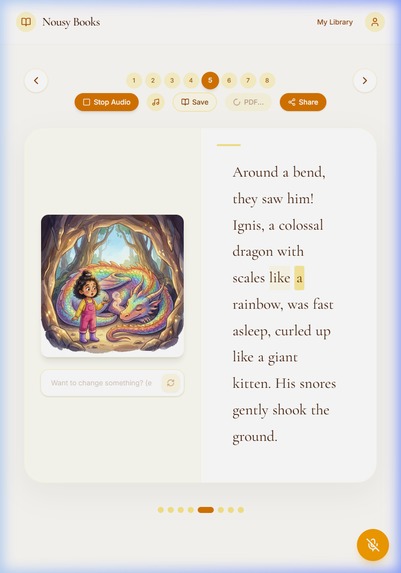
Audio Highlighting
The Inspiration: A Story for My Daughter
Every parent knows the magic of a bedtime story. But what if the hero of the story looked exactly like your child?
As a parent of a 7-year-old daughter, I've spent years reading with her — exploring everything from Usborne's lift-the-flap books and sound books to interactive stories with surprise elements. We've tried several ebook apps over the years, searching for that perfect blend of engagement and personalization. Through all of it, one thing became clear: children light up most when they feel like the story is theirs. Not a generic hero — them.
Existing personalized book services are expensive ($50-100+), take weeks to deliver, and use crude template swaps — paste a name here, drop a generic face there. The result feels manufactured, not magical. And none of them capture what makes physical children's books special — the artistry, the different illustration styles, the feeling that each page was crafted with care.
The Core Tech: The "Anchor Image Pattern"
Then, on February 26, 2026, Google released Nano Banana 2 (gemini-3.1-flash-image-preview). When I saw its character consistency feature — the ability to maintain a person's likeness across multiple generated images using reference photos — the idea clicked instantly. This was the missing piece. I could build a tool that generates illustrated storybooks where a child's actual face appears on every page, consistently, in any art style from watercolor to Pixar-style 3D. Not a template swap — real AI-generated illustrations starring your child.
I wanted to build something different: a tool where a parent could talk about what kind of story they wanted, and within minutes hold a fully illustrated, narrated storybook — combining the artistic variety my daughter and I love in physical books with the personalization that no book on the shelf can offer.
Meet Nousy: The Gemini Live Voice Assistant
The Gemini Live Agent Challenge was the perfect catalyst. The Live API enables a voice-first assistant ("Nousy") that makes story creation feel like a conversation, not a form — the way my daughter and I naturally brainstorm bedtime stories together. Nousy guides the entire flow — adding characters, choosing styles, brainstorming topics — through natural voice with 12 function calling tools. And Gemini's multimodal capabilities — text, image generation, and TTS — make it possible to deliver a complete storybook experience from a single AI platform.
What It Does
NousyBooks generates personalized children's storybooks end-to-end in minutes:
1. Upload & Personalize Parents upload 1-4 photos of their children as character references and choose from 8 curated art styles (Watercolor Dream, 3D Animation, Anime Fantasy, Paper Cutout Collage, and more).
2. Talk to Nousy A floating voice assistant — Nousy — guides the entire story creation through natural conversation. Parents click the mic button and Nousy helps with everything: "Add a character named Shreya, she's a 7 year old elder sister" → Nousy creates the character. "I want 3D animation style" → Nousy selects it. "She loves butterflies and is afraid of the dark" → Nousy brainstorms and sets the story topic. When ready, Nousy triggers generation — reminding parents to upload reference photos first.
Nousy uses 12 function calling tools (addCharacter, removeCharacter, selectArtStyle, setStoryTopic, setStoryLanguage, setPageCount, openUploadDialog, startGeneration, getCurrentState, navigateToLibrary, createNewStory, editIllustration, editPageText) to control the entire app via voice. Say "I want the story in Spanish" and Nousy sets the language. Alternatively, parents can type a topic or hit "Auto-Generate" for a surprise story idea.
3. Choose Language & Page Count Stories can be generated in 14 languages — English, Spanish, French, Hindi, Mandarin, Japanese, Korean, Arabic, Portuguese, German, Italian, Russian, Telugu, Tamil. Set via the Advanced dropdown or just tell Nousy: "Make it in Hindi." Page count is flexible: AI decides by default (4 pages for bedtime stories, 26 for alphabet books), or parents set a custom count (2-26).
4. Generate the Story Gemini writes the narrative in the chosen language with per-page visual prompts, following a proven children's book arc: Setup → Catalyst → Climax → Resolution. The story generation uses JSON schema enforcement for reliable structured output.
5. Illustrate with Character Consistency This is the core innovation. Using the Anchor Image Pattern:
- Page 1 generates first using the child's reference photos
- Pages 2-4 generate in parallel, each receiving the original references PLUS page 1's illustration as an "anchor" with a CONSISTENCY instruction
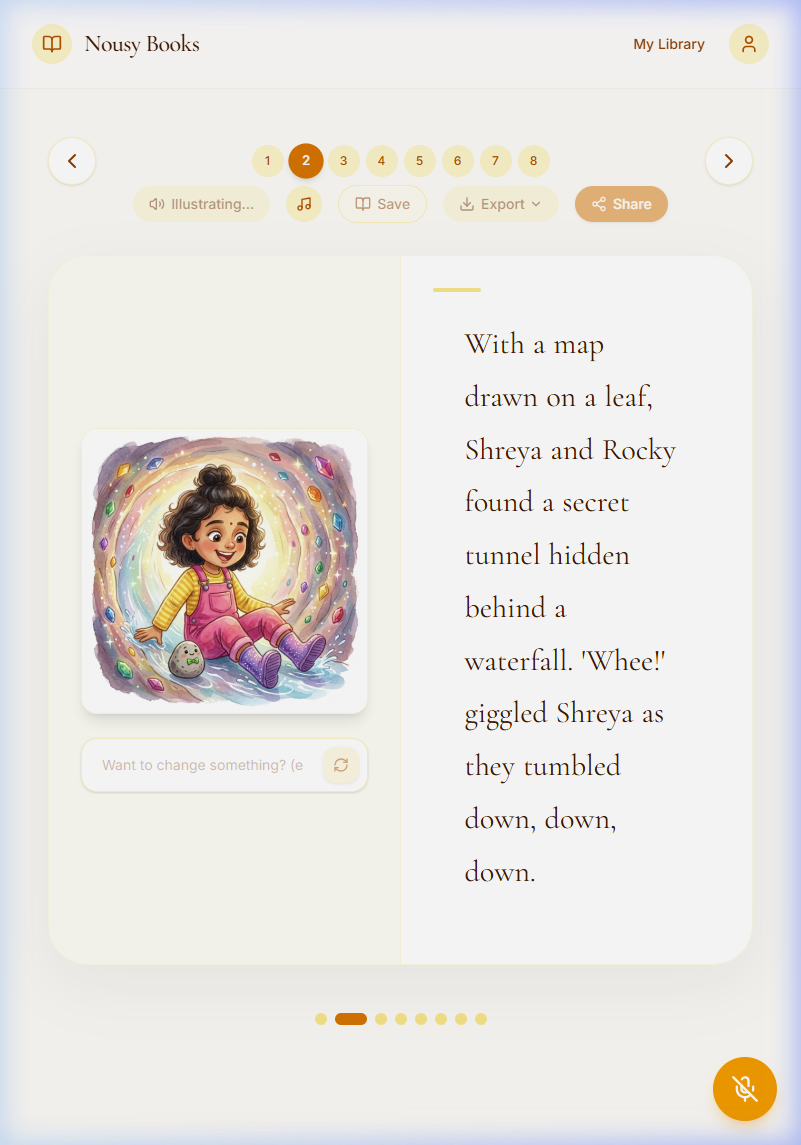
- The result: the child looks the same on every page — same face, hair, skin tone, and clothing
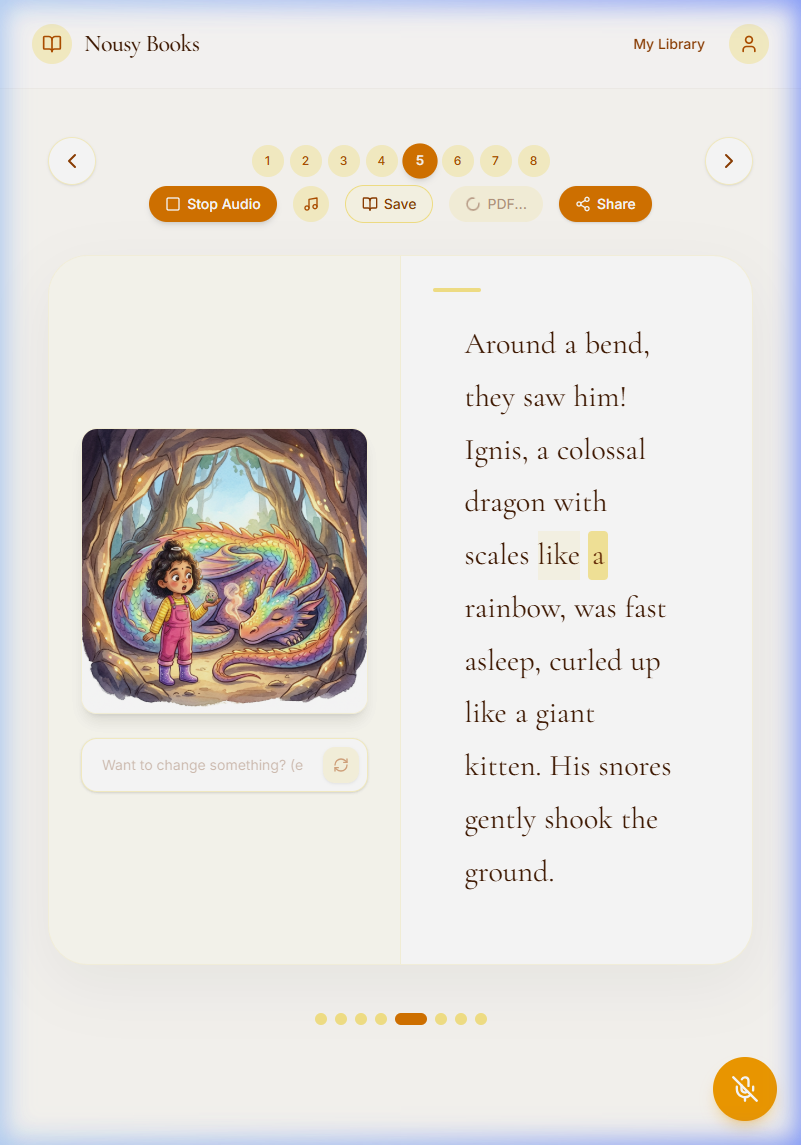
6. Listen to the Audiobook Gemini TTS narrates each page while words highlight in real-time — auto-detecting the story's language for natural pronunciation in any of the 14 supported languages. Looping MP3 background music plays softly underneath (toggleable). Pages auto-advance after narration completes.
7. Edit & Refine Parents can edit any illustration by typing natural language instructions ("make the sky more purple", "add a rainbow") while the AI preserves character identity. Story text is directly editable too.
8. Export & Share Download a print-ready 8.5"x8.5" square PDF, or export a video with karaoke subtitles and background music. Share stories via token-based links with social sharing (WhatsApp, Facebook, X) — recipients can view stories.
Screenshots
📸 Application Screenshots
1. Hero & Landing Page
Landing page with animated book icon and "Star in Your Own Story" hero headline. Shows the application's unique value proposition and Get Started CTA.
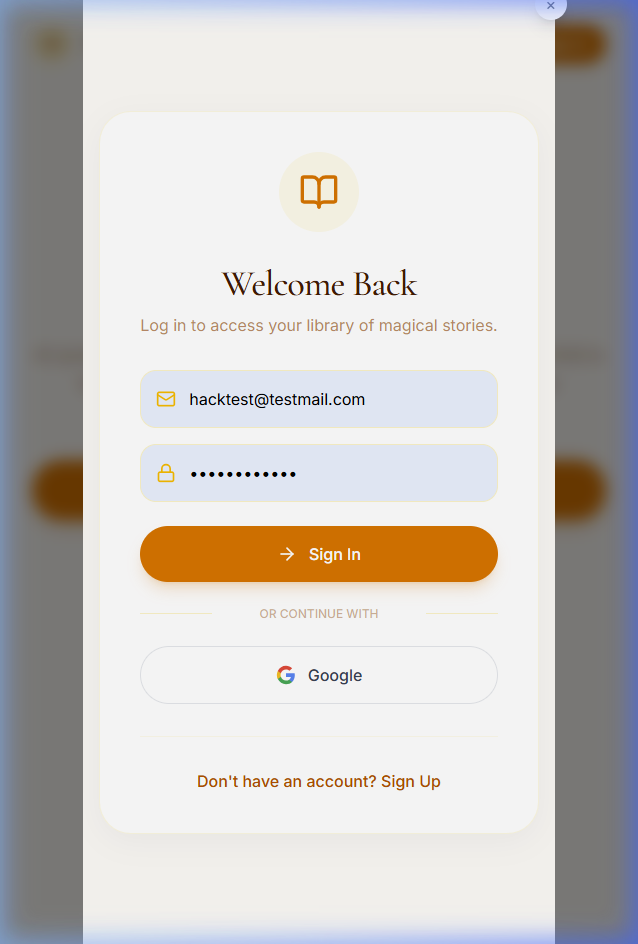
2. Login & Authentication
Modern authentication modal supporting Email/Password and Google OAuth for secure access to the personalized story library.
3. Dashboard (Ready to Generate)
The creation dashboard showing a character (Shreya) with an uploaded reference photo. The Watercolor Dream art style is selected and a story topic has been brainstormed.
4. Creative Engine in Progress
Dynamic progress indicator showing the Creative Engine "Mixing the watercolors" as it writes the story and paints the sequential illustrations.
5. Storybook Page 1 (Reading View)
The first page of a generated story with a high-fidelity watercolor illustration matching the uploaded character photo.
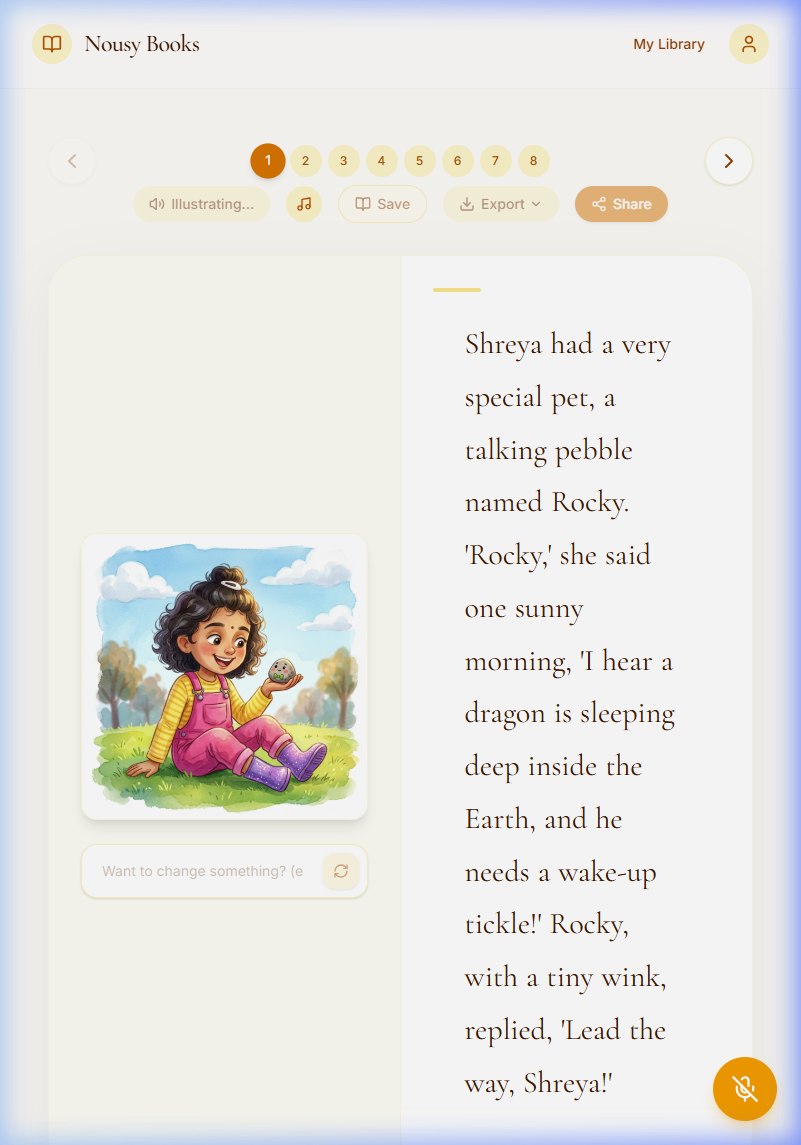
6. Character Consistency (Page 2)
Demonstrates the Anchor Image Pattern where the character’s face, hair, and clothing remain consistent across scenes.
7. Multimodal Audiobook (Voice + Highlighting)
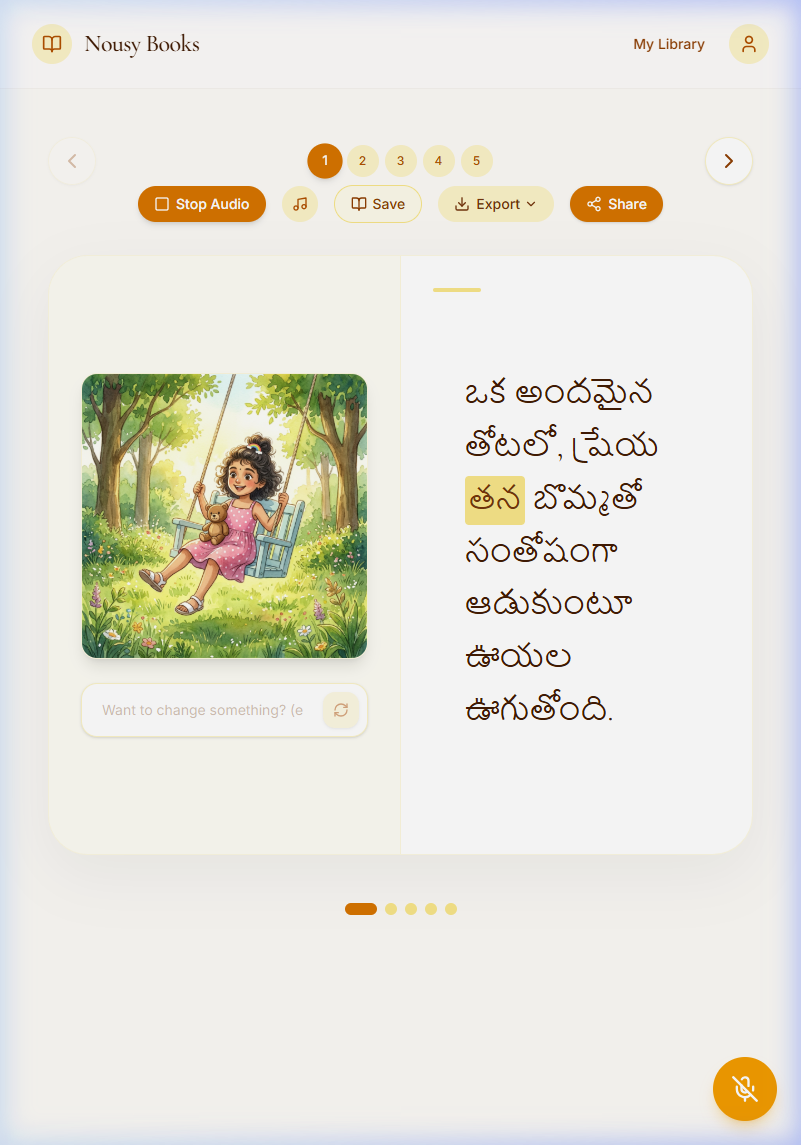
Gemini TTS narration with real-time word highlighting and ambient background music.
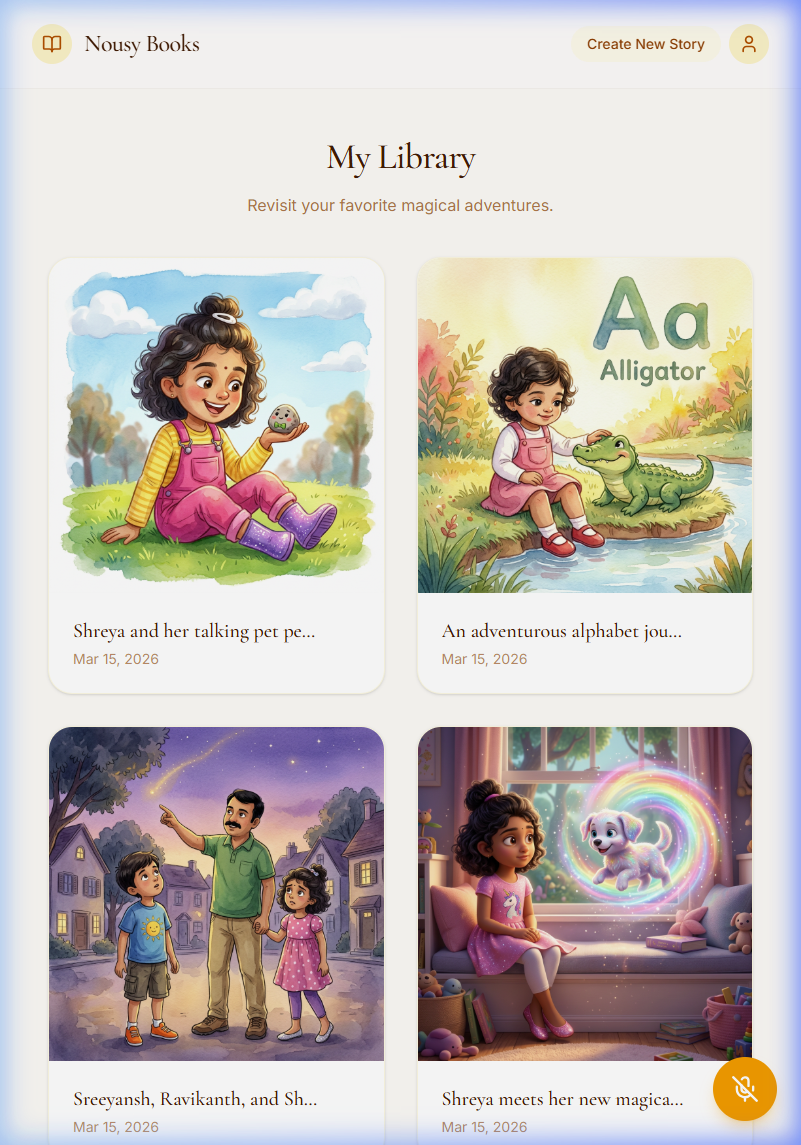
8. My Story Library
The personalized library view where parents can revisit, share, and manage their story collection.
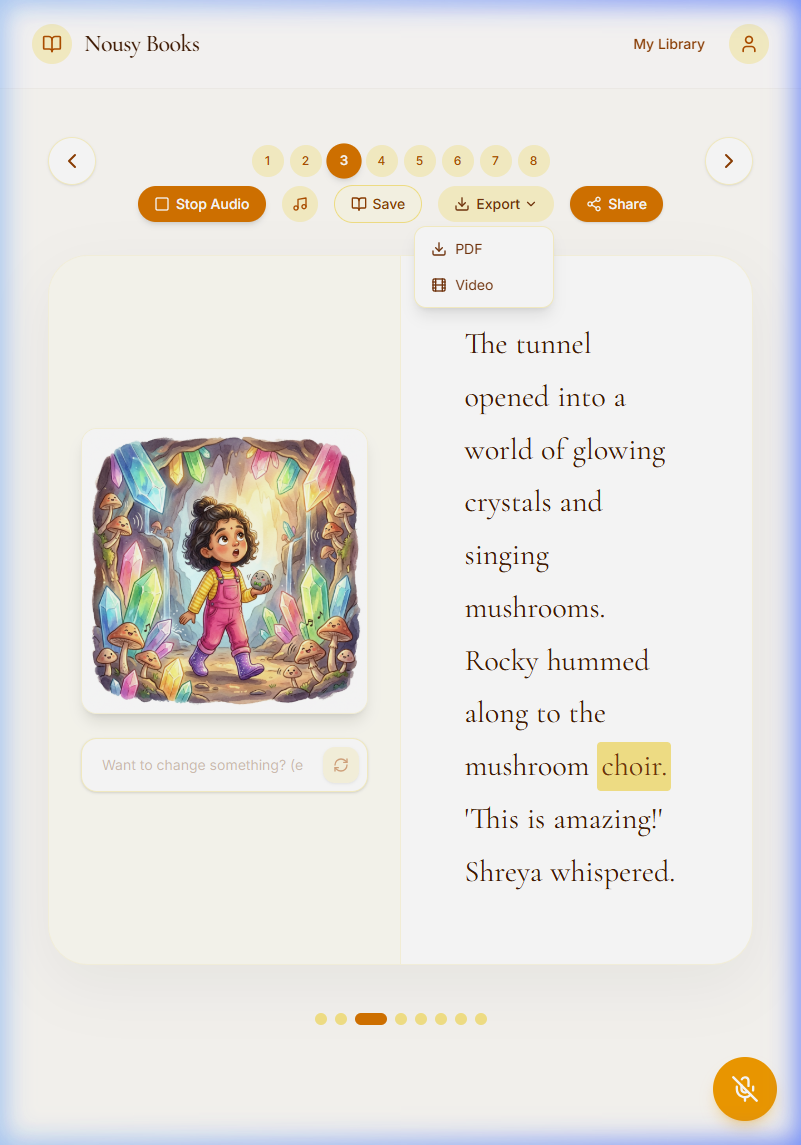
9. Export & Share Options
Export menu allowing one-click generation of print-ready PDFs and video downloads.
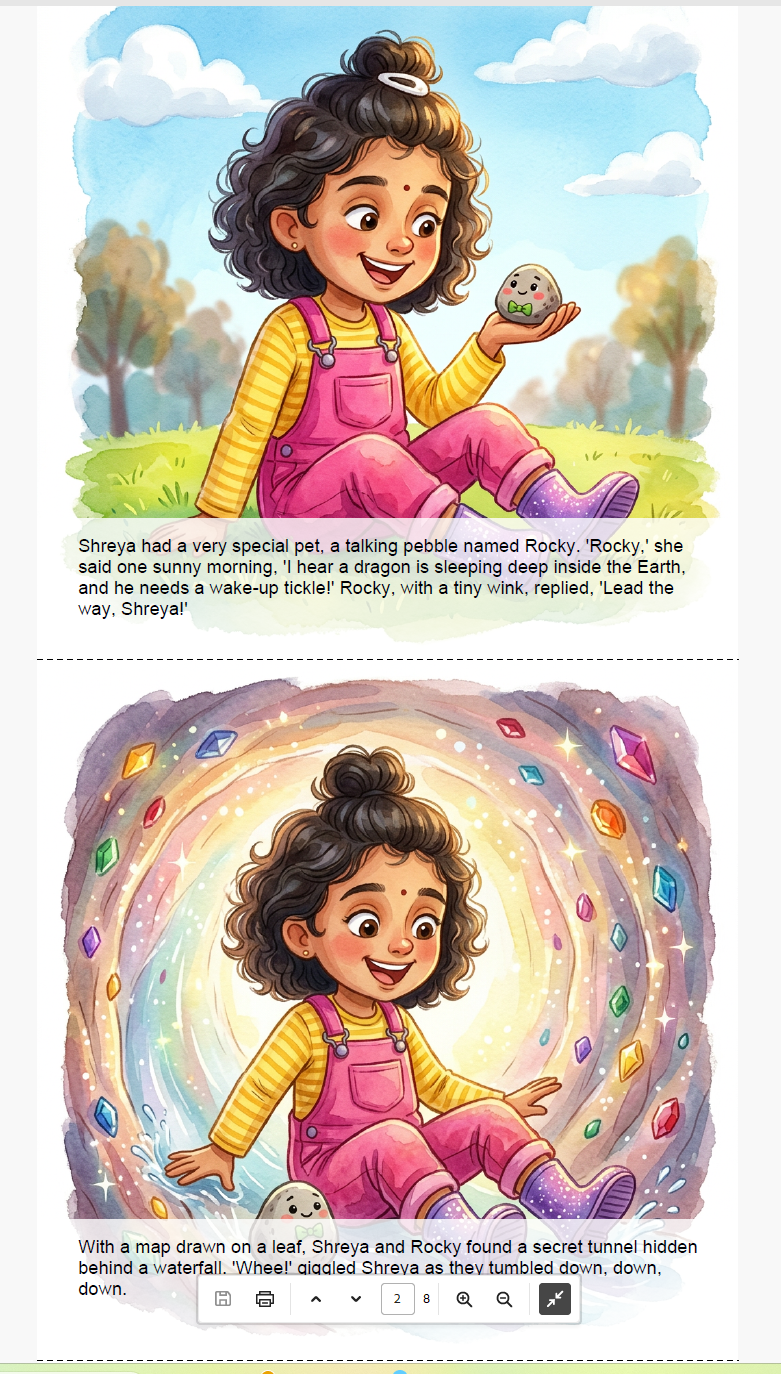
10. PDF Export Result
A high-fidelity 8.5" × 8.5" square PDF storybook generated by the app.
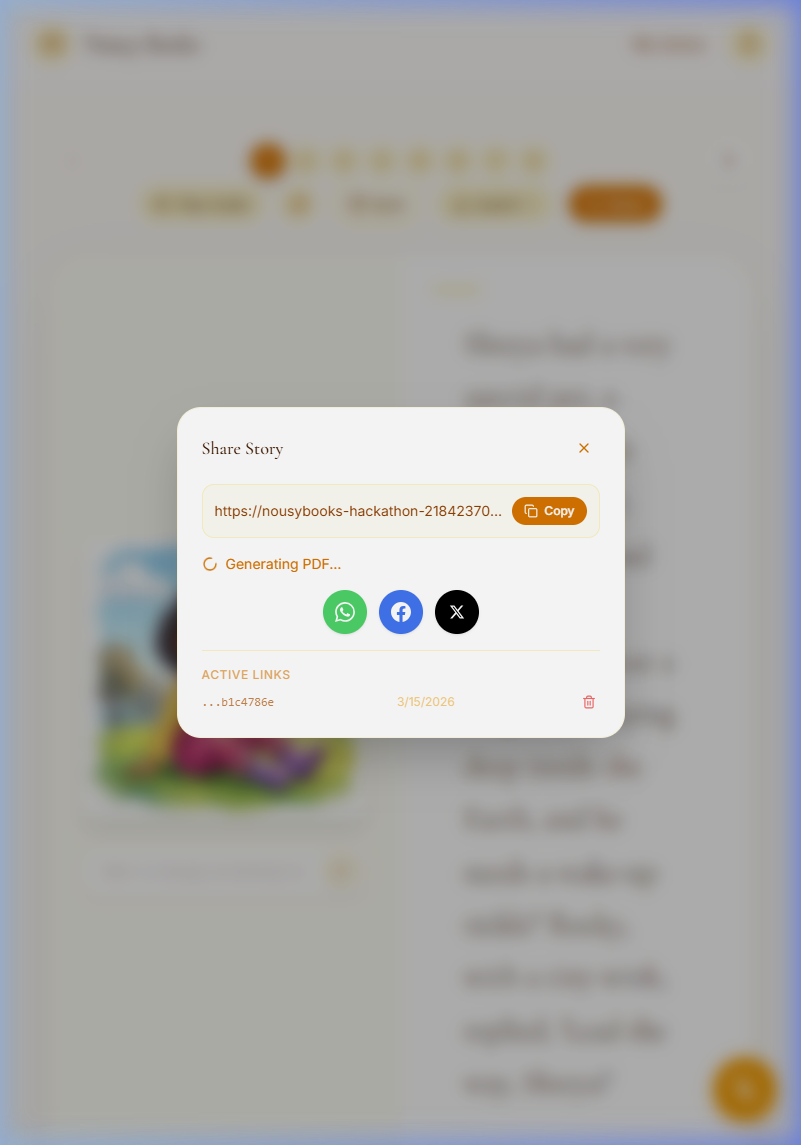
11. One-Click Share Dialog
Parents can generate secure token-based public links for family and friends.
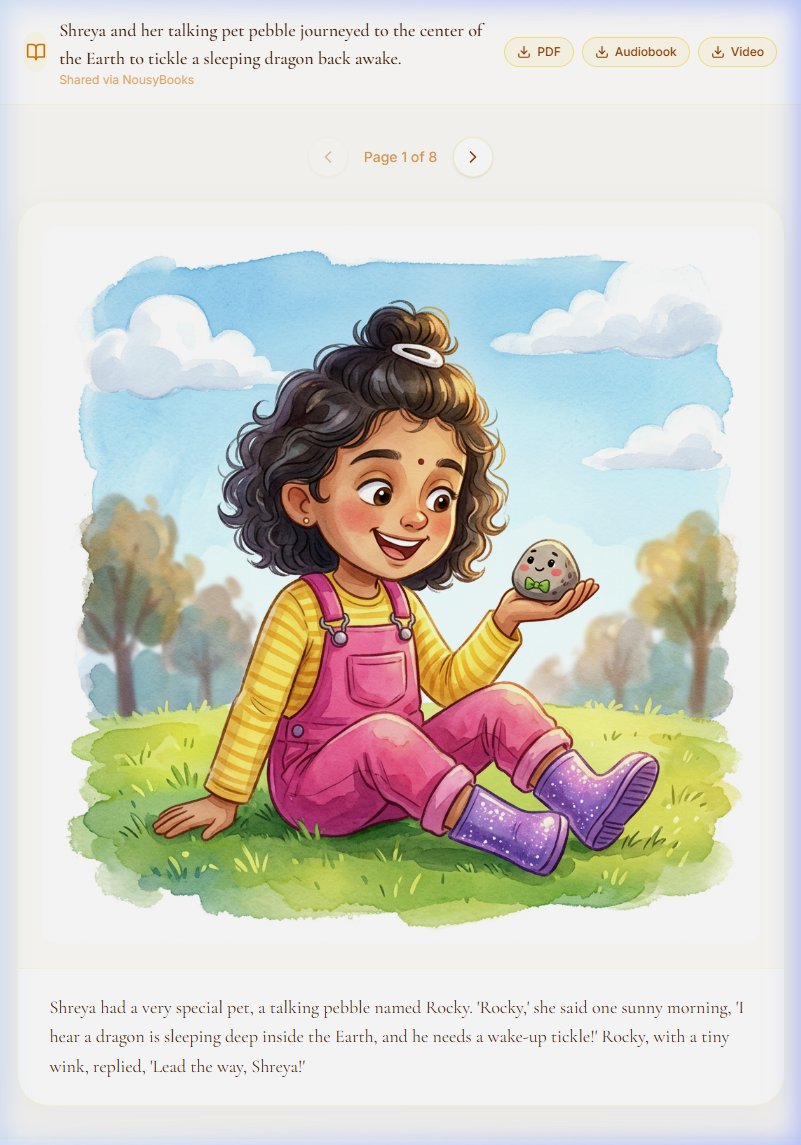
12. Guest Public-View Experience
Clean immersive reading view for shared stories with download options for PDF, Audiobook, or Video.
13. Video Storybook Export
High-quality MP4 video export with karaoke subtitles and ambient background music.
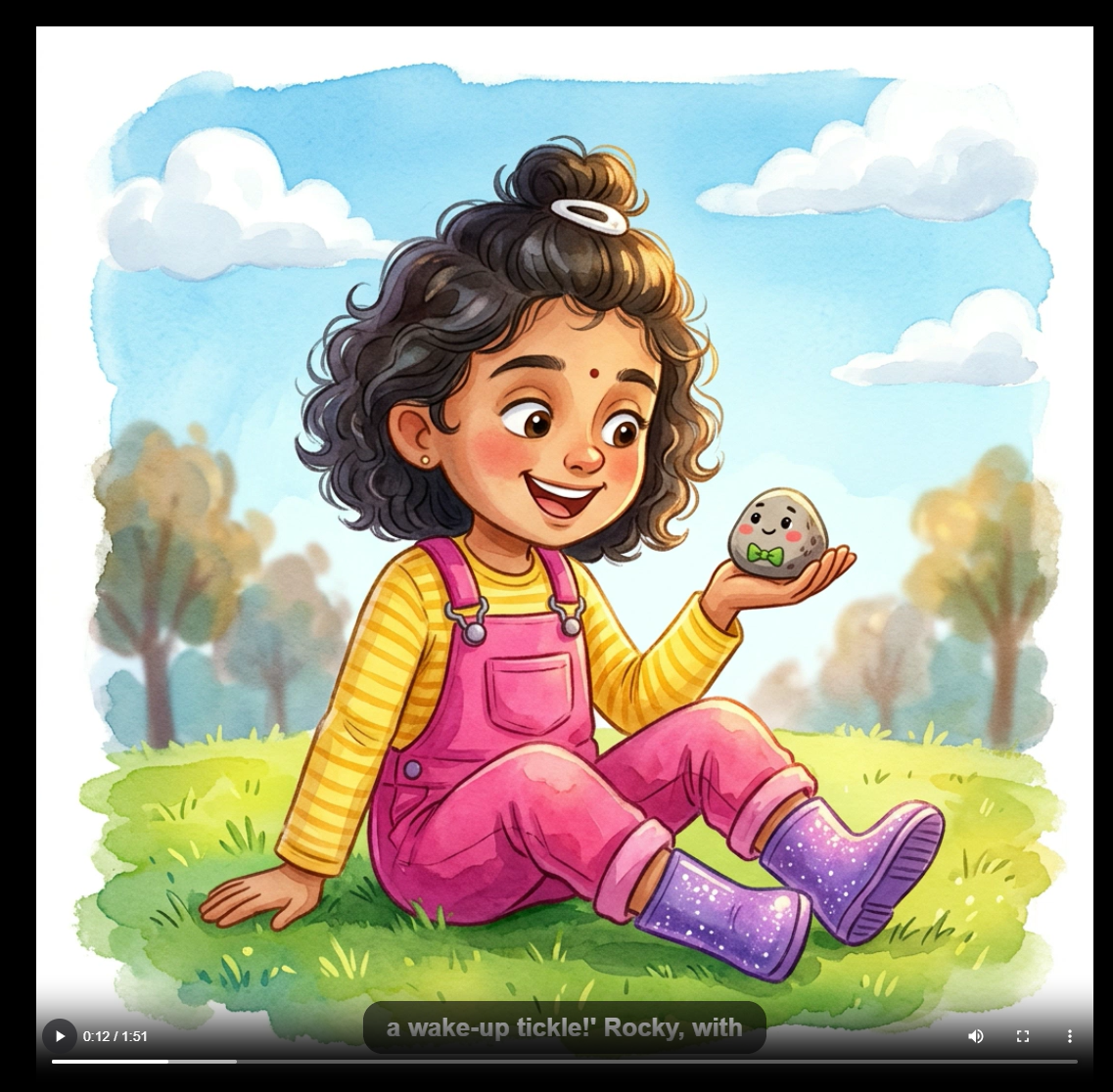
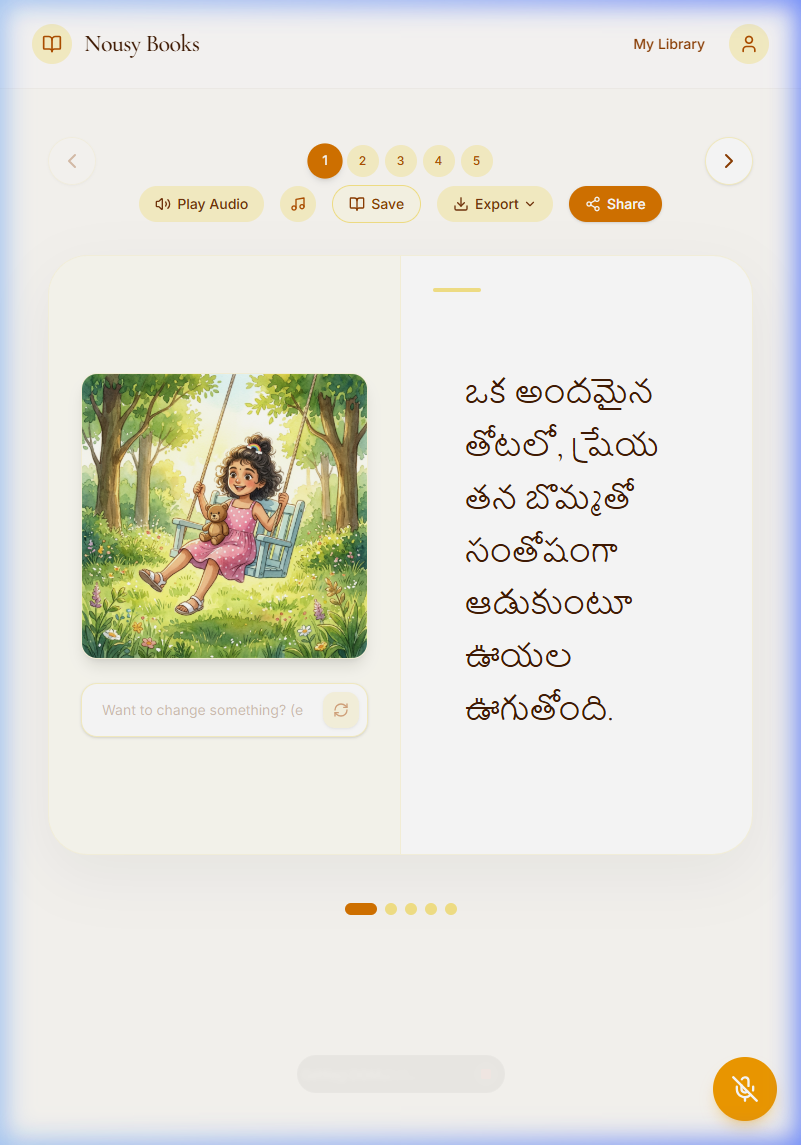
14. Global Support — Telugu Storybook
Demonstrates multi-language capabilities with natural Telugu storytelling generated by Gemini.
15. Telugu Audio Highlighting
Real-time word highlighting across 14 supported languages, including Indic scripts like Telugu.
Example Use Cases — "Global Edition"
The combination of multi-language support, dynamic page counts, and character personalization unlocks powerful use cases:
| Use Case | Why It Matters |
|---|---|
| Personalized Alphabet Book ( English) | Your child discovers each letter through their own adventures — "A is for Ava's Amazing Adventure" |
| Bilingual Bedtime Story ( Spanish) | A Spanish-language storybook starring your child, narrated in Spanish — heritage language practice at bedtime |
| Hindi Counting Adventure ( Hindi) | Your child learns to count 1-10 in Hindi through illustrated adventures with friends |
| Japanese Anime Storybook ( Japanese) | Your child as an anime hero in a Japanese-language storybook with Ghibli art style |
| French Fairy Tale ( French) | Classic fairy tale reimagined with your child, written and narrated entirely in French |
| Telugu Grandparent Gift ( Telugu) | Grandparents gift a Telugu storybook featuring their grandchild — narrated in their native language |
| Multilingual Family Collection ( multiple) | The same story in English for school, Spanish for abuela, Hindi for dadi — one child, many languages |
How I Built It

Starting Point: Google AI Studio → Local Development
I started by prototyping in Google AI Studio to quickly test Gemini's capabilities — story generation prompts, image generation with reference photos, and TTS narration. AI Studio let me validate the core concept before writing a single line of code.
Once the prototype proved the concept worked, I exported the project and used Antigravity (Google AI Studio's code export) and claude code as the foundation. From there, I built the full application locally, expanding from a simple prototype into a complete product with authentication, persistent storage, and production deployment.
Development with AI Assistance
The development process was heavily AI-assisted — true vibe coding. I used Claude Code (Anthropic's CLI) as my primary development partner, working iteratively to build features, debug issues, and architect the system. This hackathon taught me that AI-assisted development isn't about generating code blindly — it's about having a collaborative partner that helps you think through architecture decisions and implement them quickly.
🏗️ Architecture
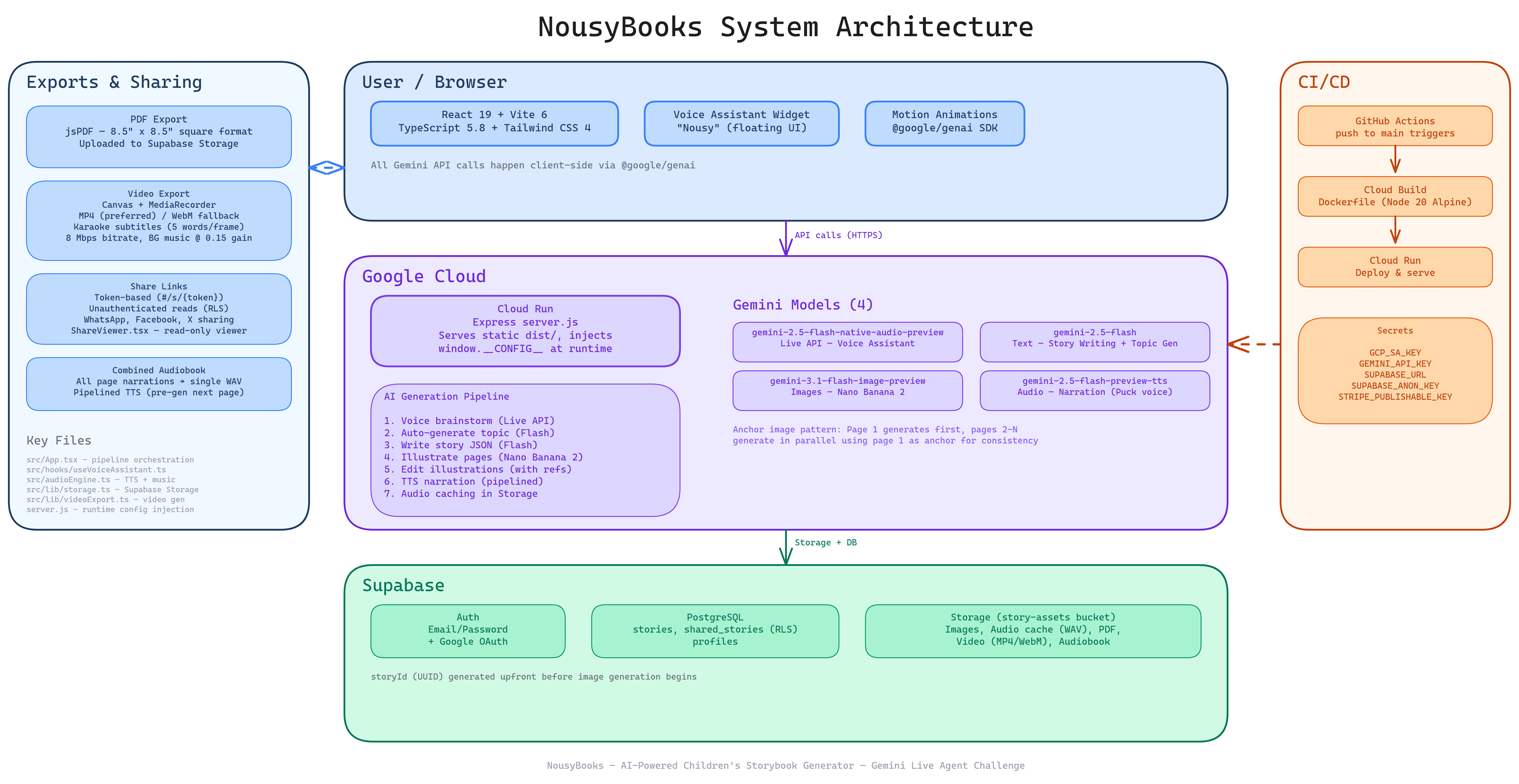
System Architecture
High-level architecture showing how the frontend, backend services, AI models, and storage interact to generate personalized storybooks.
AI Generation Pipeline
End-to-end flow of how the platform generates stories and illustrations — from user prompt to Gemini story generation, character-consistent illustration generation, and final book assembly.
Voice Assistant Architecture
Architecture of the multimodal voice system powering audiobook narration, real-time word highlighting, and conversational interactions.
Character Consistency Pattern
The Anchor Image Pattern used to maintain consistent character appearance across all illustrations generated for the story.
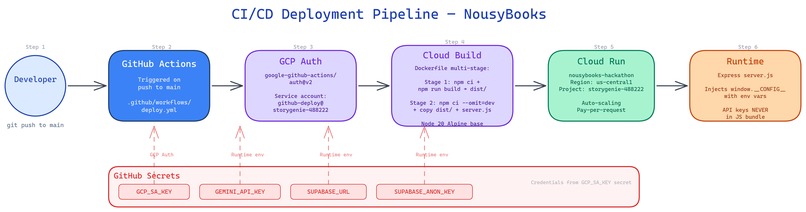
CI/CD Deployment Pipeline
Automated deployment workflow from code commit to production, including build, test, containerization, and deployment.
Data & Storage Architecture
Shows how story content, generated images, audio, and exports are stored and retrieved across the system.
🤖 AI Models Used
Voice Assistant
gemini-2.5-flash-native-audio-preview (Live API)
Powers the Nousy floating voice assistant with 12 function tools.
Topic Generation
gemini-2.5-flash
Generates one-click story ideas incorporating character details.
Story Writing
gemini-2.5-flash
Produces a structured 4-page narrative using JSON schema validation.
Illustration & Image Editing
gemini-3.1-flash-image-preview
Creates character-consistent illustrations and supports natural language edits.
Audiobook Generation
gemini-2.5-flash-preview-tts
Narration using the Puck voice with Web Audio ambient background music.
Key Technical Decisions
- Client-side AI: All Gemini API calls happen in the browser via
@google/genaiSDK. No backend AI server needed — the Express server only serves static files and injects runtime config. - Anchor Image Pattern: Novel technique for character consistency (see below).
- JSON Schema Enforcement: Story generation uses
responseMimeType: "application/json"with a strict schema, guaranteeing valid structured output every time. - Exponential Backoff: All image generation calls wrapped in retry logic (3 retries, 2s base delay) for production resilience.
- Runtime Config Injection: API keys injected via
window.__CONFIG__at request time by Express — never baked into the JS bundle.

Character Consistency Across Pages The biggest technical challenge. Early attempts produced characters that looked completely different on each page — different clothing, hair color, even skin tone. I solved this with the Anchor Image Pattern: generate page 1 first, then feed it as a visual reference to pages 2-4 alongside the original photos. This was the breakthrough that made NousyBooks feel like a real storybook rather than 4 disconnected illustrations.
Gemini Model Deprecation Mid-Build
During development, gemini-2.0-flash was deprecated and started returning 404 errors. Had to quickly migrate all text generation calls to gemini-2.5-flash. This taught me to build with model flexibility in mind.
Live API Audio & Voice Assistant
Building Nousy required working with raw PCM audio streams (16kHz input, 24kHz output) through the Live API's native audio model. Getting mic streaming, queue-based audio playback, 12 function tools, and interruption handling to work together was complex. A key challenge was handling race conditions — the WebSocket could disconnect during connection setup, leaving the UI in a stale "listening" state. Solved with a sessionRef guard pattern.
Image Generation Rate Limits Parallel generation of 4 illustrations often hit rate limits. The retry-with-backoff pattern was essential, but tuning the delays to balance speed vs. reliability took iteration.
First-Time Cloud Deployment
This was my first time deploying an application to Google Cloud. Learning Docker multi-stage builds, Cloud Run configuration, and runtime environment variable injection was a significant learning curve — but ultimately rewarding. I automated the entire deployment pipeline with a deploy.sh script for manual deploys and a GitHub Actions CI/CD workflow (.github/workflows/deploy.yml) that auto-deploys to Cloud Run on every push to main.
Accomplishments That I'm Proud Of
This is my first hackathon submission. Going from zero to a deployed, functional AI application in weeks was a huge personal milestone.
The Anchor Image Pattern works. Seeing a child's face appear consistently across multiple illustrated pages — in watercolor, in 3D animation, in any style — feels genuinely magical. This technique could be useful beyond storybooks for any sequential AI illustration task.
My daughter's reaction. When I generated stories starring her, she was thrilled. She immediately wanted more and asked to pick different art styles. Seeing her flip through a PDF storybook where she was the hero — that was the moment I knew this idea had real value.
End-to-end in minutes. From uploading a photo to holding a narrated, illustrated PDF storybook takes about 3-5 minutes. No other tool makes it this seamless.
Learning to deploy to Google Cloud. Going from local development to a containerized, auto-scaling production deployment on Cloud Run — with a full CI/CD pipeline via GitHub Actions — gave me confidence to build and ship real products.
The Nousy voice assistant experience. Talking to Nousy about characters, styles, and story ideas feels natural and creative. Nousy can add characters, select styles, brainstorm topics, and trigger generation all through voice. I personally had incredible fun talking to the assistant in my native language, Telugu, to create a storybook, and I’m excited to hear feedback from my Spanish-speaking friends on the quality of the Spanish translations and narration!
What I Learned
1. Google Cloud Deployment & CI/CD
First time using Cloud Run, Docker multi-stage builds, and runtime config injection. Learned how to manage API keys securely without baking them into the frontend bundle. Set up a full CI/CD pipeline with GitHub Actions that auto-deploys to Cloud Run on every push to main, using GCP service account authentication and GitHub Secrets for environment variables.
2. The Gemini Model Ecosystem Working with 6 different Gemini model capabilities in a single application taught me the breadth of the platform:
- Live API native audio for Nousy voice assistant (bidirectional streaming with 12 function tools)
- Flash for fast, structured text generation (JSON schema enforcement)
- Nano Banana 2 for image generation with multi-image reference input
- TTS for speech synthesis with specific voice selection
3. Vibe Coding & AI-Assisted Development Building with AI Studio (prototyping), Antigravity (code export), and Claude Code (development partner) showed me a new way of working. The key insight: AI assistance works best when you have a clear vision of WHAT to build and let the AI help with HOW.
4. Character Consistency is a Solvable Problem The anchor image pattern proves that you don't need fine-tuning or LoRA to get consistent characters across AI-generated illustrations. Reference photos + an anchor image + explicit consistency instructions is enough.
5. Children's Book Design Principles Researched Caldecott and Newbery award-winning patterns to build better prompts: the 4-page narrative arc (setup → catalyst → climax → resolution), the importance of sensory language, and the principle of "show the lesson through action, never state it."
What's Next for NousyBooks
Immediate Improvements
Age-Appropriate Modes — Add a simple age selector (Toddler 2-3 / Preschool 3-5 / Early Reader 5-8) that adjusts vocabulary, sentence complexity, and story depth.
Story Templates — Pre-built narrative structures for common themes: "Birthday Adventure", "First Day of School", "Bedtime Journey", "Learning to Share."
Architecture & Scaling
The current architecture runs all AI client-side, which is great for prototyping but has limitations for scale:
- Move AI calls server-side — Protect API keys properly, enable rate limiting per user, and add request queuing
- Add a job queue — Story + illustration generation as background jobs with progress webhooks
- Supabase Storage — Images, audio cache, and video stored in Supabase Storage (completed)
- Caching layer — Cache generated stories and illustrations to avoid redundant API calls
Impact & Future Vision
- Print-on-Demand — Partner with Lulu or Blurb to ship physical hardcover books
- ✅ Multi-Language — Stories + narration in 14 languages (completed)
- Collaborative Storytelling — Parent + child brainstorm together with the Live Agent
- Curriculum Alignment — Teacher tools with templates mapped to educational standards
- Object References — Upload photos of toys, pets, and places to appear in illustrations (not just characters)
Built With
| Technology | Purpose |
|---|---|
| Google AI Studio | Initial prototyping and concept validation |
| Antigravity | Code export from AI Studio prototype to local project |
| Gemini 2.5 Flash | Story writing, topic generation |
| Gemini 3.1 Flash Image Preview (Nano Banana 2) | Character-consistent illustration generation |
| Gemini 2.5 Flash Preview TTS | Audiobook narration (Puck voice) |
| Gemini Live API (Native Audio) | Nousy voice assistant — bidirectional audio streaming with 12 function tools |
| Google GenAI SDK | @google/genai — all Gemini API interactions |
| Google Cloud Run | Production deployment (Docker, Node 20 Alpine) |
| GitHub Actions CI/CD | Automated deployment pipeline — push to main auto-deploys to Cloud Run |
| React 19 | Frontend framework |
| TypeScript 5.8 | Type-safe development |
| Vite 6 | Build tool and dev server |
| Tailwind CSS 4 | Styling |
| Motion | Animations (page transitions, loading states) |
| Supabase | Authentication (email + Google OAuth) and story library storage |
| jsPDF | Print-ready PDF export (8.5×8.5" square format) |
| Web Audio API | Audio playback, MP3 background music mixing |
| Canvas + MediaRecorder API | Video export with karaoke subtitles and background music |
| Claude Code | AI-assisted development partner |
Links
| Resource | Link |
|---|---|
| Live App | https://nousybooks-hackathon-218423701961.us-central1.run.app |
| GitHub Repository | https://github.com/vinayguda/nousybooks-hackathon |
| Demo Video | Watch the Demo |
| Architecture Diagrams | 6 diagrams in docs/ — System, AI Pipeline, Voice Assistant, Character Consistency, CI/CD, Data Storage |
| GCP Deployment Proof | View Service on Cloud Run |
| Blog Post (Bonus) | Read on Medium (Draft) |
| GDG Profile | View Public Profile |
Submission Checklist
- [x] Text Description — Devpost project description complete
- [x] Public Code Repository — GitHub repo updated
- [ ] Demo Video — Recording needed
- [x] Architecture Diagram — Excalidraw links included
- [x] GCP Deployment Proof — Deployment verified on Cloud Run + CI/CD pipeline + deploy script in repo
- [x] Category Selected — Creative Storyteller
- [x] Test Credentials — Google OAuth / Email provided
- [x] Screenshots — 10 high-quality screenshots included
Built With
- antigravity
- canvas-api
- claude-code
- docker
- express.js
- gemini-2.5-flash
- gemini-2.5-flash-preview-tts
- gemini-3.1-flash-image-preview
- gemini-live-api
- github-actions
- google-ai-studio
- google-cloud-build
- google-cloud-run
- google-genai-sdk
- node.js-20
- supabase-auth
- supabase-database
- supabase-storage
- tailwind-css-4
- typescript-5.8
- vite-6
- web-audio-api


Log in or sign up for Devpost to join the conversation.