-
-
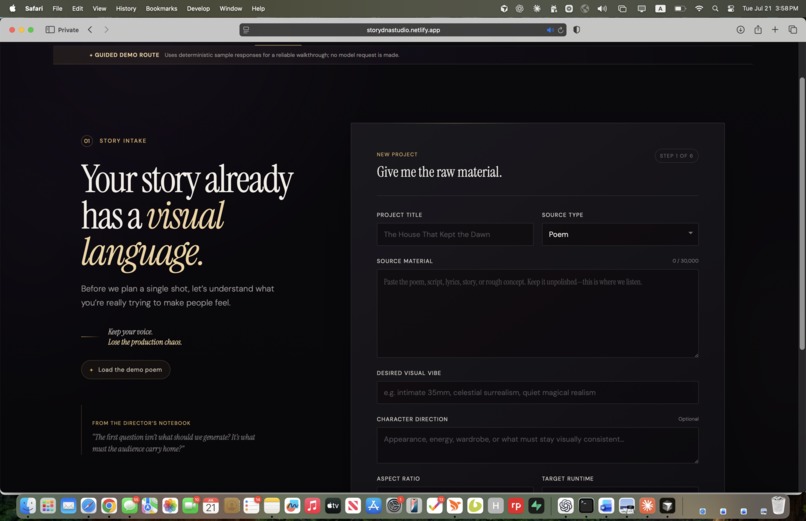
Landing page
-
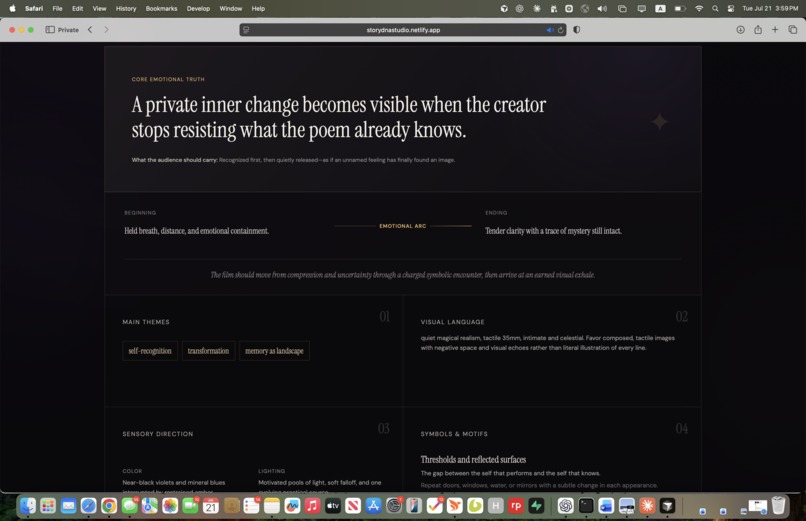
compile the DNA of your stories
-
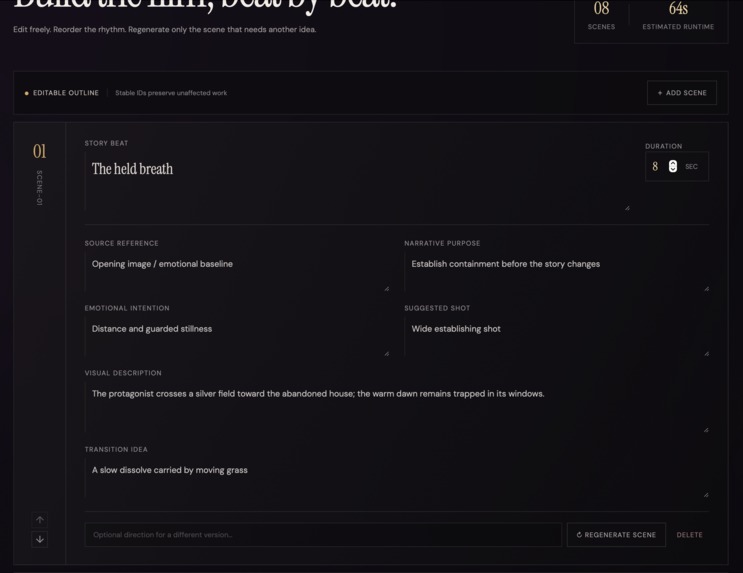
scene architecture
-
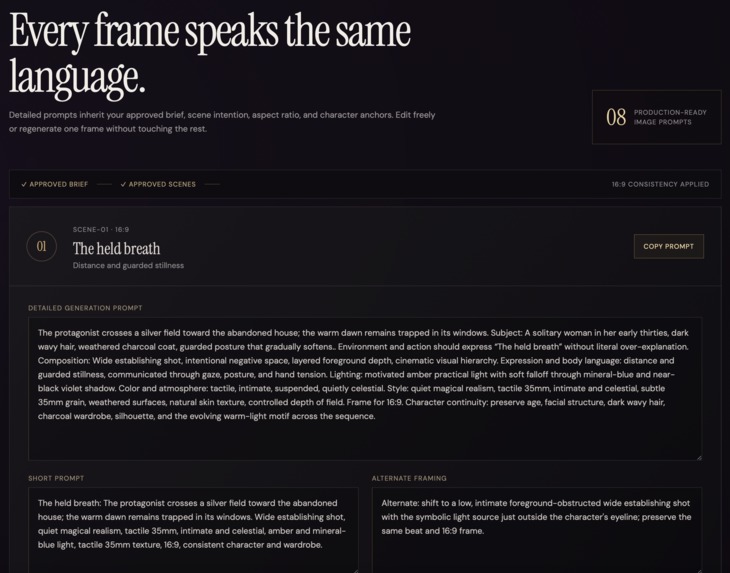
images prompt consistency
-
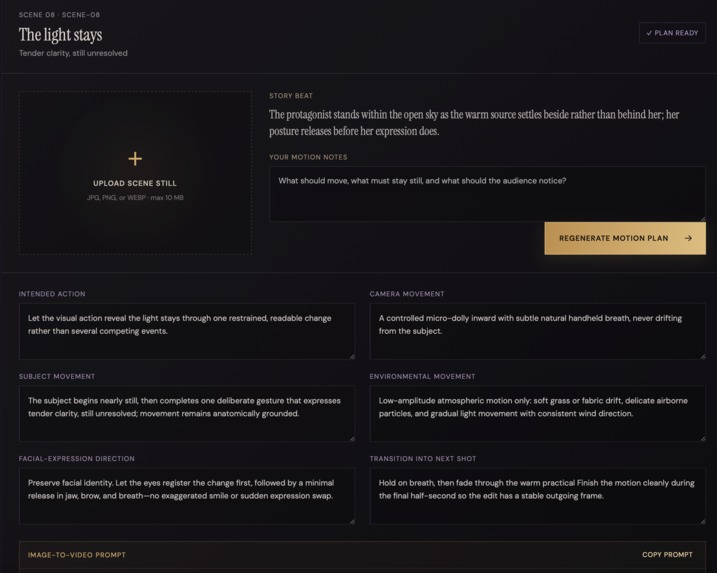
video prompt generation
-
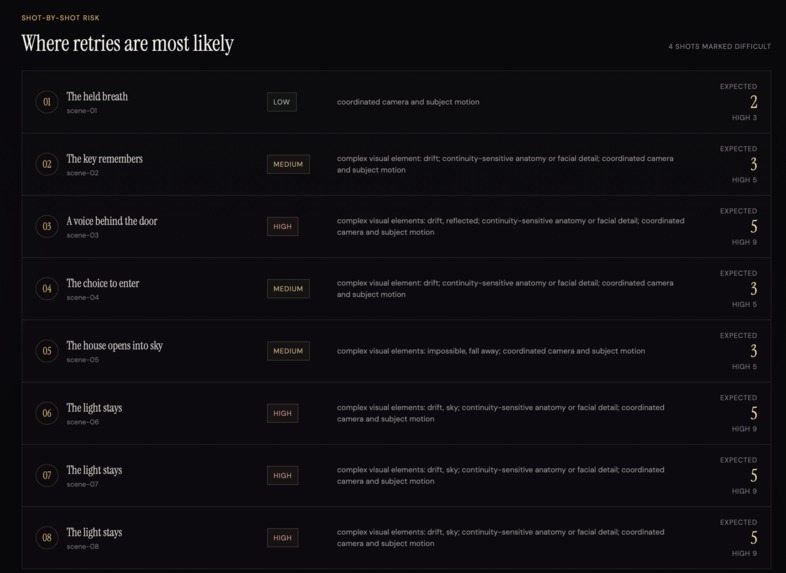
review screen
-
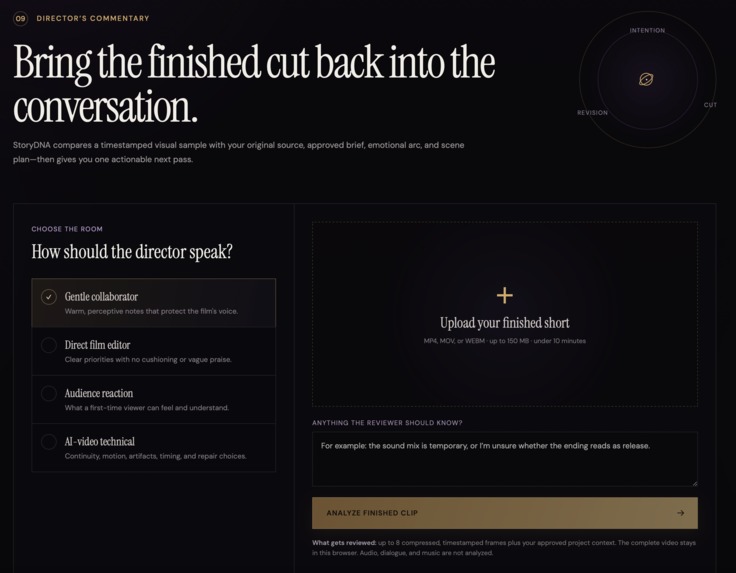
Director's Commentary
Inspiration
My inspiration for this is being a solo AI filmmaker myself, I noticed that my workflow included utilizing chatGPT to generate image prompts, animation prompts and generate the images before editing in captcha. Now I will have a place where I can do it all together and keep the originality and heart of my work. StoryDNA Studio is an AI creative director for solo AI filmmakers. A creator provides a poem, script, song, story, or rough concept. The application first understands the emotional and symbolic meaning of the story, asks three adaptive clarifying questions, and then converts the creator’s answers into a production-ready visual plan. The product promise is: Keep your voice. Lose the production chaos. The primary user is a solo AI filmmaker who uses tools such as image generators, Higgsfield, Kling, Runway, Veo, ElevenLabs, Suno, and CapCut.
What it does
StoryDNA Studio provides a staged creative-direction workflow:
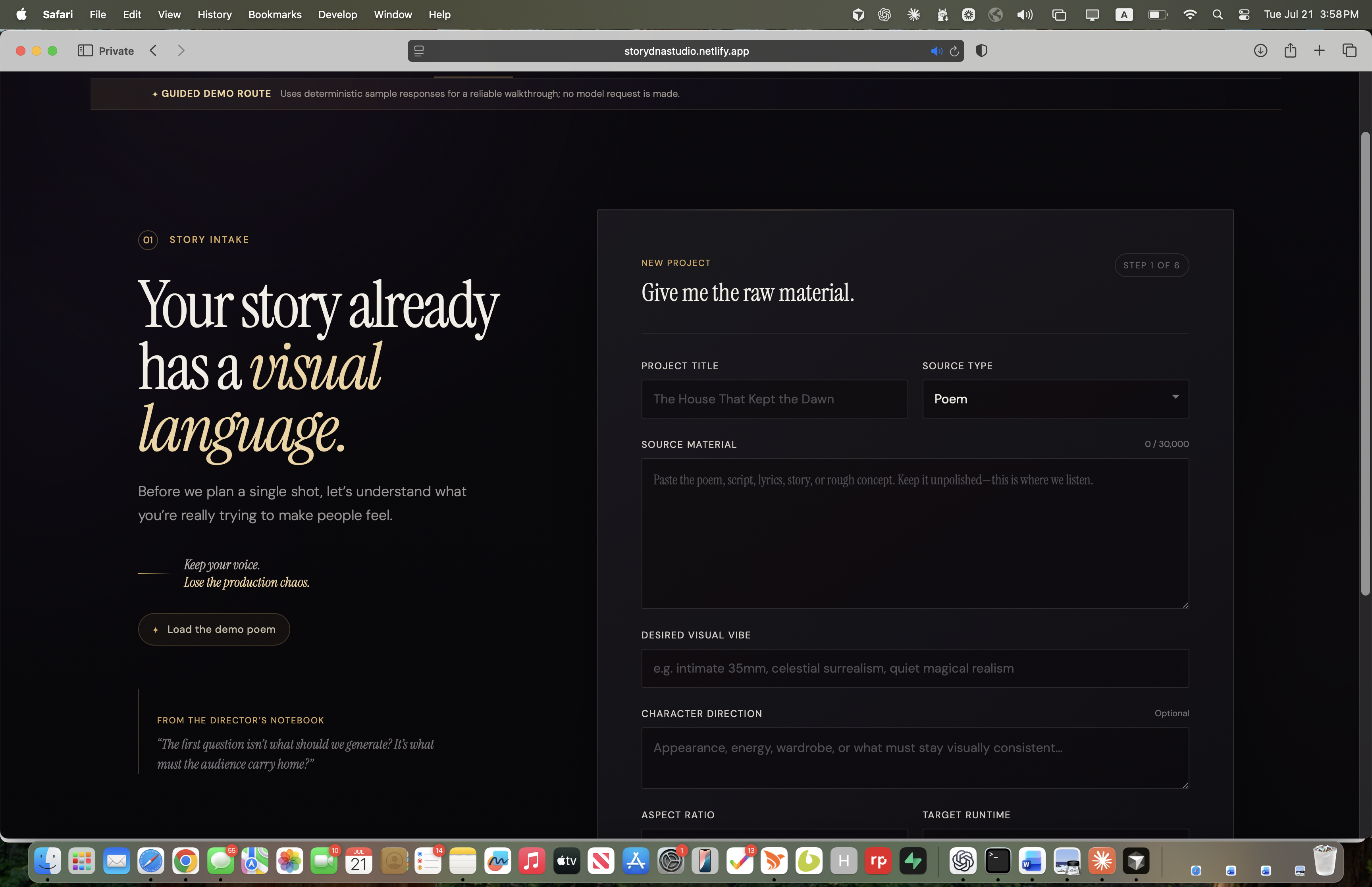
- Story intake: The creator enters a project title, source material, visual vibe, optional character direction, aspect ratio, target runtime, and preferred tools.
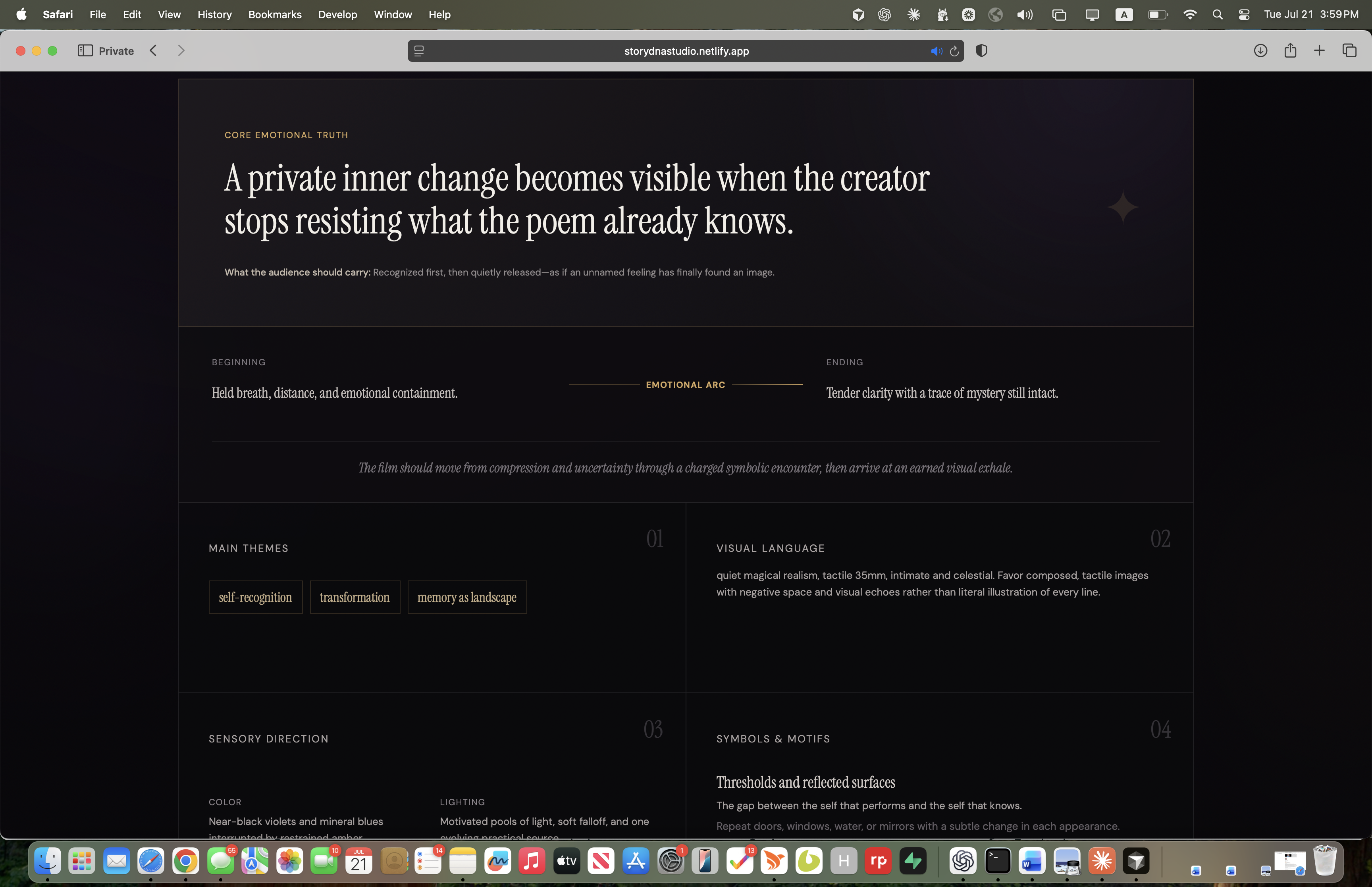
- StoryDNA analysis: The application identifies the core emotional truth, intended audience feeling, emotional arc, themes, symbols, visual language, sensory direction, interpretation risks, and an initial scene-count estimate. It deliberately does not create scenes yet.
- Three adaptive questions: The creator receives exactly three questions focused on ambiguities that could materially change the film. They can answer, add context, correct the interpretation, or request another set.
- Confirmed creative brief: StoryDNA Studio turns the interpretation and creator decisions into an editable brief. Creator corrections and answers are treated as authoritative. Approval protects the brief before downstream work begins.
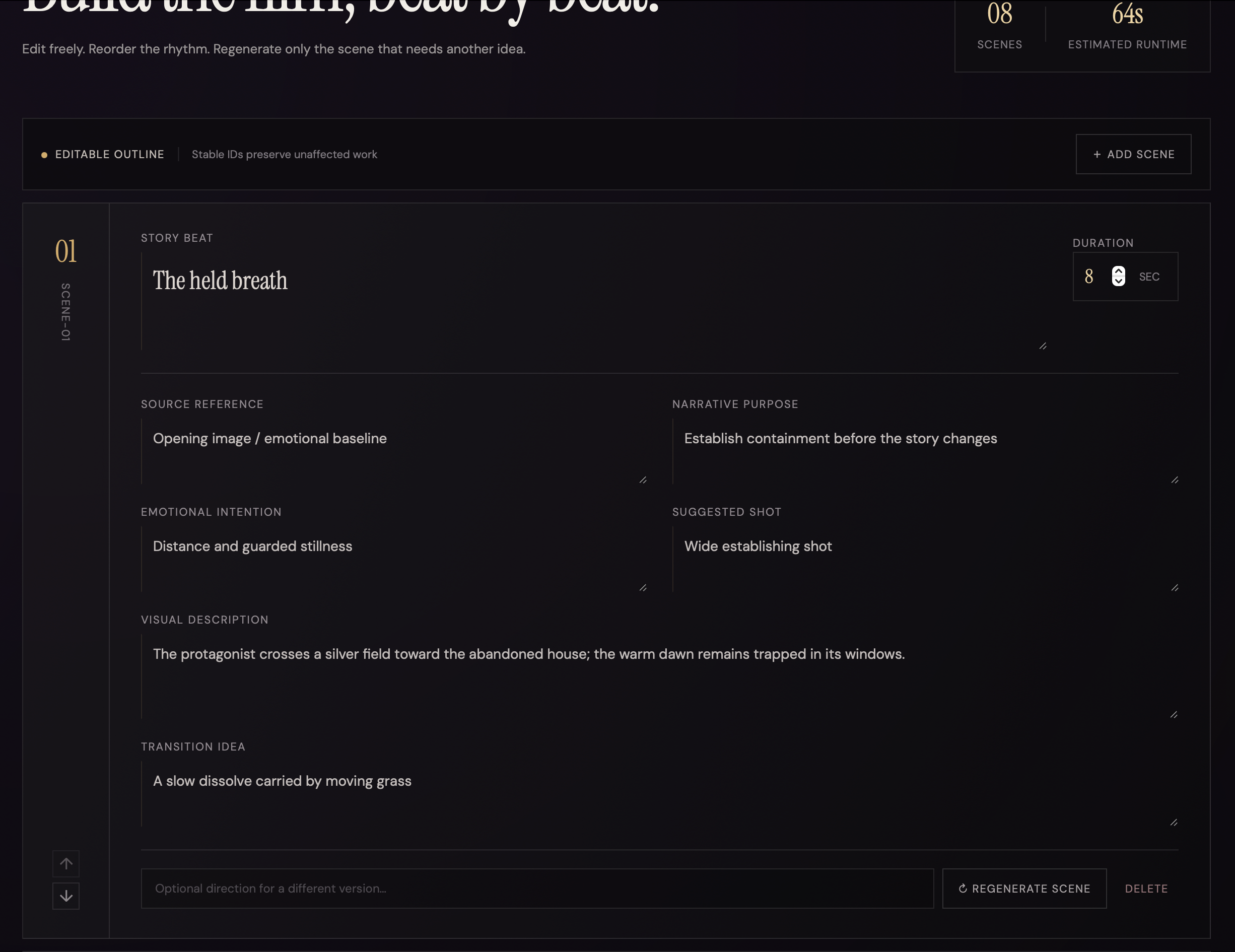
- Editable scene outline: The application generates an ordered scene plan with story beat, source reference, narrative purpose, emotional intention, visual description, shot type, duration, and transition. Creators can edit, add, delete, reorder, or regenerate one scene. Stable scene IDs prevent an isolated change from rebuilding unaffected scenes.
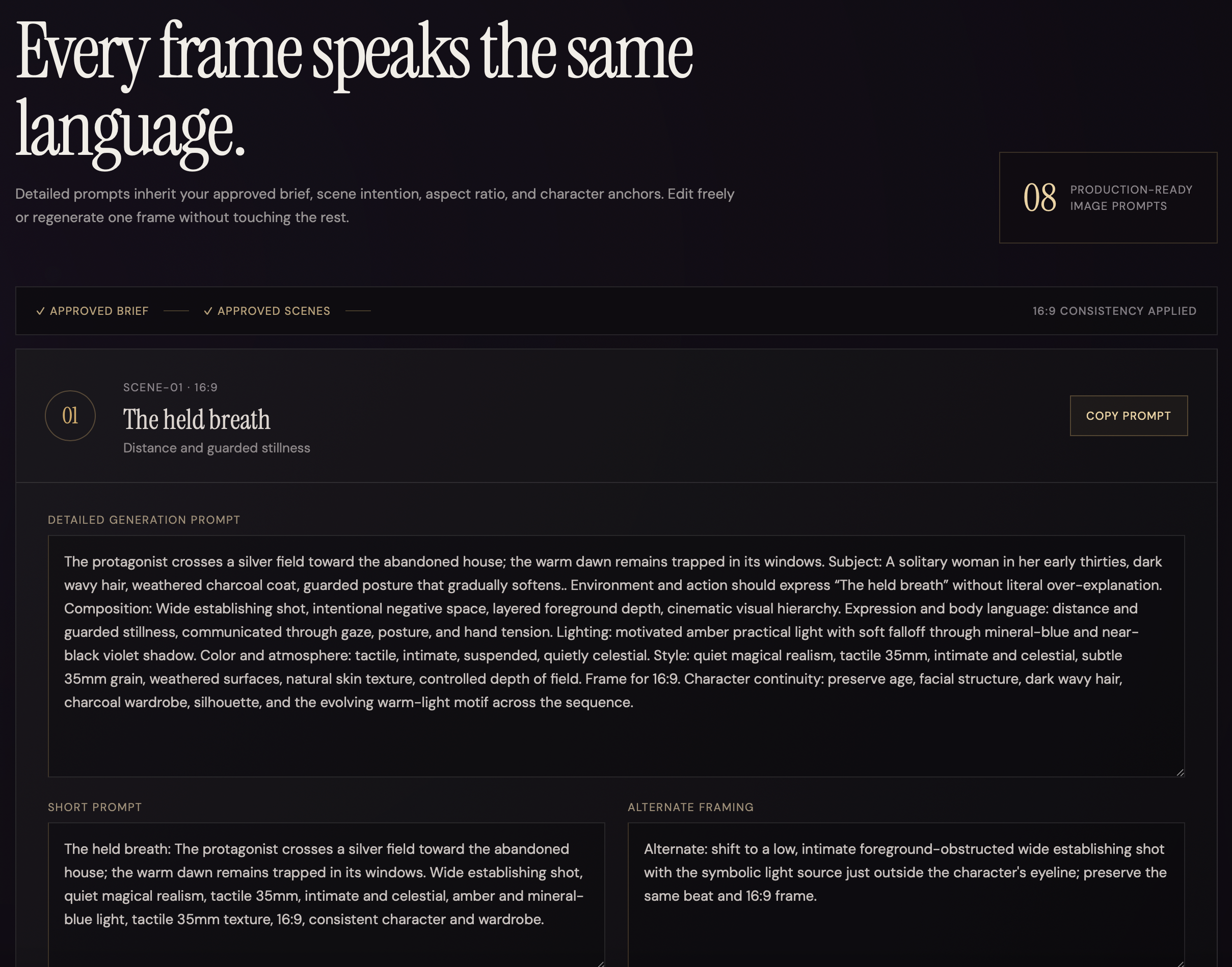
- Image direction: Each approved scene receives a detailed image prompt, shorter prompt, alternate framing, negative instructions, aspect ratio, and continuity anchors. Prompts remain editable and individually regenerable.
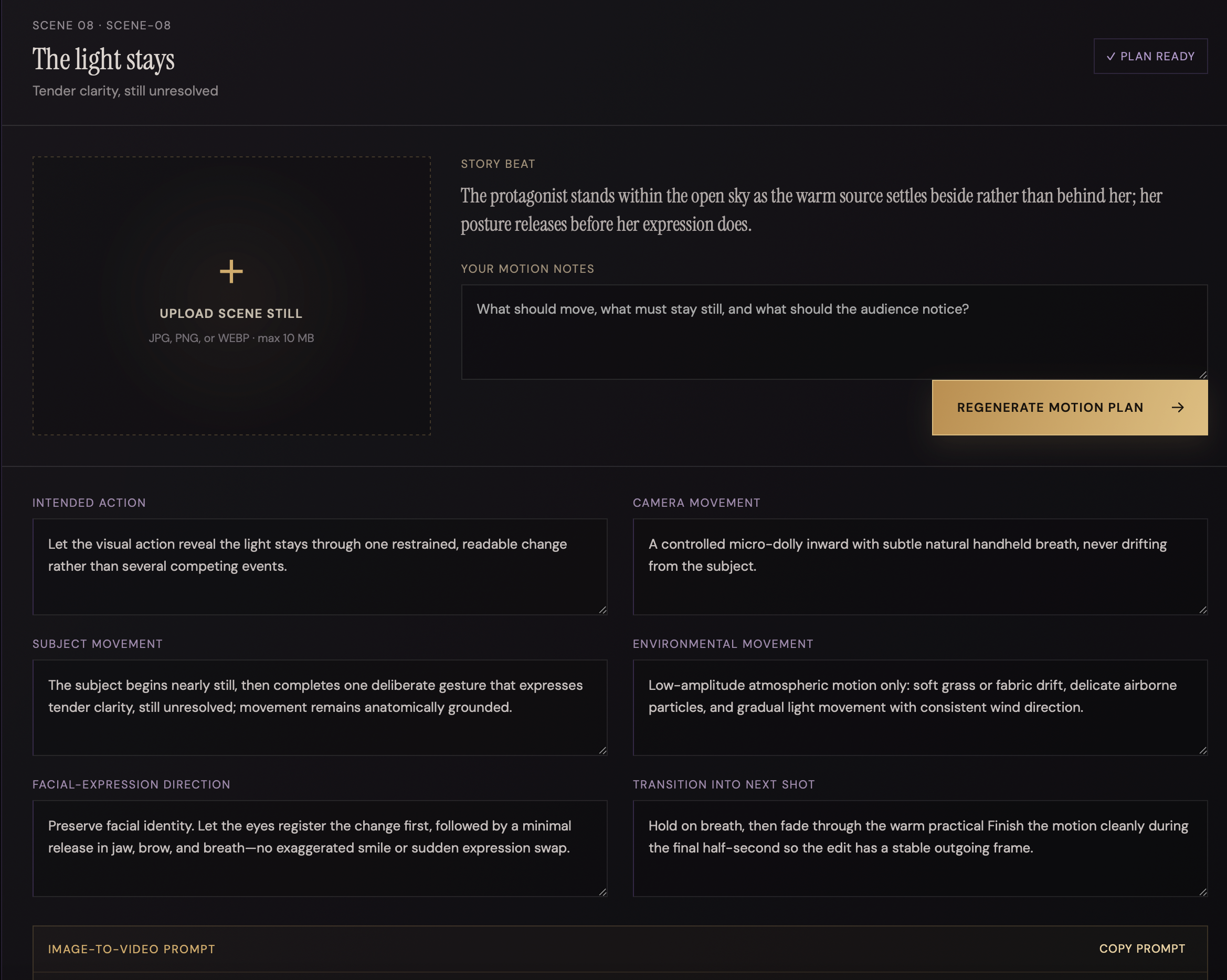
- Motion direction: For each scene, creators can select a still image locally, add motion notes, and generate an editable image-to-video plan covering camera, subject, environment, expression, timing, transitions, and negative motion guidance. Uploaded pixels are used as a browser-local reference; the text-planning request receives the filename and creator notes, not the image itself.
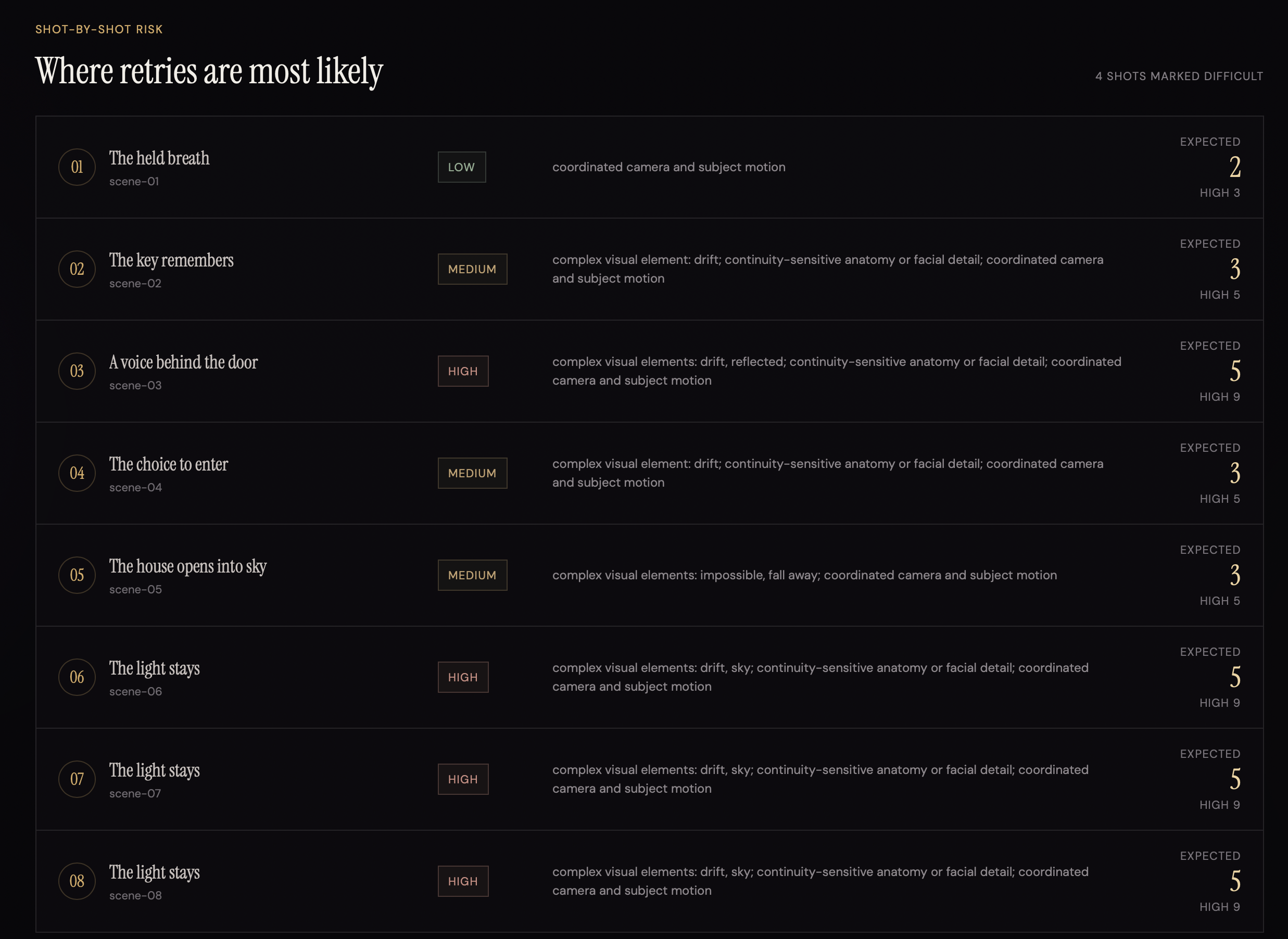
- Production estimate: A deterministic calculator converts scene count, duration, expected attempts, and shot difficulty into minimum, expected, and high-retry generation ranges. Credit estimates appear only when the creator supplies a sample rate; no current platform pricing is hardcoded.
- Production export: The complete project can be downloaded as a readable Markdown director’s packet or versioned JSON. Credentials and browser-local image previews are excluded.
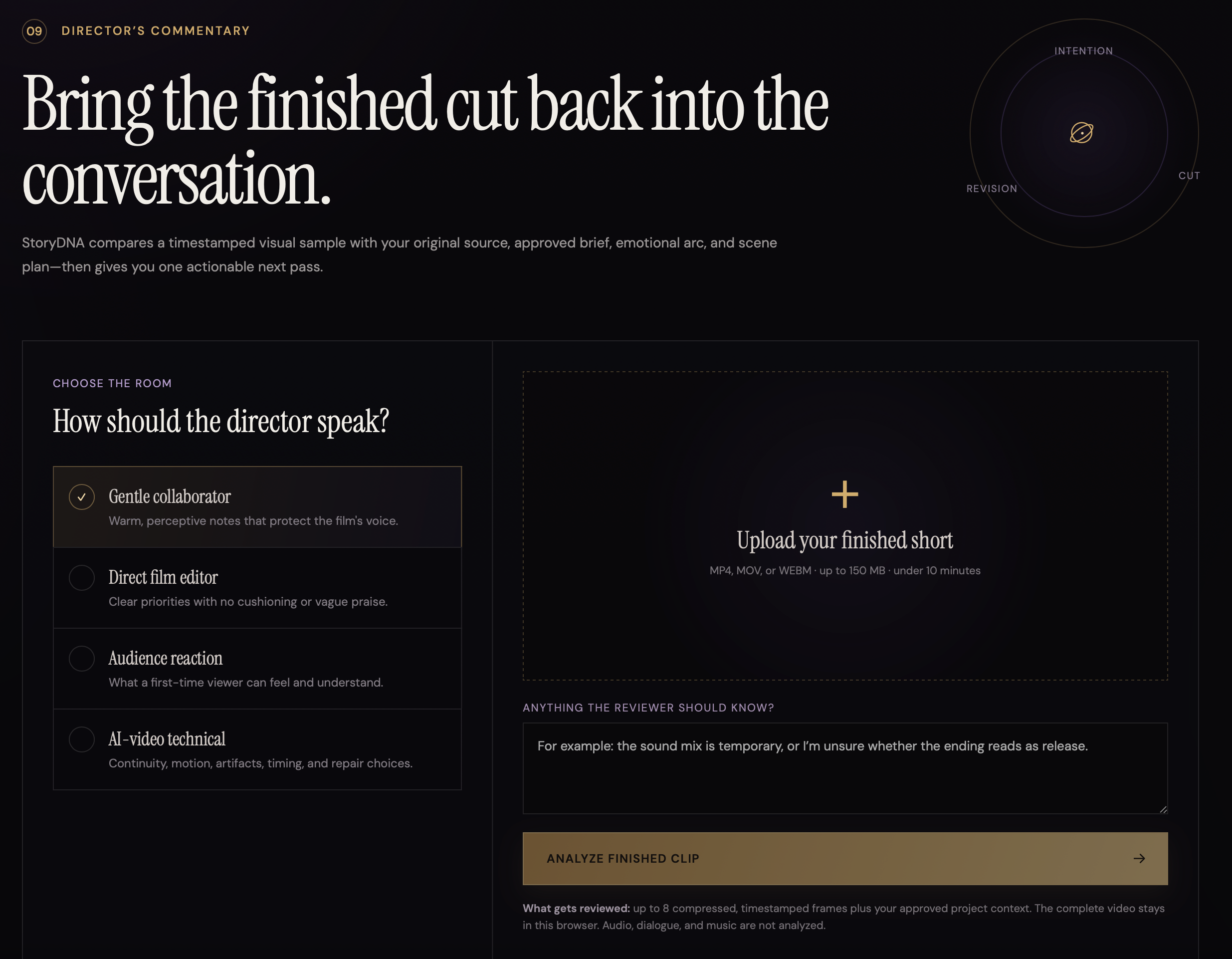
- Director’s Commentary: The creator can upload one finished clip and choose one of four feedback lenses. The browser samples up to eight timestamped frames and compares the visual evidence with the source, approved brief, emotional arc, scene plan, and motion plans. The report covers nine review areas and ends with one highest-priority revision.
The MVP does not directly generate images or videos, store projects in the cloud, analyze audio, or claim continuous video understanding. Director’s Commentary evaluates sampled visual frames rather than the full motion and sound experience.
How we built it
I started by having the user explain their concept and then the product will ask 3 clarifying questions to ensure it understands the vision the creative wants to get across. Once that interaction felt like an attentive director rather than a chatbot, we extended the same approval and provenance model through the rest of production.
Each AI responsibility was implemented as a separate operation with its own validated response schema. Story analysis, question generation, creative briefing, scene planning, image prompting, motion planning, and finished-cut feedback do not share one giant prompt. The client keeps the original source, AI interpretation, creator corrections, answers, and approved decisions distinct, and downstream prompts label the approved brief as authoritative.
The interface was built as a cinematic single-page React application. Zustand persists one active project in browser local storage, making the complete workflow usable without authentication or a database. A shared server router powers both the local Vite middleware and the deployed Netlify Function, so validation and AI behavior remain consistent across environments.
I also built for a dependable demo. When no API key is configured, the application uses a clearly labeled deterministic guided-demo director. This exercises the same schemas and UI state transitions without pretending that a model call occurred.
Challenges we ran into
Protecting the creator’s decisions The central product challenge was preventing later AI generations from silently rewriting earlier choices. I solved this by separating source, interpretation, correction, confirmation, and production artifacts in both state and prompts. Approval states are explicit, and downstream operations label approved information as authoritative.
Surgical regeneration Regenerating one scene or prompt should not damage the rest of the project. Scenes and prompts use stable IDs, and isolated regeneration endpoints forcibly preserve the target ID and position while receiving neighboring work only as continuity context.
Honest video analysis It would have been easy to describe Director’s Commentary as “watching” a video. The implemented MVP instead decodes the clip locally, samples up to eight timestamped JPEG frames, and sends only those samples plus project context. Audio and continuous motion are explicitly outside the current analysis boundary.
Production payload limits Multimodal review had to fit within Netlify’s buffered function payload. Frame count, width, and JPEG quality were deliberately constrained so the feature remains deployable without introducing video storage or transcoding infrastructure.
Deployment configuration The first Netlify attempt pointed at a repository without the application package files. A later deploy also treated a colocated test file as a serverless function and rejected its dotted function name. I corrected the GitHub connection, committed explicit Netlify configuration, moved the test outside the functions directory, and unified production and local routing.
API availability and demo reliability During development, the live API path encountered quota and model/provider errors. The application therefore includes a clearly disclosed guided-demo mode for deterministic walkthroughs. Before judging, the production model configuration must be verified with a successful end-to-end request.
Accomplishments that we're proud of
- Built a complete creative loop from raw source material through production planning and finished-cut feedback.
- Made clarification—not instant generation—the defining product interaction.
- Preserved a traceable chain from creator voice to AI interpretation to confirmed decisions to production artifacts.
- Implemented exactly three adaptive questions with regeneration and correction controls.
- Built editable approval gates for the creative brief and scene outline.
- Implemented isolated scene and image-prompt regeneration without rebuilding unaffected work.
- Produced scene-linked image and motion direction that carries emotional and continuity constraints forward.
- Created transparent production ranges without presenting invented pricing as fact.
- Kept uploaded video local while sending only controlled visual samples for critique.
- Built portable Markdown and JSON exports rather than trapping the result inside the interface.
- Delivered a responsive cinematic UI that works on desktop and mobile.
- Reached a verified local baseline of 22 passing tests, a clean TypeScript typecheck, and a successful production build.
What we learned
The strongest creative AI experiences are often built around restraint. Waiting to generate scenes until the creator has reviewed the interpretation produces a more trustworthy and differentiated interaction than adding another prompt box.
I also learned that provenance must be an architectural concern, not merely a sentence in a system prompt. If approved choices matter, they need distinct data structures, visible approval states, and server operations that cannot casually replace them.
For multimodal features, technical honesty improves the product. Describing Director’s Commentary as timestamped frame analysis allowed me to set the right expectation, design around deployment limits, and still deliver useful revision guidance.
Finally, deterministic logic is sometimes better than another model call. Production estimates are more credible when creators can see the assumptions and understand why a shot is classified as difficult.
What's next for storyDNA Studio
The next phase would add accounts, saved projects, and secure cloud storage with Supabase, followed by asset history and intentional sharing. Additional priorities include:
- Project version history and comparison between approved creative directions
- Direct integrations with selected image and video generation tools
- Configurable provider-specific cost assumptions without claiming unverified live pricing
- Richer image-aware motion planning
- Audio, dialogue, music, and transcript-aware finished-cut review
- Side-by-side comparison of two edits or generations
- PDF and production-package export with selected assets
- Collaboration and review links for creative partners
These additions would extend the workflow without changing its core promise: the creator remains the authority, and generation follows confirmed intention.
Log in or sign up for Devpost to join the conversation.