-
-
storyboarder-studio
-
architecture diagram
Project Story
Inspiration
Storyboarder came from a simple but persistent frustration: many people have strong story ideas, but moving from a vague concept to a structured visual story is still difficult. Writers, filmmakers, and creators usually do not begin with a polished screenplay. They begin with fragments: a character, a mood, a setting, a scene, or a rough premise.
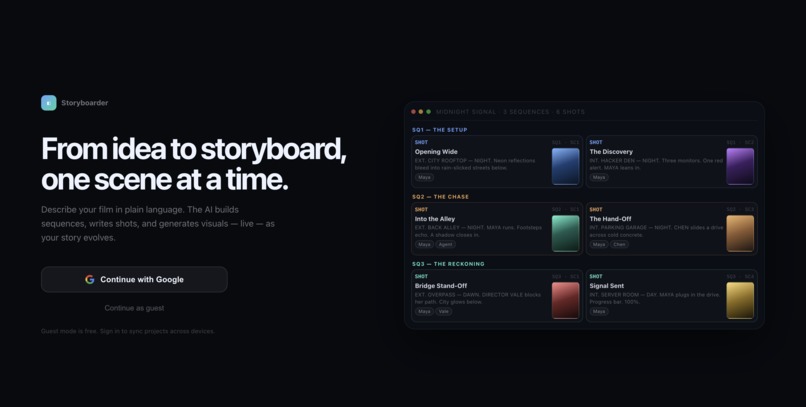
The goal behind Storyboarder was to make story development feel conversational and visual from the very beginning. Instead of forcing users to write a full script up front, the product lets them talk through an idea naturally while the system organizes that conversation into a real storyboard with sequences, scenes, shots, characters, locations, and image previews.
There was also a deeper creative motivation: learning how storyboarding actually works in film and TV production, and using that understanding to build a tool that feels useful to a director, not just impressive as an AI demo.
What it does
Storyboarder is a multimodal story development studio.
It allows a user to:
- start with a rough story idea, title, or premise
- talk to the assistant in natural language
- watch the story get structured into Sequence -> Scene -> Shot
- maintain reusable story constants like characters and locations
- generate visual previews for specific shots
- click into any shot to refine staging, mood, action, and visual direction
- keep iterating while the board updates in real time
The key product behavior is that the storyboard is not just a transcript of the chat. Storyboarder maintains a structured project state in the background and updates that state after every meaningful turn. That makes the experience feel like a living production workspace instead of a disposable conversation.
How we built it
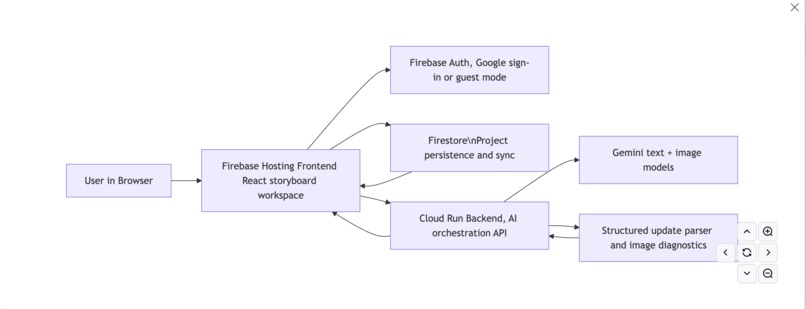
Storyboarder was built as a web application with a clear split between the UI, persistence layer, and generation backend.
Frontend
The frontend is designed as a creative workspace with:
- a conversation panel
- a storyboard board with list and grid views
- a shot inspector for editing details
- character and location panels
- inline assistant responses that can include generated storyboard previews
Structured storyboard model
Instead of treating the chat transcript as the source of truth, the app uses a structured storyboard model that tracks:
- story outline
- sequences
- scenes
- shots
- characters
- locations
- image metadata
- continuity-related visual fields
This made it possible to update the storyboard incrementally and keep it stable over multiple turns.
Backend and hosting
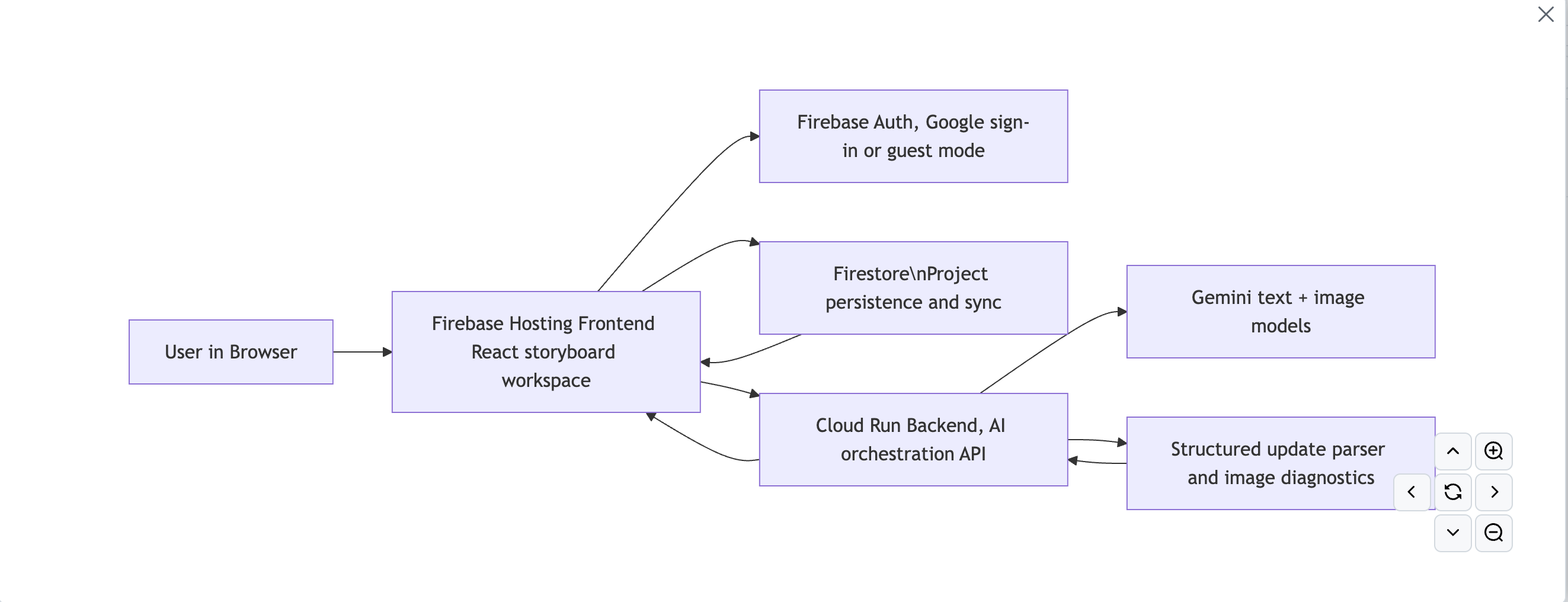
Storyboarder is hosted using:
- Firebase Hosting for the frontend
- Firestore for persistence and sync
- Firebase Auth with support for guest mode
- Cloud Run for the AI backend
The backend handles planning requests, image generation, diagnostics, and hosted demo access.
Planning system
The planning workflow uses a structured prompt plus an update pipeline. Instead of rewriting the entire project every turn, Storyboarder:
- sends the current storyboard state
- asks the model for structured updates
- applies only the changed parts
- re-renders the project from the updated state
This approach reduced drift and made iterative editing much more reliable.
Image generation system
Image generation is handled as a separate regeneration pass. Only the shots that actually change are regenerated, based on prompt hashes and scene updates. That keeps the experience faster, cheaper, and more stable.
We also built continuity-aware image prompting so the model uses scene context, linked entities, and project style cues instead of treating every shot like an isolated prompt.
Challenges we ran into
Turning conversation into structure
People do not naturally speak in production-ready terms. They say things like "what if the hare was in Manhattan?" not "update Sequence 2, Scene 3." The challenge was translating natural conversation into a stable storyboard model without making the UI feel rigid.
Preventing raw model output from leaking into the interface
Early versions exposed malformed structured model output directly in the chat. That felt broken immediately. We had to harden parsing, add salvage logic for clipped structured responses, and create safe fallbacks so the assistant always remained usable.
Continuity across the whole board
One of the hardest problems was continuity. A storyboard is not useful if every frame feels like it comes from a different movie. We had to explicitly encode continuity in both planning and image generation so characters, locations, world style, and shot language stayed coherent across the project.
Balancing automation with user control
If auto-generate mode writes too much too early, it hallucinates a full story before the user has shaped it. If it writes too little, the board feels empty and unimpressive. Finding the right balance between proactive generation and creative control took multiple iterations.
Making the app feel responsive during generation
When planning and image generation happen in the background, the user needs to know the system is still working. We added progress states, phase-based status updates, and clearer transitions so the app felt active instead of stalled.
Accomplishments that we're proud of
There are several parts of Storyboarder that feel meaningful beyond a simple AI demo:
- We built a system that keeps a structured storyboard state instead of just appending more chat output.
- We created a workflow where the assistant can return mixed output, combining narrative response with inline visual preview.
- We made the product usable in a hosted demo mode without forcing judges or users to bring their own API key.
- We added entity and continuity tracking so characters and locations can remain reusable story constants.
- We turned the experience into something that feels closer to a director's workspace than a toy prompt box.
- We solved a number of real product issues along the way: JSON leaks, poor progress feedback, unnecessary image regeneration, weak continuity, and inconsistent board presentation.
What we learned
The biggest lesson was that an LLM interface alone is not enough to build a good creative tool.
To make Storyboarder genuinely useful, we had to solve for:
- structure
- continuity
- latency
- trust
- editing control
We learned that creative users want both freedom and order. They want to speak casually, but they also want the product to remember what matters and organize it intelligently. That means the real challenge is not only model quality. It is orchestration, state, UX clarity, and visual consistency.
We also learned that many of the most important improvements were not flashy. Better parsing, better progress feedback, smarter regeneration rules, and stronger continuity instructions made the product significantly better.
What's next for StoryBoarder
The next step is to push Storyboarder from a strong prototype toward a real creative operating system for story development.
That includes:
- improving project-level continuity with a stronger style bible
- making character and location consistency more robust over long story arcs
- expanding the agentic orchestration layer
- improving exports and presentation for real pre-production workflows
- deepening the connection between planning, story structure, and visual generation
Storyboarder started as a question: what if storyboarding felt as natural as talking? This project is the first serious version of that idea.
Built With
- electron
- firestore
- gemini
- google-cloud
- javascript
- node.js
- react
- vite
- zustand

Log in or sign up for Devpost to join the conversation.