-
-

Square app icon, 1024 x 1024, no rounded corners.
-
StoreGit keeps every version of your App Store metadata, next to your keyword ranks and downloads.
-
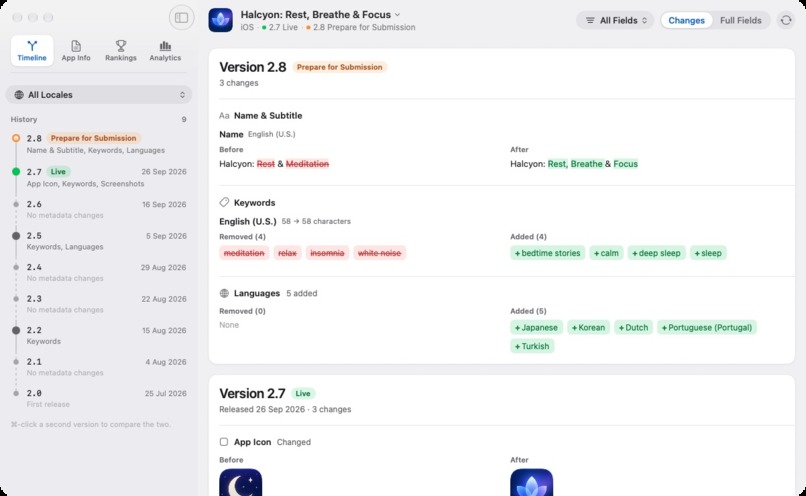
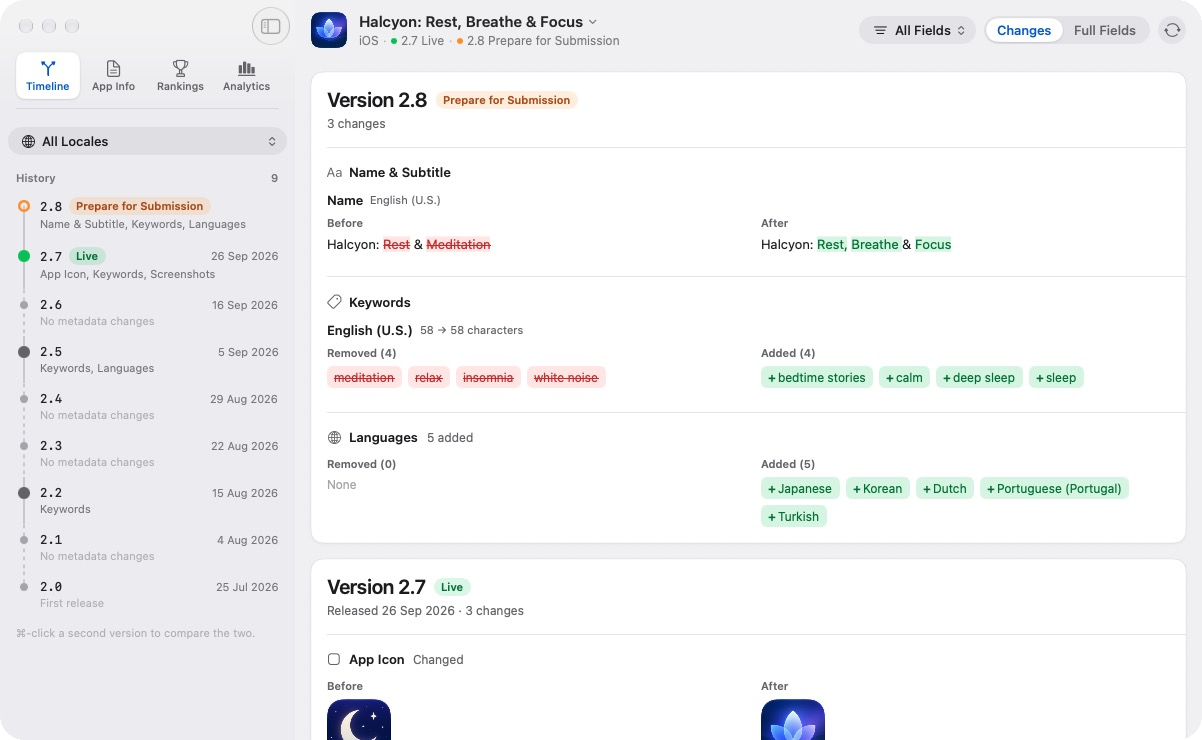
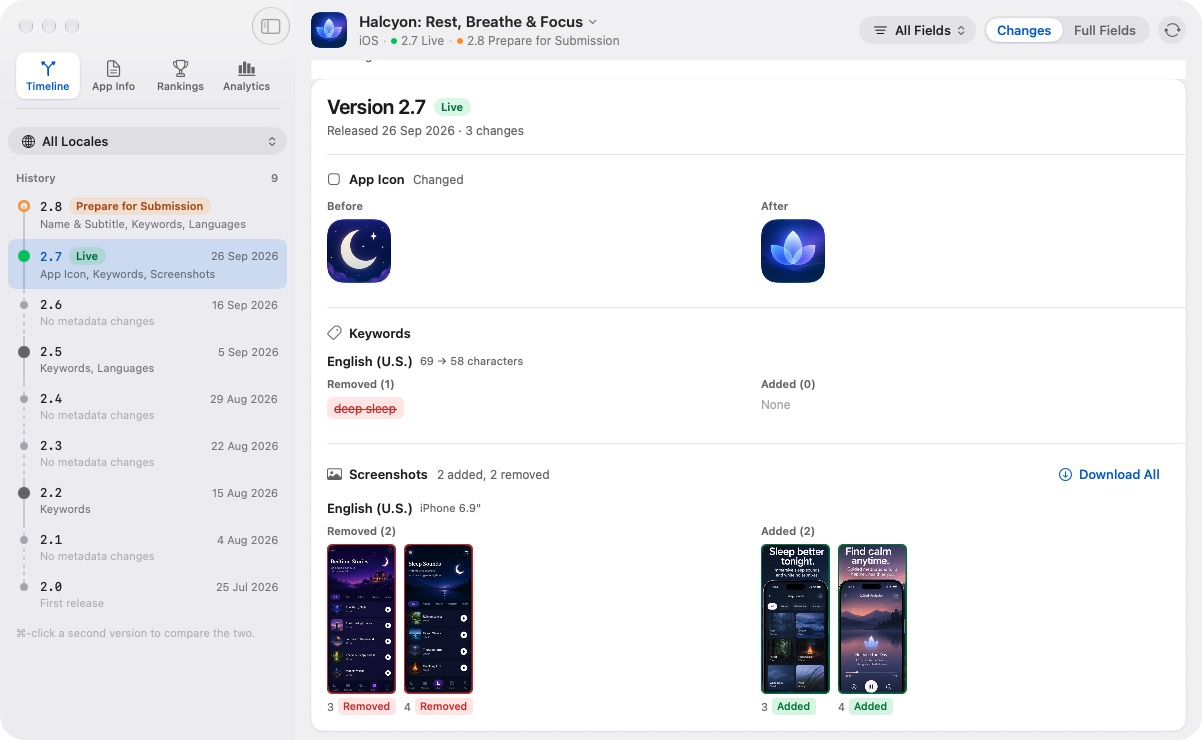
Timeline: every version of your metadata, field by field. In 2.8, demo app Halcyon gets a new name, 4 new keywords and 5 new languages.
-
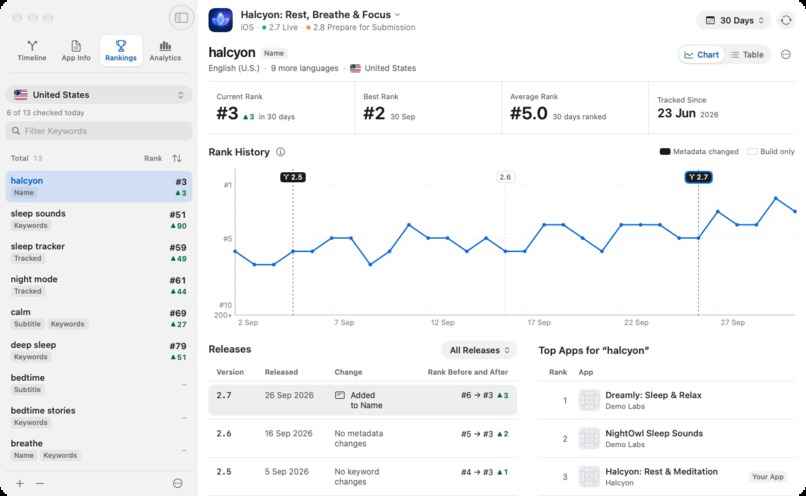
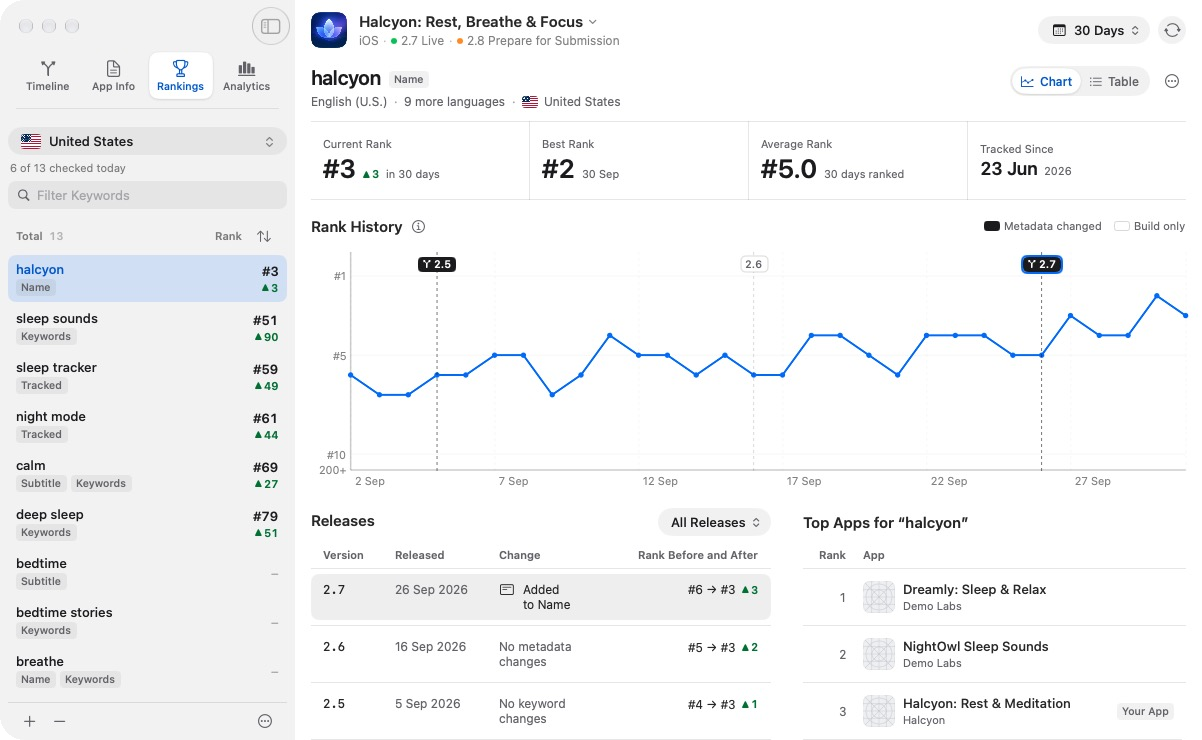
Rankings: daily keyword ranks by country, with each release flagged on the chart. After version 2.7, "halcyon" moved from #6 to #3.
-
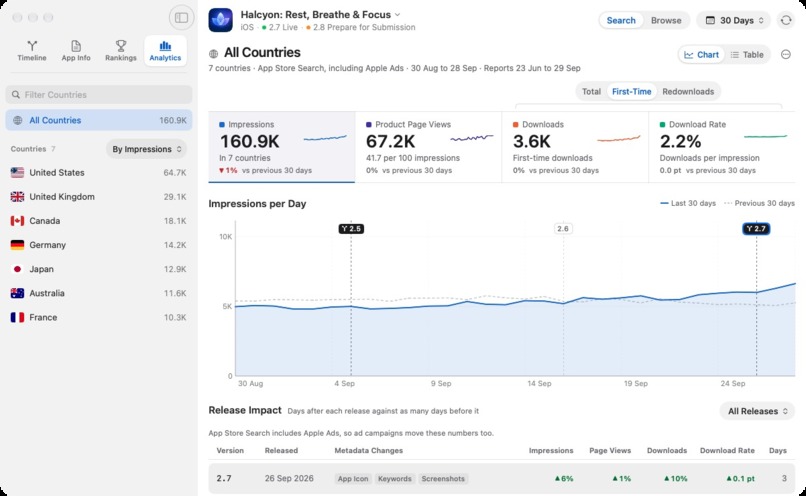
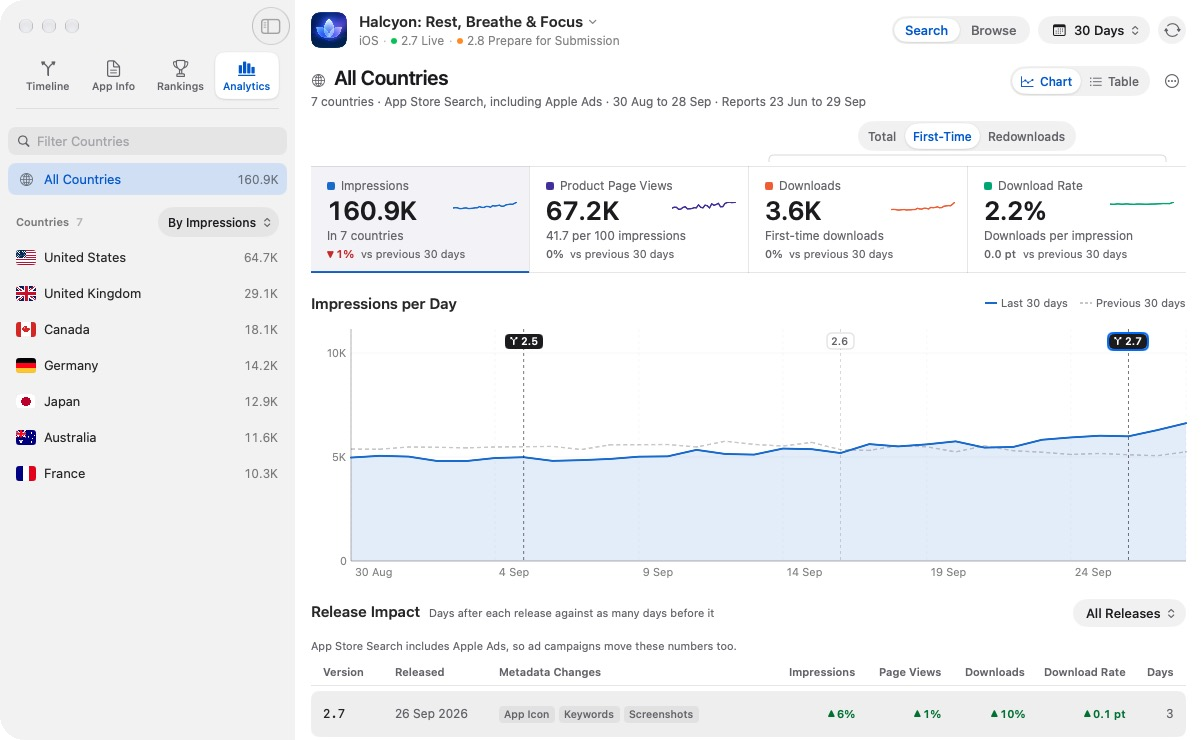
Analytics: impressions, page views, downloads and download rate. Downloads were up 10% in the 3 days after 2.7 vs the 3 days before.
-
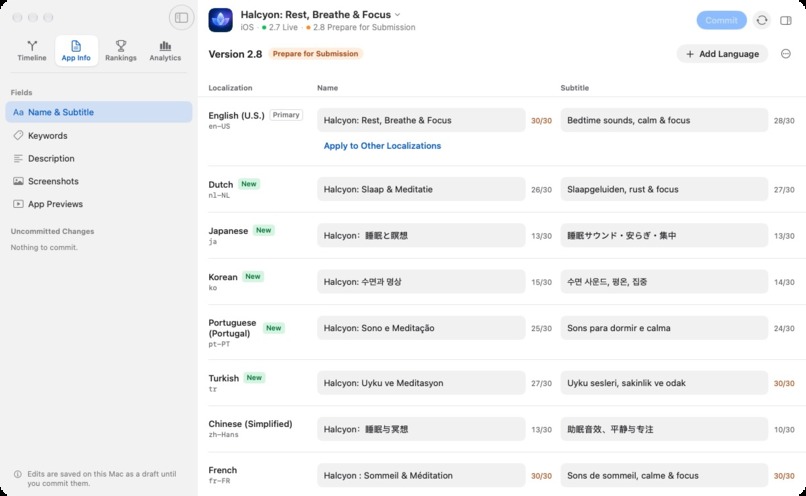
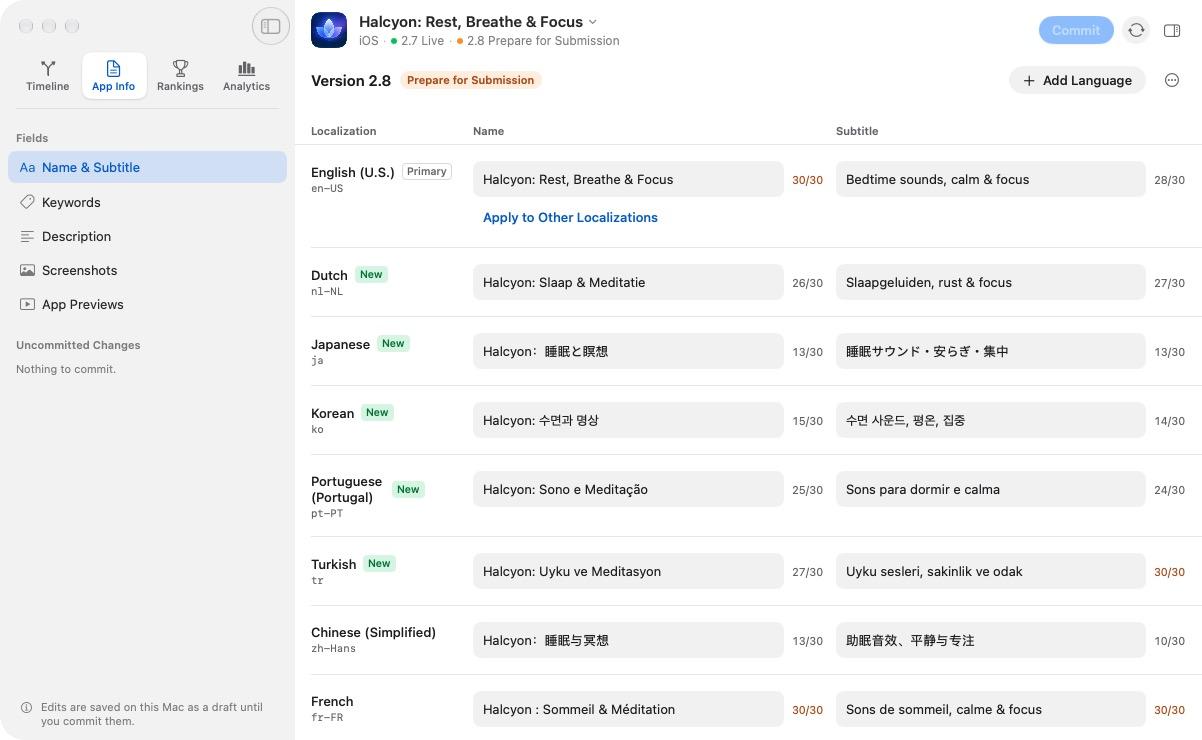
App Info: edit your name, subtitle, keywords and description in every language. Commit sends the changes to App Store Connect.
-
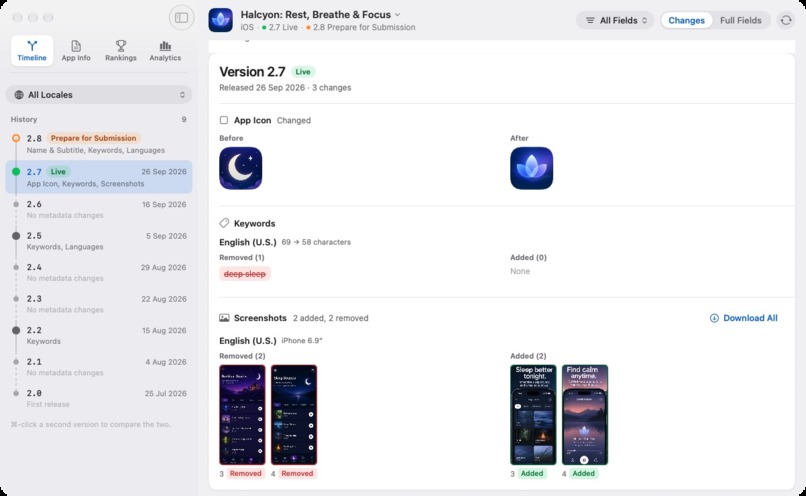
Visual history: icon and screenshot changes, before and after. Version 2.7 replaced the app icon and two screenshots.

Inspiration
App Store Connect is great at showing what your App Store metadata looks like today, but it doesn't give you much history of how it has changed over time.
As an indie developer, I regularly experiment with app names, subtitles, keywords, descriptions, screenshots, and other metadata. After a few iterations, I found myself asking questions that were surprisingly difficult to answer:
- What keywords was I using three months ago?
- What exactly changed between two versions?
- Did my rankings move after changing a keyword?
- What happened to impressions or downloads after an update?
- Have I already tried this before?
Most of the data was there, but the history wasn't.
That led to a pretty simple idea:
What if App Store metadata had Git-like history?
That's how StoreGit started.
What it does
StoreGit is Git for your App Store metadata.
It's a native macOS app that keeps a history of your App Store metadata across versions and localizations.
Instead of only seeing the current state, you can go back through previous revisions, see exactly what changed, compare any two versions, and edit every localization before committing the changes back to App Store Connect.
But knowing what changed is only half the story.
StoreGit also tracks keyword rankings daily in up to 25 countries per app and brings in performance data such as impressions, product page views, downloads, and conversion.
This lets you look at:
what you changed → when you changed it → what happened afterwards
StoreGit doesn't try to claim that a metadata change caused a particular result. It gives developers the context to spot patterns, understand their past experiments, and make better-informed ASO decisions.
How I built it
StoreGit is a native macOS app built primarily with Swift and SwiftUI, with AppKit used where deeper macOS integration is needed.
It integrates with the App Store Connect API to fetch apps, versions, localizations, metadata, and analytics.
Metadata is captured as snapshots and compared over time to build a Git-like history of revisions. Keyword rankings come from public App Store search, checked daily in each tracked country and stored over time, so developers can look at ranking movement alongside their metadata changes and performance.
StoreGit is local-first. App data and history stay on the developer's Mac, and App Store Connect credentials are securely stored in the macOS Keychain. StoreGit doesn't have a backend that stores a developer's App Store Connect data.
RevenueCat handles StoreGit's subscriptions and entitlements.
The app is built using Swift, SwiftUI, AppKit, Swift Charts, Swift Concurrency, GRDB, SQLite, Keychain, CryptoKit, RevenueCat, and the App Store Connect API.
Challenges I ran into
One of the biggest challenges wasn't actually technical. It was trust.
StoreGit needs access to App Store metadata and analytics. When it launched, StoreGit asked for a single App Store Connect Admin API key. It made the implementation and setup simple because one key could provide every permission StoreGit needed.
But after launch, it became clear that asking developers to hand a new tool an Admin key was a lot of trust. Developers hesitated right at that step.
That bothered me, especially because StoreGit is supposed to be a privacy-conscious, local-first tool.
So I redesigned the onboarding.
Developers can still use a single Admin key if they want the easiest setup, but they can now connect with two separate API keys with narrower roles instead: one for their metadata, and one for analytics. The onboarding explains which role each feature needs before it asks for anything.
This gives developers the choice between a simpler setup and a more restrictive, least-privilege setup. Either way, the credentials stay securely stored in Keychain on their Mac.
The other big challenge was figuring out how to connect all the different types of App Store data.
Metadata is localization-based. Analytics is reported by country. Keyword rankings depend on both the keyword and the country. Apple also doesn't give you a ready-made historical timeline of your metadata.
So StoreGit couldn't simply display data coming from an API. I had to build a model that could connect these different pieces over time and still make the result understandable.
Another challenge was deciding what StoreGit shouldn't become.
There are already large ASO platforms with competitive intelligence and huge amounts of market data. I didn't want to rebuild those products.
StoreGit is intentionally focused on something narrower:
turning your own App Store experiments into accumulated knowledge.
Accomplishments that I'm proud of
I'm most proud that a fairly simple idea, version control for App Store metadata, has turned into a working Mac app that connects three things I used to think about separately:
metadata history, keyword rankings, and App Store performance.
I'm also proud of how StoreGit handles developer data.
App Store data stays on the Mac, credentials are stored in Keychain, and developers can choose how much access they want to give StoreGit instead of being forced to provide a single high-privilege credential.
When you're asking another developer to connect something as sensitive as their App Store Connect account, I think that matters.
StoreGit also won the MRR Machine track at the IndeHub × RevenueCat hackathon. That gave me the confidence to take it beyond the original hackathon project and turn it into something I could ship for other developers.
What I learned
The biggest thing I learned is that individual experiments become much more useful when you preserve the history around them.
A single metadata experiment gives you a result.
A history of experiments starts giving you knowledge and direction.
I also learned that building a good developer tool isn't only about making the APIs work. Things like the permissions you request, where data is stored, how credentials are handled, and how much control you give the developer are part of the product too.
And something that sounded simple at the beginning turned out to involve a surprising amount of data modelling. Metadata, localizations, countries, rankings, analytics, and version history all work differently.
Bringing them together made StoreGit much more of a data and developer-experience problem than just another App Store Connect client.
What's next for StoreGit
Right now, I want to get StoreGit into the hands of more Apple developers and learn how they actually use this history when making App Store decisions.
One of the bigger things I want to build next is Smart Insights.
StoreGit already collects a useful dataset for each developer: their metadata changes, keyword ranking history, and App Store performance over time. I plan to use Apple's on-device Foundation Models to help make sense of that history, highlight changes worth investigating, and suggest ways developers could improve their ASO.
Using on-device models also fits naturally with StoreGit's local-first approach. I want the developer's data to become more useful without requiring them to send their App Store history to an AI service running on my servers.
Over time, I want StoreGit to become more than somewhere App Store history is stored.
I want it to become the memory of your App Store experiments, where every iteration contributes to what you know about growing your app.


Log in or sign up for Devpost to join the conversation.