-
-
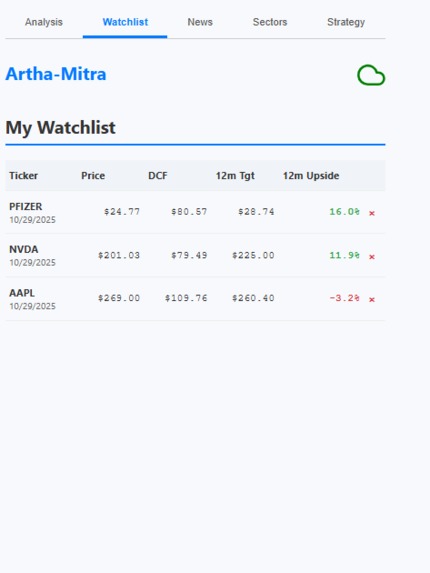
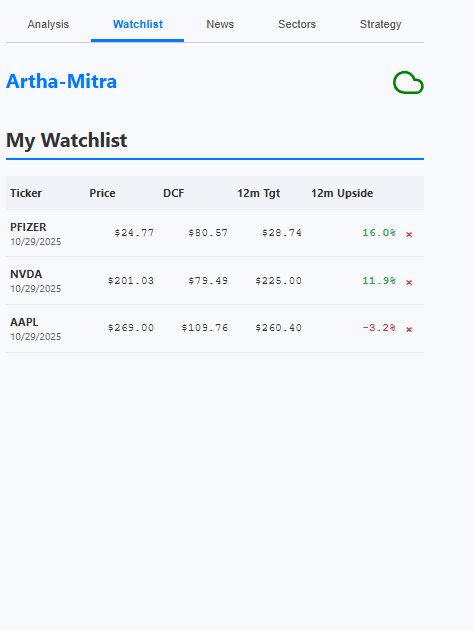
Sorted Watchlist
-
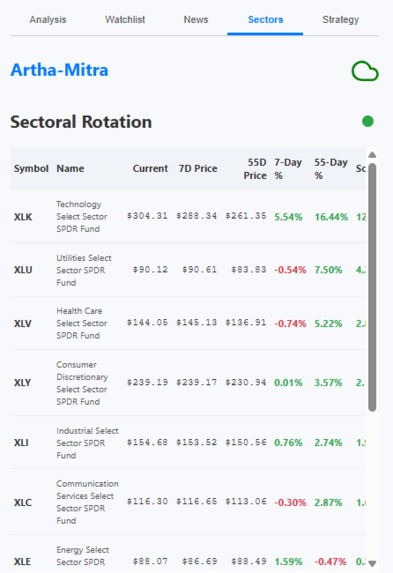
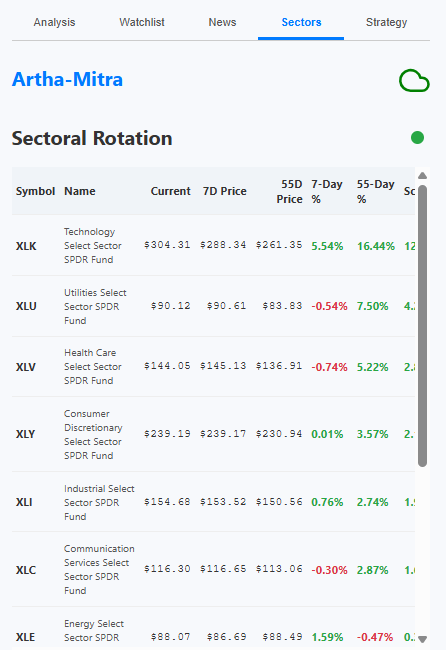
Sectoral rotation
-
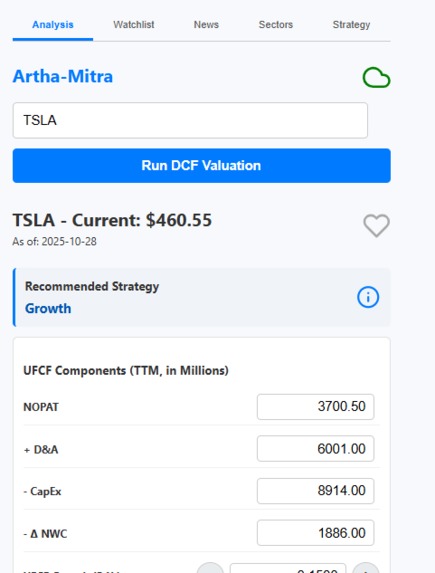
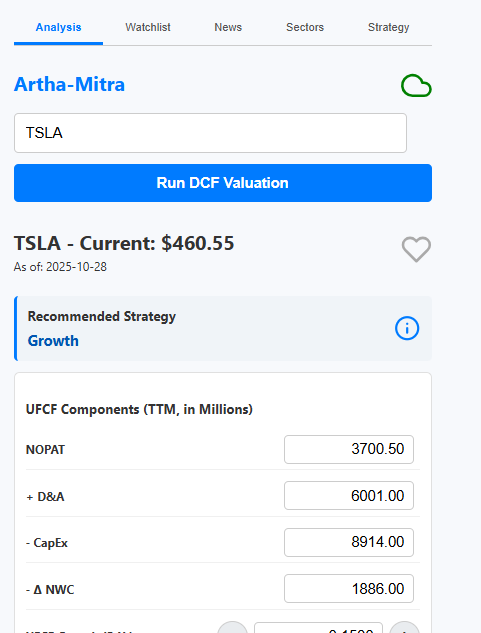
Stock valuation analysis with investment strategy
-
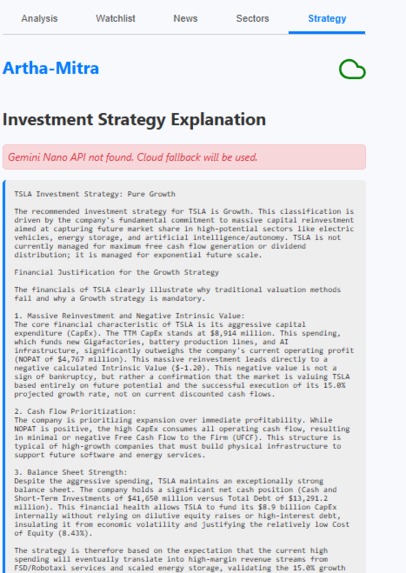
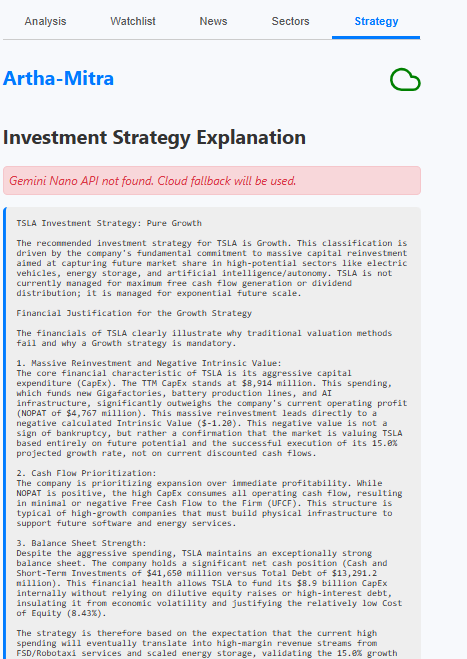
Stock specific Investment strategy explanation
-
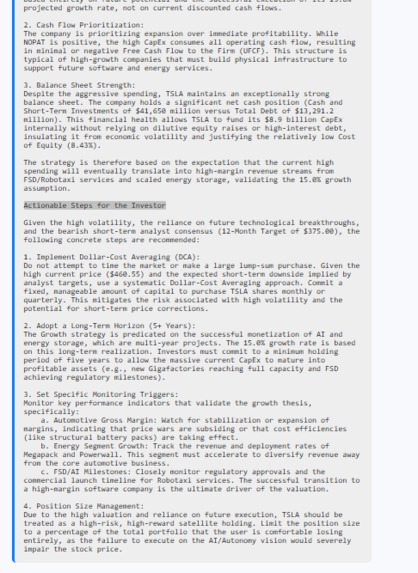
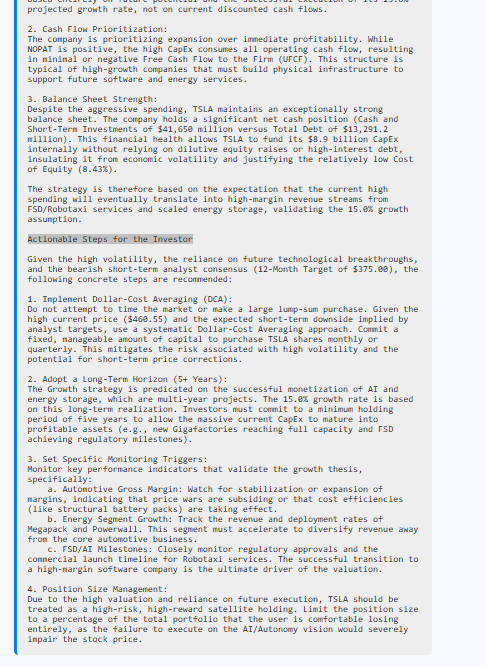
Actionable steps for investor
-
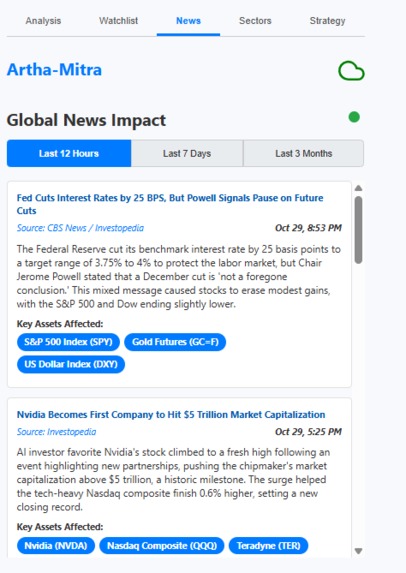
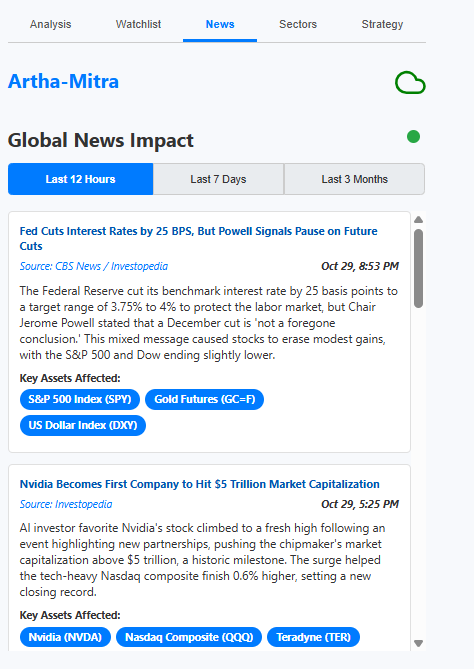
Relevant news
Inspiration
The inspiration for Artha-Mitra came directly from a personal pain point: the sheer difficulty and time required to conduct thorough investment research. As an investor, I found myself spending hours jumping between browser tabs—one for financial statements, another for news, a third for analyst ratings, and countless more for understanding complex financial models like a Discounted Cash Flow (DCF) valuation.
I needed a tool that could act as an expert assistant, synthesizing all this disparate information into one place. I wanted something that could not only fetch the raw data but also analyze it, provide context (the "why"), and help me formulate an actual strategy. The goal was to build a tool that could answer the question, "What is this stock worth, and what should I do about it?" in seconds, not hours.
What it does
Artha-Mitra is an all-in-one AI-powered investment research assistant that lives in your browser. For any stock ticker, it:
Performs an AI-Driven DCF: Uses Gemini to fetch all the complex parameters for a Discounted Cash Flow (DCF) valuation and calculates a stock's intrinsic value.
Provides Qualitative Rationale: Generates a detailed "why" for its numbers, including a SWOT analysis, key sectoral megatrends, and a recommended investment strategy.
Synthesizes Market Context: Scans global news to find impactful stories and tracks the performance of all major market sectors to identify rotation.
Generates Actionable Strategy: Uses on-device AI (Gemini Nano) or a cloud fallback to provide a private, ticker-specific explanation of how to act on the analysis.
Acts as a Portfolio Tool: Lets you save your analysis to a personal "Watchlist" to track your favorite stocks.
How we built it
The project was built in layers, starting with the core architecture and adding features one by one.
The Foundation (Manifest & Popup): It started as a standard Chrome extension with a manifest.json, a background.js service worker, and a simple popup/popup.html. The initial goal was just to have a UI that could take a ticker symbol.
The Brain (Gemini DCF): The most complex part came next: the handleValuation function in background.js. This involved extensive prompt engineering to instruct the Gemini API to act as a financial analyst, use Google Search tools to find real-time financial data, and—most importantly—return all the parameters for a DCF in a strict JSON format. This function is the heart of the extension.
The UI (Analysis Tab): With the data flowing, I built the "Analysis" tab in popup.html and popup.js. I dynamically populated all the input fields (populateDcfInputs) and then wrote the client-side calculateLocalDcf function to perform the final math. This allows the user to see the AI's parameters and then tweak them to see how the valuation changes.
Adding Market Context (News & Sectors): A valuation in a vacuum isn't enough.
News Tab: I created the handleNewsRequest function to use Gemini's search capabilities to find and summarize top financial news, again forcing a JSON response.
The "So What?" (Strategy Tab & Hybrid AI): The final piece was the "Strategy" tab. This implements a "hybrid AI" approach:
popup.js first checks for on-device Gemini Nano (checkNanoAvailability).
If Nano is available, the "Explain Strategy" button sends the entire analysis context to it for a fast, private explanation (generateStrategyExplanationNano).
If Nano isn't available, it seamlessly falls back to the cloud (generateStrategyExplanationCloud), sending the context to background.js to get the explanation from Gemini Flash.
Persistence (Watchlist & Caching): Finally, I used chrome.storage.local to add the "Watchlist" feature and to cache the News and Sector data (NEWS_CACHE_KEY, SECTOR_CACHE_KEY), preventing redundant API calls and making the extension feel much faster.
Challenges we ran into
Reliable JSON Output: This was a constant battle. It required refining the prompt to be extremely specific ("Your entire response MUST be a single, validated JSON object...") and adding fallback parsing logic in the fetchWithRetry function.
UI Design: Fitting this much dense, complex financial information (a full DCF input panel, rationale, news cards, and data tables) into a 400px wide popup window without it feeling impossibly cluttered was a major design challenge.
Accomplishments that we're proud of
The "Hybrid AI" System: This is our biggest accomplishment. The extension automatically detects if the user's browser supports on-device Gemini Nano. If it does, it uses Nano for instant, private strategy explanations. If not, it seamlessly falls back to the Gemini Cloud API. This provides the best of both worlds: privacy and speed when available, and powerful cloud access when needed.
Complex, Reliable JSON from an LLM: Getting an AI to reliably return a 20+ field JSON object for a DCF valuation every single time was a huge prompt engineering challenge. We built a robust prompt and a fetchWithRetry function with specific JSON-finding logic to make this core feature stable.
The Interactive DCF Model: We're proud that we don't just show the user the AI's answer. We populate the AI's parameters into editable input fields. This allows the user to challenge the AI's assumptions, tweak the numbers (e.g., "What if growth is 2% higher?"), and see how the valuation changes in real-time. It turns a static report into an interactive tool.
What we learned
Prompt Engineering is Hard: Getting an AI to reliably return only a valid JSON object is a significant challenge. The fetchWithRetry function in background.js has specific logic to find a JSON block (e.g., rawText.match(/```json.../)) because the model would often add commentary like "Here is the JSON you requested..." which breaks JSON.parse().
Hybrid AI is Powerful: Using Gemini Nano for the instant, on-device strategy explanation is a fantastic user experience. Learning to build a seamless fallback to the cloud model for users without Nano was a key takeaway.
Chrome Extension State: Managing asynchronous communication between the popup (popup.js) and the service worker (background.js) using chrome.runtime.sendMessage is the key to building a responsive extension.
What's next for Valora
- AI-Powered SEC Filing Summaries:
A new function (handleFilingSummary) that uses Gemini and Google Search to find the latest 10-K (annual) or 10-Q (quarterly) filing for a ticker. The prompt would ask the AI to "read" the filing and summarize the "Management's Discussion and Analysis" (MD&A) section, pulling out key risks, opportunities, and financial highlights. This is an extremely valuable task for investors.
- "Pay-as-you-go" Credits Low-friction alternative to a subscription model example: Name: "Analysis Credit Packs" Price: $5.00 for 50 Credits, $15.00 for 200 Credits Best For: Casual investors who do intense research for one weekend and then go inactive for a month. They won't subscribe, but they will happily pay $5 for a pack of credits. Payment Backend: Stripe + Firebase

Log in or sign up for Devpost to join the conversation.