-
Preview

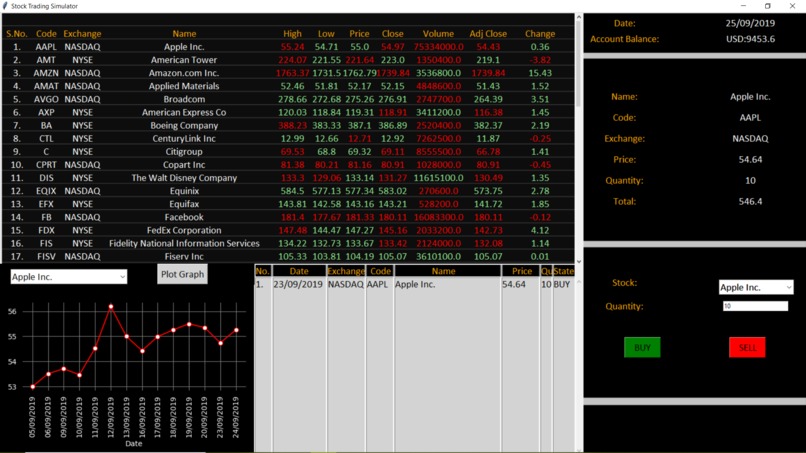
The stock-trading simulator is an innovative tool built using Python and the tkinter module, designed to provide a realistic simulation of real-world trading. To ensure that the data is accurate and up-to-date, the simulator scrapes stock data from Yahoo Finance, which is then utilized to generate a dynamic and immersive experience.
One of the key features of the simulator is the frequency with which stock prices are updated, which occurs every 4 seconds. This ensures that traders using the tool are always equipped with the most current information, allowing them to make informed decisions and stay ahead of the market.
The user interface of the simulator is intuitive and user-friendly, making it accessible to traders of all experience levels. The tool enables traders to explore and experiment with different strategies and approaches, allowing them to hone their skills and gain valuable insight into the intricacies of the stock market.
Overall, the stock-trading simulator represents a valuable tool for traders seeking to refine their skills and gain a deeper understanding of the stock market. With its dynamic and immersive experience, frequent updates, and intuitive user interface, the simulator represents a significant step forward in the world of stock trading tools.
Additional Info:
Download stock data on the excel file using this: https://stackoverflow.com/questions/32545316/how-to-write-data-to-excel-using-python-for-stock-data-being-pulled-from-yahoo
Download the above folder and run the python file (named 'Stock Trading Simulator.py') Make sure all the files (inside the folder are always) inside the same folder(same file path).
Display Settings: Display Resolution: 1920x1080 Size: 125%
You can view 50 stock prices update in the first window (top left). You can make purchases in the second one (top right). You can view the performance of a stock in the third window (bottom left) and view your transactions in the fourth one (bottom right).
Bug Fixes:
Use pip install xlrd==1.2.0 to solve the xlrd module issue.
Built With
- python
- tkinter


Log in or sign up for Devpost to join the conversation.