-
-
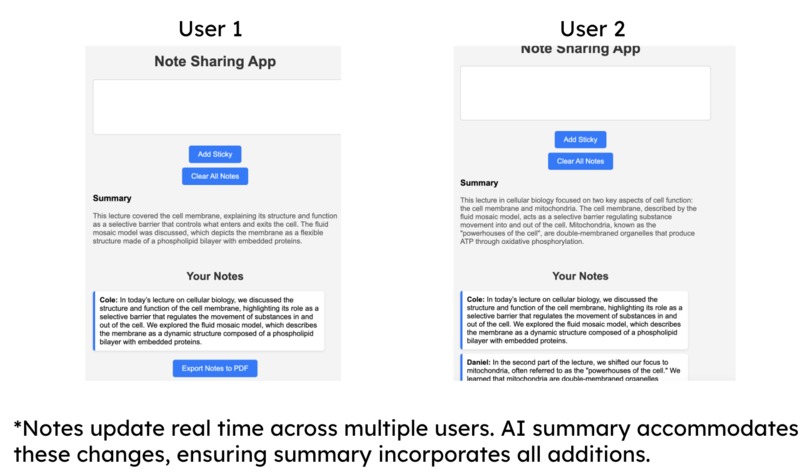
This is a sample comparison between multiple users using the web application.
Inspiration
We wanted to give people an easier way to manage and keep track of what needs to get done as they work on a project. Trying to do so using a group chat works at first, but as people have to talk further about what they're doing, the scroll back to the top gets increasingly inconvenient and time consuming.
What it does
This web app allows users to enter their names and write notes in a text box. After clicking the "add sticky" button, the note is displayed at the bottom with the user's name. It supports collaboration, enabling classmates to add notes together. Each note is sent to Gemini AI for summarization, increasing the prompt size with more notes. Once finished, users can export the summary and notes as a PDF, with the summary presented first.
How we built it
First, we created a React App with Vite and formatted the input boxes, buttons, and notes. We then used Google's Gemini AI API to summarize the notes and display the summary on the page. We leveraged LocalStorage to share notes between users and instances of the app and jsPDF to allow users to save their notes after a session.
Challenges we ran into
One challenge we ran into was getting the .env file to work with the app, this is where our API key was for Gemini AI use. We eventually found out that file location was critical for it to work.
Accomplishments that we're proud of
We were able to make calls to the Gemini API after a lot of troubleshooting and display it nicely on the page. We're also proud that we were able to allow instances of the app running locally to communicate with each other.
What's next for Sticky Note AI
We will be publishing our app as a fully fledged site.


Log in or sign up for Devpost to join the conversation.