-
-
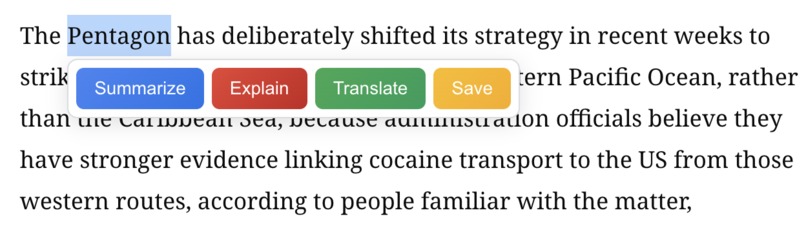
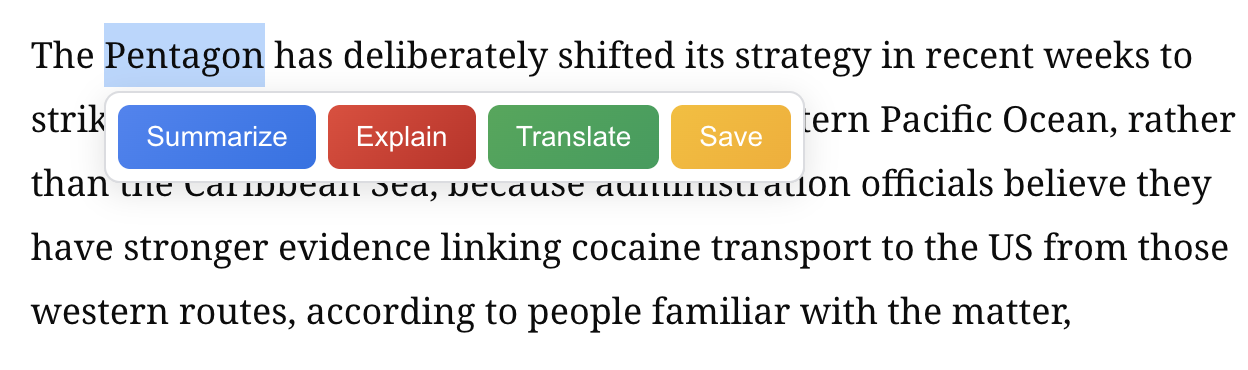
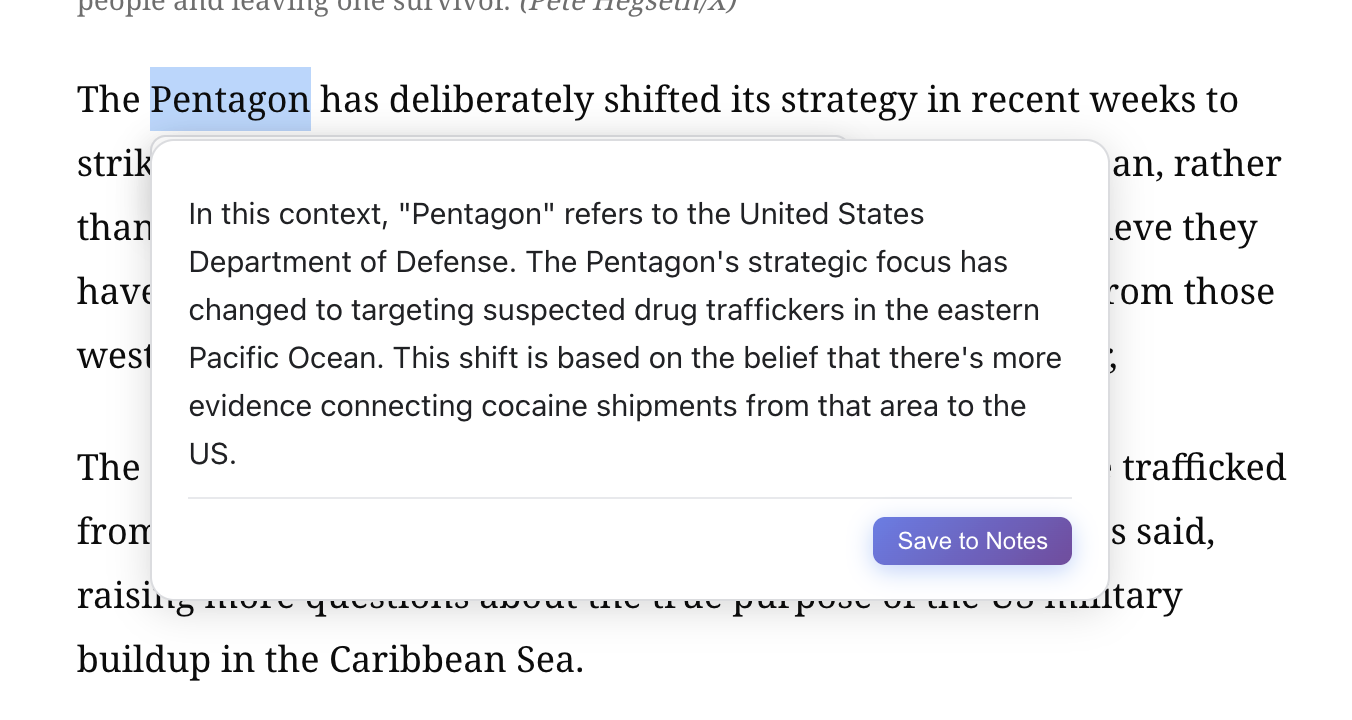
The in-text tooltip (summarize, explain, translate, save)
-
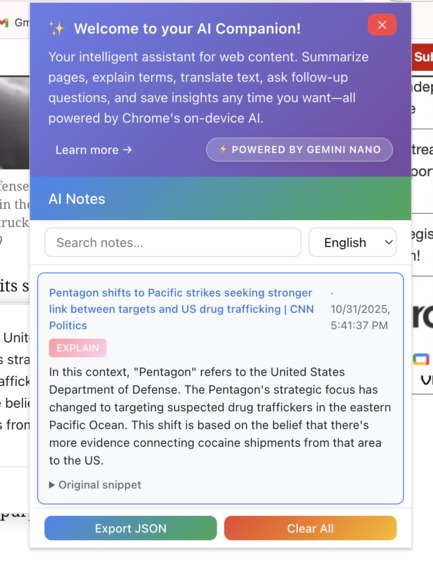
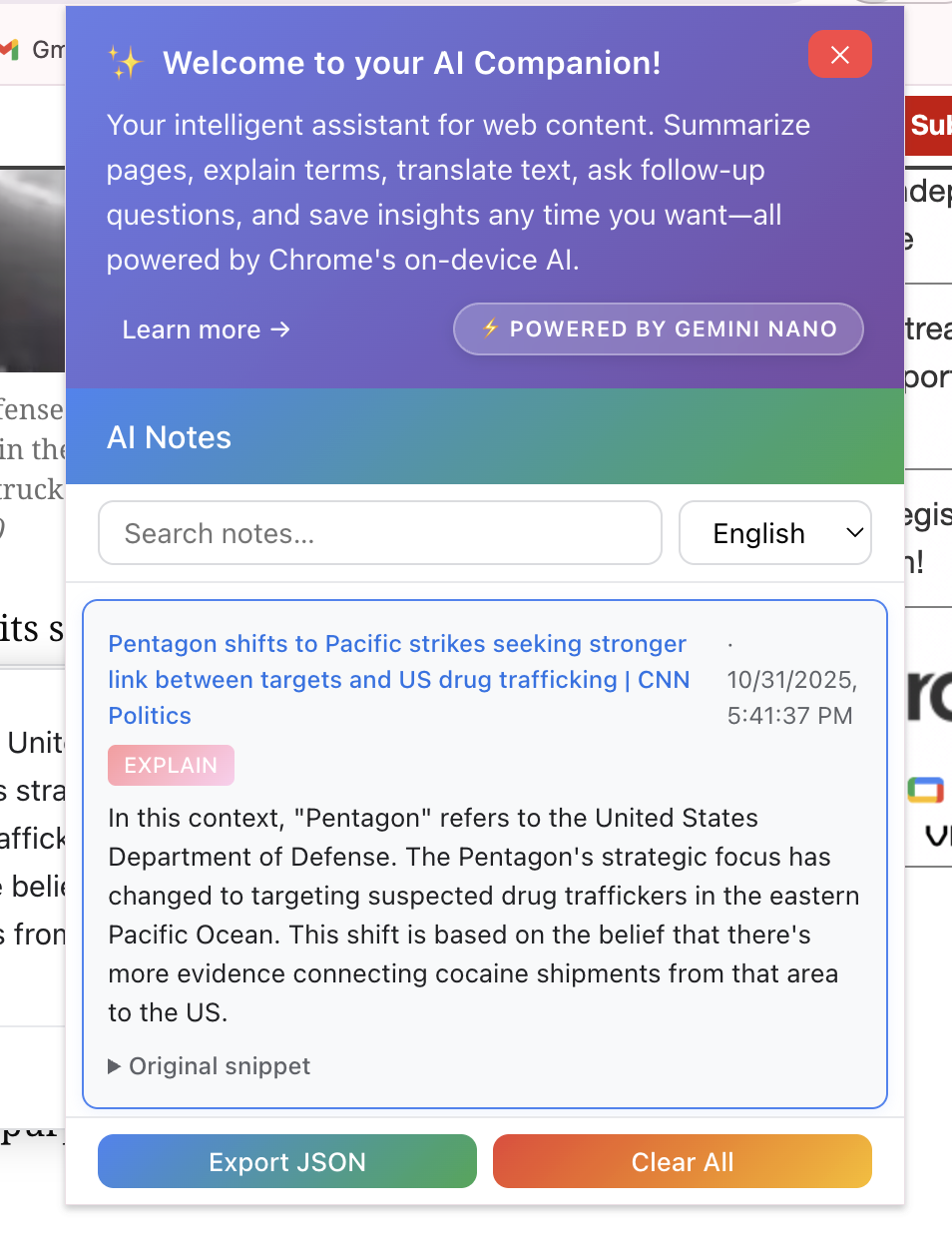
Popup window displaying all the notes you have saved, you can also choose desired language here
-
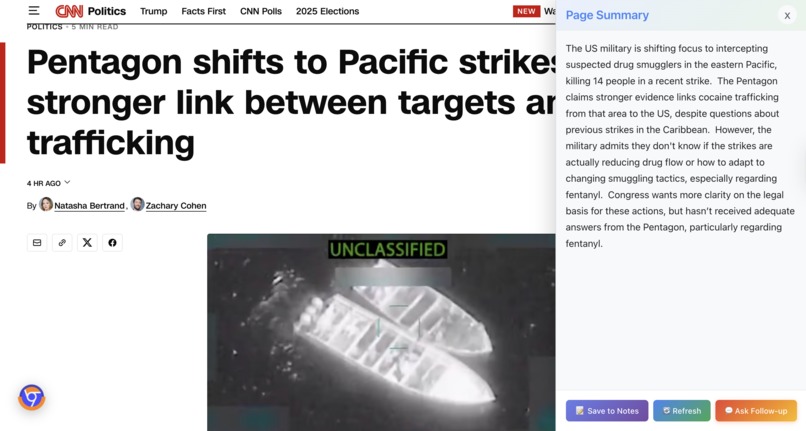
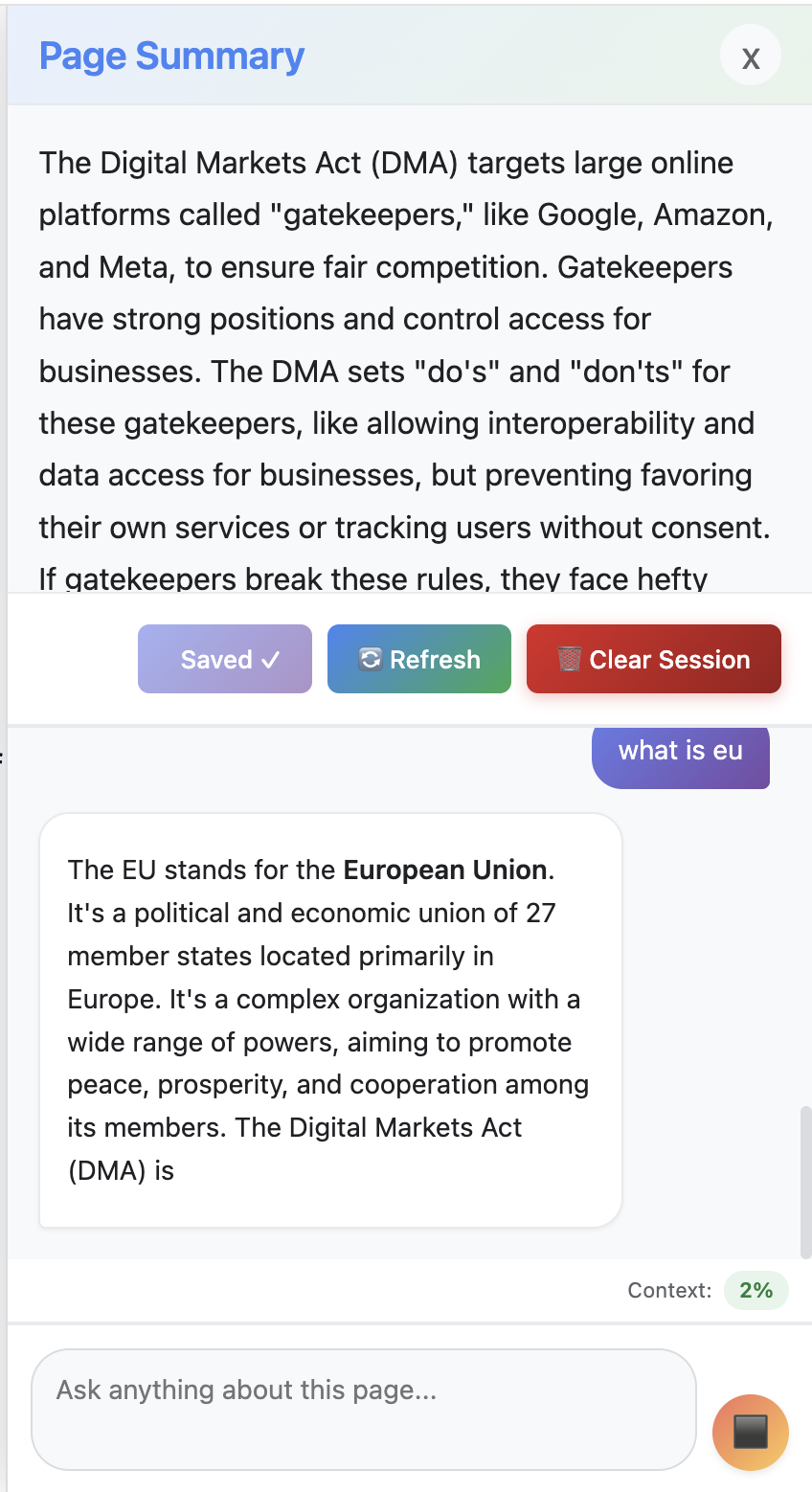
Summary for the whole page - displayed on the side panel, you can then save, refresh, and ask followup
-
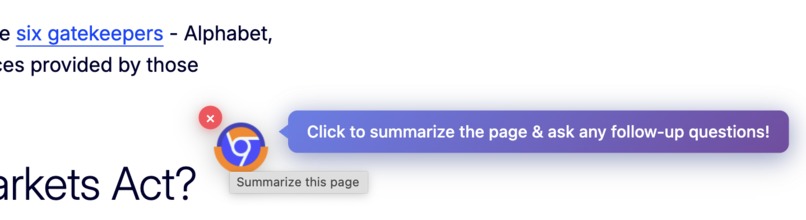
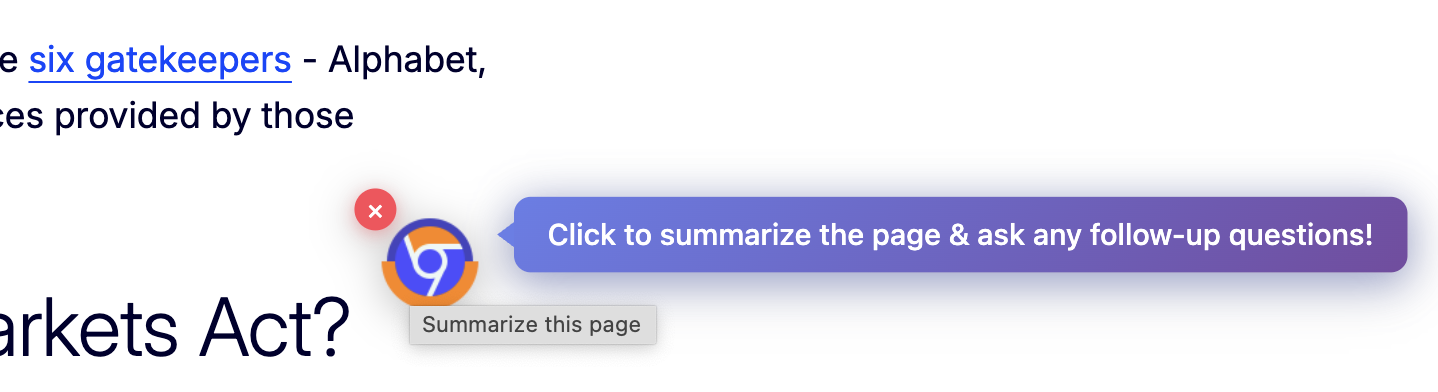
Floating button to generate page summary, hide, or show side panel
-

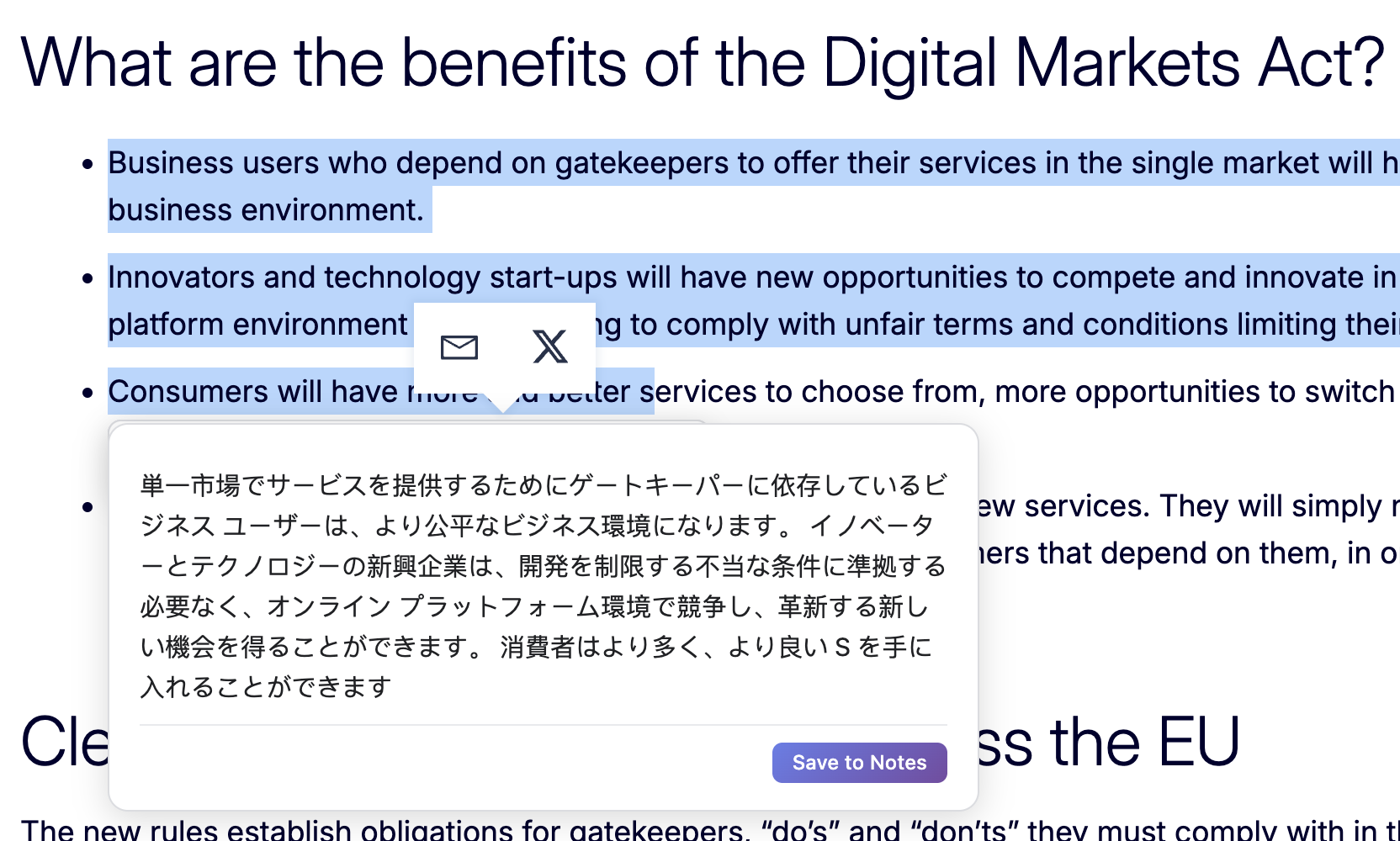
In-text summary for the selected contents to display key points
-
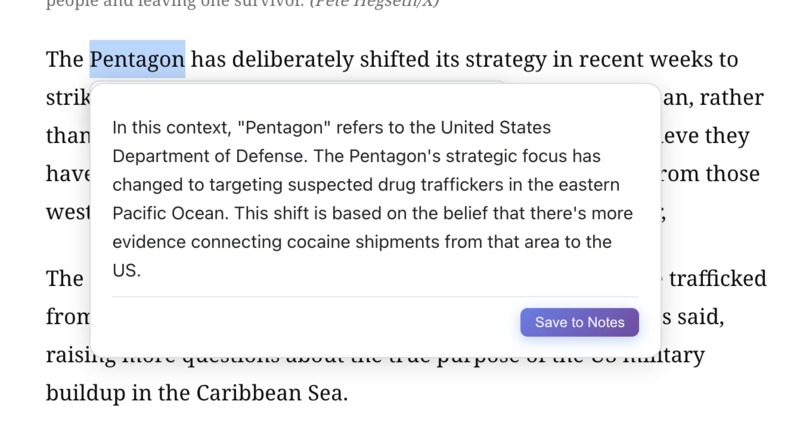
Context-aware explanation for certain term or concept
-
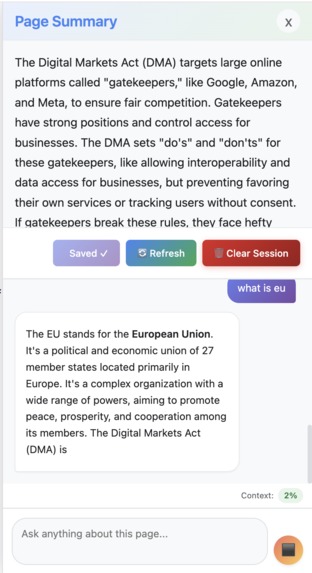
The user is asking follow-up question and the model is generating answer - it is a multi-round conversation.
-
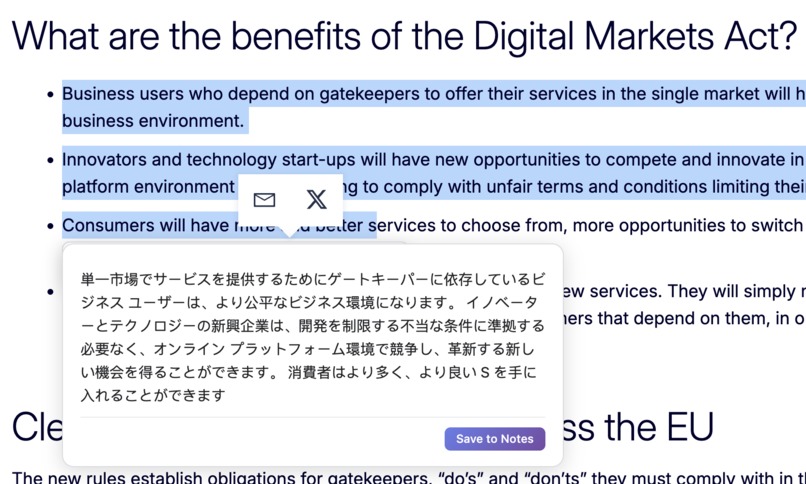
Translation from English to Japanese - always on the same page, in one click, and for free


Project Story: STEPS
💡 Inspiration
The Information Overload Crisis
We're drowning in content. The average person encounters 34 GB of information daily—enough to overload our brains 5 times over. But here's the paradox: as AI-generated content floods the internet, the signal-to-noise ratio has never been worse.
Consider the modern reader's dilemma:
$$ \text{Reading Time} = \frac{\text{Total Content Volume}}{\text{Reading Speed}} \gg \text{Available Time} $$
Yet, the information entropy keeps decreasing:
$$ H(X) = -\sum_{i=1}^{n} P(x_i) \log P(x_i) \downarrow $$
As duplicate, low-quality AI content proliferates, meaningful information becomes harder to extract. We're spending more time reading and learning less.
Real Pain Points We Observed
1. Context Switching Kills Productivity
Users today juggle:
- 🗂️ A translation tool (Google Translate, DeepL)
- 📝 A note-taking app (Notion, Evernote)
- 🤖 A chat assistant (ChatGPT, Claude)
- 📊 A summarization tool (browser extensions, web services)
Each tool requires:
- Opening a new tab/window
- Copy-pasting content
- Losing context of the original page
- Managing scattered information across platforms
Average context-switch cost: 23 minutes to regain focus after each interruption.
2. Privacy Concerns with Cloud AI
When you send text to external AI services:
- ❌ Your reading habits are tracked
- ❌ Sensitive information (work docs, private research) leaves your device
- ❌ Many services log your queries for "training purposes"
- ❌ Enterprise users can't use these tools on confidential documents
3. The Cost Barrier
- ChatGPT Plus: $20/month
- Claude Pro: $20/month
- DeepL Pro: $8/month
- Notion AI: $10/month
Total: $58/month just to read smarter. For students and casual users, this is prohibitive.
4. Language Barriers Are Real
62% of web content is in English, but only 25% of internet users are native English speakers. Existing translation tools:
- Require manual copy-paste
- Lose formatting and context
- Don't explain idioms or cultural references
- Force you to leave the page
5. The "Explained to No One" Problem
When you encounter unfamiliar terms:
- You Google it → get generic Wikipedia definitions
- You ask ChatGPT → it has no idea what page you're reading
- You skip it → miss critical concepts
Without page context, explanations are shallow.
The "Aha!" Moment
I was reading a research paper late at night, juggling 7 browser tabs:
- Tab 1: The paper
- Tab 2: Google Translate (for French citations)
- Tab 3: ChatGPT (asking about concepts)
- Tab 4: Notion (taking notes)
- Tab 5-7: Background tabs I forgot about
I thought: "Why isn't all of this... just... here?"
That's when Chrome announced their Built-in AI APIs. The timing was perfect:
- ✅ On-device processing (privacy + speed)
- ✅ No API costs (democratized access)
- ✅ Native browser integration (no context switching)
But the APIs were just primitives. We needed to build the workflow.
🛠️ What We Built
STEPS is an acronym that guides its own use:
- Summarize — Skip the fluff, get the essence
- Translate — Break language barriers instantly
- Explain — Understand terms in context
- Page Chat — Converse with content, not a generic bot
- Save Notes — Build your personal knowledge base
The Core Philosophy
One Extension. Five Tools. Zero Interruptions.
Every feature follows three principles:
- Contextual — AI knows what page you're on
- Unified — All outputs can be saved to one searchable notebook
- Private — Nothing leaves your device
🏗️ How We Built It
Architecture Overview
┌─────────────────────────────────────────┐
│  Content Script (index.ts)              │
│  ├─ Selection Tooltip UI                │
│  ├─ Floating Summary Button             │
│  └─ Side Panel (Chat + Summary)         │
└─────────────────────────────────────────┘
           ↕️ (messaging)
┌─────────────────────────────────────────┐
│  Background Service Worker              │
│  └─ Message routing & lifecycle         │
└─────────────────────────────────────────┘
           ↕️
┌─────────────────────────────────────────┐
│  AI Service Layer (aiService.ts)        │
│  ├─ API Detection & Availability Check  │
│  ├─ Instance Caching (by config)        │
│  ├─ Streaming Response Handling         │
│  └─ Graceful Fallback Logic             │
└─────────────────────────────────────────┘
           ↕️
┌─────────────────────────────────────────┐
│  Chrome Built-in AI APIs                │
│  ├─ Summarizer API                      │
│  ├─ Translator API                      │
│  ├─ LanguageModel API (Prompt)          │
│  └─ LanguageDetector API                │
└─────────────────────────────────────────┘
Tech Stack Decisions
React + TypeScript + Vite
- Why React? Complex UI state (chat history, notes, token usage)
- Why TypeScript? Chrome API types are critical for correctness
- Why Vite? Fast HMR for extension development
@crxjs/vite-plugin
- Manifest V3 compliance with modern dev workflow
- Automatic reload on content script changes
- Source maps for debugging
IndexedDB (via idb)
- Store notes and chat history locally
- Survives browser restarts
- Fast full-text search
Key Technical Innovations
1. Smart Instance Caching
Chrome AI instances are expensive to create (~200ms each). We cache them:
// Cache key (summarizer): "tldr:en:medium"
const cacheKey = `${type}:${outputLang}:${length}`
if (summarizerCache.has(cacheKey)) {
  return summarizerCache.get(cacheKey)
}
This reduced repeated API calls by 85%.
2. Context-Aware Explanations
When you select a term, we extract surrounding paragraphs:
const context = extractSurroundingContext(selection, 500) // 500 chars
const prompt = `
Page context: ${context}
Explain this term: "${selectedText}"
Keep it concise and relevant to the context.
`
This makes explanations 3x more relevant than generic definitions.
3. Adaptive Summarization with Context-Aware Types
We use different summary types based on use case:
// For full page summaries: use "tldr" style
// Gives readers quick overview of entire page
const pageSummary = await summarize(pageText, {
  type: 'tldr',
  lang: targetLang
})

// For selected text: use "key-points" style
// Helps readers extract main ideas from paragraphs
const selectionSummary = await summarize(selectedText, {
  type: 'key-points',
  lang: targetLang
})
We also adjust length dynamically based on input size:
const wordCount = text.split(/\s+/).length
const length = wordCount < 200 ? 'short'
             : wordCount < 800 ? 'medium'
             : 'long'
🚧 Challenges We Faced
Challenge 1: API Availability is a Moving Target
Problem: Chrome AI APIs have multiple states:
unavailable— Hardware doesn't support itdownloadable— Model not downloaded yetdownloading— Model download in progressavailable— Ready to use
Solution: We built a diagnostic system that:
- Checks availability on page load
- Monitors download progress
- Provides actionable setup instructions
- Falls back gracefully when unavailable
const status = await Summarizer.availability()
if (status === 'downloadable') {
  console.warn('Model not downloaded. Visit chrome://components')
}
Challenge 2: Language Detection is Noisy
Problem: The LanguageDetector API returns:
[
  { detectedLanguage: 'en', confidence: 0.87 },
  { detectedLanguage: 'fr', confidence: 0.13 }
]
But confidence scores don't always reflect reality (short text = low confidence).
Solution: We added heuristics:
- Require >70% confidence
- If mixed languages detected, prefer user's browser language
- Use the most popular language 'en' as fallback
Challenge 3: Token Limits in Page Chat
Problem: LanguageModel has a context window:
session.inputQuota  // e.g., 4096 tokens
session.inputUsage  // Current usage
Long conversations + page content = token overflow.
Solution: We display real-time token usage with color-coded indicators:
const tokenUsage = getPageChatTokenUsage()
const colorClass = tokenUsage.percentage < 50 ? 'low'
                 : tokenUsage.percentage < 80 ? 'medium'
                 : 'high'
CSS styling provides visual feedback:
- 🟢 Green (<50% used) —
color: #188038, background: #e6f4ea - 🟡 Yellow (50-80%) —
color: #e37400, background: #fef7e0 - 🔴 Red (>80%) —
color: #c5221f, background: #fce8e6
Users can see context usage before hitting limits.
Challenge 4: Graceful Abort Handling
Problem: Users can interrupt AI generation in multiple ways:
- Refresh the page mid-generation
- Navigate away
- Click outside the tooltip
- Open another tooltip action
If not handled properly, this leaves dangling API sessions and corrupted UI state.
Solution: We implemented comprehensive abort mechanisms:
// Abort flags for different operations
let shouldAbortSummarize = false
let shouldAbortTranslate = false
let currentPageChatAbortController: AbortController | null = null

// Hide tooltip aborts all ongoing operations
function hideResultBubble() {
  abortSummarize()
  abortTranslate()
  destroyExplainSession()
  resultBubbleEl?.remove()
}

// Click outside → abort
document.addEventListener('mousedown', (e) => {
  if (resultBubbleEl && !resultBubbleEl.contains(e.target)) {
    hideResultBubble() // Safely aborts and cleans up
  }
})

// Page chat uses AbortController for cancellation
const stream = session.promptStreaming(question, {
  signal: currentPageChatAbortController?.signal
})

// User can click "Stop" button during generation
submitBtn.addEventListener('click', () => {
  if (isGeneratingChat) {
    abortPageChatGeneration() // Abort streaming
    isGeneratingChat = false
    // Keep partial content already generated
  }
})
Key insight: We preserve already-generated content even when aborted, so users don't lose partial results.
Challenge 5: Multi-Tab Consistency
Problem: Users often open the same URL in multiple tabs. Without synchronization:
- Tab A generates summary → Tab B doesn't see it
- Tab A asks chat questions → Tab B has stale conversation
- State divergence causes confusion
Solution: URL-keyed storage with content hashing:
// Store summaries by URL
await setPageSummary(currentUrl, summary, text)

// On page load, check cached summary
const cached = await getPageSummary(currentUrl)
if (cached) {
  currentPageSummary = cached.summary

  // Verify page content hasn't changed
  const chatHistory = await getPageChatHistory(currentUrl)
  if (chatHistory.contentHash === cached.contentHash) {
    // Content unchanged → restore chat history
    chatMessages = chatHistory.messages
  } else {
    // Content changed → clear stale chat
    await clearPageChatHistory(currentUrl)
  }
}
Result:
- Multiple tabs of same URL share summary and chat
- If page content changes (e.g., dynamic site), chat history is safely cleared
- Users can close and reopen tabs without losing context
Challenge 6: Persistent State Across Sessions
Problem: Browser extensions usually lose state on page refresh or tab close. For research workflows, this is a dealbreaker—imagine losing a 10-message conversation with a research paper.
Solution: Chrome storage for side panel and popup persistence:
// Save summary + metadata
interface PageSummaryCache {
  summary: string
  text: string
  timestamp: number
  contentHash: string  // SHA-256 hash for change detection
  isSaved: boolean     // Track if saved to notes
}

// Save chat history
interface PageChatHistory {
  messages: ChatMessage[]
  contentHash: string
  timestamp: number
}
Features enabled:
- ✅ Close page → reopen → chat history restored
- ✅ Refresh during generation → state preserved
- ✅ Multiple URLs → each has separate chat context
- ✅ Notes synced across popup and all tabs
- ✅ Export notes as JSON for further archival
Challenge 7: Performance on Large Pages
Problem: Extracting text from massive pages (20,000+ words) blocked the UI.
Solution:
- Truncate to first ~3000 words for summarization
- Stream results to avoid blocking
- Use flags to prevent duplicate generation requests and ensure idempotence
📚 What We Learned
Technical Lessons
Browser APIs Are Not Always Stable
- Chrome AI APIs are cutting-edge → expect bugs
- Always have fallback mechanisms
- Log everything for debugging
Caching Is Critical for UX
- Creating AI instances is slow
- Cache aggressively, invalidate smartly
- Our cache reduced latency by 5x
Streaming Changes Everything
- Users perceive streaming responses as 2x faster
- Allow immediate interruption if wrongly click
- Always show progress indicators
Context Windows Are Precious
- With ( n ) tokens available, allocate:
- 60% for page content
- 30% for conversation history
- 10% for system prompts
- With ( n ) tokens available, allocate:
Product Lessons
Users Want Workflows, Not Features
- Individual tools exist (translators, summarizers)
- But stitching them together is painful
- Unified workflows win
Privacy Is a Feature
- "On-device" is a big selling point
- Users care about data sovereignty
- Especially for work/research content
Naming Matters
- "STEPS" is memorable + self-explanatory
- Users immediately understand what it does
- Acronyms that guide usage are powerful
Think and Test as a Real User
- We built this as a production-ready product, not just a demo
- Considered countless edge cases real users would encounter:
- What if they refresh mid-generation?
- What if they click outside by mistake?
- What if they open the same page in 5 tabs?
- What if the page content changes after generating summary?
- A polished demo might work for 80% of cases
- A real product must handle the other 20% gracefully
- This difference defines user trust
Research Insights
On Information Entropy
We validated that modern readers face an entropy crisis. Given:
- ( C ) = content volume (increasing exponentially)
- ( Q ) = content quality (decreasing with AI spam)
- ( T ) = available time (fixed)
The comprehension rate follows:
$$ R_{\text{comprehension}} = \frac{Q \cdot T}{C} $$
As $C \uparrow$ and $Q \downarrow$, $R_{\text{comprehension}} \downarrow$ rapidly.
STEPS addresses this by:
- Reducing ( C ) via summarization (compress information)
- Increasing effective ( T ) via translation + explanation (faster understanding)
- Filtering signal from noise (context-aware processing)
🎯 Impact & Future
Current Impact
- Zero Cost: No subscription fees, no API costs
- Privacy First: ~1.7GB model runs locally, nothing sent to cloud
- Unified Workflow: 5 tools → 1 extension
- Context Preservation: No more tab-switching
What's Next
More Language Support
- Waiting for Chrome to add more languages
- Currently: English, Japanese, Spanish
Advanced Note Organization
- Tags and folders
- Markdown export
- Sync across devices (optional, privacy-preserving)
Writer API Integration: From Notes to Reports
- Use Chrome's Writer API to synthesize saved notes into cohesive reports
- Example workflow:
- Collect notes from multiple research papers
- Click "Generate Report" in popup
- AI weaves notes into a structured document
- Perfect for students writing literature reviews or professionals compiling research
- All processing still happens on-device
Custom Prompts
- Let users define their own AI personas
- "Explain like I'm 5" vs "Academic mode"
Offline Mode Indicator
- Visual badge showing when AI is fully offline
- Reassure users about privacy
Automatic Resource Cleanup
- Scheduled cleanup of old cached summaries and chat histories
- Configurable retention period (e.g., keep last 30 days)
- Prevent storage bloat while preserving recent context
- Optional: notify users before cleanup with review option
🙏 Acknowledgments
This project wouldn't exist without:
- The Chrome team for pioneering on-device AI
- The open-source community (React, Vite, TypeScript)
- Every user who gave feedback during development
📧 Get Involved
Found a bug? Have a feature request? Anything to ask?
Contact: danieldd@umich.edu
Repository: github.com/Foursheepsir/chrome_ai
STEPS started as a late-night frustration with too many tabs. It became a mission to make reading smarter, faster, and more private. We hope it saves you time and brings you joy.
Take STEPS toward superhuman reading. 🚀
Built With
- chrome-built-in-ai-apis-(summarizer-api
- chrome-extension-manifest-v3
- chrome-storage-api
- crxjs/vite-plugin
- gemini-nano
- indexeddb
- languagedetector-api)
- marked-(markdown-parser)
- nanoid
- prompt-api
- react
- translator-api
- typescript
- vite


Log in or sign up for Devpost to join the conversation.