Inspiration
Choosing a home to rent or buy still means flicking through photos, or travelling to a viewing that rules the place out in thirty seconds. Phone scanning (Gaussian splats) can now capture a whole home in a few minutes, and a headset is the one screen where a home feels like a place rather than a picture.
What it does
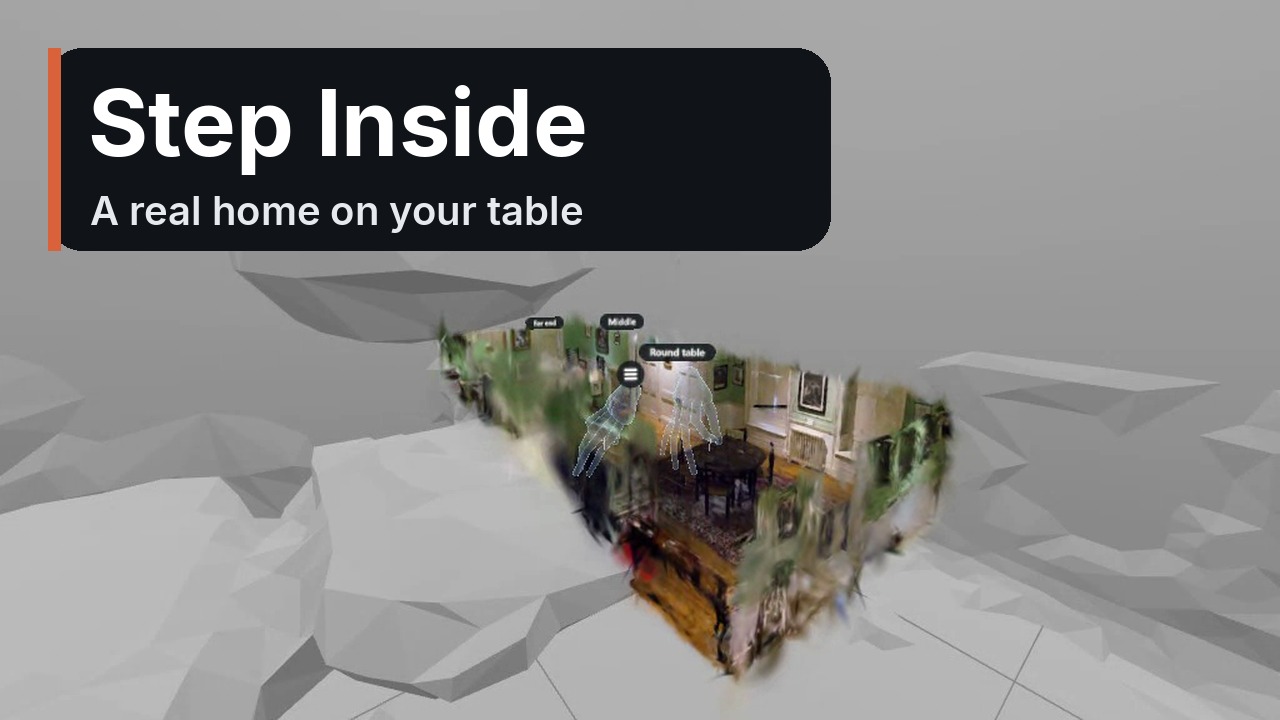
Step Inside turns a phone scan of a home into a walk-through tour anyone can open from a link. In a Quest headset the tour becomes:
- A dollhouse on your real table. In passthrough the whole home appears as a miniature on your table (found with plane detection, coffee tables included), with the ceiling cut away so you look down into every room.
- Hands first. Pinch and drag to turn it, pinch with both hands to resize it, point at a room or its floating label and pinch to step inside at full size. Your hands show as soft see-through glass, and every choice clicks.
- Walking without a stick. Point at the floor and pinch to move, pinch and swipe to snap turn, with a comfort fade on every jump.
- A menu for one hand or two, within fingertip reach: touch a row or pinch it from a distance.
- Rooms you can jump to. Owners name rooms and visitors jump straight to them.
- Seated friendly. Seated mode lifts you to standing eye height.
- Owners finish tours in the headset: set the start view and name rooms by picking from a list or saying it out loud.
- Always level. Every tour finds its own floor when it opens and straightens itself.
- Walk it together. An agent and a buyer walk the same home at the same time from their own headsets, phones or computers: see-through heads and hands with name tags, spatial voice, shared pointers, little figures on the dollhouse you can pinch to go and stand beside, and "bring everyone here". Up to six people.
The same link works on a phone or computer, so an agent or landlord shares one URL with everyone.
How to test
- In the Quest browser, open https://stepinside.pages.dev/t/demo and tap Step inside. The demo home appears on your table.
- Pinch and drag to turn it; pinch with both hands to resize it; point at a room label and pinch to step inside.
- Inside: point at the floor and pinch to move. Point up, pinch and hold for the menu.
- Walk it together on your own: on a laptop or phone, open the same link, tap Walk it together, then Start with voice, and copy the link it shows. Open that link in the Quest browser, tap Join, then Step inside.
- Everything is free during judging, with no sign-in.
Demo home: the "Dr Johnson" house capture from the Deep Blending dataset (Hedman et al., 2018).
How we built it
- WebXR on three.js with Spark (Gaussian splat rendering). No install: it runs in the Quest browser from a link.
- The dollhouse is the real scan, scaled and placed on the table, with a Spark SDF box edit that hides the ceiling and anything outside the home.
- Plane detection picks the nearest real table within reach and sizes the dollhouse to fit it.
- Auto-levelling: on load the viewer finds the floor with RANSAC and a least-squares plane fit and rotates the scan so the floor is flat.
- See-through hands: instanced capsules along each finger bone, drawn depth first and then with a soft edge-glow shader.
- Menus follow Meta's hand guidelines: within reach, big rows with gaps, touch or pinch, a click on every choice, and each pinch acts on what you pointed at when you pinched.
- Big scans are thinned to the 500,000 splats that matter most so standalone headsets stay smooth.
- Cloudflare Pages and Workers KV host tours; owners edit through a private owner link.
- Shared walks: a Cloudflare Worker with one Durable Object per walk relays heads, hands and pointers about ten times a second in the home's own coordinates; voices go between browsers over WebRTC and play with spatial audio.
- Built and tested with Meta's Immersive Web Emulation Runtime (IWER) and its Synthetic Environment Module.
What's new in the competition window
Everything: Step Inside was built during the window (first public version 26 September 2026).
Challenges
- Making a scan feel like a small physical object on a surface you can actually see.
- Keeping every action one pinch, with no controller.
- Tilted scans: the demo home leaned about 8 degrees, very noticeable in a headset. Levelling every tour on load fixed it for every scan.
- Building for Quest without a Quest: every feature was developed and filmed in Meta's emulator, driving the hands from a script.
- Two people, two very different views: sharing everything in the home's own coordinates keeps the person at full size and the person holding the dollhouse both right.
Accomplishments we're proud of
- A full hands-only journey from a miniature on your table to standing inside a real home, with no install and no controller.
- One link for everyone: the same tour works on a phone, a computer and a headset, alone or together.
What we learned
- Comfort is in the details: a level floor, a fade on every jump and seated eye height matter more than extra features.
- A shared pointer has to be bold: a solid beam with a ring where it lands reads at a glance.
- Menus belong within reach of a fingertip.
What's next
Floor plans drawn from the scan, and custom room names typed on a hand keyboard.
Built With
- cloudflare-workers
- durable-objects
- gaussian-splatting
- javascript
- three.js
- web-audio
- webrtc
- webxr

Log in or sign up for Devpost to join the conversation.