-
-
Sted: Everything you save. Finally Useful
-
 GIF
GIF
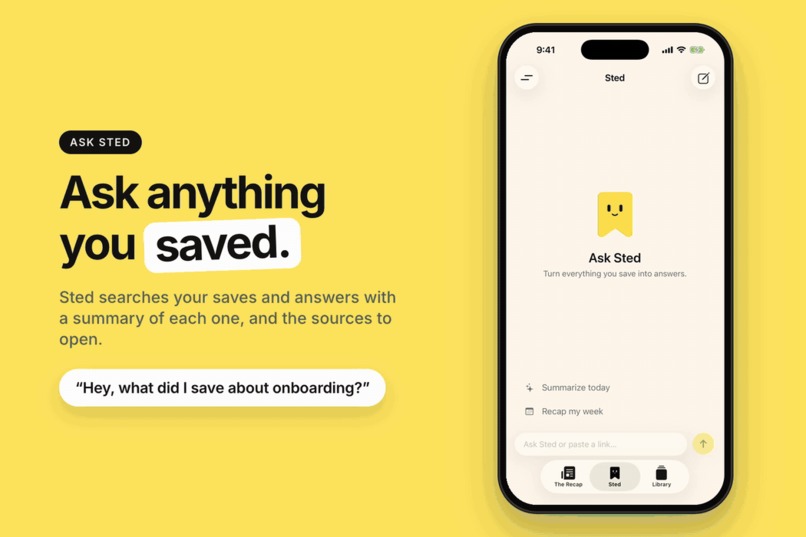
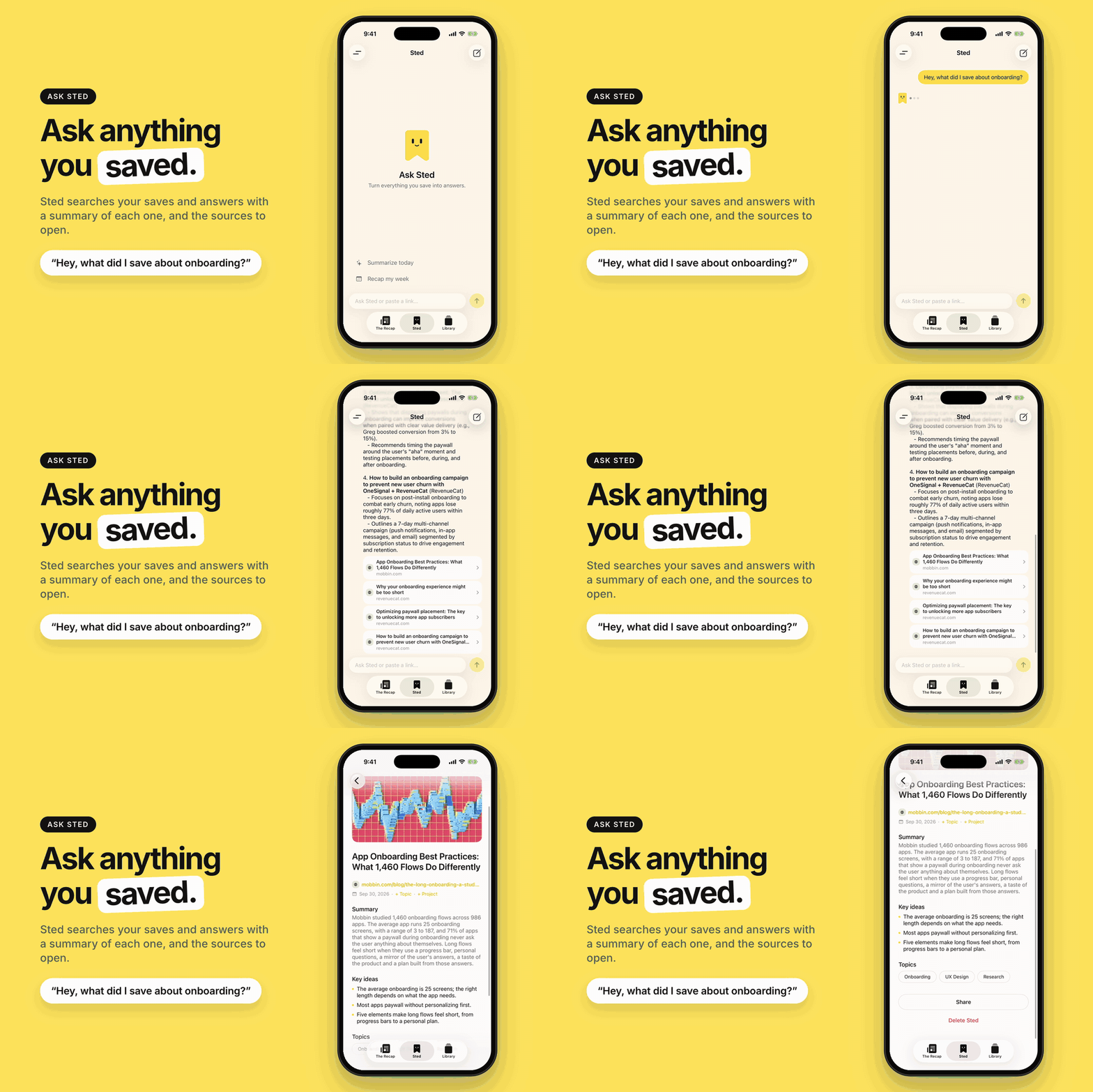
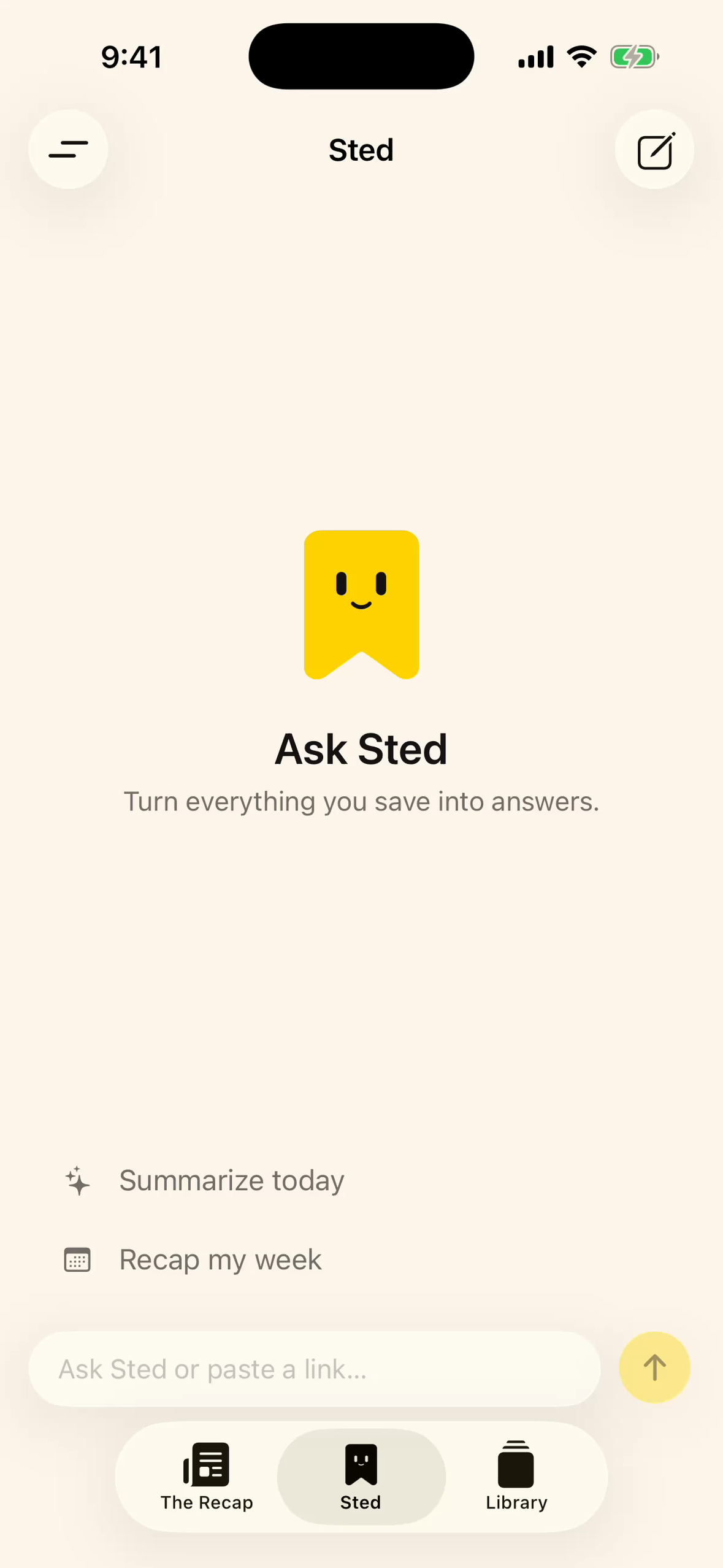
Chat with Sted about what you saved
-
 GIF
GIF
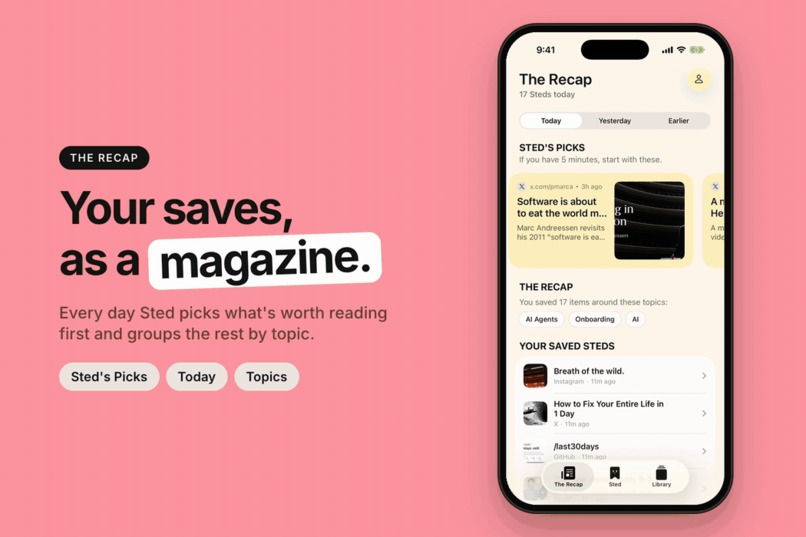
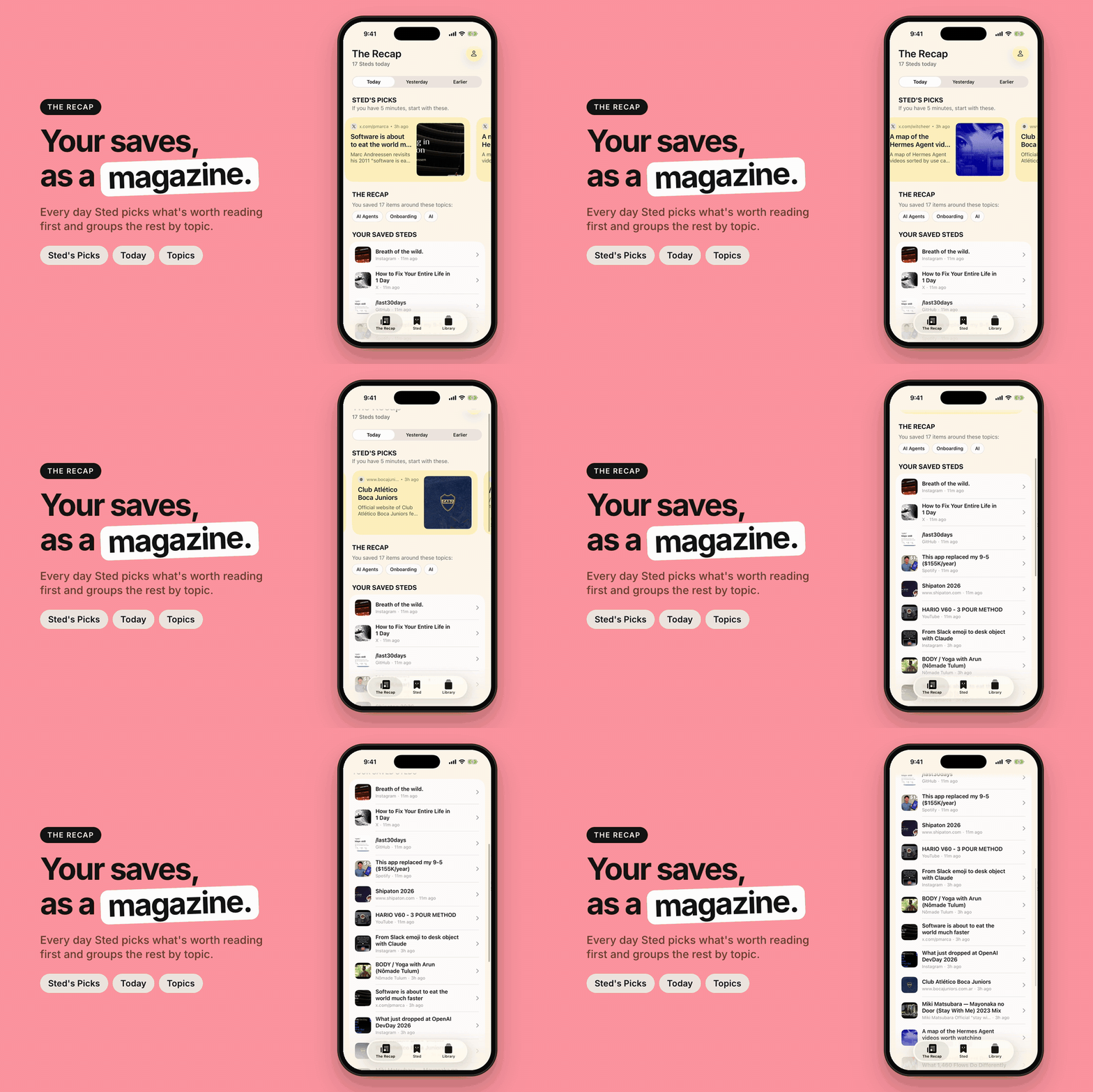
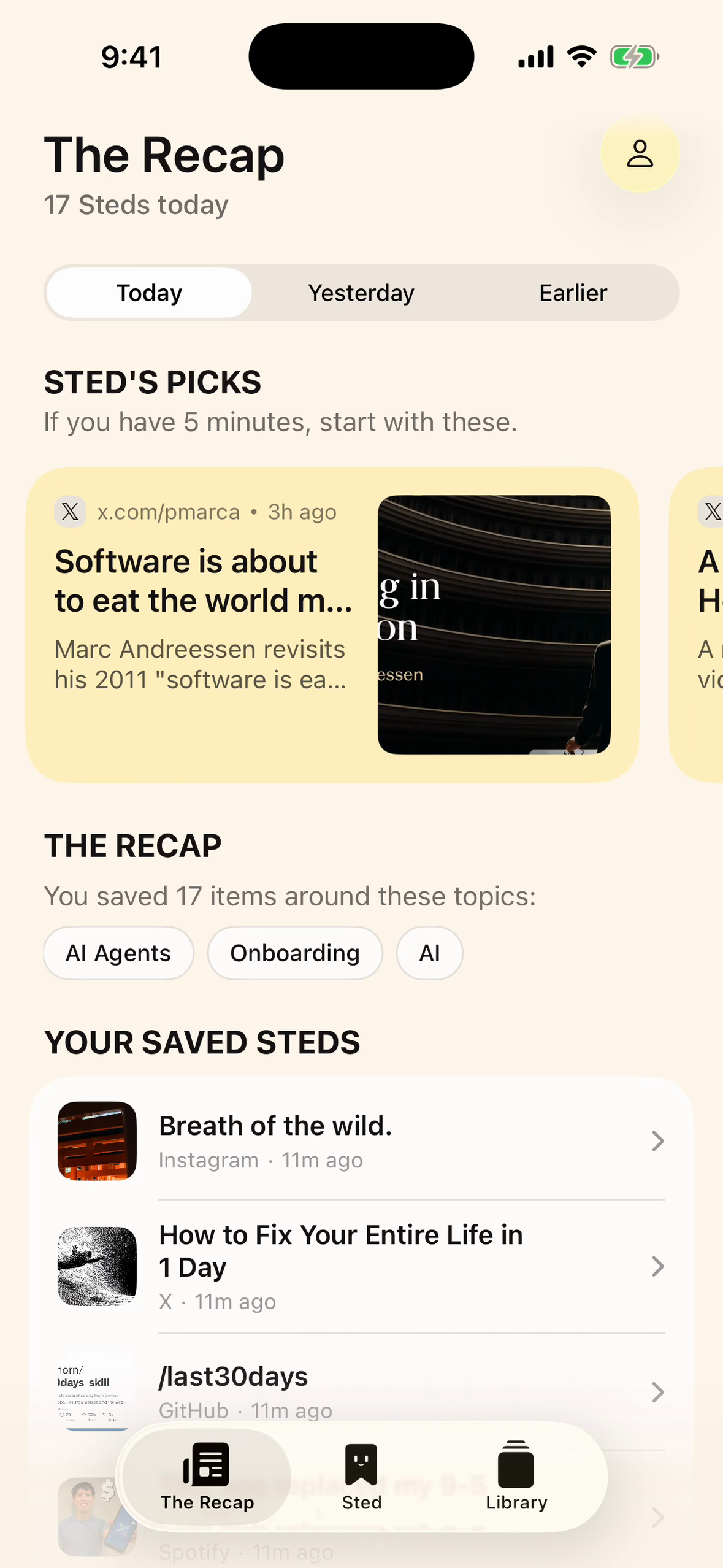
The Recap: Sted shows you what matters first
-
 GIF
GIF
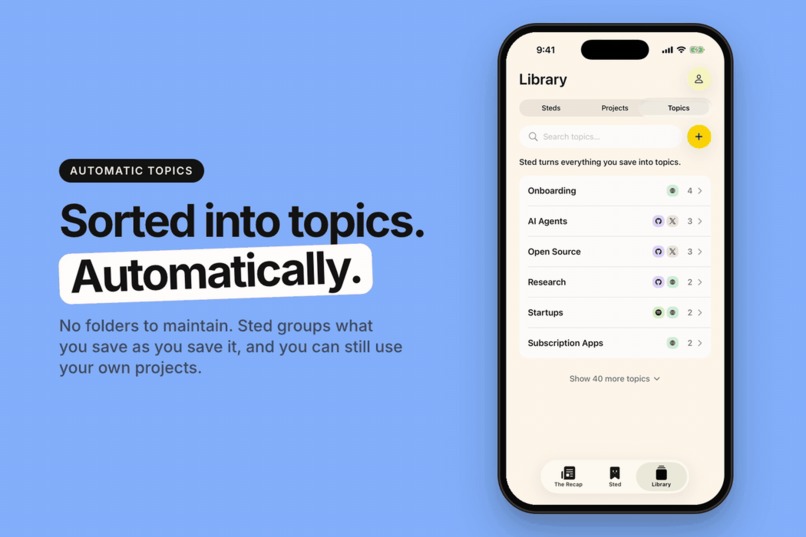
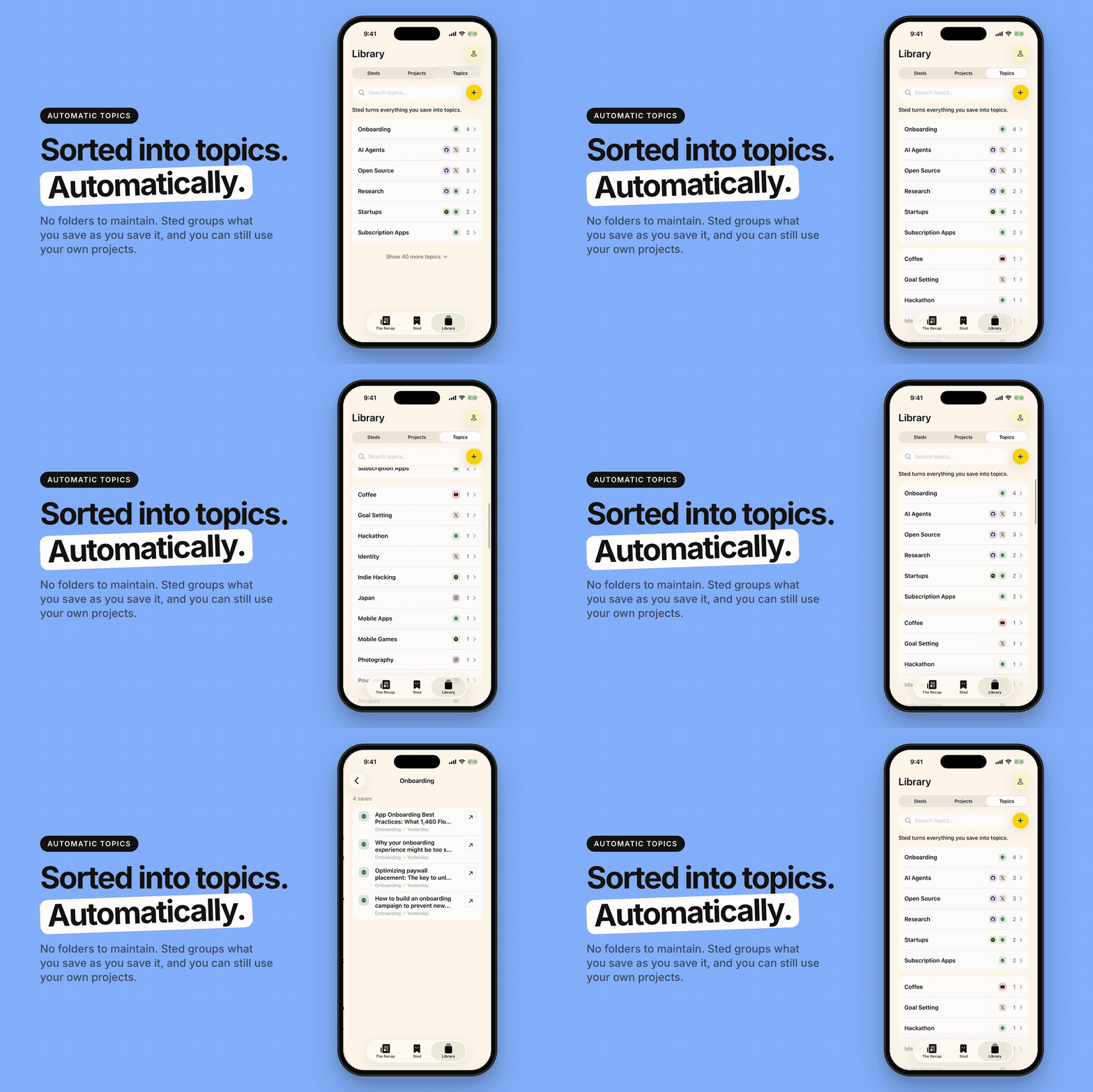
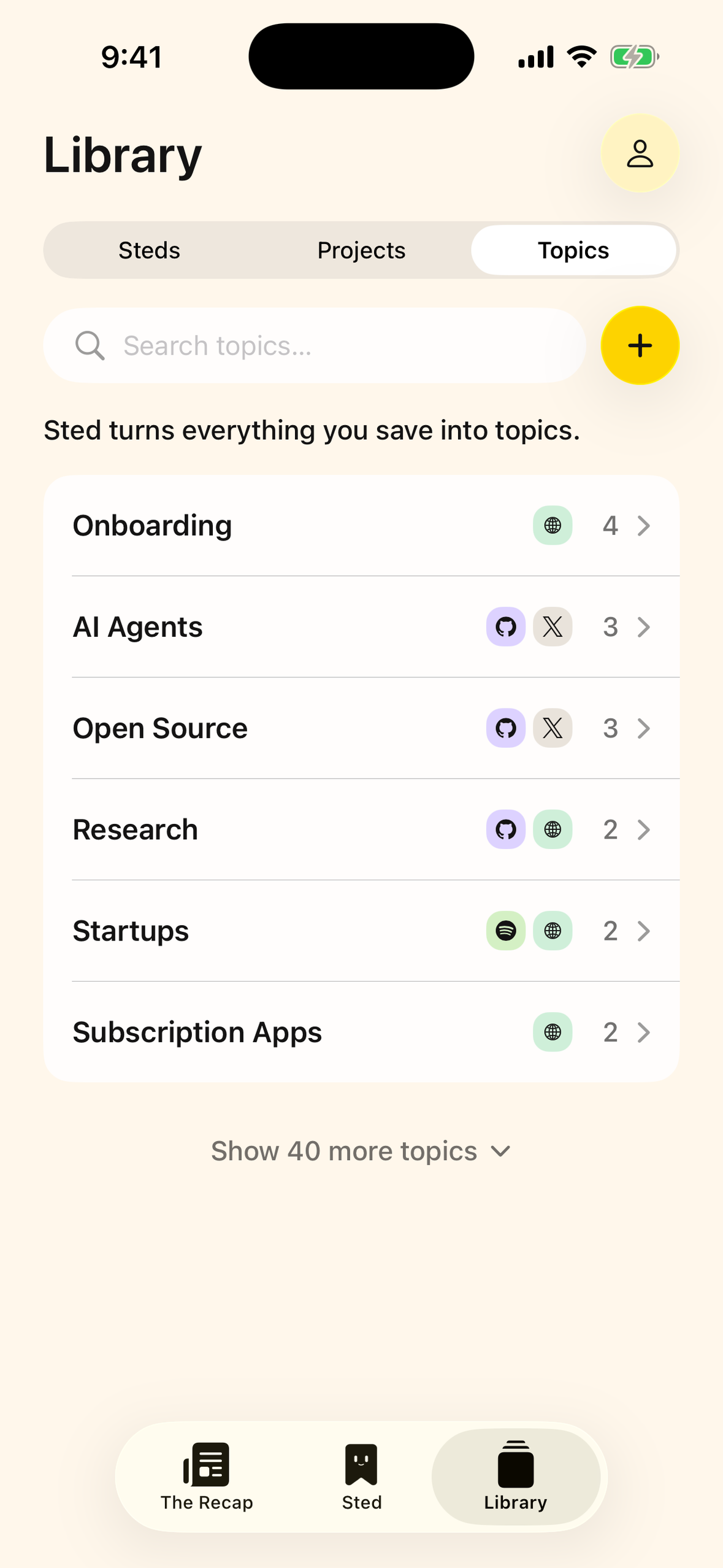
Library: Steds, Projects & Topics
-
 GIF
GIF
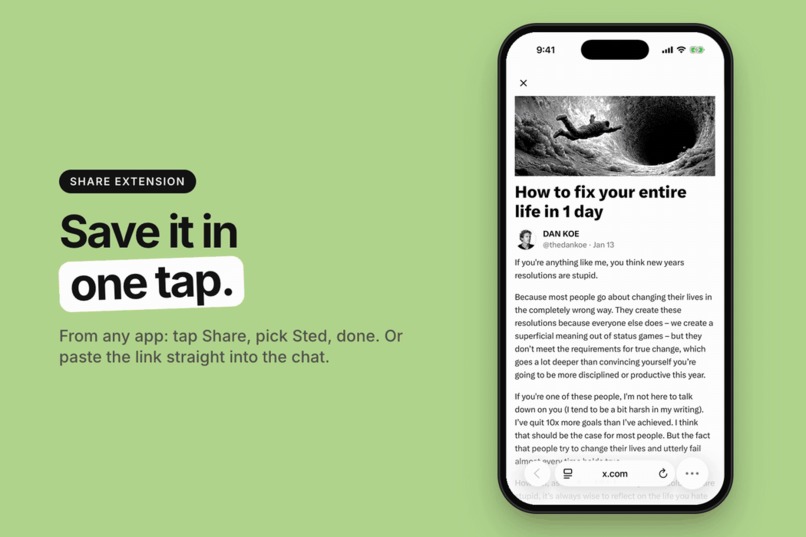
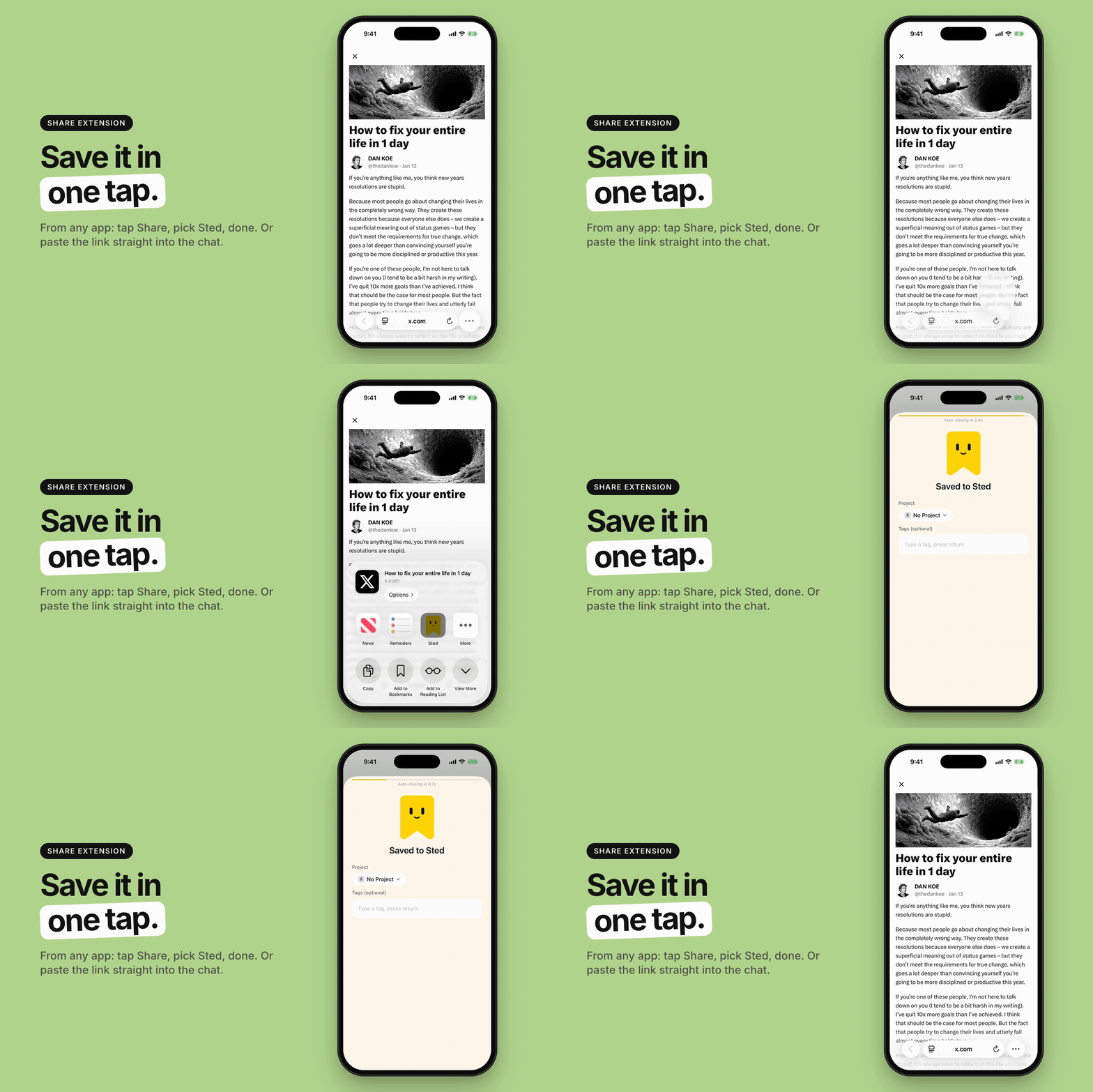
Save in one tap (iOS extension) or in the chat
-

Sted App Icon
-
Chat with Sted - Screenshot No Frame 1
-
Library: Steds, Topics & Projects - Screenshot No Frame 3
-
The Recap - Screenshot No Frame 2
-
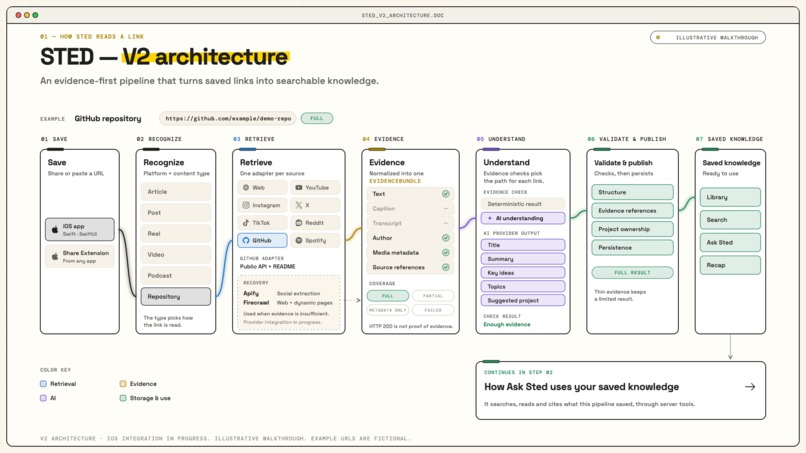
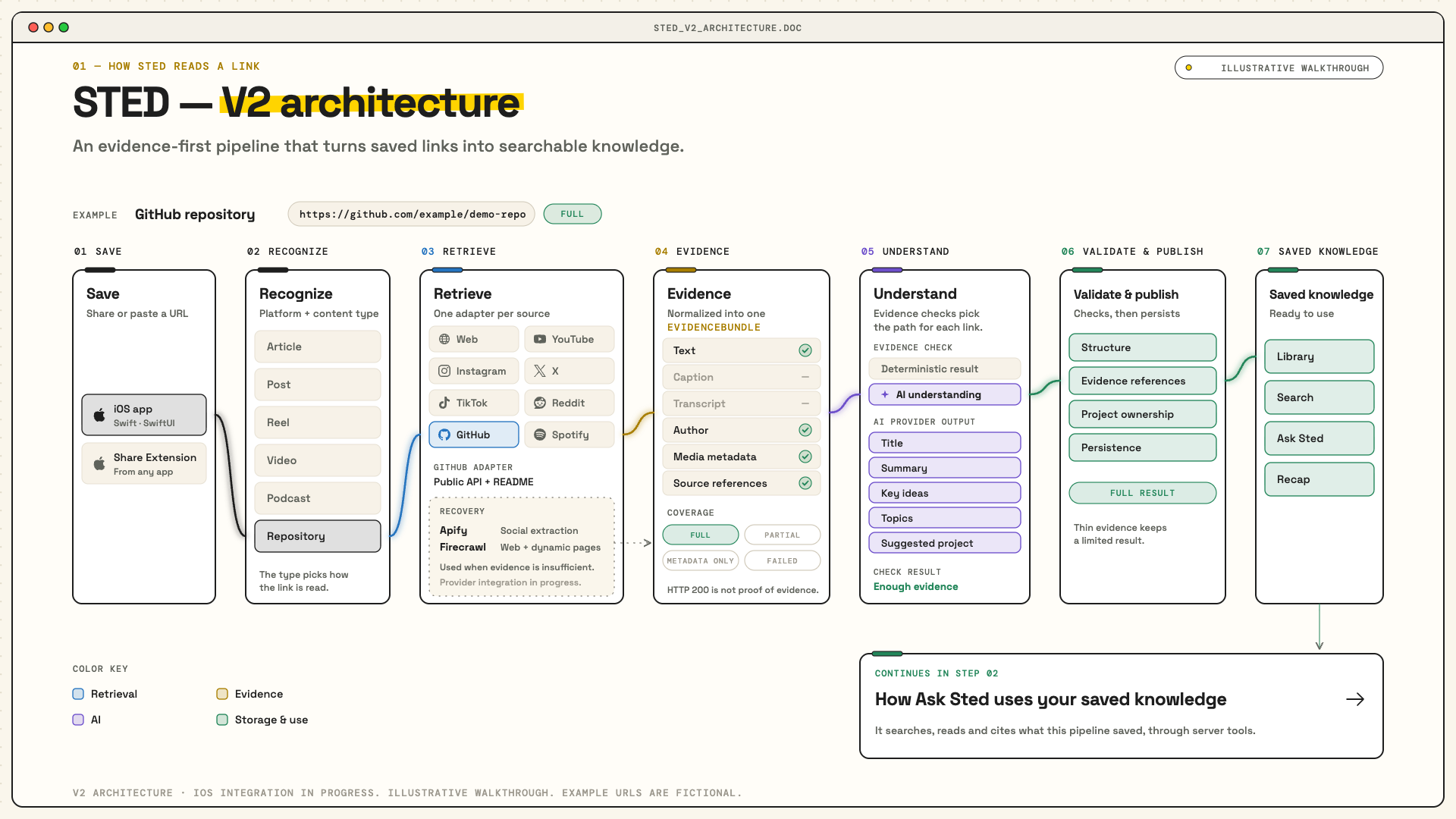
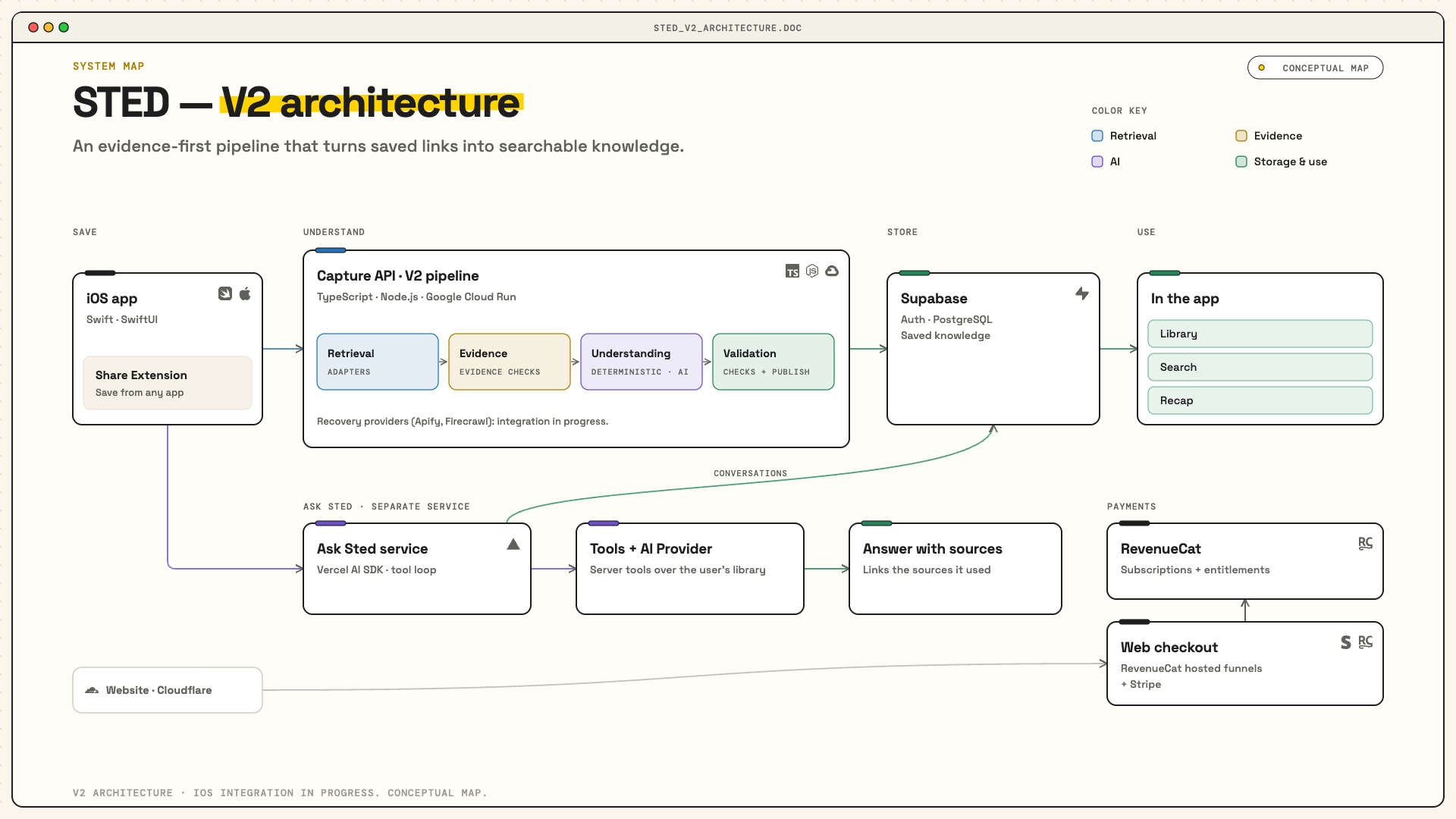
Arquitecture - Link Extraction
-
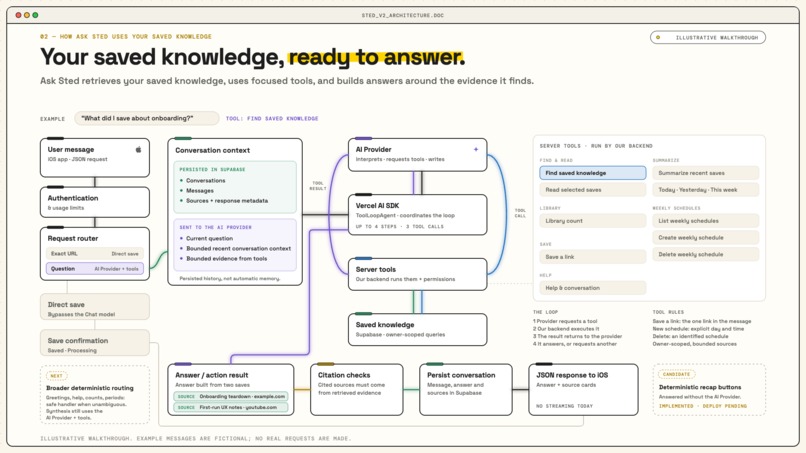
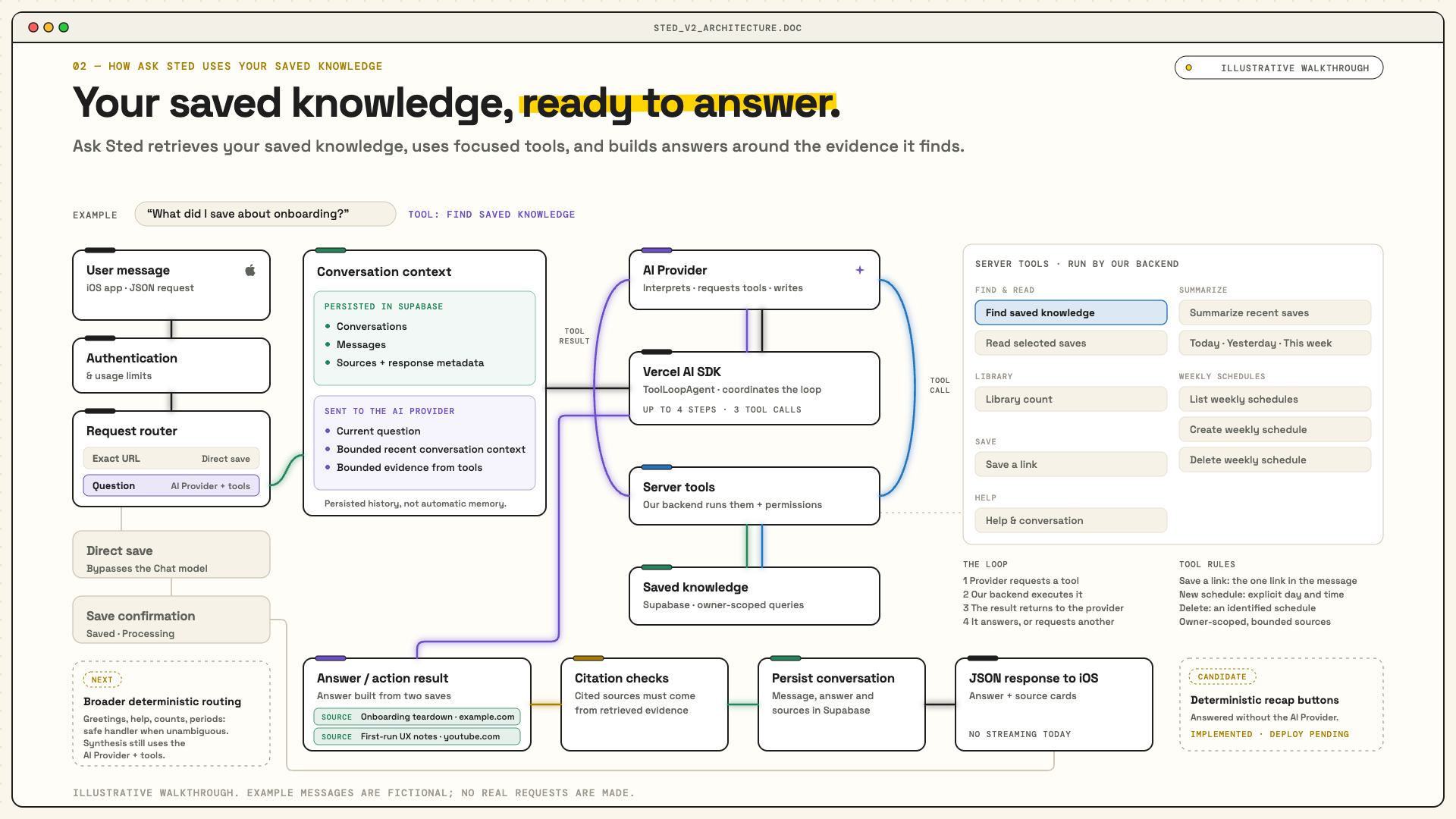
Arquitecture - Chat / Search / AI
-
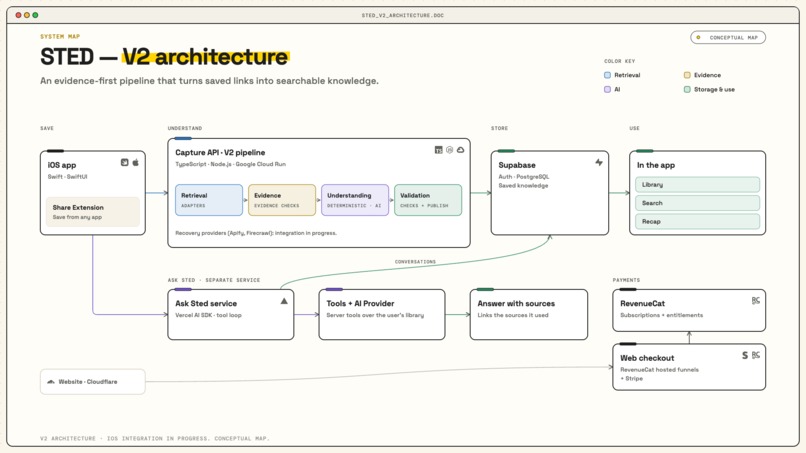
Arquitecture - Chat / Search / AI

TL;DR
- Problem: We save useful links everywhere and almost never come back to them.
- What Sted does: Save any link from any app. Sted reads it, summarizes it, organizes it automatically, and lets you search or ask questions across everything you saved.
- Build in Public: I posted for 43 days straight, built a community around the process, interviewed 8 founders and experts in the Building Sted with Experts series, and shared everything I learned for free through 13 guides with prompts, workflows and the full process of going from zero to a real product.
- Business model: Free to start, with Sted Pro powered by RevenueCat. Pro gives users more Sted reads, unlimited saves and extended chat.
- Traction: Launched publicly and got my first paying users in the first week.
- Categories: #BuildInPublic Award, RevenueCat Design Award, Influencer Award – Productivity.
Inspiration
Hi! I'm Dante.
For years, I've had the same problem: I save lots of things I want to read later or use in my life, but most of them disappear into my bookmark graveyard and I never come back to them.
The things I save are very varied, from open-source projects, information about technology or content references, to more personal stuff like book lists or travel ideas.
I tried different ways to organize them. Notes, Notion databases, bookmarks, spreadsheets or even links sent to myself on WhatsApp and Slack. Some systems worked for a while, but they always required too much time to maintain. And when I actually needed something I had saved, I usually couldn't find it.
This is how I used to organize my saved links before:

So as I've always wanted to fix this. I actually tried building something around this idea when the ChatGPT API first became available. I made a small web MVP, but it never worked well enough and I never finished it. Extracting useful information from different websites was difficult, the models were much more limited, and eventually I moved on to other things.
But I kept having exactly the same problem, and more importantly also noticed this problem was general and a lot of people had it as well.
When I found RevenueCat Shipaton, it felt like the perfect excuse to try again. The tools were much better, AI had changed dramatically, and I finally had a deadline to build something I had wanted for myself for years.
That became Sted.
What it does

Instead of saving something and hoping I remember why it mattered, I can share a link directly to Sted, or paste it manually in the chat.
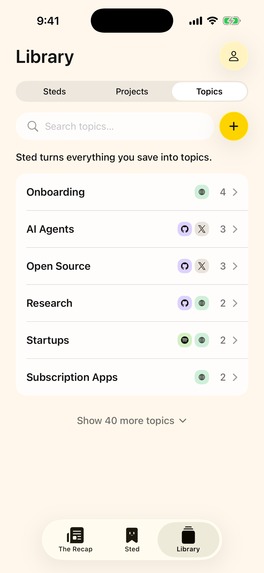
Powered with AI: Sted reads it first, gives me a short summary and the key ideas, and helps me decide whether it is actually worth my time. If I want to come back to it later, I don't need to remember where I saved it. Everything stays in one Library, already understood and searchable. Sted automatically organizes saved items into topics, and I can also group related links into Projects.
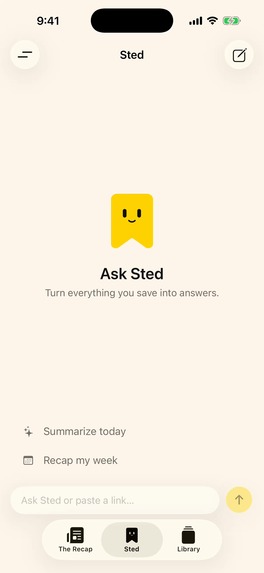
Chat with Sted: The part I'm most excited about is that I can now talk to everything I've saved. Ask Sted helps me come back to it, understand the ideas and think about how to use them. I can ask, "What did I save about onboarding?" or "Explain the main ideas from the Dan Koe article I saved." Then I can follow up: "How could I apply those ideas to my routine?" Sted uses the available content from my own saves and links its answers to the sources, so I can go deeper without starting my search all over again. It's also easier to find the things I've saved. Instead of trying to remember the exact link or searching through folders, I can ask Sted something like, "What did I save about mobile app monetization?" Sted searches across my own saves, answers using that information and gives me the sources so I can open them again.
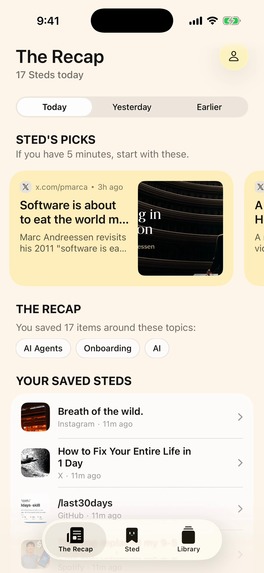
The Recap: Sted prepares a daily way to come back to what you saved. It turns recent saves into a simple reading experience, with Sted's Picks for what might be worth reading first and the rest grouped automatically by topic.
The goal is simple: save something in a few seconds, understand why it matters without having to read everything immediately, and be able to find and use it again when I actually need it.
Monetization
Sted uses a freemium subscription model, users can start using all Sted functionalities for free, and Sted Pro is the paid subscription for people who save and use more.
The Free plan includes up to 1,000 saves, 50 saves Sted reads for you each month, full-library search and limited chat.
Sted Pro, powered by RevenueCat, includes unlimited saves, 500 saves Sted reads for you each month, full-library search and extended chat. Sted Pro is available for $9.99/week, $12.99/month or $79.99/year
I believe the biggest opportunity is what comes next. As I add more tools, Sted will be able to do more with everything you save: resurface information when you need it, create summaries, plan trips, research for your projects and eventually take actions for you.
My goal is to turn Sted from a bookmark manager into an agent that actually knows what you save and helps you use it.
How I built it
I'm not a developer, so building Sted became an experiment in how far I could get by using AI. My workflow and tech stack consisted of:
- ChatGPT: I used it mainly as an orchestrator to plan the work and give the coding agents context. I used the chat function in order to save tokens and weekly usage.
- Codex: I used it heavily as my backend developer and architect, building with TypeScript and Node.js on Google Cloud Run, Supabase for authentication and data, and Vercel AI SDK for Sted's AI powered chat.
- Claude Code: It became my main iOS developer, building the app and Share Extension with Swift and SwiftUI, and integrating RevenueCat for subscriptions.
- ChatGPT Image + Claude Design: I used ChatGPT Image to generate mockups of the app (literally over 100 images) then worked with Claude Design to refine them before handing them to Claude Code for implementation.
My job was less about writing every line myself and more about giving the agents context, making product decisions, testing what they were building, finding what was wrong and deciding what to do next.
On a another note: While the iOS version was stuck in App Store review, I decided to see how quickly I could bring Sted to Android too. I thought it might take a weekend, it took way longer. That version is built separately with React Native, Expo and TypeScript, uses the same backend, but it hasn't been reviewed yet by Google.
The backend ended up becoming one of the most important parts of the product because before AI can understand a link, Sted first needs to reliably figure out what is actually behind it.
Starting with the easy party it runs on Google Cloud Run, with Supabase storing user data, saves and Projects, an AI layer handling content understanding, and RevenueCat managing Sted Pro and subscription entitlements.
Now for how Sted handles the links part:
A normal webpage can be relatively straightforward. However, social media links (Instagram, TikTok, YouTube, etc.) and JavaScript-heavy websites are not.
So instead of depending on one extraction method, I built a layered retrieval system. Sted starts with the simplest and most reliable methods available for that source and progressively falls back to other retrieval strategies when the first ones don't return enough trustworthy information.
Only after that retrieval step does the content go to the AI. The important idea is that retrieval and understanding are two different problems. Sted first collects the evidence it can actually retrieve from the saved URL. Only then does the AI layer use that evidence to generate things like the summary, key ideas and topics. The backend also validates the result before saving it. You can check in the following image:

Finally for the Ask Sted functionality, I chose the Vercel AI SDK to coordinate the AI provider and the tools that search your saved content. Conversations are stored in Supabase, and the agent receives a certain amount of recent context for follow-up questions. The goal is simple: help you find and connect what you saved, with answers linked to the sources they use.
If you're a bit nerdy like me, I built a visual flow to understand the full architecture here:
Challenges I ran into
1. Speaking in public and creating content while actually building the product. I committed to sharing the journey every day, but fcreating content and actually building Sted at the same time was a huge challenge. I suddenly had 2 full time jobs.
2. Turning support into useful product feedback. Building in public got a lot of support from the beginning, but support and product feedback are different things. I needed people to actually use Sted and tell me what didn't work and what was confusing.
3. Making Sted work with almost any link. Different websites expose content in completely different ways. Getting the text, images, metadata and context reliably became one of the hardest technical parts of Sted.
4. Figuring out how to launch a real paid mobile app. I had never submitted an app to Apple, integrated subscriptions or dealt with the store, tax and account requirements. Sted spent 16 days in review, was rejected once, and payments had their own surprises.
How Building Sted in Public helped me overcome them
1. Just start positing
When I decided to join the Build in Public challenge, I was afraid I would just speak into the void. But to my surprise, I found a lot of support and encouragement that helped me keep pushing every day and stay motivated.
It was really surprising to get messages from ex-colleagues or old friends I hadn't spoken to in years saying that what I was doing with Sted was really cool, or that seeing me speaking in public inspired them to do the same, because I think this is something we all struggle with.
The true story is that I decided to join Shipaton and said, "I'll enjoy this weekend and start posting everything on Monday the 17th." Then I started filming myself, in English, which is not my native language, and I panicked. I kept delaying it until Wednesday the 19th, when I finally said, "I have to do it. Just go for it." That's why I ended up posting for 43 days straight instead of the 45 I originally planned. Once I started, all the support I received really motivated me to keep pushing.

2. Turning support into useful product feedback
I got a lot of support from the beginning, but getting real product feedback was harder. I had to go out and find it. So I started reaching out to people one by one, asking them to try Sted, jumping on calls and asking for their help.
After a few of those conversations, I realized something: if their feedback was useful to me, maybe the conversations could also be useful to other people building their own things.
That's how Building Sted With Experts started.
I began inviting product managers, software engineers, founders and creators to actually try Sted and then talk with me about it. This gave me the chance to ask much deeper questions about the product, the technology, distribution and what I should build next.
And a lot of those conversations ended up shaping Sted.

3. Making Sted work with almost any link
This was probably the biggest technical challenge. I know I am being repetitive but that's why this was the most complicated challenge I had to overcome in this journey. As every website works so differently, making Sted reliably read links from X, Instagram, YouTube, articles and other websites took a lot of testing.
Building in public helped here too. I got advice from developers through Building Sted With Experts, but also from other people in the community. In the Shipaton Discord, I asked how other builders were solving similar problems, and one person shared the APIs they were using in their own app.
So I kept asking, testing and trying different approaches. By now I've tested more than 2,000 links, some manually and many automatically, and I still keep testing the backend all the time to make it better.
If you want to check the full technical architecture, you can find it here: Sted Technical Architecture
4. Figuring out how to launch my first real paid mobile app
I started Shipaton late, and then I saw Miguel from RevenueCat saying that one of his apps had taken around three weeks to get through Apple review. So I panicked a little and built the first MVP as fast as I could and submitted it.
While I was waiting, I watched the RevenueCat videos and livestreams and learned a lot from them. I remember one tip that I actually used later was to include a video showing Apple exactly how the app works during the review process.
In the meantime, I also decided to build the Android version. The problem was that I didn't even have an Android phone, so I needed real people to test it. This is where the community really showed up. I asked for help and got people testing different Android devices and sending me feedback.
I also got stuck with an Apple tax form. I had already searched forums, Reddit and everything I could find, but I couldn't solve it. I asked about it publicly, and special thanks to Rhys from RevenueCat, who tagged someone from Apple and helped me finally get it solved.
A lot of these things would have been much harder to figure out alone.

43 Days of Building in Public
One of the main reasons I chose Build in Public was to prove that you can build something even if you don't know how to code and have never built an app before. That was me and even started late.
I ended up posting for 43 days straight across X, LinkedIn, Instagram, TikTok and YouTube, sharing the good parts, but also the problems I encountered, the feedback and everything I was learning.
So I turned that into 13 completely free guides with the workflows, lessons and everything I used to create Sted. If you want to build something and don't know where to start, hopefully this helps: From Zero to 100 — Free Guide. And if I can help, just reach out.
And if I can help with anything, just reach out to me. I think we should keep sharing what we learn and helping each other build.
A lot of people say Building in Public is dead. After these 43 days, I think it's more alive than ever.
More on that on the next section.
The Feedback Loop
The most valuable part of Building Sted in Public was seeing how the feedback actually changed the product. I tried to keep a very simple loop during these 43 days: build something, share it, get feedback, improve it and share it again.
Some examples:
The Sted character. I shared different versions on Instagram and asked people which one they preferred. The community helped me choose the direction that became Sted today.

The onboarding. I showed Sted to Kara, a Product Manager, during Building Sted With Experts. He gave me feedback on the onboarding, so I went back and rebuilt it.

Chat with Sted. During another interview, a software engineer suggested being able to talk with all the information you save. I loved the idea and started building it.

Resurfacing. The Recap was already part of Sted, but several people I interviewed kept coming back to the same problem: saving is not enough if you never see that information again. That feedback validated that resurfacing needs to become a much bigger part of Sted.
There were many smaller changes too, from the website to how you save links and what I'm building next. Some feedback came from social media, some from interviews, some from testers and some from conversations in the Shipaton community.
For me, this was probably the biggest lesson from the whole experiment: Building in Public wasn't just how I shared Sted. It became part of how I built it.
Social media and launch
When I started, Instagram, TikTok and YouTube were completely new accounts. On X I started with around 720 followers after almost three years without posting, and on LinkedIn I started with 2,242, also not posting for a long time.
However, I found a lot of support on Instagram and LinkedIn from the beginning. Then little by little X started growing too, especially during the last weeks, and I started meeting more builders and getting more feedback there.
After 43 days, this is where we ended:
Instagram: 0 → 340 followers
X: 720 → 1,178 followers (+458)
LinkedIn: 2,242 → 2,562 followers (+320)
Across the 43 days, the content generated around 200,000 views and impressions across the five platforms: 43K views on Instagram, 24K on TikTok, 23K on YouTube, 90K impressions on X and 20K on LinkedIn.
More importantly, all of this helped me get the first people interested in actually using Sted. Around 200 people joined the waitlist before launch.
The Launch Timeline:
- Apple finally approved Sted on September 23, and I launched it on September 24.
- Four days later, on September 28, I launched Sted Pro, powered by RevenueCat. (Yes 2 days before the deadline, as soon as apple approved my payments subscriptions)
- Today, one week after launch, Sted is getting close to 200 users and we already have our first 4 paying customers.
Now the next challenge starts: figure out how to grow Sted.

Accomplishments I'm proud of
I started Shipaton without knowing how to build a mobile app. By the end of it, Sted was a real product in the App Store with real users. In roughly the first week, Sted reached almost 200 users and got its first four paying customers. That's the most important accomplishment for me.
In second place, I would put building something technically challenging for me. Sted ended up being much more complex than I expected, with an AI agent and a backend that reads and understands different types of links. I also had to implement payments and deploy the backend to the cloud (Google, please make it easier). And most importantly, it worked on launch day.
A small note: I also built a second app that, funnily enough, was approved before Sted on both the App Store and Google Play Store. It's called Shimpaku. It was a simple Pomodoro focus timer, but anyway, it was nice to do it. So I actually built two apps in these last weeks.
The other accomplishment I'm very proud of is the Building in Public journey, where I shared the whole process every day and was able to meet a lot of people along the way who helped me keep pushing and build Sted until the last day of Shipaton.
Finally, I'm proud and excited that something I had tried and failed to build years ago finally became a real product that other people can use.
What I learned
If you have a deadline, submit your MVP as soon as possible. Get the first version into the App Store and Google Play early. Reviews can take much longer than expected. I learned that one the hard way.
It's honestly incredible what one person can do with AI today. We all know AI can do a lot, but building Sted made me realize how far one person can actually go with it. I used AI for things I had no idea how to do before. As output gets cheaper, I think taste and judgment become more important than ever.
Be organized when working with AI. This one cost me real time. I had too many chats building different things at the same time and eventually everything got mixed up. I had to go back and redo work. Learn the basics of GitHub early. It will save you a lot of pain.
Start marketing from day one. I started building a waitlist early and I'm glad I did, but not everyone on a waitlist becomes a user. Start talking about the problem as soon as possible. You need time to find the people who actually have it.
The power of Building in Public and Community. I had the opportunity to meet people through social media while building in public and also while joining a community like the RevenueCat Discord. I met other people building apps and found developers willing to help when I got stuck. It was also motivating to see everyone pushing towards the same goal.
Launching is only the beginning. For weeks, getting Sted into the App Store felt like the finish line. Now comes the harder part: distribution. I need to get more people to try Sted and give them a reason to keep using it.
What's next for Sted
The main goal now is to grow Sted. I will be focusing on marketing and distribution to get more people using Sted.
On the product side, I want to keep adding more tools to the agent so Sted can help you do more with the things you save. I also want to go deeper into resurfacing: how can Sted bring something back when you actually need it? I'm starting to explore context graphs and ways for Sted to understand more about what you're working on and your projects. Another important next step is adding the capability to add screenshots/images, and also documents like PDF's to Sted.
On the technical roadmap:
- Chrome & Safari extensions: already in testing, to easily save links from your computer.
- Android: submitted and waiting for Google Play approval.
- Web app: in development, so you can use Sted from any computer.
- macOS: later in the roadmap. First I want to launch the web app, grow the user base and see how people use it.

Final comments
If you made it this far, first of all, thank you!
I really want to thank RevenueCat for Shipaton. I had wanted to build Sted for years, but I always found a reason not to do it. Having this deadline finally pushed me to start and finish it.
Thanks also to the RevenueCat team, the Discord mods and everyone I met in the community during these weeks. I joined a lot of the livestreams where I asked a lot of questions and honestly learned a lot there.
And special thanks to everyone who followed me these days. A lot of people tried Sted and helped me when I got stuck. I really appreciate it.
That's it. Back to building Sted.

Build in Public Social Media Links
- Dante Galeazzi on LinkedIn
- Dante Galeazzi on Instagram
- Dante Galeazzi on X
- Dante Galeazzi on YouTube
- Building Sted with Experts — 8 interviews
- Zero to 100 — 13 free guides, prompts and workflows
Sted
Built With
- api
- expo.io
- google-cloud-run
- ios
- node.js
- postgresql
- react-native
- revenuecat
- stripe
- supabase
- swift
- swiftui
- typescript
- vercel-ai-sdk

Log in or sign up for Devpost to join the conversation.