-
-
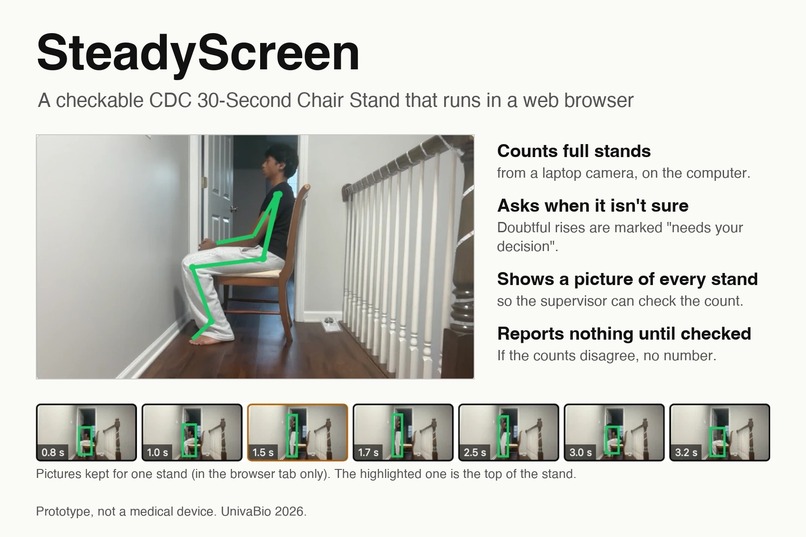
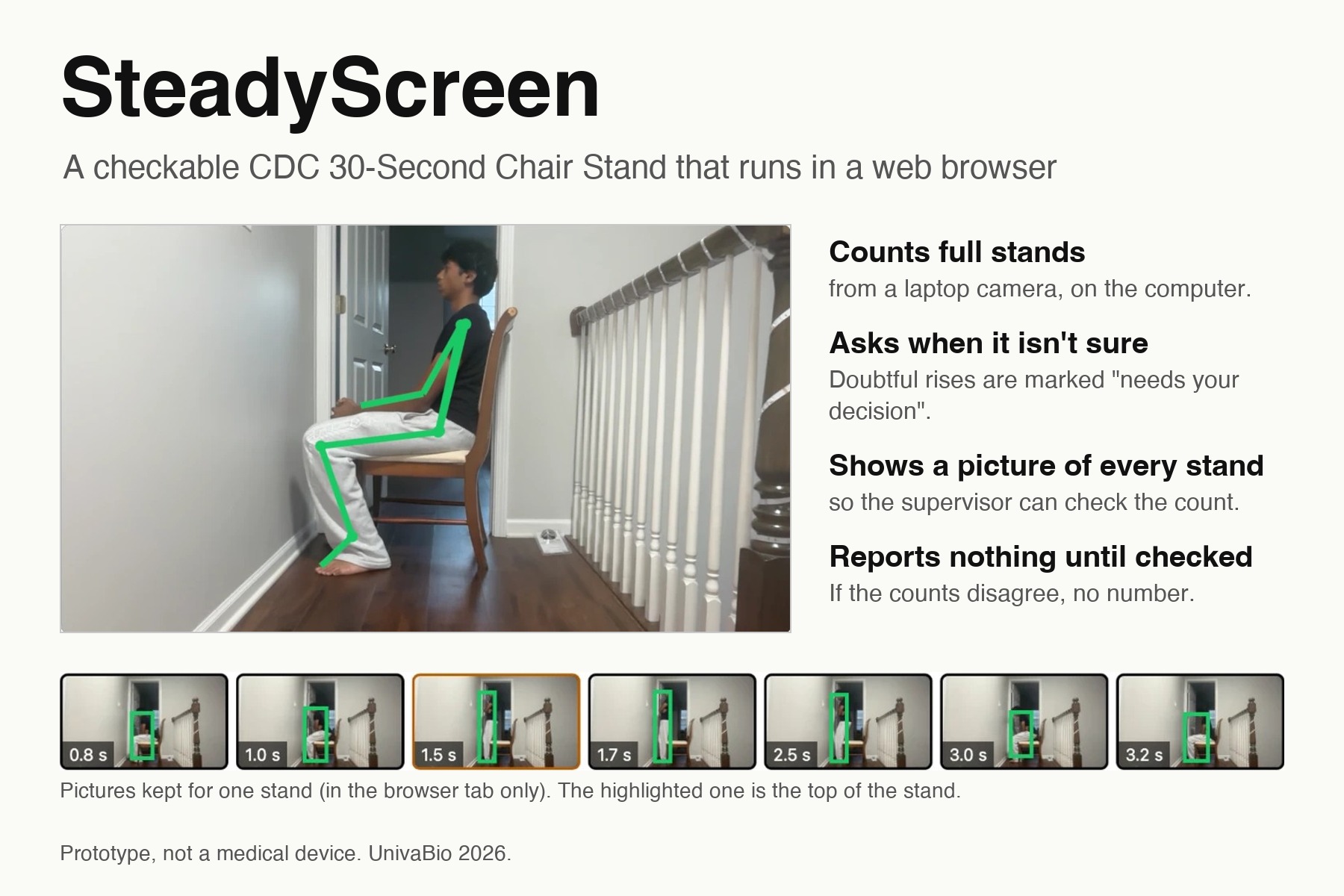
SteadyScreen: count the stands, check each one against its picture, and report nothing until it has been checked.
-
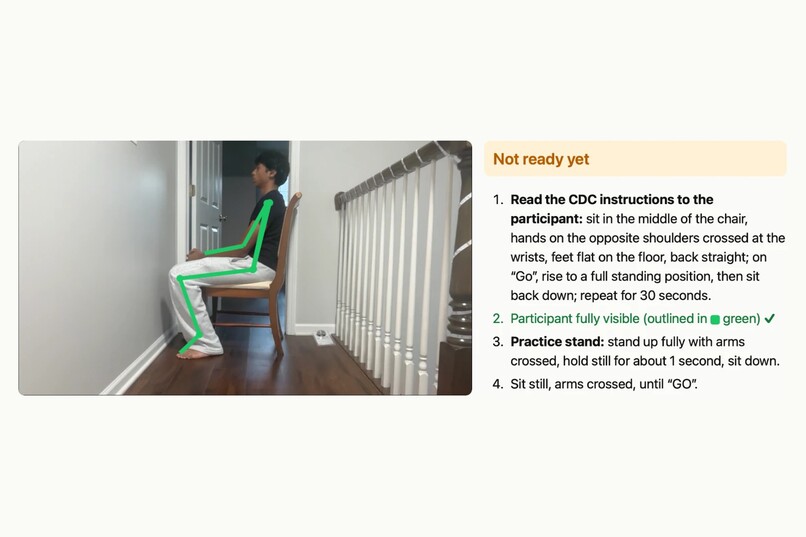
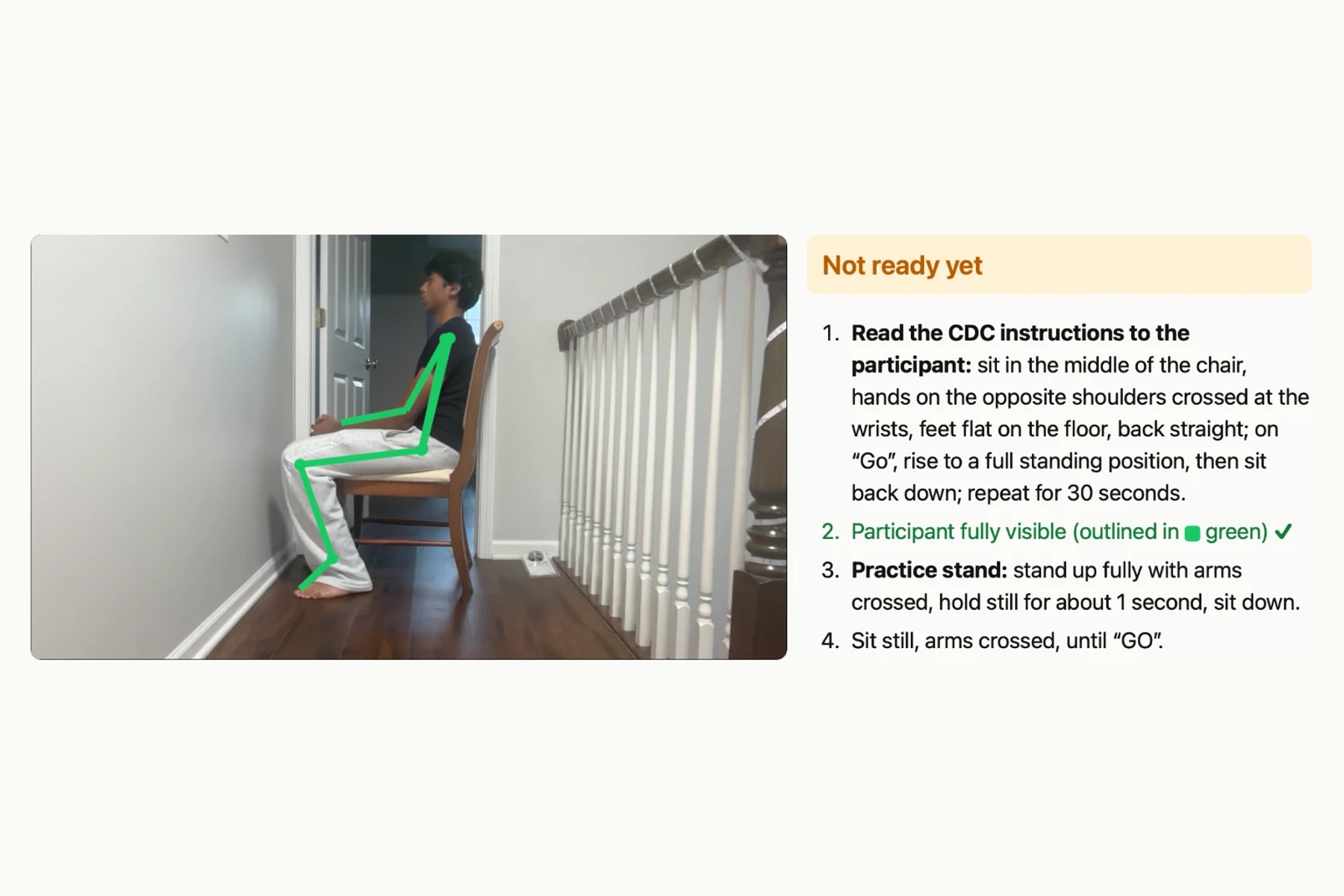
Real camera check at home: the app tracks the participant (green) and lists what is still needed before GO.
-
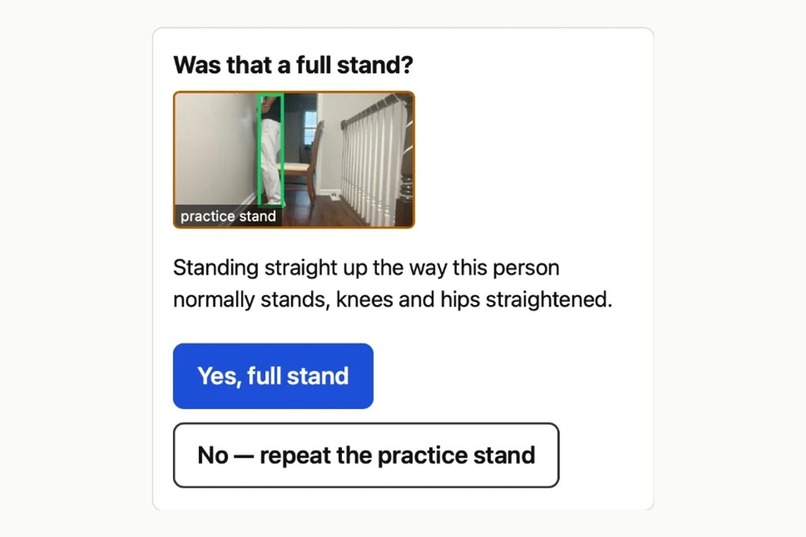
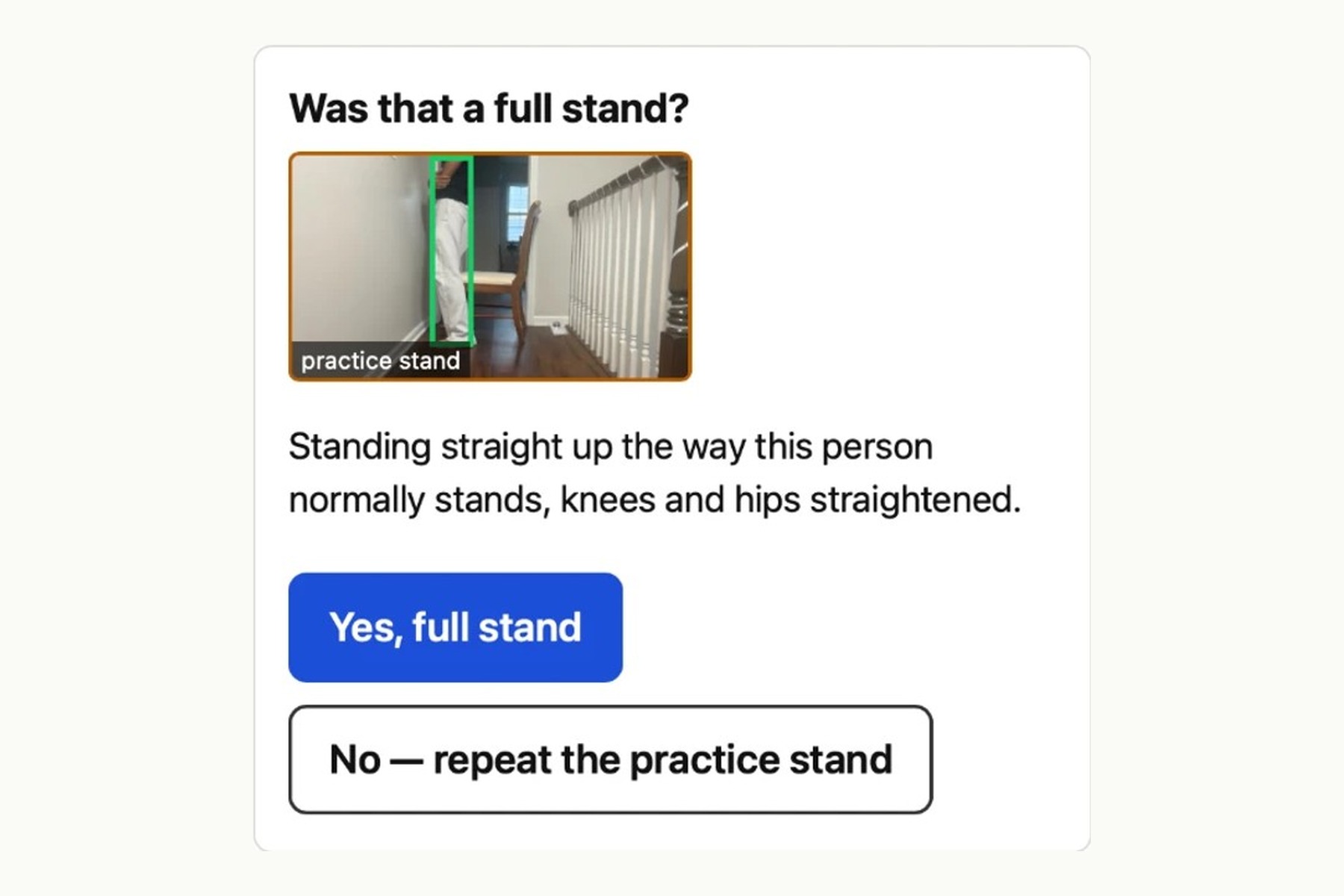
The practice stand: the supervisor confirms from its picture that it was a full stand.
-
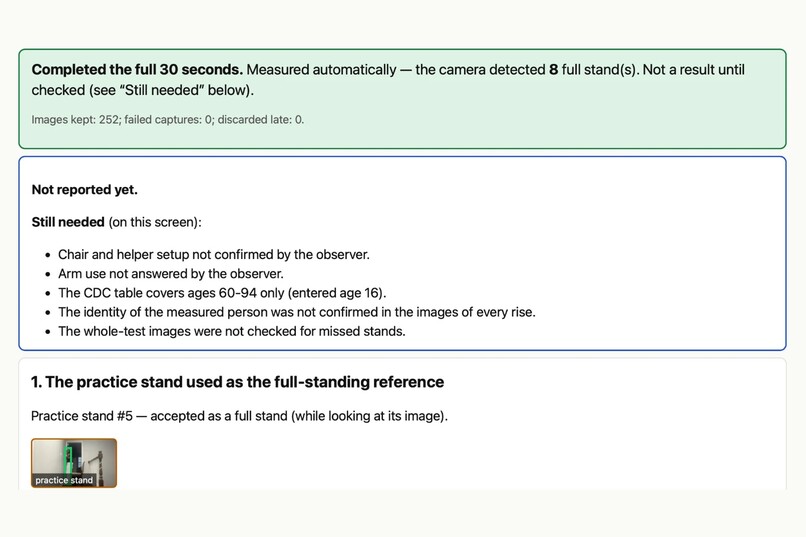
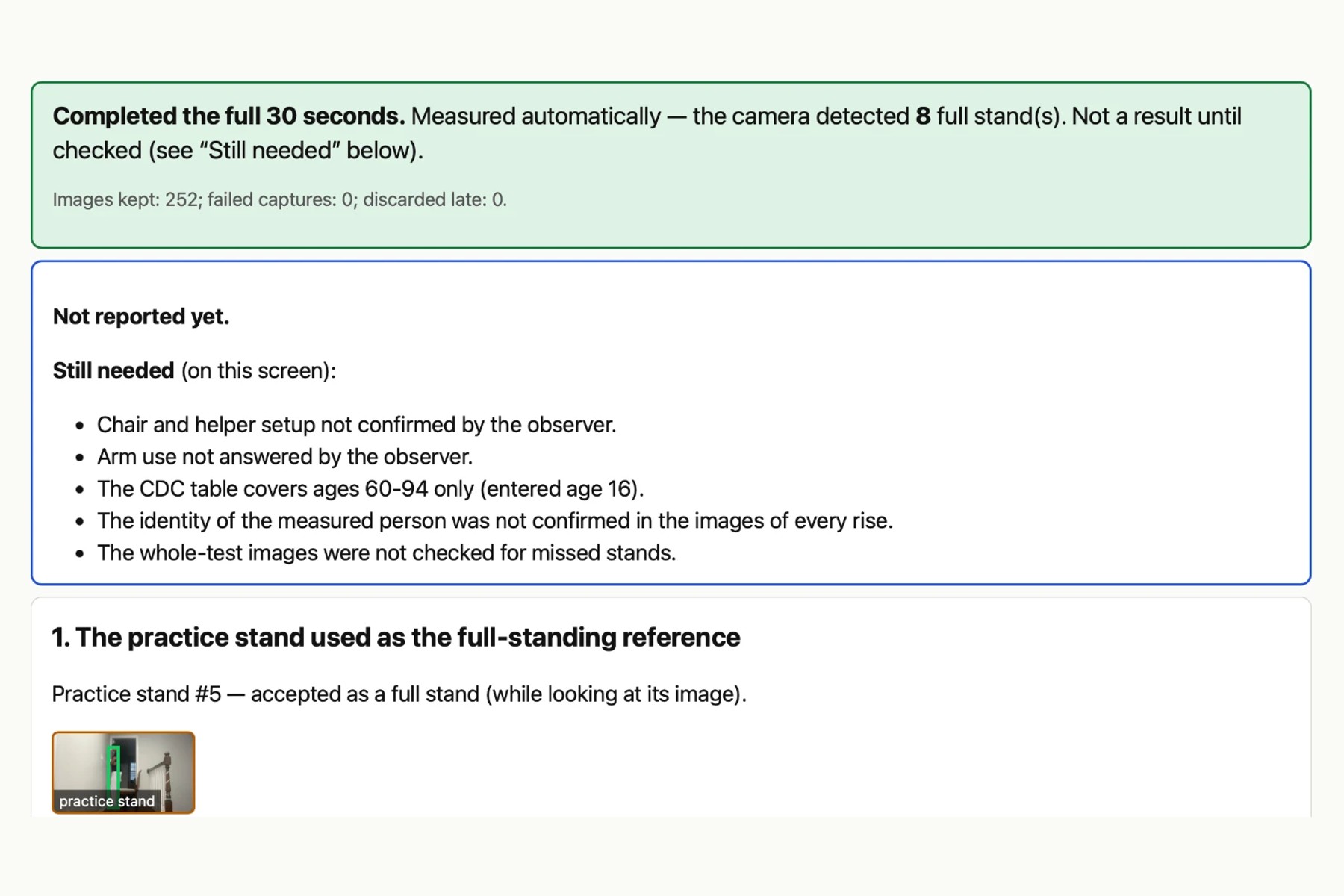
Second real try: the camera found 8 full stands, but it is not a result until the supervisor has checked it.
-
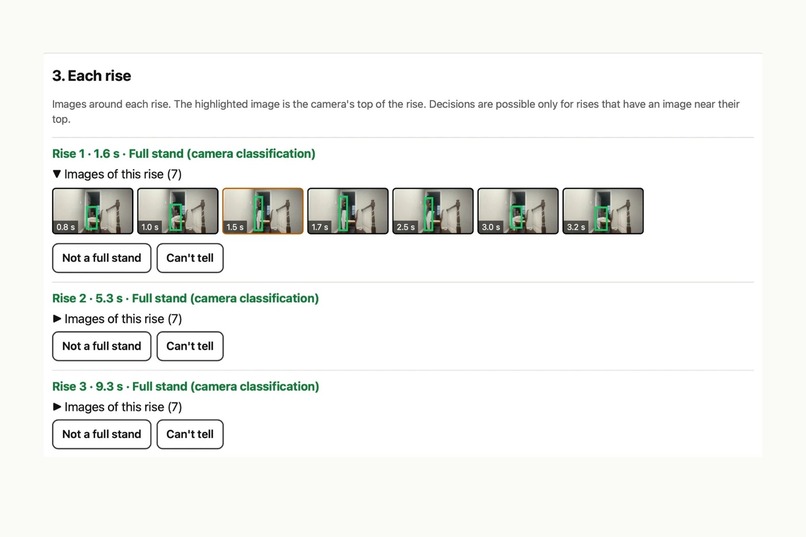
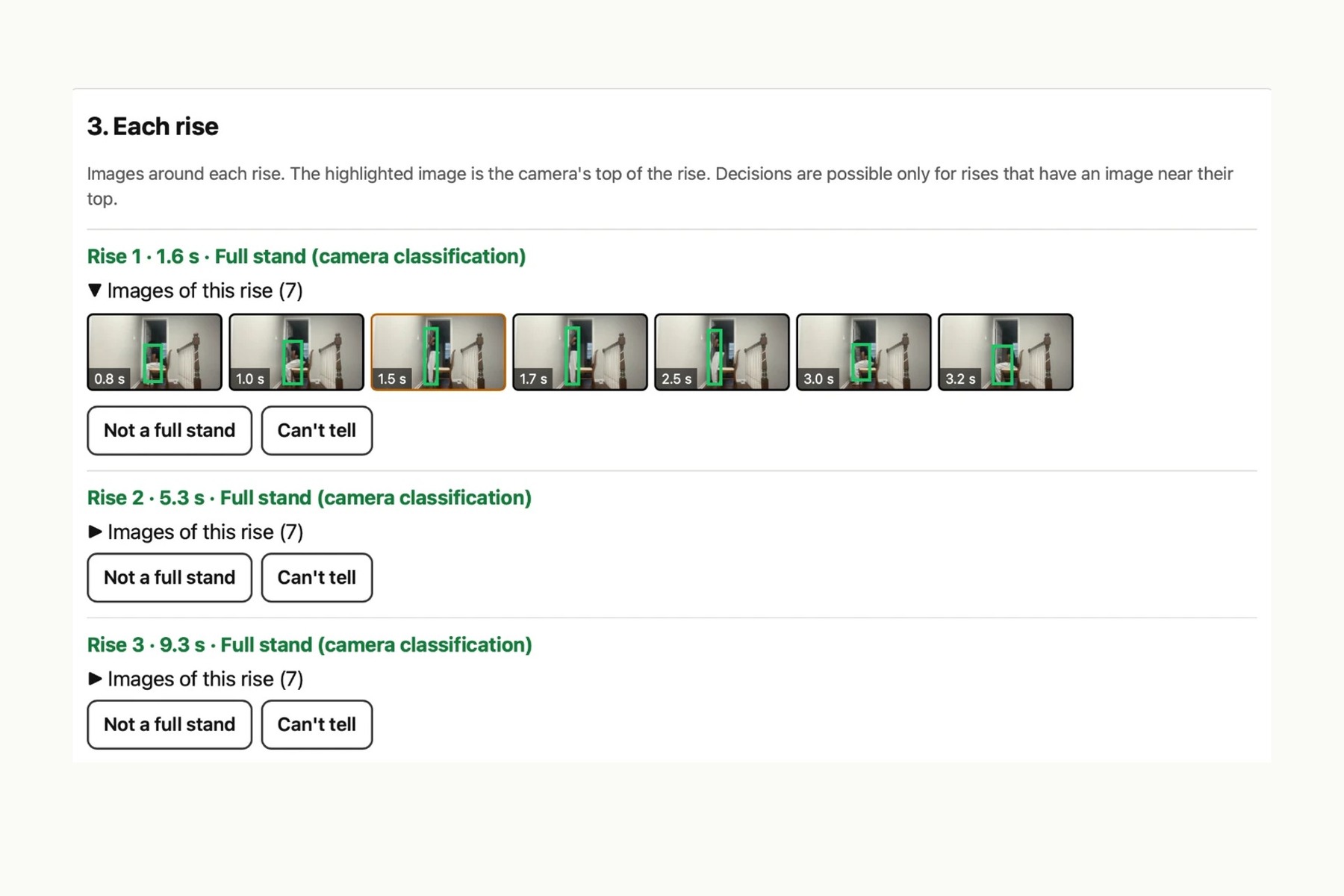
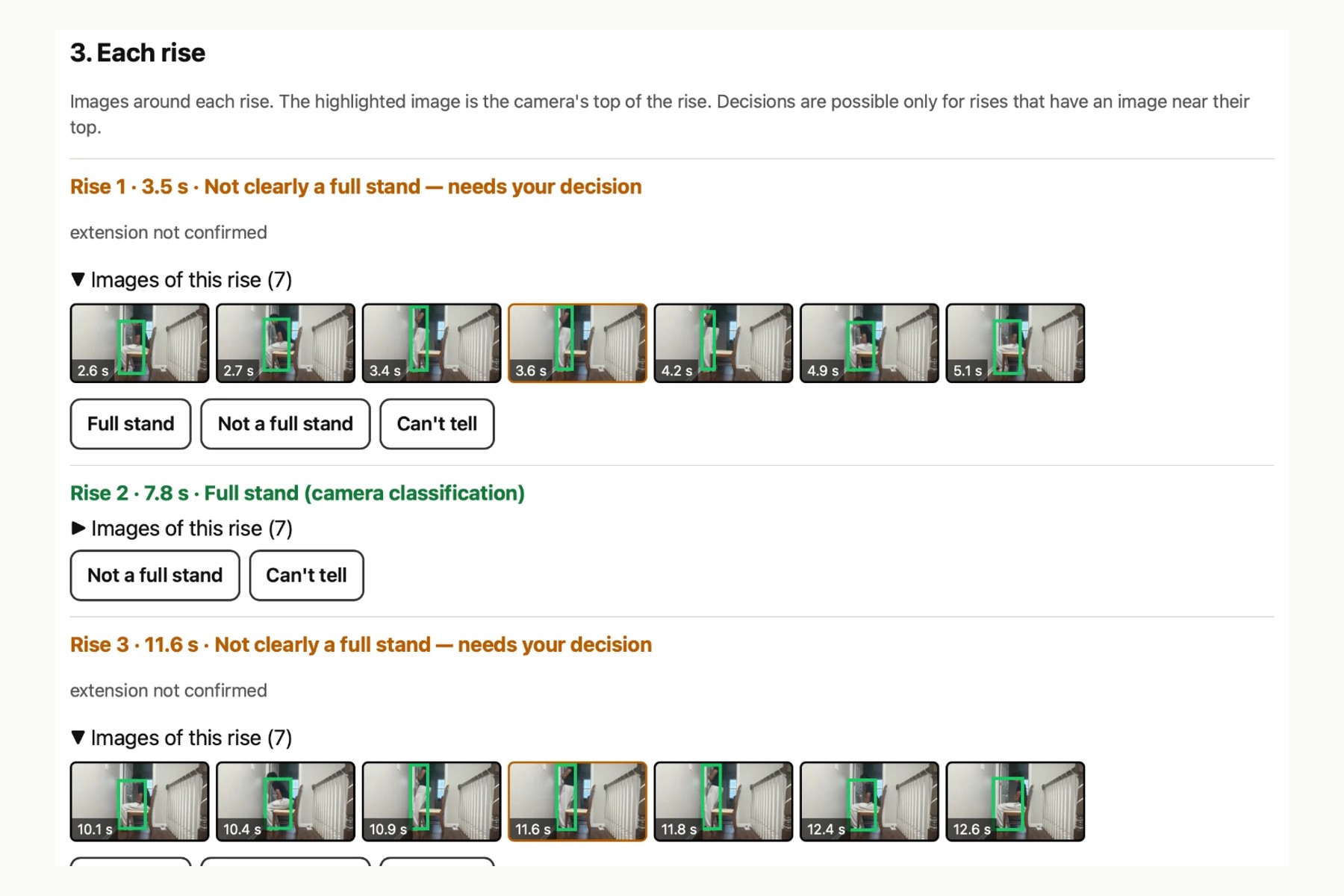
Each stand has its own pictures; the highlighted one is the top of the stand.
-
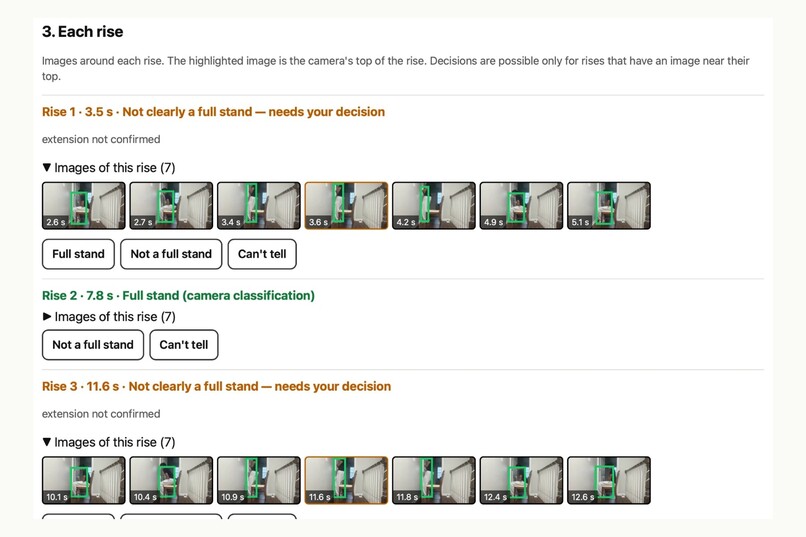
First real try: head out of frame, so the app asked us to decide 4 of 7 rises instead of guessing.
-
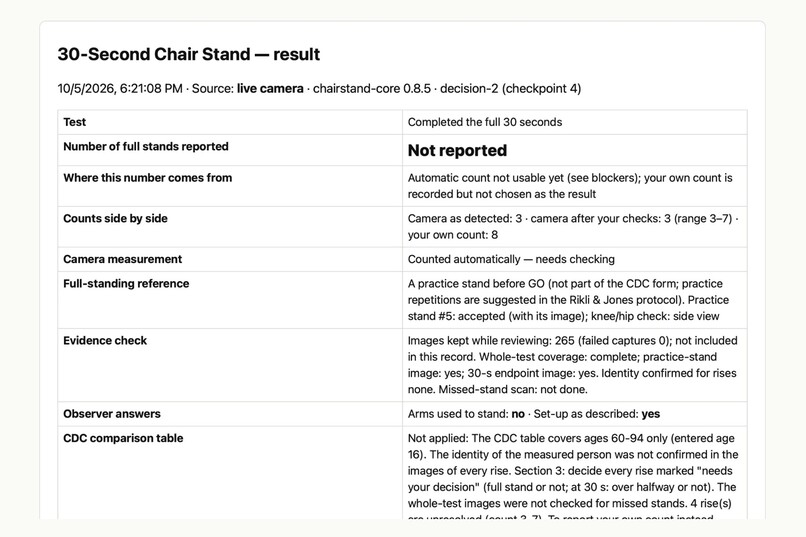
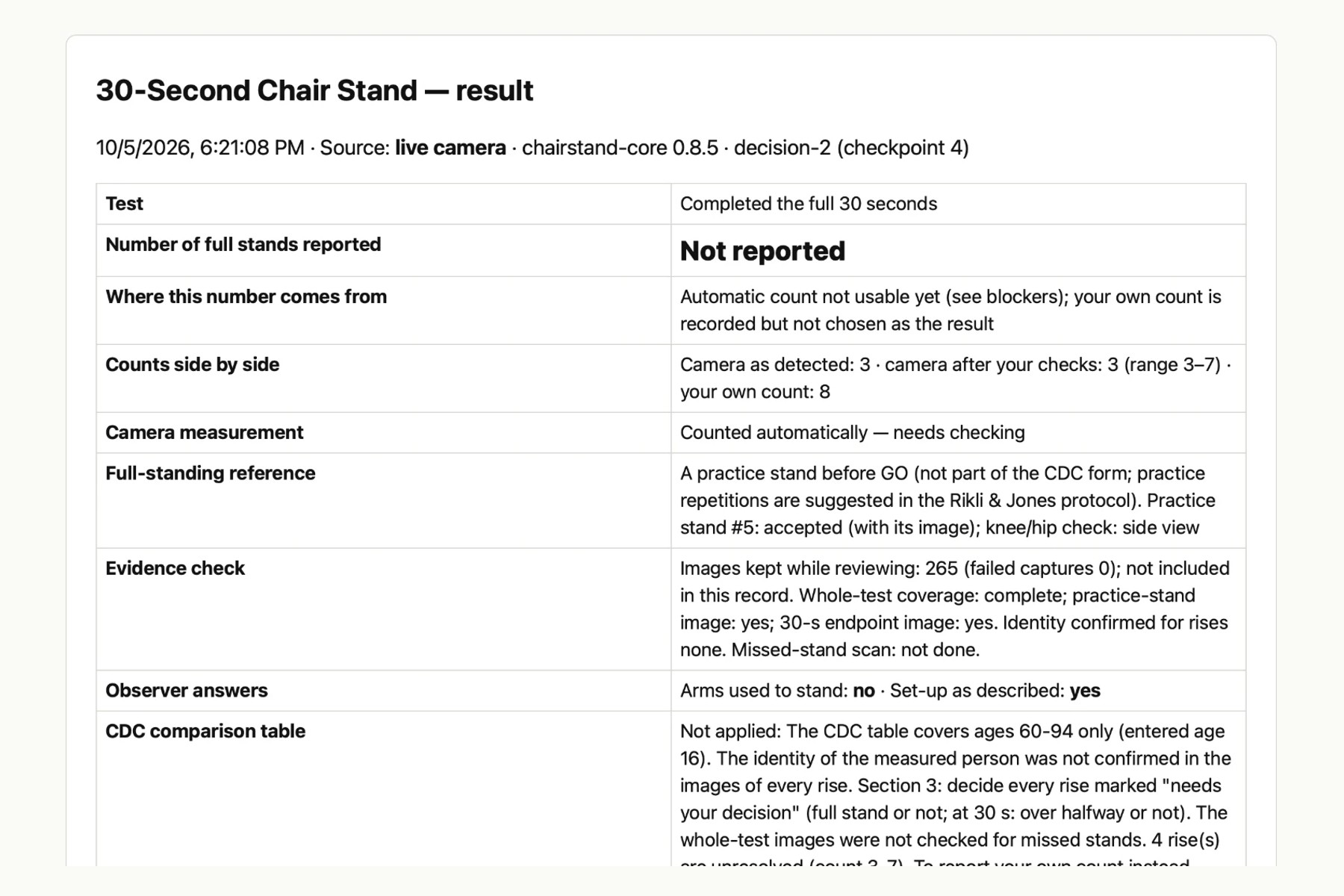
First-try summary: our count was 8, the camera's 3 to 7, so the app reported no number.
Try it: https://adityaraut09.github.io/steadyscreen/ (press "Try the demo" if you have no chair or camera). One-page description (PDF): https://github.com/adityaraut09/steadyscreen/blob/main/docs/SteadyScreen_one_page.pdf . Code PDF: https://github.com/adityaraut09/steadyscreen/blob/main/docs/SteadyScreen_code.pdf . Code: https://github.com/adityaraut09/steadyscreen
Inspiration
The CDC's 30-Second Chair Stand is a short test in the CDC STEADI falls toolkit: an older adult stands up from a chair as many times as they can in 30 seconds, and the number is compared with a table for their age. It needs no equipment, but the person running it has to do three things at once. They stand next to the participant in case they lose balance, they time 30 seconds, and they count every full stand. Once the test is over, nobody can check that count.
A laptop camera could take over the timing and counting. The problem is that a camera counter can also be wrong without anyone noticing: it can count a half stand as full, miss a stand, or follow the wrong person. We wanted to build a version of the test where every count can be checked afterwards, and where the app says so when it isn't sure.
Camera counting of this test already exists. A University of Alberta iPad app counted 30-second chair stands and agreed closely with a certified exercise physiologist (ICC 0.93, PLOS Digital Health, 2026). AVA Mobility is a free phone app that runs fall-risk movement tests on the phone. We are not trying to count better than they do. We didn't find a tool that lets the supervisor check each stand against pictures, fix the count in either direction, and hold back the score when the app isn't sure. The Alberta authors say the physiologist sometimes counted a borderline stand right at the end of the 30 seconds, or one that wasn't fully upright, where their app's fixed thresholds did not. Those are the stands our review is built for.
What it does
SteadyScreen runs in a web browser with a laptop camera. A supervising adult goes through these steps:
- Setup follows the CDC form: a helper beside the participant, a straight-backed chair with no arm rests, the camera to the side, and the CDC instructions shown on screen to read out.
- The participant does one practice stand. The supervisor confirms from its picture that it was a full stand, and that posture becomes this person's own standard for "full". The practice stand is our addition. It is not on the CDC form, though the test's authors (Rikli and Jones) suggest one or two practice stands.
- The app gives the "Go", times 30 seconds and counts full stands. A rise it can't confirm is marked "needs your decision" instead of being counted or dropped. At the 30-second mark it applies the CDC rule that a rise more than halfway up counts.
- If the supervisor turned on temporary still images, each stand has its own pictures. The supervisor can confirm the right person was measured, reject a stand, accept one the camera doubted, and scan the whole test for a stand the camera missed. Every change is logged.
- The supervisor's own count is kept separately. If it disagrees with the camera, nothing is reported until they pick one and give a reason.
- The CDC comparison table only appears when every check is done, and only for ages 60 to 94. Otherwise the summary lists exactly what is missing.
Video is analysed in the browser tab and is not uploaded. The still images stay in the tab and are not saved in the downloaded record.
There is also a demo mode with a computer-drawn participant, so anyone can try the whole test, from setup to the review and a reported number, without a chair, a helper or a camera. Every screen, every image and the downloaded record say it is simulated.
How we built it
It is plain HTML, CSS and JavaScript with no framework or build step. The AI part is Google's MediaPipe Pose Landmarker, a pretrained model that finds 33 body points in each video frame and runs on the computer. We didn't train a model. Everything after that is our own JavaScript. It tracks the participant, measures hip height and the knee and hip angles, compares each rise with the confirmed practice stand, and decides whether a count can be reported. The same code runs in the browser and in our test suite.
It has 342 passing automated tests, plus end-to-end tests in Chrome that use recorded video and Chrome's simulated camera. Our real test below was in Safari.
We used AI coding assistants while building it, as the hackathon encourages, including to review the code many times for ways the app could report a wrong number without a warning. Every problem found got a test that failed before the fix and passed after it.
Testing it for real
On October 5 we ran it in Safari on a laptop at home. One of us was the participant and a helper stood beside them. On the first try the participant's head and shoulders went out of the frame when standing, so the camera could not check the hip angle. The app was sure of 3 stands and marked 4 more "needs your decision", so its count could be anywhere from 3 to 7. Our own count was 8, higher than anything the camera found. Because the counts disagreed and the review wasn't finished, the app reported no number, which is what it should do. We didn't finish that review, so we still don't know whether the camera missed a stand or we miscounted.
We then moved the camera so the whole body stayed in view. On the second try it found 8 full stands with no doubtful rises and an image for each one. We didn't write down our own count that time, so 8 is the camera's number. It looked right to us, but nobody checked it.
Our screen recording of the counted 30 seconds was lost. The demo video shows the real setup and result screens, and the 30-second count in it comes from the demo mode, labelled as simulated.
Challenges
Most of the work went into cases that look fine but aren't: a stand right at the 30-second mark, a person sitting down higher than they started, the camera losing someone's shoulders, a helper walking into the frame, or a practice stand that wasn't really straight. Several of our own fixes created new problems, which we only caught because we kept re-testing after every change.
Getting the setup right in a real room was harder than we expected. Our first attempts used a rolling desk chair, faced the camera, and cut off the head or feet. The app's on-screen messages ("Hips, knees and ankles must be visible") told us what was wrong each time.
What we learned
Getting the camera to count stands was the quick part. Most of our time went into working out when the app should not trust its own count, and how to show the pictures so a person can check them fast.
Limitations
SteadyScreen does not diagnose anything or predict falls, and it has not been validated. We have only tried it on our own team, who are students, not older adults. We have not shown that it is faster or more accurate than a person with a stopwatch, and the review takes some time. A person who looks the same and sits in the same place cannot be told apart from the participant by pose alone, which is one reason the supervisor checks the images. The CDC does not endorse this tool.
What's next
We want to try it with more people and different laptops, time how long the review takes, and compare it with someone counting the same test from a video.
Built With
- computer-vision
- css3
- html5
- javascript
- mediapipe
- node.js

Log in or sign up for Devpost to join the conversation.