-
Extension
-
Waveform
-
Waveform
-
Example
-
System Architecture
Inspiration
Over 10 million people live with Parkinson’s disease, and tens of millions more cope with Essential Tremor. For someone dealing with involuntary hand tremors, browsing the modern web is often an exercise in frustration. Most websites expect pixel-perfect mouse precision, packing interfaces with tiny checkboxes, tightly spaced multi-column forms, and hair-trigger buttons. A routine chore like paying a bill, scheduling an appointment, or signing up for a service quickly turns into accidental double-clicks, missed targets, and endless corrections.
Most existing accessibility tools either cost hundreds of dollars for specialized hardware, demand clunky system-wide software drivers, or simply do not work well inside modern web browsers. We wanted to build something practical, lightweight, and accessible to anyone right away: SteadyHand. It pairs external motion sensing with a smart Chrome extension and Gemini AI to give people back control, speed, and confidence when using the web.
What it does
SteadyHand connects real-time physical motion diagnostics, intelligent browser-side cursor assistance, and generative UI layout adaptation:
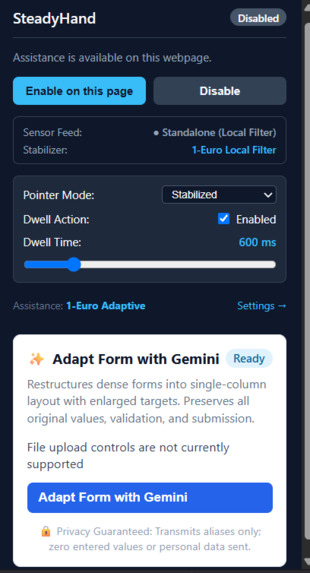
- Adaptive Pointer Stabilization: It smooths out high-frequency tremor jitter using an adaptive 1-Euro filter while keeping the cursor quick and responsive during deliberate movements.
- Smart Target Discovery and Snapping: The extension constantly scans visible web page elements (buttons, text fields, links, checkboxes) and gently snaps the cursor toward interactive targets when the user gets close.
- Cancellable Dwell Clicking: Users can click without physically pressing a mouse button by simply hovering over a target. A clean circular progress ring fills up, and flicking the cursor away cancels the click immediately to prevent accidental submissions.
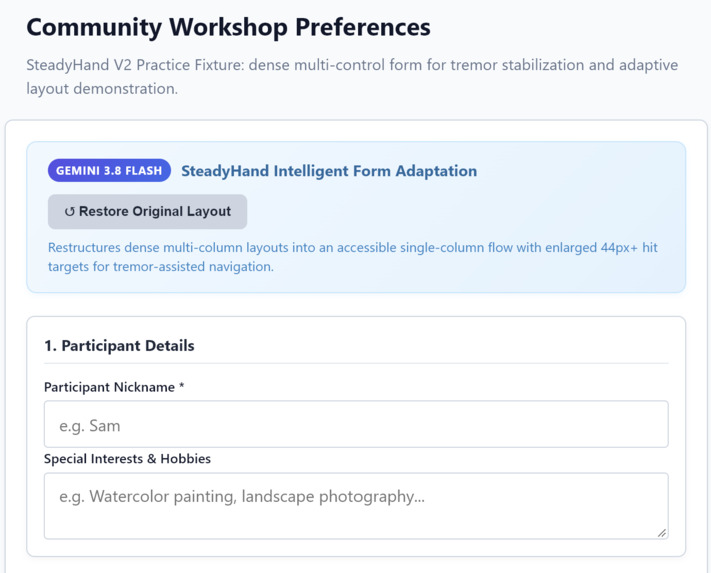
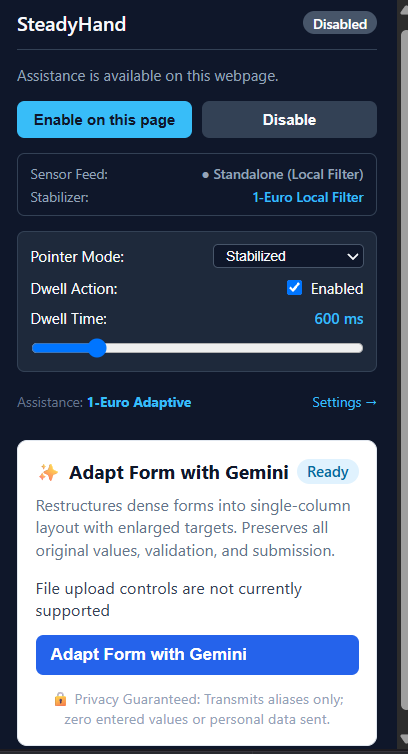
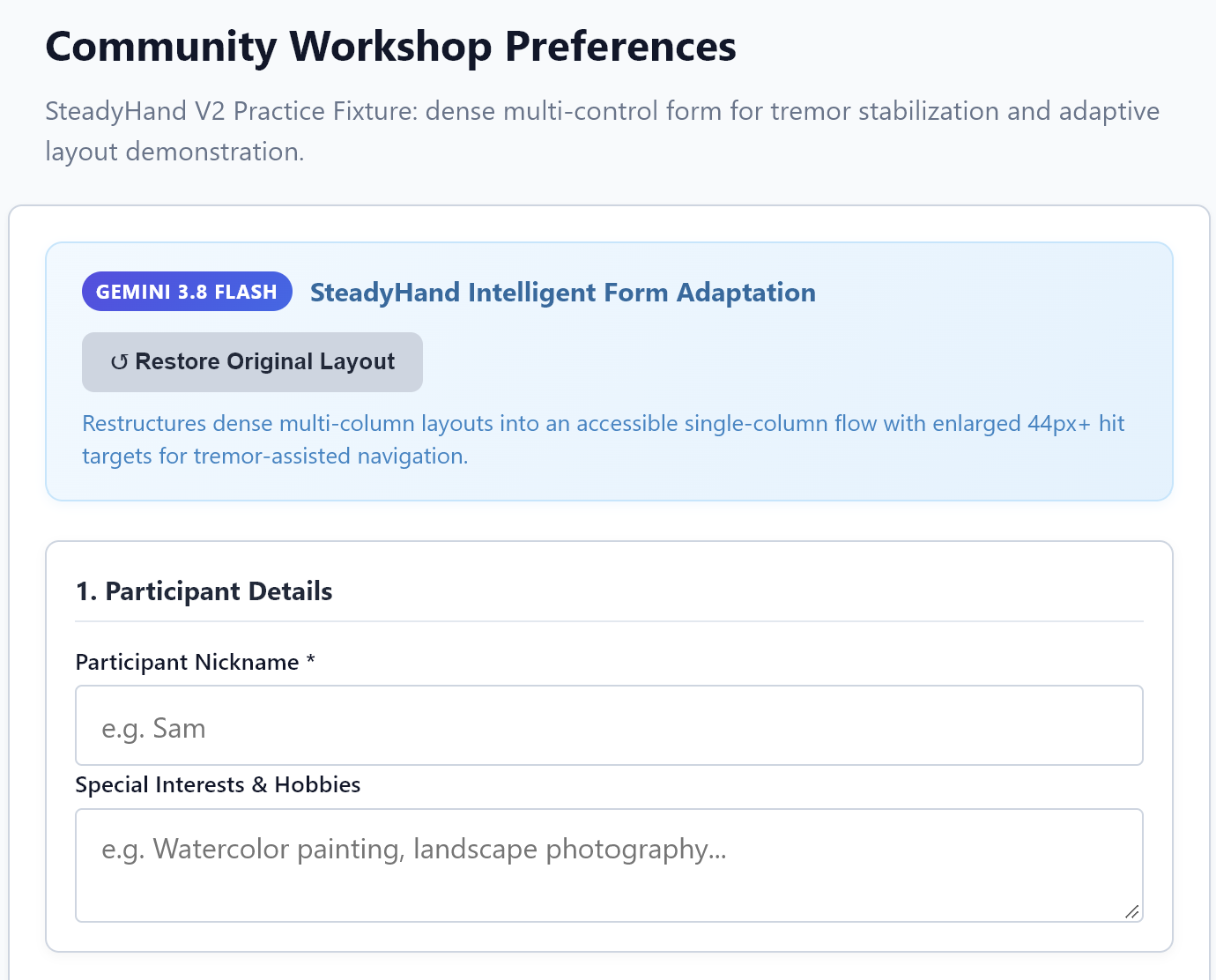
- Adaptive Forms with Gemini: With one click, SteadyHand uses Gemini 3.8 Flash to analyze crowded, multi-column forms and dynamically re-architect them into an accessible single-column flow with enlarged touch targets, generous spacing, and clear semantic section headers.
- Hardware Motion Sensing: An external Arduino UNO R4 WiFi paired with a Grove 3-axis accelerometer sits beside the laptop trackpad, measuring hand and wrist vibrations at 50 Hz.
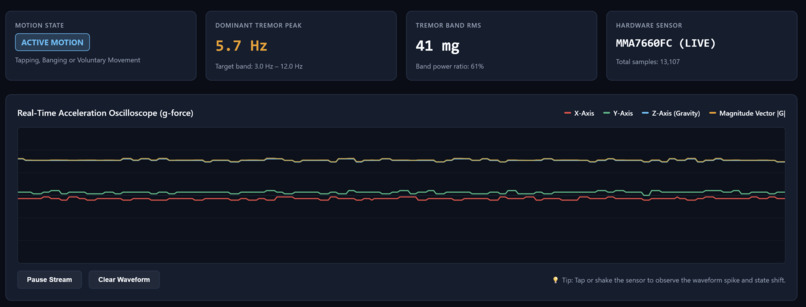
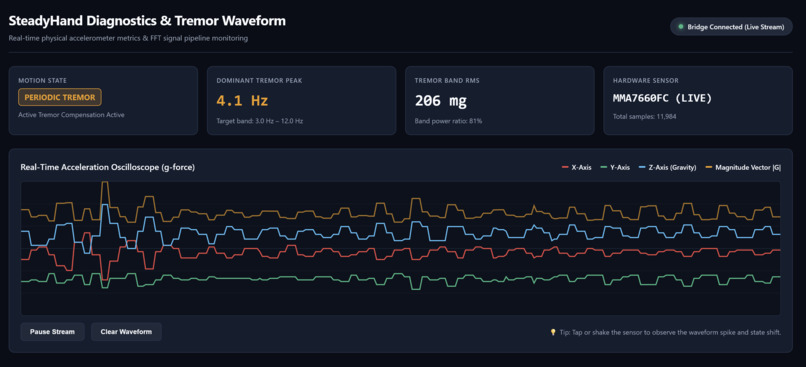
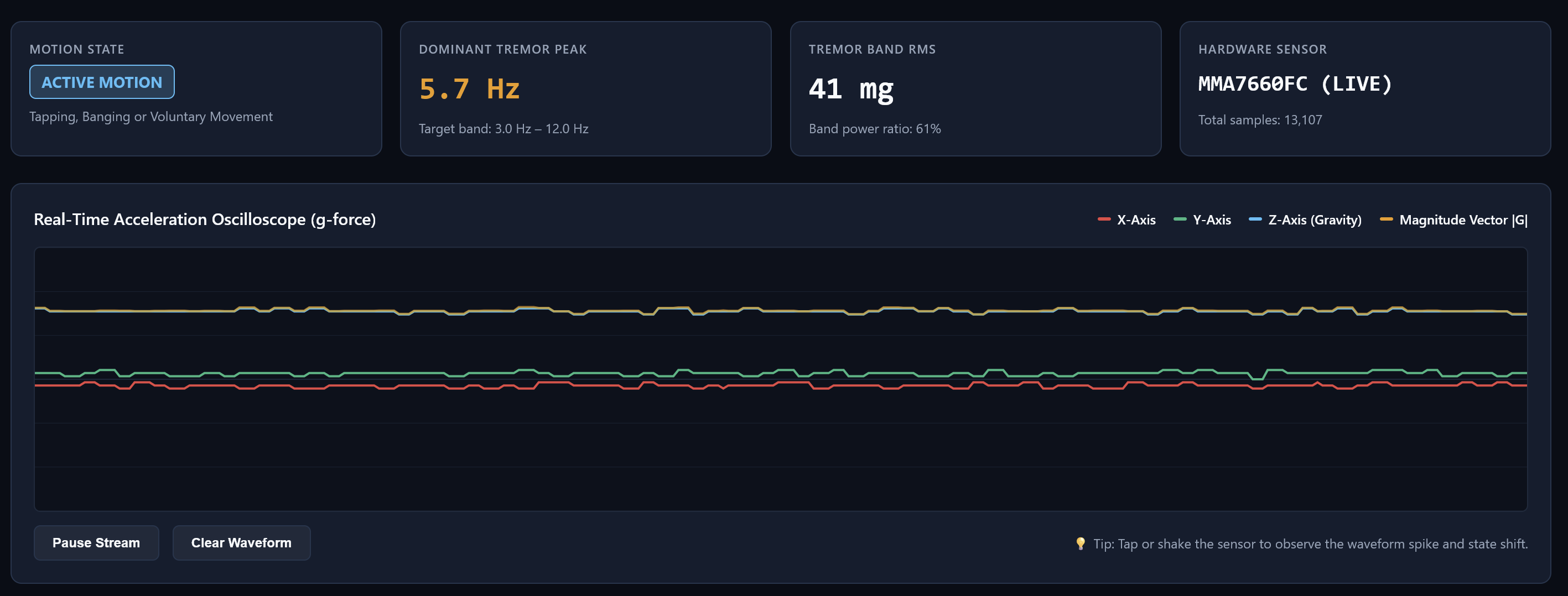
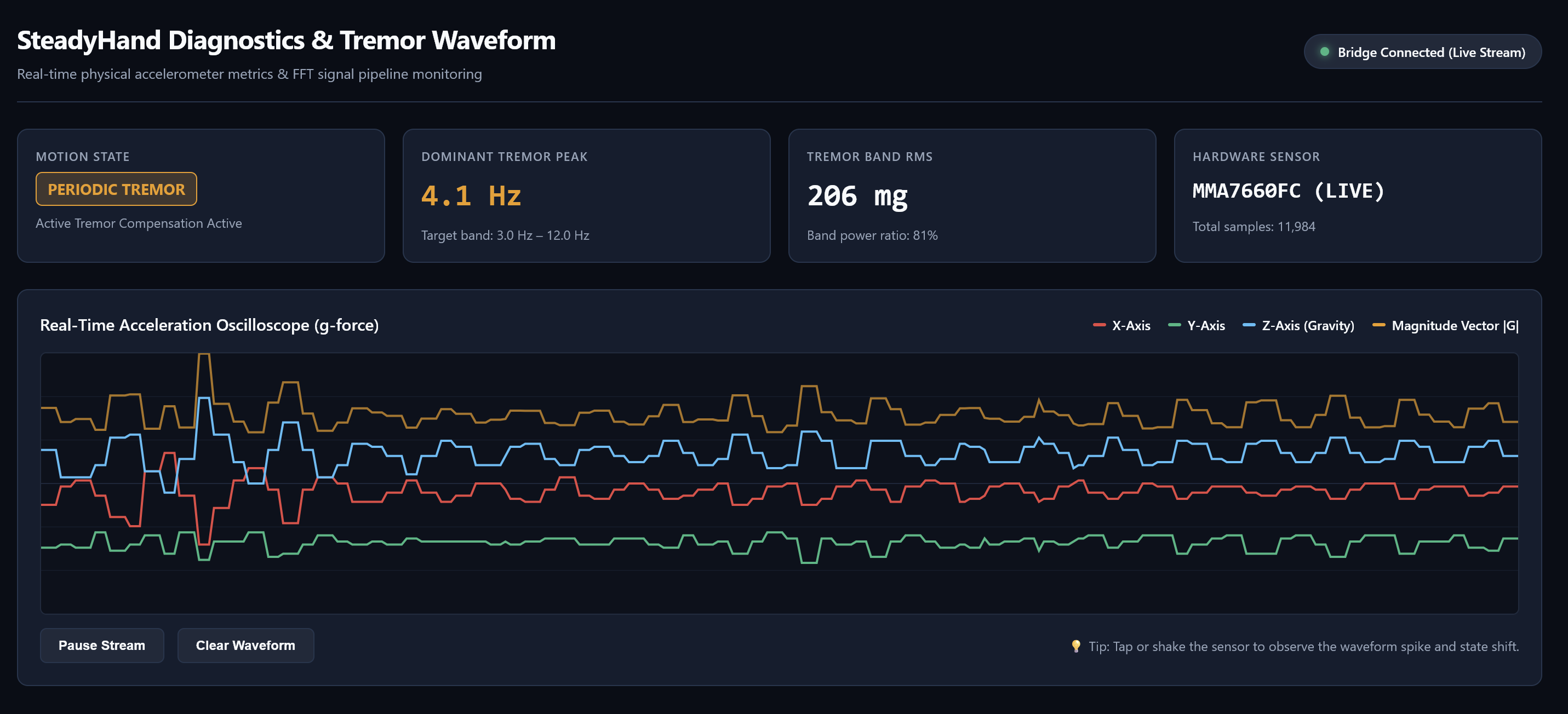
- Live Diagnostic Monitor and Oscilloscope: A local WebSocket bridge runs FFT frequency analysis on the accelerometer stream, isolates typical tremor frequency bands, and visualizes live waveforms on an oscilloscope dashboard.
- Zero-Hardware Standalone Fallback: If an Arduino is not plugged in, the Chrome extension continues to run completely in software, ensuring anyone can use it anywhere without needing physical peripherals.
How we built it
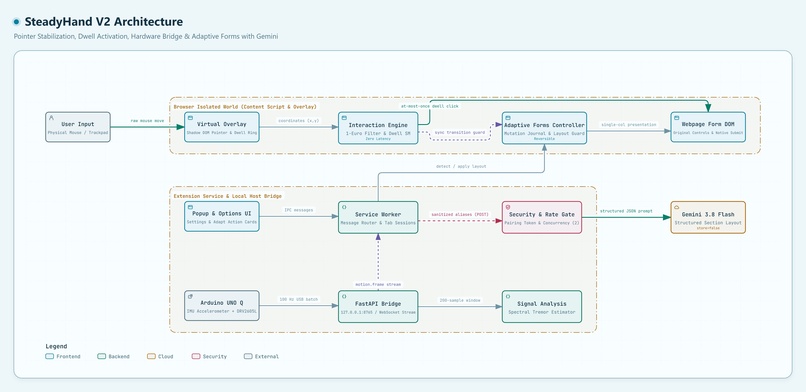
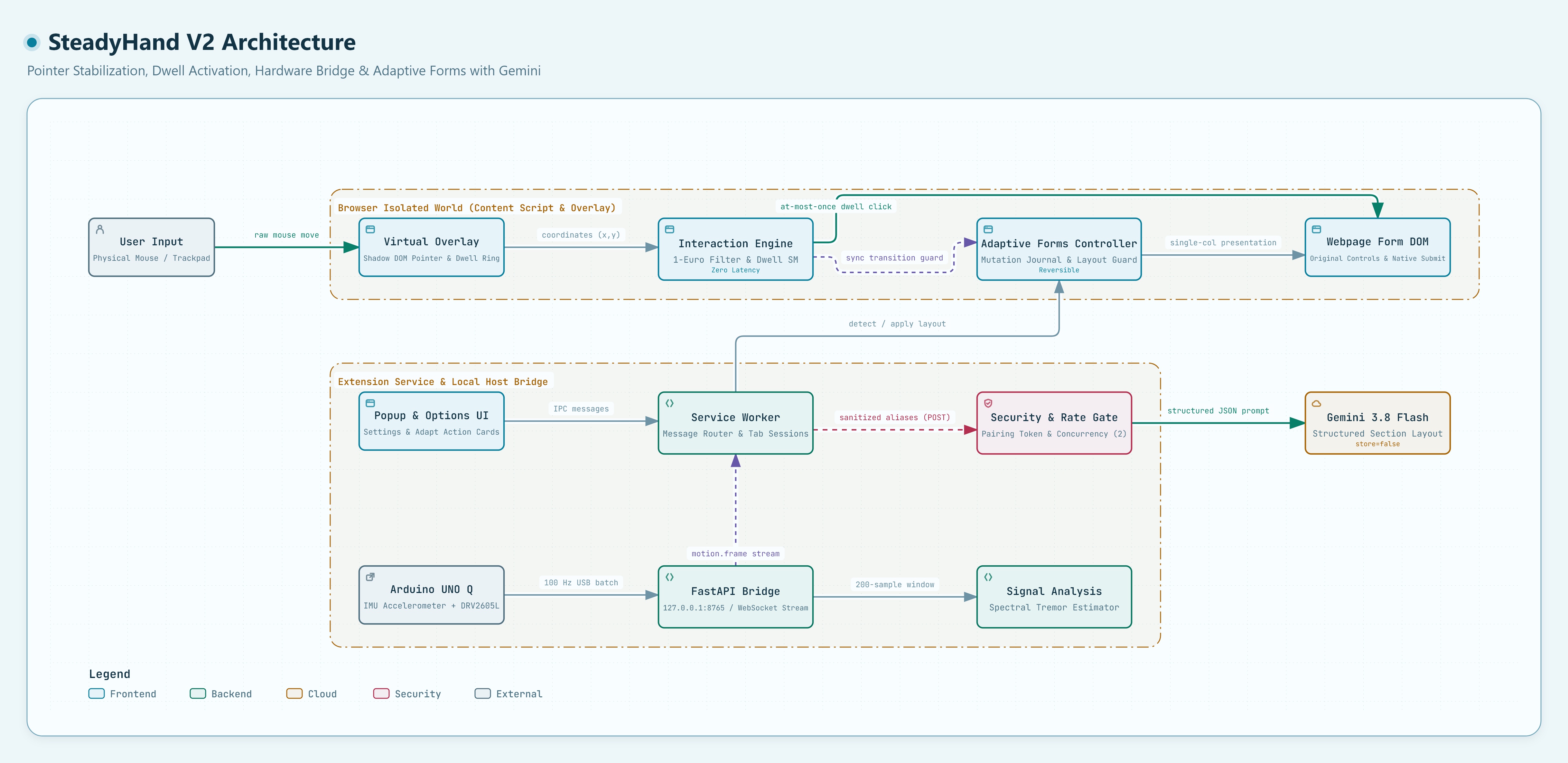
We designed SteadyHand across four modular layers that communicate cleanly:
- Hardware Layer: An Arduino UNO R4 WiFi reading a Seeed Studio Grove MMA7660FC 3-axis accelerometer at 50 Hz, sending serial packets at 115200 baud.
- Bridge Service: A Python FastAPI service that ingests the serial stream, runs spectral analysis, and broadcasts structured telemetry over WebSockets.
- Gemini Adaptive Planner: An asynchronous backend module using Google Gemini 3.8 Flash via the
google-genaiSDK to transform form layouts. It takes sanitized field metadata and returns structured section groupings. - Chrome Extension (Manifest V3): A client-side TypeScript application built with Vite that handles DOM target arbitration, pointer smoothing, dwell interaction, and reversible form restyling directly on web pages.
Pointer Stabilization Engine (1-Euro Filter)
We implemented a speed-adaptive low-pass filter in TypeScript right inside the browser content script. The filter adjusts its cutoff frequency on the fly based on how fast the user is trying to move:
$$ \hat{x}i = \alpha x_i + (1 - \alpha)\hat{x}{i-1} $$
The smoothing coefficient (\alpha) is calculated from the cutoff frequency (f_c) and the sampling interval (\Delta t):
$$ \alpha = \frac{1}{1 + \frac{\tau}{\Delta t}} = \frac{1}{1 + \frac{1}{2\pi f_c\Delta t}} $$
The adaptive cutoff frequency (f_c) scales with pointer speed (|\dot{x}|):
$$ f_c = f_{c,\text{min}} + \beta \cdot |\dot{x}| $$
When the hand rests or hovers over a target, (f_c) drops toward (f_{c,\text{min}}), heavily filtering involuntary tremors in the 4 to 8 Hz range. When the user makes a quick, purposeful swipe across the screen, (f_c) increases, eliminating pointer lag.
Signal Processing and Tremor Feature Extraction
The Python bridge processes 3-axis acceleration vectors ((a_x, a_y, a_z)) sampled at 50 Hz. Over sliding analysis windows of (N = 128) samples, we apply a Hann window to control spectral leakage:
$$ w_k = 0.5\left(1 - \cos\left(\frac{2\pi k}{N - 1}\right)\right), \quad k = 0,\ldots,N-1 $$
We compute the one-sided Power Spectral Density (PSD) for each frequency bin (m):
$$ S_{xx}(f_m) = \frac{2}{f_s\sum_{k=0}^{N-1}w_k^2}\left|\sum_{k=0}^{N-1}(x_k-\bar{x})w_ke^{-j\frac{2\pi mk}{N}}\right|^2 $$
From this spectrum, we evaluate the ratio of tremor-band energy to total signal energy (focusing on (f \in [4,8]\,\text{Hz})). This allows the bridge to flag whether the user is resting, moving deliberately, or experiencing an active tremor episode.
AI-Powered Form Restructuring (Gemini 3.8 Flash)
While cursor smoothing solves the motor challenge, cramped layouts remain a visual and targeting hurdle. When the user clicks Adapt Form with Gemini, our content script extracts the form structure, sanitizes it into abstract aliases (like field-1, field-2), and sends it to Gemini 3.8 Flash.
Gemini analyzes the semantic relationships between fields and returns a clean, structured JSON blueprint dividing the inputs into distinct logical sections. Our content script then applies an accessible CSS grid overlay that expands hitboxes to a minimum of 48 pixels and stacks items into a single, uncluttered column. Because the transformation is purely visual and managed through a mutation journal, original DOM elements, form validation rules, and event listeners remain intact, and the layout can be restored instantly at any time.
Challenges we ran into
- Balancing Smoothing vs. Latency: Standard moving-average filters create heavy cursor sluggishness that makes users feel like their mouse is stuck in mud. Fine-tuning the 1-Euro filter parameters ((f_{c,\text{min}}), (\beta), and derivative cutoff) took significant experimentation to dampen tremor amplitude without adding noticeable latency.
- Privacy-First AI Architecture: We wanted the reasoning power of Gemini without compromising user privacy. Passing raw form data to an external API would risk leaking sensitive personal information. We engineered a strict sanitization boundary: only generic element types and labels are sent using synthetic IDs, with user-entered values, passwords, and tokens stripped completely, and all Gemini requests configured with
store=false. - Layout Shift Safety: When Gemini adapts a form, shifting elements could easily cause a hovering pointer to accidentally trigger a nearby button. We created a layout transition guard that immediately pauses any running dwell timer, clears assisted click arming, and rescans target boundaries before resuming.
- Preventing Accidental Dwell Clicks: Accidental clicks on irreversible buttons like Submit or Delete can be disastrous. We implemented a strict finite state machine (
IDLE,ARMED,DWELLING,TRIGGERED,COOLDOWN). If the user jerks their hand or moves beyond the target boundary, the dwell timer aborts immediately. - Manifest V3 Lifecycle Quirks: Manifest V3 background service workers go idle quickly and have no DOM access. We kept high-frequency pointer calculations entirely within the content script running on
requestAnimationFrame, while letting the background script handle decoupled WebSocket subscriptions and Gemini bridge requests.
Accomplishments that we're proud of
- Dual-Layer Accessibility Solution: SteadyHand tackles accessibility from both sides of the problem: filtering motor jitter at the input level with our 1-Euro filter, and reducing targeting difficulty at the UI level with Gemini form restructuring.
- Sub-Millisecond Browser Response: Both the pointer filtering and target acquisition algorithms run client-side at a smooth 60 frames per second with negligible CPU usage.
- Ethical AI Implementation: We used Gemini where it excels (semantic understanding and layout design) while ensuring the core interaction loop remains 100% local, predictable, and privacy-preserving.
- Robust Hardware & Mock Pipeline: The system automatically detects whether the physical Arduino is plugged in. If not, it launches in mock mode with realistic simulated tremor data so anyone can test the full pipeline immediately.
- Non-Destructive DOM Adaptation: The Gemini form adapter never destroys or clones DOM nodes, preserving form integrity, browser autofill, and native submit behaviors.
What we learned
- Tremor Dynamics: Pathological hand tremors cluster tightly in the 4 to 8 Hz band. Treating tremors as a specific oscillatory frequency rather than random noise is what makes selective software stabilization work so well.
- Decoupling AI from Real-Time Loops: High-frequency accessibility loops (like moving a mouse at 60 fps) cannot wait on network latency. Keeping pointer physics completely local while leveraging cloud LLMs asynchronously for macroscopic layout restructuring gave us the best of both worlds.
- Accessibility Philosophy: Truly helpful accessibility software should never fight the user or take away control. It should quietly filter out involuntary noise while highlighting their deliberate choices.
What's next for SteadyHand
- On-Device Microcontroller ML: Moving our frequency classification models onto the Arduino UNO R4 microcontroller using TinyML, letting the hardware detect tremor states on-chip before sending data.
- Automated Form Adaptation: Allowing users to automatically trigger Gemini layout adaptation on any page that contains dense, non-accessible form layouts without needing manual activation.
- System-Wide Mouse Driver: Packaging the stabilization math into an open-source virtual HID mouse driver so users can benefit from SteadyHand across all desktop applications, not just inside Chrome.
- Personalized Auto-Calibration: Building a quick 30-second onboarding test that maps an individual's personal tremor frequency profile and automatically sets their ideal filter constants, dwell timings, and spacing preferences.


Log in or sign up for Devpost to join the conversation.