Inspiration

We kept coming back to the same question: why hasn't anyone built a genuinely consequential strategy game inside a social, persistent platform? The games that hit hardest weren't the ones with the best graphics — they were the ones where losing something meant something. FTL: Faster Than Light proved that decisions under pressure create emotional attachment faster than any cutscene. XCOM demonstrated that a named soldier who doesn't come home from a mission creates grief no scripted narrative can manufacture. Homeworld showed that a fleet carrying its history visually — the scars, the salvage, the mismatched plating — builds investment no single-session game can replicate. We asked: what if those emotional mechanisms lived inside a persistent, social, mobile-native world where the war keeps moving whether you log in or not? What if the fleet you built was visible to your community, your faction relationships had real political weight, and the gap between what you want to protect and what the war forces you to sacrifice was where the game actually lived? That question became Station Zero: Gatefall.

What it does

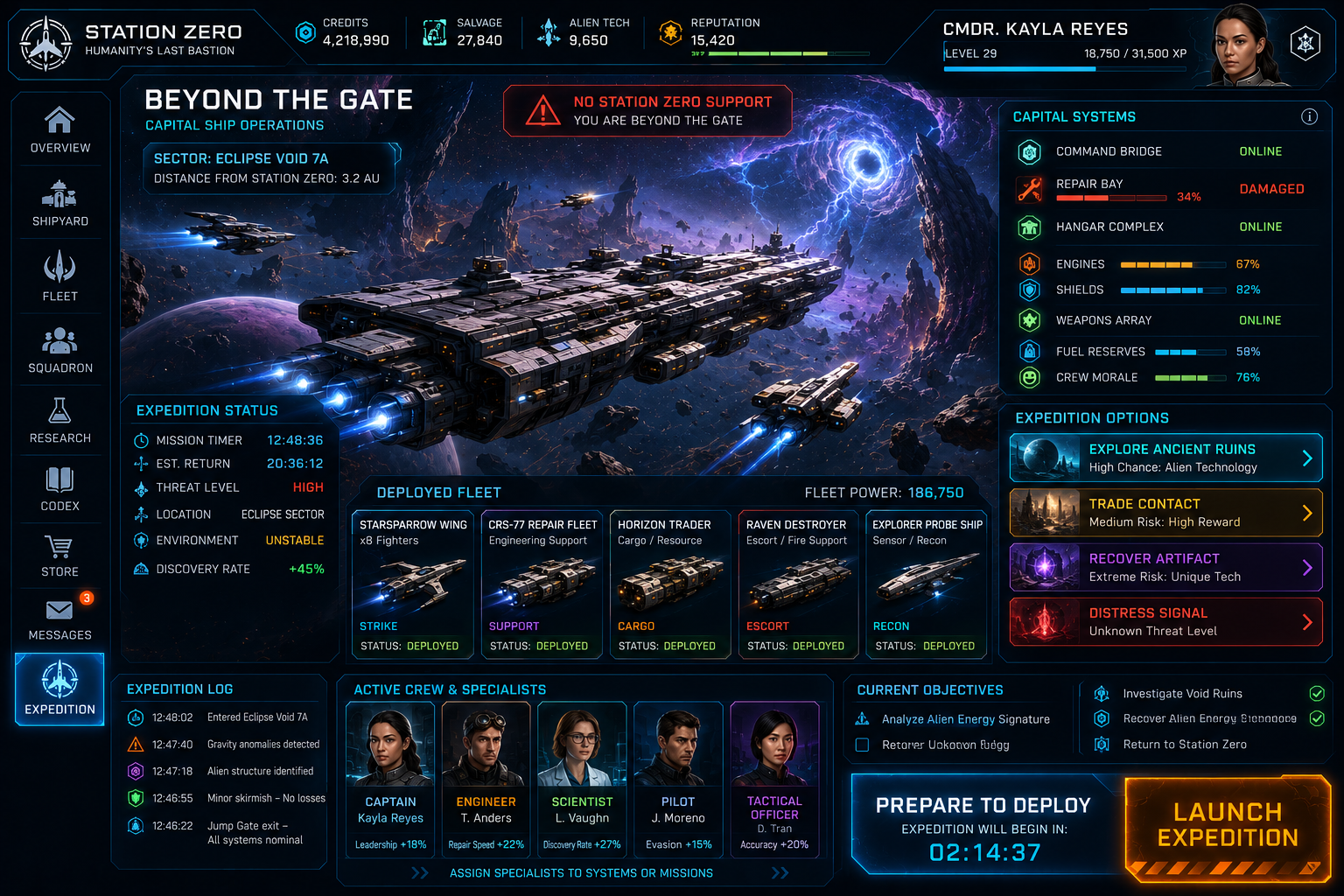
Station Zero is a fleet-building management game for Meta Horizon Worlds. You are not the commander of the station — you are a surviving pilot who became a fleet captain because the people who were supposed to be in charge didn't make it. Every ship in your fleet was salvaged or rescued. Every captain serving under you survived at least one mission that could have ended differently.

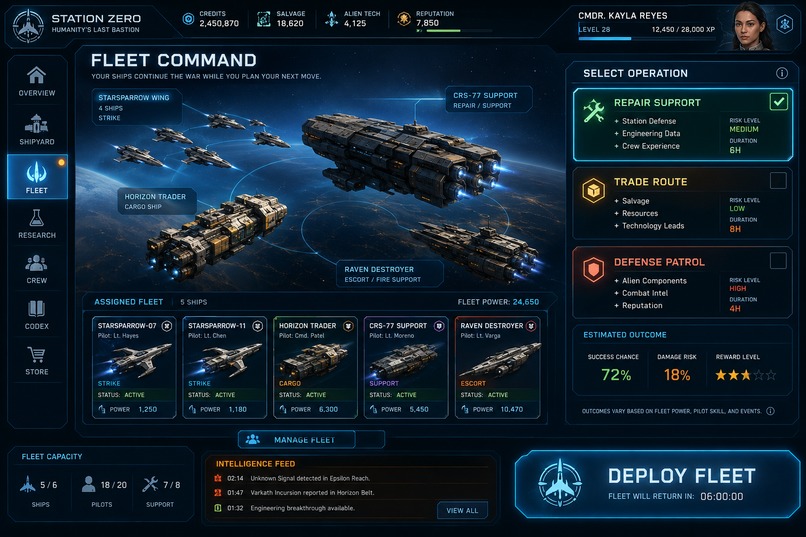
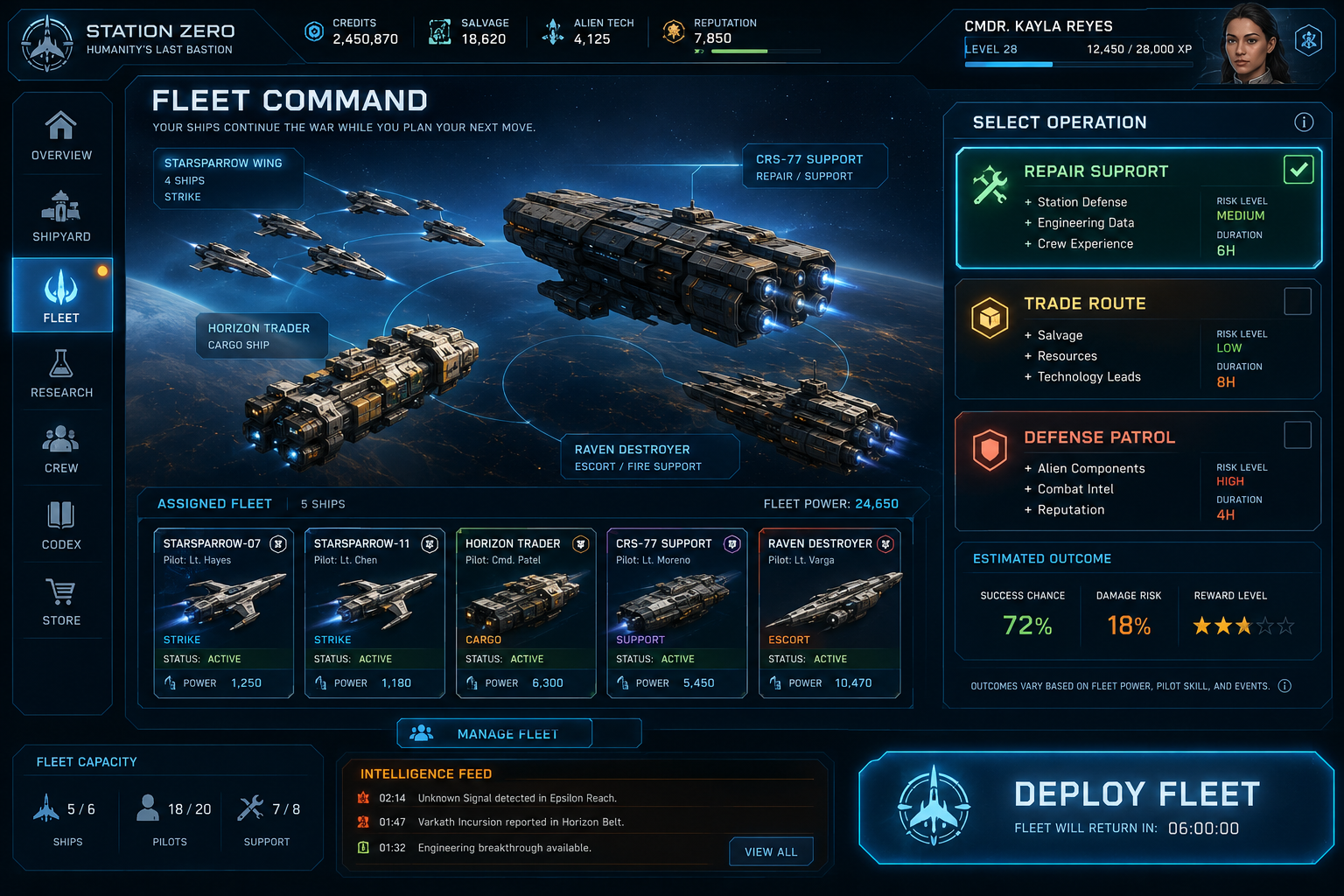
The core tension is permanent: Station Zero needs resources from trade routes and protection from Varkesh incursions. You cannot staff both at full strength simultaneously. Every shift is a decision cycle where the cost of each choice is visible in what is left undefended.

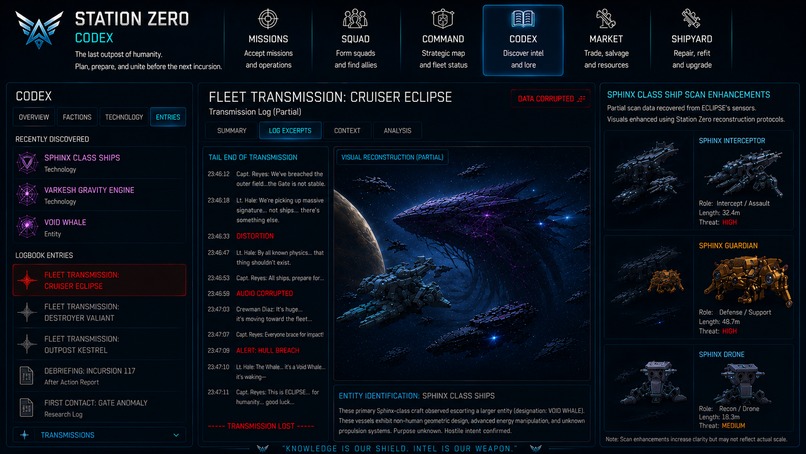
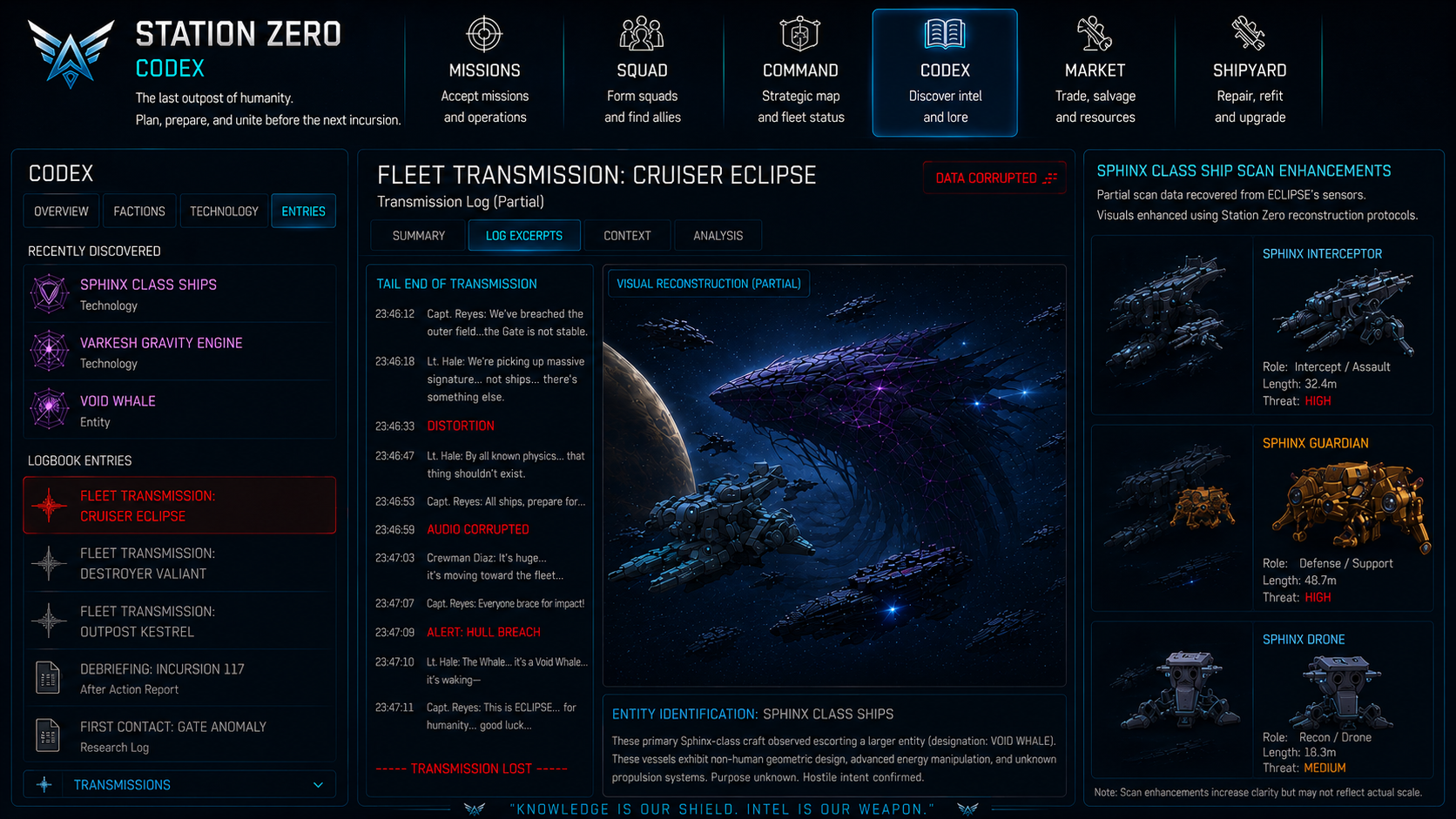
The Varkesh are adaptive. They are not a conventional military force — they consume territory rather than hold it, communicate through behavior rather than language, and remember what worked against them. A player who runs defensive patrols on a fixed schedule will find that schedule anticipated. A player who has used the same ship configuration for three sessions will find it countered. The war learns.

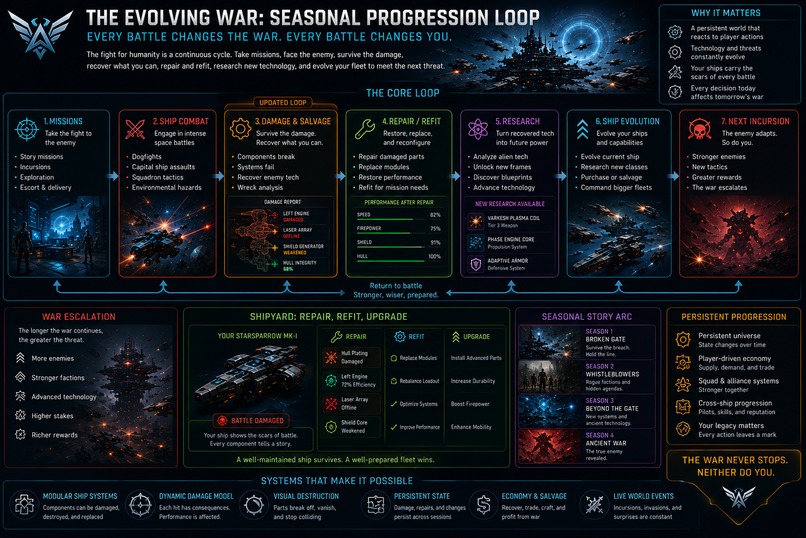
The fleet is a biography. Ships carry visible damage from past missions — patch-welded hull sections, repurposed components from different factions, markings that identify their origins. Captains accumulate histories. When a ship is lost, the player loses the story attached to it, not just a stat block. No two players who have run the same number of sessions will have the same fleet, because no two players made the same calls under pressure.

The station is alive between sessions. The Varkesh operate on a pressure schedule that advances whether the player is logged in or not. A player who checks in regularly gets a manageable war. A player who returns after two days gets a crisis — a faction relationship degraded from an undefended corridor, a ship that needed repair and didn't get it, a front that moved. This is not punishment. It is consequence. The station reflects what you left behind.

How we built it

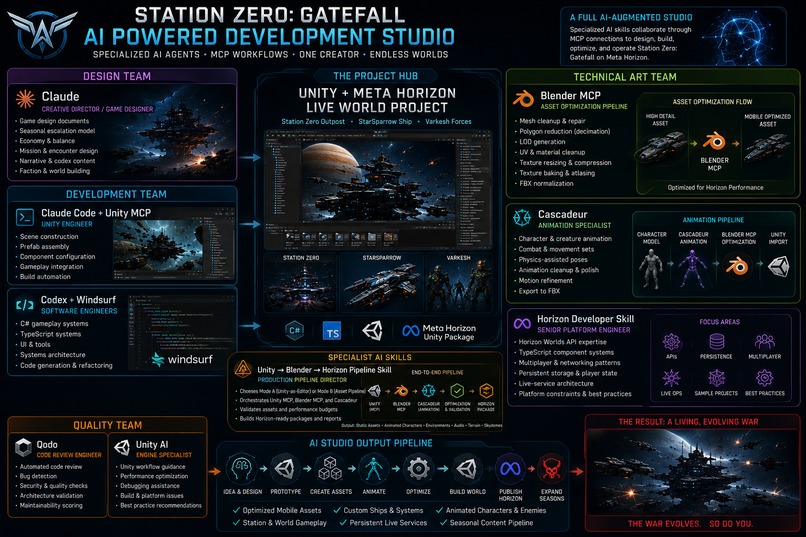
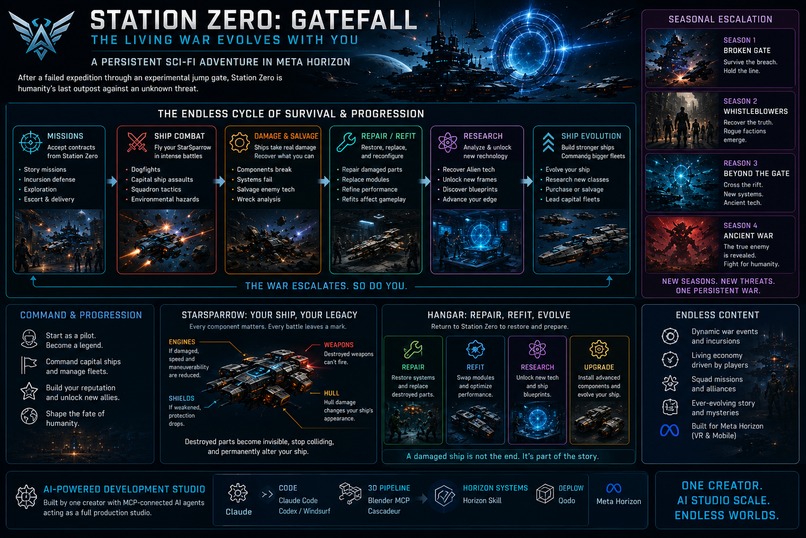
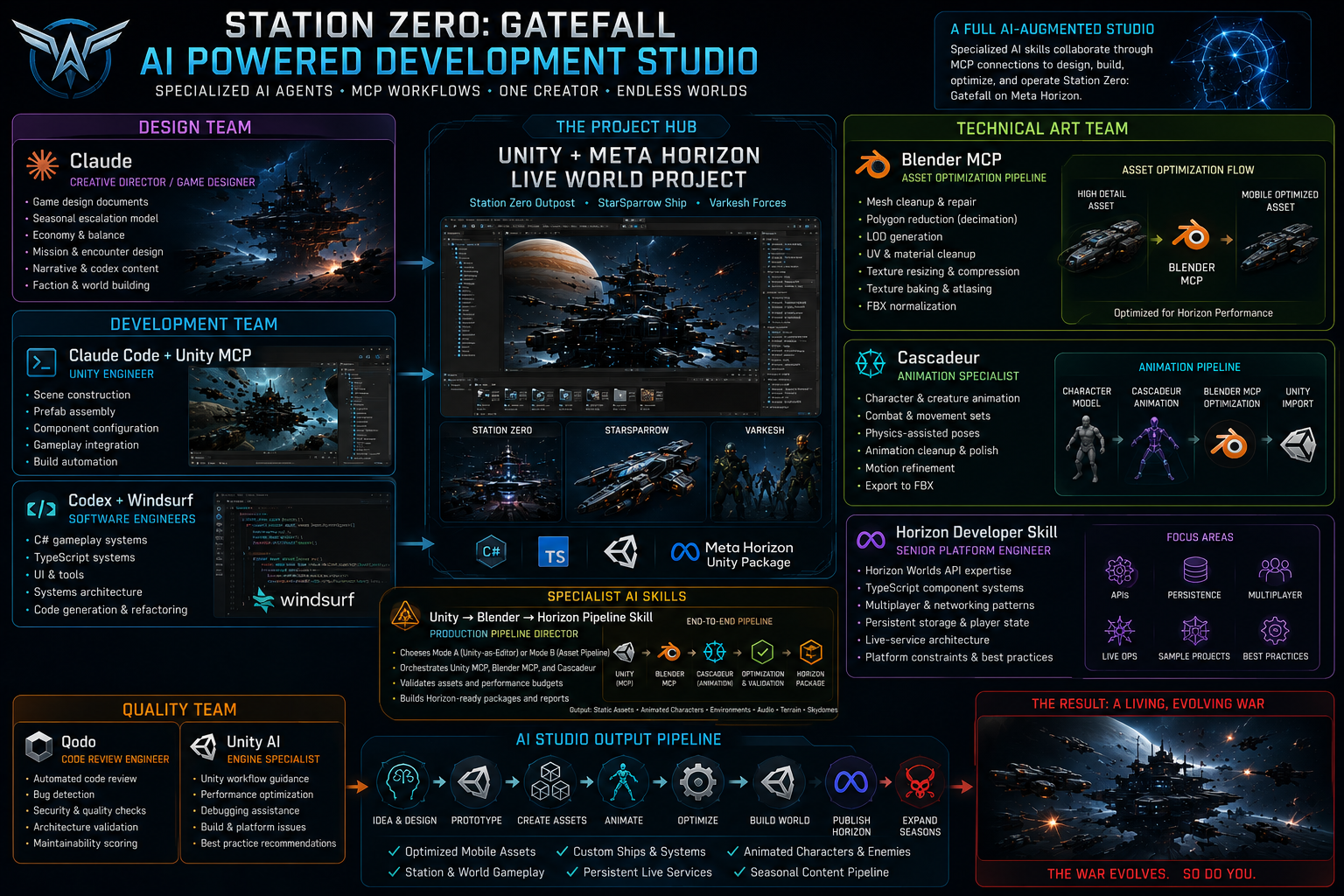
Station Zero is built by a small group of collaborators with a fully integrated AI development studio — specialized AI agents collaborating through MCP connections to design, build, optimize, and operate the game in parallel.

Design Team

BearKingLeo — Creative director managing high level planning and design. Claude (Game Designer) — game design documents, seasonal escalation model, economy & balance, mission & encounter design, narrative & codex content, faction & world-building

Development Team & SME

Claude Code + Unity MCP (Unity Engineer) — scene construction, prefab assembly, component configuration, gameplay integration, build automation Codex + Windsurf (Software Engineers) — C# and TypeScript gameplay systems, UI & tools, systems architecture, code generation & refactoring

Unity AI (Engine Specialist) — workflow guidance, performance optimization, debugging assistance, best practice recommendations

A Claude skill trained a Horizon Developer acts as the Senior Platform Engineer and architects using Horizon Worlds API, TypeScript component systems, multiplayer & networking patterns, persistent storage & player state, and live-service architecture.

Technical Art Team

Claude Skill running Blender MCP (Asset Optimization Pipeline) — mesh cleanup, polygon reduction, LOD generation, UV & material cleanup, texture baking & atlasing, FBX normalization for Horizon's mobile performance budgets Cascadeur (Animation Specialist) — character & creature animation, combat & movement sets, physics-assisted poses, export to FBX

Quality Team

Qodo (Code Review Engineer) — automated code review, bug detection, security & quality checks, architecture validation

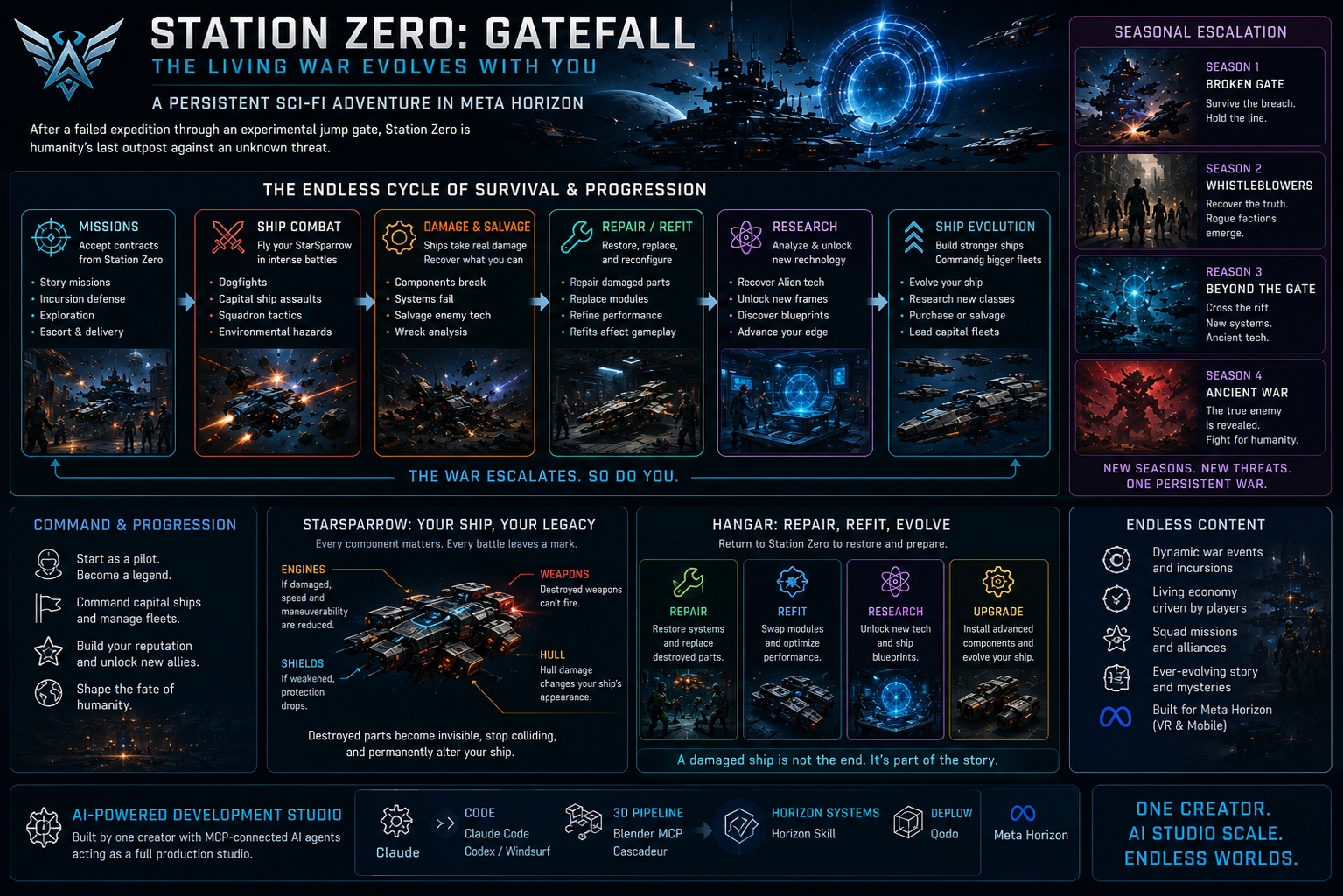
The production pipeline runs: Idea & Design → Prototype → Create Assets → Animate → Optimize → Build World → Publish Horizon → Expand Seasons. Every stage is augmented — not replaced. The AI handles generation velocity; the human handles creative judgment and player experience decisions.

Assets use a modular build system: ship hulls, module slots, damage states, faction markings, and repair patches are separate layers. This produces the visual variety of dozens of distinct ships with a fraction of the traditional asset count. A new ship class is a new hull and a set of module configurations — the damage and repair vocabulary is already built.

Challenges we ran into

Building a living war that isn't punishing. The line between "consequence" and "punishment" is razor thin in persistent games. A session gap that makes the game harder must feel earned — the player must believe the station moved on because the war moves, not because the game is penalizing absence. Getting that tone right in the mission briefing text and the faction response timing required many iterations.

Adaptive enemy design without a custom ML backend. The Varkesh need to remember player patterns and change behavior between sessions — on Horizon's infrastructure, without a dedicated server running opponent AI between play sessions. The solution is a deterministic behavioral fingerprint: the Varkesh response is computed from a hash of the player's last NNN tactical decisions stored in persistentStorage, producing an adaptive response on session load without any live inference.

Mobile performance with meaningful visual variety. Each ship needs to look like it has a history — different damage states, mixed faction components, repair patches — while staying within Horizon's mobile polygon budgets. The Blender MCP pipeline handles per-asset decimation and LOD generation, but designing the modular system so that visual variety didn't overwhelm the asset count and texture limitations required rethinking the entire ship component architecture.

Emotional hooks that work without audio cues. Mobile play is often silent. The fleet attachment system — naming ships, captain histories, visible damage — had to carry emotional weight through interface design and text alone. A captain shown as available-but-low-loyalty needs to read differently from one who is trusted, without a narrator explaining it.

One creator, one designer, and a full studio pipeline. Coordinating AI agents that each own a domain — and ensuring their outputs are consistent with each other — is a new kind of production challenge. The designer provides requirements and Abobe Firefly or Blender MCP produce assets that Claude Code then imports; Cascadeur exports models and animations; the Horizon Developer Skill plans all features to optimize look and performance using the Horizon API. Keeping the pipeline coherent is a human coordination problem the tools don't yet solve automatically.

Built With

Share this project:

Updates

posted an update —

Station Zero — a station-command space game, de-risked by a Horizon⇄Unity round trip

Galaxy Starships / Station Zero — the full build log · Meta Horizon Creator Program, Game Design

If the flying doesn't feel good, nothing else matters. So we proved the flying — and the shooting — before we built a single menu.

Station Zero is a mobile-first space game for Meta Horizon Worlds: build a modular starship, fly and fight PvE incursions, then run a whole station-command economy — crew, research, factions, offline operations — between sorties. The design is big. The interesting part isn't that we designed it; it's that we de-risked it, on the exact platform it ships on, before committing to the expensive parts.

The method is a deliberate round trip:

  1. Prove the feel where it's risky — in Horizon Worlds, because if piloting a ship on a phone isn't fun, there is no game.
  2. Prove the fun where it's fast — in Unity, the fastest simulator on earth for design systems.
  3. Convert it back — Unity's proven systems become Horizon TypeScript, meshes become an import-ready package, and custom agent skills do the packaging — with compatibility held the whole way so the conversion is clean, not a rewrite.

This is that story, end to end.


1 · Prove the feel first — in Horizon, where it's risky

The temptation on a project this size is to start with the fun meta-systems. We didn't, because everything hinged on one question a design doc can't answer: does piloting a starship feel good on a phone, in an engine with no flight physics?

The thing that scared us: Horizon has no rigidbody physics. Our reference implementation lived in Unity on a mature combat kit whose entire value is force-driven rigidbody flight — you push a Rigidbody with thrusters and the solver does the rest. Horizon gives you triggers, colliders, and kinematic transform control. There is no body to shove. If you want a ship to fly, you move it yourself, every frame, in TypeScript — no solver, no "just add force," inside a 16 ms mobile frame budget.

So the proof of concept wasn't art or content. It was a single script: can we hand-write a flight model that feels like flying, not like dragging an icon around? The answer was yes, and the core of PlayerShipFlightController.ts (now ~2,600 lines) is honest and simple:

  • Integrate velocity ourselves. Thrust builds a desired velocity along the ship's forward axis; we ease the current velocity toward it with a tunable acceleration, then advance the transform by velocity * dt. Let go, and a braking term bleeds speed so the ship settles instead of coasting forever.
  • Rotate on rates, not torque. Separate pitch / yaw / roll rates (85° / 95° / 120° per second), a touch of yaw-roll coupling so banking into a turn feels natural, and an auto-level term that gently rights the ship. This is what reads as "a ship," not "a free-floating camera."
  • Boost you feel. A short burst multiplies speed and acceleration and kicks camera FOV from 70° to 86° with a little jitter — cheap tricks that sell speed better than the raw number does.
  • Attach the camera, don't build a rig. Horizon's LocalCamera.setCameraModeAttach parents the camera to the ship, so a solid chase/cockpit cam comes free and we spend effort on feel.

Crucially it runs as a Local (per-player) script with proper ownership — each pilot simulates their own ship on their own device and relays input to the server via a NetworkEvent. That's how you do responsive multiplayer on Horizon without writing a netcode stack. Desktop (W/S throttle, A/D yaw, mouse pitch, boost) and mobile (twin sticks + on-screen buttons) both run the same model.

Then the "is it fun?" gate. Working wasn't the bar — fun was, and that only came out in tuning: an early throttle sign bug had W/S reversed (you accelerated backward); A/D didn't turn until we wired the yaw axis per platform; boost needed a burst timer and an audio "clunk" on expiry to feel physical; and layered engine audio — a low loop and a high loop cross-faded by throttle — did more for the sense of speed than any particle. When those landed, the ship stopped feeling like a cursor and started feeling like a fighter. That was the green light for the whole project.

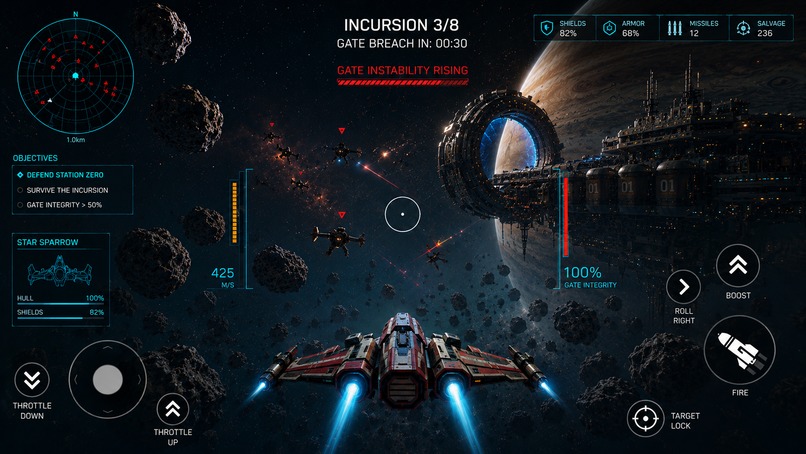
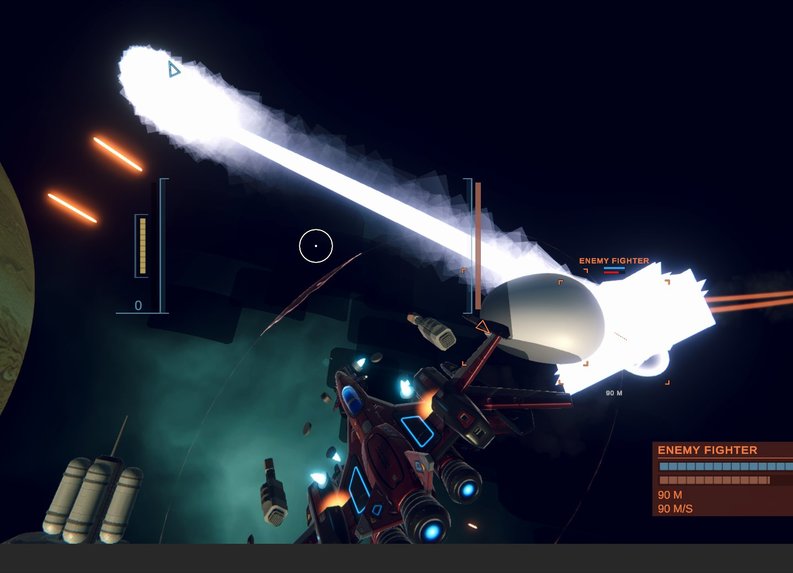
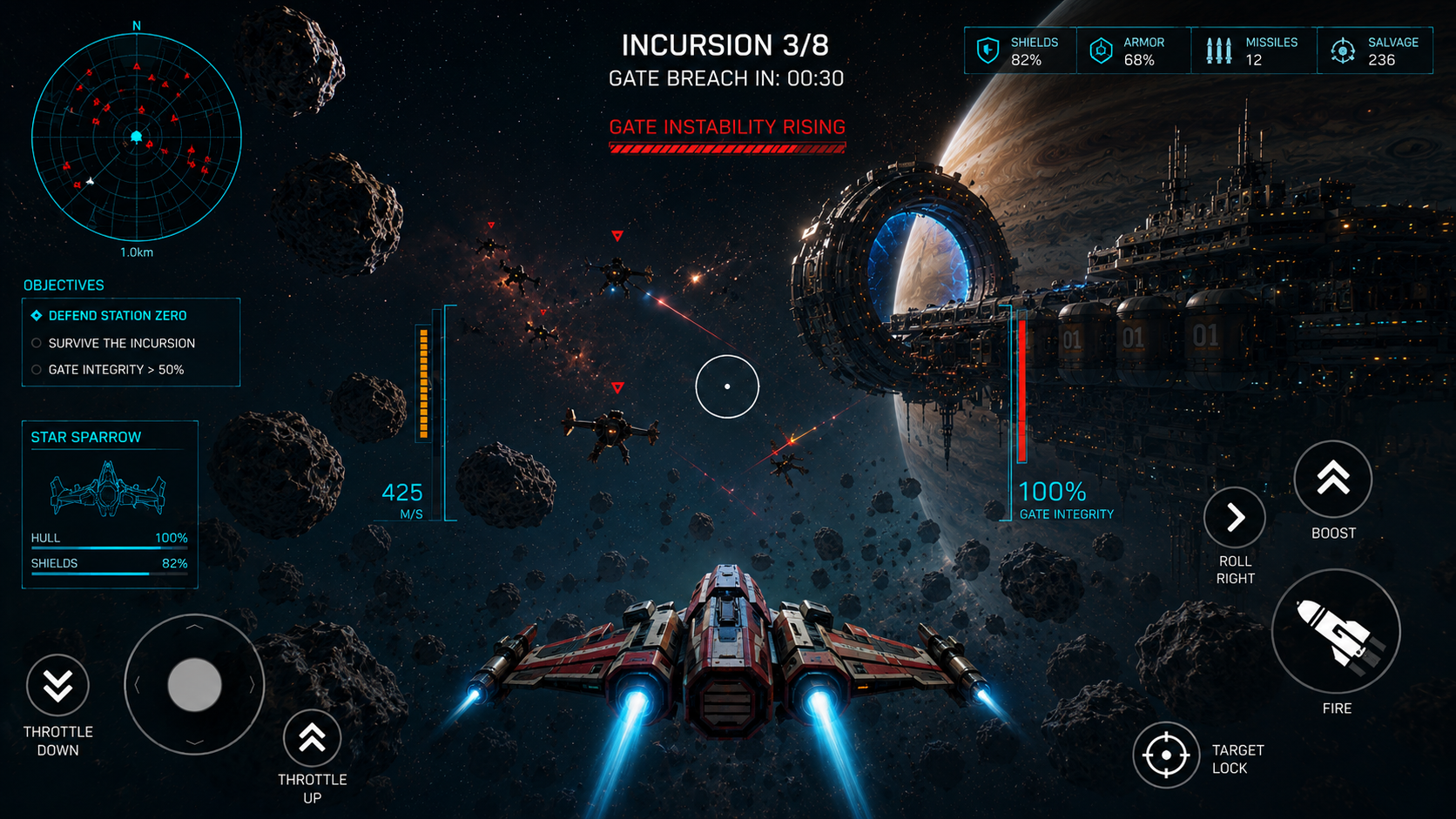
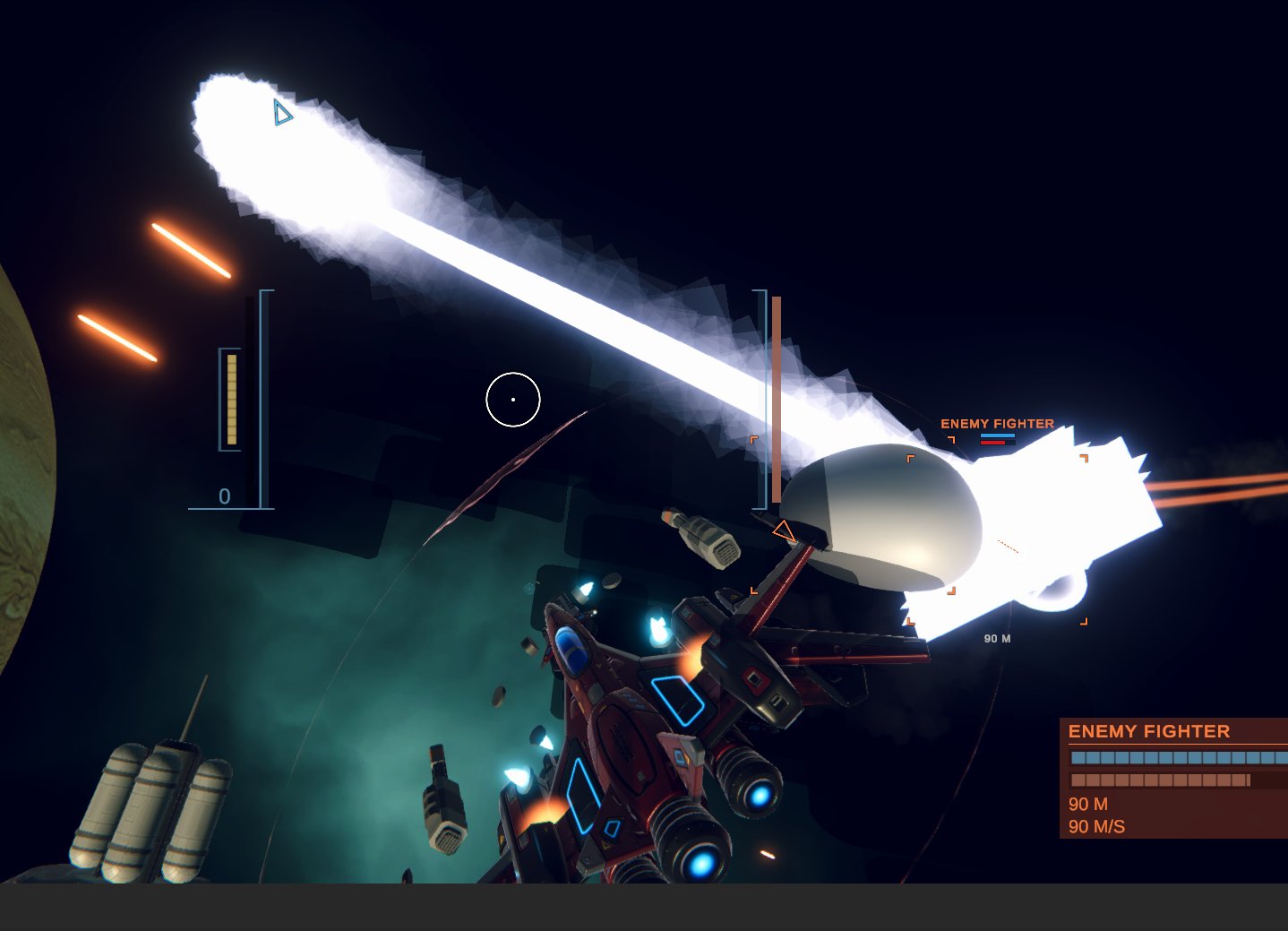
Combat prototype Proving the feel — live flight and combat with the targeting HUD. The beam and VFX are placeholder; the hand-built kinematic flight model is what this shot proved.

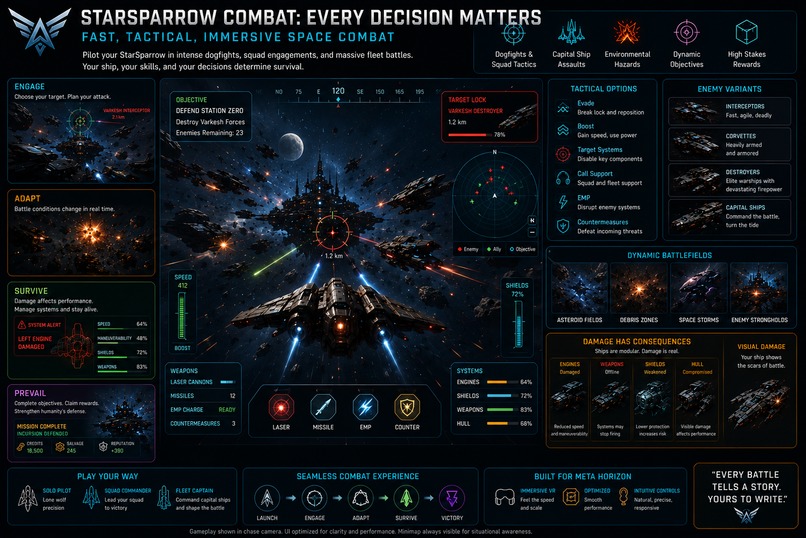
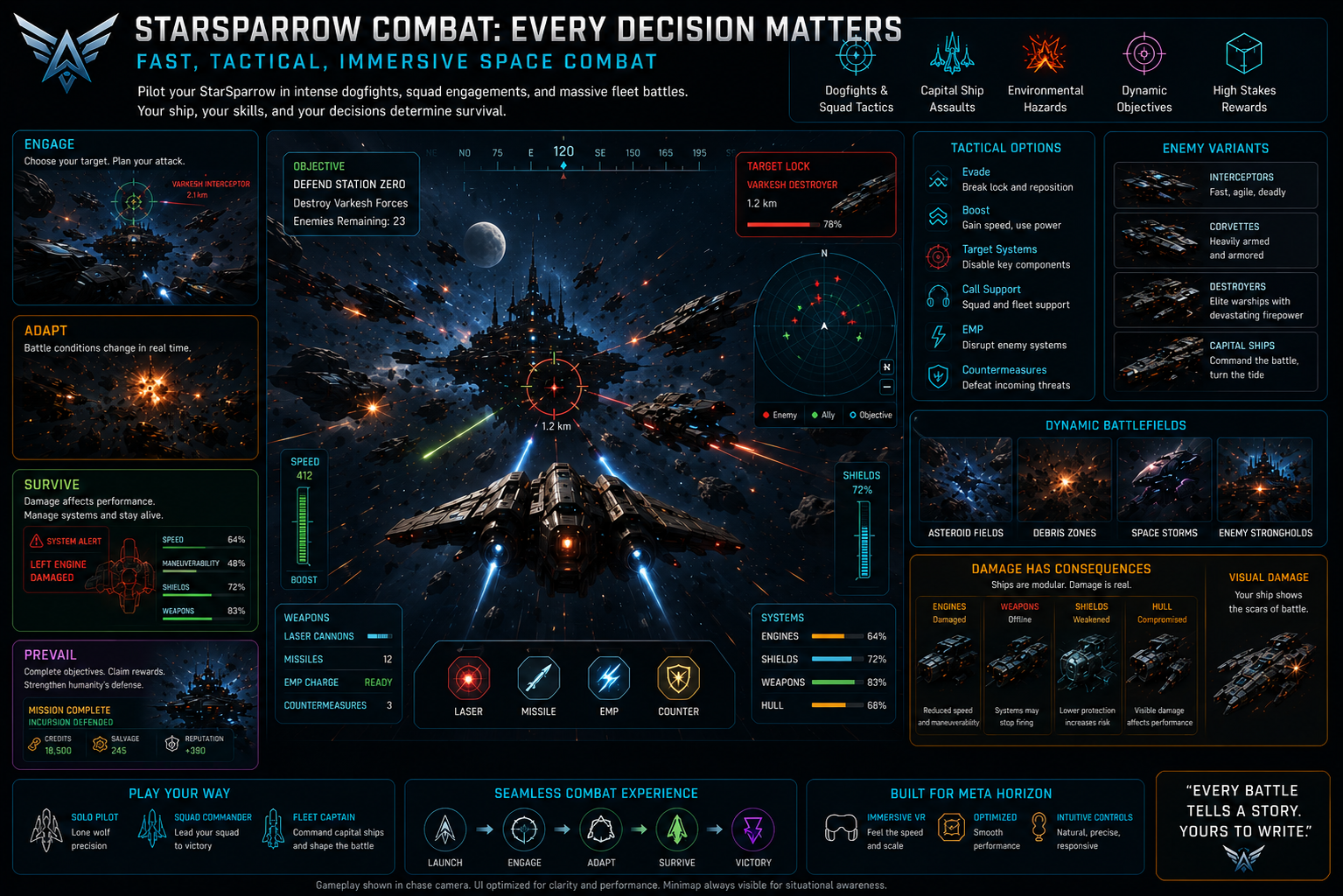
Only then did we design combat for the platform: pooled projectiles (spawn once, recycle forever — spawn/destroy churn is Horizon's #1 killer), two weapon feels (a rapid gun for knife-fights, slower rockets for stand-off), a readable targeting HUD with missiles and turrets, and waves with a capital-ship launch moment for spectacle — all throttled and pooled to hold frame rate.


2 · Prove the fun fast — Unity as the rapid-prototyping lab

Part 1 ended with fun flight-and-combat running natively in Horizon. So why did the next step move back into Unity? Because the two hardest problems left have nothing to do with the engine:

  1. Is the ship builder actually fun and legible?
  2. Does the mission/station loop give the combat meaning?

Those are design problems — data models, economy math, UI/UX, pacing — and the fastest place to iterate on them is Unity + a mature combat kit + a full editor, where you change a number, hit Play, and see it in two seconds. So we treated Unity as a prototyping lab: find the fun cheaply, then pay to rebuild the winners in Horizon.

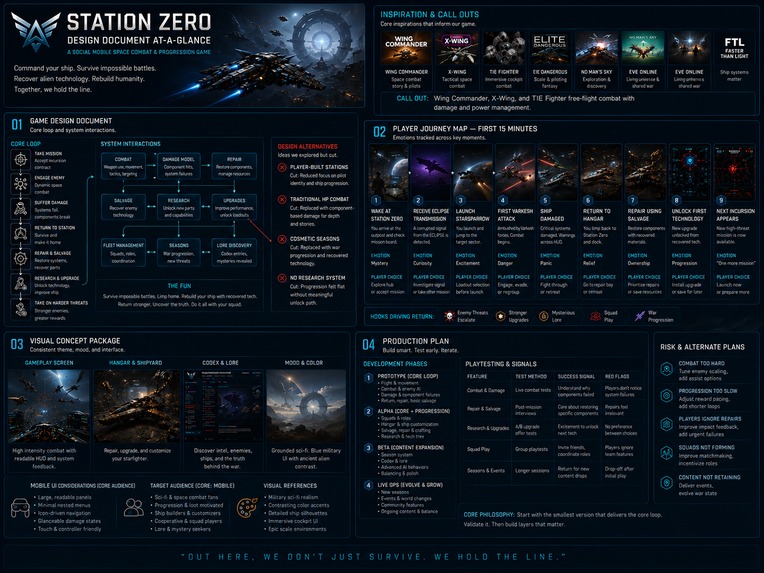
This is also where AI-assisted development carried real weight — and it wasn't ad-hoc. The MCP-driven agents worked autonomously off the game design documents: the Game Design Document, Player Journey Map, and Visual Concept Package were the spec, and agents driving the Unity Editor over MCP implemented them — generating parts, wiring prefabs, rendering icon thumbnails, building the systems, and refactoring — so a solo-scale team moved at studio pace. Concept → design → running code, traceable end to end.

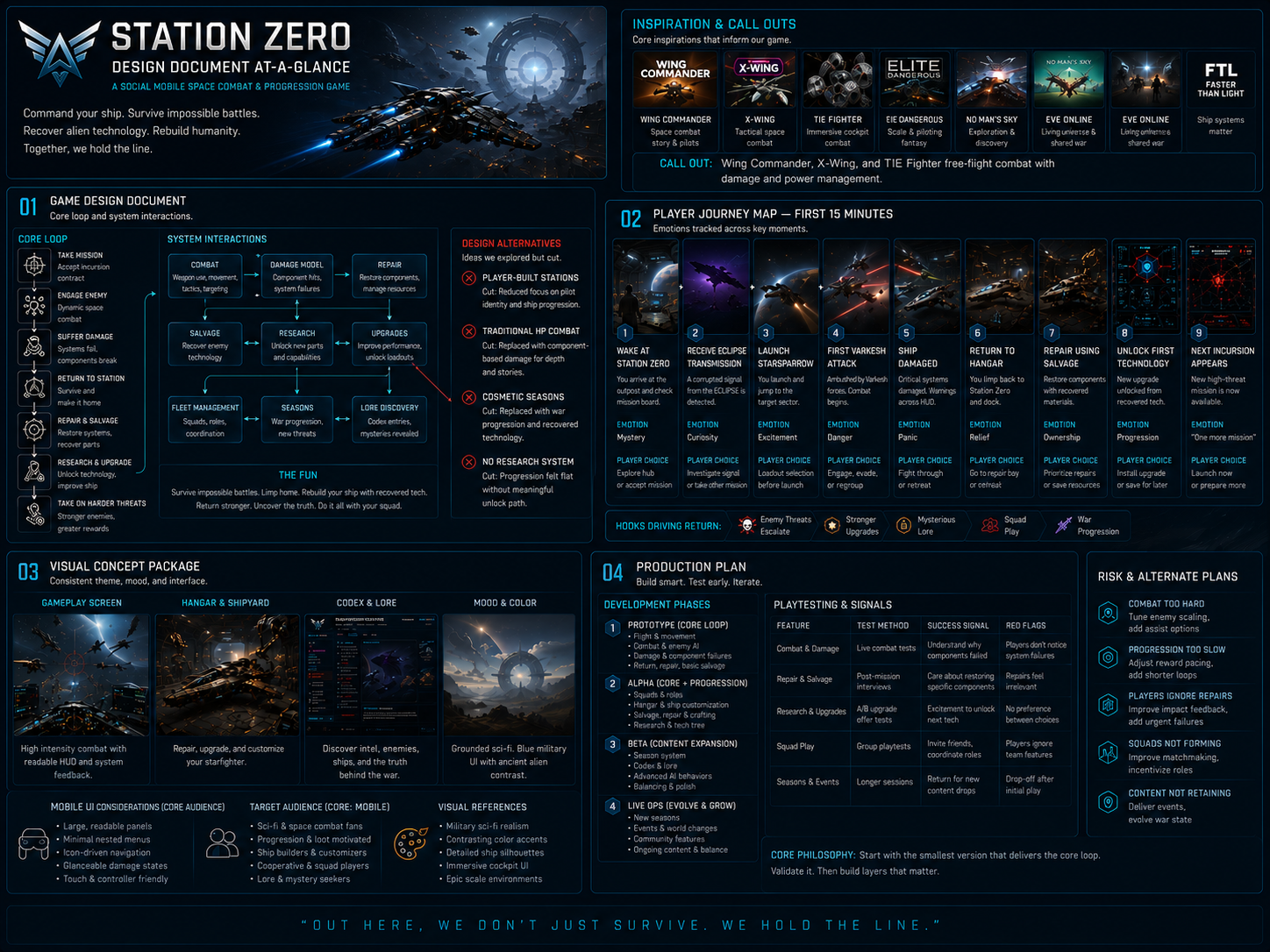
Game Design Document The Game Design Document — the spec the MCP-driven agents built from autonomously (target player, core loop, the six progression pillars).

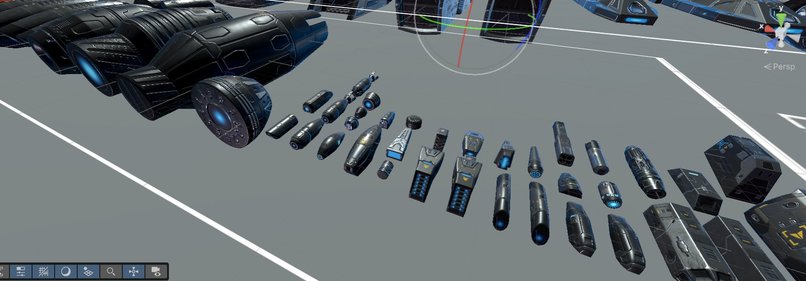
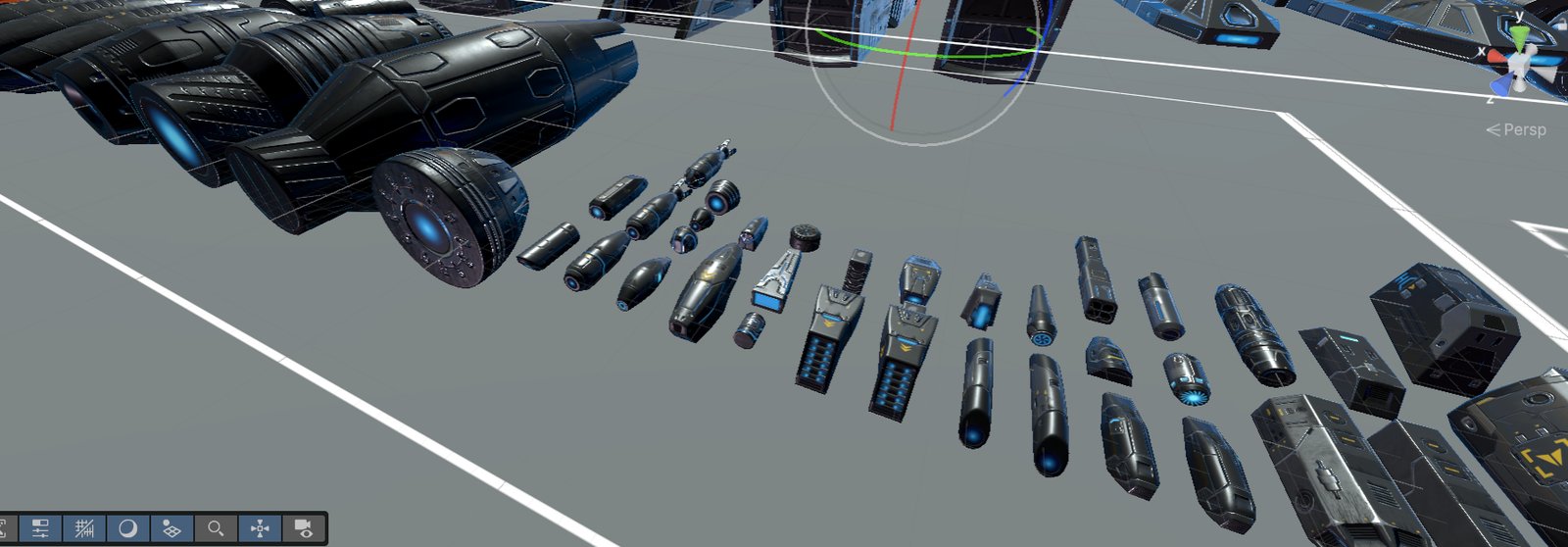
Ship Engineering (internally "kitbash"). You don't pick a ship, you build one. A pack of pre-cut modules — 17 part families, ~279 parts — becomes a catalog of cockpits, hulls, wings, engines, thrusters, fins, and weapon mounts. Each frame exposes named sockets; each part carries its own stats and effects. And the build itself is deliberately tiny data — a frame ID plus a socket→part map. A ship is a handful of strings, which turns out to matter enormously for the port. The shipyard is type-locked (no capital modules on a fighter frame) and drives a live build: swap a part, and the ship you fly is the ship you assembled. Building it in Unity answered the fun question fast — does swapping parts feel meaningful? You can't design that on paper; you have to fly it.

Ship Engineering parts Ship Engineering (kitbash): the pre-cut module catalog in Unity — cockpits, engines, thrusters, wings, weapon mounts.

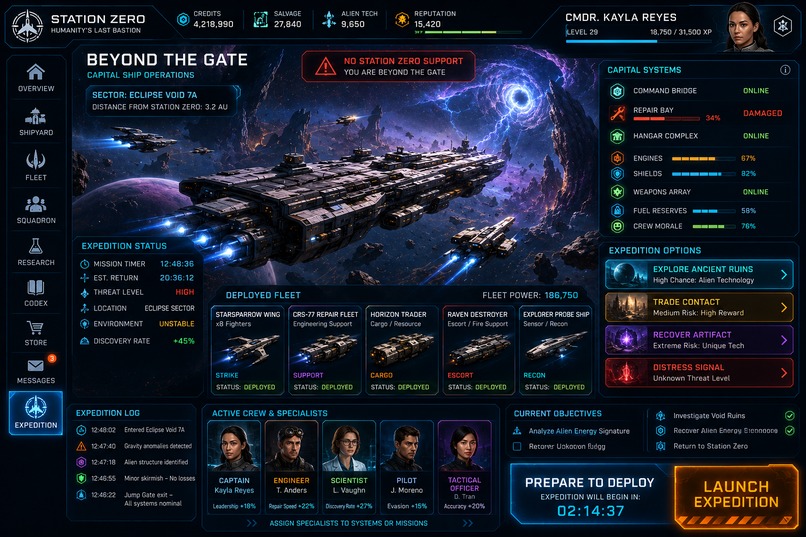
Encounters with consequences. Unity let us prototype the structure of fights: a timed incursion (a live event you drop into for its remaining window, with escalating waves and a capital-ship payoff), expeditions (self-contained encounter zones at capital-ship camera scale), and a free-flight training zone for testing builds with no timer or enemies. We tuned spawn counts and difficulty curves against real flight and kept only what felt good.

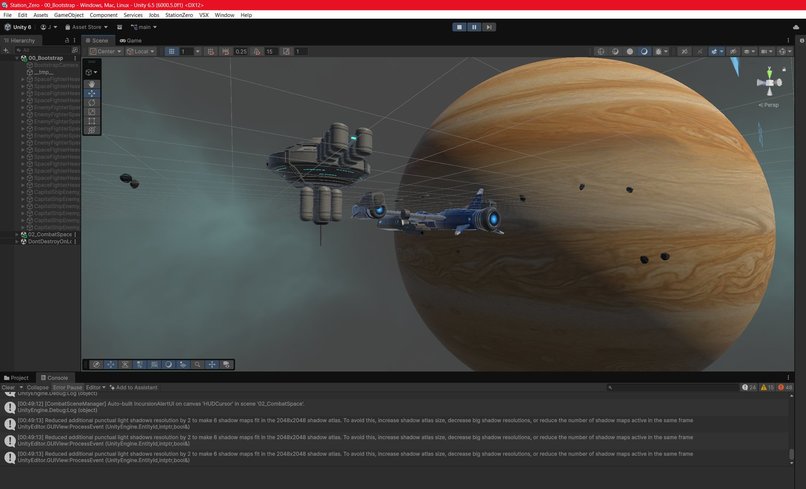
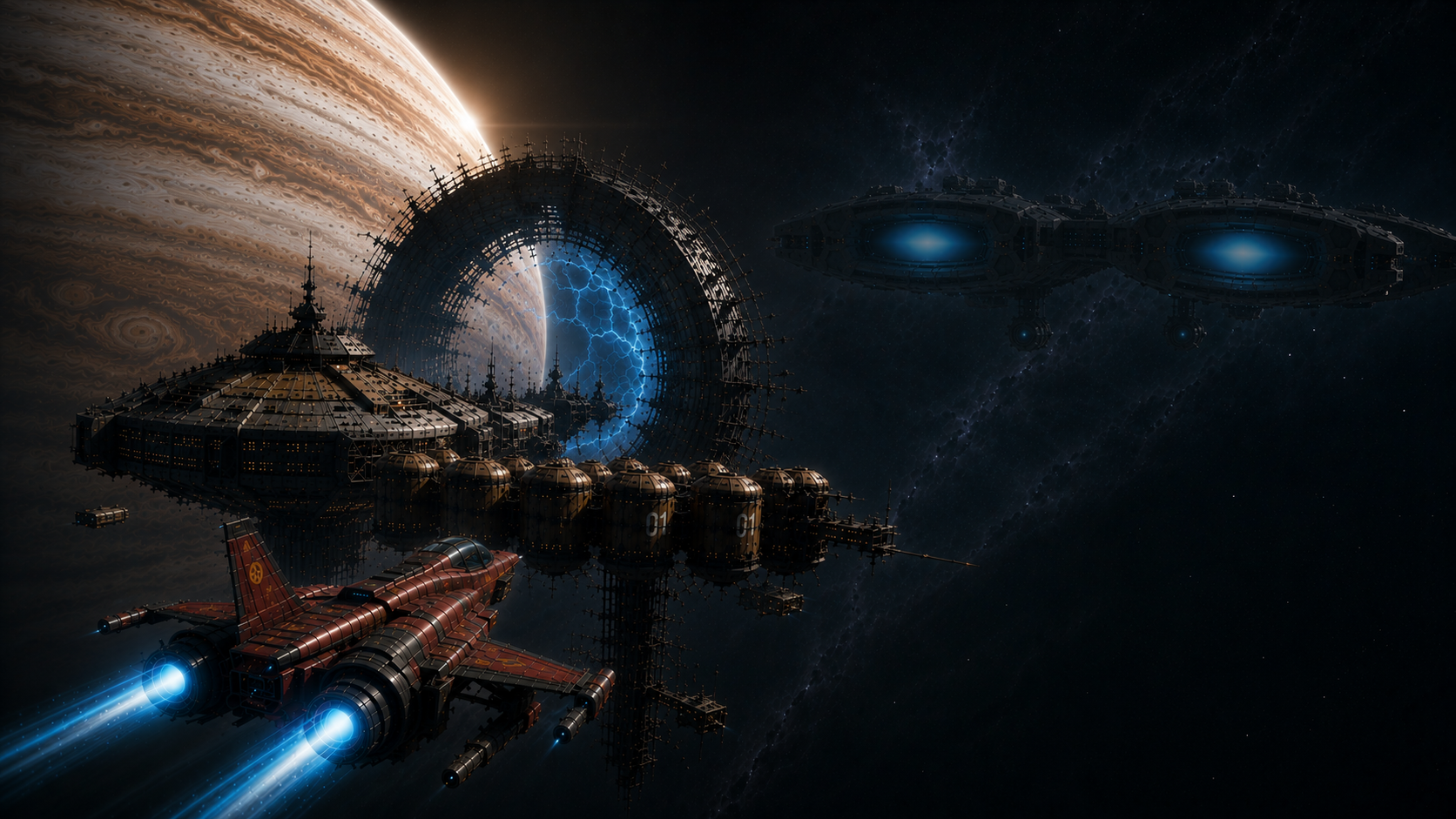
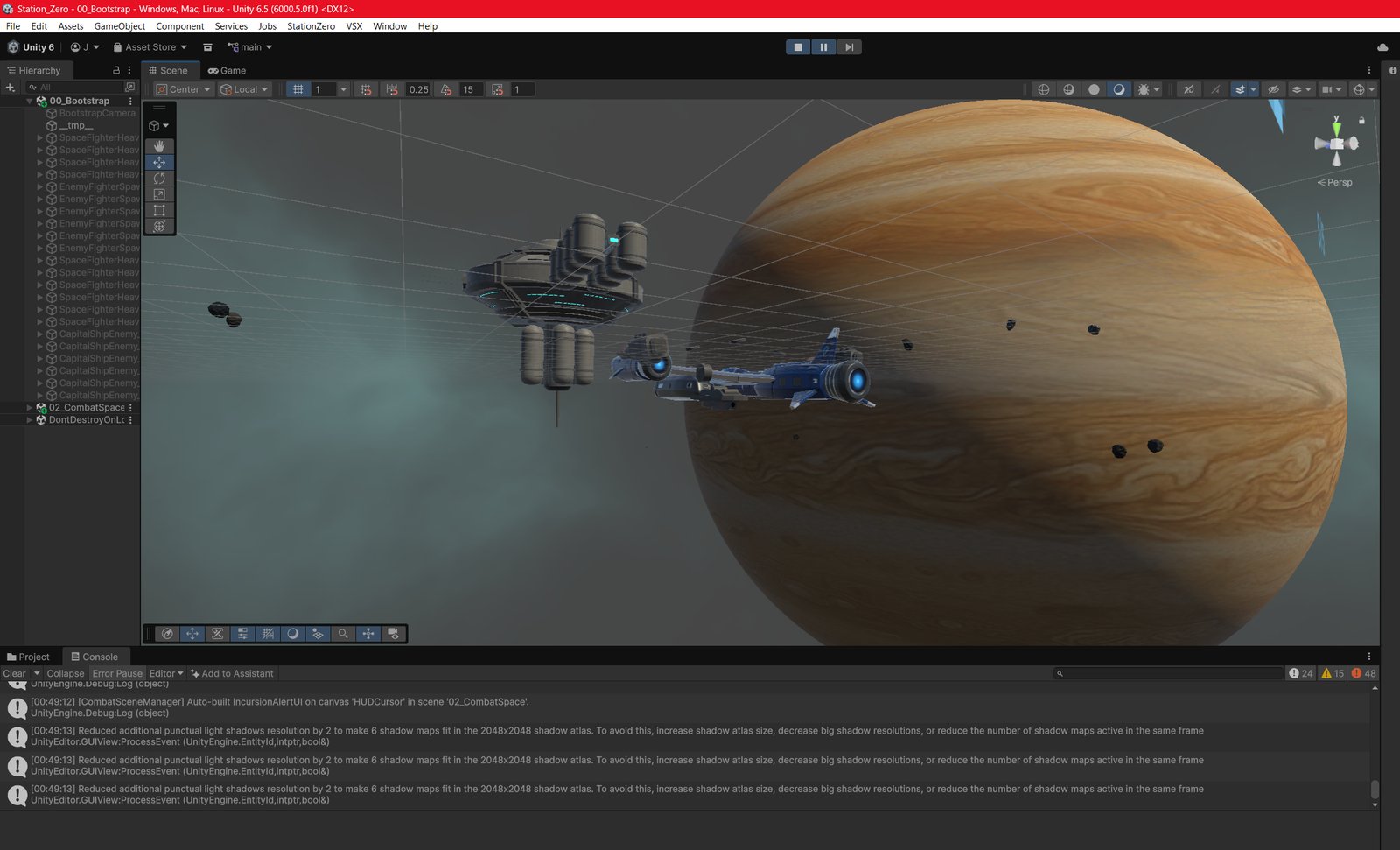
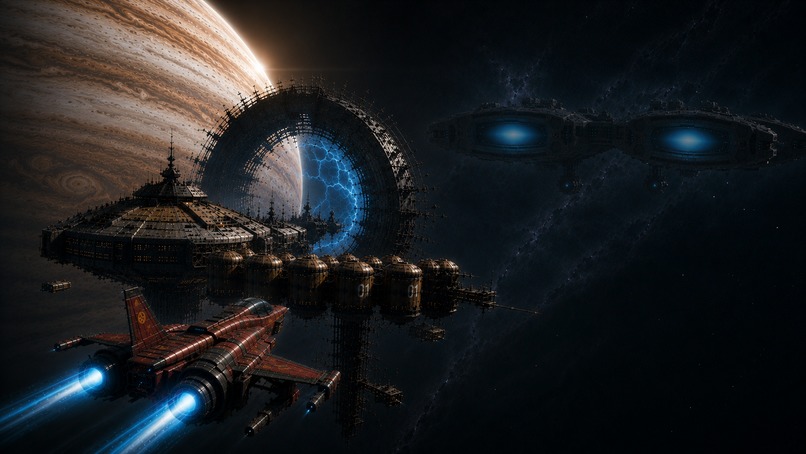
Unity prototyping lab The Unity prototyping lab — the Station Zero project: station, a kitbashed fighter, Jupiter, and the incursion systems auto-building the combat HUD.

The station meta-game — the loop that makes combat matter. Combat without stakes is a tech demo, so the lab was also where we built the station command loop: an economy (salvage / station value / tiers) that turns combat into resources, crew you recruit for bonuses, a research tree that unlocks capability, a faction "Threat" system that makes the galaxy react to you, and hailing/trading for non-combat play — all presented through an LCARS-style station console so the fantasy is that you're a station commander, not just a pilot.

The insight that made everything portable: the meta-game is just data and logic. A build is a frame ID and a socket map. Crew bonuses are numbers. Research is a state tree. The economy is arithmetic. None of it is bound to Unity, physics, or shaders. Unity wasn't the destination — it was the fastest simulator for the design, and because we'd built everything as decoupled services around an event bus and a persistence adapter already pointed at Horizon, we knew the winners would carry cleanly.


3 · Bring it home — convert back into Horizon

Step 3 is the "bring it home" pass. The good news up front: because physics/presentation and data/logic stayed honestly separated, the seam we cut along is clean. In the Unity project, of ~148 gameplay scripts, only ~11 touch flight physics at all. Everything else is portable logic.

The whole action layer already runs in Horizon from Part 1 — kinematic flight, combat, missiles, turrets, targeting HUD, enemy brains and formations, waves, capital-ship launch, progression, save, zones. The engine-bound part is done. Step 3 rides the station meta-game in on top of it.

What ports almost verbatim (data + logic → Horizon server-authoritative TypeScript "services", with per-player local scripts for HUD):

Unity system Horizon form
Ship builder (frame ID + socket→part map) SZShipBuildStore service; parts spawned/attached to each socket transform; Orbit camera for the build screen
Crew · Research · Faction · Economy State machines + arithmetic → TS services, saved to world.persistentStorage (keys were already namespaced sz_...)
Incursions & expeditions Directors on the existing wave plumbing — actually simpler on Horizon, since everyone is already in one shared hosted instance (no scene load, no join dance)
SZEventBus Maps one-to-one onto Horizon LocalEvent / NetworkEvent

What gets rebuilt, not ported — we were honest about what doesn't cross:

  • VFX and shaders. Custom shield/energy shaders and layered particle stacks don't exist on Horizon; rebuilt with materials, particle gizmos, and emissive tells.
  • All UI. Unity's screen-space LCARS console becomes 3D-space panels, per-player and ownership-bound — a real rewrite that fits the fiction: the console literally becomes a world-space station display you stand at.
  • Networking. The Unity build's custom multiplayer stack is deleted — Meta hosts the world and gives you implicit server authority, avatars, and voice. Less code, not more.
  • Scenes → zones. Six Unity scenes collapse into zones of one persistent world.

The trade, everywhere: keep the depth of the Unity design, accept a presentation downgrade where the platform demands it. Depth was always the point; shader fidelity never was.


4 · The conversion up close — what the agent skills actually did

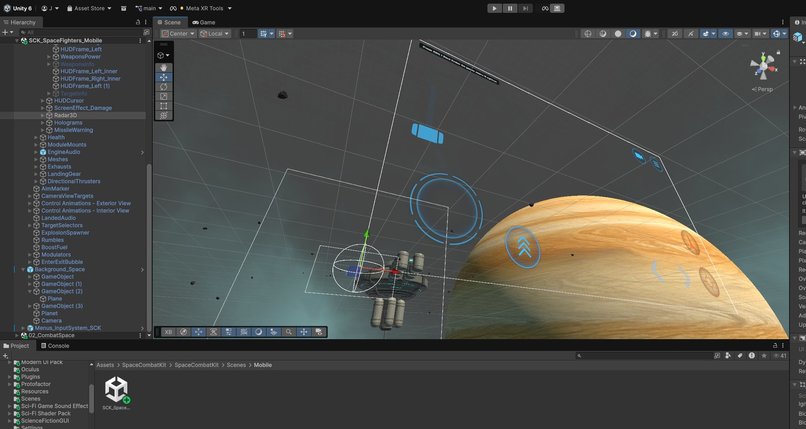
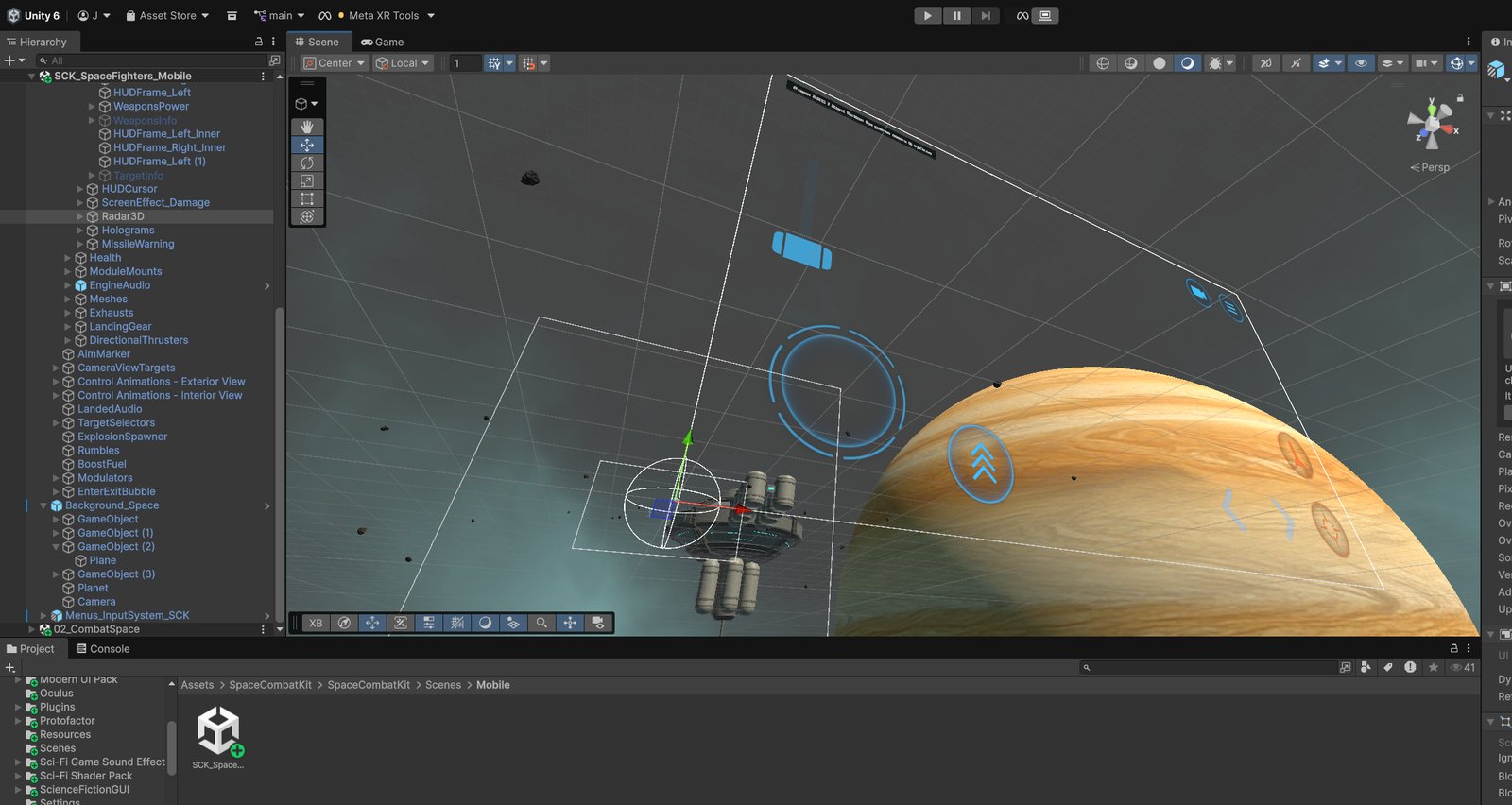
Bringing it home wasn't hand work. With gameplay already prototyped, the conversion ran on two custom agent skills working in tandem — one for authoring the Horizon world and its TypeScript, one for the Unity→Blender→Horizon asset hand-off. Each skill carries the platform's real budgets and failure modes, so the agent built to spec instead of guessing. The trick that makes this efficient is staying close to Meta XR spec, URP, and mobile budgets in the Unity project from day one, so nothing needs re-authoring to survive the jump.

SCK mobile / Meta XR Staying in spec — the Space Combat Kit ship rig in the Mobile scene under Meta XR Tools, inside Horizon's URP/mobile envelope from day one.

The code. A coding agent rebuilt every gameplay system as Horizon TypeScript from the Unity C# base — 51 station services (SZ*) plus 8 console screens and a battle banner, each bound to real data catalogs generated from Unity, all saving through 9 persistent keys.

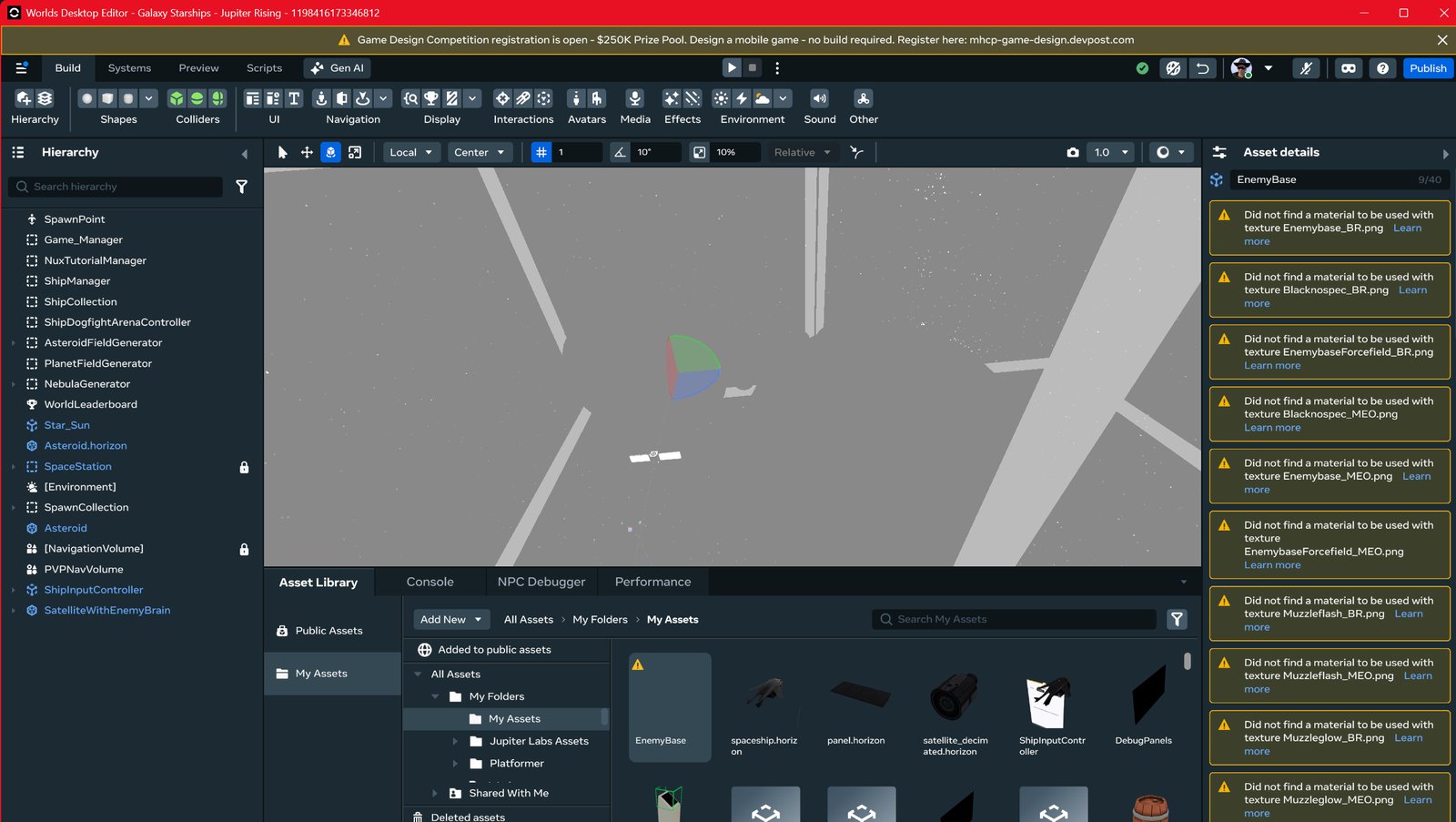
The asset package — a folder you just drag in. Every model was pulled from Unity and normalized through Blender to Horizon's material convention, and the skill does the unglamorous compatibility work automatically:

  • decimating meshes to mobile polygon budgets,
  • resizing textures to powers of two,
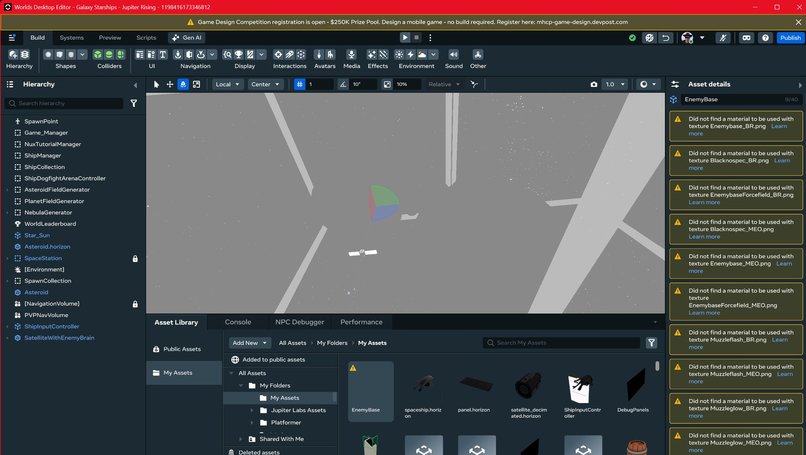
  • renaming every map to the exact _BR (base color + roughness-in-alpha) / _MEO (metallic / emission / occlusion) strings the importer expects,
  • exporting binary FBX (Horizon and Blender reject Unity's default ASCII), imported at 0.01 scale.

The output is one staging folder, HorizonExport/: 20 whole-ship packages, 267 kitbash part meshes across 18 families, and 267 generated part icons for the builder menus. 630 files, 280 MB — one import, nothing to reassemble.

Horizon mesh import Converting to Horizon — importing meshes with the _BR/_MEO texture convention and resolving material matches in the Desktop Editor.

3D audio. Unity AudioSource maps to Horizon's spatialized AudioGizmo. The flyby whoosh isn't a UI blip — it's emitted from the passing enemy ship's own world position, so it sweeps across you in true 3D as the ship screams by; detection keys off trigger-radius entry/exit on a 100 ms scan so one fast pass fires exactly once. Voice-over runs through gamestate-grouped, positioned audio entities with randomized selection.

Effects. With no custom shaders on Horizon, the Unity/kit VFX were rebuilt as native ParticleGizmo effects driven from script events — the flyby whoosh, ship explosions, and the energy-shield bubble whose rim glow (a shader parameter in Unity) became an emissive material value the controller drives directly.

The design document as the contract. One living file, HORIZON_SETUP_REQUIREMENTS.md, specifies exactly what to configure in the Desktop Editor — the Persistent Player Variables (PPV) each service uses, the API modules to enable, and the component placement with every script parameter:

Variable key (PPV) Type Owner service Holds
sz_shipbuild Player · Object SZShipBuildStore current build + saved fleet
sz_research Player · Object SZResearchService unlocked, scans, queue, drops
sz_crew Player · Object SZCrewService hired specialists + recruits
sz_economy Player · Object SZEconomyService credits, salvage, reputation
sz_faction Player · Object SZFactionService Threat standing per faction
sz_away Player · Object SZAwayMissionService offline ops + Station Reports
sz_next_incursion World · Number SZIncursionDirector shared incursion clock
// Script parameters are specified the same way — the tuning knobs
// live in each component's propsDefinition, so the editor pass is fill-in-the-blank:

// SZCrewService — starter roster + cap
maxRoster:      { type: Number, default: 12 }
starterCrewIds: { type: String, default: 'CREW_PETRA_VOSS,CREW_RAEL_SOMO,CREW_KIRA_DASK' }

// ShipFlybyVFXController — 3D audio + particle trigger
triggerRangeMeters: { type: Number, default: 25 }
minEnemySpeed:      { type: Number, default: 8 }
scanIntervalMs:     { type: Number, default: 100 }

5 · The station command loop today

The meta-game isn't a wish list — it's built and typechecking. It's a genuine systems sim, and its systems interlock:

  • Ship Workshop — type-locked sockets, class-locked frames, live stat simulation. The same custom build plays differently on a fighter than a capital, because each frame class amplifies its favored part category.
  • Research — the deliberate bottleneck. Each queued research occupies one Engineer research bay, and bays are shared with repairs, so throughput is gated by your crew. Exotic alien tech costs the most time and salvage to unlock (a tiered multiplier), and there are two paths: rare part drops or 10 blueprint scans + salvage.
  • Crew as capacity — Pilots fly combat runs, Traders run trade, Engineers staff research and repair. Named specialists plus anonymous recruits you hire with credits, so the bottleneck is tunable.
  • Factions & part politics — reputation as hostility (Threat). The tech on your ship — alien, stolen, or a rival's — shifts every faction's live standing. And the sharpest tension in the game: the best stats come from the exotic gear that generates the most enmity, so top performance forces you to manage your reputation, not ignore it.
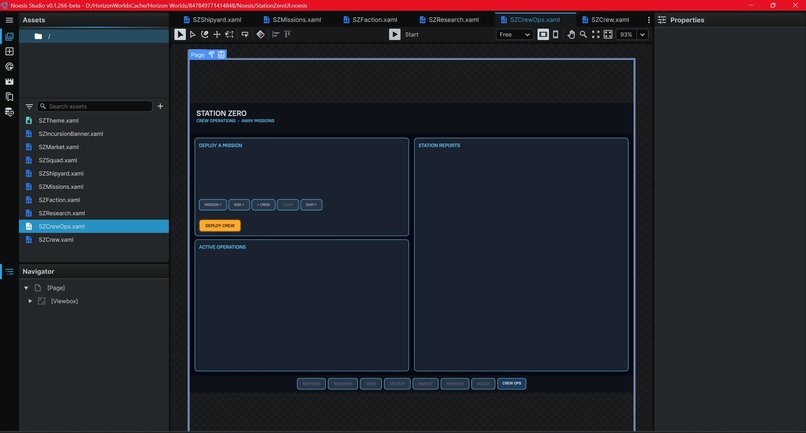
  • Offline Crew Ops — deploy crew on absolute-time missions that resolve while you're logged out; log in to Station Reports with rewards, ship damage, and faction fallout. Combat runs need a Pilot and feed blueprints + rare parts; trade runs need a Trader and open factions + tech.
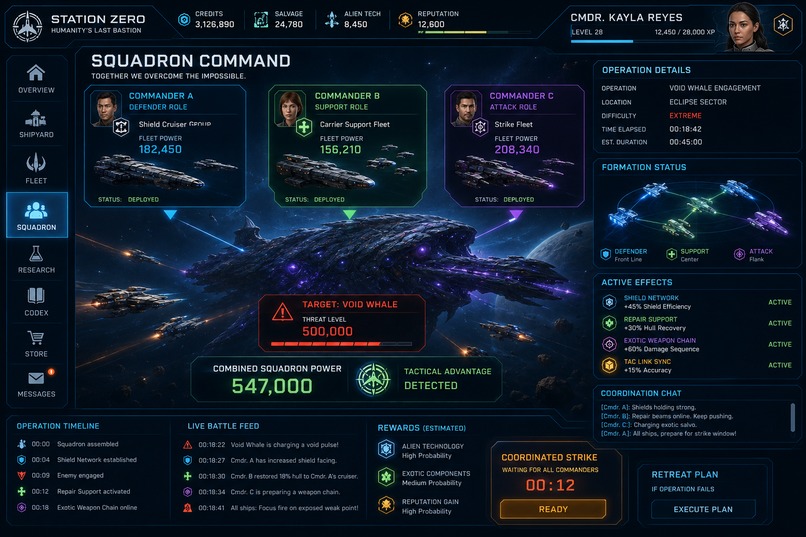
  • Incursions & pirates — continuous pirate raids and scheduled Varkesh incursions with a spectator battle view; the coalition fleet that fights alongside you scales with how many factions still like you. All PvE.

Every one of those loops feeds another: combat feeds research and faction Threat; research gates power; crew gates research; faction standing gates your allies and your contracts. That interlock is the "design depth and systems thinking" the whole project is built to earn.

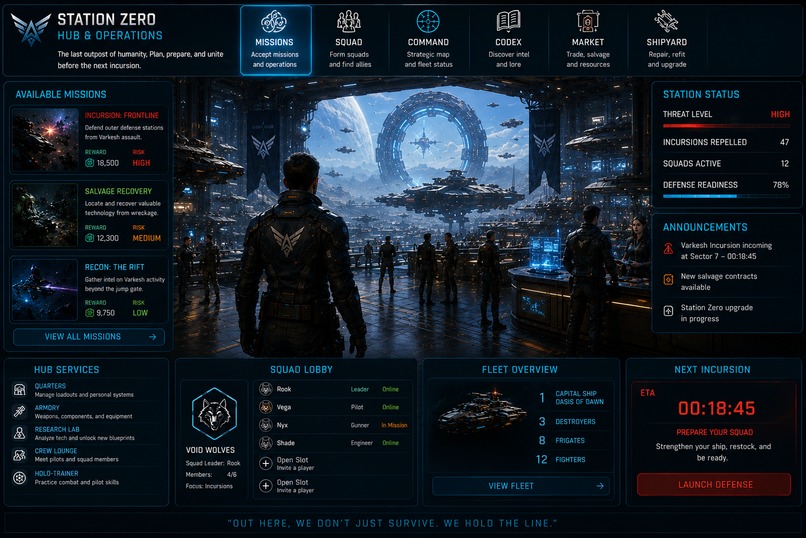
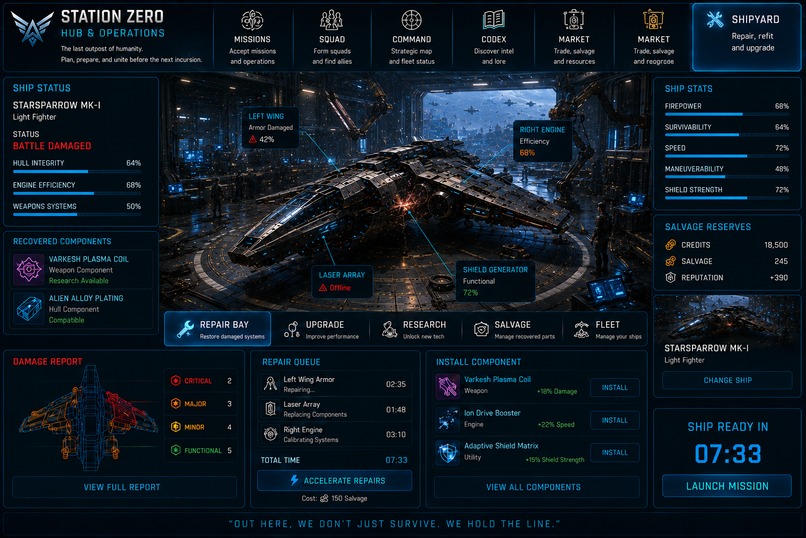
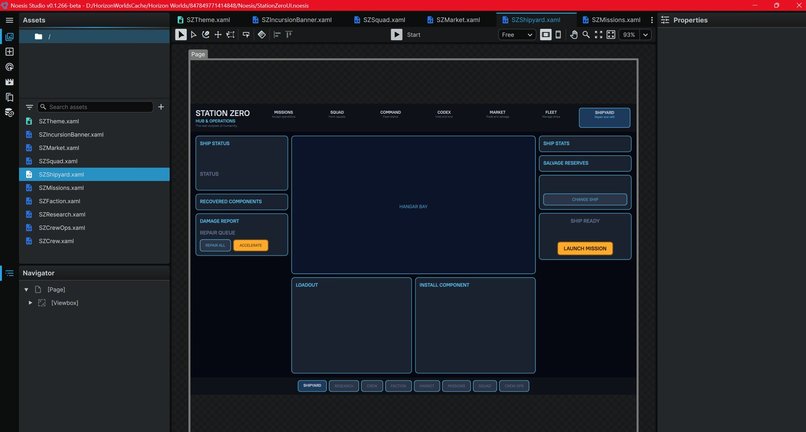
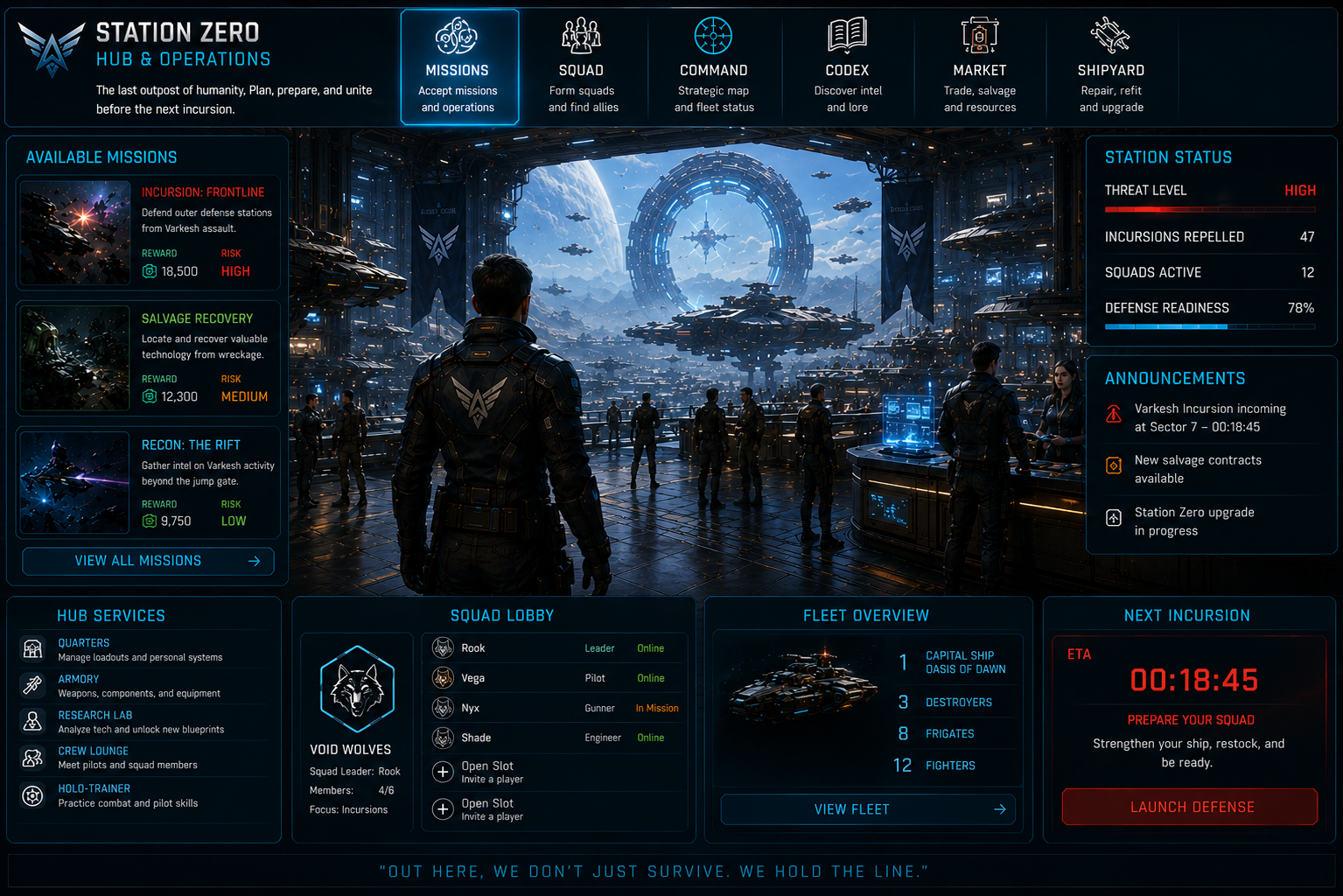
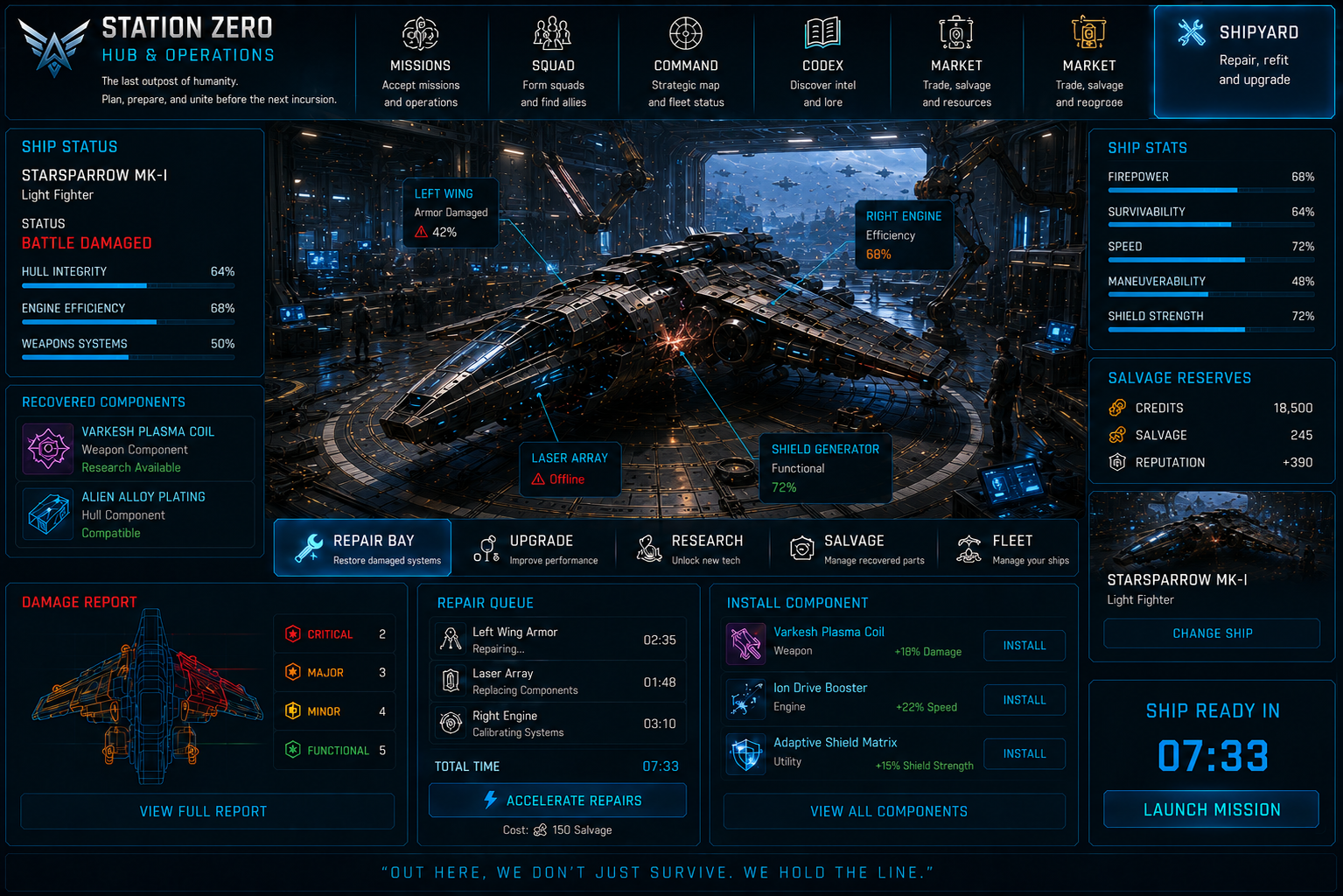
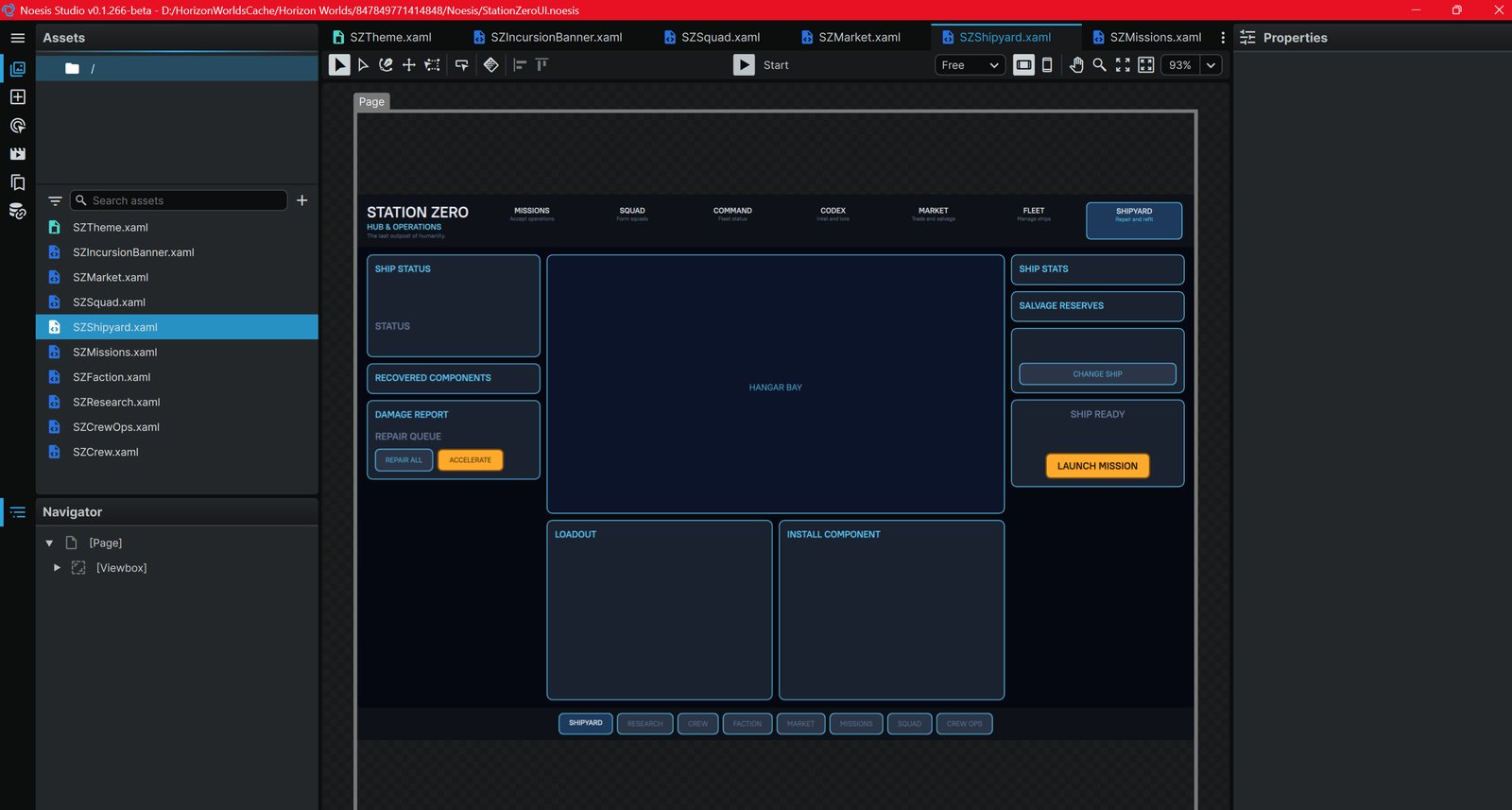
Noesis Shipyard hub The Horizon-side rebuild — the LCARS Shipyard hub in Noesis: status, hangar, salvage, loadout, install-component, repair queue, and the 8-screen tab nav.

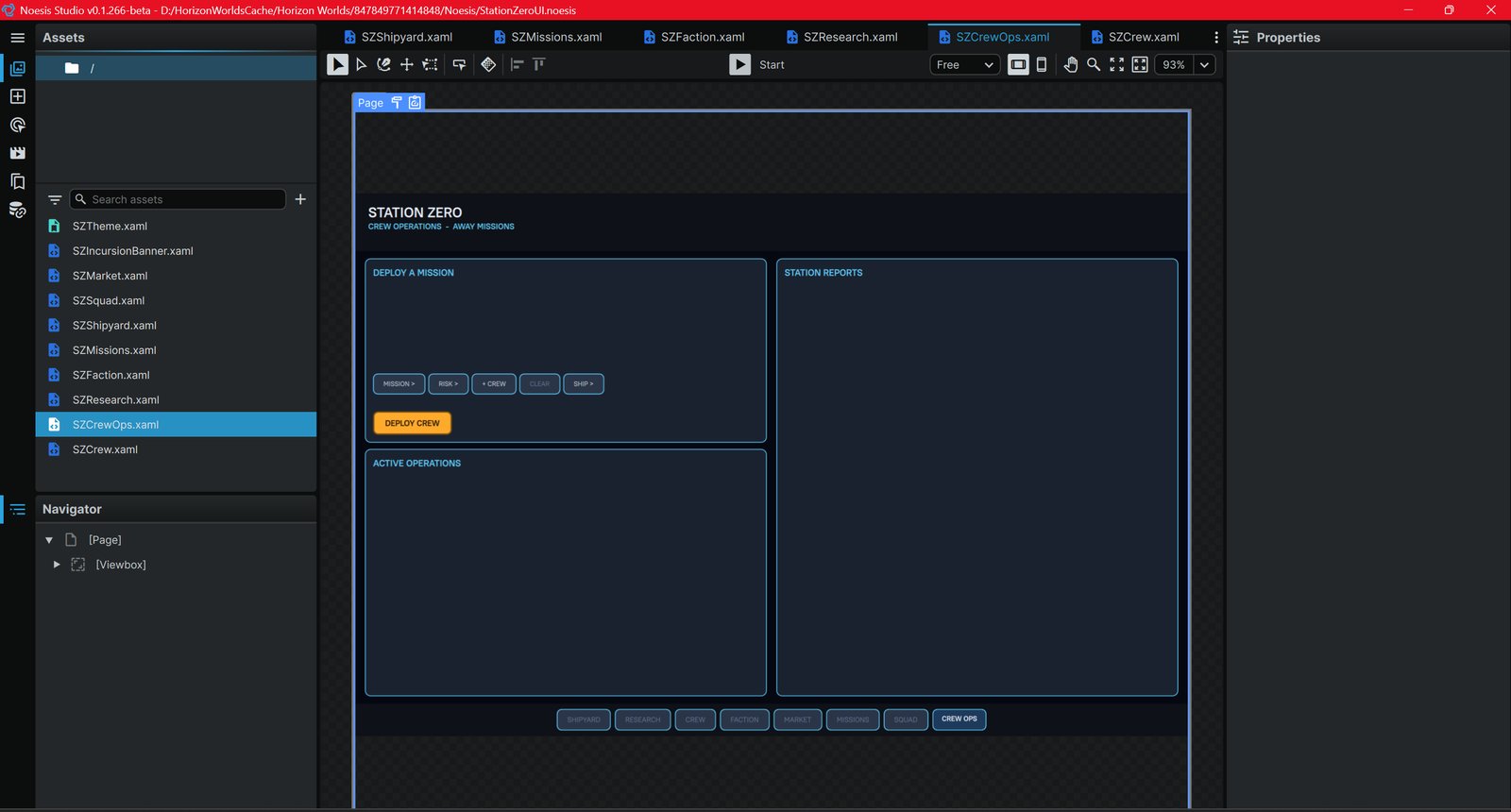
Noesis Crew Ops Crew Operations / Away Missions — deploy crew, track active operations, and read the Station Reports on return.
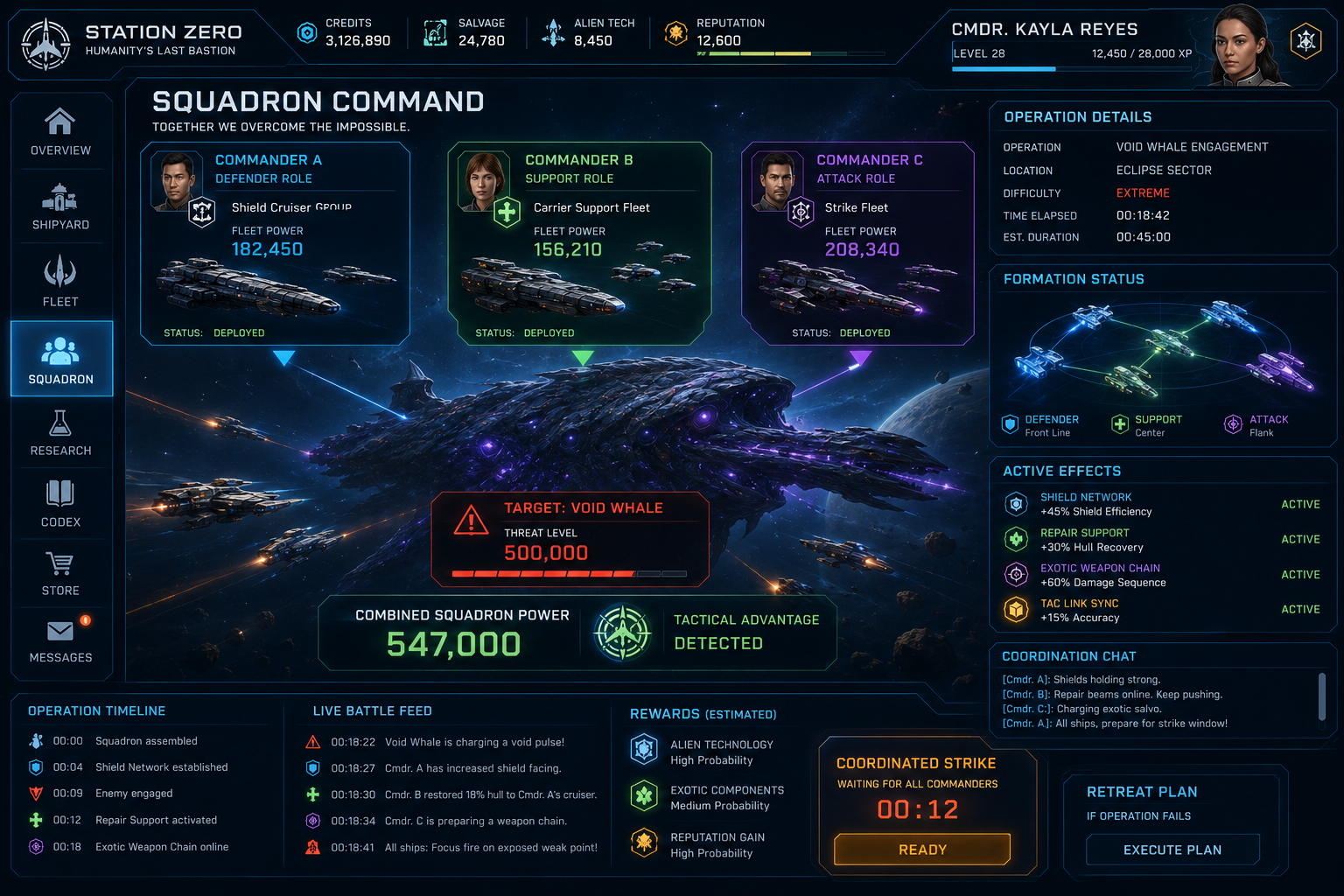
Squad command Squad command — coordinating multiple ships against a Varkesh raid group.

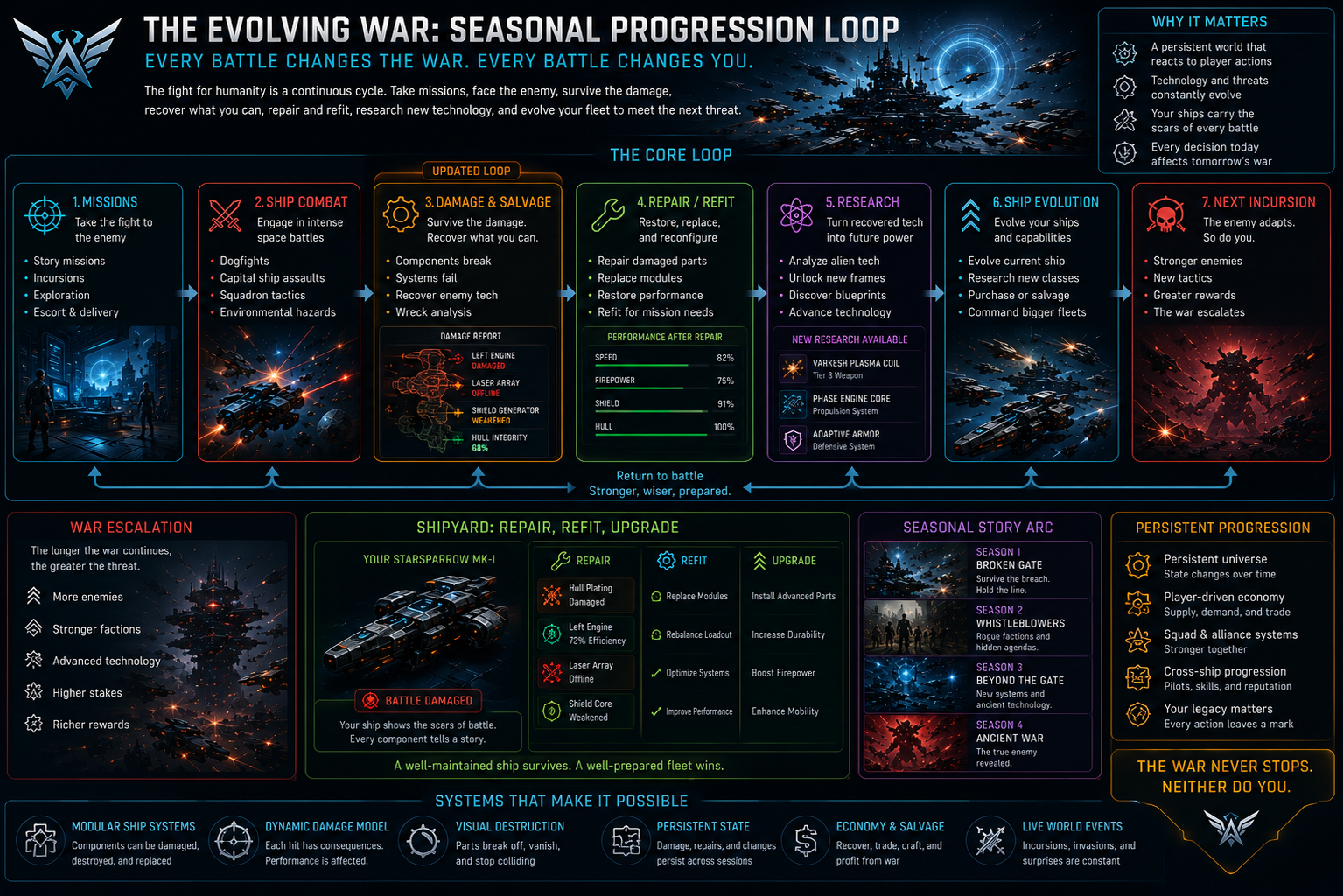
Seasonal progression Seasonal progression — the captain-pressure loop that shapes each season.


6 · The automation line — tested, not theorized

Part of what makes this a workflow story is being honest about how far agents fold into a production pipeline today. So we didn't estimate it — we drove the Horizon Desktop Editor live and measured. Here's what actually happened.

The unlock: press-duration clicks. The editor silently ignores instantaneous synthetic clicks — which is almost certainly why browser automation looked "blocked." Separating press and release by ~130 ms makes every control respond. That one detail flipped the editor from "nothing works" to "the structural setup automates."

Fully automated — proven live in the world:

  • ✅ C# → TypeScript conversion of every gameplay system, and every code fix (headless, in git)
  • ✅ Mesh decimation, power-of-two textures, _BR/_MEO renaming, binary FBX — the whole HorizonExport/ package
  • ✅ Persistent Variable Group + all 10 variables (9 Player·Object + 1 World·Number, initial 0)
  • ✅ Asset import — create folder, import dialog, native file picker via typed path, multi-select
  • ✅ Empty-object creation and script attachment (a searchable group:class picker)
  • ✅ Script registration — files present on disk + a clean compile, and the editor registers the whole set

Still manual — hands required:

  • ⬜ Object placement / positioning in 3D space
  • ⬜ Entity-reference wiring (dragging a scene entity into a script prop)
  • ⬜ Property-panel numeric widgets (they reject typed values)

The manual remainder is narrow and specific — it's the two things that are inherently spatial (positioning, drag-wiring) plus one stubborn custom input (numeric fields). Everything structural — variables, import, script setup, code, the design doc — is hands-off. So the honest ratio is better than we'd feared going in.

Advice from actually doing it:

  • Keep gameplay values in code defaults. The numeric property widget is the one input the editor won't take from an agent — and every value we needed was already a propsDefinition default, so we never had to touch it.
  • Reference persistent variables as groupName:variableName (StationZero:sz_research). Bare keys silently no-op against the group — a bug that only shows up in production, never in a quick test.
  • A file on disk isn't "in the world." The script manifest is cloud-authoritative and prunes files it doesn't know; scripts get registered by being present and compiling cleanly, not by hand-editing the manifest. Git is the source of truth; the world is a separate registration.
  • Verify against the real editor types, not a local stub. Two live crashes (a world-variable API that doesn't exist on the player object; a persistence blob over the 10,000-char cap) passed local tsc and only surfaced against the editor's actual API and limits.

The takeaway

Prove the feel where it's risky (Horizon). Prove the fun where it's fast (Unity). Keep the two layers honestly separated — physics/presentation vs. data/logic — convert the winners back with skills, and hold compatibility the whole way so the port is clean. The round trip pays for itself: Horizon told us the flying is fun before we built content; Unity told us the systems are fun before we paid to rebuild them; and the clean seam meant they carry across as TypeScript services with minimal rework.

The result is a mobile-first Horizon Worlds space game with the ambition of a full Unity build behind it — flight proven, combat proven, a deep station-command loop already running in TypeScript, and every asset staged in a single import-ready folder.

What's next: the in-editor finish — import the package, bundle the part icons into the UI asset, set placements and script parameters, wire the spawn seams, and playtest. The agent builds, converts, and documents; the creator imports and tunes.


Development log

A note on the development screenshots in the gallery above: these are working prototypes, not final art — thrusters, weapons, and some VFX are still placeholder. That's the point of the pipeline. A ship is a frame plus a socket→part map plus a few effects, so we can swap a model or a VFX and re-test the design in minutes — proving the feel before committing to final assets.

The design-document pages in the gallery aren't just planning — they're the spec the MCP-driven agents built from autonomously. The Game Design Document defined the six progression pillars; the Player Journey Map defined the first-15-minutes onboarding (one new mechanic per beat); the Visual Concept Package defined every screen. The agents read those documents and implemented them. So the images trace a single line: concept → design document → agent-built system.


Built with

Meta Horizon Worlds (Unity authoring path) · Horizon Desktop Editor · Unity MCP (live editor drive) · URP / Meta XR spec / mobile · TypeScript · Noesis / XAML UI · Unity 6000.3 · Blender (MCP) · Space Combat Kit · Claude Code + custom agent skills

Prove the feel where it's risky. Prove the fun where it's fast. Keep them separable, convert with skills, and the round trip pays for itself.

Log in or sign up for Devpost to join the conversation.

Submission history