-
-
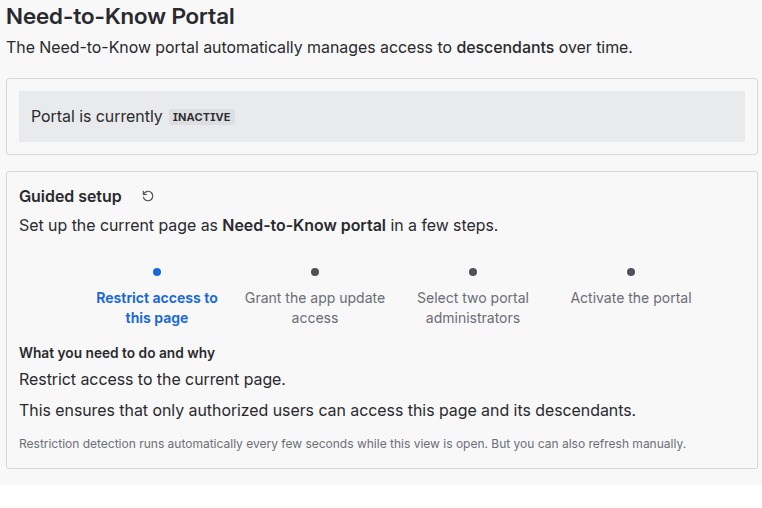
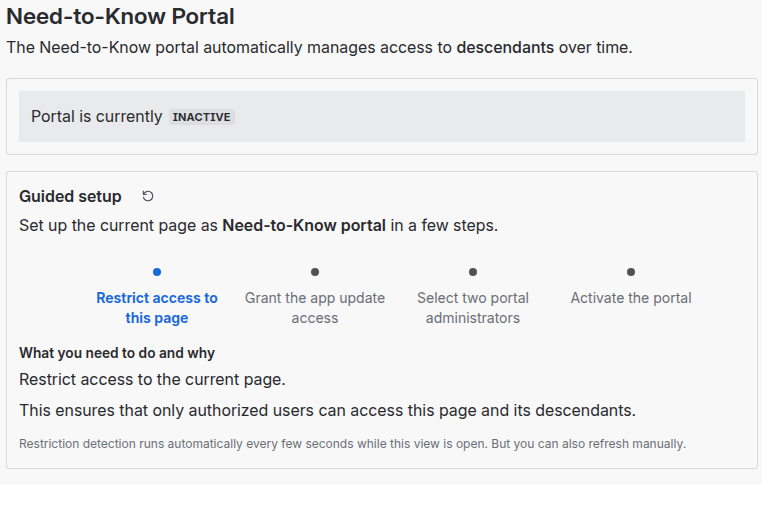
Place the Need-to-Know macro on any page and a guided portal setup helps you getting started quickly.
-
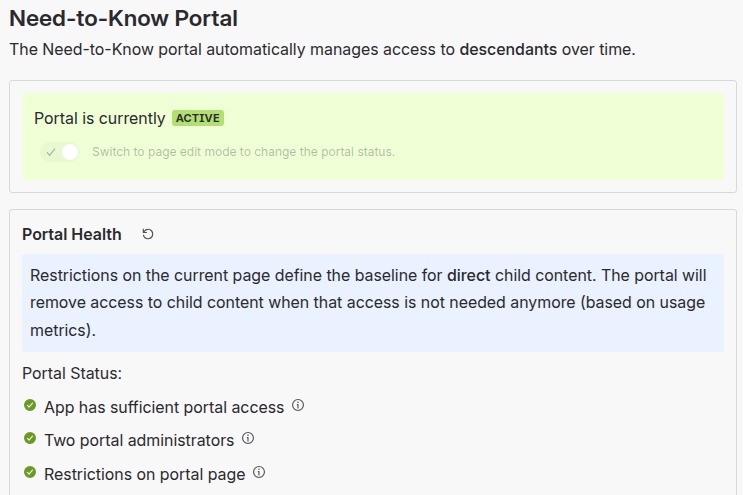
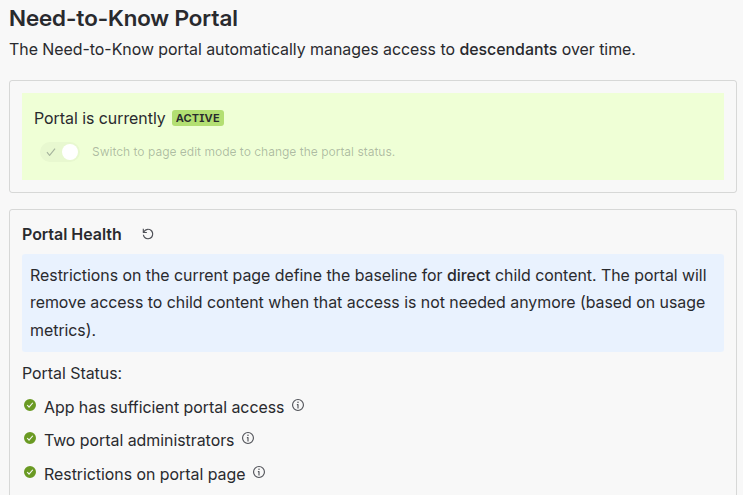
The Need-to-Know portal is active.
-
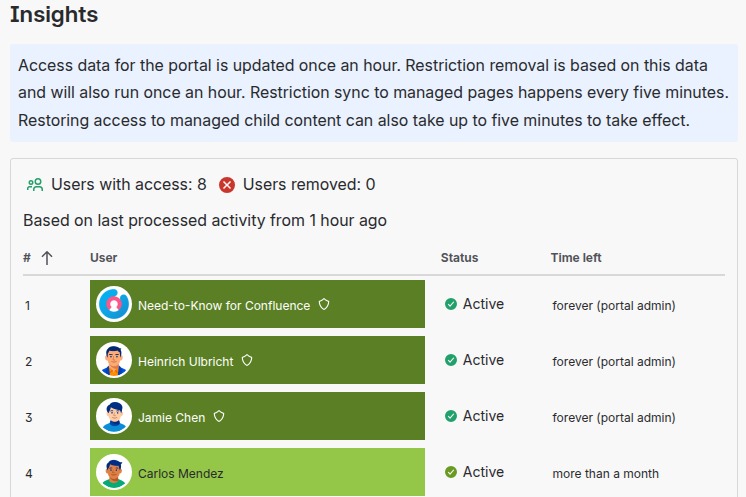
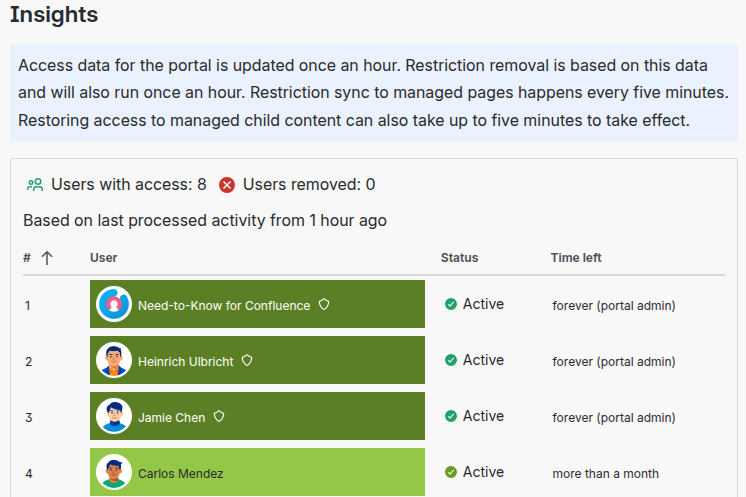
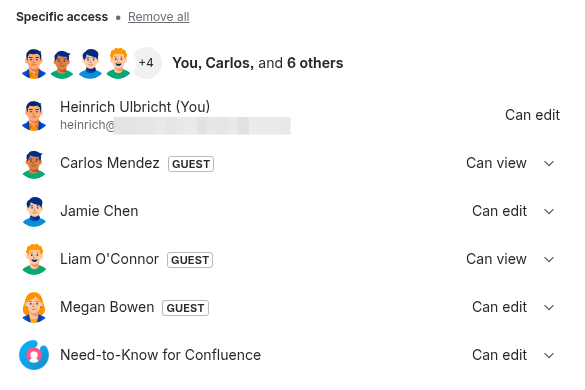
The user list shows (to portal admins) who has access to descendant content and when their access will be revoked, based on access events.
-
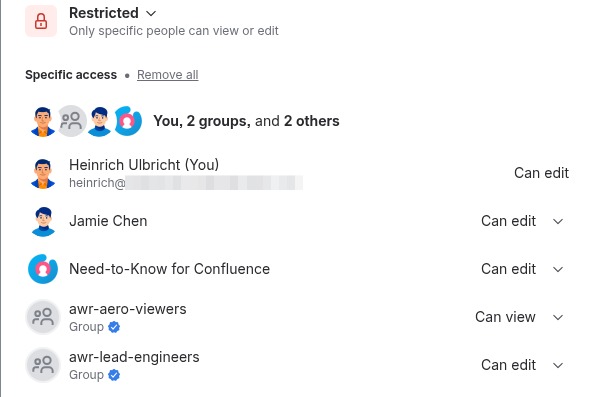
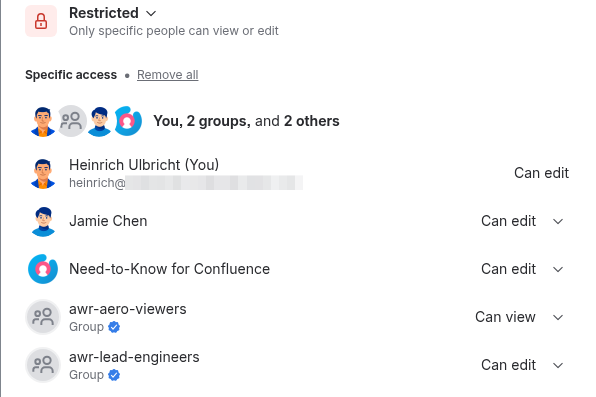
Configure the access baseline for descendant content on the portal page, using standard Confluence restrictions. You can use groups here.
-
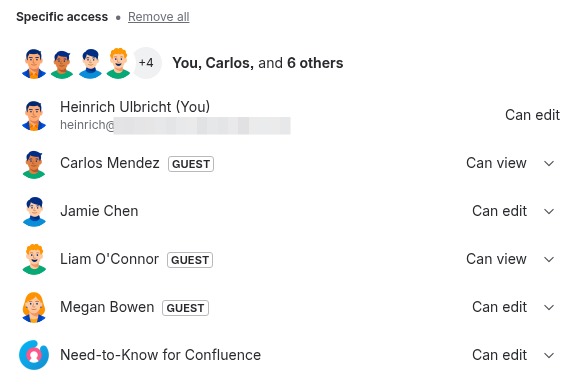
The Need-to-Know portal configures access restrictions for portal child pages and takes care of removing inactive users automatically.
-
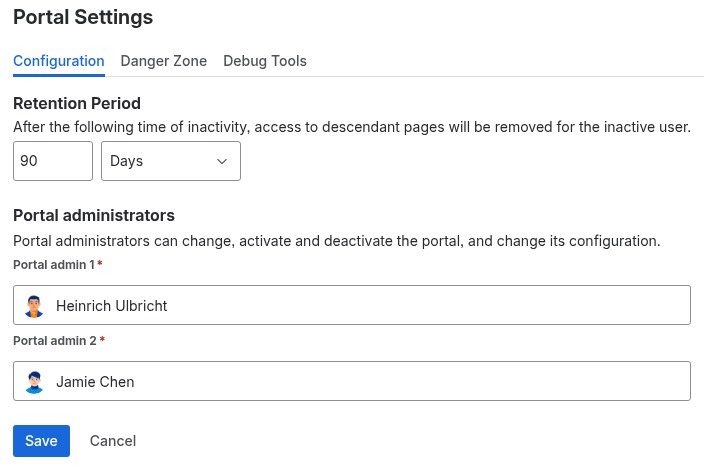
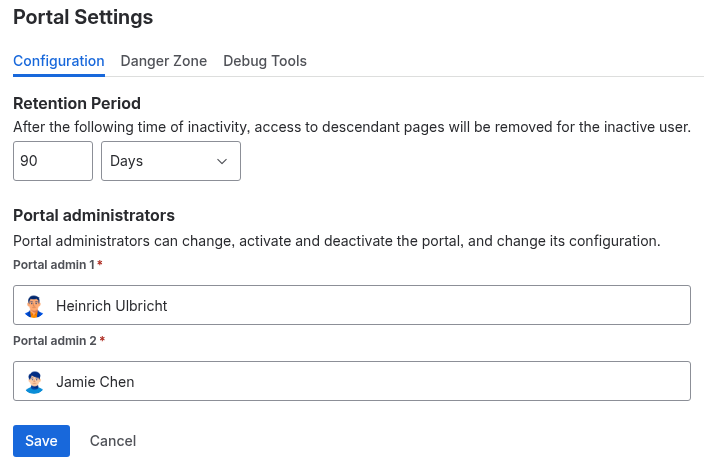
Set portal admins who are allowed to change portal settings and view portal usage insights. Also set the removal time for inactive users.
-
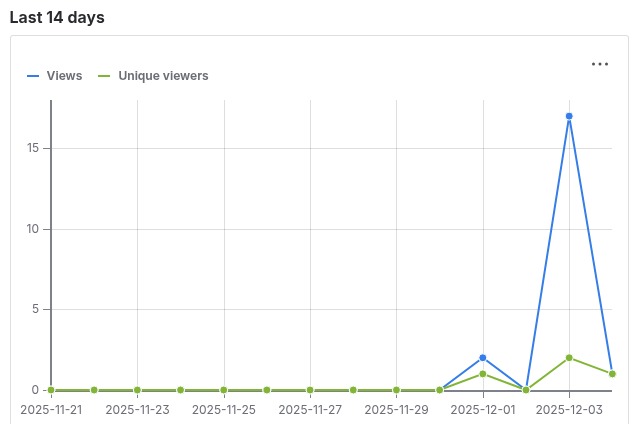
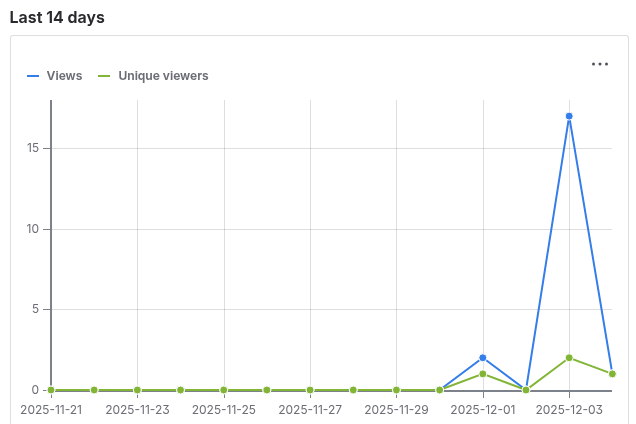
Portal admins get insights into portal views and unique viewers the last 14 days. This covers all descendants of the portal page.
-
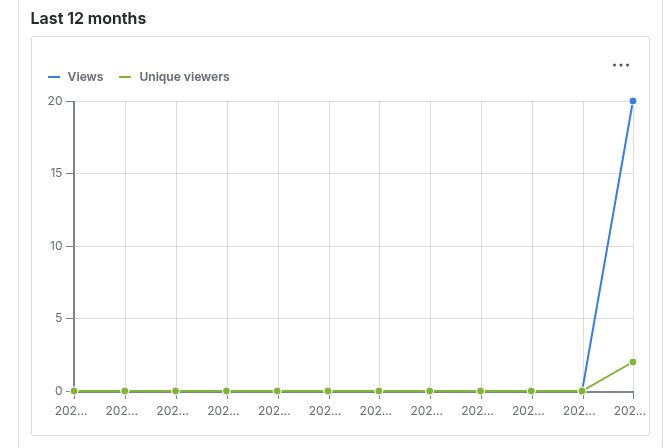
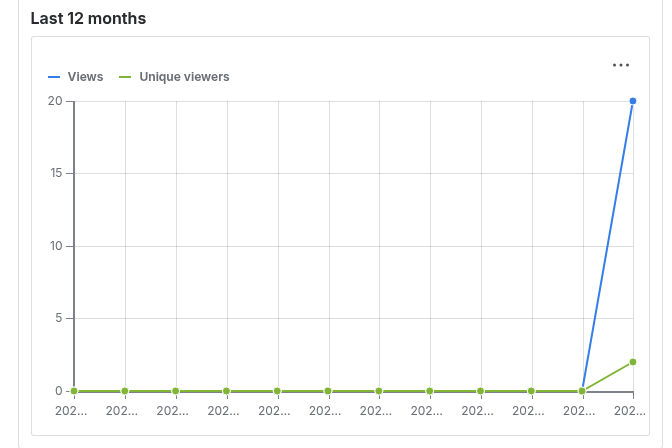
Portal admins also get insights into portal views and unique viewers the last 12 months. This covers all descendants of the portal page.
Inspiration
While collaborating with many clients in Confluence, I noticed the following concerning pattern: project assignments came to an end, but the level of access in Confluence stayed. For years after an assignment, team members were still able to access sensitive project information.
While this retained level of access might be intentional, it often is not. There had to be a solution.
And now it's here: Need-to-Know for Confluence is your solution to permission sprawl.
What it does
With Need-to-Know for Confluence you place a smart macro on a page that becomes your Need-to-Know portal.
Restrictions on the portal page define the baseline access for descendant content items. The team collaborates on those content items and the Need-to-Know for Confluence app keeps track of who is actually active. After a certain time of inactivity, access is automatically revoked for inactive collaborators, based on real usage.
How I built it
The app was built using Atlassian Forge and the built-in UI Kit components for the frontend. Everything runs on Atlassian, as it should be for an app that processes sensitive information.
What was great for development was Atlassian providing a Forge MCP to aid LLMs that were used in creating the app.
Challenges I ran into
While creating the initial proof of concept for the app was relatively easy, the following challenges stood out:
How to store rather large amounts of data with Forge? Access events need to be stored and processed. In large environments, the amount of data that needs to be handled might push the Forge data stores to their limits OR result in costs for the app creator. It took some iteration to find the right balance that hold up even in large environments.
The next challenge was a small one with large UX impact: UI Kit provides really nice diagrams, but currently it is not possible to set specific colors for e.g. the parts of a Donut chart. At least, there is a roadmap item "under consideration" to address this.
Another challenge is Forge not supporting guest users - the macro just doesn't render for them and shows an error message. Many companies collaborate with external users that are guest users in Confluence. At the time of writing this, Forge does not support guest users. This means that access tracking for guest users is not possible. But again, I noticed Atlassian is working on that and plan to make that work until the end of 2025 - which is great.
Accomplishments that I'm proud of
Seeing the app in action is great. The real accomplishment will be getting positive feedback from users, which is a next step.
What I learned
Designing data storage and long-running operations on Forge requires thought. Also, LLMs currently get quite confused when generating code to access the Confluence REST API - they mix up v1 and v2, and make up non-existing endpoints. Also, they often don't choose the most effective endpoints. So, code reviews are a must.
What's next for Need-to-Know for Confluence
The next step for sure is getting feedback from real users.
Feature-wise the following are good candidates:
- allowing more administrative control for space owners and Confluence admins - they should be able to control app usage on a per-space level; currently, the app is available for all users
- refining what which role is able to do: users with view and update permissions, space owners, portal owners, etc. - the current state is kind of a suggestion, but the details will have to be adjusted according to feedback
- adding more insights into usage patterns; the app tracks page access, so it is possible to create more analysis based on those and surface them on the space or site level
- adding a self-service form for removed users to quickly request to be re-added by the portal administrators
- localizing the app to other languages than English (it's currently English-only)
And of course there needs to be more documentation, showcases, etc. that help users.
Built With
- cloud
- confluence
- forge
- rest
- typescript

Log in or sign up for Devpost to join the conversation.