-
-
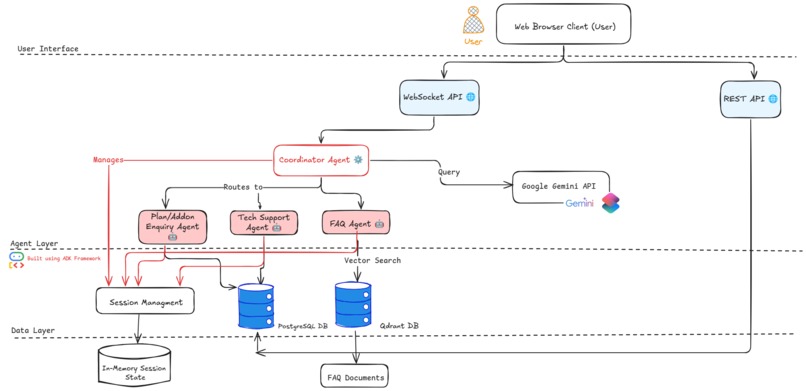
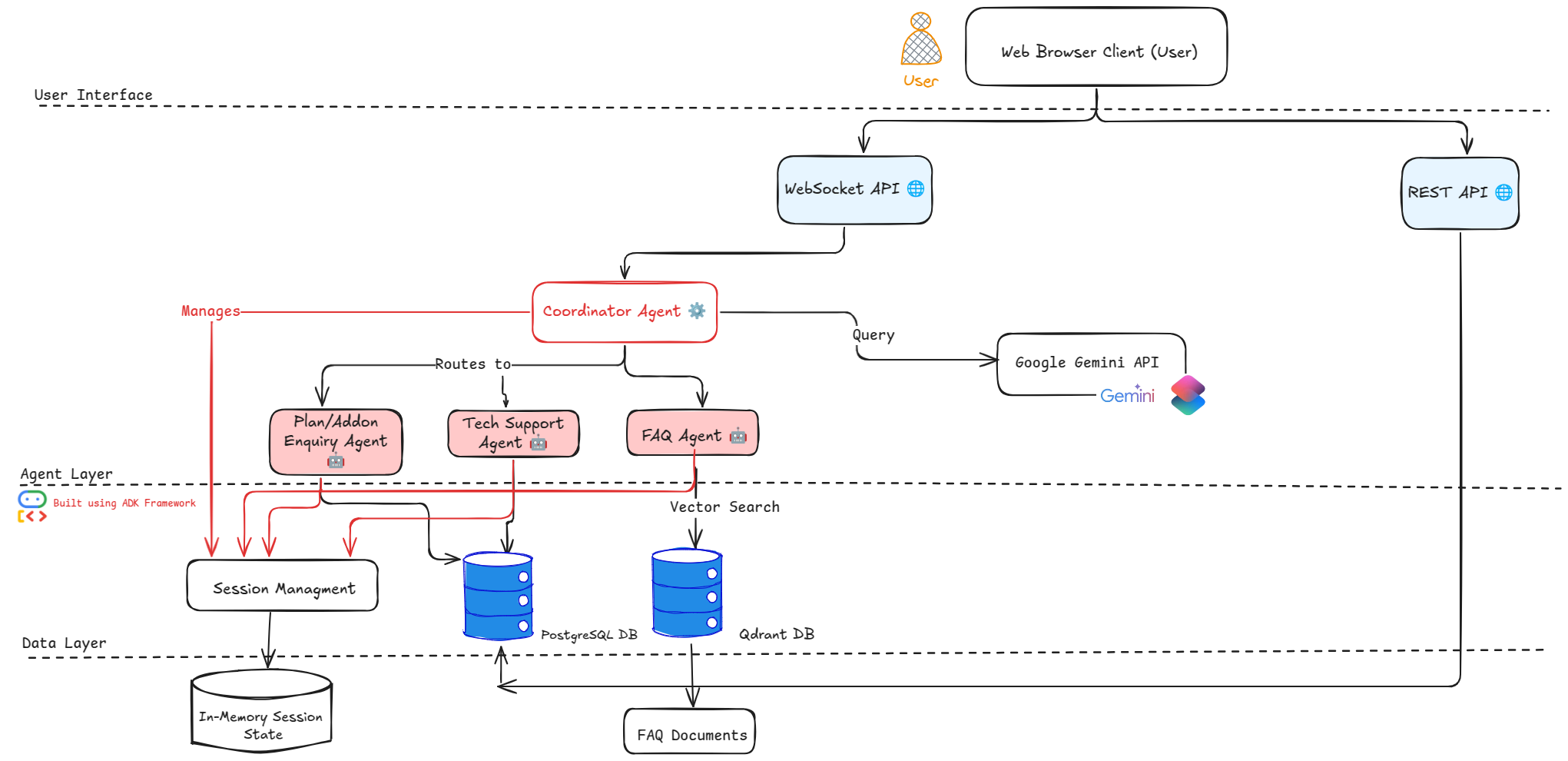
Architecture Diagram
Stateful Multi-Agent System for NexTel Network Provider
Inspiration
Traditional customer service systems often treat each conversation like it's the first, even when it's not. This leads to frustrating repetition and impersonal support. We set out to build a smarter system that remembers customers, adapts responses, and delegates intelligently.
We modeled our system for NexTel, where millions of users demand real-time, accurate, and personalized support.
What It Does
This project implements a stateful multi-agent system for NexTel that simulates modern customer support with memory, specialization, and intelligent delegation.
- State Management: Persisting information about customers and conversations across interactions
- Multi-Agent Architecture: Distributing tasks among specialized agents based on their expertise
The result is a sophisticated agent ecosystem that can:
- Remember customer information and interaction history
- Route queries to the most appropriate specialized agent
- Provide personalized responses based on past interactions
- Maintain context across multiple agent delegates
This example implements a customer service system for an NexTel network provider, where specialized agents handle different aspects of customer support while sharing a common state.
Key Features
- Persisting customer data across sessions
- Identifying customers via phone number
- Delegating queries to specialized agents (billing, tech support, plan enquiry)
- Sharing session state across all agents
- Tracking interaction history for contextual responses
Workflow
Session Creation
Initializes a new session usingInMemorySessionServicewith default values.Customer Identification
The coordinator agent requests phone or email and fetches customer data to populate session state.Query Routing
The coordinator agent analyzes the user's message and routes it to the appropriate sub-agent.State Updates
Agents can update the shared session state with new or modified customer information.Personalized Responses
Agents tailor replies using customer profile and previous interactions stored in the session.
Advanced Features
- Interaction history tracking
- Personalized logic based on user subscription plans
- Modular agent design for scalable growth
How We Built It
The architecture is based on three key patterns:
Session Management
Each user session maintains a shared, updateable state.State Sharing Across Agents
All agents use and update the same session state for continuity.Multi-Agent Delegation
The coordinator agent analyzes intent and delegates queries to specialized agents.
Technical Stack
- Python (FastAPI)
- Uvicorn server
- Modular folder structure for manager, agents, config, and tools
- Shared memory via
InMemorySessionService
Challenges We Faced
- Designing a consistent shared session model
- Coordinating multiple agents while preserving context
- Managing stateless-to-stateful transition logic
- Handling errors and state corruption gracefully
Accomplishments
- Fully functional stateful multi-agent framework
- Seamless agent delegation with memory retention
- Personalized user responses based on shared state
- Clean modular architecture supporting easy expansion
What We Learned
- Importance of shared state in multi-agent architectures
- Effective design of modular agent-based systems
- Techniques for secure session tracking and delegation
- Practical insights into state persistence and fault tolerance
What's Next
- Implement persistent database-backed session storage
- Add user authentication (OTP, login systems)
- Improve agent error handling and fallback strategies
- Add monitoring, logging, and observability tools
- Scale architecture for concurrent users and complex queries
Prerequisites
- Python 3.8+
- Virtual environment setup (optional but recommended)
- A valid Google API key for any RAG components
Virtual Environment Activation
From the root directory, activate your virtual environment:
# macOS/Linux:
source ../.venv/bin/activate

# Windows CMD:
..\.venv\Scripts\activate.bat

# Windows PowerShell:
..\.venv\Scripts\Activate.ps1


##Run
-web- adk web
-Fastapi

``cd app:
uvicorn chat_server:app --reload --host 0.0.0.0 --port 8000```


##Usage Credentials

###customer Login (use any one number):
-9765822200
-9765822201
-9765822202

otp -1234

###Admin Login:
username: admin
password: admin123
Built With
- css
- fastapi
- html
- javascript
- python
- qdrant
- react
- sql
- typescript


Log in or sign up for Devpost to join the conversation.