-
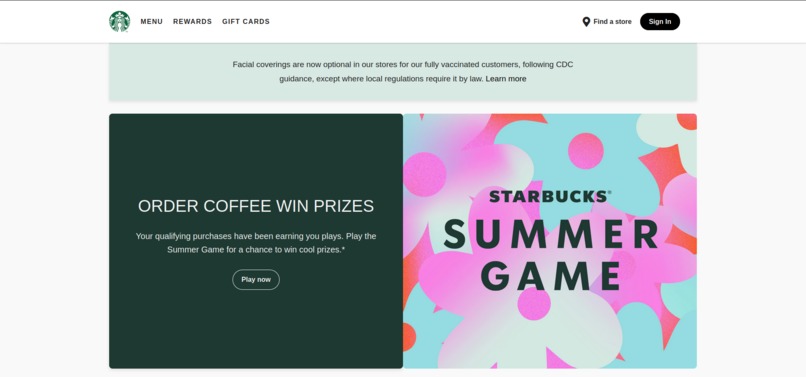
An Improved UI of Starbucks

Inspiration
We created a Starbucks clone because we love their coffee and have been a regular customer for a few years. This project was a great way for us to combine our passion for Starbucks with our interest in web development. The idea of replicating the Starbucks website came to us while enjoying our favorite cup of coffee. We wanted to capture the essence of their sleek and inviting online presence and recreate it using our own skills. This project was a perfect opportunity to dive deeper into front-end development and challenge ourselves into building something we admire.
How we built it
We started with the basic HTML structure, creating different sections like the header, main content, and footer. Next, we moved on to CSS, where we focused on making the UI visually appealing. This involved a lot of trial and error, especially with flexbox and grid layouts. Finally, we used JavaScript to add interactivity and enhance the user experience.
We followed these steps:
Planning: We outlined the main features and layout of the website.
Designing: We created a style guide to ensure consistency in colors, fonts, and overall design.
Developing: We built the HTML structure first, then styled it with CSS, and finally added functionality with JavaScript.
Testing: We tested the website across different browsers and devices to ensure responsiveness and usability.
Challenges we ran into
Centering a Div: Centering a div can sometimes feel like trying to solve a complex puzzle blindfolded. Flexbox and grid made it easier, but there were moments when we wondered if the div was purposefully avoiding the center just to spite us.
Choosing the Right Images: Finding high-quality images that matched Starbucks' vibe was tricky. We spent a lot of time browsing through stock photo websites to find the perfect images for the coffee menu and background.
Responsive Design: Ensuring the website looked good on all devices was a challenge. We had to constantly tweak the CSS to make sure everything was aligned properly on mobile, tablet, and desktop screens.
JavaScript Bugs: There were times when our JavaScript code didn't work as expected. Debugging and fixing these issues taught us a lot about patience and problem-solving.
Accomplishments We're Proud Of
Building the Starbucks clone was a rewarding journey with several standout accomplishments. Ensuring the website looked great on all devices was a significant milestone, as mastering CSS flexbox and grid allowed us to create a layout that adapts seamlessly from desktops to mobile screens. Capturing the essence of the Starbucks brand by carefully choosing the right fonts, colors, and images was crucial, and the positive feedback we received confirmed that we had successfully recreated their inviting and modern vibe. Writing clean, organized, and maintainable code using semantic HTML, structured CSS, and modular JavaScript functions was another accomplishment, ensuring best practices were followed.
What we learned
Through this project, we gained a deeper understanding of HTML5, CSS3, and JavaScript. Here's a breakdown of some key lessons:
HTML5: We learned how to structure a webpage using semantic elements like
<header>,<nav>,<section>, and<footer>. This helped us create a well-organized and accessible website.CSS3: We explored various CSS functions to make the UI appealing.
- Hover Effects: We learned how to use the
:hoverpseudo-class to add interactive elements, like changing the color of buttons or adding underline effects to links when the user hovers over them. - Flexbox and Grid: These tools were essential in creating a responsive layout. We learned how to center a div (which, let's be honest, can feel like an epic quest sometimes) and align items properly across different screen sizes.
- Styling: We experimented with different fonts, colors, and background images to match Starbucks' brand aesthetics.
- Hover Effects: We learned how to use the
JavaScript: We used JavaScript to make the website functional. For example, we added interactive elements like a responsive navigation menu, a coffee selection feature, and a cart system. Learning how to manipulate the DOM and handle events was crucial for these features.
What's next for Starbucks
We are planning to add a fully functional Menu where users can browse and order the coffee they want.
