-
-
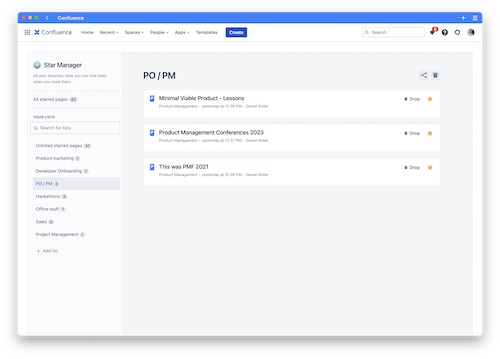
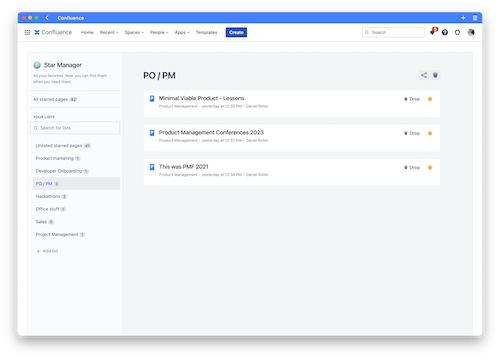
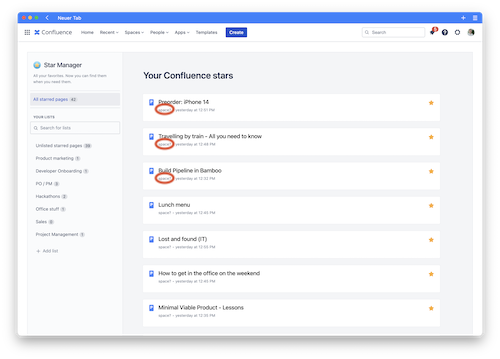
Star Manager hub with lists of starred content
-
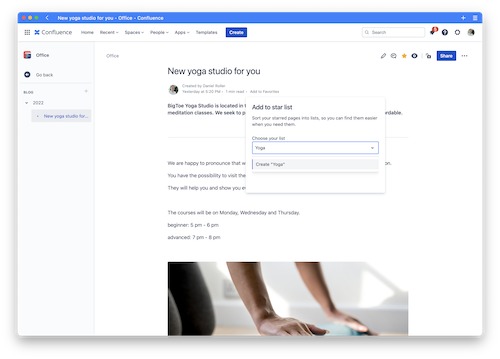
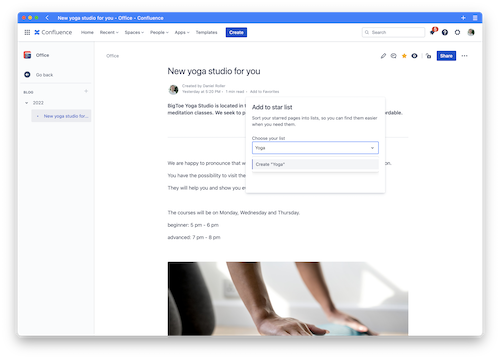
Adding a new page to a Star Manager list
-
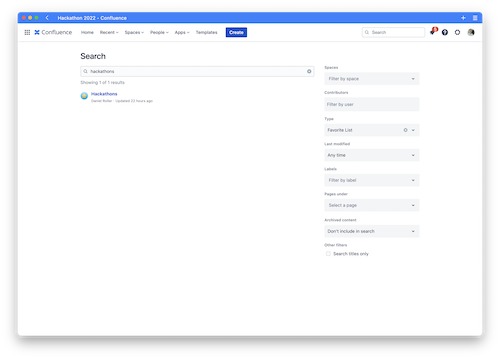
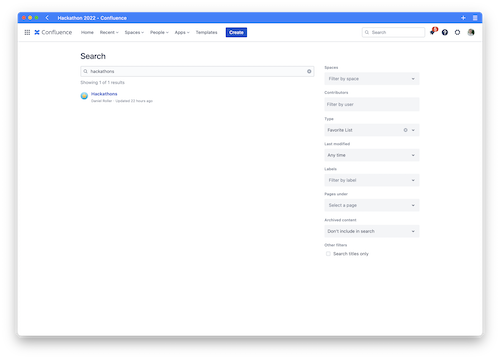
Searching for Star Manager lists in Confluence
-
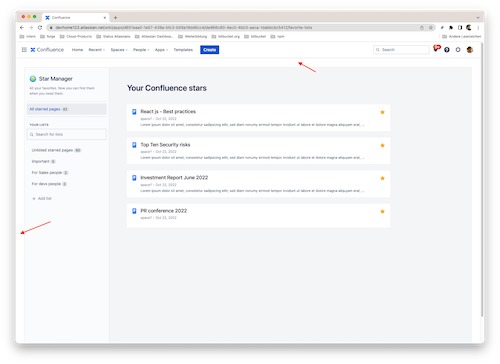
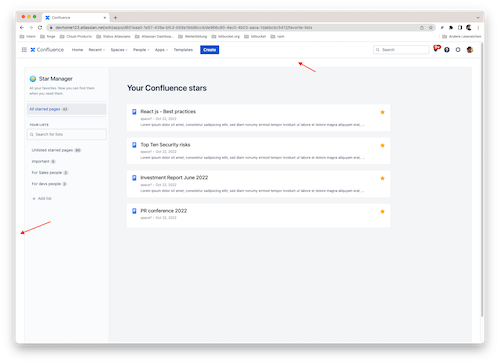
Challenge: Getting rid of the white border in Star Manager hub
-
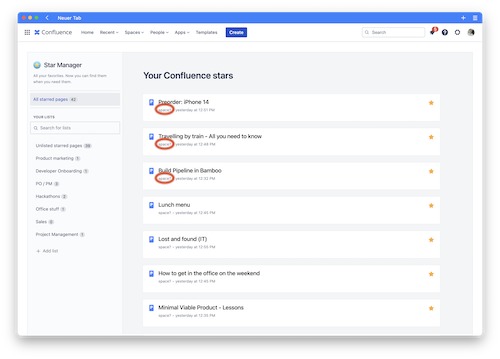
Challenge: Resolving space names via CQL API
-
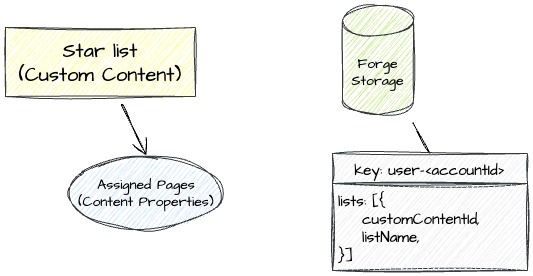
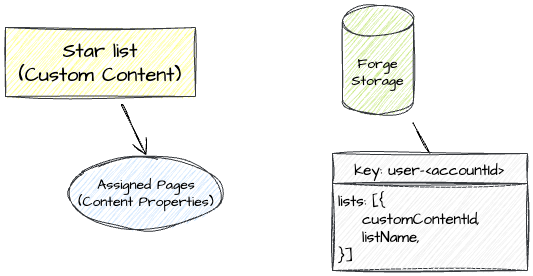
Stored objects in Star Manager
Inspiration
Confluence is the central location in the company where knowledge is documented and collaboration on projects and innovative ideas takes place. In order to have the most important information at hand at all times, Confluence provides each user with a personal favorites list in which any pages and blog posts can be stored ("Starred" ⭐️).
Over time, this list accumulates several dozen to several hundred pages and blogposts. After just a few months, it can become difficult to keep track of personal favorites and to separate really important content from that which loses relevance due to new projects, personal development, or changing conditions. By default, Confluence offers only a single list for starred content, so the user has to take care of curating it well and cleaning it up when needed - a usually time-consuming and frustrating task. 😪 There has to be a better way!
What it does
Our application Star Manager offers Confluence users completely new possibilities in handling and organizing favorite contents. Star Manager builds on and integrates Confluence's existing Favorites feature. In addition, users can create any number of their own lists to which favorite content can be assigned based on topic, project, or time period, for example. In this way, users can intuitively and quickly sort favorite Confluence content into an existing structure or simply expand it. And just as quickly as content is assigned to a list, it can also be removed from the list again if required. Star Manager also provides drag and drop functionality to easily move starred content between lists. 🥳
In addition, users can share their own lists of favorite content on a particular topic with colleagues with just a few clicks, for example, to provide central information on a project at a glance as part of employee onboarding. This saves users valuable time when trying to find important content on a particular topic. ⏰
Feature breakdown of Star Manager:
- 📝 Create personal favorite lists to organize starred content
- 🌟 Two ways to add starred pages and blog posts to favorite lists: Use drag and drop in Star Manager hub or the new byline item in the Confluence page or blog post header
- 📖 Create a new favorite list via the byline item in the Confluence page or blog post header
- 🗑 Delete starred content entries from any favorite list
- 🌍 Directly access starred content from any favorite list
- ♻️ Delete favorite lists
- 📬 Share favorite lists with other users via a direct link
- 🔍 Find favorite lists of any user via Confluence global search
How we built it
We have built Star Manager with Forge only. Since Atlassian has recently published a Forge module for Custom Content, we could easily use this as our main data object. Furthermore Custom Content brings (almost) all advantages of any other content types. That helped us to add other information to our Custom Content.
Stored objects in Star Manager

Explanation:
- When a user creates a star list, it will be stored as a Custom Content Object.
- Each page assigned to that list will be stored in a Content Property array of the Custom Content.
- We are using the Forge Storage to hold information which user created which Custom Content (star list), since it is easier to get all lists of a user that way than using the Confluence REST API for that.
For the user interface we are using the Side Navigation from @atlaskit/side-navigation and some other form librarys from atlaskit.
Beside confluence:customContent our app also contains the following modules:
- confluence:globalPage – The heart of our Star Manager app. Here Confluence users find their structured favorite content. They create, manage, and share their own favourite lists on that global page.
- confluence:contentBylineItem – The easiest way for a user to add content to one of his favourite lists. We choose this module over contextAction, because we liked the idea that a content byline item can be displayed directly if a page is already on a favourite list.
Challenges we ran into
For Sven, our developer, it was the first time creating an app which heavily uses Custom Content types. Custom content was important for our app because we wanted our content to be discoverable via Confluence search. Sven faced some challenges regarding Custom Content, but he was able to master them thanks to good documentation. At the end of Codegeist 2022 he was working on getting a user’s Confluence favorites. He accomplished requesting them via Atlassians CQL API. But when he tried to display the space name of each starred page the CQL API was not able to add them to the response. Even though according to the CQL API documentation it should be possible to expand the response with space information. Due to lack of time he decided to solve this after Codegeist submission deadline. 🏃♂️

Thamara, who created the beautiful layout of Star Manager, was very unhappy with the visible white border around the global page, which we could not get rid of. We found a ticket at Atlassian for that - So at least we know it will be fixed in the future: https://ecosystem.atlassian.net/browse/FRGE-866 😊

Daniel was very pleased that our star lists are already being indexed and searchable via Confluence Search out of the box since we have used Custom Content for that. But what he does not like was that a user trying to find a favorite list first has to navigate to the Confluence advanced search to manually adjust the Type select box. Without it, Confluence does not search for Custom Content. 🔎

Accomplishments that we're proud of & what we learned
💡 Learning: Don’t be afraid to pivot. Originally, we had the idea to develop a kind of personal notebook for Confluence, in which users - similar to an analog notebook made of paper - can collect important comments on certain passages and excerpts of a page. We wanted to implement this in a similar way to inline comments and in this way give users the opportunity to add personal comments to specific text passages on a page. However, we quickly realized during implementation that both the available Forge APIs did not yet meet our requirements and the use case would only appeal to a small niche of the overall Confluence user base. So we decided to modify the idea to be more geared towards page favorites. This is how the idea for the Star Manager was finally born, as we have now implemented it for Codegeist.
🏆 Accomplishment: Develop for all Confluence users. We are proud to address every single Confluence Cloud user with Star Manager, as the app builds on a base functionality of Confluence. Favoriting pages and blog posts is also a use case that occurs regardless of role or job title - so customers of our app can gain maximum value as every employee benefits from Star Manager.
What's next for Star Manager
🚢 Preparation for Atlassian Marketplace. The current MVP state of Star Manager still has some bugs that we would like to fix before considering the app for submission to the Atlassian Marketplace. In addition, there is still potential in the user experience in some places that we would like to improve. The goal of Star Manager is to make using the app feel as intuitive and easy as possible: Users should not notice at all that they are using a third-party app from the Atlassian Marketplace to organize their favorite content, rather than basic Confluence functionality.
🤩 Gather early adopter feedback. In order to further validate the core use case, we would first like to check via the Atlassian Marketplace how well our app is accepted for solving the needs of our target group. We would also like to find out where in the user workflow our app has further potential for optimization and which functions our users urgently need.
🎁 Extend featureset. We already have a number of ideas for extending the functionality of Star Manager so that Confluence users can structure and find their favorite pages and blogposts even better. Among other things, we would like to offer filtering and sorting options, enable the assignment of labels for lists, and create even easier ways to add pages and blogposts to an existing favorites structure. Furthermore, we would like to create opportunities to work collaboratively with colleagues on the creation and maintenance of favorites lists.


Log in or sign up for Devpost to join the conversation.