🕵️ Stale Page Hunter
Inspiration
It started with a frustrating Friday afternoon.
We were onboarding a new team member and pointed them to our "Getting Started" guide in Confluence. An hour later, they came back confused—the guide referenced tools we'd deprecated six months ago, linked to repos that no longer existed, and described a deployment process we'd completely overhauled.
Sound familiar?
We realized this wasn't just our problem. Every team using Confluence accumulates documentation debt. Pages get created with good intentions, then slowly rot as processes evolve. Nobody has time to audit hundreds of pages, so stale content lurks in search results, misleading anyone who finds it.
When we saw that Rovo Agents could be built on Forge, we had our "aha" moment: What if teams could just ask an AI to hunt down their stale pages?
No complex dashboards to learn. No manual audits. Just a conversation:
"Hey, find pages in our engineering space that haven't been updated in 6 months."
And that's how Stale Page Hunter was born.
What We Learned
Prompt Engineering is Product Design
Building a Rovo Agent taught us that the agent's prompt is the product. A vague prompt leads to a confused agent that frustrates users. We spent significant time crafting instructions that define clear workflows, prevent common mistakes, and guide the conversation naturally. The prompt went through dozens of iterations—each time we tested with real scenarios, we discovered edge cases the agent handled poorly.
The Confluence API Has Two Generations
We learned (sometimes the hard way) that Confluence Cloud has both v1 and v2 REST APIs, and they're not interchangeable. Fetching pages uses v2 for its modern response format, but adding labels requires v1 since label endpoints don't exist in v2 yet. Mixing API versions felt messy at first, but it's the reality of working with evolving platforms.
Time-Based Features Need Testable Thresholds
You can't wait 180 days to test if your "find stale pages" feature works. We made thresholds configurable in minutes for development—just 5 minutes is enough time to grab coffee while waiting for test pages to "age."
Rovo Agents Work Across Products
A delightful discovery: our Confluence-focused agent appears in both the Confluence and Jira chat sidebars. Users can manage documentation health without context-switching.
How We Built It
We started with the Forge rovo-agent-rovo template and defined our core actions:
- scanStalePages — Paginates through all pages in a space, fetches version info, and filters pages older than the threshold
- labelStalePages — Adds the global "stale" label so users can search for stale content
- removeStaleLabel — Removes labels when pages get updated
- addStaleIndicator — Injects a visual macro at the top of pages showing staleness stats
The agent prompt defines the workflow: check for space key, ask for threshold if not provided, scan pages, present results with titles (never IDs!), and offer to label what it finds.
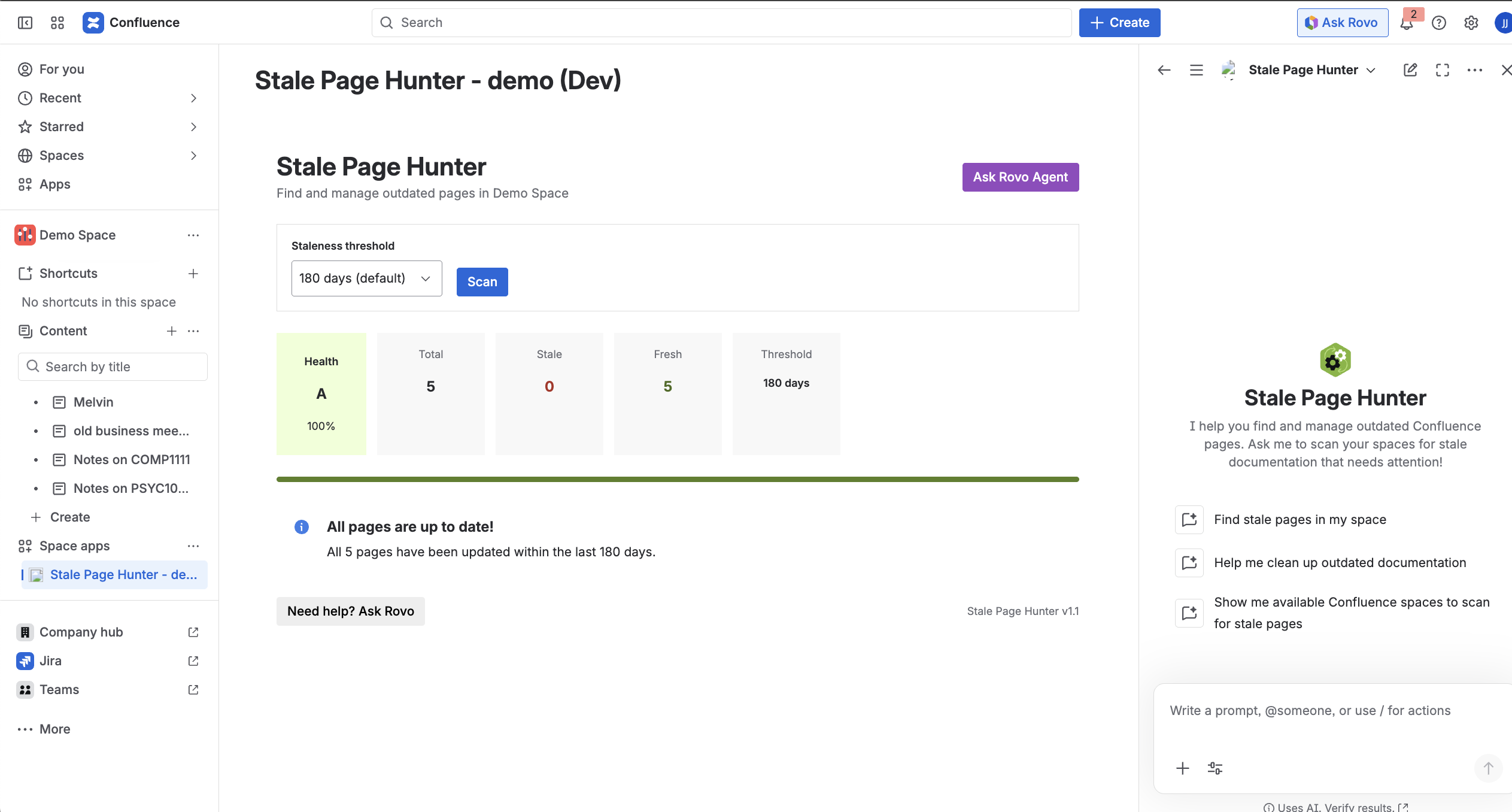
We also built a Space Page dashboard using UI Kit 2 that displays a health grade (A-F), progress bar, sortable table of stale pages, and bulk actions. For labeled pages, we created an insertable macro showing days since update, freshness percentage calculated as $$\frac{365 - \text{days stale}}{365} \times 100$$ , and a "Mark as Fresh" button.
Challenges We Faced
Forge Route Template Restrictions
Forge's route template tag is strict about interpolation—you can only interpolate values, not path segments. This meant we couldn't build dynamic routes elegantly and had to use conditional branches for different API calls.
ADF Format for Macro Insertion
Inserting our macro into existing pages required understanding Atlassian Document Format. Getting the extensionKey format right took trial and error, especially since it differs between development and production environments.
Agent Action Invocation
We wanted the agent to label pages AND add the indicator macro in one conversation, but initially it would describe what it would do instead of actually doing it. We fixed this with explicit prompt instructions telling it to invoke both actions sequentially.
Cross-Product Context
The agent runs in both Jira and Confluence sidebars, but Confluence context (like current space) isn't available when chatting from Jira. We handled this gracefully by having the agent ask for the space key or offer to list available spaces.
What's Next
Features we're excited to build: scheduled scans via Forge triggers, notifications to page owners when content goes stale, trend analytics to track documentation health over time, and bulk archive functionality for truly abandoned pages.
If you've ever been burned by stale documentation, we built this for you. 🕵️
Built With
- atlassian-document-format-(adf)
- atlassian-forge
- confluence-rest-api
- forge
- javascript
- node.js
- react
- rovo-ai-agent
- ui-kit-2


Log in or sign up for Devpost to join the conversation.