-
-
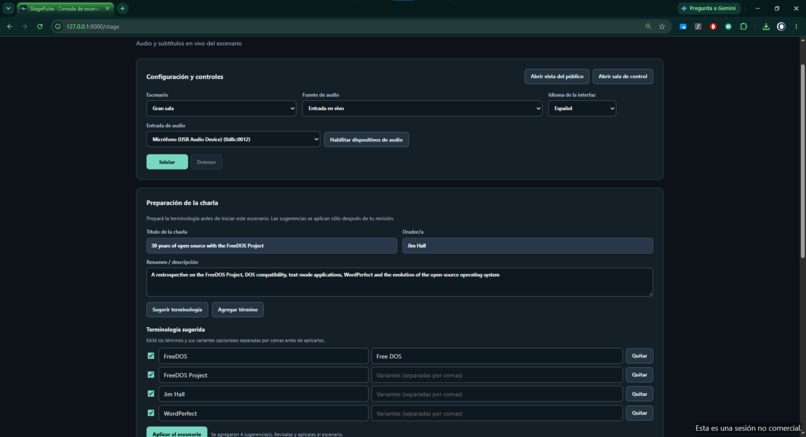
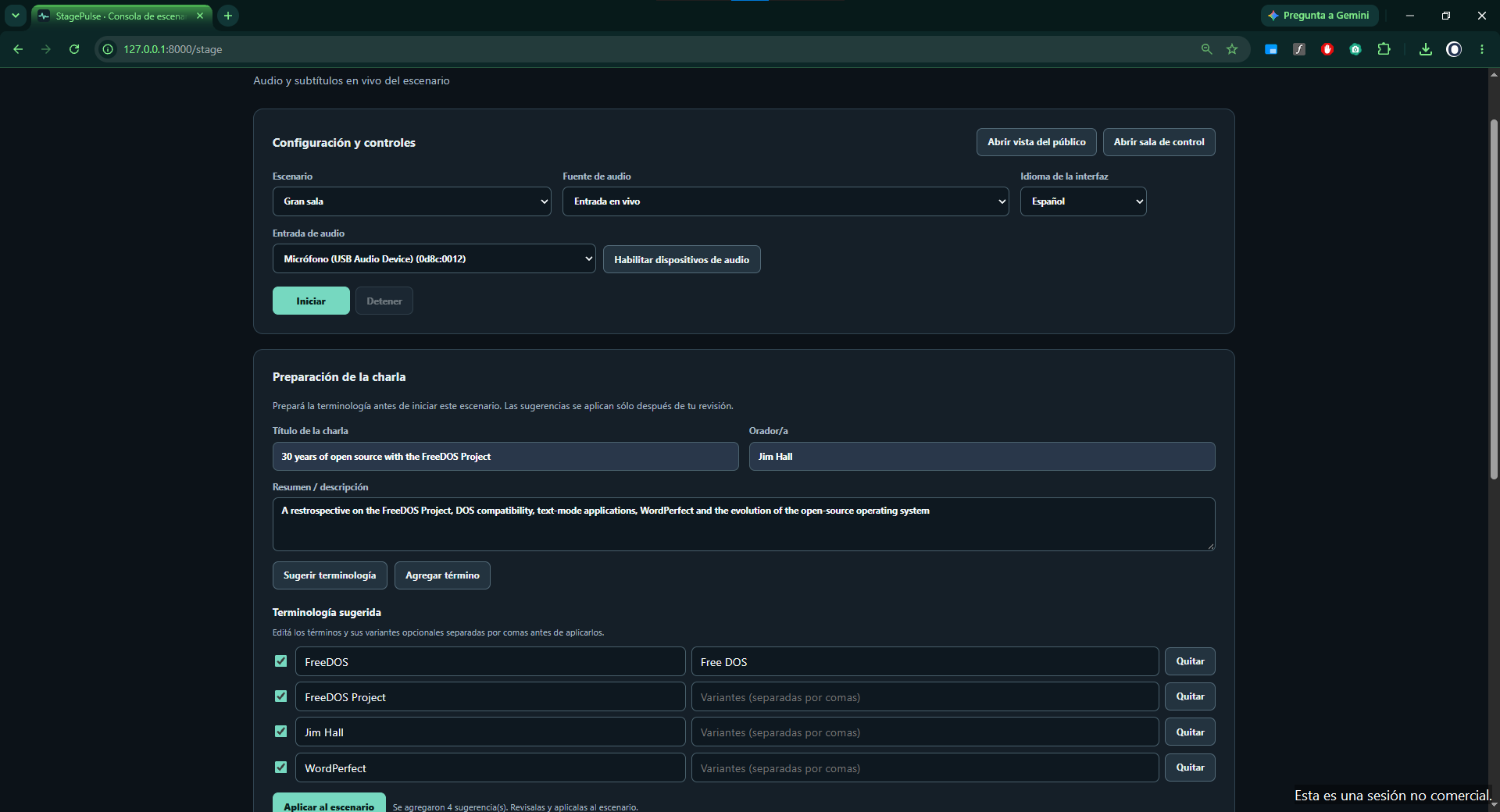
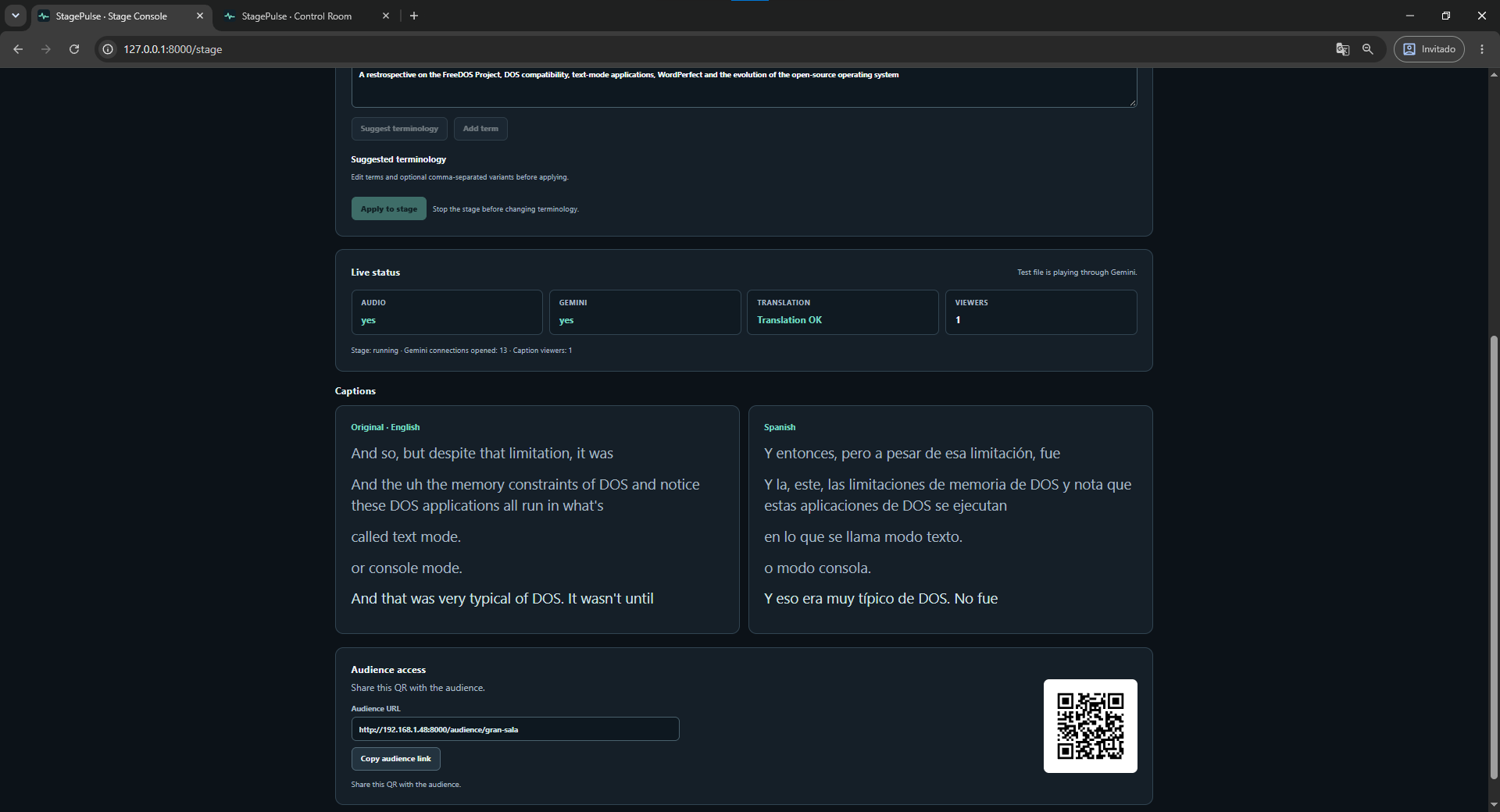
Smart Talk Prep — operator-reviewed terminology for names and technical terms before a session starts.
-
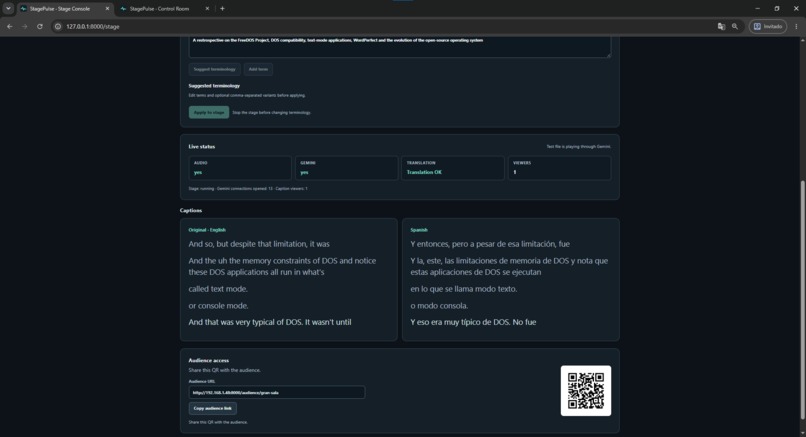
Stage Console — live English transcription and Spanish translation from a real Nerdearla talk.
-
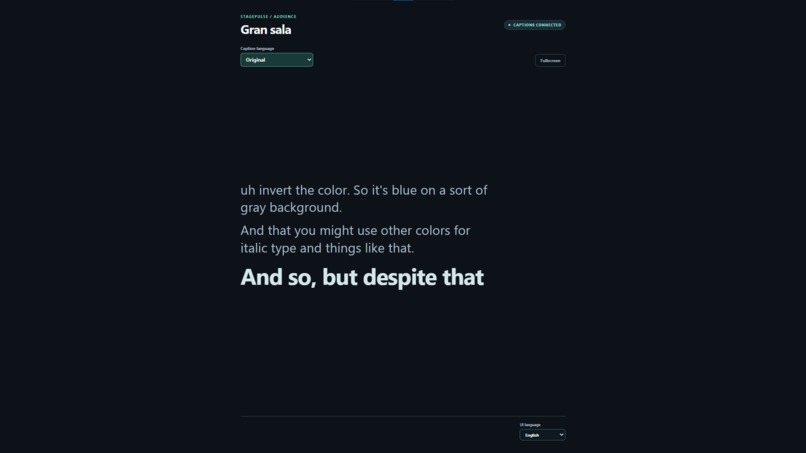
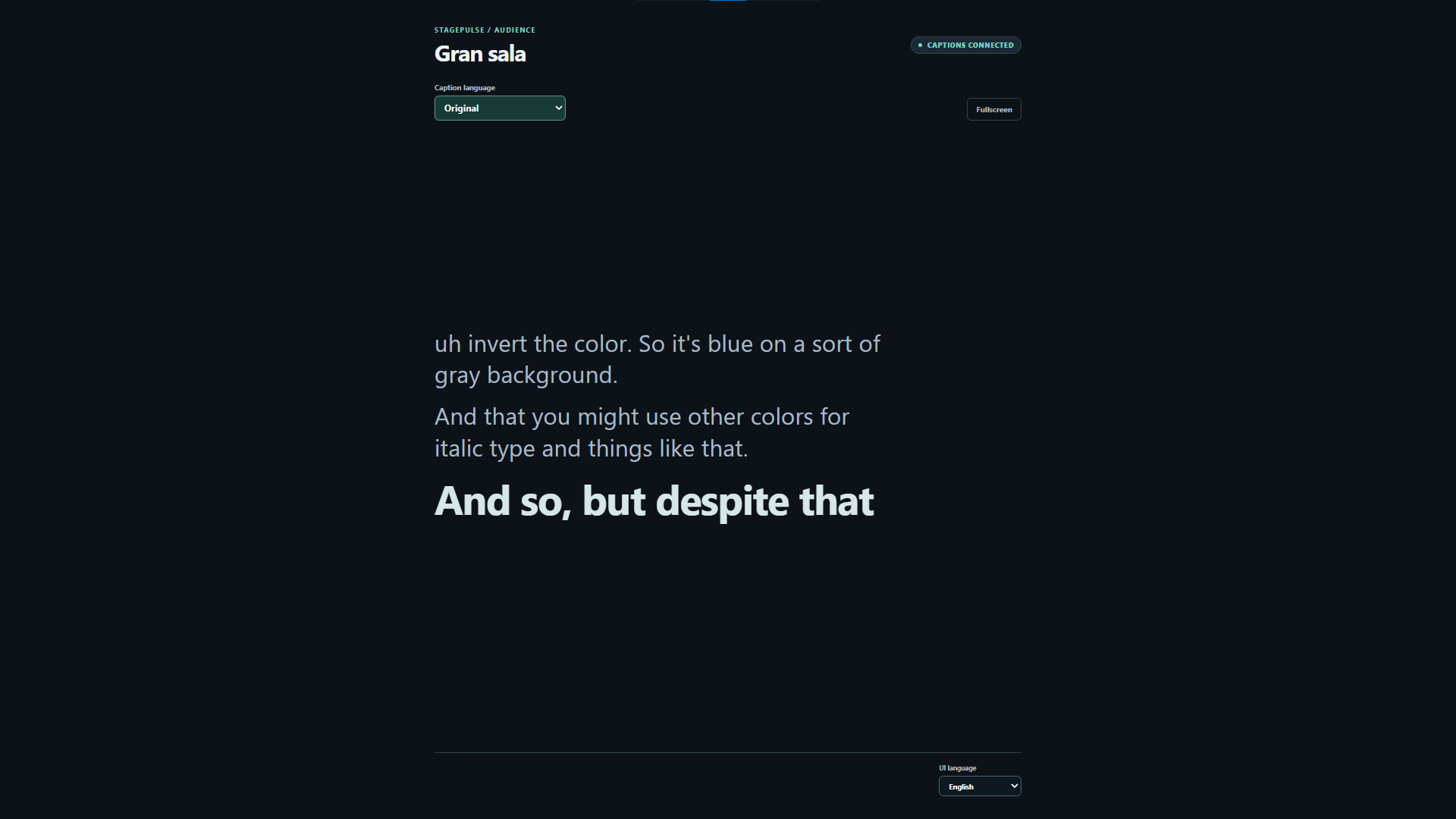
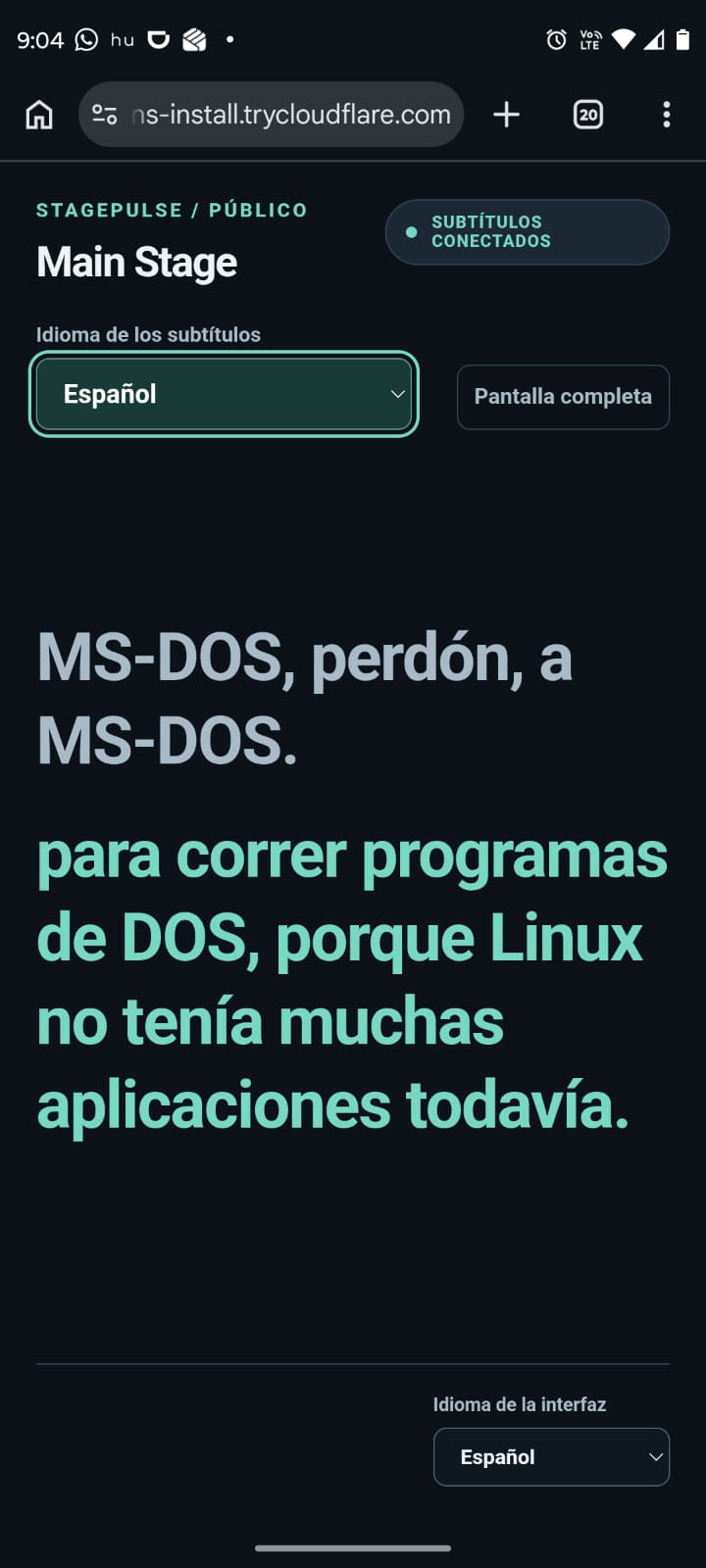
Audience View — attendees choose the caption language and receive the shared live stream.
-
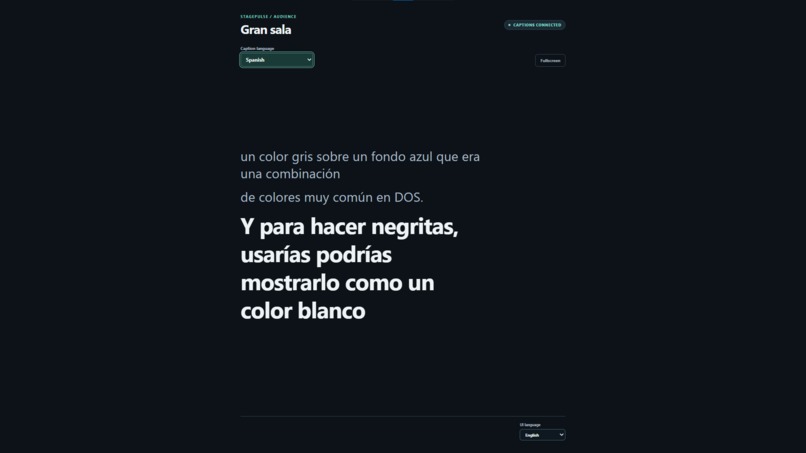
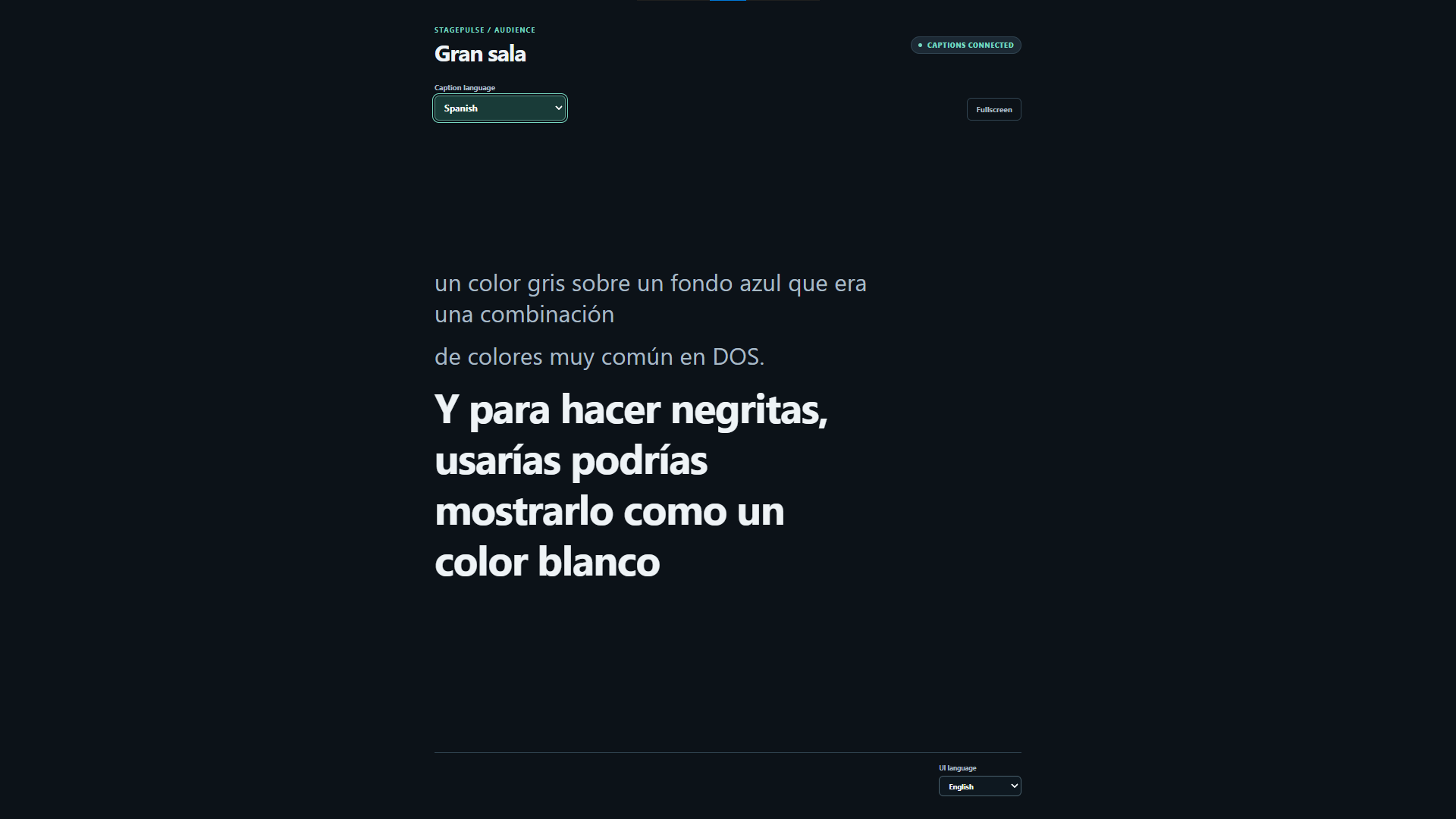
Audience View — attendees choose the caption language and receive the shared live stream.
-
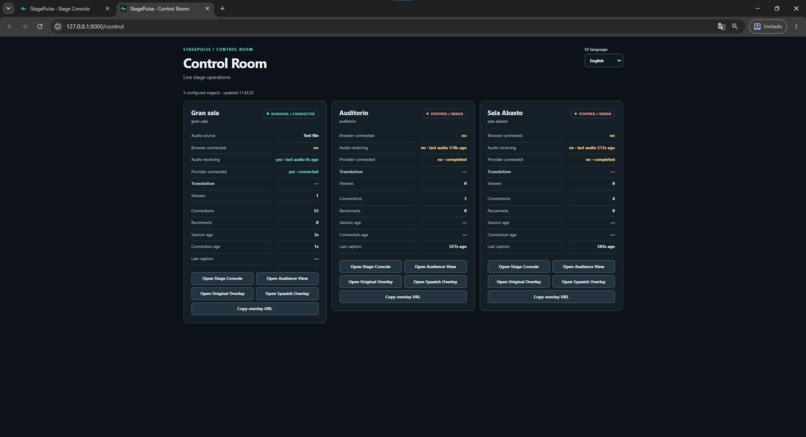
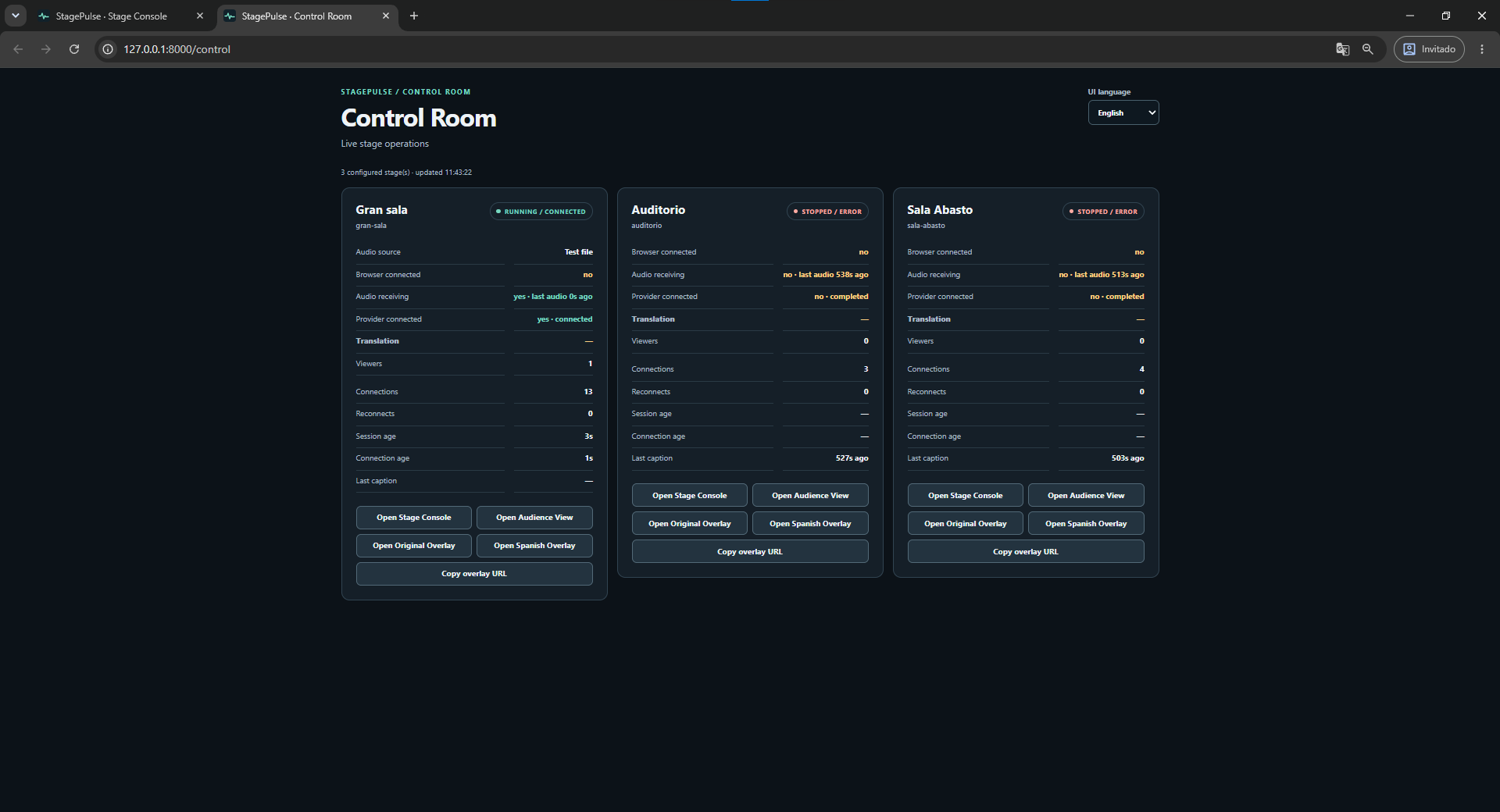
Control Room — Gran sala, Auditorio and Sala Abasto running as independent live caption pipelines.
-
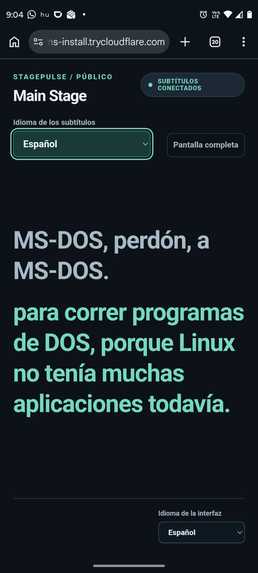
Mobile Audience View — live captions designed for attendees on their phones.
-
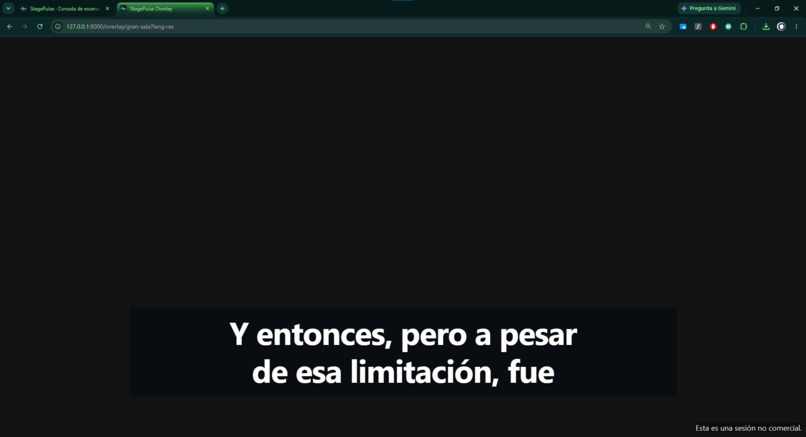
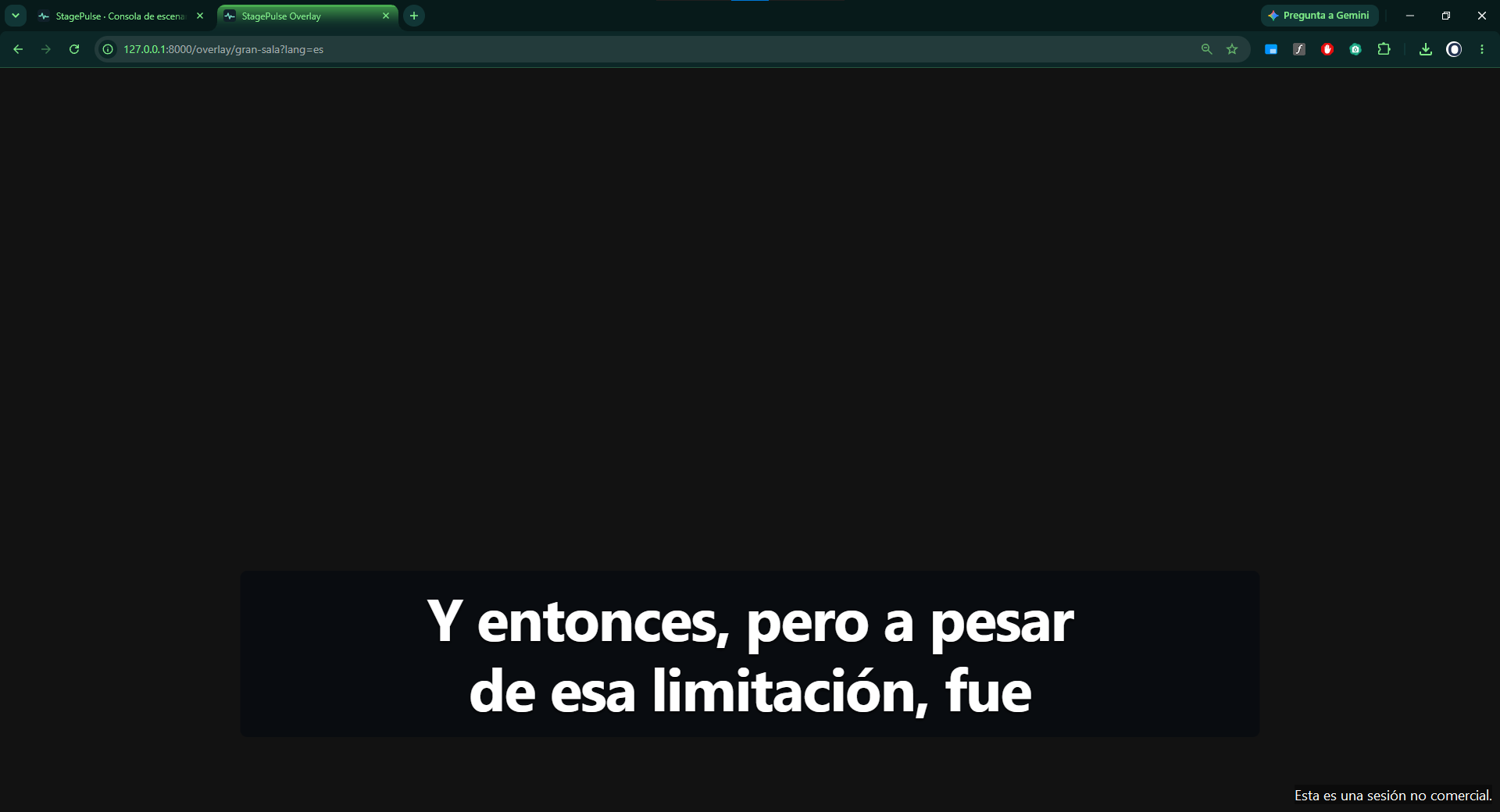
Broadcast Overlay — transparent caption output designed for OBS/vMix browser sources.
Inspiration
Nerdearla runs multiple simultaneous stages and many technical sessions in English that need live transcription and Spanish translation.
The challenge is bigger than simply generating a transcript.
A real conference needs live captions that can be operated independently across several rooms, monitored by production, shared with the in-person audience, displayed on venue screens and reused for the virtual stream without creating a new AI session for every viewer.
I built StagePulse around that complete operational problem.
What it does
StagePulse is an open-source live captioning and translation system designed for multi-stage technical conferences.
For every active stage, the same caption pipeline can simultaneously power:
- a Stage Console for the room operator;
- real-time original-language captions;
- real-time English-to-Spanish translation;
- a mobile Audience View;
- an Audience Hub where attendees choose their stage;
- a dedicated Venue Display for TVs and projectors;
- a transparent browser overlay for broadcast tools such as vMix or OBS;
- a central Control Room for production monitoring.
Viewers do not create additional AI pipelines.
The AI workload scales by active stage, not by audience size.
The operator can capture real browser audio or upload a local test audio file, which also makes the complete pipeline easy to evaluate without conference hardware.
Smart Talk Prep
Technical talks are full of project names, acronyms, products, standards and proper nouns that general-purpose transcription can render inconsistently.
StagePulse includes Smart Talk Prep.
Before a session starts, production can provide:
- the talk title;
- the speaker;
- the abstract or description.
A lightweight Gemini text model analyzes that context and suggests terminology that may be relevant to the talk.
The operator can:
- review suggestions;
- edit them;
- disable them;
- remove them;
- add terms manually;
- explicitly approve the final terminology before applying it to the stage.
Suggestions are never applied automatically.
Approved vocabulary feeds StagePulse's existing deterministic, stage-specific TerminologyNormalizer.
Most importantly, Smart Talk Prep runs before the live session. It does not add another AI model to the latency-critical caption path.
For my Nerdearla FreeDOS test, Smart Talk Prep suggested terms including FreeDOS, Jim Hall, DOS and WordPerfect.
I validated that approved terminology rules remained active while the live caption pipeline was running. I do not claim an accuracy improvement for terms that did not occur in the tested caption segment.
How I built it
The backend is built with Python, FastAPI and WebSockets, with a lightweight HTML, CSS and JavaScript frontend.
Browser audio is captured with getUserMedia and the Web Audio API, processed through an AudioWorklet and streamed to the backend as mono 16-bit / 16 kHz PCM.
Each configured stage gets an independent StageWorker.
The worker sends that stage's audio to Gemini Live and publishes the resulting caption events to a CaptionBus.
The CaptionBus then fans the same captions out to every connected output for that stage.
The core flow is:
Stage audio → StageWorker → Gemini Live → CaptionBus → multiple outputs
Those outputs can include:
- Stage Console;
- Audience View;
- Venue Display;
- Broadcast Overlay;
- Control Room.
This separation is central to StagePulse's architecture: adding viewers does not create additional Gemini Live sessions.
Smart Talk Prep uses Gemini 3.5 Flash Lite with structured output before the live session begins. Approved vocabulary is passed to the existing terminology-normalization layer.
Multi-stage architecture
StagePulse is configuration-driven.
Stages are not hardcoded into separate application flows. Each configured room is instantiated independently using the same StageWorker architecture.
For the final Nerdearla demo configuration I used:
- Gran sala
- Auditorio
- Sala Abasto
I validated all three stages running simultaneously end-to-end.
Each stage had:
- its own active audio source;
- its own Gemini Live connection;
- its own English captions;
- its own Spanish translation;
- independent state in the Control Room.
I also validated stage isolation: stopping Gran sala did not interrupt Auditorio or Sala Abasto.
The Stage Console selection is isolated per browser tab, so different operators or tabs can control different stages independently without requiring a page refresh.
The scaling model is therefore:
one AI pipeline per active stage, not one AI pipeline per viewer.
A single stage pipeline can simultaneously feed the venue screen, audience phones, broadcast output and production monitoring.
Additional viewers do not create additional Gemini Live sessions.
Provider concurrency quotas and host capacity still need to be sized appropriately for a production deployment; I do not claim concurrency levels beyond what I actually tested.
Reliability and real-world validation
I spent a significant part of the Vibeathon testing StagePulse as live event infrastructure rather than only building a short demonstration.
I validated:
- a complete approximately 32-minute Nerdearla talk end-to-end;
- three simultaneous independent stages;
- English and Spanish captions on all three stages;
- one independent Gemini Live connection per active stage;
- multiple caption subscribers sharing the same stage pipeline;
- stage isolation when stopping one of multiple active rooms;
- a real Gemini GoAway event followed by session resumption;
- bounded audio buffering during reconnects;
- browser reload recovery;
- mobile foreground reconnection;
- late-join caption snapshots;
- public Audience View access from an Android phone over 4G;
- Venue Display, Audience View, Overlay and Control Room consuming the same caption stream;
- Smart Talk Prep using a real Gemini structured-output response.
In one validation of a single stage, Stage Console, Audience View, Venue Display and Overlay consumed captions while the stage maintained one Gemini Live pipeline.
Performance
I ran controlled browser-path benchmarks using real Nerdearla audio.
Across three controlled browser runs, the median measured time from the first PCM received by the backend to the first published caption was:
- 4.65 seconds for original English
- 4.80 seconds for Spanish
These values measure backend audio reception to first published caption.
They are not:
- guaranteed maximum latency;
- speech-onset-to-caption latency;
- an SLA.
I also observed occasional provider-side latency outliers.
During one diagnostic run, English output continued while Spanish output was temporarily delayed.
Instead of hiding degraded behavior, StagePulse includes translation-delay detection so production can see when the translation stream is falling behind.
Audience experience
Attendees can access StagePulse through a direct stage link or through the Audience Hub.
The Audience Hub dynamically lists the configured rooms and allows the attendee to choose the stage they want to follow.
Inside Audience View, users can switch between the original language and Spanish translation.
The mobile experience prioritizes live freshness.
If a mobile browser is suspended and later returns, StagePulse reconnects to the current caption rather than replaying an old backlog that would leave the attendee several seconds behind the speaker.
I also validated Audience View externally over public HTTPS using an Android phone on 4G rather than the local Wi-Fi network.
Venue Display
StagePulse includes a dedicated Venue Display designed for a physical TV, monitor or projector in the conference room.
It can show:
- original captions;
- Spanish captions;
- both languages together.
The Venue Display consumes the same stage caption stream and does not create another AI pipeline.
Broadcast overlay
StagePulse also exposes a transparent browser overlay designed to be used as a browser source in streaming production software such as vMix or OBS.
The overlay can display either original or Spanish captions.
I validated the browser overlay endpoint itself, but I did not physically test it inside vMix or OBS during the Vibeathon.
Control Room
Production can monitor all configured stages from a central Control Room.
For each room StagePulse exposes operational information such as:
- stage status;
- browser connection;
- audio activity;
- Gemini provider connection;
- translation health;
- connected viewers;
- provider connection count;
- reconnect count;
- session age;
- last caption activity;
- relevant errors.
During the final multi-stage validation, Gran sala, Auditorio and Sala Abasto were all visible as LIVE simultaneously.
Each stage maintained an independent caption pipeline.
Recovery and live freshness
Long-lived real-time AI sessions need lifecycle management.
StagePulse handles:
- Gemini GoAway events;
- session resumption;
- reconnect backoff;
- bounded audio buffering;
- browser reconnects;
- mobile foreground recovery.
I performed a real continuous-session test where Gemini issued a GoAway event and StagePulse established a new connection using session-resumption state.
The goal is not to pretend that provider interruptions never happen, but to make those events observable and recoverable.
Test File workflow
StagePulse can run the same real caption pipeline using a local test audio file.
This allows an evaluator or operator to test:
audio → Gemini → captions → Audience → Venue Display → Overlay → Control Room
without requiring a physical conference audio board.
The same StageWorker and Gemini Live path are used.
A media file that does not contain an audio stream cannot be captioned; for the final validation I used a WAV extracted from a real past Nerdearla talk.
Operations and deployment
StagePulse is intentionally lightweight.
The repository includes:
- an automated setup script;
- a doctor/preflight script;
- environment-variable documentation;
- stage configuration;
- English and Spanish documentation;
- a Test File workflow;
- operational troubleshooting guidance.
The basic workflow is:
setup → API key → doctor → start
No database, Redis cluster or Kubernetes deployment is required for the Vibeathon prototype.
The project is released under the Apache 2.0 open-source license.
Challenges I ran into
The hardest part was not getting an AI model to produce text.
It was making a long-lived real-time AI session behave like event infrastructure.
I had to work through:
- session lifetime and reconnection;
- Gemini GoAway events;
- fragmented live translation responses;
- browser and file audio chunk differences;
- mobile browsers suspending WebSockets;
- occasional provider-side translation stalls;
- stage isolation;
- multiple browser tabs controlling different stages;
- multiple outputs consuming the same caption stream;
- avoiding unnecessary AI sessions for viewers;
- keeping the audience live instead of replaying stale captions.
One multi-stage issue appeared late in testing: the Stage Console originally persisted the selected room in localStorage, so another tab could inherit the state of an already-running stage and incorrectly lock its controls.
I changed selected-stage state to be isolated per tab, refreshed state from the selected stage, and validated three rooms starting independently without requiring an F5 refresh.
That test also confirmed that stopping one stage did not affect the other two.
What I learned
Real-time AI applications are systems problems, not only model problems.
Model quality matters, but live conference infrastructure also depends on:
- audio routing;
- lifecycle management;
- reconnection;
- observability;
- fan-out architecture;
- browser behavior;
- stage isolation;
- terminology;
- deployment simplicity;
- operational clarity.
I also learned that for live captions, preserving the attendee's position in the current conversation can be more useful than replaying every caption missed during a temporary disconnect.
What I'm proud of
StagePulse grew from a transcription experiment into a working multi-stage conference captioning workflow during the Vibeathon.
It now covers the lifecycle of a technical conference session:
Prepare → Capture → Translate → Distribute → Monitor → Recover
An operator can prepare talk-specific vocabulary, start a stage from a browser, generate original and Spanish captions, distribute the same stream to multiple destinations and monitor the complete event centrally.
In the final validation, three real Nerdearla room configurations ran simultaneously and independently.
The architecture keeps the AI workload tied to the number of active stages rather than the number of viewers.
What's next
Future work could include:
- additional source and translation languages;
- WebVTT / SRT / text session exports;
- persistent caption and session history;
- production authentication and role-based access;
- deeper event-platform integrations;
- dynamic room management for event administrators;
- additional deployment packaging;
- larger multi-stage production benchmarks.
Built With
- ai
- api
- audio
- audioworklet
- cloudflare
- css3
- fastapi
- ffmpeg
- gemini
- gen
- github
- html5
- javascript
- live
- powershell
- python
- sdk
- tunnel
- web
- websockets

Log in or sign up for Devpost to join the conversation.