Inspiration
Editors are good at telling you that your code is broken, but not why. Error messages like TypeError: Cannot read properties of undefined (reading 'map') are written for people who already know the language. If you're three weeks into Python or JavaScript, the usual routine is to copy the error, leave the editor, search for it, and read an answer written for experts. We wanted the explanation to already be waiting next to the code to make it easier to understand and fix the error.
What it does
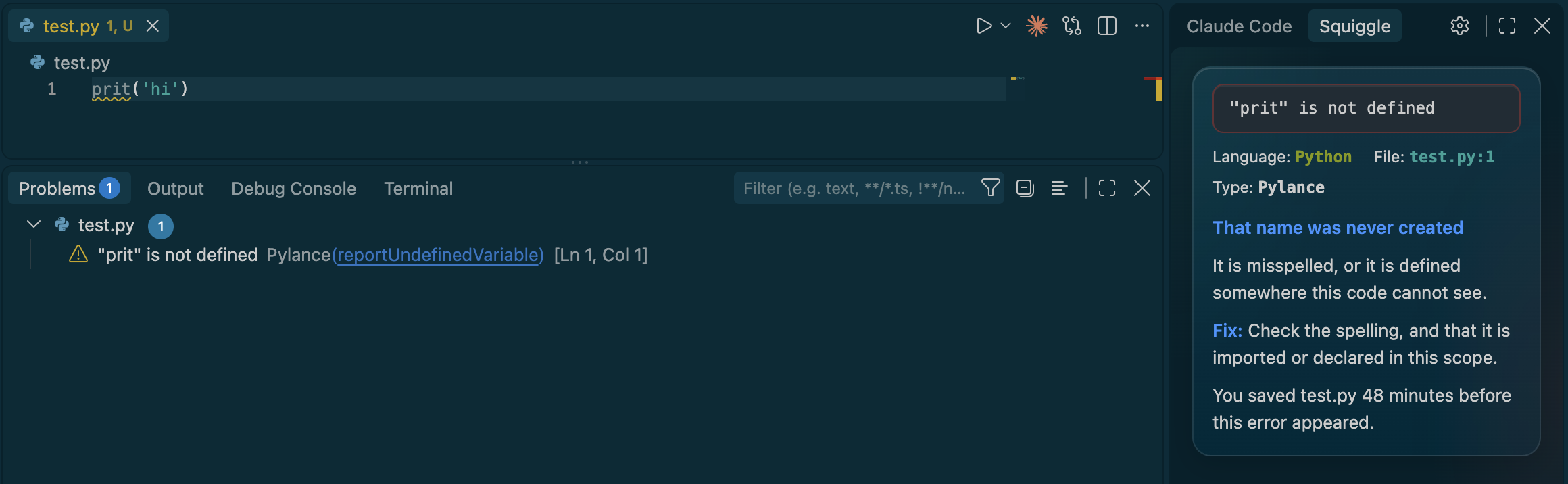
Squiggle is a VS Code extension for people learning a new language. When a red squiggle stays put, a side panel explains the error in three parts: what happened, why, and how to fix it, often with a corrected version of your actual line. You don't press a button or copy anything to use squiggle. It waits until you stop typing, so half-finished lines never set it off. It also tells you which recent save probably caused the error ("12s after you saved auth.py").
For simple mistakes, Fix it for me applies the fix in one click. That covers a misspelled name, a missing colon, curly quotes, or VS Code's own quick fix. The changed line is highlighted, and undo works as normal.
It covers 55 Python errors, 25 JavaScript errors and 16 TypeScript-specific ones. Anything else gets a general explanation from pattern rules. It runs offline, it's free, it's lightweight, and nothing leaves your computer.
How we built it
Everything is written in TypeScript. We split it into two pieces:
- A small VS Code extension that watches VS Code's own error list (.getDiagnostics), draws the side panel and suggests one-click fixes. The panel takes its colors from your theme and updates accordingly.
- A shared core that runs in the background on your computer. The two talk over a local WebSocket using a small shared message format. The core decides when an error is real (with a ~1.2s debounce), then explains it. It checks our hand-written library first, then a cache, then pattern rules. It also looks at the broken line and the names around it to spot typos and suggest an exact fix. -AI: We used Claude to help us link the backend and frontend and write the framework for the VSCode panel, ChatGPT to update our error libraries from existing language documentation, and OpenCode for backend assistance (like watching the VSCode diagnostics for errors and relating them to our error libraries.
Challenges we ran into
- Telling real errors from in-progress typing. We had to tune how long to wait so the panel never reacts to a line you're still writing.
- Linking errors to the save that caused them. Windows reports the same file path in different formats, so we had to normalize paths before matching saves to errors.
- Keeping automatic fixes safe. Fix it for me only handles fixes we're sure about. Everything else stays an explanation, so learners still make the fix themselves.
- Joining the frontend and backend. These were built in parallel, so connecting them took a careful handoff link and a fair amount of debugging.
- Writing explanations that are actually beginner-friendly. That meant short sentences, no jargon, and always ending on a concrete fix.
Accomplishments that we're proud of
- It works end to end in a live demo: make a typo, watch the explanation appear, then fix it in one click.
- It looks like a native part of VS Code. It switches cleanly between dark, light and high-contrast themes, and it works with screen readers, keyboard navigation and reduced-motion settings.
- Nearly 100 hand-written explanations, plus fixes suggested for your specific line.
- Answers are instant, free, private, and predictable.
What we learned
It's important to keep explanations short and sweet. Explanations should be easy to read and comprehend and timed well so that they're actually helpful. We gained familiarity with TypeScript and extension development. We learned how to link the features of extensions for functionality, such as listening to the code editor's logs to trigger actions.
What's next for Squiggle
Because the core doesn't care which editor an error came from, adding another editor only means writing another small plugin.
- Deploy Squiggle as an actual extension for VSCode.
- Plugins for more editors: Neovim, JetBrains, Cursor.
- More languages, and a bigger library of errors.
- Errors not found in libraries can be outsourced to LLMs, with usage staying free for the user. This is what the $1000 would go towards.
- Support for Jupyter notebooks and Code.org (for K–12) as a Chrome extension.
Built With
- chatgpt
- claude
- css
- javascript
- opencode
- typescript
