-
-
Squeek
-
How Squeek Works
-
architecture
-
evaluation
-
pipeline
Inspiration
The text says your bank account will be locked in two hours unless you pay a $49.99 fee. The link is right there. Most people who fall for this already know scams exist. They fall for it because the message is built to keep them from stopping long enough to think.
Scam education happens weeks before that moment, in a pamphlet, or after it, in a call to the bank. We wanted something present during it: a voice that says "wait, look at this" right when someone is about to tap the link or send the money. That's Squeek.
What it does
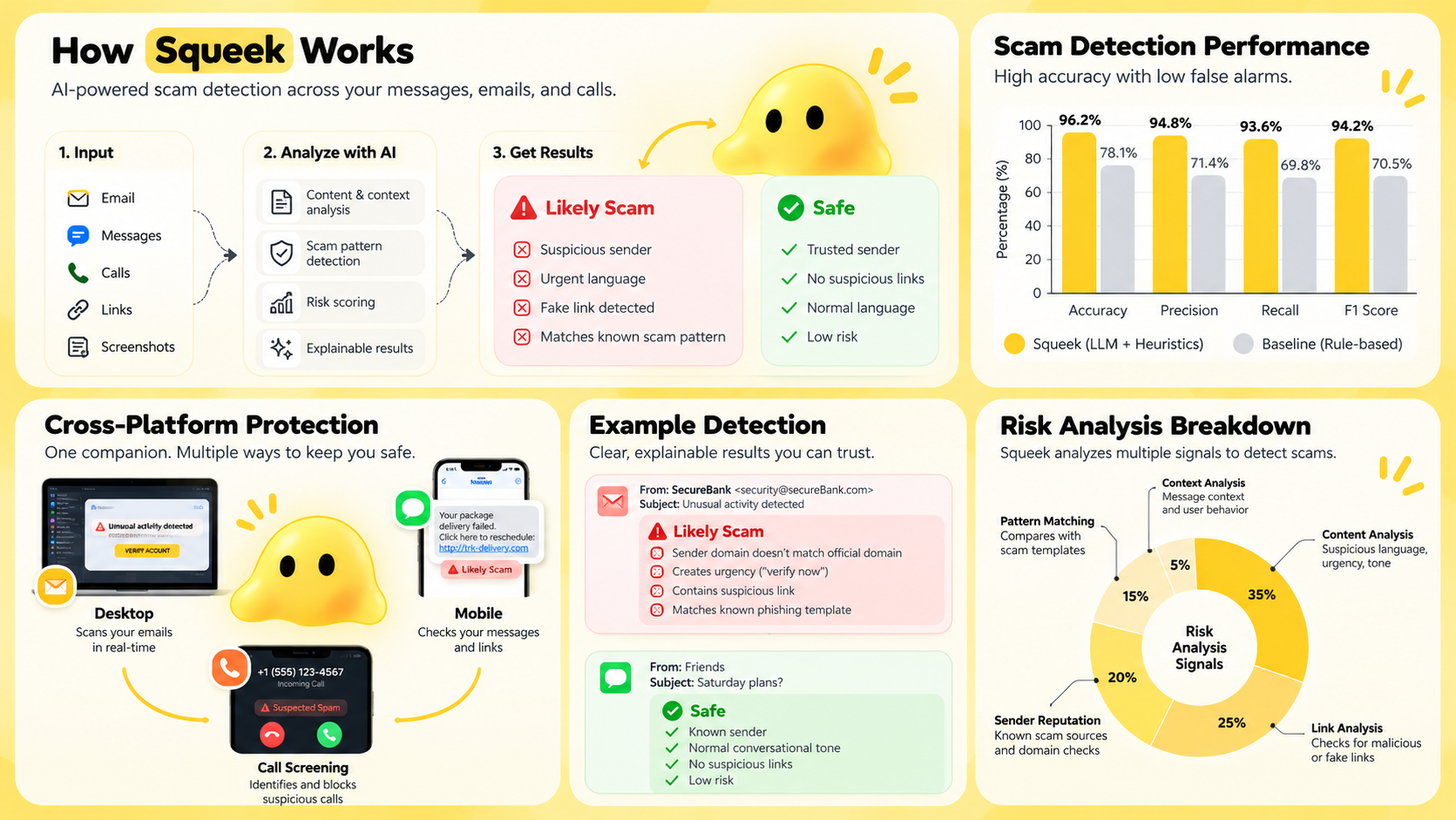
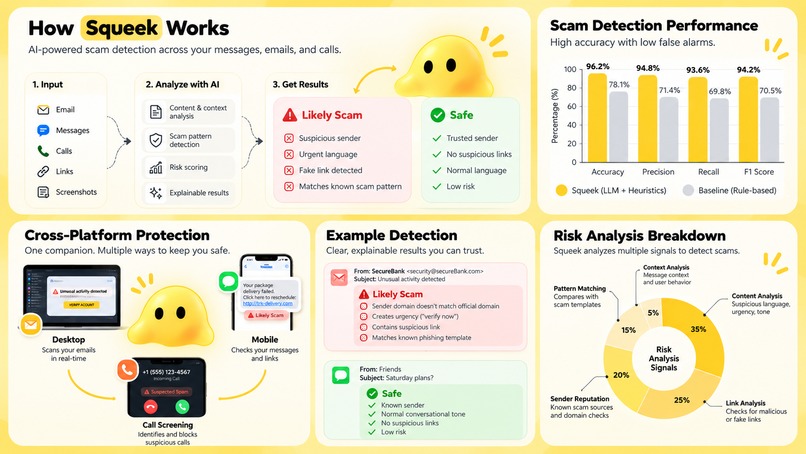
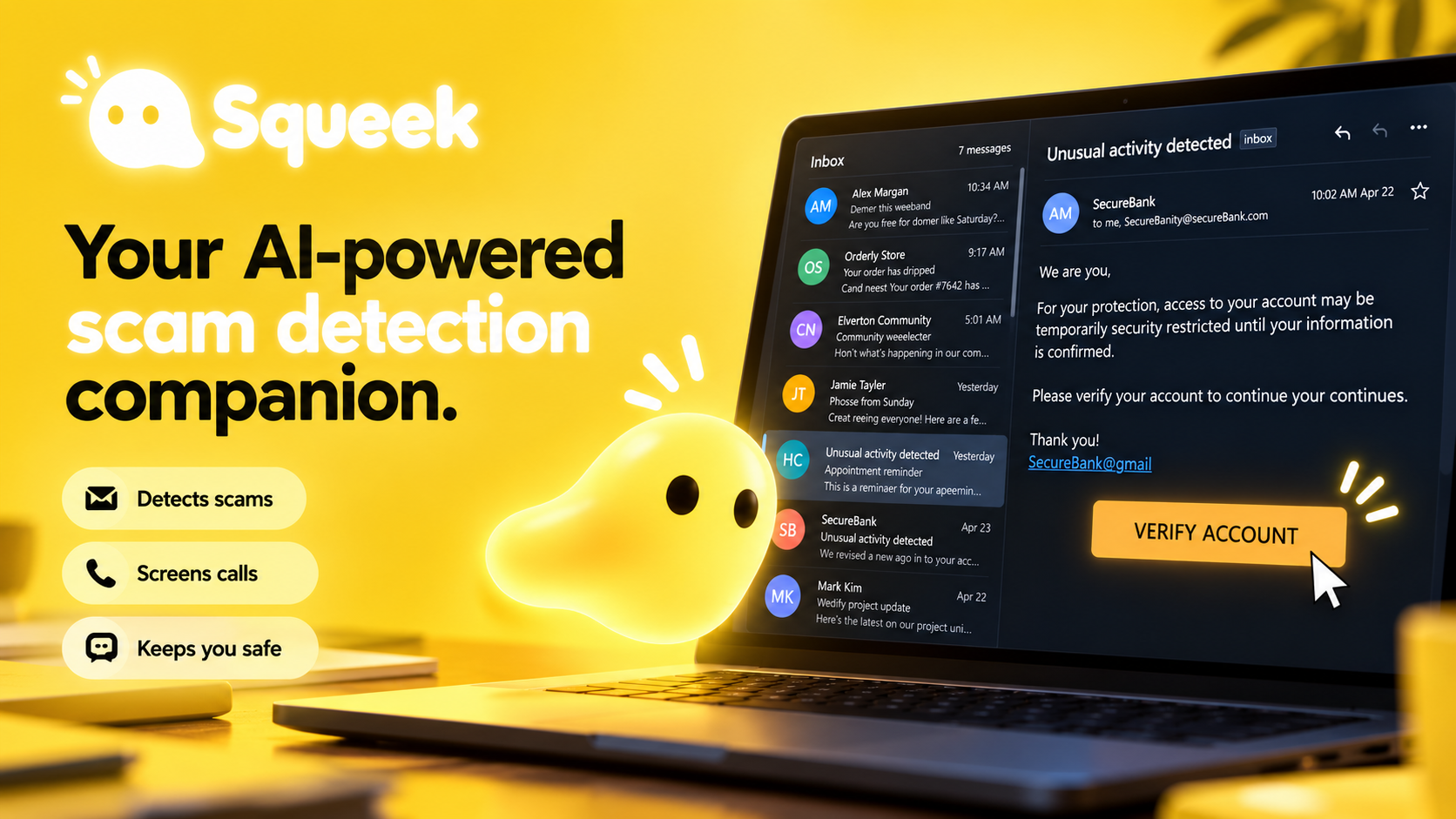
Squeek watches for scam patterns and tells you what it saw, in plain language, while you're still deciding.
On Windows, a small indicator follows your cursor. When you opt in, Squeek reads text from a supported browser. If a page combines a deadline, a payment request, and a threat, a warning panel opens. It highlights the exact phrases that triggered it and reads the warning aloud. It never clicks, types, or pays for you. In Squeek's own simulated payment flow, it can hold the payment until you review it.
On iPhone, Squeek checks anything you share to it and warns about links. It also filters texts from unknown senders, labels reported callers, and lets you connect a trusted person (a kid, a caregiver) who shares your settings and block lists.

How we built it
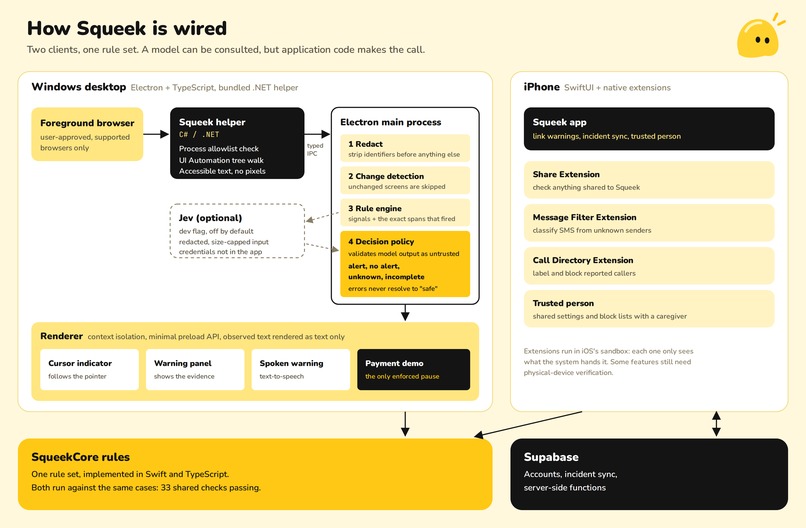
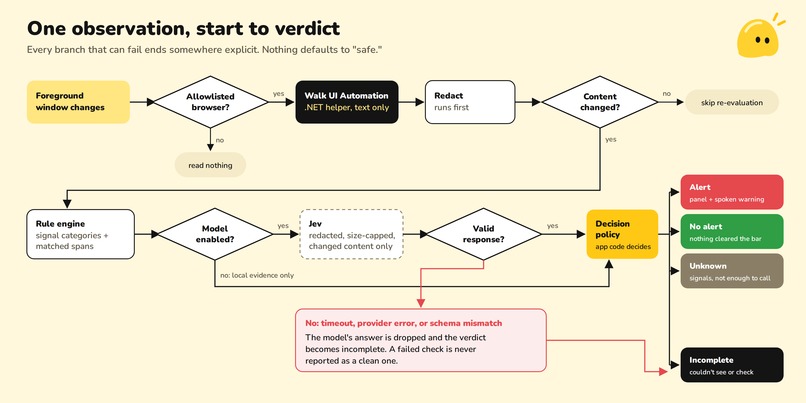
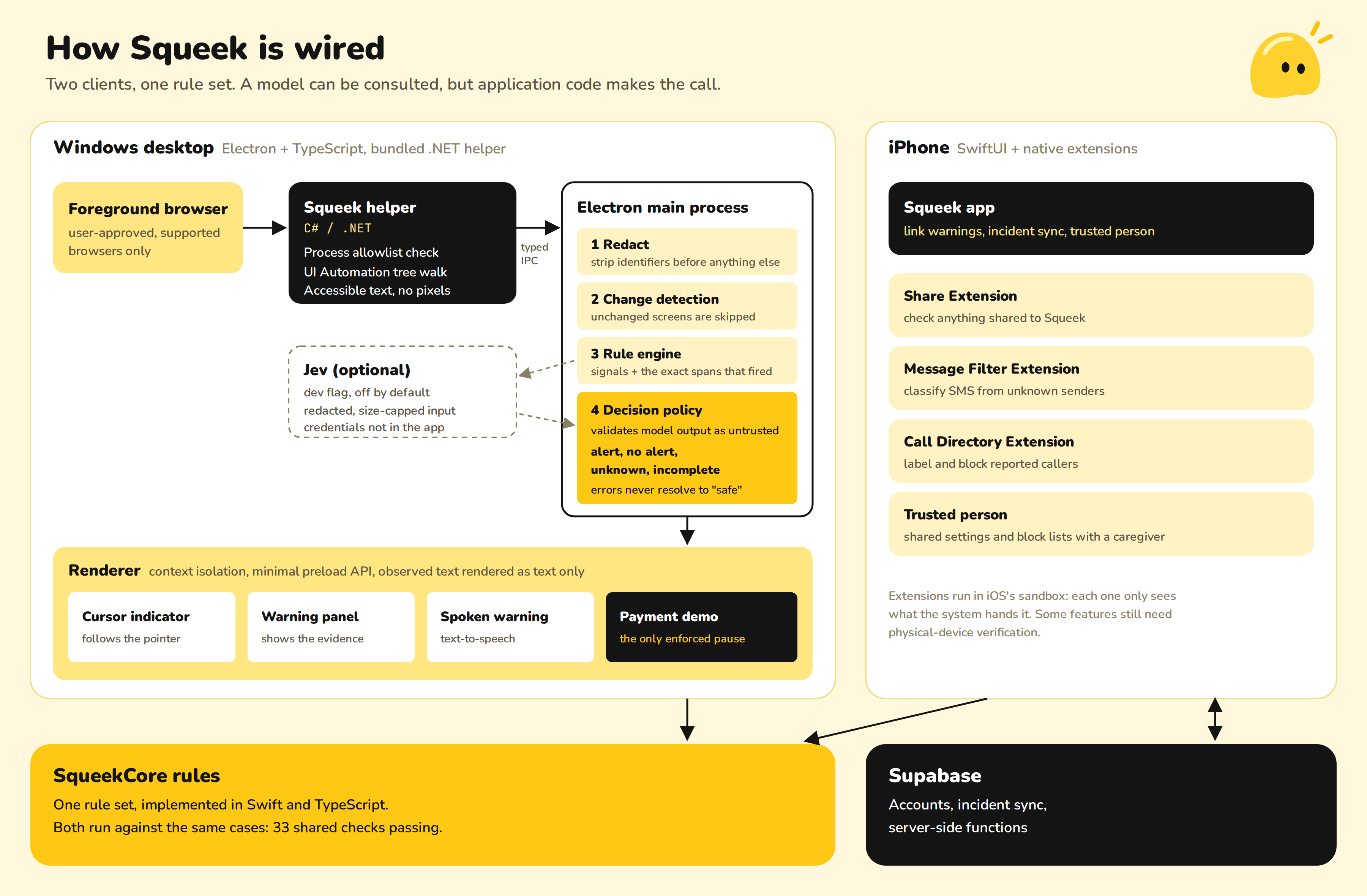
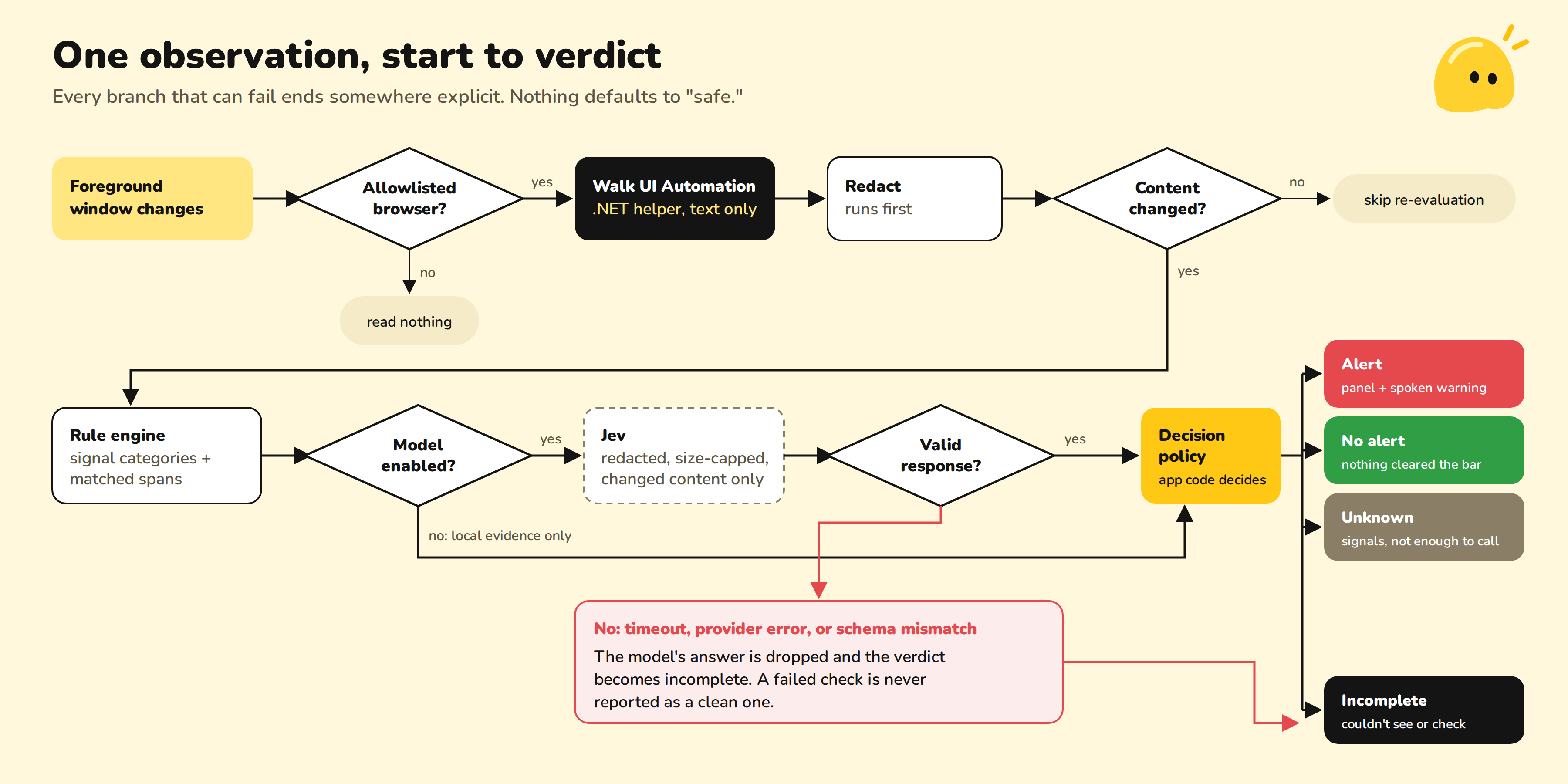
Reading the screen without screenshots. A C#/.NET helper ships with the Electron app. When the foreground window changes, the helper checks the window's process against an allowlist of supported browsers. If the window isn't one of them, Squeek reads nothing. If it is, the helper walks the Windows UI Automation tree and pulls only the text the browser exposes for accessibility. No pixels are captured at any point. The text goes to the Electron main process over a narrow, typed IPC channel.
Redact first, then decide whether to look. The first thing the main process does is redact identifiers. Then a change-detection step compares the text with what it last assessed, so re-rendering the same page costs nothing and triggers no new requests.
Rules that return evidence, not a score. The rule engine emits structured findings. Each finding has a signal category (urgency, payment request, credential request, threat) and the exact text span that matched. That span is what the warning panel highlights. The same rules run on iPhone through SqueekCore, which implements them in Swift and TypeScript. Both implementations pass the same 33 shared checks, so the two platforms can't quietly drift apart.
The model advises, the code decides. With a development flag on, Squeek can send redacted, size-capped text to Jev for a second opinion. Provider credentials aren't in the packaged app. Jev's response is treated as untrusted input: it gets validated against a schema and reconciled with the local evidence, and then Squeek's own policy code picks one of four verdicts: alert, no alert, unknown, or incomplete. A timeout, provider error, or malformed response produces incomplete. A failed check is never reported as "safe."

A renderer that can't be turned against the user. The warning UI runs with context isolation and has no Node access. It talks to the main process only through a minimal preload API. Observed page text is always rendered as text, never as HTML, so a malicious page can't inject markup into the warning that's supposed to protect you from it.
iPhone. The app is SwiftUI, and each feature uses the iOS extension built for it. A Share Extension checks shared content. A Message Filter Extension classifies texts from unknown senders. A Call Directory Extension labels and blocks reported numbers. Supabase handles accounts, incident sync, and server-side functions, including syncing trusted-person settings and block lists.
Challenges we ran into
The accessibility tree only shows what apps put in it. We chose UI Automation over screenshots for privacy, bandwidth, and cost. The price is that anything drawn on a canvas, rendered as an image, or virtualized off-screen may not show up in the tree. We'd rather admit that gap than cover it by streaming people's screens to a cloud model.
You can't stop a payment in someone else's app. Electron has no supported way to intercept input in another process, such as a bank's website open in Chrome. Anything that tried would be fragile and dangerous. So Squeek only enforces a pause in the flow it controls, and everywhere else it warns.
Real bills have deadlines too. "Payment due Friday" appears in your electric bill and in scams alike. One signal on its own is weak evidence. The policy weighs signals across categories and returns unknown when there isn't enough to decide, rather than forcing a yes or no.
Two operating systems, two sets of walls. Accessibility support on Windows differs from app to app. iOS extensions only see what the system hands them: the message filter gets texts from unknown senders, and call identification uses a directory the system loads ahead of time. Much of our design work was finding what each platform actually allows.
Accomplishments that we're proud of
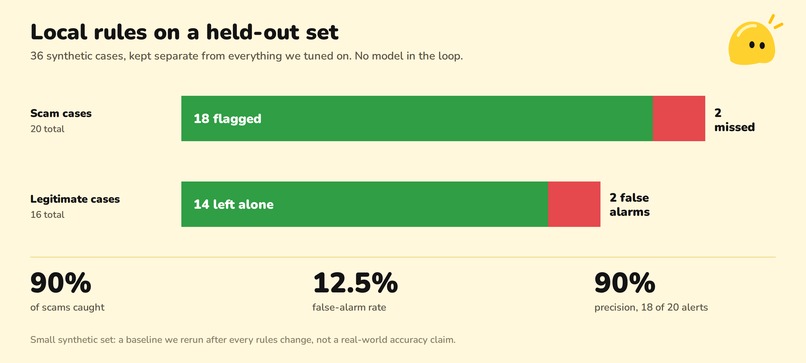
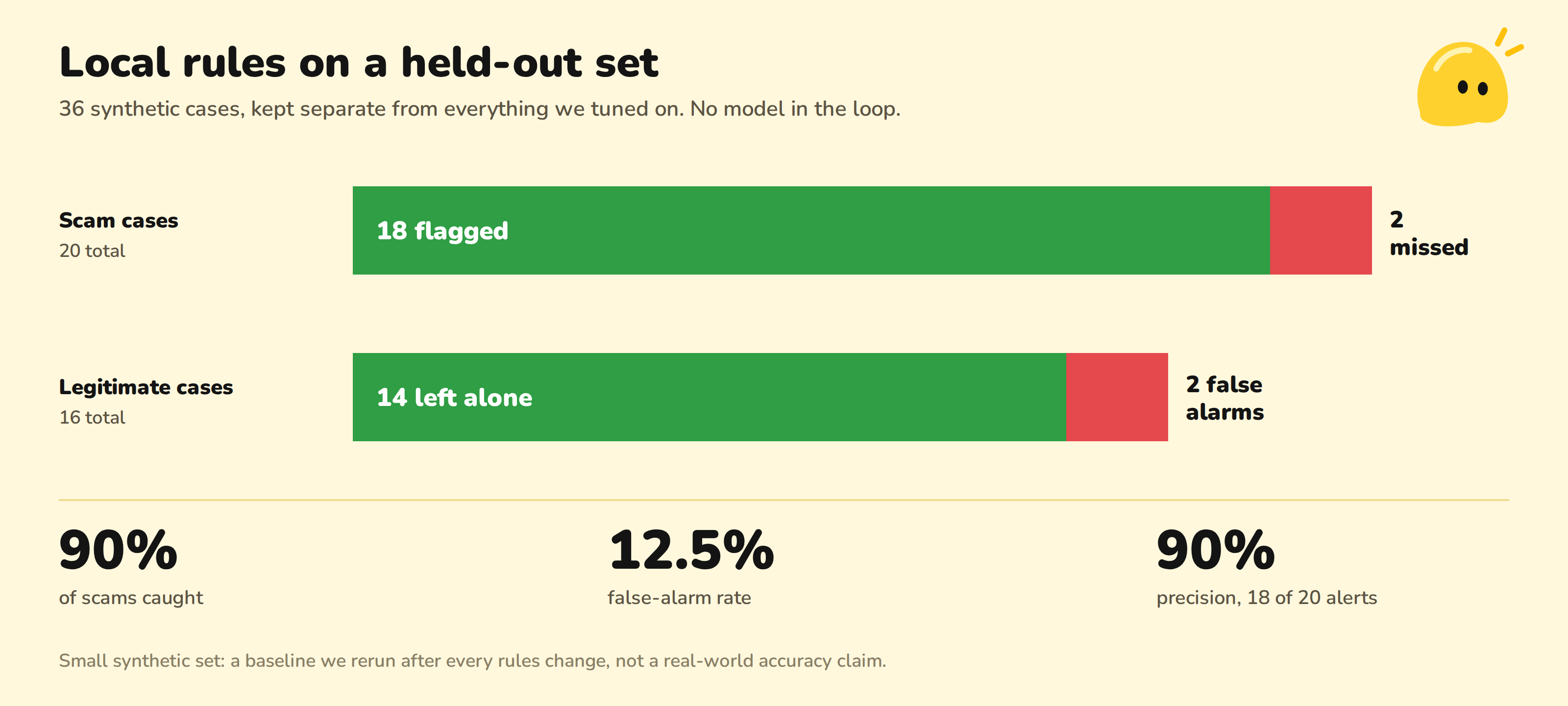
We built an evaluation before we built confidence. On a held-out set of 36 synthetic cases, separate from everything we tuned on, the local rules alone caught 18 of 20 scams and raised false alarms on 2 of 16 legitimate messages. It's small and synthetic, so it says nothing about real inboxes. But it's a baseline we can rerun after every rules change, and it tells us exactly which 2 scams to go after next.
We're also proud that the privacy rules are part of the architecture, not a settings page. Monitoring is opt-in. Only allowlisted windows are read. Redaction happens before any analysis. Raw message text is kept out of operational logs. The model is optional, and Squeek can't send a message or move money on its own. The desktop UI is checked for keyboard use, text scaling, contrast, and compact warning states.
What we learned
Detecting a scam is the easy half. The hard half is telling someone why in a way they'll believe, separating "this is a scam" from "I couldn't see enough," and failing safely when the model is down.
We also learned that how you observe the screen limits what you can honestly claim. Our accessibility-based approach is private and cheap, but it's partly blind. OCR could fill in some of the gaps, but only if it runs locally and we measure it first.
Finally, scammers win by applying pressure, so a protection tool can't add more of it. Squeek's job is to slow things down.
What's next for Squeek
Next we'll package the app and helper together, install on a clean Windows machine as a standard user, and verify the whole loop end to end: observation, warnings, speech, pause, and exit. We'll also measure resource use and warning latency during real monitoring. We'll test Chrome and Edge separately, document where the accessibility tree comes up empty, and prototype local OCR for those gaps. On iPhone, the extensions need verification on a physical device. Most importantly, we'll put Squeek in front of older adults and their caregivers, since they're who it's for.
Built With
- .net
- c#
- electron
- supabase
- swiftui
- typescript


Log in or sign up for Devpost to join the conversation.