-
-
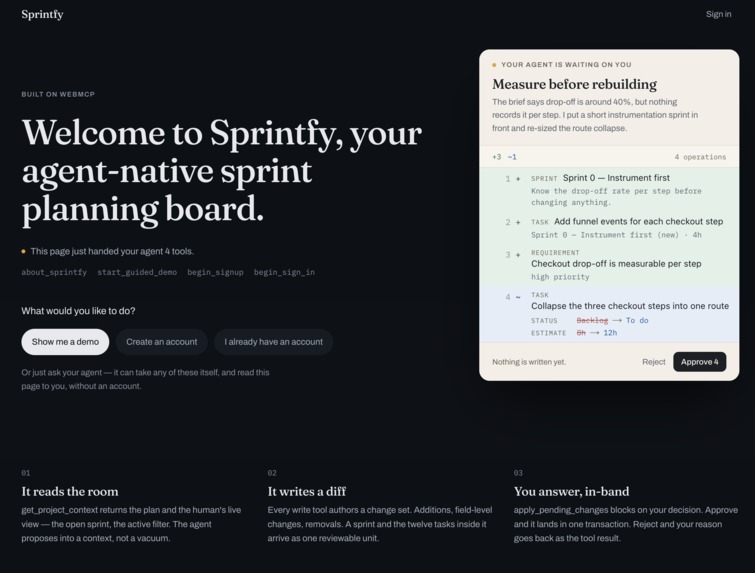
Landing Page
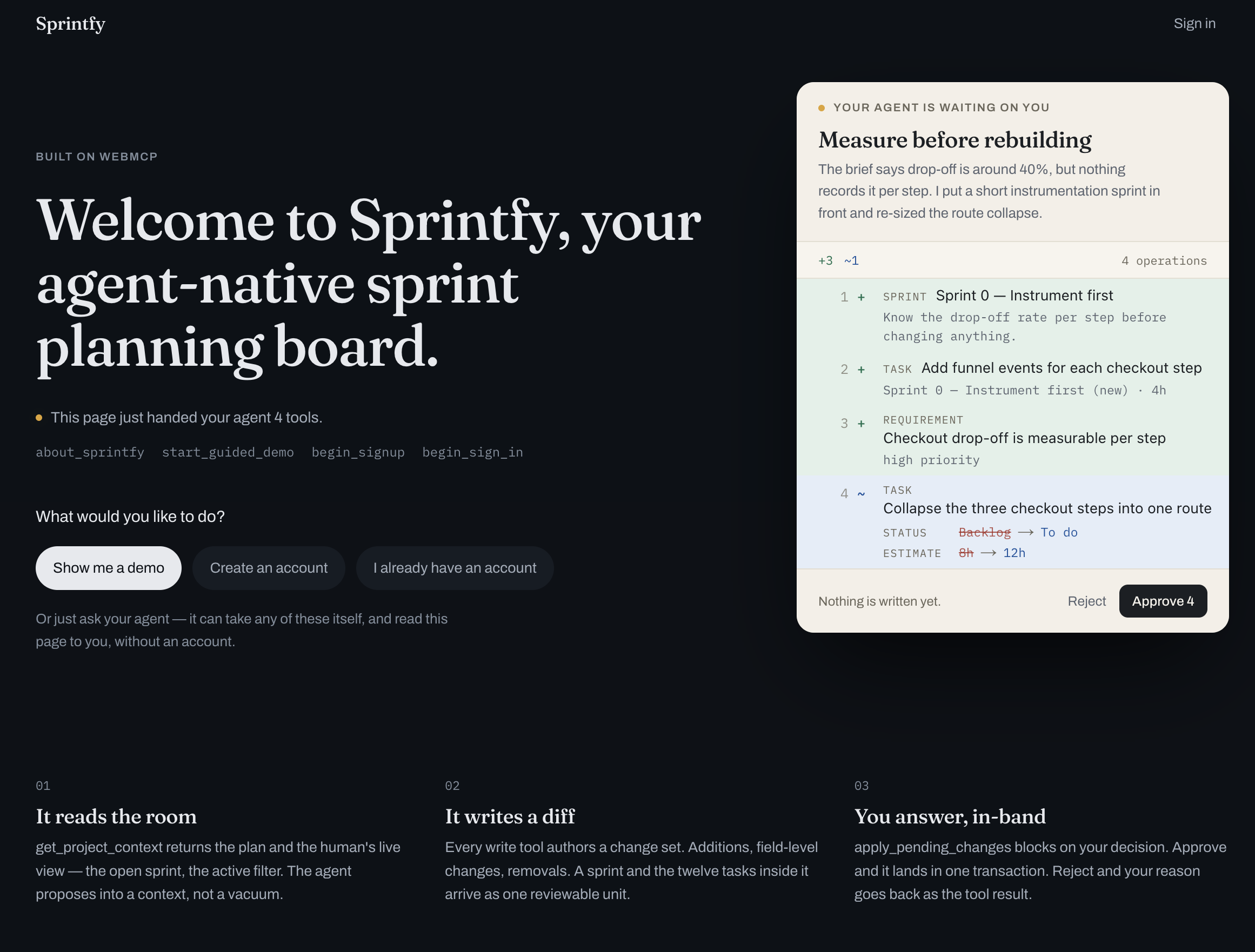
Live: https://sprintfy.vercel.app — no account needed to see the whole idea.
Open it in the ChatGPT desktop app, in ChatGPT mode: its built-in browser exposes WebMCP on its own, so the tools register with no flag and no extension. Desktop Chrome with chrome://flags/#enable-webmcp-testing works too, as does Chrome with the ChatGPT extension. One caveat: Codex mode in that same desktop app does not expose WebMCP, so the tools stay dormant there and the page will honestly say so — same app, two modes, two answers.
Ask your agent for start_guided_demo, or press "Show me a demo", and you land in a real workspace with a proposal already waiting in the review panel and six tools live.
Inspiration
Every "agent-ready" app I looked at exposed the same shape of tool: create_task, update_task, delete_task. The model writes straight to the database. That is fine until the model is confidently wrong about your sprint plan, and then you are doing archaeology on a project board, trying to work out what it touched and in what order.
Project planning is exactly the wrong domain for blind writes. A plan is an argument about sequencing and effort — it is the thing a lead is paid to have an opinion about. Handing that to an agent as unsupervised INSERTs gets you a plan nobody trusts and everybody re-checks, which is more work than writing it by hand.
So I wanted to find out whether WebMCP could carry something other than commands. Can a tool call ask a question and wait for a human's answer? If it can, the agent stops being a thing you supervise and becomes a thing you argue with.
What it does
Sprintfy is a sprint planner — requirements, sprints, tasks, hour estimates — that exposes its workspace to agents over WebMCP. No agent tool writes to the plan. The loop has three moves:
1. The agent reads the room. get_project_context returns the plan and what the human is currently looking at: active view, selected sprint, status filter, which proposal is open. The agent plans into a context, not a vacuum.
2. The agent proposes a diff. Every write tool authors a change set — an ordered list of operations stored as JSON, rendered in the review panel as a real diff: additions in green, field-level changes as before → after, removals struck through. Nothing has touched the domain tables. An agent can propose a sprint and the twelve tasks inside it as one unit, using local ref ids that resolve to real primary keys only at apply time.
3. The human decides, and the agent hears the answer. apply_pending_changes opens the diff and blocks — the tool call's promise stays open while the person reads it. Approve applies the whole change set in a single Postgres transaction and the tool resolves with what landed. Reject resolves with the reason they typed, delivered back to the agent as the tool result.
You do not start from an empty board either. You hand Sprintfy the thing you already have — a backlog note, a PRD as .md, .txt, .pdf or .docx, or a few paragraphs typed in — and it returns a plan sequenced by risk rather than by comfort. A real Turkish brief produced 8 requirements, 4 sprints and 38 tasks in 56 seconds, in Turkish, with the database migration ranked critical and placed first.
Sprintfy's own planner is held to the same rule. It does not write the plan either: it authors a change set marked source: "planner" that lands in the same review panel, behind the same gate.
How we built it
Next.js (App Router) and React on Vercel, Supabase for Postgres, Auth and Realtime, and WebMCP for the agent surface.
The architecture is one idea repeated: the write path is a data structure, not a function call. Tools append operations to a change_sets row. A single PL/pgSQL function, apply_change_set, applies them atomically and resolves ref placeholders to real ids as it goes. It is declared security invoker, so row-level security still guards every insert it performs — an agent cannot use it to reach another user's project.
On the WebMCP side:
- Surface detection. The API moved during the spec's life and shipping browsers do not agree yet, so one adapter registers against
document.modelContext.registerTool,navigator.modelContext.registerTool, ornavigator.modelContext.provideContext, whichever exists, and the header badge reports which one it found. - Page-scoped tool sets. Four tools before you sign in, six inside a project. The surface changes as the human navigates.
- Cancellation is honoured. The
AbortSignalpassed toapply_pending_changesreleases the approval wait, so an agent that walks away does not leave the page stuck on a modal. - Tools never throw at the browser. Failures come back as text an agent can recover from, including "these task ids don't exist in this project, call
get_project_contextagain."
Planning uses a strict JSON schema derived from the same Zod schema that backs the propose_plan tool — one schema, two authors, so a plan from the model and a plan from an agent are the same shape.
Challenges we ran into
Tool calls do not wait for React. Two bugs had the same root: an agent could not always see the proposal it had just written, and focus moved the human's view without get_project_context reporting it. A tool call can land before React has committed state, so reading a render closure returns the past. Tools now read from a ref that is written before the state, never from a closure. Both cases became eval scenarios so they cannot come back.
Registering the same tool twice. Navigating between pages left the previous page's registration alive and the browser rejected the new one as a duplicate. Fixed with a module-level registry where claiming a name synchronously releases the previous holder.
A machine asking a question and getting an HTML redirect. An unauthenticated POST to the planning endpoint was redirected to the sign-in page; Next then read the multipart body as a server action and answered 404. In an app whose premise is that machines are first-class callers, that was the wrong answer to give one. API routes now reply in JSON.
The date picker that could not be used. The month grid was absolutely positioned inside a modal that clips its own corners and scrolls its body, so it was sliced off a few pixels below the field. It renders into a portal now, in viewport coordinates, flipping above the field when there is no room below.
Knowing where WebMCP actually exists. Support is not a property of an application, it turns out — it is a property of a surface inside it. The ChatGPT desktop app has two modes, and only one of them exposes the API: in ChatGPT mode the built-in browser hands the page document.modelContext with no flag and no extension, while in Codex mode the built-in browser does not, so the same URL in the same application registers six tools or none depending on which mode you are in. I spent a while concluding the tools were broken before realising I had been testing in the wrong half of one app.
That is why the page never assumes. It probes each surface, reports which one it found, and — when it finds none — still works and still explains itself, in its own voice, to a person who came in through an ordinary browser.
Faking things. An early version showed timed loading stages — "Reading the brief", "Sequencing by risk" — while the model call ran. They were theatre, in a product whose entire argument is that you should not have to take an agent's word for anything. They were replaced with the true elapsed seconds.
Accomplishments that we're proud of
The blocking approval gate. Turning a WebMCP tool call from a command into a request is the part that is hard to fake, and it means the agent can be genuinely useful — proposing whole plans rather than timid one-row edits — without ever being trusted with the write.
The evals. /evals.js runs seven scenarios against the actual ToolDescriptor objects the page registered, on the live site, from the console, with no account. Seven of seven pass in production. They assert the invariants rather than the happy path: a proposal writes zero rows; a rejection arrives as the tool's return value; approval applies a sprint and its tasks in one transaction with refs resolved; hallucinated ids are refused outright rather than half-applied.
And the fact that Sprintfy's own planner goes through its own gate. A product arguing for review does not get to exempt its author.
What we learned
That a tool result is a channel back to the human, not just a status code. Once you treat it that way, "the agent asked and I said no, here's why" becomes a normal part of the protocol rather than something bolted on top.
That the reviewable-proposal pattern belongs in the page, not in the model. The site knows what a legitimate change to itself looks like, so the site should render the diff and hold the gate. Any agent — any model, any vendor — inherits that safety by using the tools.
And that the timing between a tool call and a UI framework's render cycle is a real correctness surface, not a detail. Two of our seven evals exist only because of it.
What's next for Sprintfy
Shared review: today the gate is one person's screen. A team queue, where a proposal can be routed to whoever owns that part of the plan, is the obvious next move.
Richer diffs — moving a task between sprints is currently shown as field changes when it is really a reordering, and sequencing is the thing this tool is about.
Multi-project context, so an agent can notice that two projects are about to need the same engineer in the same week.
Billing exists as a decision, not as code: it was deliberately left out of the hackathon build so the whole product stays open to anyone who wants to try it.
Built With
- next.js
- nextjs
- openai
- postgresql
- react
- supabase
- tailwind
- tailwindcss
- typescript
- vercel
- webmcp

Log in or sign up for Devpost to join the conversation.