-
banner
-
homepage
-
-
diagram
-
google cloud
-
overlay
Spectra
Built for accessibility. Designed for everyone.
Your screen, your voice, your way
Inspiration
There is a specific kind of tired you get from staring at screens all day where you stop reading and start scanning. Your eyes move but nothing goes in. You click the wrong tab. You re-read the same sentence four times.
One night I was in that state and I thought: I wish I could just close my eyes and have someone read this to me. Not a podcast. Not a summary. The actual thing, on the actual page I was already on, in real time.
That thought did not leave. Because while I was tired from a long day, there are 2.2 billion people who navigate the web like that every single day, not because they are tired, but because the web was never built for them. 96% of the top million websites fail basic accessibility standards. Screen readers read DOM trees, not meaning. They describe. They never act.
I wanted to build something that doesn't just describe your screen, it uses it for you.
What it does
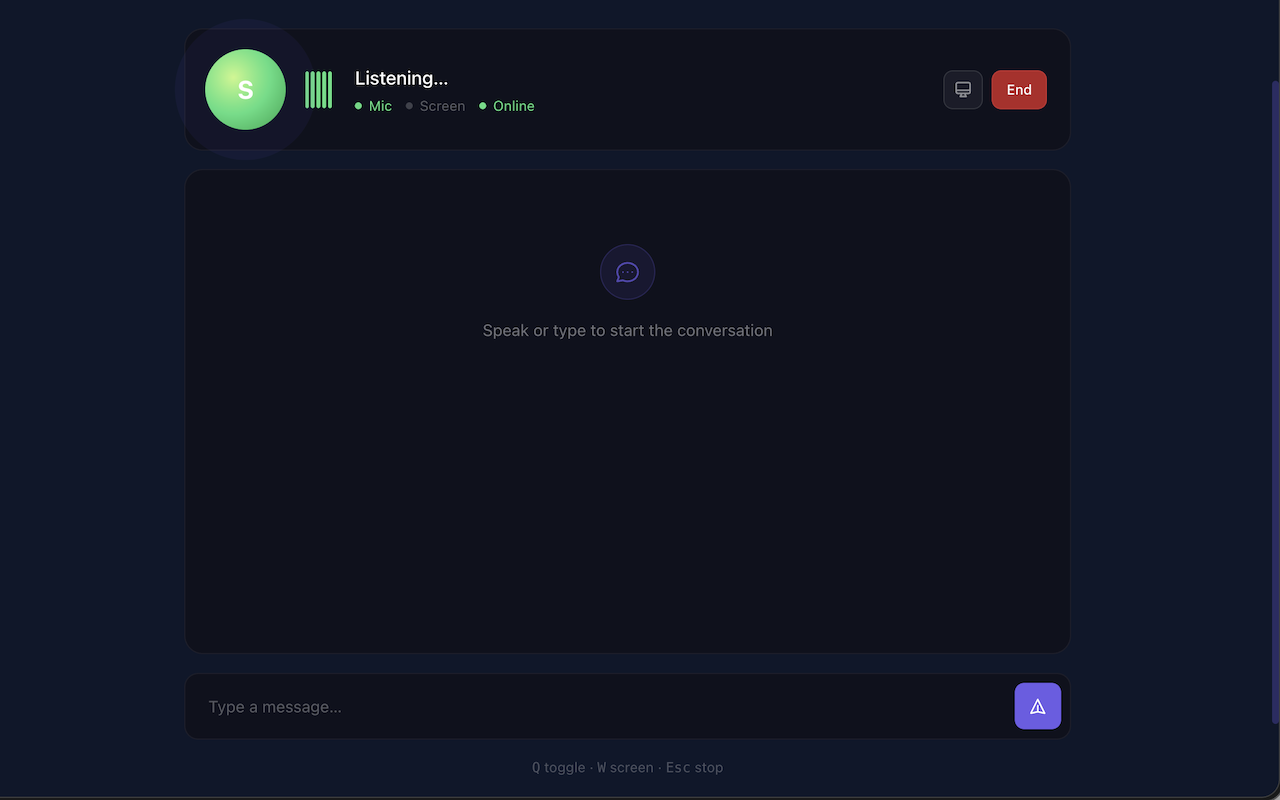
Spectra is a real-time AI agent that closes the loop between seeing and doing:
- Sees your screen continuously via live video stream (adaptive JPEG @ 2 FPS)
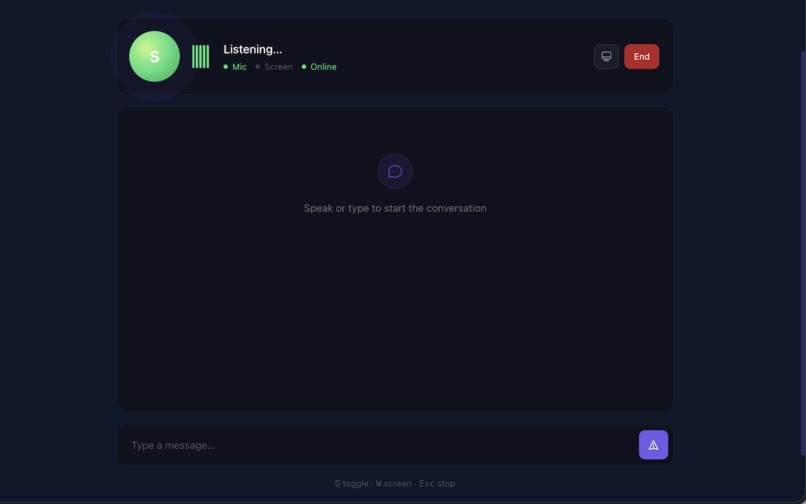
- Listens to your voice in real time — no button press, no wake-and-wait
- Understands layout, text, images, buttons, forms — everything a sighted person would see
- Acts on your behalf — clicks, types, scrolls, navigates, fills forms
- Speaks back naturally — in 30+ languages, interruptible mid-sentence
Example interaction:
You:     "Go to BBC News and read me the top headline."

Spectra: "You're on BBC News. The top story is: 'Scientists confirm
          water ice found beneath Mars south pole.' Want me to open it?"

You:     "Yes, open it."

Spectra: "Opening the article... Researchers at the European Space Agency
          have confirmed the largest deposit of water ice ever detected
          on Mars. Want me to keep reading?"
No mouse. No keyboard. No reading required. A task that takes a sighted person 30 seconds — done entirely by voice, on any website, without the site needing to support any accessibility standard.
Key capabilities:
- Wake word activation — say "Hey Spectra" to start, no button to find
- Barge-in support — interrupt mid-sentence, she stops immediately
- 9 agent tools — click, type, scroll, navigate, press keys, highlight, read page, describe screen, read page structure
- Zero data stored — screenshots exist in RAM only, each frame replaces the last
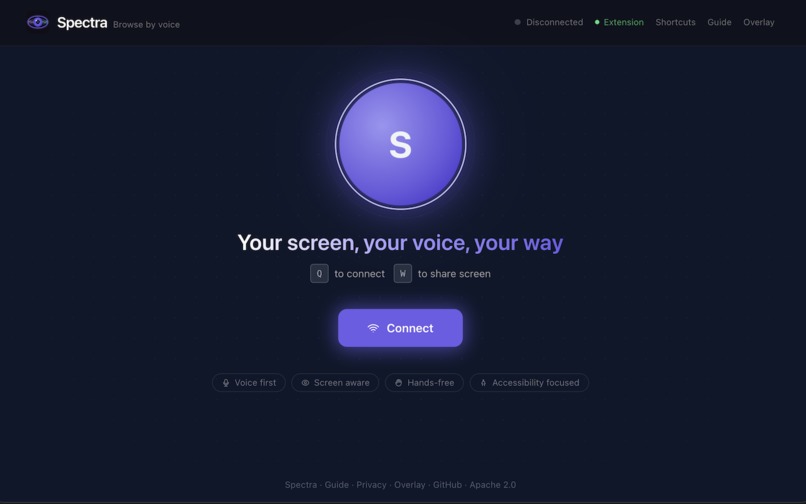
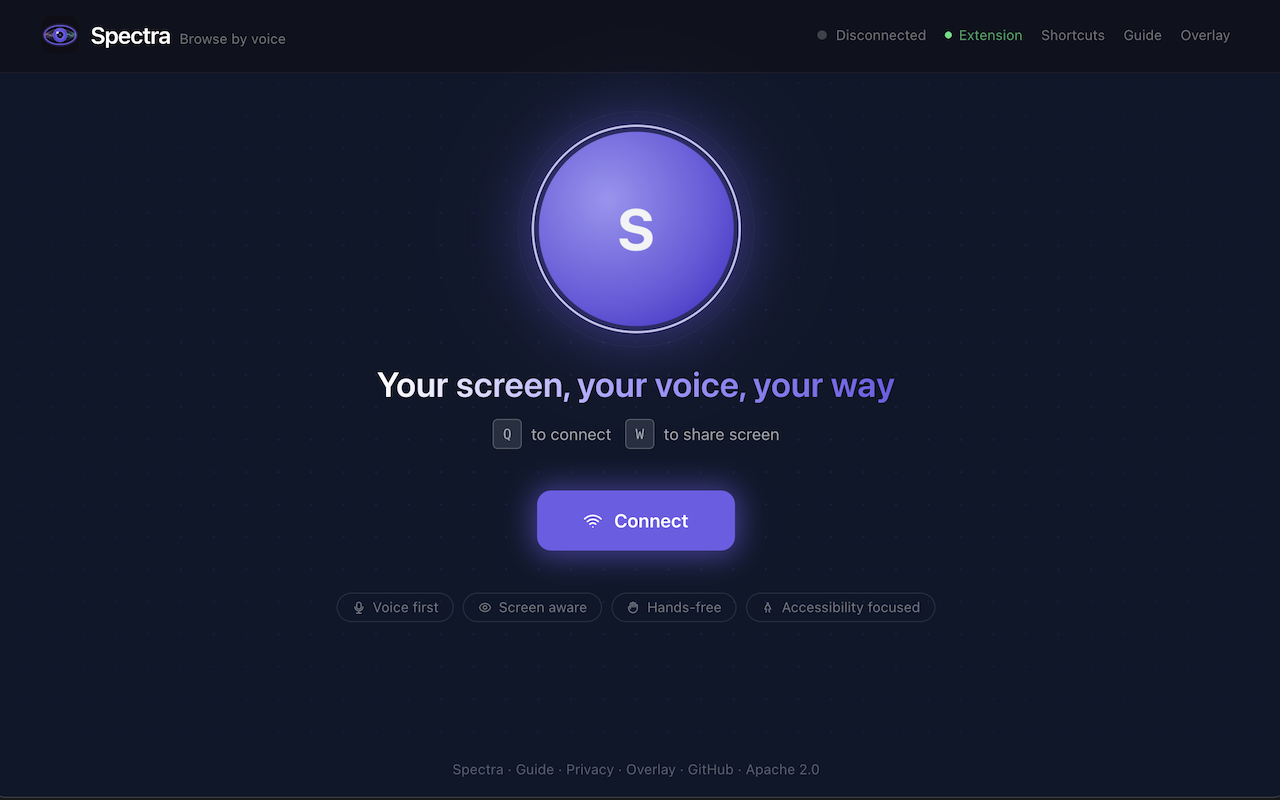
- Keyboard shortcuts — Q (toggle), W (screen share), Escape (stop)
- Full ARIA support — dual live regions, skip links, screen reader compatible
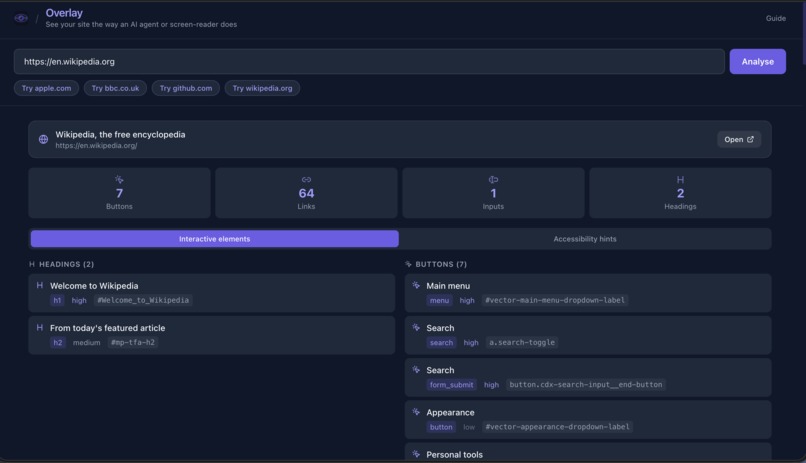
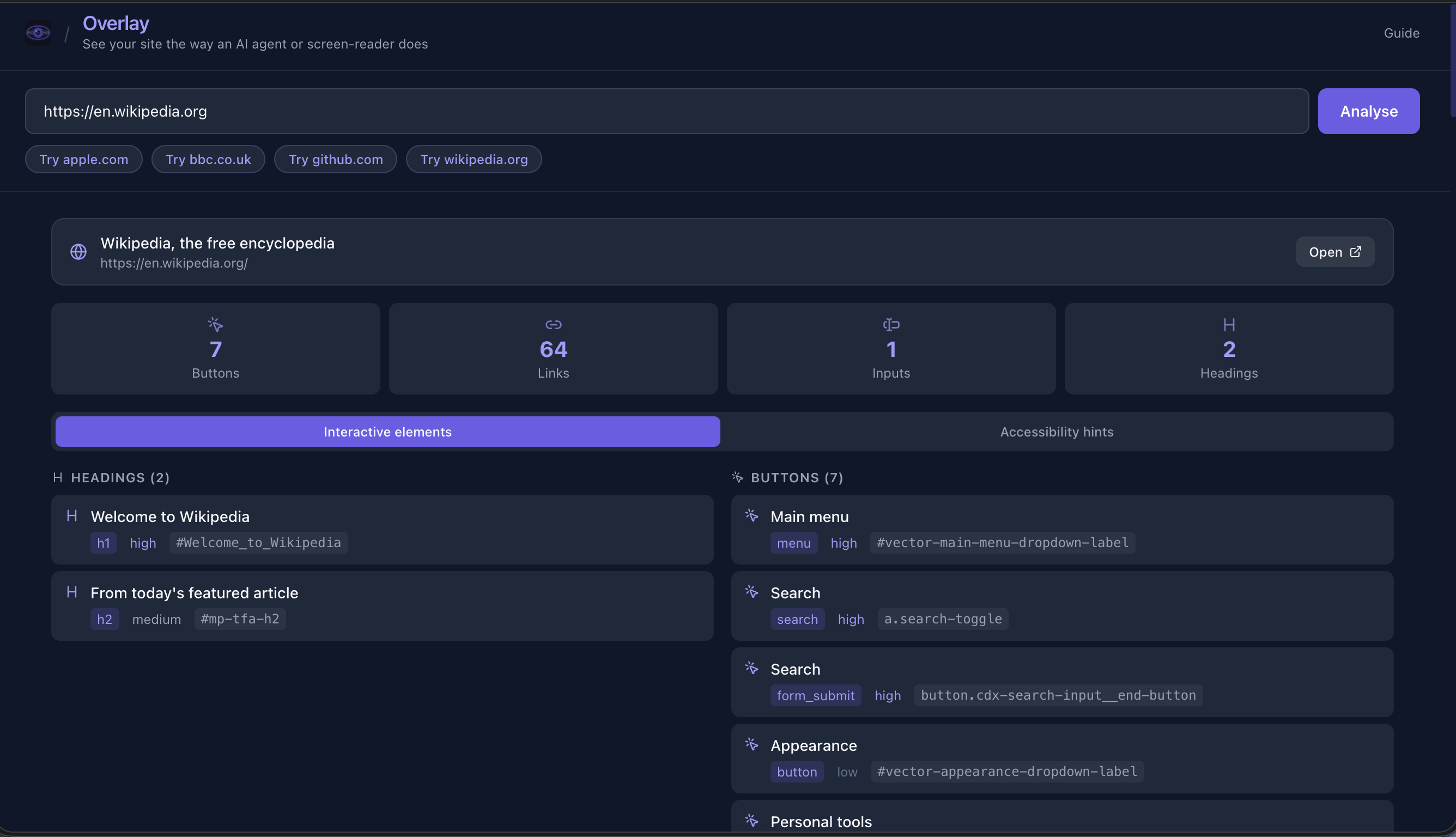
- Overlay view — The page as Spectra sees it, structure, priorities, a11y hints.
How I built it
Why only Gemini can do this
I tried other approaches first. I built a prototype other models, send a screenshot, get a text response, parse it, act, repeat. It worked, technically. But the experience felt like texting someone to press buttons for you. There was always a gap, always a turn boundary, always a moment where the AI was gone and you were waiting.
Gemini Live API changed everything.
bidiGenerateContent is a persistent bidirectional WebSocket: voice audio streams in continuously, Gemini's native audio streams back in real time, and tool calls (click, type, navigate) interleave with speech mid-conversation. Spectra talks while it works. It sounds and feels like a person sitting next to you at a computer.
Three Gemini capabilities make this possible and I haven't found them anywhere else:
| Capability | What It Enables |
|---|---|
| Native audio I/O | No TTS/STT middleware. Gemini speaks directly with natural prosody (Aoede voice) and handles interruptions via Voice Activity Detection. Sub-second voice response. |
| Multimodal Live streaming | Screenshots and audio arrive in the same stream Gemini is already reasoning over. No separate vision API call. Screen understanding and voice happen simultaneously. |
| Thinking with suppressed chain-of-thought | gemini-2.5-flash reasons internally via its thinking budget. I suppress emission of those thoughts so the model navigates complex tasks intelligently without leaking internal monologue to the audio stream. |
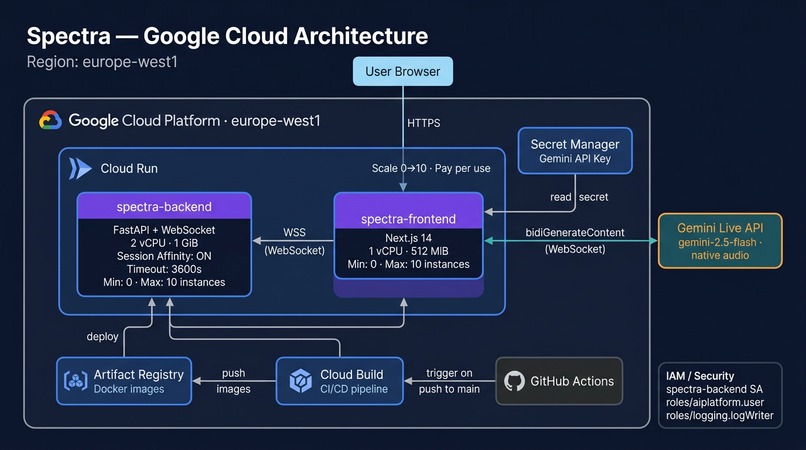
Architecture
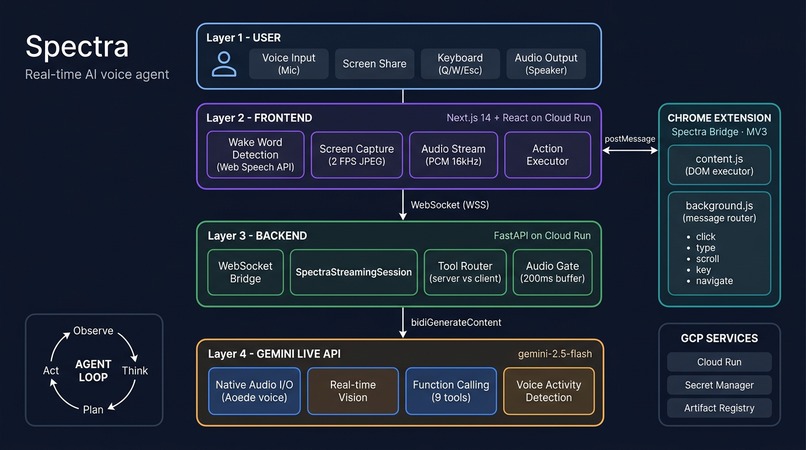
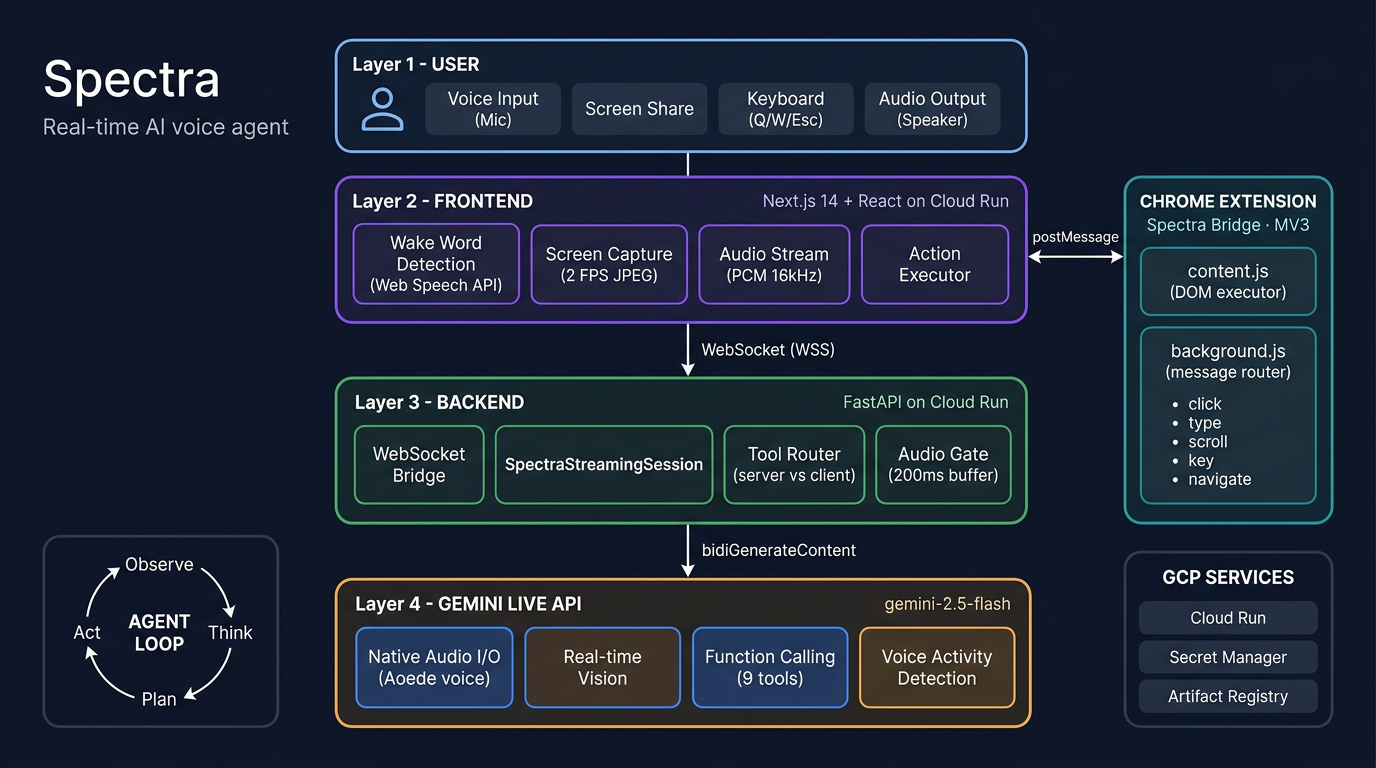
Spectra has four components:
User (Voice + Screen)
    ↓
Frontend (Next.js on Cloud Run)
  • Wake word detection (Web Speech API)
  • Screen capture (MediaStream → JPEG @ 2 FPS)
  • Audio streaming (PCM 16kHz ↔ WebSocket)
  • Action executor
    ↓ WebSocket
Backend (FastAPI on Cloud Run)
  • WebSocket bridge: Client ↔ Gemini Live API
  • SpectraStreamingSession (bidiGenerateContent)
  • System instructions + 9 tool declarations
  • Audio gate (200ms buffer to prevent premature narration)
    ↓ bidiGenerateContent
Gemini Live API
  • gemini-2.5-flash with native audio (Aoede voice)
  • Real-time vision over live screenshots
  • Function calling for UI actions
  • Voice Activity Detection + barge-in
    ↓
Spectra Bridge (Chrome Extension MV3)
  • content.js — DOM action executor (click, type, scroll, keys)
  • background.js — message router to active tab
  • Description-first element targeting (text/aria-label over coordinates)
The agent loop
Spectra runs a continuous observe → think → plan → act loop with no turn boundaries:
- Observe — Screen frames and user audio stream into Gemini simultaneously via
send_realtime_input - Think — Gemini reasons over combined visual and audio context (thinking budget suppressed from output)
- Plan — Gemini selects the right tool call (e.g.,
click_element(description="Sign in button")) - Act — Tool call routes through WebSocket → frontend → Chrome extension → target tab, results flow back to Gemini
System instruction engineering
The system instruction is ~550 lines of carefully tuned prompt engineering:
- Tool-first, speech-second — when the user says "click the button," Gemini calls
click_elementimmediately, no "Sure, let me click that" beforehand - Recovery ladder — six-step escalation when actions fail (retry by description → page structure → keyboard nav → scroll → fresh look → tell user)
- Accessibility rules — spatial language ("top left", "centre of the page"), natural numbers ("twenty-three", not "23"), one thing at a time
Deployment
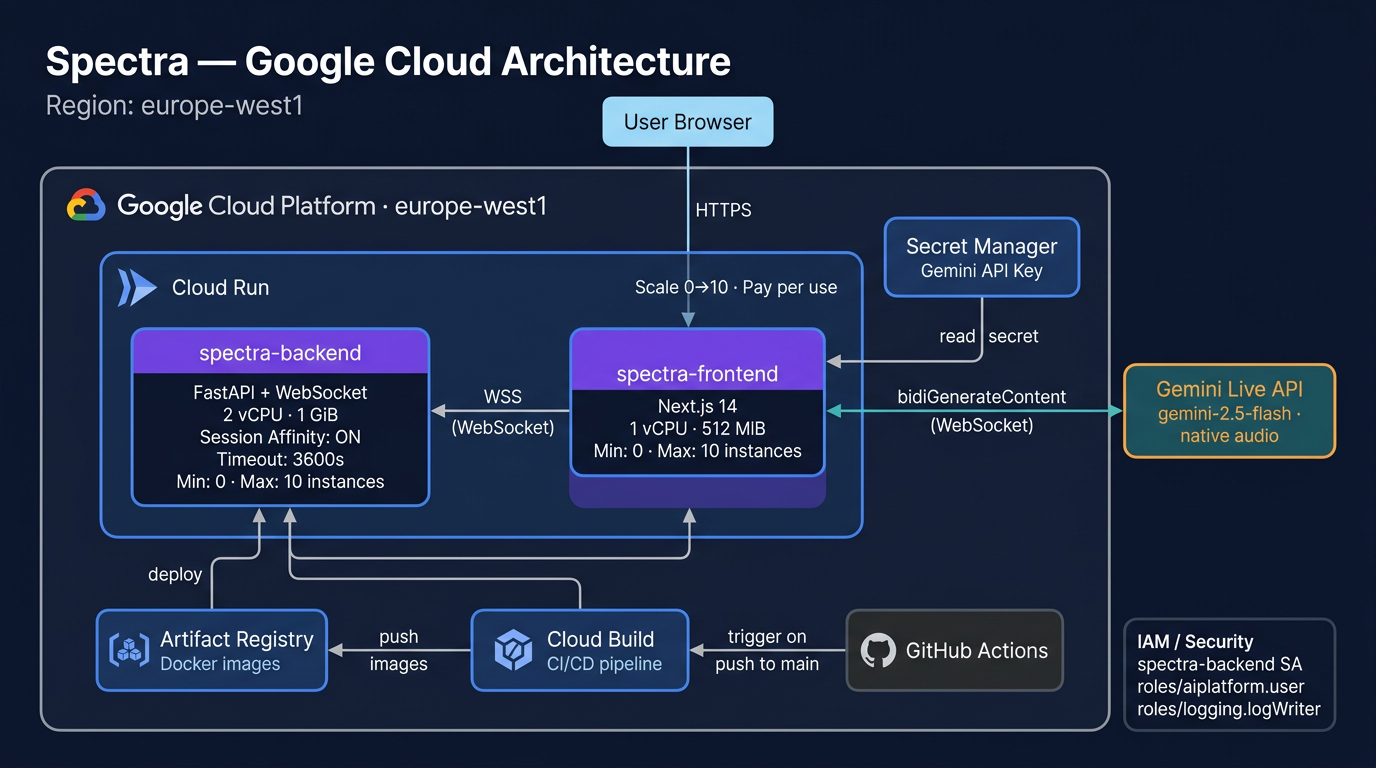
One command deploys to Google Cloud Run:
./deploy.sh your-project-id europe-west1
Infrastructure as Code via Terraform (infra/main.tf). CI/CD via GitHub Actions — every push to main lints, builds, deploys, and health-checks.
Challenges I ran into
1. The "done before doing" problem Spectra would say "Done!" before issuing the tool call. The user hears success, then watches the click happen a second later. I spent a full day thinking the system instruction was wrong before realising the issue was in the audio stream timing. Solved with an audio gate: buffer audio for 200ms at the start of each model turn, discard if a tool call arrives first.
2. WebSocket race conditions (3 days)
With three concurrent async tasks (client listener, Gemini receiver, heartbeat), messages could arrive out of order. A tool response could arrive after Gemini had already moved on. Three days of staring at logs to find a bug that manifested as "sometimes Spectra ignores you." Solved with asyncio.Lock and a single-reader pattern.
3. The echo loop
When Spectra speaks through speakers, the microphone picks it up, Gemini hears itself, and the conversation loops. Solved by muting the mic during playback with a 2.5-second safety timer in case onended never fires.
4. Gemini's 15-minute session limit
The Live API sends a go_away signal before closing. I handle this transparently: reconnect to Gemini, re-inject context (URL, latest frame, extension status), tell the model "don't say hello again." The user never notices.
5. Duplicate sessions React StrictMode re-mounts components in dev, opening two WebSockets and two Gemini sessions. Spectra would literally talk over herself. Added session deduplication on the backend and a WebSocket guard on the frontend.
Accomplishments that I've proud of
- Sub-second voice-to-action latency — real-time streaming, no request/response loop
- Works on any website — no site modifications needed, no accessibility standards required from the site
- Zero data stored — screenshots exist as a single variable in RAM; no files, no database, no cloud storage
- Accessibility-first design — dual ARIA live regions, skip links, keyboard shortcuts, VoiceOver/NVDA/JAWS compatible,
prefers-reduced-motionsupport, 44px touch targets - 9 agent tools with description-first element targeting — matches by visible text and
aria-labelinstead of fragile coordinates - 30+ languages — Gemini native audio auto-matches the user's language
- 20 test files covering session logic, accessibility compliance, blind user experience, conversation scenarios, and connection recovery
- One-command deployment to Google Cloud Run with Terraform IaC
- Built solo — ~16,700 lines of code
What I learned
- Prompt engineering is real engineering. The system instruction took longer to get right than the WebSocket infrastructure. Every word matters when you're shaping real-time audio behaviour.
- The Live API is incredible, but underdocumented. I figured out the audio gate, the
go_awayreconnection, and the VAD sensitivity tuning through trial and error. - Accessibility is a design constraint, not a feature. When I designed for blind users first, the interface got better for everyone.
- Solo doesn't mean alone. The Gemini API, Google Cloud, and open-source community made this possible. I just put the pieces together.
What's next
- Chrome Web Store — Package Spectra Bridge as a public extension
- Firefox support — Port the extension to Firefox's extension model
- Mobile — PWA with system-level screen capture
- Multi-tab awareness — Spectra remembers what's in each tab
- Workflow learning — "Remember that 'check email' means navigate to Gmail"
- Community testing — Real user testing with VoiceOver, NVDA, and JAWS users
Built with
- Gemini 2.5 Flash — AI model with native audio, vision, and function calling
- Gemini Live API —
bidiGenerateContentbidirectional streaming WebSocket - Google GenAI SDK —
google-genaiPython SDK (>=1.14.0) - Google Cloud Run — serverless deployment with WebSocket support and session affinity
- Google Cloud Build — CI/CD pipeline
- Google Secret Manager — API key storage
- Google Artifact Registry — Docker image registry
- Vertex AI — Gemini API access via service account
- FastAPI — Python async backend with WebSocket support
- Next.js 14 — React frontend with TypeScript
- Web Speech API — browser-native wake word detection ("Hey Spectra")
- Chrome Extension (Manifest V3) — DOM action execution on any tab
- Terraform — Infrastructure as Code for Cloud Run
- GitHub Actions — CI/CD deployment pipeline
- Docker — containerised backend and frontend
- Python 3.11+ — backend runtime
- TypeScript — frontend type safety
- Tailwind CSS — utility-first styling
- PCM audio streaming — 16kHz input / 24kHz output via WebSocket
Try it
Source code: github.com/Aqta-ai/spectra
Apache 2.0 — open source for transparency and community audit.
Built With
- fastapi
- germini
- germini-live
- github
- google-cloud
- typscrpt
- vertex

Log in or sign up for Devpost to join the conversation.